Page 2 - DTS and
For DTS patents, see http://patents.dts.com. Manufactured under license from DTS Licensing Limited. DTS, the Symbol, & DTS and the Symbol together are registered trademarks, and DTS Sound is a trademark of DTS, Inc. © DTS, Inc. All Rights Reserved. Please visithttp://consumer.huawei.com/en/suppo...
Page 3 - ภาษาไทย; Contents
English . . . . . . . . . . . . . . . . . . . . . . . . . . . . . . . . .1Français . . . . . . . . . . . . . . . . . . . . . . . . . . . . . . .24 香港繁體 . . . . . . . . . . . . . . . . . . . . . . . . . . . . . . .34 Indonesia . . . . . . . . . . . . . . . . . . . . . . . . . . . . . .41Melayu . . . ...
Page 5 - Your phone at a glance
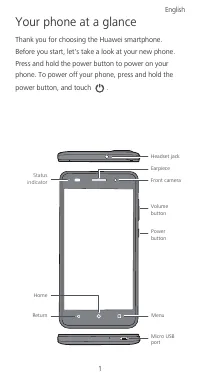
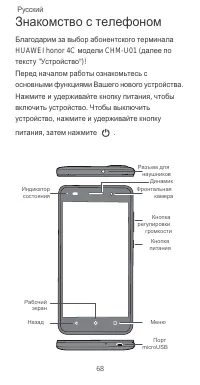
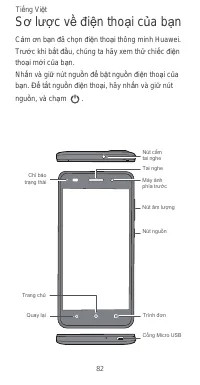
1 Your phone at a glance Thank you for choosing the Huawei smartphone. Before you start, let's take a look at your new phone. Press and hold the power button to power on your phone. To power off your phone, press and hold the power button, and touch . Micro USB port Menu Return Home Status indicator...
Page 6 - Getting started
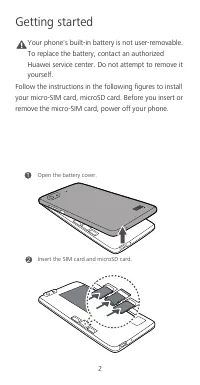
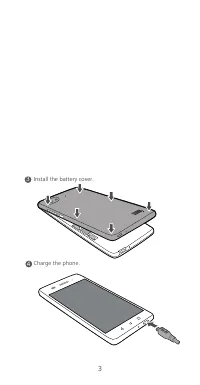
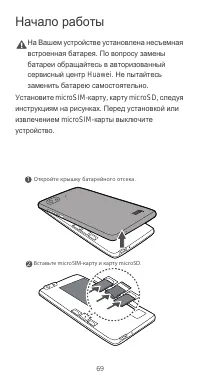
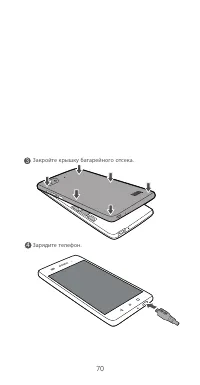
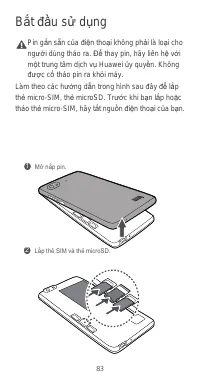
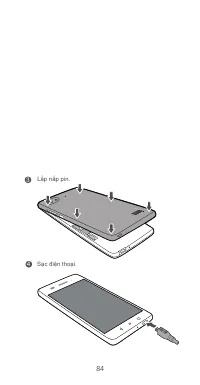
2 Getting started Caution Your phone's built-in battery is not user-removable. To replace the battery, contact an authorized Huawei service center. Do not attempt to remove it yourself. Follow the instructions in the following figures to install your micro-SIM card, microSD card. Before you insert o...
Page 8 - For more information; Wa nt to obtain the full us er guide?; Wa nt to lear n mo re about Hu awei EMUI?
4 For more information Wa nt to obtain the full us er guide? Download the User Guide from http://consumer.huawei.com/en. Wa nt to lear n mo re about Hu awei EMUI? Go to http://www.emui.com/ for the latest information. All pictures and illustrations in this guide, including but not limited to the pho...
Page 11 - Safety information; Electronic device
7 Safety information This section contains important information about the operation of your device. It also contains information about how to use the device safely. Read this information carefully before using your device. Electronic device Do not use your device if using the device is prohibited. ...
Page 13 - Operating envir onment
9 may hurt you because of the strong force when the air bag inflates. • Do not use your device while flying in an aircraft or immediately before boarding. Using wireless devices in an aircraft may disrupt wireless networks, present a hazard to aircraft operation, or be illegal. Operating envir onmen...
Page 14 - Ac cesso ries
10 • Do not use your device's camera flash directly in the eyes of people or pets. Otherwise temporary loss of vision or damage to the eyes may occur. • Do not touch the device's antenna. Otherwise, communication quality may be reduced. • Do not allow children or pets to bite or suck the device or a...
Page 15 - Charger safety; Ba ttery s afety
11 Charger safety • For pluggable devices, the socket-outlet shall be installed near the devices and shall be easily accessible. • Unplug the charger from electrical outlets and the device when not in use. • Do not drop or cause an impact to the charger. • If the power cable is damaged (for example,...
Page 17 - Clea ning and maintena nc e
13 • If the device standby time shortens significantly, replace the battery. • The device has a built-in, non-removable battery. Do not attempt to remove the battery, otherwise the device may be damaged. To replace the battery, take the device to an authorized service center. Clea ning and maintena ...
Page 22 - India regulatory conformance; Safety precautions; Dispos al and recy cling information
18 India regulatory conformance Safety precautions • Use of wireless hands-free system (headphone, headset) with a low power Bluetooth emitter. • Make sure the cell phone has a low SAR. • Keep your calls short or send a text message (SMS) instead. This advice applies especially to children, adolesce...
Page 23 - Reduc tio n of ha za rdou s su bsta nc es
19 waste disposal service, or the retail store where you purchased this device. The disposal of this device is subject to the e-waste (Management and Handling) Rules, 2011. The purpose for separating e-waste from other wastes is to minimize the potential environmental impacts on human health of any ...
Page 24 - Legal Notice; Trademarks and Permissions
20 Europe is 2.0 W/kg averaged over 10 grams of tissue, and the highest SAR value for this device complies with this limit. The SAR limit adopted by India is 1.6 watts/kilogram (W/kg) averaged over one gram of tissue. The highest SAR value for this device is 0.953 W/kg. Legal Notice Copyright © Huaw...
Page 25 - Bluetooth; Notice
21 The Bluetooth ® word mark and logos are registered trademarks owned by Bluetooth SIG, Inc. and any use of such marks by Huawei Technologies Co., Ltd. is under license. Other trademarks, product, service and company names mentioned may be the property of their respective owners. Notice Some featur...
Page 26 - DI SCLAIMER
22 not guarantee the availability of any content or service. Third-party service providers provide content and services through network or transmission tools outside of the control of Huawei. To the greatest extent permitted by applicable law, it is explicitly stated that Huawei shall not compensate...
Page 28 - Prise en main du téléphone
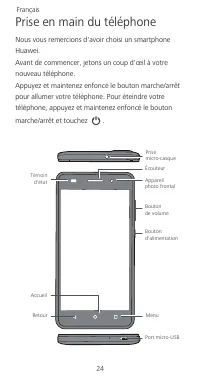
24 Prise en main du téléphone Nous vous remercions d'avoir choisi un smartphone Huawei. Avant de commencer, jetons un coup d'œil à votre nouveau téléphone. Appuyez et maintenez enfoncé le bouton marche/arrêt pour allumer votre téléphone. Pour éteindre votre téléphone, appuyez et maintenez enfoncé le...
Page 29 - Prise en main
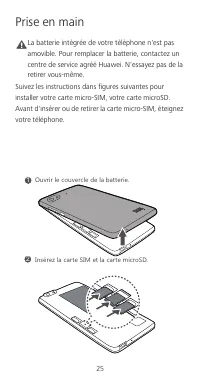
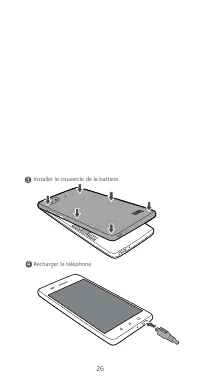
25 Prise en main Caution La batterie intégrée de votre téléphone n'est pas amovible. Pour remplacer la batterie, contactez un centre de service agréé Huawei. N'essayez pas de la retirer vous-même. Suivez les instructions dans figures suivantes pour installer votre carte micro-SIM, votre carte microS...
Page 33 - Protec tion de l'envir onnement
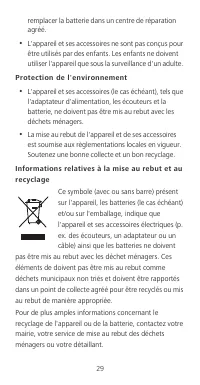
29 remplacer la batterie dans un centre de réparation agréé. • L'appareil et ses accessoires ne sont pas conçus pour être utilisés par des enfants. Les enfants ne doivent utiliser l'appareil que sous la surveillance d'un adulte. Protec tion de l'envir onnement • L'appareil et ses accessoires (le cas...
Page 36 - Déclaration; Restrictions au niveau de la bande 2,4 GHz :
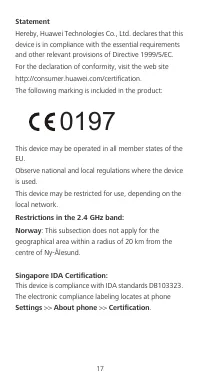
32 Déclaration Par la présente, Huawei Technologies Co., Ltd. déclare que cet appareil est conforme aux exigences fondamentales et aux autres dispositions pertinentes de la directive 1999/5/CE. Consultez la déclaration de conformité sur le site Web http://consumer.huawei.com/certification. Le marqua...
Page 37 - Mention légale; Politique de co nfidentialité
33 Mention légale Copyright © Huawei Technologies Co ., Ltd. 2015. Tou s droits rés ervés. CE DOCUMENT EST FOURNI À TITRE INFORMATIF UNIQUEMENT. IL NE CONSTITUE EN AUCUN CAS UNE FORME DE GARANTIE. Politique de co nfidentialité Pour une meilleure compréhension de la protection des informations person...
Page 38 - 手機功能一覽
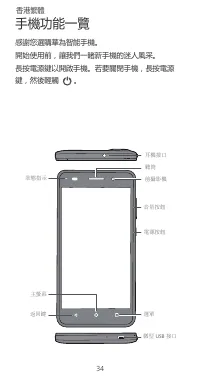
34 手機功能一覽 感謝您選購華為智能手機。 開始使用前,讓我們一睹新手機的迷人風采。 長按電源鍵以開啟手機。若要關閉手機,長按電源鍵,然後輕觸 。 微型 USB 接口 選單 返回鍵 主螢幕 狀態指示 電源按鈕 音量按鈕 前攝影機 聽筒 耳機接口 香港繁體
Page 39 - 入門指南
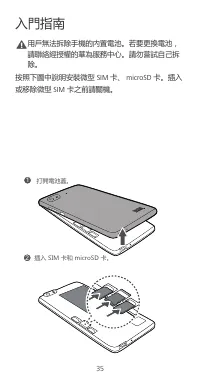
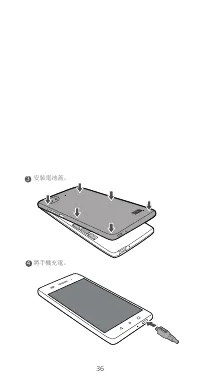
35 入門指南 Caution 用戶無法拆除手機的內置電池。若要更換電池,請聯絡經授權的華為服務中心。請勿嘗試自己拆除。 按照下圖中說明安裝微型 SIM 卡、 microSD 卡。插入 或移除微型 SIM 卡之前請關機。 2 ݖҵ9/3ԪչSOIXU9*Ԫ澞 1 ۸旇朅ࡐ嘮澞
Page 41 - 安全資訊; 醫療設備的干擾
37 安全資訊 本部分包含關於裝置的重要資訊。亦包括如何安全使用裝置的資訊。使用裝置前請仔細閱讀此資訊。 醫療設備的干擾 • 請遵循由醫院及健康護理中心訂立的規則。請勿在禁止使用裝置的地方使用裝置。 • 某些無線裝置可能影響助聽器或起搏器的效能。向您的服務供應商查詢更多資訊。 • 起搏器製造商建議在手機與起搏器之間保持最少 15 公分的距離,以免對起搏器產生干擾。如您使 用起搏器,請於起搏器的反側使用手機,並切勿 將手機置於胸前口袋內。 操作環境 • 要防止有可能的聽覺受損,請勿長時間 收聽高度音量。 • 理想操作溫度為 0°C 到 35°C 。理想保存溫度為 -20°C 到 70°C 。極度...
Page 44 - 法律通知
40 聲明 Huawei Technologies Co., Ltd 特此聲明,本裝置符合 1999/5/EC 指令中的主要要求和其他相關規定。 如欲符合性聲明資料,請瀏覽網站 http://consumer.huawei.com/certification 。 產品內包含以下標示: 本裝置可在歐盟的所有成員國操作。遵守使用裝置的國際及當地法則。裝置可能會根據當地網絡被限制使用。 2.4 GHz 頻段限制: 挪威 :此分款不適用於距離新奧爾松中心半徑小於 20 公里的地理區域。 法律通知 版權所有 © 華為技術有限公司 2015 。保留一切權 利。 本文件用途只提供資訊,並不構成任何形式的保證...
Page 45 - Sekilas tentang ponsel Anda
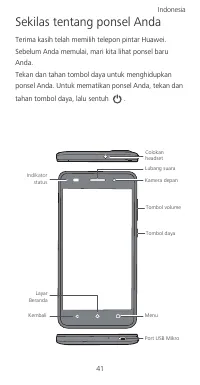
41 Sekilas tentang ponsel Anda Terima kasih telah memilih telepon pintar Huawei. Sebelum Anda memulai, mari kita lihat ponsel baru Anda. Tekan dan tahan tombol daya untuk menghidupkan ponsel Anda. Untuk mematikan ponsel Anda, tekan dan tahan tombol daya, lalu sentuh . Port USB Mikro Menu Kembali Lay...
Page 46 - Cara memulai
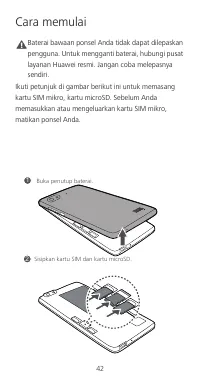
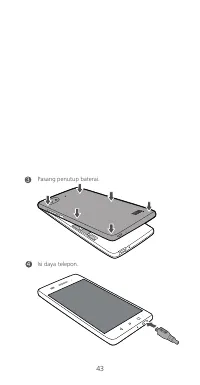
42 Cara memulai Caution Baterai bawaan ponsel Anda tidak dapat dilepaskan pengguna. Untuk mengganti baterai, hubungi pusat layanan Huawei resmi. Jangan coba melepasnya sendiri. Ikuti petunjuk di gambar berikut ini untuk memasang kartu SIM mikro, kartu microSD. Sebelum Anda memasukkan atau mengeluark...
Page 48 - Informasi keselamatan; Ganggua n de ngan pera latan medis
44 Informasi keselamatan Bagian ini memuat informasi penting tentang penggunaan perangkat ini. Bagian ini juga berisi informasi tentang cara menggunakan perangkat dengan aman. Bacalah informasi ini dengan saksama sebelum menggunakan perangkat Anda. Ganggua n de ngan pera latan medis • Patuhi peratur...
Page 50 - Perlindungan lingkungan
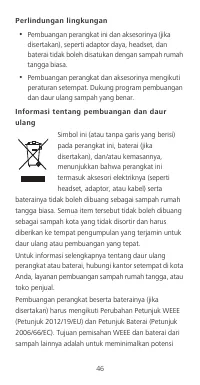
46 Perlindungan lingkungan • Pembuangan perangkat ini dan aksesorinya (jika disertakan), seperti adaptor daya, headset, dan baterai tidak boleh disatukan dengan sampah rumah tangga biasa. • Pembuangan perangkat dan aksesorinya mengikuti peraturan setempat. Dukung program pembuangan dan daur ulang sa...
Page 52 - Pernyataan
48 berapa pun usia dan bagaimana pun tingkat kesehatannya. Angka Penyerapan Spesifik (Specific Absorption Rate (SAR)) merupakan unit pengukuran untuk jumlah energi frekuensi radio yang diserap oleh tubuh saat menggunakan perangkat. Nilai SAR ditentukan pada level daya sertifikasi tertinggi pada kond...
Page 53 - Norwegia; Pemberitahuan Hukum; Kebija ka n Pr iva si
49 Patuhi peraturan nasional dan lokal di mana perangkat ini digunakan. Penggunaan perangkat ini mungkin terbatas, tergantung pada jaringan lokal. Pembatasan dalam 2,4 GHz band: Norwegia : Sub-bagian ini tidak berlaku bagi wilayah geografis dalam radius 20 km dari pusat Ny-Ålesund. Pemberitahuan Huk...
Page 54 - Telefon anda sekilas pandang
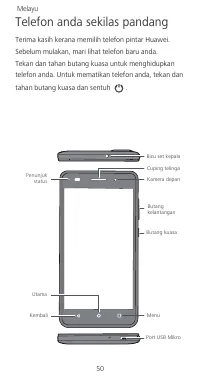
50 Telefon anda sekilas pandang Terima kasih kerana memilih telefon pintar Huawei. Sebelum mulakan, mari lihat telefon baru anda. Tekan dan tahan butang kuasa untuk menghidupkan telefon anda. Untuk mematikan telefon anda, tekan dan tahan butang kuasa dan sentuh . Port USB Mikro Menu Kembali Utama Pe...
Page 55 - Bermula
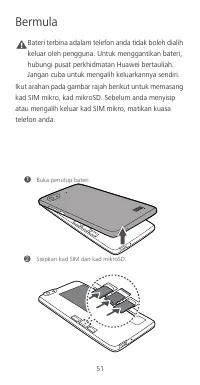
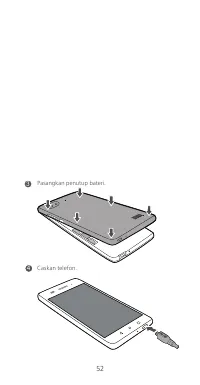
51 Bermula Caution Bateri terbina adalam telefon anda tidak boleh dialih keluar oleh pengguna. Untuk menggantikan bateri, hubungi pusat perkhidmatan Huawei bertauliah. Jangan cuba untuk mengalih keluarkannya sendiri. Ikut arahan pada gambar rajah berikut untuk memasang kad SIM mikro, kad mikroSD. Se...
Page 57 - Maklumat keselamatan; Gangguan de ngan peralatan perubata n
53 Maklumat keselamatan Bahagian ini mengandungi maklumat penting mengenai operasi peranti anda. Ia juga mengandungi maklumat mengenai bagaimana untuk menggunakan peranti dengan selamat. Baca maklumat ini dengan teliti sebelum menggunakan peranti anda. Gangguan de ngan peralatan perubata n • Ikuti p...
Page 62 - Notis Perundangan; Da sar Privasi
58 Notis Perundangan Hak Cipta © Hua wei Tec hnolo gies Co ., Ltd. 2015. Hak cipta terpelihara DOKUMEN INI ADALAH UNTUK TUJUAN MAKLUMAT SAHAJA, DAN TIDAK MEMBENTUK APA-APA JENIS WARANTI Da sar Privasi Untuk lebih memahami bagaimana kami melindungi maklumat peribadi anda, sila lihat dasar privasi di ...
Page 63 - Breve descrição do telefone
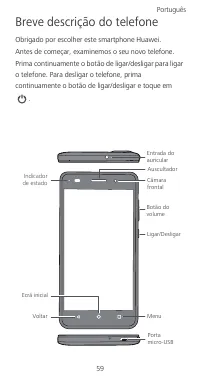
59 Breve descrição do telefone Obrigado por escolher este smartphone Huawei. Antes de começar, examinemos o seu novo telefone. Prima continuamente o botão de ligar/desligar para ligar o telefone. Para desligar o telefone, prima continuamente o botão de ligar/desligar e toque em . Porta micro-USB Men...
Page 64 - Introdução
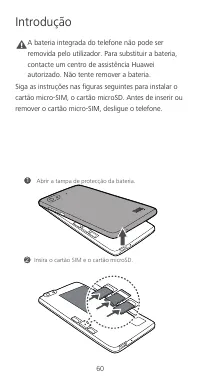
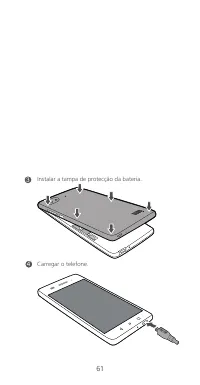
60 Introdução Caution A bateria integrada do telefone não pode ser removida pelo utilizador. Para substituir a bateria, contacte um centro de assistência Huawei autorizado. Não tente remover a bateria. Siga as instruções nas figuras seguintes para instalar o cartão micro-SIM, o cartão microSD. Antes...
Page 66 - Informações de segurança; Interfer ênc ia c om equipamentos médic os
62 Informações de segurança Esta secção contém informações importantes relacionadas com o funcionamento do dispositivo. Contém também informações sobre como utilizar o dispositivo de forma segura. Leia estas informações atentamente antes de utilizar o dispositivo. Interfer ênc ia c om equipamentos m...
Page 70 - Declaração
66 (ICNIRP, ou Comissão Internacional para a Protecção contra Radiações Não Ionizantes), uma organização científica independente, e incluem medidas de segurança para todos os utilizadores, independentemente da idade e do estado de saúde. A taxa de absorção específica (SAR) é a unidade de medida para...
Page 71 - Noruega; Aviso legal; Política de privac idade
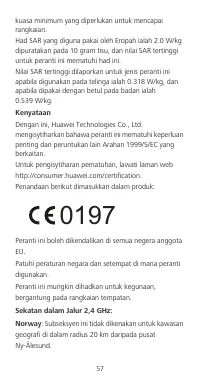
67 É utilizada a seguinte marcação incluída no produto: Este dispositivo pode ser utilizado em todos os Estados-Membros da UE. Cumpra os regulamentos nacionais e locais aplicáveis no local de utilização do dispositivo. A utilização deste dispositivo pode estar restrita, consoante a rede local. Restr...
Page 75 - Медицинское
71 Меры предосторожности В данном разделе приведена важная информация по работе и безопасной эксплуатации вашего устройства . Внимательно прочтите данный раздел перед началом работы . Медицинское оборудование • Соблюдайте правила , принятые в больницах и медицинских учреждениях . Не используйте устр...
Page 81 - Декларация
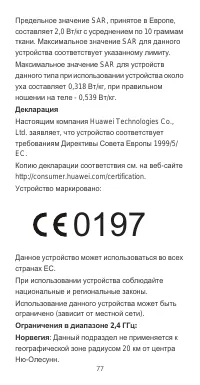
77 Предельное значение SAR, принятое в Европе , составляет 2,0 Вт / кг с усреднением по 10 граммам ткани . Максимальное значение SAR для данного устройства соответствует указанному лимиту . Максимальное значение SAR для устройств данного типа при использовании устройства около уха составляет 0,318 В...
Page 82 - Уведомления; Все
78 Уведомления Copyright © Huawei Technologi es Co. , Lt d. 2015. Все права защищены . ДАННЫЙ ДОКУМЕНТ ПРЕДОСТАВЛЯЕТСЯ ТОЛЬКО В ИНФОРМАЦИОННЫХ ЦЕЛЯХ БЕЗ КАКИХ - ЛИБО ЯВНЫХ ИЛИ НЕЯВНЫХ ГАРАНТИЙ . Политика конфиденциальности Меры , принимаемые компанией Huawei для защиты Вашей личной информации , опис...
Page 89 - Thông tin an toàn; ườ
85 Thông tin an toàn M ụ c này ch ứ a thông tin quan tr ọ ng v ề vi ệ c v ậ n hành thi ế t b ị c ủ a b ạ n. Nó c ũ ng ch ứ a thông tin v ề cách s ử d ụ ng thi ế t b ị m ộ t cách an toàn. Hãy đọ c k ỹ thông tin này tr ướ c khi s ử d ụ ng thi ế t b ị c ủ a b ạ n. Gây nhi ễ u t hi ế t b ị y t ế • Tuân ...
Page 91 - độ
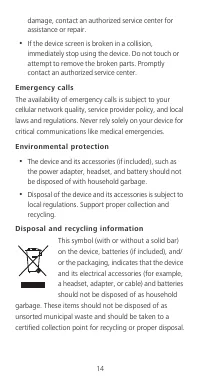
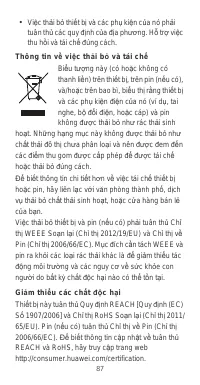
87 • Vi ệ c th ả i b ỏ thi ế t b ị và các ph ụ ki ệ n c ủ a nó ph ả i tuân th ủ các quy đị nh c ủ a đị a ph ươ ng. H ỗ tr ợ vi ệ c thu h ồ i và tái ch ế đ úng cách. Thông ti n v ề vi ệ c t h ả i b ỏ và tái ch ế Bi ể u t ượ ng này (có ho ặ c không có thanh li ề n) trên thi ế t b ị , trên pin (n ế u c...
Page 94 - Thông Báo Pháp Lý
90 Thông Báo Pháp Lý B ả n quy ề n © Huawei Technologi es Co. , Lt d. 2015. B ả o l ư u m ọ i quy ề n. TÀI LI Ệ U NÀY CH Ỉ DÀNH CHO M Ụ C Đ ÍCH THAM KH Ả O, VÀ KHÔNG CH Ứ A ĐỰ NG B Ấ T C Ứ S Ự B Ả O HÀNH NÀO. Chí nh sách Quy ề n ri êng t ư Để hi ể u h ơ n v ề cách th ứ c chúng tôi b ả o v ệ thông ti...
Page 95 - การใช้โทรศัพท์ในครั้งแรก
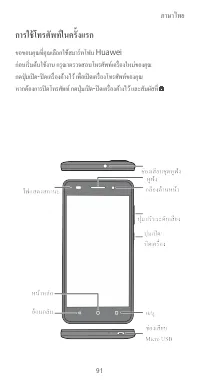
ภาษาไทย 91 การใช้โทรศัพท์ในครั้งแรก ขอขอบคุณที่คุณเลือกใช้สมาร์ทโฟน Huawei ก่อนเริ่มต้นใช้งาน กรุณาตรวจสอบโทรศัพท์เครื่องใหม่ของคุณ กดปุ่มเปิด - ปิดเครื่องค้างไว้ เพื่อเปิดเครื่องโทรศัพท์ของคุณ หากต้องการปิดโทรศัพท์ กดปุ่มเปิด - ปิดเครื่องค้างไว้ และสัมผัสที่
Page 96 - เริ่มต้นใช้งาน
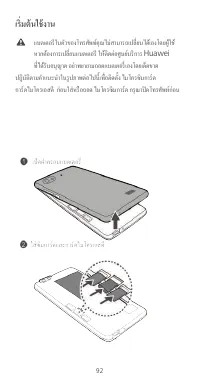
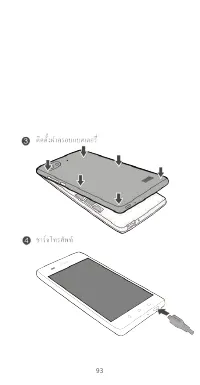
92 เริ่มต้นใช้งาน แบตเตอรีในตัวของโทรศัพท์คุณไม่สามารถเปลี่ยนได้เองโดยผู้ใช้ หากต้องการเปลี่ยนแบตเตอรี ให้ติดต่อศูนย์บริการ Huawei ที่ได้รับอนุญาต อย่าพยายามถอดแบตเตอรี่เองโดยเด็ดขาด ปฎิบัติตามคําแนะนําในรูปภาพต่อไปนี้เพื่อติดตั้ง ไมโครซิมการ์ด การ์ดไมโครเอสดี ก่อนใส่หรือถอด ไมโครซิมการ์ด กรุณาปิดโท...
Page 99 - การปกป้องสิ่งแวดล้อม
95 การใช้งานอะแดปเตอร์ไฟฟ้า ที่ชาร์จ หรือแบตเตอรีที่ไม่ได้รับการรับรองหรือเข้ากันไม่ได้อาจเป็นสาเหตุให้เกิด เพลิงไหม้ การระเบิด หรืออันตรายอื่น ๆ ได้ สําหรับอุปกรณ์ที่เสียบปลั๊กได้ ควรติดตั้งเต้ารับไว้ใกล้กับอุปกรณ์ และควรเข้าใช้งานได้ง่าย เก็บแบตเตอรีให้ห่างจากสถานที่ที่ร้อนเกินไปหรือถูกแสงแด...
Page 100 - REACH
96 ข้อมูลการกําจัดและการรีไซเคิล สัญลักษณ์นี้ ( ไม่ว่าจะมีแถบสีทึบด้วยหรือไม่ ) บนอุปกรณ์ แบตเตอรี ( หากรวมอยู่ด้วย ) และ / หรือบนบรรจุภัณฑ์ของอุปกรณ์ บ่งชี้ว่าไม่ควรกําจัดอุปกรณ์และอุปกรณ์เสริมที่เป็นอุปกรณ์ไ ฟฟ้า ( เช่น ชุดหูฟัง อะแดปเตอร์ หรือสายไฟ ) และแบตเตอรีต่าง ๆ แบบขยะในครัวเรือน ไม่ควรกําจ...
Page 101 - RoHS; การปฏิบัติตามระเบียบของสหภาพยุโรป; (International Commission on
97 RoHS กรุณาเยี่ยมชมเว็บไซต์ http://consumer.huawei.com/certification การปฏิบัติตามระเบียบของสหภาพยุโรป การใช้งานเมื่อพกพาไว้บนร่างกาย อุปกรณ์นี้ผลิตขึ้นตรงตามข้อกําหนดจําเพาะเกี่ยวกับคลื่นความถี่วิทยุในการใช้ งานอุปกรณ์ใกล้กับบริเวณหูที่ระยะห่างจากร่างกาย 1.5 เซนติเมตร ตรวจสอบว่าอุปกรณ์เสริมของอุป...
Page 102 - คําแถลง
98 ขีดจํากัดของค่า SAR ที่ทวีปยุโรปรับมาใช้เฉลี่ยอยู่ที่ 2.0 วัตต์ / กิโลกรัม ต่อเนื้อเยื่อ 10 กรัม และค่า SAR สูงสุดสําหรับอุปกรณ์นี้สอดคล้องตามขีดจํากัดนี้ ค่า SAR สูงสุดที่รายงานไว้สําหรับอุปกรณ์ชนิดนี้ เมื่อทดสอบสําหรับการใช้งานที่หูคือ 0.318 วัตต์ / กิโลกรัม และเมื่อพกพาไว้ตามปกติบนร่างกายคือ 0...
Page 103 - หมายเหตุทางกฎหมาย; ลิขสิทธิ์; เอกสารนี้จัดทําขึ้นเพื่อวัตถุประสงค์ในการให้ข้อมูลเท่านั้น; นโยบายความเป็นส่วนตัว
99 หมายเหตุทางกฎหมาย ลิขสิทธิ์ © Huawei Technologies Co., Ltd. 2015 ขอสงวนลิขสิทธิ์ทุกประการ เอกสารนี้จัดทําขึ้นเพื่อวัตถุประสงค์ในการให้ข้อมูลเท่านั้น และไม่ก่อให้เกิดการรับประกันในรูปแบบใด ๆ ทั้งสิ้น นโยบายความเป็นส่วนตัว เพื่อทําความเข้าใจว่าเรามีวิธีการในการป้องกันข้อมูลส่วนบุคคลของคุณอย่าง ไร ก...



 Huawei Ascend D2 User Manual
 Huawei Honor 4X User Manual
 Huawei Honor 6 Plus User Manual
 Huawei Honor 7 User Manual
 Huawei P8 User Manual
 Huawei P8 Lite User Manual
 Huawei P40 Lite 6/128GB Crush Green (JNY-LX1) User Manual
 Huawei P40 Lite 6/128GB Midnight Black (JNY-LX1) User Manual
 Huawei U8110 Manual
 Huawei U8350 Manual
 Huawei U8500 Manual
 Huawei U8860 Manual


