Page 2 - DTS and
For DTS patents, see http://patents.dts.com. Manufactured under license from DTS Licensing Limited. DTS, the Symbol, & DTS and the Symbol together are registered trademarks, and DTS Sound is a trademark of DTS, Inc. © DTS, Inc. All Rights Reserved. Please visithttp://consumer.huawei.com/en/suppo...
Page 3 - ภาษาไทย; Contents
English . . . . . . . . . . . . . . . . . . . . . . . . . . . . . . . . .1Français . . . . . . . . . . . . . . . . . . . . . . . . . . . . . . .24 香港繁體 . . . . . . . . . . . . . . . . . . . . . . . . . . . . . . .36 Indonesia . . . . . . . . . . . . . . . . . . . . . . . . . . . . . .44Melayu . . . ...
Page 5 - Your phone at a glance; Power off
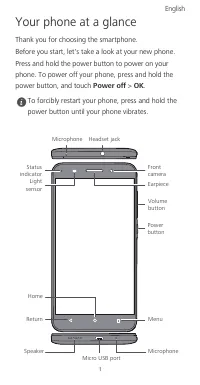
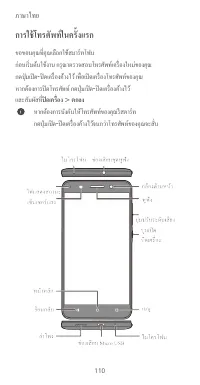
1 Your phone at a glance Thank you for choosing the smartphone. Before you start, let's take a look at your new phone. Press and hold the power button to power on your phone. To power off your phone, press and hold the power button, and touch Power off > OK . To forcibly restart your phone, press...
Page 6 - Getting started
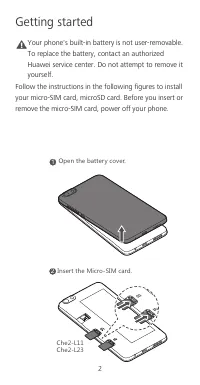
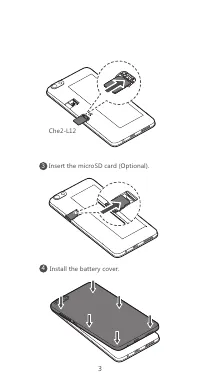
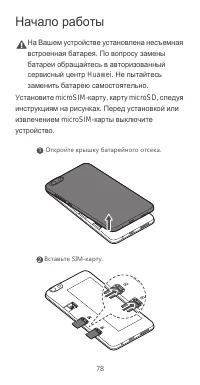
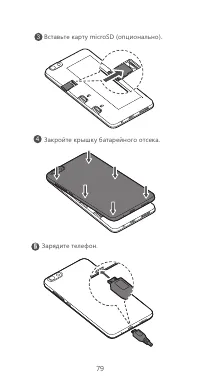
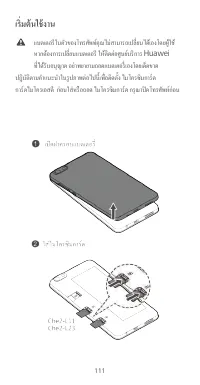
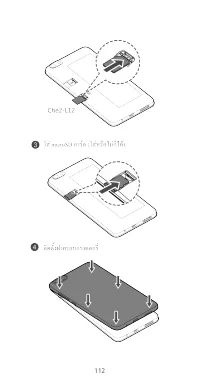
2 Getting started Caution Your phone's built-in battery is not user-removable. To replace the battery, contact an authorized Huawei service center. Do not attempt to remove it yourself. Follow the instructions in the following figures to install your micro-SIM card, microSD card. Before you insert o...
Page 8 - For more information; Wa nt to obtain the full us er guide?; Wa nt to lear n mo re about Hu awei EMUI?
4 For more information Wa nt to obtain the full us er guide? Download the honor 4X User Guide from http://consumer.huawei.com/en. Wa nt to lear n mo re about Hu awei EMUI? Go to http://emui.huawei.com for the latest information. All pictures and illustrations in this guide, including but not limited...
Page 9 - Safety information; Electronic device
5 Safety information This section contains important information about the operation of your device. It also contains information about how to use the device safely. Read this information carefully before using your device. Electronic device Do not use your device if using the device is prohibited. ...
Page 11 - Operating envir onment
7 may hurt you because of the strong force when the air bag inflates. • Do not use your device while flying in an aircraft or immediately before boarding. Using wireless devices in an aircraft may disrupt wireless networks, present a hazard to aircraft operation, or be illegal. Operating envir onmen...
Page 12 - Ac cesso ries
8 • Do not use your device's camera flash directly in the eyes of people or pets. Otherwise temporary loss of vision or damage to the eyes may occur. • Do not touch the device's antenna. Otherwise, communication quality may be reduced. • Do not allow children or pets to bite or suck the device or ac...
Page 13 - Charger safety
9 • (Che2-L11 & Che2-L12)Use only the following listed AC Adapters/Power Supplies: HUAWEI: HW-050100E2W, HW-050100A2W, HW-050100B2W, HW-050100U2W. Charger safety • For pluggable devices, the socket-outlet shall be installed near the devices and shall be easily accessible. • Unplug the charger fr...
Page 14 - Ba ttery s afety
10 Ba ttery s afety • Do not connect battery poles with conductors, such as keys, jewelry, or other metal materials. Doing so may short-circuit the battery and cause injuries or burns. • Keep the battery away from excessive heat and direct sunlight. Do not place it on or in heating devices, such as ...
Page 15 - Clea ning and maintena nc e
11 • Do not smash or pierce the battery, or expose it to high external pressure. Doing so may lead to a short circuit or overheating. • Do not drop the device or battery. If the device or battery is dropped, especially on a hard surface, it may be damaged. • If the device standby time shortens signi...
Page 19 - Statement; Norway; FCC Regulatory Compliance
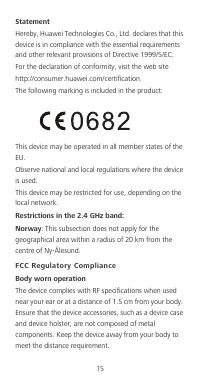
15 Statement Hereby, Huawei Technologies Co., Ltd. declares that this device is in compliance with the essential requirements and other relevant provisions of Directive 1999/5/EC. For the declaration of conformity, visit the web site http://consumer.huawei.com/certification. The following marking is...
Page 20 - FCC statement
16 Certification information (SAR) This device is also designed to meet the requirements for exposure to radio waves established by the Federal Communications Commission (USA). The SAR limit adopted by the USA is 1.6 W/kg averaged over one gram of tissue. The highest SAR value reported to the FCC fo...
Page 21 - Thailand SAR Statement
17 --Reorient or relocate the receiving antenna. --Increase the separation between the equipment and receiver. --Connect the equipment into an outlet on a circuit different from that to which the receiver is connected. --Consult the dealer or an experienced radio/TV technician for help. This device ...
Page 24 - Legal Notice; Trademarks and Permissions
20 Legal Notice Copyright © Huawei Technologies Co ., Ltd. 2015. All rights r eser ved. No part of this manual may be reproduced or transmitted in any form or by any means without prior written consent of Huawei Technologies Co., Ltd. and its affiliates ("Huawei"). The product described in t...
Page 26 - DI SCLAIMER
22 Huawei shall not compensate or be liable for services provided by third-party service providers, or the interruption or termination of third-party contents or services. Huawei shall not be responsible for the legality, quality, or any other aspects of any software installed on this product, or fo...
Page 28 - Prise en main du téléphone; Éteindre
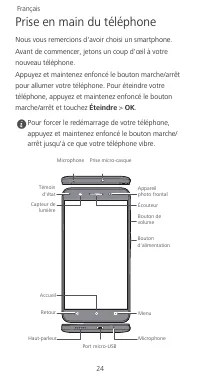
24 Prise en main du téléphone Nous vous remercions d'avoir choisi un smartphone. Avant de commencer, jetons un coup d'œil à votre nouveau téléphone. Appuyez et maintenez enfoncé le bouton marche/arrêt pour allumer votre téléphone. Pour éteindre votre téléphone, appuyez et maintenez enfoncé le bouton...
Page 29 - Prise en main
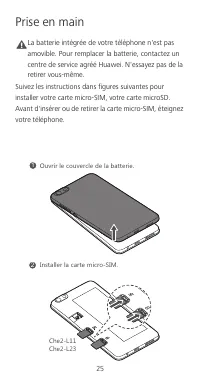
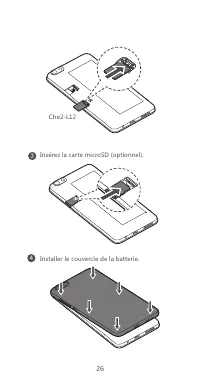
25 Prise en main Caution La batterie intégrée de votre téléphone n'est pas amovible. Pour remplacer la batterie, contactez un centre de service agréé Huawei. N'essayez pas de la retirer vous-même. Suivez les instructions dans figures suivantes pour installer votre carte micro-SIM, votre carte microS...
Page 36 - Déclaration; Restrictions au niveau de la bande 2,4 GHz :
32 Déclaration Par la présente, Huawei Technologies Co., Ltd. déclare que cet appareil est conforme aux exigences fondamentales et aux autres dispositions pertinentes de la directive 1999/5/CE. Consultez la déclaration de conformité sur le site Web http://consumer.huawei.com/certification. Le marqua...
Page 37 - Déclaration de la FCC
33 corps afin de respecter les exigences en matière de distance. Informations de certification (DAS) Cet appareil est également conçu pour répondre aux exigences d'exposition aux ondes radio établies par la Federal Communications Commission (États-Unis). La limite DAS adoptée par les États-Unis est ...
Page 39 - Mention légale; Politique de co nfidentialité
35 Mention légale Copyright © Huawei Technologies Co ., Ltd. 2015. Tou s droits rés ervés. CE DOCUMENT EST FOURNI À TITRE INFORMATIF UNIQUEMENT. IL NE CONSTITUE EN AUCUN CAS UNE FORME DE GARANTIE. Politique de co nfidentialité Pour une meilleure compréhension de la protection des informations person...
Page 40 - 手機功能一覽; 關機
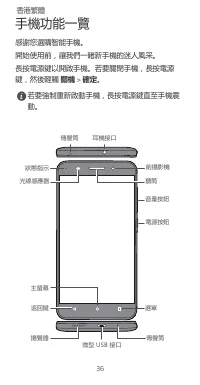
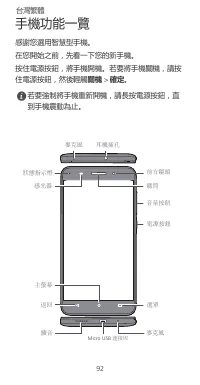
36 手機功能一覽 感謝您選購智能手機。 開始使用前,讓我們一睹新手機的迷人風采。 長按電源鍵以開啟手機。若要關閉手機,長按電源鍵,然後輕觸 關機 > 確定 。 若要強制重新啟動手機,長按電源鍵直至手機震動。 ৶㷬ݎՍ 朅࢛ܷ扸 ܷ扸 ڳֺ;9(ݎՍ ӹ㥝ڧ㷬 刴ঊ ଏ֛揗 П売ٳ 惴⯎ 䖚㘟ܶॐ ⟂利ঊ ⟂利ঊ Ұ俠۟㚙֘ 㠸利֘ 香港繁體
Page 41 - 入門指南
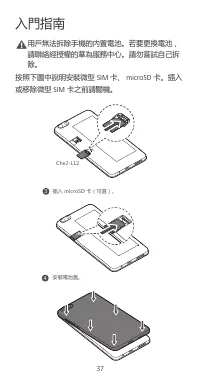
37 入門指南 Caution 用戶無法拆除手機的內置電池。若要更換電池,請聯絡經授權的華為服務中心。請勿嘗試自己拆除。 按照下圖中說明安裝微型 SIM 卡、 microSD 卡。插入 或移除微型 SIM 卡之前請關機。 )NK2 3 ݖҵSOIXU9*ԪͧՕ惴ͨ澞 4 ؍娙朅ࡐ嘮澞
Page 42 - 安全資訊; 醫療設備的干擾
38 安全資訊 本部分包含關於裝置的重要資訊。亦包括如何安全使用裝置的資訊。使用裝置前請仔細閱讀此資訊。 醫療設備的干擾 • 請遵循由醫院及健康護理中心訂立的規則。請勿在禁止使用裝置的地方使用裝置。 • 某些無線裝置可能影響助聽器或起搏器的效能。向您的服務供應商查詢更多資訊。 • 起搏器製造商建議在手機與起搏器之間保持最少 15 公分的距離,以免對起搏器產生干擾。如您使 用起搏器,請於起搏器的反側使用手機,並切勿 將手機置於胸前口袋內。 操作環境 • 要防止有可能的聽覺受損,請勿長時間 收聽高度音量。 • 理想操作溫度為 0°C 到 35°C 。理想保存溫度為 – 20°C 到 70°C 。極...
Page 43 - 棄置及回收資訊
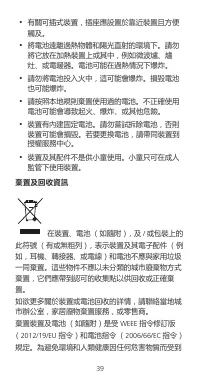
39 • 有關可插式裝置,插座應設置於靠近裝置且方便觸及。 • 將電池遠離過熱物體和陽光直射的環境下。請勿將它放在加熱裝置上或其中,例如微波爐、爐 灶、或電暖器。電池可能在過熱情況下爆炸。 • 請勿將電池投入火中,這可能會爆炸。損毀電池也可能爆炸。 • 請按照本地規則棄置使用過的電池。不正確使用電池可能會導致起火、爆炸、或其他危險。 • 裝置有內建固定電池。請勿嘗試拆除電池,否則裝置可能會損毀。若要更換電池,請帶同裝置到 授權服務中心。 • 裝置及其配件不是供小童使用。小童只可在成人監管下使用裝置。 棄置及回收資訊 在裝置、電池 (如隨附),及 / 或包裝上的 此符號 (有或無粗列),表示裝置...
Page 45 - 聲明
41 Che2–L11 : 本裝置類型匯報在耳邊測試時的最高 SAR 值為 0.285 W/kg ,和正確戴在身上測試時為 0.807 W/kg 。 Che2–L12 : 本裝置類型匯報在耳邊測試時的最高 SAR 值為 0.292 W/kg ,和正確戴在身上測試時為 0.999 W/kg 。 聲明 Huawei Technologies Co., Ltd 特此聲明,本裝置符合 1999/5/EC 指令中的主要要求和其他相關規定。 如欲符合性聲明資料,請瀏覽網站 http://consumer.huawei.com/certification. 產品內包含以下標示: 本裝置可在歐盟的所有成員國操...
Page 47 - 注意:; 法律通知; 版權所有
43 擾,及 (2) 此裝置必須接受任何接收到的干擾,包括 造成故障的干擾。 注意: 本裝置的任何變更或修改未明確地由 Huawei Technologies Co., Ltd. 認可為符合規範可導致使用者操 作本設備的權力無效。 法律通知 版權所有 © 華為技術有限公司 2015 。保留一切權 利。 本文件用途只提供資訊,並不構成任何形式的保證。 私隱政策 如要深入了解我們如何保障您的個人資料,請前往 http://consumer.huawei.com/privacy-policy 參考私隱政 策。
Page 48 - Sekilas tentang ponsel Anda; Matikan daya
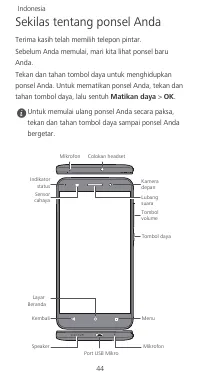
44 Sekilas tentang ponsel Anda Terima kasih telah memilih telepon pintar. Sebelum Anda memulai, mari kita lihat ponsel baru Anda. Tekan dan tahan tombol daya untuk menghidupkan ponsel Anda. Untuk mematikan ponsel Anda, tekan dan tahan tombol daya, lalu sentuh Matikan daya > OK . Untuk memulai ula...
Page 49 - Cara memulai
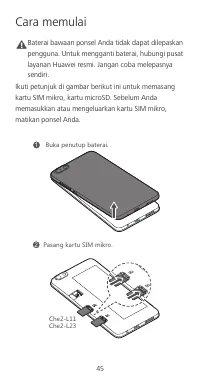
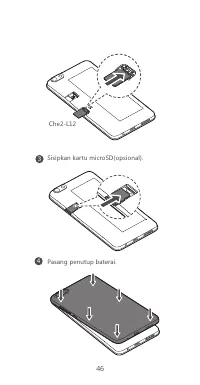
45 Cara memulai Caution Baterai bawaan ponsel Anda tidak dapat dilepaskan pengguna. Untuk mengganti baterai, hubungi pusat layanan Huawei resmi. Jangan coba melepasnya sendiri. Ikuti petunjuk di gambar berikut ini untuk memasang kartu SIM mikro, kartu microSD. Sebelum Anda memasukkan atau mengeluark...
Page 51 - Informasi keselamatan; Ganggua n de ngan pera latan medis
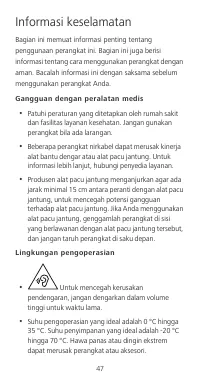
47 Informasi keselamatan Bagian ini memuat informasi penting tentang penggunaan perangkat ini. Bagian ini juga berisi informasi tentang cara menggunakan perangkat dengan aman. Bacalah informasi ini dengan saksama sebelum menggunakan perangkat Anda. Ganggua n de ngan pera latan medis • Patuhi peratur...
Page 55 - Pernyataan
51 Angka Penyerapan Spesifik (Specific Absorption Rate (SAR)) merupakan unit pengukuran untuk jumlah energi frekuensi radio yang diserap oleh tubuh saat menggunakan perangkat. Nilai SAR ditentukan pada level daya sertifikasi tertinggi pada kondisi laboratorium, namun level SAR aktual saat dioperasik...
Page 56 - Norwegia; Kepatuhan terhadap Peratura n FCC
52 Simbol berikut ini disertakan dalam produk: Perangkat ini mungkin dioperasikan di semua negara anggota Uni Eropa (EU). Patuhi peraturan nasional dan lokal di mana perangkat ini digunakan. Penggunaan perangkat ini mungkin terbatas, tergantung pada jaringan lokal. Pembatasan dalam 2,4 GHz band: Nor...
Page 57 - Pernyataan FCC
53 Che2-L12 : Nilai SAR tertinggi yang dilaporkan ke FCC untuk tipe perangkat ini ketika digunakan di telinga adalah 0,548 W/kg, dan ketika dikenakan dengan benar pada tubuh adalah 0,497 W/kg, dan ketika menggunakan fungsi hotspot Wi-Fi adalah 1,049 W/Kg. Che2-L23 : Nilai SAR tertinggi yang dilapork...
Page 58 - Pemberitahuan Hukum; Kebija ka n Pr iva si
54 --Tambah pemisah antara peralatan dengan penerima. --Sambungkan peralatan ke stop kontak pada sirkuit berbeda dari yang dipakai oleh pesawat penerima. --Mintalah bantuan dealer atau teknisi radio/TV yang berpengalaman. Perangkat ini mematuhi Pasal 15 dari Peraturan FCC. Penggunaan perangkat tundu...
Page 59 - Telefon anda sekilas pandang; Matikan kuasa
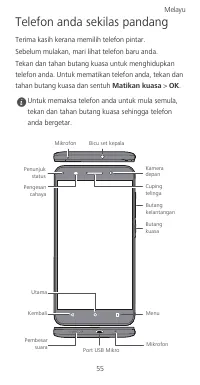
55 Telefon anda sekilas pandang Terima kasih kerana memilih telefon pintar. Sebelum mulakan, mari lihat telefon baru anda. Tekan dan tahan butang kuasa untuk menghidupkan telefon anda. Untuk mematikan telefon anda, tekan dan tahan butang kuasa dan sentuh Matikan kuasa > OK . Untuk memaksa telefon...
Page 60 - Bermula
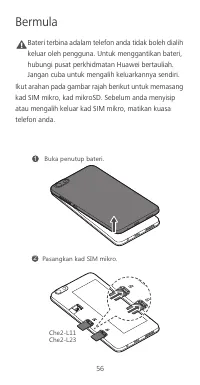
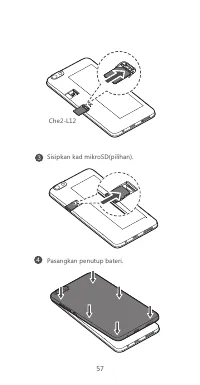
56 Bermula Caution Bateri terbina adalam telefon anda tidak boleh dialih keluar oleh pengguna. Untuk menggantikan bateri, hubungi pusat perkhidmatan Huawei bertauliah. Jangan cuba untuk mengalih keluarkannya sendiri. Ikut arahan pada gambar rajah berikut untuk memasang kad SIM mikro, kad mikroSD. Se...
Page 62 - Maklumat keselamatan; Gangguan de ngan peralatan perubata n
58 Maklumat keselamatan Bahagian ini mengandungi maklumat penting mengenai operasi peranti anda. Ia juga mengandungi maklumat mengenai bagaimana untuk menggunakan peranti dengan selamat. Baca maklumat ini dengan teliti sebelum menggunakan peranti anda. Gangguan de ngan peralatan perubata n • Ikuti p...
Page 64 - Ma klumat pelu pu san dan kita r semula; Pengura nga n B ahan ya ng Ber bahay a
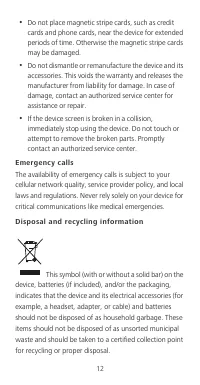
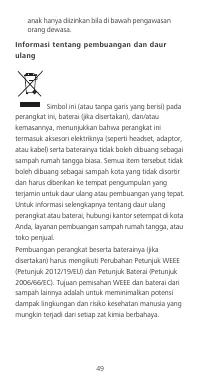
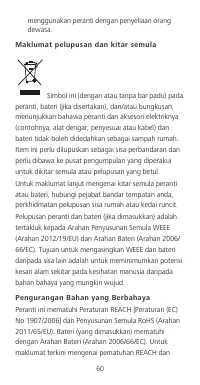
60 menggunakan peranti dengan penyeliaan orang dewasa. Ma klumat pelu pu san dan kita r semula Simbol ini (dengan atau tanpa bar padu) pada peranti, bateri (jika disertakan), dan/atau bungkusan, menunjukkan bahawa peranti dan aksesori elektriknya (contohnya, alat dengar, penyesuai atau kabel) dan ba...
Page 65 - Pema tuha n perundangan EU
61 RoHS, sila lawati laman web http://consumer.huawei.com/certification. Pema tuha n perundangan EU Pengendalian dipakai pada badan Peranti mematuhi spesifikasi RF apabila digunakan berdekatan telinga anda atau pada jarak 1.5 cm dari badan anda. Pastikan aksesori peranti seperti bekas peranti dan pe...
Page 66 - Kenyataan
62 Had SAR yang diguna pakai oleh Eropah ialah 2.0 W/kg dipuratakan pada 10 gram tisu, dan nilai SAR tertinggi untuk peranti ini mematuhi had ini. Che2–L11 : Nilai SAR tertinggi dilaporkan untuk jenis peranti ini apabila digunakan pada telinga ialah 0.285 W/kg, dan apabila dipakai dengan betul pada ...
Page 67 - Pema tuha n Perundangan FCC
63 Peranti ini mungkin dihadkan untuk kegunaan, bergantung pada rangkaian tempatan. Sekatan dalam Jalur 2,4 GHz: Norway : Subseksyen ini tidak dikenakan untuk kawasan geografi di dalam radius 20 km daripada pusat Ny-Ålesund. Pema tuha n Perundangan FCC Pengendalian dipakai pada badan Peranti mematuh...
Page 68 - Kenyataan FCC
64 Che2-L23 : Nilai SAR tertinggi dilaporkan kepada IC untuk jenis peranti ini apabila digunakan pada telinga ialah 0.548 W/kg, dan apabila dipakai pada badan ialah 1.173 W/kg, dan apabila menggunakan fungsi hotspot Wi-Fi ialah 1.017 W/Kg. Kenyataan FCC Peralatan ini telah diuji dan mematuhi had unt...
Page 69 - Notis Perundangan; Da sar Privasi
65 Peranti ini mematuhi Bahagian 15 Peraturan FCC. Operasi adalah tertakluk kepada dua keadaan berikut: (1) peranti ini tidak menyebabkan gangguan yang merbahaya, dan (2) peranti ini harus menerima mana-mana gangguan yang diterima, termasuk gangguan yang menyebabkan operasi yang tidak diingini. Lang...
Page 70 - Breve descrição do telefone; Encerrar
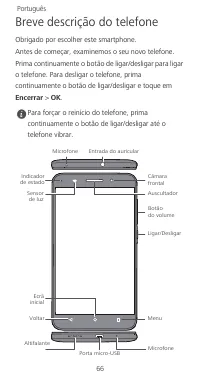
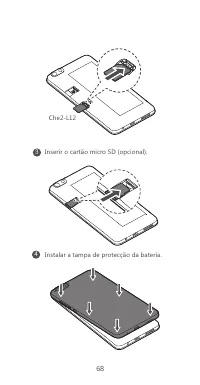
66 Breve descrição do telefone Obrigado por escolher este smartphone. Antes de começar, examinemos o seu novo telefone. Prima continuamente o botão de ligar/desligar para ligar o telefone. Para desligar o telefone, prima continuamente o botão de ligar/desligar e toque em Encerrar > OK . Para forç...
Page 71 - Introdução
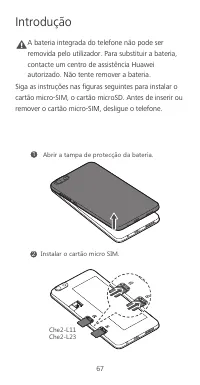
67 Introdução Caution A bateria integrada do telefone não pode ser removida pelo utilizador. Para substituir a bateria, contacte um centro de assistência Huawei autorizado. Não tente remover a bateria. Siga as instruções nas figuras seguintes para instalar o cartão micro-SIM, o cartão microSD. Antes...
Page 73 - Informações de segurança; Interfer ênc ia c om equipamentos médic os
69 Informações de segurança Esta secção contém informações importantes relacionadas com o funcionamento do dispositivo. Contém também informações sobre como utilizar o dispositivo de forma segura. Leia estas informações atentamente antes de utilizar o dispositivo. Interfer ênc ia c om equipamentos m...
Page 75 - Infor maç ões sobre eliminaç ão e r ecic lagem
71 substituir a bateria, leve o dispositivo a um centro de assistência autorizado. • O dispositivo e os respectivos acessórios não foram concebidos para serem utilizados por crianças. As crianças não devem utilizar o dispositivo sem a supervisão de um adulto. Infor maç ões sobre eliminaç ão e r ecic...
Page 77 - Declaração
73 contra Radiações Não Ionizantes), uma organização científica independente, e incluem medidas de segurança para todos os utilizadores, independentemente da idade e do estado de saúde. A taxa de absorção específica (SAR) é a unidade de medida para a quantidade de energia de radiofrequência absorvid...
Page 78 - Noruega; Conformidade regulamentar da FCC
74 requisitos essenciais e outras disposições relevantes da Directiva 1999/5/CE. Para consultar a declaração de conformidade, visite a página Web http://consumer.huawei.com/certification. É utilizada a seguinte marcação incluída no produto: Este dispositivo pode ser utilizado em todos os Estados-Mem...
Page 79 - Declaração da FCC
75 estabelecidas pela Federal Communications Commission (EUA). O limite da SAR adoptado pelos EUA é de 1,6 W/kg, calculado com base num grama de tecido. O valor de SAR mais elevado comunicado à FCC para este tipo de dispositivo está em conformidade com este limite. Che2-L12 : O valor de SAR mais ele...
Page 80 - Aviso legal; Política de privac idade
76 equipamento, recomenda-se que o utilizador tente corrigir a interferência através de uma ou mais das seguintes medidas:--Reoriente ou reposicione a antena receptora.--Aumente a distância entre o equipamento e o receptor.--Ligue o equipamento a uma tomada num circuito diferente do circuito ao qual...
Page 81 - Отключить
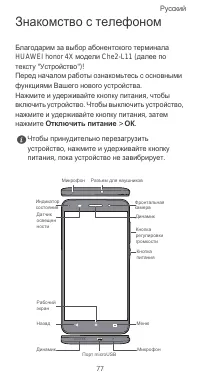
77 Знакомство с телефоном Благодарим за выбор абонентского терминала HUAWEI honor 4X модели Che2-L11 ( далее по тексту " Устройство ")! Перед началом работы ознакомьтесь с основными функциями Вашего нового устройства . Нажмите и удерживайте кнопку питания , чтобы включить устройство . Чтобы ...
Page 84 - Медицинское
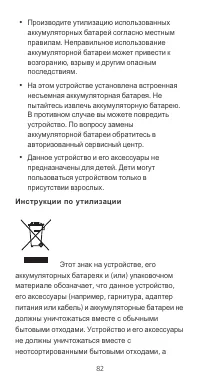
80 Меры предосторожности В данном разделе приведена важная информация по работе и безопасной эксплуатации вашего устройства . Внимательно прочтите данный раздел перед началом работы . Медицинское оборудование • Соблюдайте правила , принятые в больницах и медицинских учреждениях . Не используйте устр...
Page 89 - Декларация
85 облучения человека независимо от возраста и состояния здоровья . Для определения уровня радиочастотного излучения , возникающего при работе беспроводных устройств , используется единица измерения , называемая удельным коэффициентом поглощения (SAR). Значение SAR определяется в лабораторных услови...
Page 90 - Уведомления
86 Копию декларации соответствия см . на веб - сайте http://consumer.huawei.com/certification. Устройство маркировано : Данное устройство может использоваться во всех странах ЕС . При использовании устройства соблюдайте национальные и региональные законы . Использование данного устройства может быть...
Page 97 - 開始使用
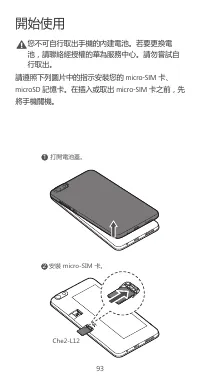
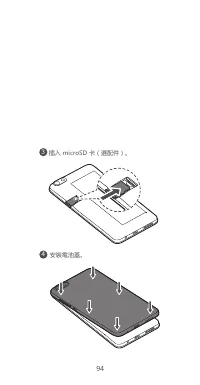
93 開始使用 Caution 您不可自行取出手機的內建電池。若要更換電池,請聯絡經授權的華為服務中心。請勿嘗試自行取出。 請遵照下列圖片中的指示安裝您的 micro-SIM 卡、 microSD 記憶卡。在插入或取出 micro-SIM 卡之前,先 將手機關機。 1 ۸旇朅ࡐ嘮澞 2 ؍娙SOIXU9/3Ԫ澞 )NK2
Page 99 - 對醫療設備的干擾
95 安全資訊 本節包含操作本裝置的重要資訊,亦包括如何安全使用裝置的資訊。使用裝置前請詳讀這些資訊。 對醫療設備的干擾 • 請遵循由醫院及健康護理中心訂立的規則。禁止使用本裝置時,請勿使用。 • 部分無線裝置可能會干擾助聽器或心律調整器。詳情請洽詢電信業者。 • 心律調整器製造商建議在手機與心律調整器之間保持最少 15 公分的距離,以免對心律調整器產生 干擾。如果使用心律調整器,請在心律調整器的 反側使用裝置,且勿將裝置放置於胸前口袋。 操作環境 • 為避免聽力受損之虞,請勿長時間以高 音量使用耳機。 • 理想的操作溫度是 0°C 到 35°C 之間。理想的存放 溫度是 -20°C 到 70...
Page 100 - 電磁波吸收能量比值
96 • 請勿置電池於高溫附近或陽光直接照射處。不要將電池放在加熱裝置上或放入其中,例如微波 爐、瓦斯爐或電熱器。電池過熱可能會引起爆 炸。 • 請勿將電池投入火中以免爆炸。損壞的電池也可能會爆炸。 • 請按照當地標準規範廢棄處理用過的電池。電池使用不當可能導致火災、爆炸或其他危險。 • 裝置採用內建式電池,使用者無法自行更換。請勿嘗試取出電池,否則可能會損壞裝置。若要更 換電池,請將裝置送到授權服務中心。 • 本裝置及其配件並非針對兒童使用者而設計,兒童只可在大人監督下使用。 電磁波吸收能量比值 (SAR) 本款行動電話符合國際有關輻射能量的標準要求。您的行動電話是一個低功率的無線電接收機和...
Page 102 - 法律聲明; 保留一切權利。; 隱私權政策
98 法律聲明 Copyright © Huawei Technologies Co ., Ltd. 2015. 保留一切權利。 本文內容僅供參考,不構成任何形式的保證。 隱私權政策 欲進一步瞭解我們對個人資訊所採取的保護措施,請至 http://consumer.huawei.com/privacy-policy 參閱隱私 權政策內容。
Page 103 - t ngu
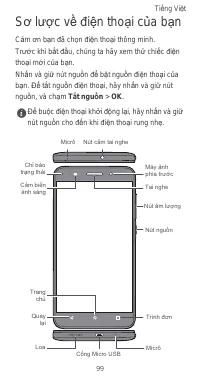
99 S ơ l ượ c v ề đ i ệ n tho ạ i c ủ a b ạ n C ả m ơ n b ạ n đ ã ch ọ n đ i ệ n tho ạ i thông minh. Tr ướ c khi b ắ t đầ u, chúng ta hãy xem th ử chi ế c đ i ệ n tho ạ i m ớ i c ủ a b ạ n. Nh ấ n và gi ữ nút ngu ồ n để b ậ t ngu ồ n đ i ệ n tho ạ i c ủ a b ạ n. Để t ắ t ngu ồ n đ i ệ n tho ạ i, hãy...
Page 106 - Thông tin an toàn; ườ
102 Thông tin an toàn M ụ c này ch ứ a thông tin quan tr ọ ng v ề vi ệ c v ậ n hành thi ế t b ị c ủ a b ạ n. Nó c ũ ng ch ứ a thông tin v ề cách s ử d ụ ng thi ế t b ị m ộ t cách an toàn. Hãy đọ c k ỹ thông tin này tr ướ c khi s ử d ụ ng thi ế t b ị c ủ a b ạ n. Gây nhi ễ u t hi ế t b ị y t ế • Tuân...
Page 108 - độ
104 Thông ti n v ề vi ệ c t h ả i b ỏ và tái ch ế Bi ể u t ượ ng này (có ho ặ c không có thanh li ề n) trên thi ế t b ị , trên pin (n ế u có), và/ho ặ c trên bao bì, bi ể u th ị r ằ ng thi ế t b ị và các ph ụ ki ệ n đ i ệ n c ủ a nó (ví d ụ , tai nghe, b ộ đổ i đ i ệ n, ho ặ c cáp) và pin không đượ ...
Page 110 - Tuyên b
106 Gi ớ i h ạ n SAR áp d ụ ng t ạ i Châu Âu là trung bình 2,0 W/kg cho 10 gam gi ấ y l ụ a, giá tr ị SAR cao nh ấ t dành cho thi ế t b ị này tuân th ủ gi ớ i h ạ n này. Che2–L11: Giá tr ị SAR cao nh ấ t đượ c báo cáo đố i v ớ i lo ạ i thi ế t b ị này khi đượ c s ử d ụ ng ở tai là 0,285 W/kg, và khi...
Page 113 - Thông Báo Pháp Lý
109 Thông Báo Pháp Lý B ả n quy ề n © Huawei Technologi es Co. , Lt d. 2015. B ả o l ư u m ọ i quy ề n. TÀI LI Ệ U NÀY CH Ỉ DÀNH CHO M Ụ C Đ ÍCH THAM KH Ả O, VÀ KHÔNG CH Ứ A ĐỰ NG B Ấ T C Ứ S Ự B Ả O HÀNH NÀO. Chí nh sách Quy ề n ri êng t ư Để hi ể u h ơ n v ề cách th ứ c chúng tôi b ả o v ệ thông t...
Page 114 - การใช้โทรศัพท์ในครั้งแรก; ปิดเครื่อง
ภาษาไทย 110 การใช้โทรศัพท์ในครั้งแรก ขอขอบคุณที่คุณเลือกใช้สมาร์ทโฟน ก่อนเริ่มต้นใช้งาน กรุณาตรวจสอบโทรศัพท์เครื่องใหม่ของคุณ กดปุ่มเปิด - ปิดเครื่องค้างไว้ เพื่อเปิดเครื่องโทรศัพท์ของคุณ หากต้องการปิดโทรศัพท์ กดปุ่มเปิด - ปิดเครื่องค้างไว้ และสัมผัสที่ ปิดเครื่อง > ตกลง หากต้องการบังคับให้โทรศัพ...
Page 115 - เริ่มต้นใช้งาน
111 เริ่มต้นใช้งาน แบตเตอรีในตัวของโทรศัพท์คุณไม่สามารถเปลี่ยนได้เองโดยผู้ใช้ หากต้องการเปลี่ยนแบตเตอรี ให้ติดต่อศูนย์บริการ Huawei ที่ได้รับอนุญาต อย่าพยายามถอดแบตเตอรี่เองโดยเด็ดขาด ปฎิบัติตามคําแนะนําในรูปภาพต่อไปนี้เพื่อติดตั้ง ไมโครซิมการ์ด การ์ดไมโครเอสดี ก่อนใส่หรือถอด ไมโครซิมการ์ด กรุณาปิดโ...
Page 118 - ข้อมูลการกําจัดและการรีไซเคิล
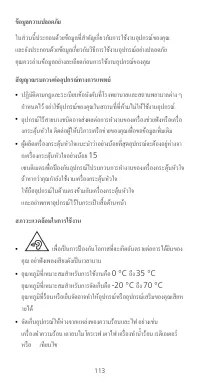
114 การใช้งานอะแดปเตอร์ไฟฟ้า ที่ชาร์จ หรือแบตเตอรีที่ไม่ได้รับการรับรองหรือเข้ากันไม่ได้อาจเป็นสาเหตุให้เกิดเพลิงไหม้ การระเบิด หรืออันตรายอื่น ๆ ได้ (Che2-L 11 & Che 2-L12) ใช้อะแดปเตอร์ AC/ แหล่งจ่ายไฟในรายการต่อไปนี้เท่านั้น : HUAWEI: HW-050100E2W, HW-050100A2W, HW-050100B2W, HW-050100U2W...
Page 119 - การลดสารอันตราย; REACH
115 บ่งชี้ว่าไม่ควรกําจัดอุปกรณ์และอุปกรณ์เสริมที่เป็นอุปกรณ์ไฟฟ้า ( เช่น ชุดหูฟัง อะแดปเตอร์ หรือสายไฟ ) และแบตเตอรีต่าง ๆ แบบขยะในครัวเรือน ไม่ควรกําจัดอุปกรณ์เหล่านี้แบบขยะเทศบาลที่ไม่ได้คัดแยก และควรนําไปส่งให้กับจุดจัดเก็บขยะที่ได้รับอนุญาตเพื่อนําไปรีไซเคิล หรือกําจัดทิ้งอย่างเหมาะสม สําหรับข้...
Page 121 - คําแถลง
117 Che2–L11 : ค่า SAR สูงสุดที่รายงานไว้สําหรับอุปกรณ์ชนิดนี้ เมื่อทดสอบสําหรับการใช้งานที่หูคือ 0.285 วัตต์ / กิโลกรัม และเมื่อพกพาไว้ตามปกติบนร่างกายคือ 0.807 วัตต์ / กิโลกรัม Che2–L12 : ค่า SAR สูงสุดที่รายงานไว้สําหรับอุปกรณ์ชนิดนี้ เมื่อทดสอบสําหรับการใช้งานที่หูคือ 0.292 วัตต์ / กิโลกรัม และเ...
Page 123 - FCC; ข้อควรระวัง
119 ญาณรบกวนต่าง ๆ สําหรับการติดตั้งใช้งานในที่พักอาศัย อุปกรณ์นี้สามารถสร้าง ใช้ หรือแผ่รังสีพลังงานคลื่นความถี่วิทยุได้ และหากไม่ได้ติดตั้งและใช้งานตามคําแนะนําอาจก่อให้เกิดสัญญาณรบกวนที่เ ป็นอันตรายต่อการสื่อสารด้วยคลื่นวิทยุ อย่างไรก็ตาม ไม่มีการรับประกันว่าสัญญาณรบกวนดังกล่าวจะไม่เกิดขึ้นในการต...
Page 124 - หมายเหตุทางกฎหมาย; ลิขสิทธิ์; เอกสารนี้จัดทําขึ้นเพื่อวัตถุประสงค์ในการให้ข้อมูลเท่านั้น; นโยบายความเป็นส่วนตัว
120 หมายเหตุทางกฎหมาย ลิขสิทธิ์ © Huawei Technologies Co., Ltd. 2015 ขอสงวนลิขสิทธิ์ทุกประการ เอกสารนี้จัดทําขึ้นเพื่อวัตถุประสงค์ในการให้ข้อมูลเท่านั้น และไม่ก่อให้เกิดการรับประกันในรูปแบบใด ๆ ทั้งสิ้น นโยบายความเป็นส่วนตัว เพื่อทําความเข้าใจว่าเรามีวิธีการในการป้องกันข้อมูลส่วนบุคคลของคุณอย่างไร ก...





 Huawei Ascend D2 User Manual
 Huawei Honor 4C User Manual
 Huawei Honor 6 Plus User Manual
 Huawei Honor 7 User Manual
 Huawei P8 User Manual
 Huawei P8 Lite User Manual
 Huawei P40 Lite 6/128GB Crush Green (JNY-LX1) User Manual
 Huawei P40 Lite 6/128GB Midnight Black (JNY-LX1) User Manual
 Huawei U8110 Manual
 Huawei U8350 Manual
 Huawei U8500 Manual
 Huawei U8860 Manual


