Honeywell RTH8800WF2022 - User Manual
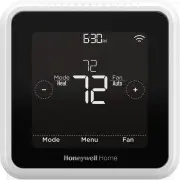
Honeywell RTH8800WF2022 Thermostat – User Manual, read for free online in PDF format. We hope this helps you resolve any issues you may have. If you have further questions, please contact us through the contact form.


Table of Contents:
- Page 2 – Compatibility; Removing your old thermostat; Do not remove any wires from; Do you have thick black wires; Y R RC; Read and save these instructions.
- Page 3 – Installing your T5 Smart Thermostat
- Page 4 – START SETUP; Setup with Honeywell Home App; Yes
- Page 5 – How to use your Honeywell Home App; How to use your T5 Smart Thermostat; Select; Manual Setup; Edit
- Page 6 – Equipment Setup Options; Conventional Forced Air Heat:
- Page 8 – FCC REGULATIONS
- Page 9 – Apple® HomeKitTM Setup Code; included with your T5 Smart thermostat.; -Year Limited Warranty; For Warranty information go to; CAUTION: ELECTRICAL HAZARD; environment and human health.
T5+ Smart Thermostat
Programmable Thermostat
RCHT8610WF, RCHT8612WF,
RTH8800WF
Product Data
For more information visit
honeywellhome.com
Mode
Menu
Fan
Mode
Fan
Heat
Auto
Wake
Away
Home
Sleep
Following Schedule
M37257C
Included in your box
Screws and
anchors
UWP™
Mounting
System
(UWP)
T5 Smart
Thermostat
Quick Install
Guide
Get the most from T5 Smart Thermostat
Multiple programming options that fit your lifestyle:
1.
Location-Based scheduling –
The thermostat uses your smartphone’s location to know when you’re away, and saves you energy. Through
geofence technology, it senses your return and helps make you comfortable upon arrival. You can always manually change your preset Home
and Away temperature either on the thermostat or on the Honeywell Home app.
2.
Smart scheduling –
Use a combination of geofencing and time scheduling to fit your busy, active lifestyle.
3.
Time-Based scheduling –
Program your thermostat for one week; each day (each day is a different schedule); Mon-Fri, Sat, Sun; or Mon-Fri,
Sat-Sun. All days with four adjustable periods per day.
4.
No scheduling –
Control your comfort manually by adjusting temperature set points only.
Smart Alerts.
Push notifications remind you of filter changes and warn you of extreme indoor temperatures.
Smart Response.
Learns your heating and cooling system to deliver the optimal temperature at the right time.
Auto Change From Heat to Cool.
Automatically determine if your home needs heating or cooling to provide maximum comfort.
!
"Loading the manual" means you need to wait until the file loads and becomes available for online reading. Some manuals are very large, and the time they take to appear depends on your internet speed.
Was this manual helpful?
About this manual
- Brand
- Honeywell
- Model
- RTH8800WF2022
- Document type
- User Manual
- Category
- Thermostat
- Language(s)
- English
- Pages
- 12
- File size
- 2.9 MB
- Format
Summary
2 Tools you will need You may need Wire stripper Needle-nose pliers Drill and drill bit (7/32 in) Smartphone To install your thermostat and photograph existing wiring. Honeywell Home app To configure your system and connect to your smartphone. Small flat head screwdriver Phillips screwdriver Pencil ...
3 8 Write down the color of the wires Check mark the wires that are connected to terminals. Next to the check mark, write down the color of the wire. Do not include jumpers as a part of your count.Check all that apply (Not all will apply): Terminal Wire Color Y Y2 G C 7 Record if you have wires in t...
4 13 Set R-switch position and insert R-wire or wires Set the R-switch up or down based on your wiring notes in Step 7 . 14 Connect remaining wires from Step 8 Tip: Do not mount the UWP to the wall prior to connecting the wires. Depress the tabs to put the wires into the inner holes of their corre- ...
Ask a question
Related manuals
Popular Honeywell Thermostats


More Honeywell Thermostats models
 Honeywell RTH6580WF User Manual
 Honeywell RTH6580WF1001 User Manual
 Honeywell RTH7560E User Manual
 Honeywell RTH7600D User Manual
 Honeywell RTH8560D User Manual
 Honeywell RTH8560D1002 User Manual
 Honeywell RTH9585WF User Manual
 Honeywell RTH9585WF1004/W User Manual
 Honeywell TH8321WF1001 User Manual
 Honeywell CT50K1028 User Manual
 Honeywell CT53K User Manual
 Honeywell CT87K User Manual
 Honeywell CT87N User Manual
 Honeywell CT410B User Manual