Honeywell RTH9585WF - User Manual
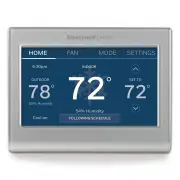
A user manual for Honeywell Home thermostats covers essential wiring configurations when a common (C) power wire is missing during installation or replacement. The document addresses two primary scenarios: locating an unused C-wire in the wall or using the G-wire as a temporary solution for compatible heating/cooling systems, with clear guidance on system compatibility. It also includes safety warnings to ensure proper electrical disconnection before working and diagrams illustrating terminal connections.


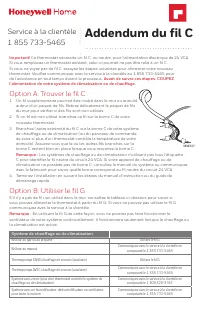
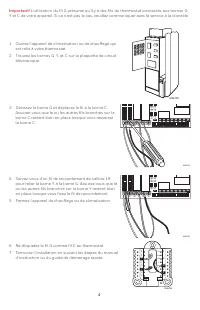



Table of Contents:
- Page 1 – Handling Missing C Wire During Installation
- Page 2 – Wiring Modification Steps
- Page 3 – Installing Thermostat with C-wire Requirements
- Page 4 – Rewiring HVAC Unit Connections
- Page 5 – Installing Thermostat with Alternative Cabling
- Page 6 – Modifying HVAC Control Panel Wiring
C Wire Addendum
Customer Support
1-855-733-5465
Important!
This thermostat requires a C, or common, wire for power.
If you are replacing an existing thermostat, it might not have a C wire connected to it.
If you don’t see a C wire, try one of these two options to power your new thermostat. Please
contact Customer Support at 1-855-733-5465 for assistance at any time during this process.
Before beginning these steps, turn OFF power to your heating/cooling system.
Option A: Finding the C wire
1 There might be an extra wire pushed into the wall or wrapped
around the wire bundle. Gently pull the wire bundle out of the
wall to check for unused wires.
2 If you have an unused wire, connect that wire to the C terminal
on your new thermostat.
3 Connect the other end of the C wire to the C terminal on your
heating/cooling system (or the zone panel if your home uses
more than one thermostat to control heat and cool). Be sure
the other wire(s) connected to the C terminal stay securely
connected when you re-tighten the C terminal.
Note:
Not all heating/cooling equipment use the C label for the 24 VAC common wire. If your
heating/cooling equipment does not have a C terminal, check the system manual or contact
the manufacturer to find out which terminal is the 24 VAC common.
4 Complete the installation following the steps in the instruction manual or quick start guide.
Option B: Using the G wire
If there is no unused wire in the wall, check the table below to see if you can use the G wire to
power the thermostat. If you can’t use the G wire, contact Customer Support.
Note:
Using the G wire in this manner means you can’t run your system fan continuously. It will
run when the system is heating or cooling.
Heating/Cooling System
Furnace that burns gas or propane
Use G wire
Furnace that burns oil
Call Customer Support at 1-855-733-5465
Heat pump WITHOUT backup (auxiliary) heat
Use G wire
Heat pump WITH backup (auxiliary) heat
Call Customer Support at 1-855-733-5465
Zoned system (more than one thermostat
controlling the heating/cooling system)
Call Zoning Support at 1-800-828-8367
System with a whole-house humidifier,
dehumidifier, or ventilator
Call Customer Support at 1-855-733-5465
M36727
"Loading the manual" means you need to wait until the file loads and becomes available for online reading. Some manuals are very large, and the time they take to appear depends on your internet speed.
Was this manual helpful?
About this manual
- Brand
- Honeywell
- Model
- RTH9585WF
- Document type
- User Manual
- Category
- Thermostat
- Language(s)
- English
- Pages
- 8
- File size
- 1 MB
- Format
Other Manuals for Honeywell RTH9585WF
Summary
Options for wiring without a C wire, including using an unused wire or the G wire, and safety precautions before starting work.
Step-by-step instructions for modifying thermostat wiring by relocating the G wire to the C terminal and connecting the Y terminal to the G terminal using a jumper wire, illustrated with diagrams.
Guidance for installing a thermostat requiring a C-wire, detailing options to locate an unused C-wire or use a G-wire, along with system compatibility information and wiring diagrams.
Ask a question
Related manuals
Popular Honeywell Thermostats


More Honeywell Thermostats models
 Honeywell RTH6580WF1001 User Manual
 Honeywell RTH7560E User Manual
 Honeywell RTH7600D User Manual
 Honeywell RTH8560D User Manual
 Honeywell RTH8560D1002 User Manual
 Honeywell RTH8800WF2022 User Manual
 Honeywell RTH9585WF1004/W User Manual
 Honeywell TH8321WF1001 User Manual
 Honeywell CT50K1028 User Manual
 Honeywell CT53K User Manual
 Honeywell CT87K User Manual
 Honeywell CT87N User Manual
 Honeywell CT410B User Manual
 Honeywell RLV4305A User Manual