Fluke ST120-LW - User Manual
Fluke ST120-LW Measuring Instrument – User Manual, read for free online in PDF format. We hope this helps you resolve any issues you may have. If you have further questions, please contact us through the contact form.

PN 5311597
September 2020, Rev. 1, 8/21
©2020-2021 Fluke Corporation. All rights reserved.
Specifications are subject to change without notification. All product names are trademarks of their respective companies.
Introduction
Before you use the Fluke ST120/ST120+/ST240/ST240+ Socket Tester (the Product), see
Safety
Information
.
Safety Information
Make sure to read the Safety Information that is enclosed on the Product packaging.
Symbols
Table 1 explains the symbols used on the Product and in these instructions.
Table 1. Symbols
Product Use
To use the Product:
1. For best results, unplug all appliances and equipment on the circuit under test.
2. Plug the Product into the socket and note which indicators light.
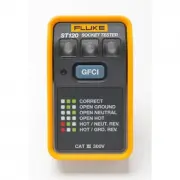
3. To determine the wiring, see the diagram on the Product shown for reference in Figure 1.
Figure 1.
GFCI /RCD Test
To test a GFCI or RCD:
1. Before you plug the Product into a GFCI or RCD socket, push the GFCI/RCD test button, if applicable,
to trip the GFCI or RCD socket. If the GFCI or RCD does not trip, the socket is faulty and should be
replaced.
2. After the GFCI/RCD trips, push the RESET button on the socket.
3. Plug in the Product and push the blue GFCI/RCD test button on the Product for a minimum of 6 sec-
onds. As you push the Product button, but before the GFCI/RCD trips, the LED to the left of the Product
button briefly turns on. Once the GFCI/RCD trips, all of the LEDs on the Product go out. If the
GFCI/RCD does not trip, or if any of the LEDs on the Product remain on, there is a problem with the
wiring of the socket, the socket itself, or the Product. Consult an electrician to determine the problem.
Beeper (ST120+ and ST240+)
The ST120+and ST240+ include a switchable beeper that emits a tone when voltage is present on the
Product and the beeper is switched on. To switch off the beeper, slide the beeper switch to the left position.
Contact Fluke
Fluke Corporation operates worldwide. For local contact information, go to our website:
www.fluke.com
To register your product, view, print, or download the latest manual or manual supplement, go to our
website.
+1-425-446-5500
LIMITED WARRANTY AND LIMITATION OF LIABILITY
This Fluke product will be free from defects in material and workmanship for two years from the date of
purchase. This warranty does not cover fuses, disposable batteries, or damage from accident, neglect,
misuse, alteration, contamination, or abnormal conditions of operation or handling. Resellers are not
authorized to extend any other warranty on Fluke’s behalf. To obtain service during the warranty period,
contact your nearest Fluke authorized service center to obtain return authorization information, then send
the product to that Service Center with a description of the problem.
THIS WARRANTY IS YOUR ONLY REMEDY. NO OTHER WARRANTIES, SUCH AS FITNESS FOR A PARTICULAR
PURPOSE, ARE EXPRESSED OR IMPLIED. FLUKE IS NOT LIABLE FOR ANY SPECIAL, INDIRECT, INCIDENTAL OR
CONSEQUENTIAL DAMAGES OR LOSSES, ARISING FROM ANY CAUSE OR THEORY. Since some states or countries
do not allow the exclusion or limitation of an implied warranty or of incidental or consequential damages, this limitation of
liability may not apply to you.
11/99
Symbol
Description
W
WARNING. RISK OF DANGER.
X
WARNING. HAZARDOUS VOLTAGE. Risk of electric shock.
»
Consult user documentation.
J
Earth
~
This product complies with the WEEE Directive marking requirements. The affixed
label indicates that you must not discard this electrical/electronic product in domestic
household waste. Product Category: With reference to the equipment types in the
WEEE Directive Annex I, this product is classed as category 9 "Monitoring and Control
Instrumentation" product. Do not dispose of this product as unsorted municipal waste.
RCD
Fluke Corporation
P.O. Box 9090
Everett, WA 98206-9090
U.S.A
PO Box 1186
5602 BD Eindhoven,
The Netherlands
ST120/ST120+/ST240/ST240+
Socket Tester
Instructions
"Loading the manual" means you need to wait until the file loads and becomes available for online reading. Some manuals are very large, and the time they take to appear depends on your internet speed.