Fluke FLUKE-971 - User Manual
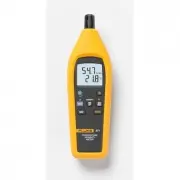
Fluke FLUKE-971 Measuring Instrument – User Manual, read for free online in PDF format. We hope this helps you resolve any issues you may have. If you have further questions, please contact us through the contact form.


Table of Contents:
- Page 3 – Introduction; Caution; Electrical and Safety Symbols
- Page 4 – Display
- Page 5 – Operation; Note; Dew Point and Wet Bulb Temperature
- Page 6 – Min Max Record; Saving and Recalling Measurements
- Page 7 – Automatic Power Off
- Page 8 – Maintenance; Battery Replacement; appears in the display, replace the batteries as
- Page 9 – Cleaning
- Page 10 – Specifications
- Page 12 – LIMITED WARRANTY AND LIMITATION OF LIABILITY
®
PN 2441047
September 2005 Rev.1, 5/06
© 2005-2006 Fluke Corporation, All rights reserved. Printed in Taiwan
All product names
are trademarks of their respective companies.
971
Temperature Humidity Meter
Users Manual
"Loading the manual" means you need to wait until the file loads and becomes available for online reading. Some manuals are very large, and the time they take to appear depends on your internet speed.
Summary
1 Introduction W Caution To extend sensor life, keep the sensor’s protective shutter closed whenever the meter is not in use. The Fluke Model 971 (hereafter referred to as “the Meter” is a battery powered meter that measures relative humidity and temperature. Through a few easy to use controls, the ...
971 Users Manual 2 Display 1 3 7 6 4 5 2 bdm002f.eps No. Symbol Meaning 1 B Low battery. 2 Wet bulb or dew point temperature displayed. 3 M MAX, MIN, AVG Min Max Record enabled. Maximum, minimum, or average reading displayed. 4 °F, °C Temperature measurement units. 5 % RH Relative humidity measureme...
Temperature Humidity Meter Operation 3 Operation Note When moving from one temperature/humidity extreme to another, allow time for the Meter to stabilize. After opening the sensor’s protective shutter, press O to turn on the Meter and start taking measurements. Temperature readings are displayed in ...