Page 3 - DellTM PowerEdgeTM 1950 Systems; Getting Started With
w w w . d e l l . c o m | s u p p o r t . d e l l . c o m Dell™ PowerEdge™ 1950 Systems Getting Started With Your System
Page 5 - System Features
Getting Started With Your System 3 System Features The major hardware and software features of your system includes: • One or Two Dual Core Intel ® Xeon ® Processor 5000 Sequence. • Support for symmetric multiprocessing (SMP), which is available on systems with two Intel Xeon microprocessors. SMP gr...
Page 6 - Supported Operating Systems; Other Information You May Need
4 Getting Started With Your System • Four USB 2.0-compliant connectors (two on the front and two on the back) capable of external support for a diskette drive, a CD-ROM drive, a keyboard, a mouse, or a USB flash drive. • Optional remote access controller (RAC) for remote systems management. • An int...
Page 7 - Obtaining Technical Assistance; Installation and Configuration; Unpacking the System
Getting Started With Your System 5 • Updates are sometimes included with the system to describe changes to the system, software, and/or documentation. NOTE: Always check for updates on support.dell.com and read the updates first because they often supersede information in other documents. • Release ...
Page 8 - Installing the Rail and System in a Rack
6 Getting Started With Your System Installing the Rail and System in a Rack Install the system in the rack once you have read the "Safety Instructions" located in the rack installation documentation for your system. See your rack installation documentation for instructions on installing your...
Page 9 - Connecting the Power
Getting Started With Your System 7 Connecting the Power Connect the system’s power cable(s) to the system. Plug the other end of the cable into a grounded electrical outlet or a separate power source such as an uninterrupted power supply (UPS) or a power distribution unit (PDU). Installing the Power...
Page 10 - Turning on the System
8 Getting Started With Your System Turning on the System Turn on the system and monitor (optional). Press the power button on the system and the monitor. The power indicators should light. Adjust the monitor's controls until the displayed image is satisfactory. Installing the Bezel Install the bezel...
Page 11 - Complete the 0perating System Setup; Technical Specifications
Getting Started With Your System 9 Complete the 0perating System Setup If you purchased a preinstalled operating system, see the operating system documentation that ships with your system. To install an operating system for the first time, see the Quick Installation Guide . Be sure the operating sys...
Page 15 - Systèmes DellTM PowerEdgeTM 1950; Guide de mise en route
w w w . d e l l . c o m | s u p p o r t . d e l l . c o m Systèmes Dell™ PowerEdge™ 1950 Guide de mise en route
Page 16 - Remarques, avis et précautions
Remarques, avis et précautions REMARQUE : une REMARQUE indique des informations importantes qui peuvent vous aider à mieux utiliser votre ordinateur. AVIS : un AVIS vous avertit d'un risque de dommage matériel ou de perte de données et vous indique comment éviter le problème. PRÉCAUTION : une PRÉCAU...
Page 17 - Caractéristiques du système
Guide de mise en route 15 Caractéristiques du système Les caractéristiques principales du système sont les suivantes : • Un ou deux processeurs double cœur Intel ® Xeon ® 5000. • Prise en charge du SMP (Symmetric Multiprocessing [multi-traitement symétrique]), disponible sur les systèmes dotés de de...
Page 18 - Systèmes d'exploitation pris en charge
16 Guide de mise en route • Logement PCI réservé pour un adaptateur de bus hôte SAS intégré ou une carte contrôleur RAID intégrée en option avec mémoire cache de 256 Mo et pile RAID. REMARQUE : le démarrage du système à partir d'un périphérique externe connecté à une carte SAS ou SCSI n'est pas pris...
Page 19 - Autres informations utiles; Obtention d'une assistance technique; Installation et configuration
Guide de mise en route 17 Autres informations utiles PRÉCAUTION : le Guide d'informations sur le produit contient d'importantes informations se rapportant à la sécurité et aux réglementations. Les informations sur la garantie se trouvent soit dans ce document, soit à part. • Le document Instructions...
Page 20 - Déballage du système
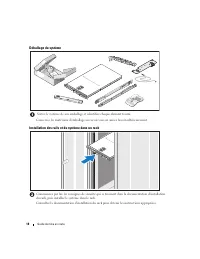
18 Guide de mise en route Déballage du système Sortez le système de son emballage et identifiez chaque élément fourni. Conservez les matériaux d'emballage au cas où vous en auriez besoin ultérieurement. Installation des rails et du système dans un rack Commencez par lire les consignes de sécurité qu...
Page 21 - Connexion du clavier, de la souris et du moniteur
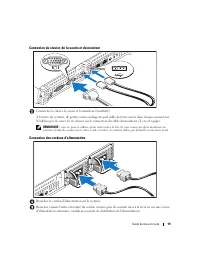
Guide de mise en route 19 Connexion du clavier, de la souris et du moniteur Connectez le clavier, la souris et le moniteur (facultatif). À l'arrière du système, de petites icônes indiquent quel câble doit être inséré dans chaque connecteur. N'oubliez pas de serrer les vis situées sur le connecteur d...
Page 22 - Mise sous tension du système
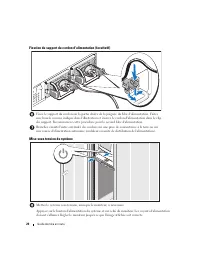
20 Guide de mise en route Fixation du support du cordon d'alimentation (facultatif) Fixez le support du cordon sur la partie droite de la poignée du bloc d'alimentation. Faites une boucle comme indiqué dans l'illustration et insérez le cordon d'alimentation dans le clip du support. Recommencez cette...
Page 23 - Installation du cadre; Finalisation de l'installation du système d'exploitation
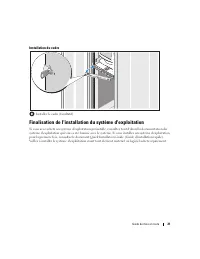
Guide de mise en route 21 Installation du cadre Installez le cadre (facultatif). Finalisation de l'installation du système d'exploitation Si vous avez acheté un système d'exploitation préinstallé, consultez tout d'abord la documentation du système d'exploitation qui vous a été fournie avec le systèm...
Page 24 - Spécifications techniques
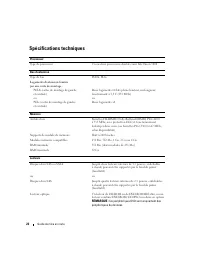
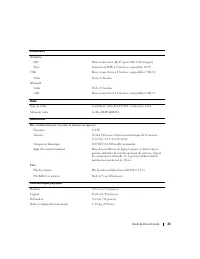
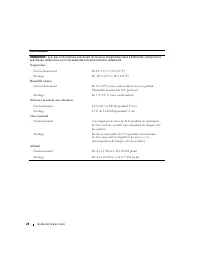
22 Guide de mise en route Spécifications techniques Processeur Type de processeur Un ou deux processeurs double cœur Intel Xeon 5000 Bus d'extension Type de bus PCI-X, PCIe Logements d'extension fournis par une carte de montage : PCI-X (cartes de montage de gauche et centrale) ouPCIe (cartes de mont...
Page 27 - Sistemas DellTM PowerEdgeTM 1950; Primeiros passos
w w w . d e l l . c o m | s u p p o r t . d e l l . c o m Sistemas Dell™ PowerEdge™ 1950 Primeiros passos com o sistema
Page 28 - Notas, avisos e cuidados
Notas, avisos e cuidados NOTA: As NOTAS fornecem informações importantes que o ajudam a utilizar melhor o computador. AVISO: As mensagens de AVISO informam sobre possíveis danos ao hardware ou perda de dados e indicam como evitar o problema. CUIDADO: As mensagens de CUIDADO indicam possíveis danos d...
Page 29 - Recursos do sistema
Primeiros passos com o sistema 27 Recursos do sistema Os principais recursos de hardware e software do sistema incluem: • Um ou dois processadores Intel ® Xeon ® Dual Core Série 5000. • Suporte para multiprocessamento simétrico (SMP), disponível nos sistemas com dois micro-processadores Intel Xeon. ...
Page 30 - Sistemas operacionais admitidos
28 Primeiros passos com o sistema • Slot PCI dedicado para um adaptador de barramento host SAS integrado ou uma placa controladora RAID integrada opcional, com 256 MB de memória cache e uma bateria RAID. NOTA: A inicialização do sistema não tem suporte de dispositivos externos conectados ao adaptado...
Page 31 - Outras informações úteis; Como obter assistência técnica; Instalação e configuração
Primeiros passos com o sistema 29 Outras informações úteis CUIDADO: O Guia de informações do produto fornece informações importantes sobre segurança e regulamen- tação. As informações sobre garantia podem estar incluídas neste documento ou serem fornecidas como documento separado. • O documento Rack...
Page 32 - Remoção do sistema da embalagem; Instalação do trilho e do sistema no rack
30 Primeiros passos com o sistema Remoção do sistema da embalagem Remova o sistema da embalagem e identifique cada item. Guarde todos os materiais de envio caso sejam necessários mais tarde. Instalação do trilho e do sistema no rack Instale o sistema no rack depois de ler as instruções de segurança ...
Page 33 - Conexão de teclado, mouse e monitor
Primeiros passos com o sistema 31 Conexão de teclado, mouse e monitor Conecte o teclado, o mouse e o monitor (opcional).Os conectores localizados na parte traseira do sistema possuem ícones indicando quais cabos devem ser ligados a cada conector. Certifique-se de apertar os parafusos (se houver) no ...
Page 34 - Como ligar o sistema
32 Primeiros passos com o sistema Instalação do suporte de retenção do cabo de alimentação (opcional) Conecte o suporte de retenção do cabo de alimentação na dobra direita da alça da fonte de alimentação. Dobre o cabo de alimentação do sistema em forma de laço conforme apresentado na ilustração e co...
Page 35 - Instalação do painel; Conclua a configuração do sistema operacional
Primeiros passos com o sistema 33 Instalação do painel Instale o painel frontal (opcional). Conclua a configuração do sistema operacional Caso tenha adquirido um sistema operacional pré-instalado, consulte a respectiva documentação fornecida com o sistema. Para instalar um sistema operacional pela p...
Page 36 - Especificações técnicas
34 Primeiros passos com o sistema Especificações técnicas Processador Tipo de processador Um ou dois processadores Intel Xeon Dual Core Série 5000 Barramento de expansão Tipo de barramento PCI-X, PCIe Slots de expansão via placa riser: Risers central e esquerda PCI-XouRisers central e esquerda PCIe ...
Page 39 - Sistemas DellTM PowerEdgeTM 1950; Procedimientos iniciales
w w w . d e l l . c o m | s u p p o r t . d e l l . c o m Sistemas Dell™ PowerEdge™ 1950 Procedimientos iniciales con el sistema
Page 40 - Notas, avisos y precauciones
Notas, avisos y precauciones NOTA: una NOTA proporciona información importante que le ayudará a utilizar mejor el ordenador. AVISO: un AVISO indica la posibilidad de daños en el hardware o la pérdida de datos, e informa de cómo evitar el problema. PRECAUCIÓN: un mensaje de PRECAUCIÓN indica el riesg...
Page 41 - Características del sistema
Procedimientos iniciales con el sistema 39 Características del sistema Éstas son las características principales de hardware y software del sistema: • Uno o dos procesadores Intel ® Xeon ® de doble núcleo 5000 Sequence. • Compatibilidad con SMP (multiprocesamiento simétrico), que está disponible en ...
Page 42 - Sistemas operativos admitidos
40 Procedimientos iniciales con el sistema • Una ranura PCI dedicada para un adaptador de bus de host SAS integrado o una tarjeta controladora RAID integrada opcional con 256 MB de memoria caché y una batería RAID. NOTA: no es posible iniciar el sistema desde un dispositivo externo conectado a un ad...
Page 43 - Otra información necesaria; Obtención de asistencia técnica; Instalación y configuración
Procedimientos iniciales con el sistema 41 Otra información necesaria PRECAUCIÓN: en la Guía de información del producto se proporciona información importante sobre seguridad y normativas. La información de la garantía puede estar incluida en este documento o constar en un documento aparte. • En los...
Page 44 - Desembalaje del sistema; Instalación del riel y del sistema en un rack
42 Procedimientos iniciales con el sistema Desembalaje del sistema Desembale el sistema e identifique cada elemento. Guarde el material de embalaje por si lo necesitara más adelante. Instalación del riel y del sistema en un rack Instale el sistema en el rack una vez que haya leído las “Instrucciones...
Page 45 - Conexión del teclado, el ratón y el monitor
Procedimientos iniciales con el sistema 43 Conexión del teclado, el ratón y el monitor Conecte el teclado, el ratón y el monitor (opcional).Los conectores de la parte posterior del sistema tienen iconos que indican qué cable enchufar a cada conector. Asegúrese de apretar los tornillos (si los hubier...
Page 46 - Encendido del sistema
44 Procedimientos iniciales con el sistema Instalación del soporte de retención del cable de alimentación (opcional) Fije el soporte de retención del cable de alimentación en el codo derecho del asa de la fuente de alimentación. Doble el cable de alimentación del sistema en forma de bucle, tal como ...
Page 47 - Instalación del embellecedor; Configuración del sistema operativo
Procedimientos iniciales con el sistema 45 Instalación del embellecedor Instale el embellecedor (opcional). Configuración del sistema operativo Si ha adquirido un sistema operativo preinstalado, consulte la documentación del sistema operativo que se suministra con el sistema. Para instalar un sistem...
Page 48 - Especificaciones técnicas
46 Procedimientos iniciales con el sistema Especificaciones técnicas Procesador Tipo de procesador Uno o dos procesadores Intel Xeon de doble núcleo 5000 Sequence Bus de expansión Tipo de bus PCI-X, PCIe Ranuras de expansión mediante una tarjeta vertical: Tarjetas verticales PCI-X central e izquierd...









 Dell PowerEdge 1750 Troubleshooting Guide
 Dell PowerEdge 1850 User Manual
 Dell POWEREDGE 1855 User Manual
 Dell PowerEdge 1900 Installation Manual
 Dell PowerEdge 2420 User Manual
 Dell PowerEdge 2450 User Manual
 Dell PowerEdge 2500 User Manual
 Dell PowerEdge 2550 User Manual
 Dell PowerEdge 2600 User Manual