Dell B3465DNF - User Manual
Dell B3465DNF – User Manual, read for free online in PDF format. We hope this helps you resolve any issues you may have. If you have further questions, please contact us through the contact form.

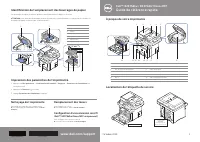
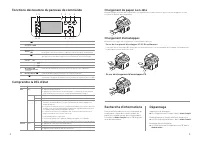


Table of Contents:
- Page 2 – Loading Letterhead; When Loading C5; Finding Information
- Page 3 – Guide de référence rapide; Identification de l'emplacement des bourrages de papier; Nettoyage de l’imprimante; Remplacement des toners; Configuration d'une connexion sans fil
- Page 4 – Chargement de papier à en-tête; Chargement d’enveloppes; En cas de chargement d'enveloppes C5; Recherche d'informations
- Page 5 – Guía de referencia rápida; Identificación de la ubicación de los atascos de papel; Limpieza de la impresora; Cambio de tóner; Configuración de la conexión inalámbrica
- Page 6 – Carga de membrete; Carga de sobres; Al cargar sobres C5; Búsqueda de información; Solución de problemas
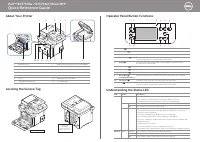
About Your Printer
Locating the Service Tag
1
2
3
4
5
10
11
12
13
14
9
8
7
6
1
Operator Panel
3
Document Width Guide
5
Document Output Tray
7
Control Board Cover
9
Output Tray
11
Tray 1
13
Paper Output Extension
2
Duplex Automatic Document Feeder (DADF)
4
Document Input Tray
6
Document Glass
8
USB Memory Port
10
Front Cover
12
Multipurpose Feeder (MPF)
14
Toner Cartridge
Service Tag XXXXXXX
Service Tag
XXXXXXX
000 000 000 00
Express Service Code
Dell™ B2375dfw / B2375dnf Mono MFP
Quick Reference Guide
October 2013
1
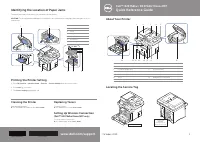
Identifying the Location of Paper Jams
The paper jams may occur at any of the locations shown below:
Printing the Printer Setting
CAUTION
: To avoid permanent damage to your printer, do not attempt to clear paper jams using any tools or
instruments.
1 Press
My Settings
→
Machine Setup
→
Reports
→
Printer Settings
from the home screen.
2 Press
Start
( ) on screen.
3 The
Printer Settings
page prints out.
1
Scanner Unit
2
DADF Cover
3
Levers
4
Fusing Unit
5
Rear Cover
6 Front Cover
7
Multipurpose Feeder (MPF)
7
6
5
4
3
1
2
Cleaning the Printer
Vertical blanks in prints
➥
See "Cleaning Your Printer" in the
User's Guide
Replacing Toners
To replace toners
➥
See "Maintenence" in the
User's Guide
Setting Up Wireless Connection
(Dell™ B2375dfw Mono MFP only)
To set up wireless connection
➥
See "Networking" in the
User's Guide
www.dell.com/support
HMCWMA00
JC68-03031A00
"Loading the manual" means you need to wait until the file loads and becomes available for online reading. Some manuals are very large, and the time they take to appear depends on your internet speed.
Was this manual helpful?
About this manual
- Brand
- Dell
- Model
- B3465DNF
- Document type
- User Manual
- Language(s)
- English, Spanish, French
- Pages
- 6
- File size
- 5.8 MB
- Format
Other Manuals for Dell B3465DNF
Summary
3 2 Operator Panel Button Functions Understanding the Status LED 1 2 4 3 5 6 11 10 9 8 7 1 Home Go to home screen. 2 Log In/Out You can log in or log out. 3 Status LED Status LED indicates the status of your machine. 4 Redial/Pause Redials the recently sent fax number or received caller ID in ready ...
À propos de votre imprimante Localisation de l'étiquette de service 1 2 3 4 5 10 11 12 13 14 9 8 7 6 1 Panneau de commande 3 Guides de largeur de document 5 Bac de sortie des documents 7 Tableau de commande capot 9 Bac de sortie 11 Bac 1 13 Extension de sortie papier 2 DADF (chargeur automatique de ...
3 2 Fonctions des boutons du panneau de commande Comprendre la DEL d'état 1 2 4 3 5 6 11 10 9 8 7 1 Accueil Aller à l'écran d'accueil. 2 Vous pouvez vous connecter ou vous déconnecter. 3 DEL d'état La DEL d'état indique l'état de votre machine. 4 Recompose le dernier numéro de fax envoyé ou l'ID de ...