Dell B2375dfw - User Manual
Dell B2375dfw – User Manual, read for free online in PDF format. We hope this helps you resolve any issues you may have. If you have further questions, please contact us through the contact form.

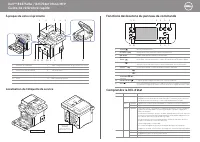
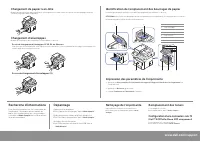
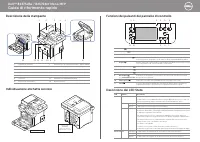
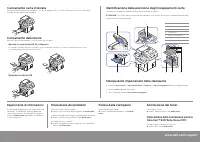

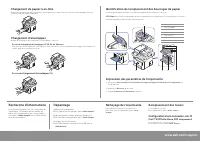


Table of Contents:
- Page 2 – When Loading C5
- Page 3 – Guide de référence rapide; À propos de votre imprimante; Fonctions des boutons du panneau de commande
- Page 4 – Chargement de papier à en-tête; Chargement d’enveloppes; En cas de chargement d'enveloppes C5; Recherche d'informations; Identification de l'emplacement des bourrages de papier; Nettoyage de l’imprimante; Remplacement des toners; Configuration d'une connexion sans fil
- Page 5 – Guida di riferimento rapido; Descrizione della stampante
- Page 6 – Quando si carica il C5; Impostazione della connessione wireless
- Page 7 – Kurzanleitung; Ihr Drucker
- Page 9 – Guía de referencia rápida; Acerca de la impresora; Funciones de los botones del panel de operación
- Page 10 – Al cargar sobres C5; Búsqueda de información; Solución de problemas; Identificación de la ubicación de los atascos de papel; Limpieza de la impresora; Cambio de tóner; Configuración de la conexión inalámbrica
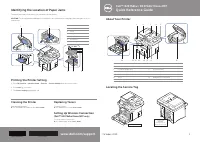
Dell™ B2375dfw / B2375dnf Mono MFP
Quick Reference Guide
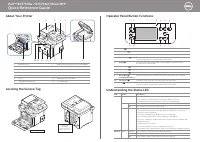
About Your Printer
Locating the Service Tag
Operator Panel Button Functions
Understanding the Status LED
1
2
3
4
5
1 2
4
3
5
6
11 10
9
8 7
10
11
12
13
14
9
8
7
6
1
Operator Panel
3
Document Width Guide
5
Document Output Tray
7
Control Board Cover
9
Output Tray
11
Tray 1
13
Paper Output Extension
2
Duplex Automatic Document Feeder (DADF)
4
Document Input Tray
6
Document Glass
8
USB Memory Port
10
Front Cover
12
Multipurpose Feeder (MPF)
14
Toner Cartridge
1
Home
Go to home screen.
2
Log In/Out
You can log in or log out.
3
Status LED
Status LED indicates the status of your machine.
4
Redial/Pause
Redials the recently sent fax number or received caller ID in ready mode,
or inserts a pause(-) into a fax number in edit mode.
5
Copy
Start copy job using copy default setting regardless of which screen
the user is in if it is selected.
6
Power Saver
You can enter or exit Power Save mode.
7
Speed Dial1
Fax image to destination from stored speed dial1.
8
Speed Dial2
Fax image to destination from stored speed dial2.
9
Wi-Fi/WPS
Configures the wireless network connection easily without a computer.
(
Dell B2375dfw Mono MFP
only)
10
Job Status
Job status shows the jobs currently running and in queue.
11
Info
Gives detailed information about product feature guide machine’s info.
reports, troubleshooting guide, and quick reference guide.
LED
Status
Wireless
Status
Off
Green
Orange
Blue
Blinking
On
Blinking
Blinking
On
Off
Description
• The machine is off-line.
• The machine is in power save mode. When data is received,
or any button is pressed, it switches to on-line automatically.
The machine is warming up or ready to receive the data.
The machine is on-line and can be used.
• A minor error has occurred and the machine is waiting for the error to be
cleared. Check the display message. When the problem is cleared, the
machine resumes operation.
• The toner cartridge is low. Order a new toner cartridge.
You can temporarily improve print quality by redistribution.
• The toner cartridge is totally empty. Remove the old toner cartridge and
install a new one.
• A paper jam has occurred.
• There is no paper in the tray. Load paper in the tray.
• The machine has stopped due to a major error. Check the display message.
• The machine is connecting to a wireless network.
• The machine is connected to a wireless network.
• The machine is disconnected from a wireless network.
Service Tag XXXXXXX
Service Tag
XXXXXXX
000 000 000 00
Express Service Code
"Loading the manual" means you need to wait until the file loads and becomes available for online reading. Some manuals are very large, and the time they take to appear depends on your internet speed.
Was this manual helpful?
About this manual
- Brand
- Dell
- Model
- B2375dfw
- Document type
- User Manual
- Language(s)
- English, Spanish, French, Italian
- Pages
- 10
- File size
- 9.6 MB
- Format
Other Manuals for Dell B2375dfw
Summary
Loading Letterhead Identifying the Location of Paper Jams Load the letterhead in the printer with the print-side facing up. Ensure that the title on the letterhead enters the printer first. To prevent DL and Monarch from getting wrinkled, they are recommended to be loaded with the print-side facing ...
Dell™ B2375dfw / B2375dnf Mono MFP Guide de référence rapide À propos de votre imprimante Localisation de l'étiquette de service Fonctions des boutons du panneau de commande Comprendre la DEL d'état 1 2 3 4 5 1 2 4 3 5 6 11 10 9 8 7 10 11 12 13 14 9 8 7 6 Service Tag XXXXXXX Service Tag XXXXXXX 000 ...
www.dell.com/support Chargement de papier à en-tête Chargez le papier à en-tête dans l'imprimante, côté imprimé vers le haut. Veillez à ce que le côté titre du papier à en-tête soit inséré en premier dans l'imprimante. Pour éviter que les enveloppes DL ou Monarch ne soient chiffonnées, il est recomm...
Ask a question
Related manuals
Popular Dell Other


More Dell Other models
- Dell B1160W Manual
- Dell B1165nfw User Manual
- Dell B1165nfw Multifunction Mono Laser Printer User Manual
 Dell B1260dn User Manual
 Dell B1265dfw User Manual
 Dell B2360D User Manual
 Dell B2375dnf User Manual
 Dell B3460dn Installation Manual
 Dell B3465DNF User Manual
 Dell B5460DN Manual
 Dell B5465dnf Troubleshooting Guide
 Dell BELL81818BLK Manual