Page 3 - ภาษาไทย; Contents
English . . . . . . . . . . . . . . . . . . . . . . . . . . . . . . . . .1Español . . . . . . . . . . . . . . . . . . . . . . . . . . . . . . . .21Français . . . . . . . . . . . . . . . . . . . . . . . . . . . . . . .31 香港繁體 . . . . . . . . . . . . . . . . . . . . . . . . . . . . . . .39 Indonesia ....
Page 5 - Your phone at a glance
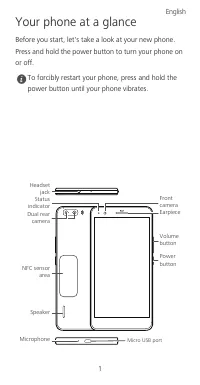
1 Your phone at a glance Before you start, let's take a look at your new phone. Press and hold the power button to turn your phone on or off. To forcibly restart your phone, press and hold the power button until your phone vibrates. Headset jack Power button Volumebutton Front cameraEarpiece Micro U...
Page 6 - Getting started
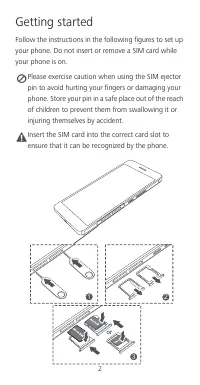
2 Getting started Follow the instructions in the following figures to set up your phone. Do not insert or remove a SIM card while your phone is on. Please exercise caution when using the SIM ejector pin to avoid hurting your fingers or damaging your phone. Store your pin in a safe place out of the r...
Page 7 - For more information; Wa nt to obtain the full us er guide?
3 For more information Wa nt to obtain the full us er guide? Download the User Guide from http://consumer.huawei.com/en. All pictures and illustrations in this guide, including but not limited to the phone color, size, and display content, are for your reference only. The actual product may vary. No...
Page 8 - Safety information; Electronic device
4 Safety information This section contains important information about the operation of your device. It also contains information about how to use the device safely. Read this information carefully before using your device. Electronic device Do not use your device if using the device is prohibited. ...
Page 10 - Operating envir onment
6 may hurt you because of the strong force when the air bag inflates. • Do not use your device while flying in an aircraft or immediately before boarding. Using wireless devices in an aircraft may disrupt wireless networks, present a hazard to aircraft operation, or be illegal. Operating envir onmen...
Page 11 - Ac cesso ries
7 • Do not use your device's camera flash directly in the eyes of people or pets. Otherwise temporary loss of vision or damage to the eyes may occur. • Do not touch the device's antenna. Otherwise, communication quality may be reduced. • Do not allow children or pets to bite or suck the device or ac...
Page 12 - Charger safety; Ba ttery s afety
8 Charger safety • For pluggable devices, the socket-outlet shall be installed near the devices and shall be easily accessible. • Unplug the charger from electrical outlets and the device when not in use. • Do not drop or cause an impact to the charger. • If the power cable is damaged (for example, ...
Page 14 - Clea ning and maintena nc e
10 • If the device standby time shortens significantly, replace the battery. • The device has a built-in, non-removable battery. Do not attempt to remove the battery, otherwise the device may be damaged. To replace the battery, take the device to an authorized service center. Clea ning and maintena ...
Page 17 - Statement
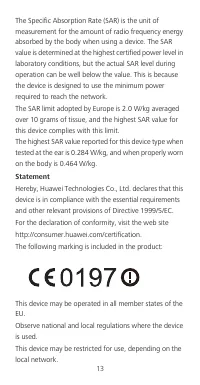
13 The Specific Absorption Rate (SAR) is the unit of measurement for the amount of radio frequency energy absorbed by the body when using a device. The SAR value is determined at the highest certified power level in laboratory conditions, but the actual SAR level during operation can be well below t...
Page 18 - Thailand SAR Statement
14 Restrictions in the 2.4 GHz band: Norway : This subsection does not apply for the geographical area within a radius of 20 km from the centre of Ny-Ålesund. Restrictions in the 5 GHz band: WLAN function of this device is restricted only to indoor use when operating in the 5150 to 5350 MHz frequenc...
Page 21 - Legal Notice; Trademarks and Permissions
17 Legal Notice Copyright © Huawei Technologies Co ., Ltd. 2015. All rights r eser ved. No part of this manual may be reproduced or transmitted in any form or by any means without prior written consent of Huawei Technologies Co., Ltd. and its affiliates ("Huawei"). The product described in t...
Page 23 - DI SCLAIMER
19 interruption or termination of third-party contents or services. Huawei shall not be responsible for the legality, quality, or any other aspects of any software installed on this product, or for any uploaded or downloaded third-party works in any form, including but not limited to texts, images, ...
Page 25 - Descripción rápida del teléfono
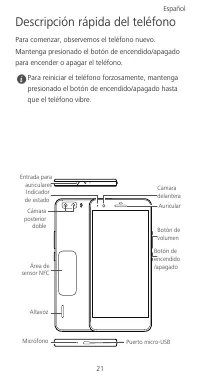
21 Descripción rápida del teléfono Para comenzar, observemos el teléfono nuevo. Mantenga presionado el botón de encendido/apagado para encender o apagar el teléfono. Para reiniciar el teléfono forzosamente, mantenga presionado el botón de encendido/apagado hasta que el teléfono vibre. Entrada para a...
Page 26 - Pasos iniciales
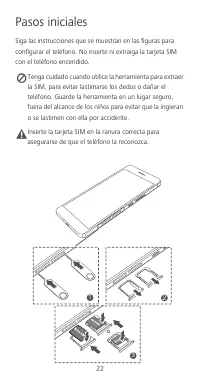
22 Pasos iniciales Siga las instrucciones que se muestran en las figuras para configurar el teléfono. No inserte ni extraiga la tarjeta SIM con el teléfono encendido. Tenga cuidado cuando utilice la herramienta para extraer la SIM, para evitar lastimarse los dedos o dañar el teléfono. Guarde la herr...
Page 27 - Información de seguridad; Interfer enc ias con dispositivos médic os
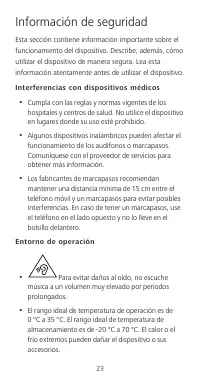
23 Información de seguridad Esta sección contiene información importante sobre el funcionamiento del dispositivo. Describe, además, cómo utilizar el dispositivo de manera segura. Lea esta información atentamente antes de utilizar el dispositivo. Interfer enc ias con dispositivos médic os • Cumpla co...
Page 29 - Reducción de sustancias peligros as
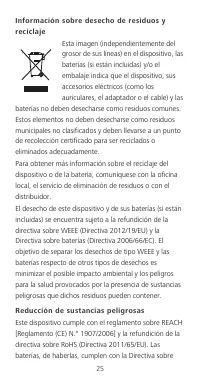
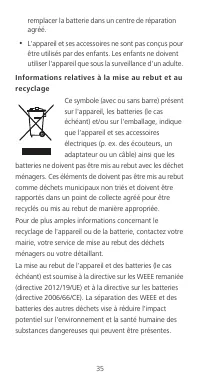
25 Infor mac ió n sobr e desecho de residuos y rec icla je Esta imagen (independientemente del grosor de sus líneas) en el dispositivo, las baterías (si están incluidas) y/o el embalaje indica que el dispositivo, sus accesorios eléctricos (como los auriculares, el adaptador o el cable) y las batería...
Page 30 - Utilización del teléfono cerca del cuerpo
26 baterías (Directiva 2006/66/EC). Para obtener información actualizada sobre el cumplimiento con las directivas sobre REACH y RoHS, visite el sitio web http://consumer.huawei.com/certification. Cumplimiento de las normas de la Unión Euro pea Utilización del teléfono cerca del cuerpo El dispositivo...
Page 31 - Declaración
27 un dispositivo. El valor SAR se determina al nivel certificado más alto de potencia en condiciones de laboratorio, pero el nivel SAR real del dispositivo en funcionamiento puede estar muy por debajo del valor. Esto se debe a que el dispositivo está diseñado para utilizar la potencia mínima requer...
Page 32 - Restricciones de la banda de 5 GHz
28 El uso de este dispositivo puede estar restringido dependiendo de la red local. Restricciones de la banda de 2.4 GHz Noruega : Este inciso no es aplicable a las áreas geográficas ubicadas dentro de un radio de 20 kilómetros del centro de Ny-Ålesund. Restricciones de la banda de 5 GHz La función W...
Page 34 - Aviso legal; Política de privac idad
30 Aviso legal Copyright © Huawei Technologies Co ., Ltd. 2015. Todos los derechos r eservados. EL PRESENTE DOCUMENTO TIENE COMO ÚNICA FINALIDAD LA DE PROVEER INFORMACIÓN Y NO CONSTITUYE GARANTÍA DE NINGÚN TIPO. Política de privac idad Para comprender cómo protegemos su información personal, consult...
Page 35 - Votre téléphone en un clin d’œil
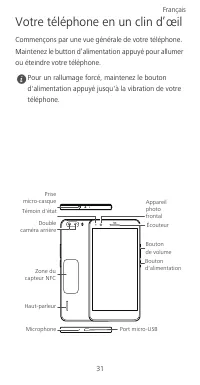
31 Votre téléphone en un clin d’œil Commençons par une vue générale de votre téléphone. Maintenez le button d’alimentation appuyé pour allumer ou éteindre votre téléphone. Pour un rallumage forcé, maintenez le bouton d'alimentation appuyé jusqu'à la vibration de votre téléphone. Prise micro-casque B...
Page 36 - Commencer
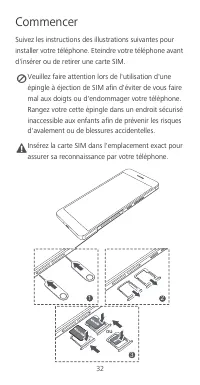
32 Commencer Suivez les instructions des illustrations suivantes pour installer votre téléphone. Eteindre votre téléphone avant d'insérer ou de retirer une carte SIM. Veuillez faire attention lors de l'utilisation d'une épingle à éjection de SIM afin d'éviter de vous faire mal aux doigts ou d'endomm...
Page 41 - Déclaration
37 Le DAS (débit d'absorption spécifique) est l'unité de mesure de la quantité d'énergie radiofréquence absorbée par le corps humain lors de l'utilisation d'un appareil. La valeur DAS correspond au niveau maximal d'émissions agréé testé en laboratoire, mais le niveau DAS réel en cours de fonctionnem...
Page 42 - Mention légale; Politique de co nfidentialité
38 Respectez les règlementations locales et nationales en vigueur lors de l'utilisation de l'appareil. L'utilisation de cet appareil peut être restreinte en fonction du réseau local. Restrictions au niveau de la bande 2,4 GHz : Norvège : Ce sous-chapitre ne s'applique pas à la zone géographique de 2...
Page 43 - 手機概覽
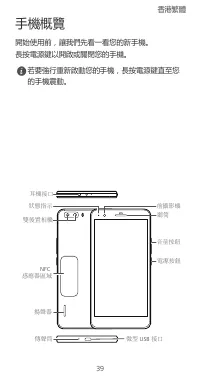
39 手機概覽 開始使用前,讓我們先看一看您的新手機。長按電源鍵以開啟或關閉您的手機。 若要強行重新啟動您的手機,長按電源鍵直至您的手機震動。 耳機接口 電源按鈕 音量按鈕 前攝影機 聽筒 微型 USB 接口 雙後置相機 揚聲器 NFC 感應器區域 傳聲筒 狀態指示 香港繁體
Page 44 - 開始使用
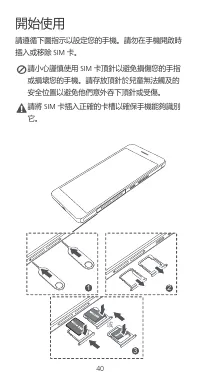
40 開始使用 請遵循下圖指示以設定您的手機。 請勿在手機開啟時 插入或移除 SIM 卡。 請小心謹慎使用 SIM 卡頂針以避免損傷您的手指 或損壞您的手機。 請存放頂針於兒童無法觸及的 安全位置以避免他們意外吞下頂針或受傷。 Caution 請將 SIM 卡插入正確的卡槽以確保手機能夠識別 它。 1 2 3 或
Page 45 - 安全資訊; 醫療設備的干擾
41 安全資訊 本部分包含關於裝置的重要資訊。亦包括如何安全使用裝置的資訊。使用裝置前請仔細閱讀此資訊。 醫療設備的干擾 • 請遵循由醫院及健康護理中心訂立的規則。請勿在禁止使用裝置的地方使用裝置。 • 某些無線裝置可能影響助聽器或起搏器的效能。向您的服務供應商查詢更多資訊。 • 起搏器製造商建議在手機與起搏器之間保持最少 15 公分的距離,以免對起搏器產生干擾。如您使 用起搏器,請於起搏器的反側使用手機,並切勿 將手機置於胸前口袋內。 操作環境 • 要防止有可能的聽覺受損,請勿長時間 收聽高度音量。 • 理想操作溫度為 0°C 到 35°C 。理想保存溫度為 -20°C 到 70°C 。極度...
Page 48 - 法律通知
44 產品內包含以下標示: 本裝置可在歐盟的所有成員國操作。遵守使用裝置的國際及當地法則。裝置可能會根據當地網絡被限制使用。 2.4 GHz 頻段限制: 挪威 :此分款不適用於距離新奧爾松中心半徑小於 20 公里的地理區域。 5 GHz 頻段限制: 本裝置在 5150 到 5350 MHz 頻率範圍內操作,其 WLAN 功能只可於室內使用。 法律通知 版權所有 © 華為技術有限公司 2015 。保留一切權 利。 本文件用途只提供資訊,並不構成任何形式的保證。 私隱政策 如要深入了解我們如何保障您的個人資料,請前往 http://consumer.huawei.com/privacy-polic...
Page 49 - Sekilas tentang ponsel Anda
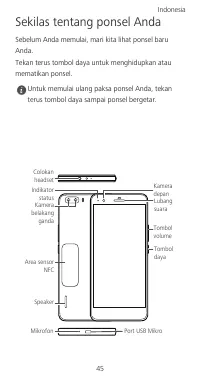
45 Sekilas tentang ponsel Anda Sebelum Anda memulai, mari kita lihat ponsel baru Anda. Tekan terus tombol daya untuk menghidupkan atau mematikan ponsel. Untuk memulai ulang paksa ponsel Anda, tekan terus tombol daya sampai ponsel bergetar. Colokan headset Tombol daya Tombol volume Kamera depan Luban...
Page 50 - Cara memulai
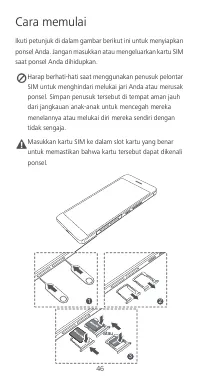
46 Cara memulai Ikuti petunjuk di dalam gambar berikut ini untuk menyiapkan ponsel Anda. Jangan masukkan atau mengeluarkan kartu SIM saat ponsel Anda dihidupkan. Harap berhati-hati saat menggunakan penusuk pelontar SIM untuk menghindari melukai jari Anda atau merusak ponsel. Simpan penusuk tersebut ...
Page 51 - Informasi keselamatan; Ganggua n de ngan pera latan medis
47 Informasi keselamatan Bagian ini memuat informasi penting tentang penggunaan perangkat ini. Bagian ini juga berisi informasi tentang cara menggunakan perangkat dengan aman. Bacalah informasi ini dengan saksama sebelum menggunakan perangkat Anda. Ganggua n de ngan pera latan medis • Patuhi peratur...
Page 53 - Pengura nga n za t kimia ber bahay a
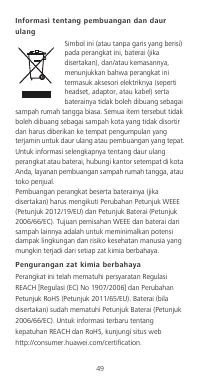
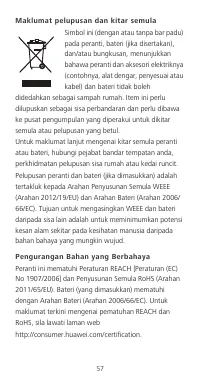
49 Infor masi tentang pembuangan dan daur ula ng Simbol ini (atau tanpa garis yang berisi) pada perangkat ini, baterai (jika disertakan), dan/atau kemasannya, menunjukkan bahwa perangkat ini termasuk aksesori elektriknya (seperti headset, adaptor, atau kabel) serta baterainya tidak boleh dibuang seb...
Page 55 - Pembatasan dalam 5 GHz band:
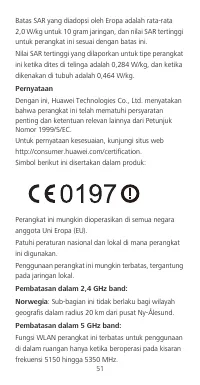
51 Batas SAR yang diadopsi oleh Eropa adalah rata-rata 2,0 W/kg untuk 10 gram jaringan, dan nilai SAR tertinggi untuk perangkat ini sesuai dengan batas ini. Nilai SAR tertinggi yang dilaporkan untuk tipe perangkat ini ketika dites di telinga adalah 0,284 W/kg, dan ketika dikenakan di tubuh adalah 0,...
Page 56 - Pemberitahuan Hukum; Kebija ka n Pr iva si
52 Pemberitahuan Hukum Hak Cipta © Hua wei Tec hnolo gies Co ., Ltd. 2015. Hak cipta dilindungi undang-u ndang. DOKUMEN INI HANYA UNTUK TUJUAN INFORMASI SEMATA, DAN TIDAK MEMBERIKAN JAMINAN DALAM BENTUK APA PUN. Kebija ka n Pr iva si Untuk lebih memahami bagaimana kami melindungi informasi pribadi A...
Page 57 - Telefon anda sekilas pandang
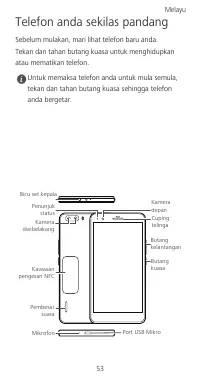
53 Telefon anda sekilas pandang Sebelum mulakan, mari lihat telefon baru anda. Tekan dan tahan butang kuasa untuk menghidupkan atau mematikan telefon. Untuk memaksa telefon anda untuk mula semula, tekan dan tahan butang kuasa sehingga telefon anda bergetar. Bicu set kepala Butang kuasa Butang kelant...
Page 58 - Bermula
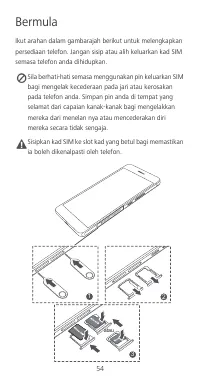
54 Bermula Ikut arahan dalam gambarajah berikut untuk melengkapkan persediaan telefon. Jangan sisip atau alih keluarkan kad SIM semasa telefon anda dihidupkan. Sila berhati-hati semasa menggunakan pin keluarkan SIM bagi mengelak kecederaan pada jari atau kerosakan pada telefon anda. Simpan pin anda ...
Page 59 - Maklumat keselamatan; Gangguan de ngan peralatan perubata n
55 Maklumat keselamatan Bahagian ini mengandungi maklumat penting mengenai operasi peranti anda. Ia juga mengandungi maklumat mengenai bagaimana untuk menggunakan peranti dengan selamat. Baca maklumat ini dengan teliti sebelum menggunakan peranti anda. Gangguan de ngan peralatan perubata n • Ikuti p...
Page 63 - Kenyataan; Norway
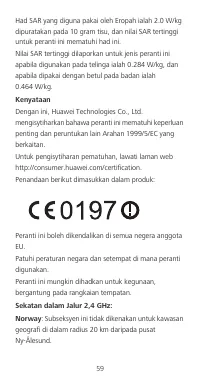
59 Had SAR yang diguna pakai oleh Eropah ialah 2.0 W/kg dipuratakan pada 10 gram tisu, dan nilai SAR tertinggi untuk peranti ini mematuhi had ini. Nilai SAR tertinggi dilaporkan untuk jenis peranti ini apabila digunakan pada telinga ialah 0.284 W/kg, dan apabila dipakai dengan betul pada badan ialah...
Page 64 - Sekatan dalam Jalur 5 GHz:; Notis Perundangan; Da sar Privasi
60 Sekatan dalam Jalur 5 GHz: Fungsi WLAN peranti ini dihadkan kepada penggunaan dalam rumah sahaja apabila beroperasi dalam julat frekuensi 5150 to 5350 MHz. Notis Perundangan Hak Cipta © Hua wei Tec hnolo gies Co ., Ltd. 2015. Hak cipta terpelihara DOKUMEN INI ADALAH UNTUK TUJUAN MAKLUMAT SAHAJA, ...
Page 65 - Início
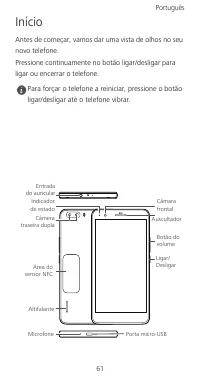
61 Início Antes de começar, vamos dar uma vista de olhos no seu novo telefone. Pressione continuamente no botão ligar/desligar para ligar ou encerrar o telefone. Para forçar o telefone a reiniciar, pressione o botão ligar/desligar até o telefone vibrar. Entrada do auricular Ligar/Desligar Botão do v...
Page 66 - Iniciação
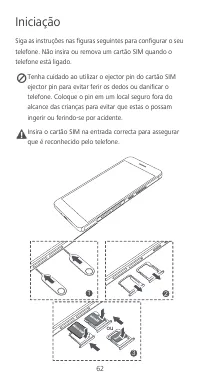
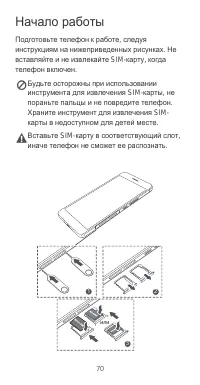
62 Iniciação Siga as instruções nas figuras seguintes para configurar o seu telefone. Não insira ou remova um cartão SIM quando o telefone está ligado. Tenha cuidado ao utilizar o ejector pin do cartão SIM ejector pin para evitar ferir os dedos ou danificar o telefone. Coloque o pin em um local segu...
Page 67 - Informações de segurança; Interfer ênc ia c om equipamentos médic os
63 Informações de segurança Esta secção contém informações importantes relacionadas com o funcionamento do dispositivo. Contém também informações sobre como utilizar o dispositivo de forma segura. Leia estas informações atentamente antes de utilizar o dispositivo. Interfer ênc ia c om equipamentos m...
Page 71 - Declaração
67 dispositivo. O valor de SAR é determinado ao nível mais elevado de potência certificada em condições de laboratório, embora o nível de SAR real em funcionamento possa estar muito abaixo desse valor. Isto deve-se ao facto de o dispositivo ser concebido para utilizar a potência mínima necessária pa...
Page 72 - Noruega; Restrições na banda de 5 GHz:; Política de privac idade
68 A utilização deste dispositivo pode estar restrita, consoante a rede local. Restrições na banda de 2,4 GHz: Noruega : Esta subsecção não se aplica à área geográfica num raio de 20 km desde o centro de Ny-Ålesund. Restrições na banda de 5 GHz: A função WLAN deste dispositivo está apenas restrita à...
Page 75 - Медицинское
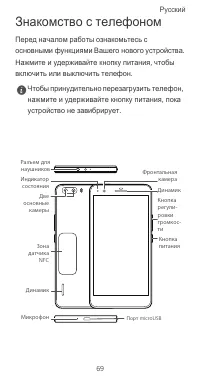
71 Меры предосторожности В данном разделе приведена важная информация по работе и безопасной эксплуатации вашего устройства . Внимательно прочтите данный раздел перед началом работы . Медицинское оборудование • Соблюдайте правила , принятые в больницах и медицинских учреждениях . Не используйте устр...
Page 80 - Декларация
76 SAR определяется в лабораторных условиях в режиме максимальной сертифицированной мощности передатчика . Фактическое значение уровня SAR для работающего устройства может оказаться значительно ниже . Это обусловлено тем , что конструкция устройства позволяет использовать минимальную мощность , дост...
Page 81 - Безопасность
77 Данное устройство может использоваться во всех странах ЕС . При использовании устройства соблюдайте национальные и региональные законы . Использование данного устройства может быть ограничено ( зависит от местной сети ). Ограничения в диапазоне 2,4 ГГц : Норвегия : Данный подраздел не применяется...
Page 84 - Уведомления; Все
80 Уведомления Copyright © Huawei Technologi es Co. , Lt d. 2015. Все права защищены . ДАННЫЙ ДОКУМЕНТ ПРЕДОСТАВЛЯЕТСЯ ТОЛЬКО В ИНФОРМАЦИОННЫХ ЦЕЛЯХ БЕЗ КАКИХ - ЛИБО ЯВНЫХ ИЛИ НЕЯВНЫХ ГАРАНТИЙ . Политика конфиденциальности Меры , принимаемые компанией Huawei для защиты Вашей личной информации , опис...
Page 90 - Thông tin an toàn; ườ
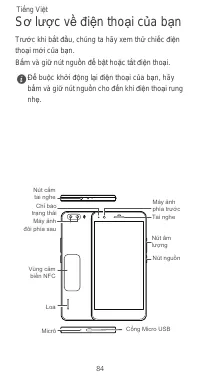
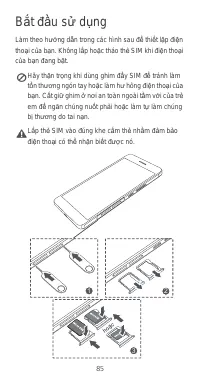
86 Thông tin an toàn M ụ c này ch ứ a thông tin quan tr ọ ng v ề vi ệ c v ậ n hành thi ế t b ị c ủ a b ạ n. Nó c ũ ng ch ứ a thông tin v ề cách s ử d ụ ng thi ế t b ị m ộ t cách an toàn. Hãy đọ c k ỹ thông tin này tr ướ c khi s ử d ụ ng thi ế t b ị c ủ a b ạ n. Gây nhi ễ u t hi ế t b ị y t ế • Tuân ...
Page 92 - độ
88 Thông ti n v ề vi ệ c t h ả i b ỏ và tái ch ế Bi ể u t ượ ng này (có ho ặ c không có thanh li ề n) trên thi ế t b ị , trên pin (n ế u có), và/ho ặ c trên bao bì, bi ể u th ị r ằ ng thi ế t b ị và các ph ụ ki ệ n đ i ệ n c ủ a nó (ví d ụ , tai nghe, b ộ đổ i đ i ệ n, ho ặ c cáp) và pin không đượ c...
Page 95 - Thông Báo Pháp Lý
91 Thông Báo Pháp Lý B ả n quy ề n © Huawei Technologi es Co. , Lt d. 2015. B ả o l ư u m ọ i quy ề n. TÀI LI Ệ U NÀY CH Ỉ DÀNH CHO M Ụ C Đ ÍCH THAM KH Ả O, VÀ KHÔNG CH Ứ A ĐỰ NG B Ấ T C Ứ S Ự B Ả O HÀNH NÀO. Chí nh sách Quy ề n ri êng t ư Để hi ể u h ơ n v ề cách th ứ c chúng tôi b ả o v ệ thông ti...
Page 96 - การใช้โทรศัพท์ในครั้งแรก; ก่อนเริ่มต้นใช้งาน กรุณาตรวจสอบโทรศัพท์เครื่องใหม่ของคุณ
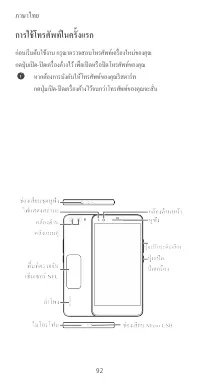
ภาษาไทย 92 การใช้โทรศัพท์ในครั้งแรก ก่อนเริ่มต้นใช้งาน กรุณาตรวจสอบโทรศัพท์เครื่องใหม่ของคุณ กดปุ่มเปิด - ปิดเครื่องค้างไว้ เพื่อเปิดหรือปิดโทรศัพท์ของคุณ หากต้องการบังคับให้โทรศัพท์ของคุณรีสตาร์ท กดปุ่มเปิด - ปิดเครื่องค้างไว้จนกว่าโทรศัพท์ของคุณจะสั่น
Page 97 - เริ่มต้นใช้งาน; ปฏิบัติตามคําแนะนําในภาพต่อไปนี้เพื่อดําเนินการตั้งค่าโทรศัพท์
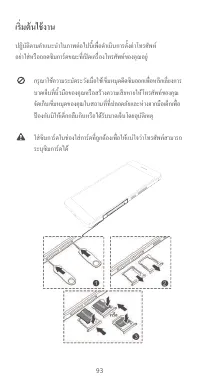
93 เริ่มต้นใช้งาน ปฏิบัติตามคําแนะนําในภาพต่อไปนี้เพื่อดําเนินการตั้งค่าโทรศัพท์ อย่าใส่หรือถอดซิมการ์ดขณะที่เปิดเครื่องโทรศัพท์ของคุณอยู่ กรุณาใช้ความระมัดระวังเมื่อใช้เข็มหมุดดีดซิมออกเพื่อหลีกเลี่ยงการบาดเจ็บที่นิ้วมือของคุณหรือสร้างความเสียหายให้โทรศัพท์ของคุณ จัดเก็บเข็มหมุดของคุณในสถานที่ที่ปล...
Page 98 - ข้อมูลความปลอดภัย; ในส่วนนี้ประกอบด้วยข้อมูลที่สําคัญเกี่ยวกับการใช้งานอุปกรณ์ของคุณ; สัญญาณรบกวนต่ออุปกรณ์ทางการแพทย์; เพื่อเป็นการป้องกันโอกาสที่จะเกิดอันตรายต่อการได้ยินของ
94 ข้อมูลความปลอดภัย ในส่วนนี้ประกอบด้วยข้อมูลที่สําคัญเกี่ยวกับการใช้งานอุปกรณ์ของคุณ และยังประกอบด้วยข้อมูลเกี่ยวกับวิธีการใช้งานอุปกรณ์อย่างปลอดภัย คุณควรอ่านข้อมูลอย่างละเอียดก่อนการใช้งานอุปกรณ์ของคุณ สัญญาณรบกวนต่ออุปกรณ์ทางการแพทย์ ปฏิบัติตามกฎและระเบียบข้อบังคับที่โรงพยาบาลและสถานพยาบาลต่า...
Page 99 - การปกป้องสิ่งแวดล้อม
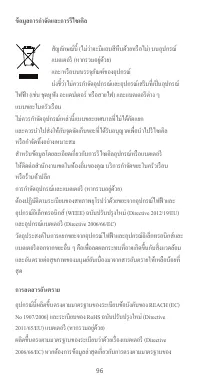
95 การใช้งานอะแดปเตอร์ไฟฟ้า ที่ชาร์จ หรือแบตเตอรีที่ไม่ได้รับการรับรองหรือเข้ากันไม่ได้อาจเป็นสาเหตุให้เกิด เพลิงไหม้ การระเบิด หรืออันตรายอื่น ๆ ได้ สําหรับอุปกรณ์ที่เสียบปลั๊กได้ ควรติดตั้งเต้ารับไว้ใกล้กับอุปกรณ์ และควรเข้าใช้งานได้ง่าย เก็บแบตเตอรีให้ห่างจากสถานที่ที่ร้อนเกินไปหรือถูกแสงแด...
Page 103 - หมายเหตุทางกฎหมาย; ลิขสิทธิ์; เอกสารนี้จัดทําขึ้นเพื่อวัตถุประสงค์ในการให้ข้อมูลเท่านั้น; นโยบายความเป็นส่วนตัว
99 หมายเหตุทางกฎหมาย ลิขสิทธิ์ © Huawei Technologies Co., Ltd. 2015 ขอสงวนลิขสิทธิ์ทุกประการ เอกสารนี้จัดทําขึ้นเพื่อวัตถุประสงค์ในการให้ข้อมูลเท่านั้น และไม่ก่อให้เกิดการรับประกันในรูปแบบใด ๆ ทั้งสิ้น นโยบายความเป็นส่วนตัว เพื่อทําความเข้าใจว่าเรามีวิธีการในการป้องกันข้อมูลส่วนบุคคลของคุณอย่าง ไร ก...



 Huawei Ascend D2
User Manual
Huawei Ascend D2
User Manual
 Huawei Honor 3X (G750)
User Manual
Huawei Honor 3X (G750)
User Manual
 Huawei Honor 4C
User Manual
Huawei Honor 4C
User Manual
 Huawei Honor 4X
User Manual
Huawei Honor 4X
User Manual
 Huawei Honor 7
User Manual
Huawei Honor 7
User Manual
 Huawei Honor Pro(Ascend G600 U8950)
User Manual
Huawei Honor Pro(Ascend G600 U8950)
User Manual
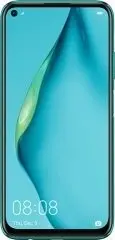 Huawei P40 Lite 6/128GB Crush Green (JNY-LX1)
User Manual
Huawei P40 Lite 6/128GB Crush Green (JNY-LX1)
User Manual
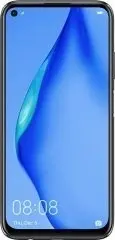 Huawei P40 Lite 6/128GB Midnight Black (JNY-LX1)
User Manual
Huawei P40 Lite 6/128GB Midnight Black (JNY-LX1)
User Manual
 Huawei P8
User Manual
Huawei P8
User Manual
 Huawei P8 Lite
User Manual
Huawei P8 Lite
User Manual
 Huawei U8860
Manual
Huawei U8860
Manual
 Huawei U8500
Manual
Huawei U8500
Manual
 Huawei U8350
Manual
Huawei U8350
Manual
 Huawei U8110
Manual
Huawei U8110
Manual