Page 2 - Read and save these instructions.
Read and save these instructions. Need Help? For assistance with this product please visit http://yourhome.honeywell.com or call Honeywell Customer Care toll-free at 1-800-468-1502 ® U.S. Registered Trademark. Patents pending. US Patent No. 6,595,430; 7,114,554; 7,274,972; 7,225,054 and other patent...
Page 3 - This thermostat is ready to go!; Table of contents
RTH7400/RTH7500 Series 1 69-2744ES—02 About your new thermostat Thermostat features .................................... 2Programming at a glance ............................ 3Quick reference to controls ......................... 4Quick reference to status display ................ 5 Programming &...
Page 4 - Operating Manual; About your new thermostat; Features
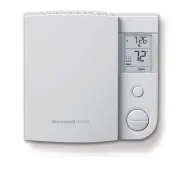
Operating Manual 69-2744ES—02 2 About your new thermostat Congratulations! You’ve just purchased the world’s most advanced, easy-to-use thermo-stat. It has been designed to give you many years of reliable service and climate control. Features • Easy-to-follow menu programming.• One-touch temp contro...
Page 6 - Quick reference to controls
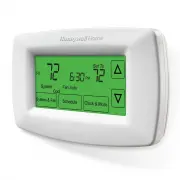
Operating Manual 69-2744ES—02 4 Quick reference to controls M28426 Arrow buttons Press to adjust temperature (see pages 11-14), or to make selections from screen menus. Clock & More Press to set clock (see page 6) or furnace filter reminder. Schedule Press to set program schedule (see pages 11-1...
Page 7 - Quick reference to status display; Other display messages:
RTH7400/RTH7500 Series 5 69-2744ES—02 Quick reference to status display System & Fan Schedule Clock & Mode System Cool Fan Auto Mon Set to Heat On Recovery AM 75 75 6:01 M28078 Current day of week Smart Response ® Technology in effect (see page 15) Current inside temperature Current time Tem...
Page 8 - Clock setting; CLOCK
Operating Manual 69-2744ES—02 6 Clock setting To set the current time display, press CLOCK , then press s or t to adjust the time. Press and hold s or t to advance the time more quickly. Press DONE to save & exit (or press GO BACK to exit without changing the time). Note: The real-time clock sho...
Page 9 - Fan setting; FAN; FAN; DONE
RTH7400/RTH7500 Series 7 69-2744ES—02 Fan setting Press SYSTEM & FAN , then FAN to select fan operation: • On: Fan is always on. • Auto: Fan runs only when the heating or cooling system is on. System & Fan Schedule Clock & More MCR28081 System Fan Done System Heat Fan Auto MCR28082 Press...
Page 10 - System setting; Note: The Auto and Em Heat system settings may not; SYSTEM
Operating Manual 69-2744ES—02 8 System setting Follow steps at left to select system: • Heat: Thermostat controls only the heating system. • Cool: Thermostat controls only the cooling system. • Auto: Thermostat automatically selects heating or cooling depending on the indoor temperature. • Off: All ...
Page 11 - Save money by setting program schedules; WAKE
RTH7400/RTH7500 Series 9 69-2744ES—02 Save money by setting program schedules It’s easy to program your system for maximum energy savings. You can program four time periods each day, with different settings for weekdays and weekends. Set to the time you awaken and the temperature you want during the...
Page 12 - Energy saving settings for maximum cost savings
Operating Manual 69-2744ES—02 10 Energy saving settings for maximum cost savings This thermostat is pre-set with energy saving program settings. We recommend these settings, since they can reduce your heating/cooling expenses by as much as 33%. (See next page to adjust times and temperatures of each...
Page 13 - To adjust program schedules (RTH7400 only)
RTH7400/RTH7500 Series 11 69-2744ES—02 To adjust program schedules (RTH7400 only) 1. Press SCHEDULE , then EDIT to see weekdays. 2. Press SELECT DAY to highlight Mon-Fri (they will share the same settings). 3. Press NEXT STEP twice, then press s or t to set Wake time for selected days. 4. Press NEXT...
Page 14 - To adjust program schedules (RTH7500 only)
Operating Manual 69-2744ES—02 12 To adjust program schedules (RTH7500 only) 1. Press SCHEDULE , then EDIT to see weekdays. 2. Press SELECT DAY . You can select multiple days to program with the same settings. 3. Press NEXT STEP twice, then press s or t to set Wake time for selected day(s). 4. Press ...
Page 15 - USE SCHEDULE
RTH7400/RTH7500 Series 13 69-2744ES—02 Program schedule override (temporary) Press s or t to immediately adjust the temperature. This will temporarily override the temperature setting for the current time period. The new temperature will be maintained until the next time period. When the timer expir...
Page 16 - HOLD
Operating Manual 69-2744ES—02 14 Program schedule override (permanent) Press s or t to adjust temperature, then press HOLD . This will turn off the program schedule. Whatever temperature you set will be maintained 24 hours a day, until you manually change it, or press USE SCHEDULE to cancel “Hold” a...
Page 19 - Filter reminder
RTH7400/RTH7500 Series 17 69-2744ES—02 About your new thermostat If activated during installation, the furnace filter reminder alerts you when it is time to replace your filter. Press RESET after changing the filter, to restart the timer. To reset the reminder interval before it expires: 1. Press MO...
Page 20 - Special features; Smart Response
Operating Manual 69-2744ES—02 18 Special features Smart Response ® Technology: This feature allows the thermostat to “learn” how long the furnace and air conditioner take to reach programmed temperature settings, so the temperature is reached at the time you set. For example: Set the Wake time to 6 ...
Page 21 - Battery replacement; LO BATT
RTH7400/RTH7500 Series 19 69-2744ES—02 MCR28101 M28103 Battery replacement Batteries are optional (to provide backup power) if your thermostat was wired to run on AC power when installed. Install fresh batteries immediately when the LO BATT warning begins flashing. The warning flashes about 30 days ...
Page 22 - Customer assistance
Operating Manual 69-2744ES—02 20 Customer assistance For assistance with this product, please visit http://yourhome.honeywell.com or call Honeywell Customer Care toll-free at 1-800-468-1502. 69-2744ES_A.indd 20 5/2/12 12:19 PM
Page 23 - Display is blank
RTH7400/RTH7500 Series 21 69-2744ES—02 About your new thermostat In case of difficulty If you have difficulty with your thermostat, please try the following suggestions. Most problems can be corrected quickly and easily. Display is blank • Check circuit breaker and reset if necessary.• Make sure pow...
Page 24 - Heating or cooling; • Press
Operating Manual 69-2744ES—02 22 About your new thermostat In case of difficulty Heating or cooling system does not respond • Press SYSTEM to set system to Heat. Make sure the temperature is set higher than the Inside temperature. • Press SYSTEM to set system to Cool. Make sure the temperature is se...
Page 26 - -year limited warranty
Operating Manual 69-2744ES—02 24 1-year limited warranty Honeywell’s sole responsibility shall be to repair or replace the product within the terms stated above. HONEYWELL SHALL NOT BE LIABLE FOR ANY LOSS OR DAMAGE OF ANY KIND, INCLUDING ANY INCIDENTAL OR CONSEQUENTIAL DAMAGES RESULTING, DIRECTLY OR...
Page 30 - Lea y conserve estas instrucciones.
Perclorato: puede ser necesario manipularlo con métodos especiales.Visite www.dtsc.ca.gov/hazardouswaste/perchlorate PRECAUCIÓN: PELIGRO DE DAÑO DEL EQUIPO. Para impedir un posible daño al compresor, no haga funcionar el sistema de refrigeración cuando la temperatura exterior sea inferior a 50° F (1...
Page 31 - ¡Este termostato; Índice de contenidos
Serie RTH7400/RTH7500 1 69-2744ES—02 Acerca de su nuevo termostato Funciones del termostato ........................... 2Programación a simple vista ....................... 3Referencia rápida de los controles ............. 4Referencia rápida de la pantalla ................. 5 Programación y operació...
Page 32 - Manual de uso; confiable y control del clima.; Funciones; del nivel que usted fije.; Acerca de su nuevo termostato
Manual de uso 69-2744ES—02 2 ¡Felicitaciones! Usted acaba de comprar el termostato más avanzado y más fácil de usar en todo el mundo. Ha sido diseñado para proporcionarle muchos años de servicio confiable y control del clima. Funciones • Programación con menú fácil de seguir.• El control de temp. de...
Page 33 - Este termostato está listo para usar!
Serie RTH7400/RTH7500 3 69-2744ES—02 El nuevo termostato viene preprogramado y listo para usar. Todo lo que tiene que hacer es ajustar la hora y el día. Luego verifique los siguientes ajustes y cámbielos si es nece-sario: 1. Ajuste la hora ...............................................................
Page 34 - Referencia rápida de los controles
Manual de uso 69-2744ES—02 4 M28426 Oprima para ajustar la temperatura (ver páginas 11-14), o para hacer selecciones de menús. Clock & More Oprima para ajustar el reloj (ver página 6) o recordatorio de cambio de filtro de la estufa. Schedule Oprima para anular el horario de programa (ver páginas...
Page 35 - Otros mensajes de pantalla:; Referencia rápida de la pantalla
Serie RTH7400/RTH7500 5 69-2744ES—02 System & Fan Schedule Clock & Mode System Cool Fan Auto Mon Set to Heat On Recovery AM 75 75 6:01 M28078 Día de la semana actual Smart Response ® Technology activado (ver página 15) Temperatura interior actual Hora actual Ajuste de temperatura Ajustes del...
Page 36 - Ajuste del reloj
Manual de uso 69-2744ES—02 6 Para ajustar la hora actual en pantalla, oprima CLOCK , luego oprima s o t para ajustar la hora. Mantenga oprimido s o t para avanzar la hora con más rapidez. Oprima DONE para guardar y salir (u oprima GO BACK para salir sin cambiar la hora). Nota: El reloj de hora-real ...
Page 37 - Ajustes del ventilador
Serie RTH7400/RTH7500 7 69-2744ES—02 Oprima SYSTEM & FAN , entonces FAN para seleccionar el funcionamiento del ventilador: • On: El ventilador está siempre encendido. • Auto: El ventilador funciona sólo cuando el sistema de calefacción o de refrigeración está encendido. System & Fan Schedule...
Page 38 - Ajustes del sistema
Manual de uso 69-2744ES—02 8 Siga los pasos en la izquierda para seleccionar: • Heat: El termostato controla sólo el sistema de calefacción. • Cool: El termostato controla sólo el sistema de refrigeración. • Auto: El termostato selecciona automáticamente la calefacción o refrigeración de acuerdo a l...
Page 39 - Ahorre dinero con el ajuste de los horarios de programas
Serie RTH7400/RTH7500 9 69-2744ES—02 Es fácil programar su sistema que permite un ahorro máximo de energía. Usted puede programar cuatro períodos de tiempo por día, con diferentes configuraciones para los días de semana y los fines de semana. Programe la hora en que se despierta y la temperatura que...
Page 41 - Para ajustar los horarios de programas (RTH7400 solamente)
Serie RTH7400/RTH7500 11 69-2744ES—02 Para ajustar los horarios de programas (RTH7400 solamente) 1. Oprima SCHEDULE , luego oprima EDIT . 2. Oprima SELECT DAY para seleccionar Lun-Vier (compartirán los mismos ajustes). 3. Oprima NEXT STEP dos veces, luego oprima s o t para fijar la hora Wake. 4. Opr...
Page 42 - À propos du thermostat; Para ajustar los horarios de programas
Manual de uso À propos du thermostat 69-2744ES—02 12 1. Oprima SCHEDULE , luego oprima EDIT . 2. Oprima SELECT DAY . Usted puede programar días múltiples con los mismos ajustes. 3. Oprima NEXT STEP dos veces, luego oprima s o t para fijar la hora Wake. 4. Oprima NEXT STEP , luego oprima s o t para f...
Page 43 - Anulación (temporaria) de horario de programas
Serie RTH7400/RTH7500 À propos du thermostat 13 69-2744ES—02 Oprima s o t para ajustar inmediatamente la temperatura. Esto anulará temporariamente el ajuste de temperatura para el período actual. La nueva temperatura se mantendrá hasta la hora que haya fijado. Cuando se cumpla el plazo, el horario d...
Page 44 - Anulación (permanente) de horario de programas
Manual de uso À propos du thermostat 69-2744ES—02 14 Oprima s o t para ajustar temperatura, luego oprima HOLD . Esto apagará el horario de programas. Cualquier temperatura que fije se mantendrá 24 horas al día, hasta que la cambie manualmente, u oprima USE SCHEDULE para cancelar “Hold” y reanude el ...
Page 47 - Recordatorio de cambio de filtro
Serie RTH7400/RTH7500 À propos du thermostat 17 69-2744ES—02 Si está activado durante la instalación, el recordatorio del filtro de la estufa le alerta cuando es hora de substituir su filtro. Oprima RESET después de cambiar el filtro, para recomenzar el contador de tiempo. Para cambiar el intervalo ...
Page 49 - Reemplazo de baterías
Serie RTH7400/RTH7500 À propos du thermostat 19 69-2744ES—02 MCR28101 M28103 Las baterías son opcionales (para brindar alimentación de respaldo) si el cableado de su termostato se instaló para funcionar con CA. Instale baterías nuevas inmediatamente cuando comience a titilar el aviso LO BATT . El av...
Page 50 - Asistencia al cliente
Manual de uso 69-2744ES—02 20 Asistencia al cliente Si necesita asistencia, visite http://yourhome.honeywell.com o llame al número gratuito de atención al cliente de Honeywell al 1-800-468-1502. 69-2744ES_A.indd 20 5/2/12 12:19 PM
Page 51 - En caso de dificultades
Serie RTH7400/RTH7500 À propos du thermostat 21 69-2744ES—02 Si usted tiene dificultades con su termostato, pruebe las sugerencias que figuran a con-tinuación. La mayoría de los problemas se pueden solucionar rápida y fácilmente. Pantalla en blanco • Verifique el disyuntor y reinicie si es necesario...
Page 53 - Garantía limitada de 1 año
Serie RTH7400/RTH7500 À propos du thermostat 23 69-2744ES—02 Honeywell garantiza este producto, a excepción de la batería, por el término de un (1) año contra cualquier defecto de fabricación o de los materiales, a partir de la fecha de compra por parte del consumidor. Si en cualquier momento durant...