Page 2 - IntRoDUCtIon; symbols used in these instructions; sAFetY; Fundamental safety warnings; DesIGnAteD Use
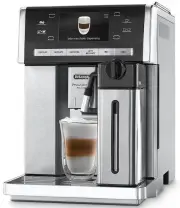
8 IntRoDUCtIon Thank you for choosing the ESAM6900 automatic coffee, cappuccino and hot chocolate machine. We hope you enjoy using your new appliance. Take a few minutes to read these instructions. This will avoid all risks and damage to the appliance. symbols used in these instructions Important wa...
Page 4 - PReLIMInARY CHeCKs; Checking the appliance; tURnInG tHe APPLIAnCe on
10 PReLIMInARY CHeCKs Checking the appliance After removing the packaging, make sure the product is complete and undamaged and that all accessories are present. Do not use the appliance if it is visibly damaged. Contact De’Longhi Customer Services. Installing the appliance Important! When you instal...
Page 5 - • When the function is active, the; oK; to confirm. The symbol alongside the current
11 When heating is complete, the message changes to “Rinsing”. The appliance is ready for use when an espresso coffee cup appears on the display. tURnInG tHe APPLIAnCe oFF Whenever the coffee machine is turned off after being used to make coffee, it performs an automatic rinse cycle. Danger of burns...
Page 6 - • When the main switch is turned off, the “Auto-Start” set-; MAKInG CoFFee; Corresponding; My coffee
12 time disappears. • When the main switch is turned off, the “Auto-Start” set- ting is reset. Auto-off (standby) You can set the auto-off time so that the appliance switches off after 15 or 30 minutes, or after 1, 2 or 3 hours. Press the oK icon to select the function. Press the or icon to select t...
Page 8 - MAKInG Hot CHoCoLAte; Thick density
14 could spread through the inside of the machine and dirty it. This could damage the appliance. • Never use more than one level measure or it could dirty the inside of the machine or block the funnel. Please note! If you use pre-ground coffee, you can only make one cup of coffee at a time. 1. Press...
Page 9 - MAKInG MILK DRInKs; Description
15 come out of the holes in the chocolate carafe lid. • Heating the milk causes splashes inside the carafe. This is normal. • The hot chocolate quantity in the cup will vary varying the density: if you choose thick density, there will be fewer chocolate than that contained in the cup if choosing the...
Page 10 - MAKInG LonG CoFFee; DeLIVeRInG Hot WAteR AnD steAM
16 3. Turn the froth adjustment dial to CLEAN (fig. 33): ): the operation is shown on the display (fig. 34) and stops automatically. 4. Turn the dial back to one of the froth selections. 5. Remove the milk container and always clean the steam nozzle with a sponge (fig. 35). Please note! • To prepare...
Page 12 - Danger of electric shock!
18 coffee machines, you need not use chemical products to clean the machine. • No parts of the appliance are dishwasher safe, apart from the hot chocolate carafe (D) and components of the milk container in contact with the milk. the thermal casing C7 cannot be washed in a dishwasher or immersed in w...
Page 14 - DesCALInG; Important! Danger of burns; settInG WAteR HARDness
20 DesCALInG When the symbol appears, you must proceed with the descaling equipment. Important! It is vital to respect the manufacturer’s safety warnings given on the descaler pack and the warnings relating to the procedure to follow in the event of contact with the skin and eyes. Please note! Use d...
Page 15 - WAteR soFteneR FILteR; Please note
21 5. Press the esC icon to exit the menu. The machine is now reprogrammed with the new water hardness setting. WAteR soFteneR FILteR Certain models are fitted with a water softener filter. If this is not the case with your model, you are recommended to purchase one from De’Longhi Customer Services....
Page 16 - DIsPLAYeD MessAGes; DIsPLAYeD MessAGe; FILL WATER TANK; INSERT WATER SPOUT; EMPTY GROUNDS CONTAINER; teCHnICAL DAtA
22 DIsPLAYeD MessAGes DIsPLAYeD MessAGe PossIBLe CAUse soLUtIon FILL WATER TANK Insufficient water in tank or tank not inserted correctly Fill the tank with water and/or insert it correctly, pushing it as far as it will go until it clicks into place. GROUND TOO FINE ADJUST MILL The grinding is too f...
Page 17 - TURN DIAL TO CLEAN
23 DIsPLAYeD MessAGe PossIBLe CAUse soLUtIon INSERT GROUNDS CONTAINER After cleaning, the grounds container has not been replaced. Open the service door, remove the drip tray and insert the grounds container. ADD PRE-GROUND COFFEE The “pre-ground coffee” function has been selected without placing an...
Page 18 - tRoUBLesHootInG
24 tRoUBLesHootInG Below is a list of some of the possible malfunctions. If the problem cannot be resolved as described, contact Customer Services. PRoBLeM PossIBLe CAUse soLUtIon The coffee is not hot The cups were not preheated. • If Energy Saving is not active, leave the cups on the cup warmer fo...
Page 19 - The; LonG; coffee has too
25 PRoBLeM PossIBLe CAUse soLUtIon The coffee does not come out of the spouts, but from around the service door. The holes in the spouts are clogged with dry coffee dust. Clean the spouts with a toothpick, sponge or hard bristled kitchen brush. The coffee guide inside the service door is blocked and...