Page 2 - C o l l e c t i o n - C o l l e c t i o n - C o l l e c i ó n - C o l l e z i o n e
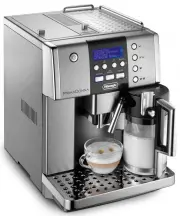
FULLY AUTOMATIC COFFEE CENTER ESAM6600 IMPORTANT INSTRUCTIONS - SAVE THESE INSTRUCTIONS MACHINE À CAFÈ AUTOMATIQUE ESAM6600 MODE D’EMPLOI IMPORTANT CONSERVEZ LES PRESENTES INSTRUCTIONS CAFETERA SUPERAUTOMATICA ESAM6600 INSTRUCIONES IMPORTANTES REPASE Y GUARDE E STAS INSTRUCCIONES LEA ESTE INSTRUCTIV...
Page 3 - C o l l e c t i o n - C o l l e c t i o n -
Page 6 - - C o l l e c i ó n - C o l l e z i o n e
1 2 1 2 2 - C o l l e c i ó n - C o l l e z i o n e
Page 7 - C o l l e c t i o n; INDEX
C o l l e c t i o n 6 INDEX IMPORTANT SAFEGUARDS . . . . . . . . . . . . . . . . . . . . . . . . . . . . . . . . . . . . . . . . . . . . . . . . . . . . . . . . . . . . . . . . . 7 1 DESCRIPTION (see page 3) . . . . . . . . . . . . . . . . . . . . . . . . . . . . . . . . . . . . . . . . . . . . . . ...
Page 8 - SHORT CORD INSTRUCTIONS; I M P O R T A N T S A F E G U A R D S; Read all instructions carefully.; SAVE THESE INSTRUCTIONS; THIS APPLIANCE IS FOR HOUSEHOLD USE ONLY
C o l l e c t i o n 7 SHORT CORD INSTRUCTIONS - A short power cord is provided to reduce risks resulting from becoming entangled in or tripping overa longer cord. - Longer, detachable power supply cords or extension cords are available and may be used if care isexercised in their use. - If an extens...
Page 9 - Control panel; SAFETY WARNINGS
C o l l e c t i o n 8 1 DESCRIPTION (SEE PAGE 3) A. Grinding coarseness regulator B. Coffee bean container C. Bean container lid D. Central lid for ground coffee E. Compartment for measuring scoop F. Cup warmer tray G. Ground coffee funnel H. Milk container lid with milk frother regulator I. Milk sp...
Page 10 - INSTALLATION; PRESS OK TO INSTALL ENGLISH; ENGLISH INSTALLED; push; PRESS OK; OK
9 C o l l e c t i o n 3 INSTALLATION • After removing the packaging, make sure the product is complete and undamaged. If in doubt, do not usethe appliance and contact a qualified professional. • Packing elements (plastic bags, polystyrene etc.) must not be left within reach of children as they may r...
Page 11 - TURNING ON AND PREHEATING; READY Regular TASTE; PREPARING COFFEE (USING COFFEE BEANS) AND USEFUL TIPS; delivery can be stopped at any time
C o l l e c t i o n 10 5 TURNING ON AND PREHEATING 1. Press the button (fig. 6). The appliance displays: HEATING UP PLEASE WAIT... to indicate preheating is underway. 2. Once preheating is completed, the appliance displays RINSING PLEASE WAIT... and performs an automatic rinse cycle (a little hot wa...
Page 12 - increase the quantity; FILL TANK; EMPTY GROUNDS CONTAINER; never remove the water tank.; GROUND TOO FINE ADJUST MILL AND
11 C o l l e c t i o n NOTE 5: As soon as delivery is complete, to increase the quantity of coffee, simply press and hold the coffee button previously selected (fig. 10), until the desired quantity is reached (this operation must be performedwithin 3 seconds from when coffee delivery from the spouts...
Page 13 - CHANGING THE QUANTITY OF COFFEE IN THE CUP; REGULATING THE COFFEE MILL
C o l l e c t i o n 12 7 CHANGING THE QUANTITY OF COFFEE IN THE CUP The appliance is factory preset to automatically deliver the following quantities of coffee:- one short coffee (when the button is pressed); - one long coffee (when the button is pressed); - two short coffees (when the button is pre...
Page 14 - 0 PRODUCING HOT WATER; HOT WATER; 1 CHANGING THE QUANTITY OF HOT WATER; HOT WATER PROGRAM QUANTITY; 2 PREPARING CAPPUCCINOS (FROTHED MILK AND COFFEE); CAPPUCCINO; CAPPUCCINO: CONTAINER POINTER IN POSITION 2
13 C o l l e c t i o n NOTE 4: Use ground coffee for espresso coffee makers only. Do not use coffee beans, freeze-dried coffee or other materials that could damage the appliance. NOTE 5: If you add more than one measure of ground coffee and the funnel blocks, use a knife to push the cof- fee down (f...
Page 15 - CLEANING; 3 PREPARING LATTE OR ITALIAN MACCHIATO; latte: MILK CONTAINER POINTER IN POSITION 1; 4 PREPARING FROTHED OR STEAMED MILK (WITHOUT COFFEE)
C o l l e c t i o n 14 NOTE 1: While preparing the cappuccino, milk or coffee delivery can be interrupted by pressing the CAP- PUCCINO button. NOTE 2: If you run out of milk while delivering frothed milk, remove the container and refill it. Then put it back in place and press the CAPPUCCINO button t...
Page 16 - MILK FOR PROGRAM QUANTITY; COFFEE FOR . PROGRAM QUANTITY; 6 CLEANING AND MAINTENANCE; Cleaning the coffee maker
15 C o l l e c t i o n 15 CHANGING THE QUANTITY OF COFFEE AND MILK FOR LATTE / CAPPUCCINO /ITALIAN MACCHIATO The appliance is factory preset to automatically deliver standard quantities of coffee or milk. To change thesequantities, proceed as follows:• Fill the container with milk up to the maximum ...
Page 17 - PUSH; CORRECT; CORRECTLY
C o l l e c t i o n 16 Check that the two red buttons have snapped out, otherwise the door cannot be closed. Support Pin Infuser Push the PUSH symbol fully in until it clicks into place. After having heard the click, checkthat the red buttons have snappedout. Bottom pipe on the infuser. The pin must...
Page 18 - 7 CHANGING AND SETTING THE MENU PARAMETERS
C o l l e c t i o n 17 16.3 Cleaning the milk container Proceed as follows:• Remove the milk spout ( 1 ) and intake tube ( 2 ). • Remove the froth regulator ( 3 ) by pulling it outwards (see figure) • Wash all the components thoroughly with hotsoapy water. Make sure there is no milk residueinside th...
Page 20 - HIGH TEMPERATURE
19 C o l l e c t i o n NOTE: If the descaling cycle is interrupted before completion, the appliance continues to display the descale message and the program must be started again from the beginning. Empty the water tank, rinse, fill with cleanwater and run off a cup of hot water. IMPORTANT: FAILURE ...
Page 21 - beep on; 8 CHANGING THE LANGUAGE
C o l l e c t i o n 20 • Press the OK button to reset the factory default values. • Press the P button (corresponding to the ESC symbol flashing on the display) to exit programming mode or to change other parameters. • The appliance is now reset to the factory default settings and the READY message ...
Page 22 - 9 TROUBLESHOOTING; MESSAGE
21 C o l l e c t i o n 19 TROUBLESHOOTING ADD PRE-GROUND COFFEE • With the function selected, the pre-ground coffee has not been poured intothe funnel. • Add the ground coffee as described insection 9. FILL BEANS CONTAINER • The coffee beans have run out. • If the coffee grinder is very noisy, thism...
Page 23 - 0 PROBLEMS TO BE RESOLVED BEFORE CALLING THE SERVICE CENTER; PROBLEM
C o l l e c t i o n 22 20 PROBLEMS TO BE RESOLVED BEFORE CALLING THE SERVICE CENTER If the appliance is not working, the causes of the malfunction can be identified and resolved by referring to sec-tion 19. If, on the other hand, a general alarm is on, run the following checks before calling the ser...
Page 25 - What does the warranty cover?; How does state law apply?
C o l l e c t i o n 24 This warranty applies to Super Automatic Espresso Machines with the De'Longhi brand name. LIMITED WARRANTY What does the warranty cover? We warrant each appliance to be free from defects in material and workmanship. Our obligation under thiswarranty is limited to repair at our...