Page 2 - | Table Of Contents; Table Of Contents; FCC Information and Copyright; Driver Installation; APPENDIX I: Specifications in Other Languages
2 | Table Of Contents Table Of Contents FCC Information and Copyright ������������������������������������������������������������������������������� 1 Chapter 1: Introduction ������������������������������������������������������������������������������������������� 3 1.1 Before You Start ............
Page 3 - Chapter 1: Introduction; Before You Start; sure you follow the instructions below:; Package Checklist; • Serial ATA Cable x2
Chapter 1: Introduction | 3 H61MHV3 Chapter 1: Introduction 1�1 Before You Start Thank you for choosing our product. Before you start installing the motherboard, please make sure you follow the instructions below: • Prepare a dry and stable working environment with sufficient lighting. • Always di...
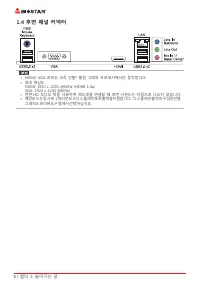
Page 5 - Rear Panel Connectors
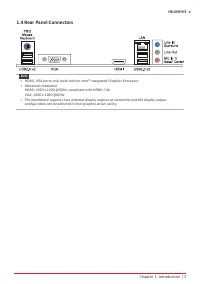
Chapter 1: Introduction | 5 H61MHV3 1.4 Rear Panel Connectors Note » HDMI, VGA ports only work with an Intel® integrated Graphics Processor. » Maximum resolution HDMI: 1920 x 1200 @60Hz, compliant with HDMI 1.4a VGA: 1920 x 1200 @60Hz » The mainboard supports two onboard display outputs at sam...
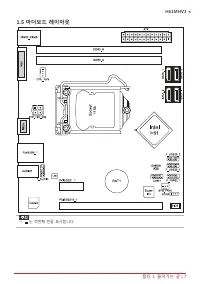
Page 6 - Motherboard Layout
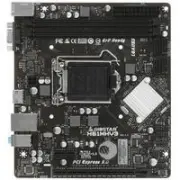
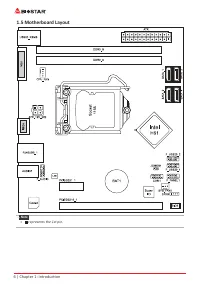
6 | Chapter 1: Introduction 1.5 Motherboard Layout Note » represents the 1st pin.
Page 7 - Chapter 2: Hardware installation; Step 1: Locate the CPU socket on the motherboard
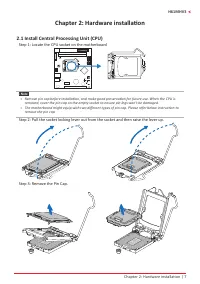
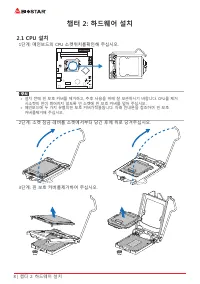
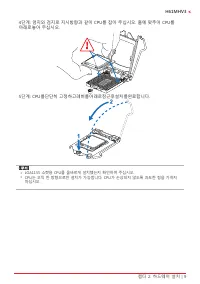
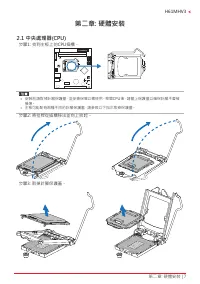
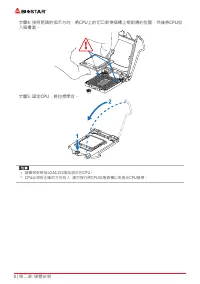
Chapter 2: Hardware installation | 7 H61MHV3 Chapter 2: Hardware installation 2.1 Install Central Processing Unit (CPU) Step 1: Locate the CPU socket on the motherboard Note » Remove pin cap before installation, and make good preservation for future use. When the CPU is removed, cover the pin cap ...
Page 9 - Install a Heatsink; to the CPU fan connector.
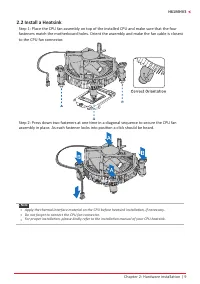
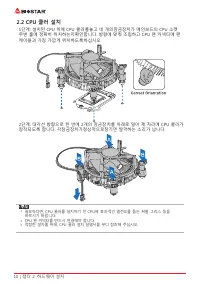
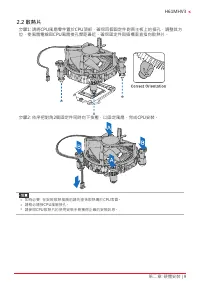
Chapter 2: Hardware installation | 9 H61MHV3 2.2 Install a Heatsink Step 1: Place the CPU fan assembly on top of the installed CPU and make sure that the four fasteners match the motherboard holes. Orient the assembly and make the fan cable is closest to the CPU fan connector. Step 2: Press down two...
Page 10 - Connect Cooling Fans; may be different according to the fan manufacturer.; Install System Memory; DDR3 Modules
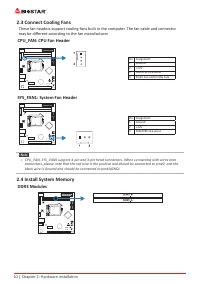
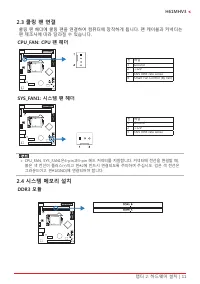
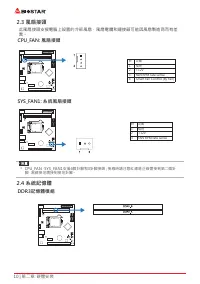
10 | Chapter 2: Hardware installation 2.3 Connect Cooling Fans These fan headers support cooling-fans built in the computer. The fan cable and connector may be different according to the fan manufacturer. CPU_FAN: CPU Fan Header Pin Assignment1 Ground 2 +12V 3 FAN RPM rate sense 4 Smart Fan Control ...
Page 11 - Memory Capacity; DIMM Socket Location DDR3 Module; Dual Channel Memory Installation; Dual Channel Status
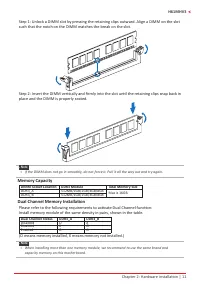
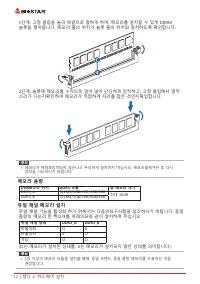
Chapter 2: Hardware installation | 11 H61MHV3 Step 1: Unlock a DIMM slot by pressing the retaining clips outward. Align a DIMM on the slot such that the notch on the DIMM matches the break on the slot. Step 2: Insert the DIMM vertically and firmly into the slot until the retaining clips snap back in...
Page 12 - Install an Expansion Card
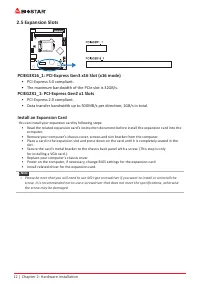
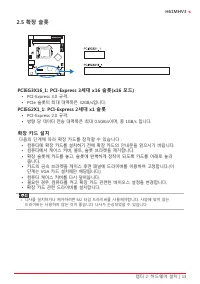
12 | Chapter 2: Hardware installation 2.5 Expansion Slots PCIEG3X16_1: PCI-Express Gen3 x16 Slot (x16 mode) • PCI-Express 3.0 compliant. • The maximum bandwidth of the PCIe slot is 32GB/s. PCIEG2X1_1: PCI-Express Gen2 x1 Slots • PCI-Express 2.0 compliant. • Data transfer bandwidth up to 500MB/s ...
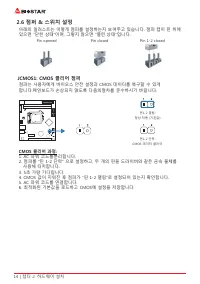
Page 13 - JCMOS1: Clear CMOS Jumper; follow the procedures to avoid damaging the motherboard.; Clear CMOS Procedures:; Load Optimal Defaults and save settings in CMOS.
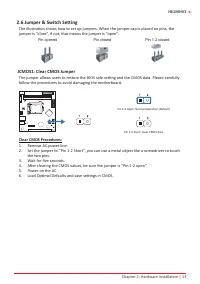
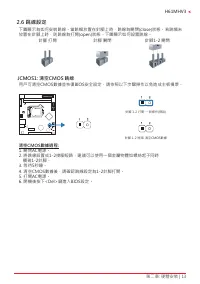
Chapter 2: Hardware installation | 13 H61MHV3 2.6 Jumper & Switch Setting The illustration shows how to set up jumpers. When the jumper cap is placed on pins, the jumper is “close”, if not, that means the jumper is “open”. Pin opened Pin closed Pin 1-2 closed JCMOS1: Clear CMOS Jumper The jumper...
Page 14 - ATX: ATX Power Source Connector; The connector provides +12V to the CPU power circuit.; to connect the PC case’s front panel switch functions.
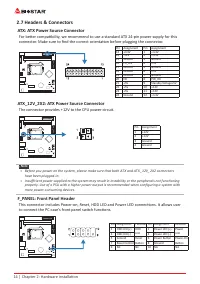
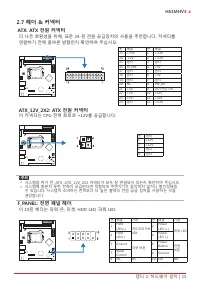
14 | Chapter 2: Hardware installation 2.7 Headers & Connectors ATX: ATX Power Source Connector For better compatibility, we recommend to use a standard ATX 24-pin power supply for this connector. Make sure to find the correct orientation before plugging the connector. Pin Assignment Pin Assignme...
Page 15 - SPKR: Chassis Speaker Header; Please connect the chassis speaker to this header.
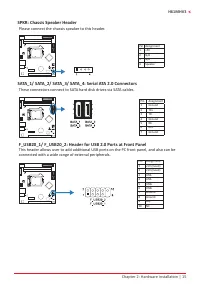
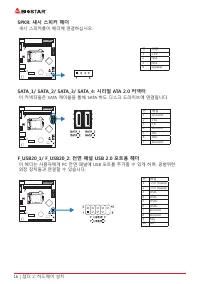
Chapter 2: Hardware installation | 15 H61MHV3 SPKR: Chassis Speaker Header Please connect the chassis speaker to this header. Pin Assignment1 +5V 2 N/A 3 N/A 4 Speaker SATA_1/ SATA_2/ SATA_3/ SATA_4: Serial ATA 2.0 Connectors These connectors connect to SATA hard disk drives via SATA cables. Pin Ass...
Page 16 - COM1: Serial Port Header
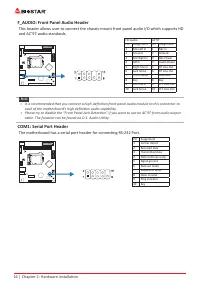
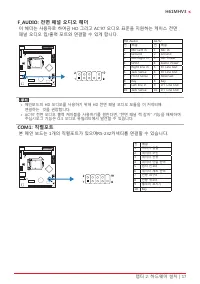
16 | Chapter 2: Hardware installation F_AUDIO: Front Panel Audio Header This header allows user to connect the chassis-mount front panel audio I/O which supports HD and AC’97 audio standards. HD Audio AC’97 Pin Assignment Pin Assignment 1 Mic Left in 1 Mic In 2 Ground 2 Ground 3 Mic Right in 3 Mic P...
Page 17 - The BIOS can be updated using either of the following utilities:; Updating BIOS with BIOSTAR BIOS-FLASHER
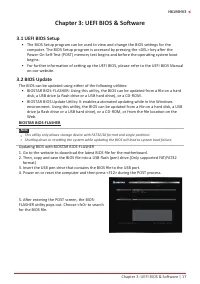
Chapter 3: UEFI BIOS & Software | 17 H61MHV3 Chapter 3: UEFI BIOS & Software 3.1 UEFI BIOS Setup • The BIOS Setup program can be used to view and change the BIOS settings for the computer. The BIOS Setup program is accessed by pressing the <DEL> key after the Power-On Self-Test (POST)...
Page 18 - computer. Then the BIOS Update is completed.; BIOS Update Utility (through the Internet); An open dialog will show up to request your
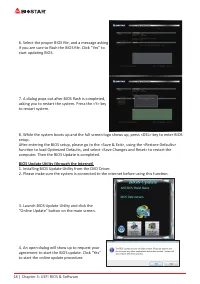
18 | Chapter 3: UEFI BIOS & Software 6. Select the proper BIOS file, and a message asking if you are sure to flash the BIOS file. Click “Yes” to start updating BIOS. 7. A dialog pops out after BIOS flash is completed, asking you to restart the system. Press the <Y> key to restart system. 8...
Page 19 - BIOS Update Utility (through a BIOS file); A warning message will show up to request your
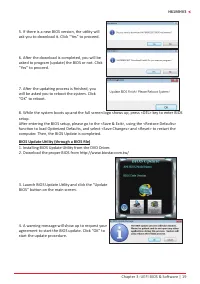
Chapter 3: UEFI BIOS & Software | 19 H61MHV3 5. If there is a new BIOS version, the utility will ask you to download it. Click “Yes” to proceed. 6. After the download is completed, you will be asked to program (update) the BIOS or not. Click “Yes” to proceed. 7. After the updating process is fin...
Page 20 - then click on “Open”. It will take several minutes,; Backup BIOS; for the backup of BIOS, and select a proper
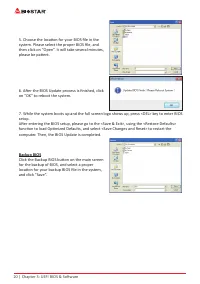
20 | Chapter 3: UEFI BIOS & Software 5. Choose the location for your BIOS file in the system. Please select the proper BIOS file, and then click on “Open”. It will take several minutes, please be patient. 6. After the BIOS Update process is finished, click on “OK” to reboot the system. 7. While ...
Page 21 - Installing Software; Follow the on-screen instructions to complete the installation.; Launching Software; BIOScreen Utility; logo so as to customize your computer.
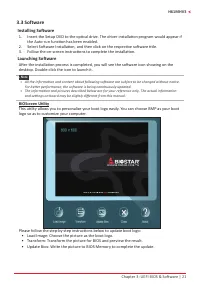
Chapter 3: UEFI BIOS & Software | 21 H61MHV3 3.3 Software Installing Software 1. Insert the Setup DVD to the optical drive. The driver installation program would appear if the Auto-run function has been enabled. 2. Select Software Installation, and then click on the respective software title. 3....
Page 22 - Chapter 4: Useful help; Driver Installation; You will see the following window after you insert the DVD; A. Driver Installation; installation program.; B. Software Installation; Manual icon to browse for available manual.
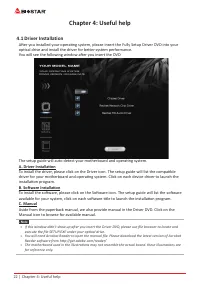
22 | Chapter 4: Useful help Chapter 4: Useful help 4.1 Driver Installation After you installed your operating system, please insert the Fully Setup Driver DVD into your optical drive and install the driver for better system performance. You will see the following window after you insert the DVD The ...
Page 23 - AMI BIOS Beep Code; Boot Block Beep Codes; POST BIOS Beep Codes; Number of Beeps; AMI BIOS post code; Code Description
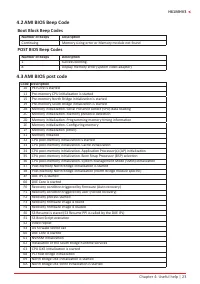
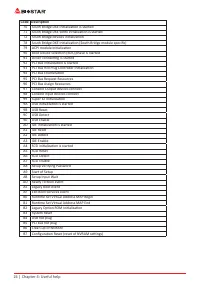
Chapter 4: Useful help | 23 H61MHV3 4.2 AMI BIOS Beep Code Boot Block Beep Codes Number of Beeps Description Continuing Memory sizing error or Memory module not found POST BIOS Beep Codes Number of Beeps Description 1 Success booting. 8 Display memory error (system video adapter) 4.3 AMI BIOS post c...
Page 25 - Troubleshooting; Probable; CPU Overheated; protection function has been activated.
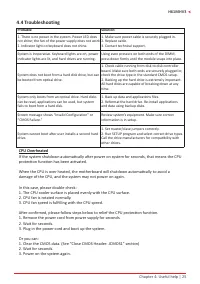
Chapter 4: Useful help | 25 H61MHV3 4.4 Troubleshooting Probable Solution 1. There is no power in the system. Power LED does not shine; the fan of the power supply does not work 2. Indicator light on keyboard does not shine. 1. Make sure power cable is securely plugged in. 2. Replace cable. 3. Conta...
Page 26 - Arabic
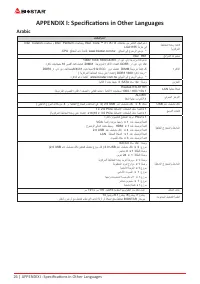
26 | APPENDIX I: Specifications in Other Languages APPENDIX I: Specifications in Other Languages Arabic تﺎﻔﺻاﻮﻤﻟا ﺔﺠﻟﺎﻌﻤﻟا ةﺪﺣو ةﺪﻋﺎﻗ ﺔﻳﺰآﺮﻤﻟا ﻢﻋد تﺎﺠﻟﺎﻌﻣ ﻦﻣ ﺮﺷﺎﻌﻟا ﻞﻴﺠﻟا Intel ® Core ™ i7 / i5 / i3 تﺎﺠﻟﺎﻌﻣو Pentium Intel ® و تﺎﺠﻟﺎﻌﻣ Celeron Intel ® ﺔﻣﺰﺣ ﻲﻓ LGA1155 * ﻊﻗﻮﻤﻟا ﻰﻟإ عﻮﺟﺮﻟا ﻰﺟﺮﻳ www.biost...
Page 27 - German
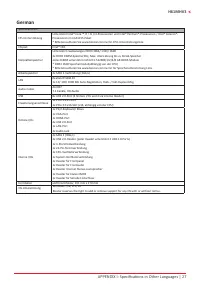
APPENDIX I: Specifications in Other Languages | 27 H61MHV3 German Spezifikationen CPU-Unterstützung Unterstützt Intel® Core ™ i7 / i5 / i3-Prozessoren und Intel® Pentium®-Prozessoren / Intel® Celeron®-Prozessoren im LGA1155-Paket* Bitte konsultieren Sie www.biostar.com.tw für CPU-Unterstützungsliste...
Page 28 - Spanish
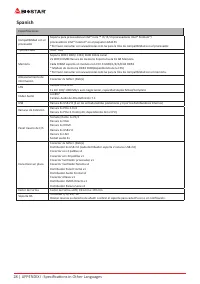
28 | APPENDIX I: Specifications in Other Languages Spanish Especificaciones Compatibilidad con el procesador Soporta para procesadores Intel® Core ™ i7/ i5/ i3 procesadores Intel® Pentium®/ procesadores Intel® Celeron® en el paquete LGA1155 *Por favor consultar con www.biostar.com.tw para la lista d...
Page 29 - Thai
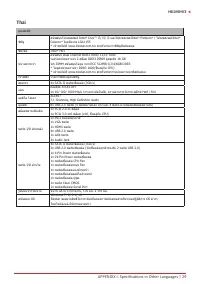
APPENDIX I: Specifications in Other Languages | 29 H61MHV3 Thai คุณสมบัติ ซีพียู สนับสนุนโปรเซสเซอร์ Intel ® Core™ i7/ i5/ i3 และโปรเซสเซอร์Intel ® Pentium ® / โปรเซสเซอร์Intel ® Celeron ® ในแพ็คเกจ LGA1155 * เข้าชมได้ที่ www.biostar.com.tw สำาหรับรายการซีพียูที่สนับสนุน ชิพเซ็ต Intel ® H61 หน่วยควา...
Page 30 - Japan
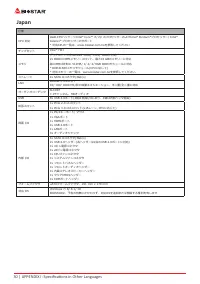
30 | APPENDIX I: Specifications in Other Languages Japan 仕様 CPU 対応 LGA1155パッケージIntel ® Core™ i7/ i5/ i3プロセッサーおよびIntel ® Pentium ® プロセッサー/ Intel ® Celeron ® プロセッサーのサポート * 対応CPUの一覧は、www.biostar.com.twを参照してください チップセット Intel ® H61 メモリ デュアルチャンネルDDR3 1066/ 1333/ 1600に対応2x DDR3 DIMMメモリースロット、最大16 GBのメモリーに対応...
Page 31 - Информация FCC и авторское право; без обязательства заранее уведомлять какую-либо сторону.
Информация FCC и авторское право Это оборудование было протестировано и признано соответствующим ограничениям для цифровых устройств класса B в соответствии с частью 15 правил Федеральной комиссии по связи США (FCC). Эти ограничения разработаны для обеспечения разумной защиты от вредных помех при ус...
Page 32 - Содержание; Информация FCC и авторское право ��������������������������������������������������������������������
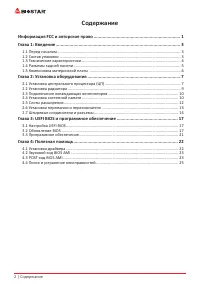
2 | Содержание Содержание Информация FCC и авторское право �������������������������������������������������������������������� 1 Глава 1: Введение �������������������������������������������������������������������������������������������������� 3 1.1 Перед началом ....................................
Page 34 - Технические характеристики
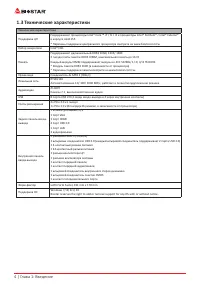
4 | Глава 1: Введение 1�3 Технические характеристики Технические характеристики Поддержка ЦП Поддерживает процессоры Intel® Core ™ i7 / i5 / i3 и процессоры Intel® Pentium® / Intel® Celeron® в корпусе LGA1155* Перечень поддержки центрального процессора смотрите на www.biostar.com.tw. Набор микросхем...
Page 35 - Разъемы задней панели
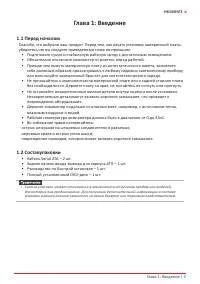
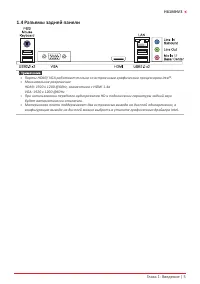
Глава 1: Введение | 5 H61MHV3 1�4 Разъемы задней панели » » Порты HDMI/ VGA работают только со встроенным графическим процессором Intel®. » » Максимальное разрешение HDMI: 1920 x 1200 @60Hz, совместимо с HDMI 1.4a VGA: 1920 x 1200 @60Hz » » При использовании переднего аудиоразъема HD и подключе...
Page 36 - �5 Компоновка материнской платы
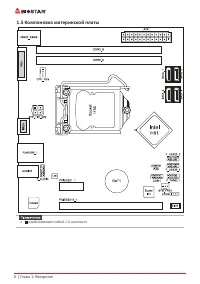
6 | Глава 1: Введение 1�5 Компоновка материнской платы » » представляет собой 1-й контакт.
Page 37 - Глава 2: Установка оборудования; �1 Установка центрального процессора (ЦП); Шаг 1: Найдите сокет ЦП на материнской плате.
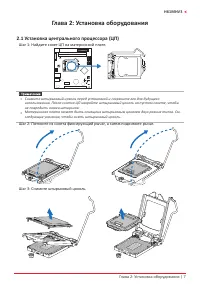
Глава 2: Установка оборудования | 7 H61MHV3 Глава 2: Установка оборудования 2�1 Установка центрального процессора (ЦП) Шаг 1: Найдите сокет ЦП на материнской плате. » » Снимите штырьковый цоколь перед установкой и сохраните его для будущего использования. После снятия ЦП накройте штырьковый цоколь...
Page 38 - наклоняя и не сдвигая процессор в сокете.
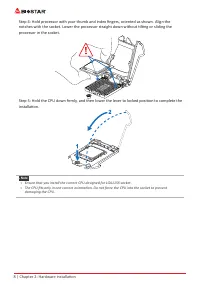
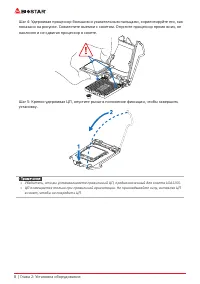
8 | Глава 2: Установка оборудования Шаг 4: Удерживая процессор большим и указательным пальцами, сориентируйте его, как показано на рисунке. Совместите выемки с сокетом. Опустите процессор прямо вниз, не наклоняя и не сдвигая процессор в сокете. Шаг 5: Крепко удерживая ЦП, опустите рычаг в положение ...
Page 39 - �2 Установка радиатора; к разъему вентилятора ЦП.
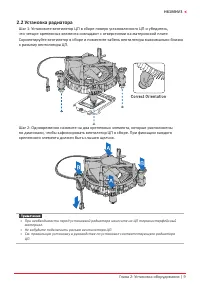
Глава 2: Установка оборудования | 9 H61MHV3 2�2 Установка радиатора Шаг 1: Установите вентилятор ЦП в сборе поверх установленного ЦП и убедитесь, что четыре крепежных элемента совпадают с отверстиями на материнской плате. Сориентируйте вентилятор в сборе и поместите кабель вентилятора максимально бл...
Page 40 - �3 Подключение охлаждающих вентиляторов; от производителя вентилятора.; CPU_FAN: Штыревой соединитель вентилятора ЦП; SYS_FAN1: Штыревой соединитель вентилятора системы; �4 Установка системной памяти; Модули DDR3
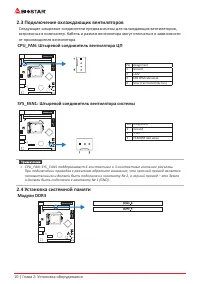
10 | Глава 2: Установка оборудования 2�3 Подключение охлаждающих вентиляторов Следующие штыревые соединители предназначены для охлаждающих вентиляторов, встроенных в компьютер. Кабель и разъем вентилятора могут отличаться в зависимости от производителя вентилятора. CPU_FAN: Штыревой соединитель вент...
Page 41 - защелкнулисьи модуль DIMM установился должным образом.; Емкость памяти; Расположение; Установка двухканальной памяти; Статус двойного
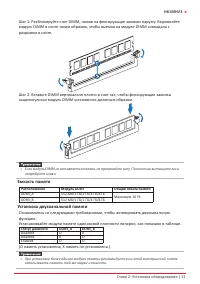
Глава 2: Установка оборудования | 11 H61MHV3 Шаг 1: Разблокируйте слот DIMM, нажав на фиксирующие зажимы наружу. Выровняйте модуль DIMM в слоте таким образом, чтобы выемка на модуле DIMM совпадала с разрывом в слоте. Шаг 2: Вставьте DIMM вертикально плотно в слот так, чтобы фиксирующие зажимы защелк...
Page 42 - �5 Слоты расширения; Установка карты расширения; устанавливать эту карту в компьютер.
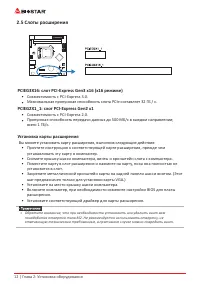
12 | Глава 2: Установка оборудования 2�5 Слоты расширения PCIEG3X16: слот PCI-Express Gen3 x16 (x16 режиме) • Совместимость с PCI-Express 3.0.• Максимальная пропускная способность слота PCIe составляет 32 ГБ / с. PCIEG2X1_1: слот PCI-Express Gen2 x1 • Совместимость с PCI-Express 2.0.• Пропускная...
Page 43 - �6 Настройка переключателя; JCMOS1: Перемычка очистки CMOS; Указания по очистке CMOS:; Отсоедините питание переменного тока.
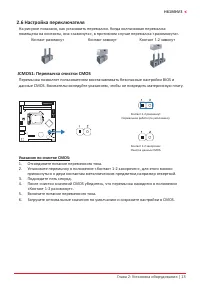
Глава 2: Установка оборудования | 13 H61MHV3 2�6 Настройка переключателя На рисунке показано, как установить перемычки. Когда колпачковая перемычка помещена на контакты, она «замкнута», в противном случае перемычка «разомкнута». Контакт разомкнут Контакт замкнут Контакт 1-2 замкнут JCMOS1: Перемычка...
Page 44 - �7 Штыревые соединители и разъемы; ATX: разъем источника питания ATX; правильной ориентации.; F_PANEL: штыревой соединитель передней панели
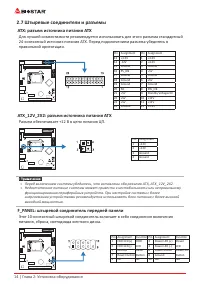
14 | Глава 2: Установка оборудования 2�7 Штыревые соединители и разъемы ATX: разъем источника питания ATX Для лучшей совместимости рекомендуется использовать для этого разъема стандартный 24-контактный источник питания ATX. Перед подключением разъема убедитесь в правильной ориентации. Pin Assignment...
Page 45 - SPKR: штыревой соединитель динамика шасси; Подключите динамик шасси к этому штыревому соединителю.; панели; периферийным устройствам.
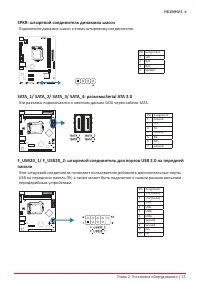
Глава 2: Установка оборудования | 15 H61MHV3 SPKR: штыревой соединитель динамика шасси Подключите динамик шасси к этому штыревому соединителю. Pin Assignment1 +5V 2 N/A 3 N/A 4 Speaker SATA_1/ SATA_2/ SATA_3/ SATA_4: разъемыSerial ATA 2�0 Эти разъемы подключаются к жестким дискам SATA через кабели S...
Page 46 - F_AUDIO: штыревой соединитель аудио передней панели; COM1: разъем последовательного порта
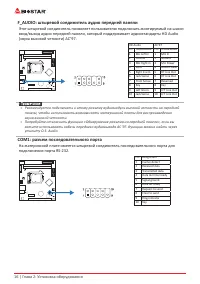
16 | Глава 2: Установка оборудования F_AUDIO: штыревой соединитель аудио передней панели Этот штыревой соединитель позволяет пользователю подключать монтируемый на шасси вход/выход аудио передней панели, который поддерживает аудиостандарты HD Audio (звука высокой четкости) AC’97. HD Audio AC’97 Pin ...
Page 47 - Глава 3: UEFI BIOS и программное обеспечение | 17; Глава 3: UEFI BIOS и программное обеспечение; �1 Настройка UEFI BIOS
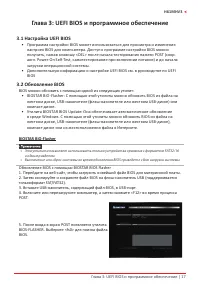
Глава 3: UEFI BIOS и программное обеспечение | 17 H61MHV3 Глава 3: UEFI BIOS и программное обеспечение 3�1 Настройка UEFI BIOS • Программа настройки BIOS может использоваться для просмотра и изменения настроек BIOS для компьютера. Доступ к программе настройки BIOS можно получить, нажав клавишу <...
Page 48 - 8 | Глава 3: UEFI BIOS и программное обеспечение
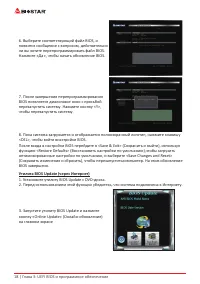
18 | Глава 3: UEFI BIOS и программное обеспечение 6. Выберите соответствующий файл BIOS, и появится сообщение с вопросом, действительно ли вы хотите перепрограммировать файл BIOS. Нажмите «Да», чтобы начать обновление BIOS. 7. После завершения перепрограммирования BIOS появляется диалоговое окно с п...
Page 49 - Глава 3: UEFI BIOS и программное обеспечение | 19
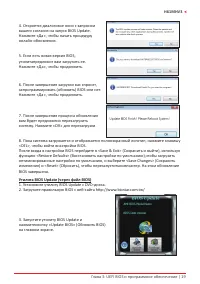
Глава 3: UEFI BIOS и программное обеспечение | 19 H61MHV3 4. Откроется диалоговое окно с запросом вашего согласия на запуск BIOS Update. Нажмите «Да», чтобы начать процедуру онлайн-обновления. 5. Если есть новая версия BIOS, утилитапредложит вам загрузить ее. Нажмите «Да», чтобы продолжить. 6. После...
Page 50 - 0 | Глава 3: UEFI BIOS и программное обеспечение; Резервное копирование BIOS
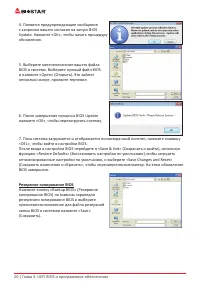
20 | Глава 3: UEFI BIOS и программное обеспечение 4. Появится предупреждающее сообщение с запросом вашего согласия на запуск BIOS Update. Нажмите «OK», чтобы начать процедуру обновления. 5. Выберите местоположение вашего файла BIOS в системе. Выберите нужный файл BIOS и нажмите «Open» (Открыть). Это...
Page 51 - Глава 3: UEFI BIOS и программное обеспечение | 21; �3 Программное обеспечение; Установка программного обеспечения; установки драйвера, если включена функция автозапуска.; Запуск программного обеспечения; Утилита BIOScreen
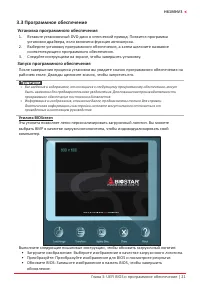
Глава 3: UEFI BIOS и программное обеспечение | 21 H61MHV3 3�3 Программное обеспечение Установка программного обеспечения 1. Вставьте установочный DVD-диск в оптический привод. Появится программа установки драйвера, если включена функция автозапуска. 2. Выберите установку программного обеспечения, а ...
Page 52 - Глава 4: Полезная помощь; Установка драйвера
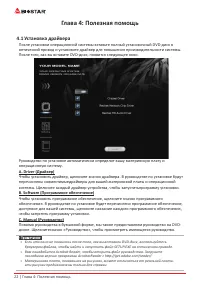
22 | Глава 4: Полезная помощь Глава 4: Полезная помощь 4�1 Установка драйвера После установки операционной системы вставьте полный установочный DVD-диск в оптический привод и установите драйвер для повышения производительности системы. После того, как вы вставите DVD-диск, появится следующее окно. Р...
Page 53 - Звуковой код BIOS AMI; Звуковые коды загрузочного блока; Звуковые POST-коды BIOS; Количество; Код Описание
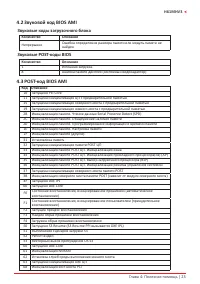
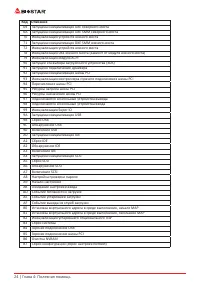
Глава 4: Полезная помощь | 23 H61MHV3 4�2 Звуковой код BIOS AMI Звуковые коды загрузочного блока Количество Описание Непрерывно Ошибка определения размера памяти или модуль памяти не найден Звуковые POST-коды BIOS Количество Описание 1 Успешная загрузка. 8 Ошибка памяти дисплея (системный видеоадапт...
Page 55 - Поиск и устранение неисправностей; Неисправность; Перегрев ЦП; это означает, что активирована функция защиты ЦП.
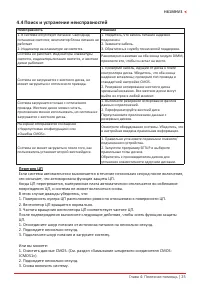
Глава 4: Полезная помощь | 25 H61MHV3 4�4 Поиск и устранение неисправностей Неисправность Решение 1. В системе отсутствует питание. Светодиод питанияне светится; вентилятор блока питания не работает 2. Индикатор на клавиатуре не светится. 1. Убедитесь, что кабель питания надежно подключен. 2. Замени...
Page 56 - Эта страница намеренно оставлена пустой.
26 | Глава 4: Полезная помощь Эта страница намеренно оставлена пустой.
Page 57 - 본설명서내용은BIOSTAR; 정전기방지 조작 규칙
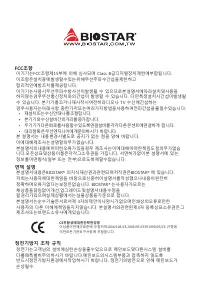
FCC조항 이기기는FCC조항제15부에 의해 심사되며 Class B급디지털장치제한에부합됩니다. 이조항은설치중에발생할수있는유해무선주파수간섭을제한하고 합리적인예방조치를제공합니다.이기기는사용시무선주파수방사선이발생될 수 있으므로본설명서에따라설치및사용을 하지않는경우무선통신장치와의간섭이 발생할 수 있습니다. 다만특정설치시간섭이발생될 수 있습니다. 본기기를끄거나재시작시여전히라디오나 TV 수신에간섭하는 경우사용자는아래사항 중한가지또는여러가지방법을사용하여전파간섭을줄일수있습니다: • 재설치또는수신안테나를조절합니다.• 본기기와수신설비간의거리를증가합니다....
Page 59 - 목차; 챕터 1: 들어가는 글 ������������������������������������������������������������������������������������������������
목차 | 3 H61MHV3 목차 챕터 1: 들어가는 글 ������������������������������������������������������������������������������������������������ 4 1.1 시작하기에 앞서 ................................................................................................................................4 1.2 패키지 체크리스트 ................
Page 60 - 패키지 체크리스트
4 | 챕터 1: 들어가는 글 챕터 1: 들어가는 글 1�1 시작하기에 앞서 우선,바이오스타제품을선택해주셔서감사합니다. 메인보드를설치하기 전에아래의내용을준수하고있는지확인 바랍니다: • 작업에적합한조명아래건조하고안정적인작업환경을갖추시기 바랍니다.• 작업전컴퓨터전원콘센트의연결을차단시키시기 바랍니다.• 정전기방지비닐에서메인보드를꺼내기전, 접지설비에안전하게접촉하거나정전기를제 거하는접지용손목스트랩을사용하여적절히접지하시기바랍니다. • 필요한경우가아니면마더보드상의부품또는보드의후면과의접촉을피하시기 바랍니다. 보드의모서리를잡고보드를구부리지마십시오....
Page 67 - �4 시스템 메모리 설치; DDR3 모듈
챕터 2: 하드웨어 설치 | 11 H61MHV3 2�3 쿨링 팬 연결 쿨링 팬 헤더에 쿨링 팬을 연결하여 컴퓨터에 장착하게 됩니다. 팬 케이블과 커넥터는 팬 제조사에 따라 달라질 수 있습니다. CPU_FAN: CPU 팬 헤더 핀 배열 1 Ground 2 +12V 3 FAN RPM rate sense 4 Smart Fan Control (By Fan) SYS_FAN1: 시스템 팬 헤더 핀 배열 1 Ground 2 +12V 3 FAN RPM rate sense » CPU_FAN, SYS_FAN1은4-pin과3-pin 헤드 커넥터를 지원...
Page 68 - 메모리 용량; DIMM소켓 위치; 듀얼 채널 메모리 설치; 듀얼 채널 상태
12 | 챕터 2: 하드웨어 설치 1단계: 고정 클립을 눌러 바깥으로 향하게 하여, 메모리를 설치할 수 있게 DIMM 슬롯을 열어줍니다. 메모리 홈의 위치가 슬롯 홈의 위치와 일치하도록 확인합니다. 2단계: 슬롯에 메모리를 수직으로 밀어 넣어 단단하게 장착하고, 고정 클립에서 딸깍 소리가 나는지확인하여 메모리가 적합하게 자리를 잡은 것인지확입합니다. » 메모리가 제대로장착되지 않는다고 무리하게 설치하지 마십시오. 메모리를제거한 후 다시 장착을 시도하시기 바랍니다. 메모리 용량 DIMM소켓 위치 DDR3 모듈 총 메모리 크기 DDR3...
Page 69 - 확장 카드 설치; 다음의 단계에 따라 확장 카드를 장착할 수 있습니다 :
챕터 2: 하드웨어 설치 | 13 H61MHV3 2�5 확장 슬롯 PCIEG3X16_1: PCI-Express 3세대 x16 슬롯(x16 모드) • PCI-Express 3.0 규격.• PCIe 슬롯의 최대 대역폭은 32GB/s입니다. PCIEG2X1_1: PCI-Express 2세대 x1 슬롯 • PCI-Express 2.0 규격.• 방향 당 데이터 전송 대역폭은 최대 0.5GB/s이며, 총 1GB/s 입니다. 확장 카드 설치 다음의 단계에 따라 확장 카드를 장착할 수 있습니다 : • 컴퓨터에 확장 카드를 설치하기 전에 확장 카드...
Page 72 - 이 커넥터들은 SATA 케이블을 통해 SATA 하드 디스크 드라이브에 연결됩니다.
16 | 챕터 2: 하드웨어 설치 SPKR: 섀시 스피커 헤더 섀시 스피커를이 헤더에 연결하십시오. 핀 배열 1 +5V 2 N/A 3 N/A 4 Speaker SATA_1/ SATA_2/ SATA_3/ SATA_4: 시리얼 ATA 2�0 커넥터 이 커넥터들은 SATA 케이블을 통해 SATA 하드 디스크 드라이브에 연결됩니다. 핀 배열 1 Ground 2 TX+ 3 TX- 4 Ground 5 RX- 6 RX+ 7 Ground F_USB20_1/ F_USB20_2: 전면 패널 USB 2�0 포트용 헤더 이 헤더는 사용자에게 PC 전면 ...
Page 73 - 본 메인 보드는 1개의 직렬포트가 있으며RS-232커넥터를 연결할 수 있습니다.
챕터 2: 하드웨어 설치 | 17 H61MHV3 F_AUDIO: 전면 패널 오디오 헤더 이 헤더는 사용자로 하여금 HD 그리고 AC’97 오디오 표준을 지원하는 케이스 전면 패널 오디오 입/출력 포트와 연결할 수 있게 합니다. HD Audio AC’97 핀 배열 핀 배열 1 Mic Left in 1 Mic In 2 Ground 2 Ground 3 Mic Right in 3 Mic Power 4 GPIO 4 Audio Power 5 Right line in 5 RT Line Out 6 Jack Sense 6 RT Line Out 7 ...
Page 74 - �1 UEFI 바이오스 설정; • 바이오스 설정 프로그램은 컴퓨터의 바이오스 설정을 보거나 변경할 때 사용됩니다.
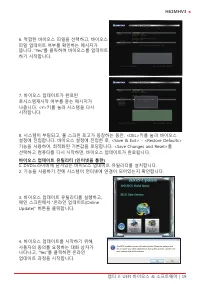
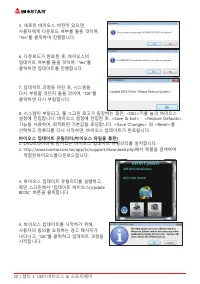
18 | 챕터 3: UEFI 바이오스 & 소프트웨어 챕터 3: UEFI 바이오스 & 소프트웨어 3�1 UEFI 바이오스 설정 • 바이오스 설정 프로그램은 컴퓨터의 바이오스 설정을 보거나 변경할 때 사용됩니다. 바이오스 설정 프로그램은 POST 메모리 테스트가 시작되고 운영 체제가 부팅되기 전에 <DEL>키를 눌러 진입할 수 있습니다. • UEFI 바이오스의 더 자세한 정보는 웹사이트의 UEFI 바이오스 설명서를 참조하여 주십시오. 3�2 바이오스 업데이트 바이오스는 다음의 유틸리티 중의 하나를 사용하여 업데...
Page 77 - 바이오스의 백업
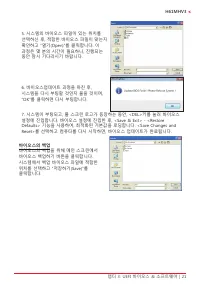
챕터 3: UEFI 바이오스 & 소프트웨어 | 21 H61MHV3 5. 시스템의 바이오스 파일이 있는 위치를 선택하신 후, 적합한 바이오스 파일이 맞는지 확인하고 “열기(Open)”를 클릭합니다. 이 과정은 몇 분의 시간이 필요하니, 진행되는 동안 잠시 기다리시기 바랍니다. 6. 바이오스업데이트 과정을 마친 후, 시스템을 다시 부팅할 것인지 물을 것이며, “OK”를 클릭하면 다시 부팅합니다. 7. 시스템이 부팅되고, 풀 스크린 로고가 등장하는 동안, <DEL>키를 눌러 바이오스 설정에 진입합니다. 바이오스 설정에 ...
Page 78 - 소프트웨어의 설치; 광학 드라이브에 시작 DVD를 넣은 후, 자동 실행 기능이 활성화 되면 드라이버; 소프트웨어의 실행; 부트 로고를 업데이트 하기 위해 아래 지시사항을 순서대로 준수하시기 바랍니다 :
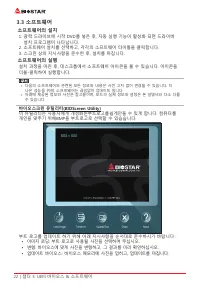
22 | 챕터 3: UEFI 바이오스 & 소프트웨어 3�3 소프트웨어 소프트웨어의 설치 1. 광학 드라이브에 시작 DVD를 넣은 후, 자동 실행 기능이 활성화 되면 드라이버 설치 프로그램이 나타납니다. 2. 소프트웨어 설치를 선택하고, 각각의 소프트웨어 타이틀을 클릭합니다.3. 스크린 상의 지시사항을 준수한 후, 설치를 마칩니다. 소프트웨어의 실행 설치 과정을 마친 후, 데스크톱에서 소프트웨어 아이콘을 볼 수 있습니다. 아이콘을 더블-클릭하여 실행합니다. » 다음의 소프트웨어와 관련된 모든 정보와 내용은 사전 고지 없이 변경...
Page 79 - 설정 가이드는 사용자의 마더보드와 운영 체제를 자동으로 감지합니다.; A� 드라이버 설치
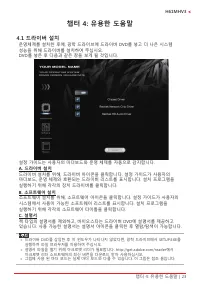
챕터 4: 유용한 도움말 | 23 H61MHV3 챕터 4: 유용한 도움말 4�1 드라이버 설치 운영체제를 설치한 후에, 광학 드라이브에 드라이버 DVD를 넣고 더 나은 시스템 성능을 위해 드라이버를 설치하여 주십시오.DVD를 넣은 후 다음과 같은 창을 보게 될 것입니다. 설정 가이드는 사용자의 마더보드와 운영 체제를 자동으로 감지합니다. A� 드라이버 설치 드라이버 설치를 위해, 드라이버 아이콘을 클릭합니다. 설정 가이드가 사용자의 마더보드, 운영 체제와 호환되는 드라이버 리스트를 표시합니다. 설치 프로그램을 실행하기 위해 각각의 ...
Page 80 - AMI 바이오스 비프 코드; 부트 블록 비프 코드; POST 바이오스 비프 코드; 비프음 횟수; �3 AMI 바이오스 포스트 코드; 코드 설명
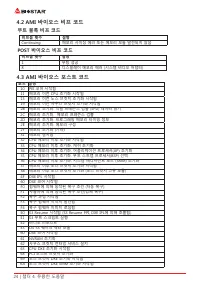
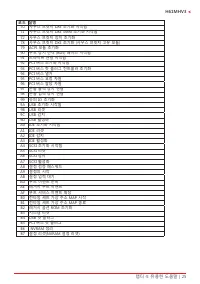
24 | 챕터 4: 유용한 도움말 4�2 AMI 바이오스 비프 코드 부트 블록 비프 코드 비프음 횟수 설명 Continuing 메모리 사이징 에러 또는 메모리 모듈 발견되지 않음 POST 바이오스 비프 코드 비프음 횟수 설명 1 부팅 성공 8 디스플레이 메모리 에러 (시스템 비디오 어댑터) 4�3 AMI 바이오스 포스트 코드 코드 설명 10 PEI 코어 시작됨11 메모리 이전 CPU 초기화 시작됨15 메모리 이전 노스 브릿지 초기화 시작됨19 메모리 이전 사우스 브릿지 초기화 시작됨2B 메모리 초기화. 직렬 프레즌스 검출 (SPD)...
Page 82 - 전원 케이블이 제대로 연결되어 있는지
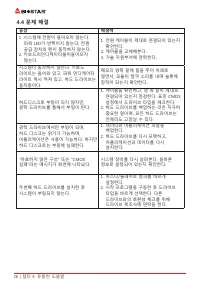
26 | 챕터 4: 유용한 도움말 4�4 문제 해결 증상 해결책 1. 시스템에 전원이 들어오지 않는다. 파워 LED가 반짝이지 않는다; 전원 공급 장치의 팬이 동작하지 않는다. 2. 키보드의인디케이터불이들어오지 않는다. 1. 전원 케이블이 제대로 연결되어 있는지 확인한다. 2. 케이블을 교체해본다.3. 기술 지원부서에 연락한다. 시스템이 동작하지 않는다. 키보드 라이트는 들어와 있고, 파워 인디케이터 라이트 역시 켜져 있고, 하드 드라이브는 동작중이다. 메모리 양쪽 끝에 힘을 주어 아래로 밀면서, 모듈이 딸깍 소리를 내며 슬롯에 장...
Page 83 - CPU의 과열
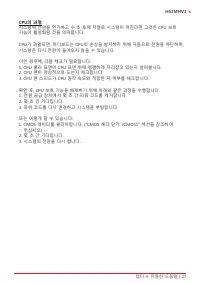
챕터 4: 유용한 도움말 | 27 H61MHV3 CPU의 과열 시스템에 전원을 인가하고 수 초 후에 저절로 시스템이 꺼진다면 그것은 CPU 보호 기능이 활성화된 것을 의미합니다. CPU가 과열되면, 마더보드는 CPU의 손상을 방지하기 위해 자동으로 전원을 차단하며, 시스템은 다시 전원이 들어오지 않을 수 있습니다. 이런 경우에, 더블 체크가 필요합니다:1. CPU 쿨러 표면이 CPU 표면 위에 평평하게 자리잡고 있는지 살펴봅니다.2. CPU 팬이 정상적으로 도는지 체크합니다.3. CPU 팬 스피드가 CPU 동작 속도와 적합한 지 여...
Page 84 - 防靜電操作規則
FCC條款 本裝置經測試,證實依據FCC規範第15篇規定,符合Class B數位裝置的限制。這些限制意 旨在提供合理的保護以防範有害的干擾。本設備會產生、使用並發出無線射頻能量,如未 依指示進行安裝與使用,可能會對無線電通訊造成有害的干擾。然而,無法保證在任一特 定安裝情況下不會產生任何干擾。如果本設備確實對無線電或電視收訊造成有害的干擾 (可 透過開啟和關閉設備電源的方式確定),則我們鼓勵使用者嘗試下列其中一項或多項方式來 改善干擾情況: • 重新調整接收天線的方向或位置。 • 增加設備與接收器之間的間隔距離。 • 將設備連接至與接收器所接電路不同的電源插座。 • 諮詢經銷商或有經驗的無線電...
Page 85 - 目錄; 第一章: 主板介绍 �������������������������������������������������������������������������������������������������������
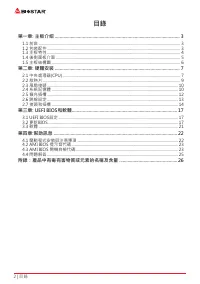
2 | 目錄 目錄 第一章: 主板介绍 ������������������������������������������������������������������������������������������������������� 3 1.1 前言 ............................................................................................................................................... 3 1.2 包裝配件 ...............
Page 87 - 主板特性
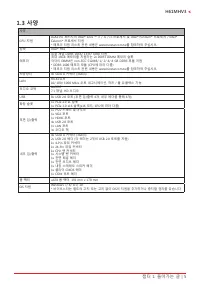
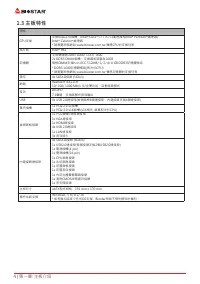
4 | 第一章: 主板介绍 1�3 主板特性 規格 CPU支援 支援LGA1155插槽,Intel ® Core™ i7 / i5 / i3處理器和Intel ® Pentium ® 處理器/ Intel ® Celeron ® 處理器 * 請瀏覽映泰網站 www.biostar.com.tw 獲得CPU的支援列表 晶片組 Intel ® H61 記憶體 支援雙通道DDR3 1066/ 1333/ 16002x DDR3 DIMM插槽,支援最高容量為16GB每根DIMM支援non-ECC 512MB/ 1/ 2/ 4/ 8 GB DDR3記憶體模組* DDR3 1600記憶體模組(取決於CPU...
Page 93 - 此風扇接頭支援電腦上設置的冷卻風扇,風扇電纜和連接器可能因風扇製造商而有差; DDR3記憶體模組
10 | 第二章: 硬體安裝 2�3 風扇接頭 此風扇接頭支援電腦上設置的冷卻風扇,風扇電纜和連接器可能因風扇製造商而有差 異。 CPU_FAN: 風扇接頭 針 定義1 接地 2 +12V 3 FAN RPM rate sense 4 Smart Fan Control (By Fan) SYS_FAN1: 系統風扇接頭 針 定義1 接地 2 +12V 3 FAN RPM rate sense » CPU_FAN,SYS_FAN1支援4個針腳和3針腳接頭;接線時請注意紅線是正級需接到第二個針 腳,黑線接地需接到接地針腳。 2�4 系統記憶體 DDR3記憶體模組
Page 94 - 記憶體容量; DIMM插槽位置; 雙通道記憶安裝; 為啓動主板雙通道功能,使用記憶體模組必須符合以下要求: 成對安裝相同密度的記憶; 雙通道狀態
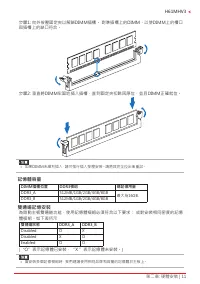
第二章: 硬體安裝 | 11 H61MHV3 步驟1: 向外按壓固定夾以解鎖DIMM插槽。 對準插槽上的DIMM,以使DIMM上的槽口 與插槽上的缺口符合。 步驟2: 垂直將DIMM牢固地插入插槽,直到固定夾扣跳回原位,並且DIMM正確就位。 » 如果DIMM未順利插入,請勿強行插入按壓安裝。請將其完全拉出後重試。 記憶體容量 DIMM插槽位置 DDR3模组 總記憶用量 DDR3_A 512MB/1GB/2GB/4GB/8GB 最大為16GB. DDR3_B 512MB/1GB/2GB/4GB/8GB 雙通道記憶安裝 為啓動主板雙通道功能,使用記憶體模組必須符合以下要求: 成對安裝相同密度的記...
Page 95 - 安裝擴充卡
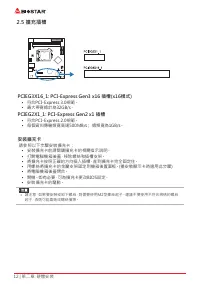
12 | 第二章: 硬體安裝 2�5 擴充插槽 PCIEG3X16_1: PCI-Express Gen3 x16 插槽(x16模式) • 符合PCI-Express 3.0規範。 • 最大帶寬總計為32GB/s。 PCIEG2X1_1: PCI-Express Gen2 x1 插槽 • 符合PCI-Express 2.0規範。 • 每個資料傳輸頻寬高達500MB/s; 總頻寬為1GB/s。 安裝擴充卡 請參照以下步驟安裝擴充卡: • 安裝擴充卡前請閱讀擴充卡的相關指示說明。 • 打開電腦機箱後蓋,移除螺絲和插槽支架。 • 將擴充卡按照正確的方向插入插槽,直到擴充卡完全固定住。 • 用螺絲將擴...
Page 97 - 為了更好的相容性,我們建議使用標準的ATX24-pin電源供應此插槽的電源。; 此10針腳接頭包含開機,重新啓動,硬碟指示燈和電源指示燈。
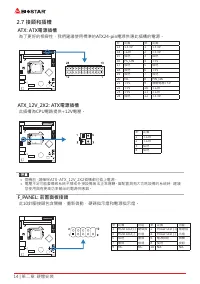
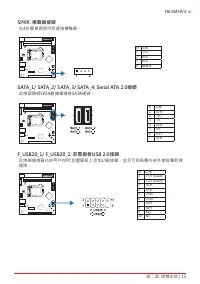
14 | 第二章: 硬體安裝 2�7 接頭和插槽 ATX: ATX電源插槽 為了更好的相容性,我們建議使用標準的ATX24-pin電源供應此插槽的電源。 針 定義 針 定義 13 +3.3V 1 +3.3V 14 -12V 2 +3.3V 15 接地 3 接地 16 PS_ON 4 +5V 17 接地 5 接地 18 接地 6 +5V 19 接地 7 接地 20 NC 8 PW_OK 21 +5V 9 喚醒電壓+5V 22 +5V 10 +12V 23 +5V 11 +12V 24 接地 12 +3.3V ATX_12V_2X2: ATX電源插槽 此插槽為CPU電路提供+12V電壓。 針 定義...
Page 99 - 此主板提供序列埠接頭可接至RS-232接頭。
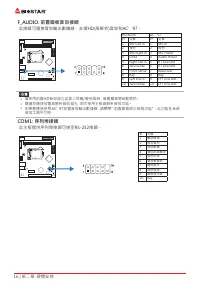
16 | 第二章: 硬體安裝 F_AUDIO: 前置面板音效接頭 此接頭可連接音效輸出數據線,支援HD(高解析)音效和AC’97。 HD Audio AC’97 針 定義 針 定義 1 Mic Left in 1 Mic In 2 接地 2 接地 3 Mic Right in 3 Mic Power 4 GPIO 4 Audio Power 5 Right line in 5 RT Line Out 6 Jack Sense 6 RT Line Out 7 Front Sense 7 Reserved 8 Key 8 Key 9 Left line in 9 LFT Line Out 10 J...
Page 100 - �1 UEFI BIOS設定
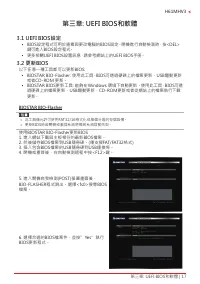
第三章: UEFI BIOS和軟體 | 17 H61MHV3 第三章: UEFI BIOS和軟體 3�1 UEFI BIOS設定 • BIOS設定程式可用於查看與更改電腦的BIOS設定。開機進行自動檢測時,按<DEL> 鍵可進入BIOS設定程式。 • 更多相關UEFI BIOS設置訊息,請參考網站上的UEFI BIOS手册。 3�2 更新BIOS 以下任意一種工具都可以更新BIOS: • BIOSTAR BIO-Flasher: 使用此工具,BIOS可透過硬碟上的檔案更新、USB驅動更新 或者CD-ROM 更新。 • BIOSTAR BIOS更新工具: 能夠在Windows 環境下...
Page 101 - BIOS更新工具(通過網路)
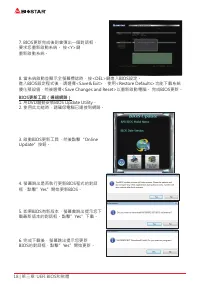
18 | 第三章: UEFI BIOS和軟體 7. BIOS更新完成後則會彈出一個對話框, 要求您重新啟動系統。 按<Y>鍵 重新啟動系統。 8. 當系統啟動並顯示全螢幕標誌時,按<DEL>鍵進入BIOS設定。 進入BIOS設定程式後,請選擇<Save&Exit>,使用<Restore Defaults>功能下載系統 優化預設值,然後選擇<Save Changes and Reset>以重新啟動電腦。 完成BIOS更新。 BIOS更新工具(通過網路) 1. 用DVD驅動安裝BIOS Update Utility。 2. 使用此功能時,...
Page 102 - BIOS更新工具(通過BIOS文件)
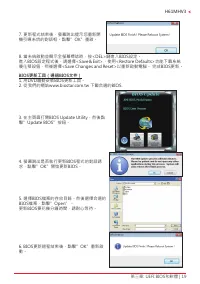
第三章: UEFI BIOS和軟體 | 19 H61MHV3 7. 更新程式结束後,螢幕跳出提示您重新開 機引導系统的對話框。點擊”OK”重啟。 8. 當系統啟動並顯示全螢幕標誌時,按<DEL>鍵進入BIOS設定。 進入BIOS設定程式後,請選擇<Save&Exit>,使用<Restore Defaults>功能下載系統 優化預設值,然後選擇<Save Changes and Reset>以重新啟動電腦。 完成BIOS更新。 BIOS更新工具(通過BIOS文件) 1. 用DVD驅動安裝BIOS更新工具。 2. 從我們的網站www.biostar....
Page 103 - 優化預設值,然後選擇以重新啟動電腦。 完成BIOS更新。; BIOS備份; 點擊BIOS備份按鈕,選擇備份檔案內的合適目
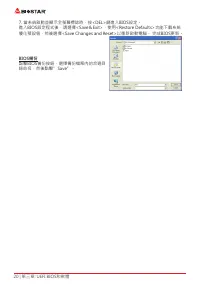
20 | 第三章: UEFI BIOS和軟體 7. 當系統啟動並顯示全螢幕標誌時,按<DEL>鍵進入BIOS設定。 進入BIOS設定程式後,請選擇<Save&Exit>,使用<Restore Defaults>功能下載系統 優化預設值,然後選擇<Save Changes and Reset>以重新啟動電腦。 完成BIOS更新。 BIOS備份 點擊BIOS備份按鈕,選擇備份檔案內的合適目 錄命名,然後點擊”Save”。
Page 104 - BIOScreen 工具
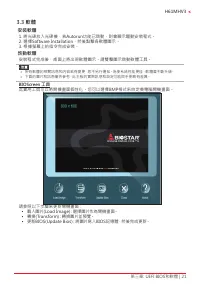
第三章: UEFI BIOS和軟體 | 21 H61MHV3 3�3 軟體 安裝軟體 1. 將光碟放入光碟機,若Autorun功能已啓動,則會顯示驅動安裝程式。 2. 選擇Software Installation,然後點擊各軟體圖示。 3. 根據螢幕上的指令完成安裝。 啓動軟體 安裝程式完成後,桌面上將出現軟體圖示。請雙擊圖示啓動軟體工具。 » 所有軟體的相關訊息和内容若有變更,恕不另行通知。為使系統性能更佳,軟體會不斷升級。 » 下面的圖片和訊息僅供參考,此主板的實際訊息和設定可能與手册略有差異。 BIOScreen 工具 此實用工具可以將開機畫面個性化。您可以選擇BMP格式來自定義電腦開...
Page 105 - 驅動程式安裝注意事項; A� 驅動程式安裝
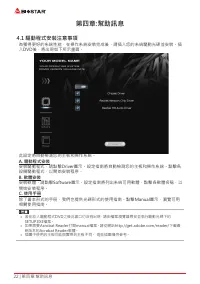
22 | 第四章:幫助訊息 第四章:幫助訊息 4�1 驅動程式安裝注意事項 為獲得更好的系統性能,在操作系統安裝完成後,請插入您的系統驅動光碟並安裝。插 入DVD後,將出現如下所示畫面。 此設定將自動檢測您的主板和操作系統。 A� 驅動程式安裝 安裝驅動程式,請點擊Driver圖示。設定指南將自動檢測您的主板和操作系統。點擊各 設備驅動程式,以開始安裝程序。 B� 軟體安裝 安裝軟體,請點擊Software圖示。設定指南將列出系統可用軟體,點擊各軟體名稱,以 開始安裝程序。 C� 使用手册 除了書本形式的手册,我們也提供光碟形式的使用指南。點擊Manual圖示,瀏覽可用 相關使用指南。 » 若...
Page 106 - AMI BIOS 提示音代碼; 啓動區塊模組提示音代碼; BIOS 開機自檢提示音代碼; 提示音次數; AMI BIOS 開機自檢代碼; 代碼 含義
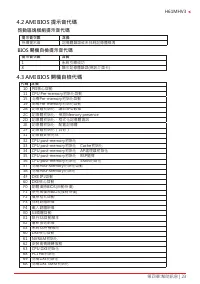
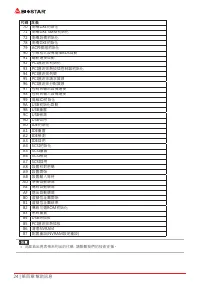
第四章:幫助訊息 | 23 H61MHV3 4�2 AMI BIOS 提示音代碼 啓動區塊模組提示音代碼 提示音次數 含義 持續提示音 記憶體錯誤或未找到記憶體模塊 BIOS 開機自檢提示音代碼 提示音次數 含義 1 系統引導成功 8 顯示記憶體錯誤(視訊介面卡) 4�3 AMI BIOS 開機自檢代碼 代碼 含義 10 PEI核心啓動11 CPU Pre-memory初始化啓動15 北橋Pre-memory初始化啓動19 南橋Pre-memory初始化啓動2B 記憶體初始化,讀取SPD數據 2C 記憶體初始化,檢測Memory presence 2D 記憶體初始化,程式化記憶體資訊 2E 記...
Page 108 - 問題解答; 問題
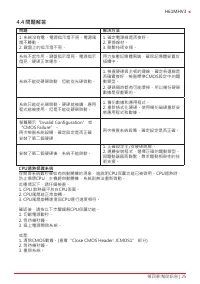
第四章:幫助訊息 | 25 H61MHV3 4�4 問題解答 問題 解决方法 1. 系統沒有電,電源指示燈不亮,電源風 扇不轉動。 2. 鍵盤上的指示燈不亮。 1. 確定電源線是否接好。 2. 更換線材。 3. 聯繫技術支援。 系統不起作用。鍵盤指示燈亮,電源指示 燈亮,硬碟正常運作。 用力按壓記憶體兩端,確保記憶體安置於 插槽中。 系統不能從硬碟啓動,但能從光碟啓動。 1. 檢查硬碟與主板的連線,確定各連線是 否確實接好,檢查標準CMOS設定中的驅 動類型。 2. 硬碟隨時都有可能壞掉,所以備份硬碟 數據是很重要的。 系統只能從光碟啓動。硬碟能被讀,應用 程式能被使用,但是不能從硬碟啓動。 ...
Page 109 - 6 | 附录:产品中有毒有害物质或元素的名称及含量; 附录:产品中有毒有害物质或元素的名称及含量
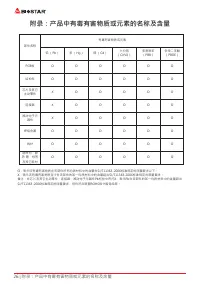
26 | 附录:产品中有毒有害物质或元素的名称及含量 附录:产品中有毒有害物质或元素的名称及含量 部件名称 有毒有害物质或元素 铅 (Pb) 汞 (Hg) 镉 (Cd) 六价铬 (Cr(VI)) 多溴联苯 (PBB) 多溴二苯醚 (PBDE) PCB板 O O O O O O 结构件 O O O O O O 芯片及其它 主动零件 X O O O O O 连接器 X O O O O O 被动电子元 器件 X O O O O O 焊接金属 O O O O O O 线材 O O O O O O 助焊剂,散 热 膏,标签 及其它耗材 O O O O O O O:表示该有毒有害物质在该部件所有均质材料中...


 Biostar A68N-2100K User Manual
 Biostar B450NH User Manual
 Biostar B550 User Manual
 Biostar B550MH User Manual
 Biostar B550MX/E PRO User Manual
 Biostar B550T User Manual
 Biostar B560MH-E 2.0 User Manual
 Biostar B660GTA User Manual
 Biostar B660GTQ User Manual
 Biostar B660MX-E PRO User Manual
 Biostar B760 User Manual
 Biostar H81MHV3 3.0 User Manual
 Biostar H510 User Manual
 Biostar H610 User Manual
 Biostar J4125 User Manual
 Biostar Z490 User Manual