Page 2 - | Table Of Contents; Table Of Contents; FCC Information and Copyright
2 | Table Of Contents Table Of Contents FCC Information and Copyright ������������������������������������������������������������������������������� 1 Chapter 1: Introduction ������������������������������������������������������������������������������������������� 3 1.1 Before You Start ............
Page 3 - Chapter 1: Introduction; Before You Start
Chapter 1: Introduction | 3 H510MHP l B560MHP Chapter 1: Introduction 1�1 Before You Start Thank you for choosing our product. Before you start installing the motherboard, please make sure you follow the instructions below: • Prepare a dry and stable working environment with sufficient lighting. • ...
Page 4 - Specifications
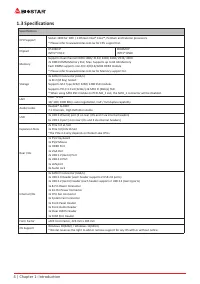
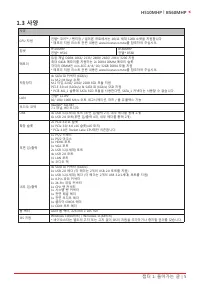
4 | Chapter 1: Introduction 1�3 Specifications Specifications CPU Support Socket 1200 for 10th / 11th Gen Intel® Core™, Pentium and Celeron processors* Please refer to www.biostar.com.tw for CPU support list. Chipset H510MHPINTEL® H510 B560MHPINTEL® B560 Memory Supports Dual Channel DDR4 1866/ 2133/...
Page 5 - Rear Panel Connectors
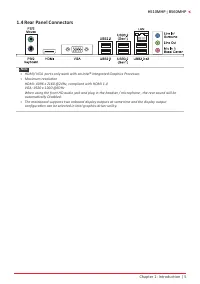
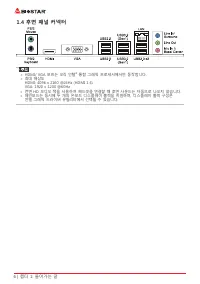
Chapter 1: Introduction | 5 H510MHP l B560MHP 1.4 Rear Panel Connectors Note » HDMI/ VGA ports only work with an Intel® integrated Graphics Processor. » Maximum resolution HDMI: 4096 x 2160 @24Hz, compliant with HDMI 1.4 VGA: 1920 x 1200 @60Hz When using the front HD audio jack and plug in the h...
Page 8 - Chapter 2: Hardware installation; Step 1: Locate the CPU socket on the motherboard
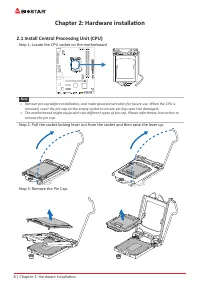
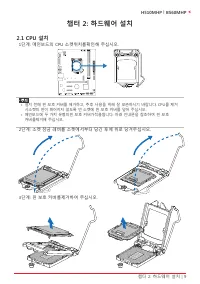
8 | Chapter 2: Hardware installation Chapter 2: Hardware installation 2.1 Install Central Processing Unit (CPU) Step 1: Locate the CPU socket on the motherboard Note » Remove pin cap before installation, and make good preservation for future use. When the CPU is removed, cover the pin cap on the e...
Page 9 - processor in the socket.
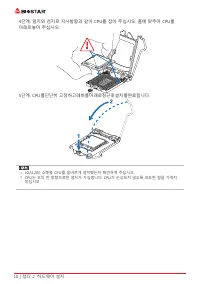
Chapter 2: Hardware installation | 9 H510MHP l B560MHP Step 4: Hold processor with your thumb and index fingers, oriented as shown. Align the notches with the socket. Lower the processor straight down without tilting or sliding the processor in the socket. Step 5: Hold the CPU down firmly, and then ...
Page 10 - Install a Heatsink; to the CPU fan connector.
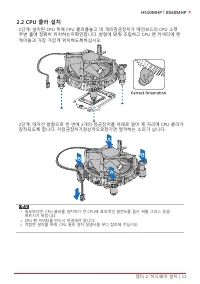
10 | Chapter 2: Hardware installation 2.2 Install a Heatsink Step 1: Place the CPU fan assembly on top of the installed CPU and make sure that the four fasteners match the motherboard holes. Orient the assembly and make the fan cable is closest to the CPU fan connector. Step 2: Press down two fasten...
Page 11 - Connect Cooling Fans; may be different according to the fan manufacturer.; Install System Memory; DDR4 Modules
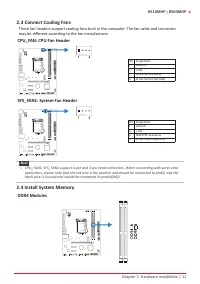
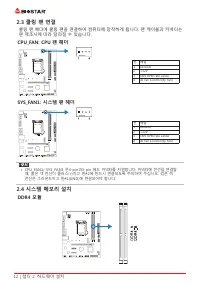
Chapter 2: Hardware installation | 11 H510MHP l B560MHP 2.3 Connect Cooling Fans These fan headers support cooling-fans built in the computer. The fan cable and connector may be different according to the fan manufacturer. CPU_FAN: CPU Fan Header Pin Assignment1 Ground 2 +12V 3 FAN RPM rate sense 4 ...
Page 12 - Memory Capacity; DIMM Socket Location DDR4 Module; Dual Channel Memory Installation; Dual Channel Status
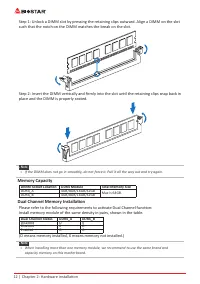
12 | Chapter 2: Hardware installation Step 1: Unlock a DIMM slot by pressing the retaining clips outward. Align a DIMM on the slot such that the notch on the DIMM matches the break on the slot. Step 2: Insert the DIMM vertically and firmly into the slot until the retaining clips snap back in place a...
Page 13 - Install an Expansion Card
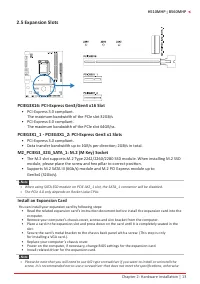
Chapter 2: Hardware installation | 13 H510MHP l B560MHP 2.5 Expansion Slots PCIEG3X16: PCI-Express Gen3/Gen4 x16 Slot • PCI-Express 3.0 compliant. The maximum bandwidth of the PCle slot 32GB/s • PCI-Express 4.0 compliant. The maximum bandwidth of the PCle slot 64GB/ss. PCIEG3X1_1 ˴ PCIEG3X1_2: PCI...
Page 14 - JCMOS1: Clear CMOS Jumper; follow the procedures to avoid damaging the motherboard.; Clear CMOS Procedures:; Load Optimal Defaults and save settings in CMOS.
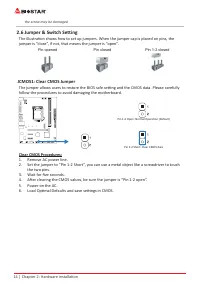
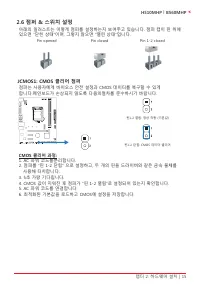
14 | Chapter 2: Hardware installation the screw may be damaged. 2.6 Jumper & Switch Setting The illustration shows how to set up jumpers. When the jumper cap is placed on pins, the jumper is “close”, if not, that means the jumper is “open”. Pin opened Pin closed Pin 1-2 closed JCMOS1: Clear CMOS...
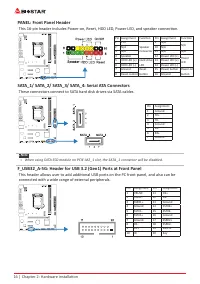
Page 16 - PANEL: Front Panel Header; These connectors connect to SATA hard disk drives via SATA cables.; connected with a wide range of external peripherals.
16 | Chapter 2: Hardware installation PANEL: Front Panel Header This 16-pin header includes Power-on, Reset, HDD LED, Power LED, and speaker connection. Pin Assignment Function Pin Assignment Function 1 +5V Speaker Connector 9 N/A N/A 2 N/A 10 N/A 3 N/A 11 N/A N/A 4 Speaker 12 Power LED (+) Power LE...
Page 17 - COM1: Serial Port Header
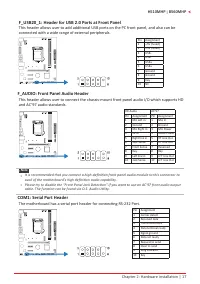
Chapter 2: Hardware installation | 17 H510MHP l B560MHP F_USB20_1: Header for USB 2.0 Ports at Front Panel This header allows user to add additional USB ports on the PC front panel, and also can be connected with a wide range of external peripherals. Pin Assignment1 +5V (fused) 2 +5V (fused) 3 USB- ...
Page 18 - The BIOS can be updated using either of the following utilities:; Updating BIOS with BIOSTAR BIO-Flasher
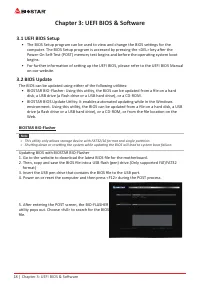
18 | Chapter 3: UEFI BIOS & Software Chapter 3: UEFI BIOS & Software 3.1 UEFI BIOS Setup • The BIOS Setup program can be used to view and change the BIOS settings for the computer. The BIOS Setup program is accessed by pressing the <DEL> key after the Power-On Self-Test (POST) memory ...
Page 19 - BIOS Update Utility (through the Internet)
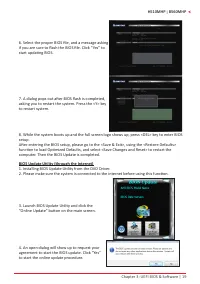
Chapter 3: UEFI BIOS & Software | 19 H510MHP l B560MHP 6. Select the proper BIOS file, and a message asking if you are sure to flash the BIOS file. Click “Yes” to start updating BIOS. 7. A dialog pops out after BIOS flash is completed, asking you to restart the system. Press the <Y> key to...
Page 20 - BIOS Update Utility (through a BIOS file)
20 | Chapter 3: UEFI BIOS & Software 5. If there is a new BIOS version, the utility will ask you to download it. Click “Yes” to proceed. 6. After the download is completed, you will be asked to program (update) the BIOS or not. Click “Yes” to proceed. 7. After the updating process is finished, y...
Page 21 - Backup BIOS
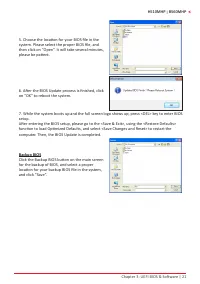
Chapter 3: UEFI BIOS & Software | 21 H510MHP l B560MHP 5. Choose the location for your BIOS file in the system. Please select the proper BIOS file, and then click on “Open”. It will take several minutes, please be patient. 6. After the BIOS Update process is finished, click on “OK” to reboot the...
Page 22 - Installing Software; Follow the on-screen instructions to complete the installation.; Launching Software; BIOScreen Utility; logo so as to customize your computer.
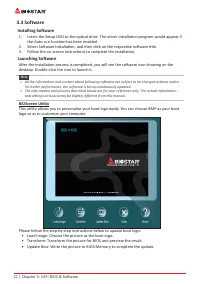
22 | Chapter 3: UEFI BIOS & Software 3.3 Software Installing Software 1. Insert the Setup DVD to the optical drive. The driver installation program would appear if the Auto-run function has been enabled. 2. Select Software Installation, and then click on the respective software title. 3. Follow ...
Page 23 - Chapter 4: Useful help; Driver Installation; You will see the following window after you insert the DVD; A. Driver Installation; installation program.; B. Software Installation; Manual icon to browse for available manual.
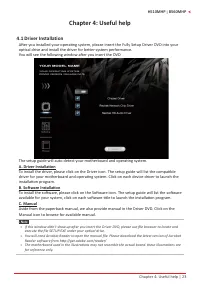
Chapter 4: Useful help | 23 H510MHP l B560MHP Chapter 4: Useful help 4.1 Driver Installation After you installed your operating system, please insert the Fully Setup Driver DVD into your optical drive and install the driver for better system performance. You will see the following window after you i...
Page 24 - AMI BIOS Beep Code; Boot Block Beep Codes; POST BIOS Beep Codes; Number of Beeps; AMI BIOS post code; Code Description
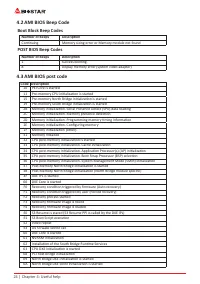
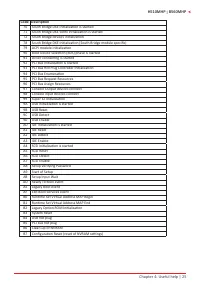
24 | Chapter 4: Useful help 4.2 AMI BIOS Beep Code Boot Block Beep Codes Number of Beeps Description Continuing Memory sizing error or Memory module not found POST BIOS Beep Codes Number of Beeps Description 1 Success booting. 8 Display memory error (system video adapter) 4.3 AMI BIOS post code Code...
Page 26 - Troubleshooting; Probable; CPU Overheated
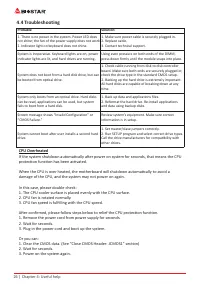
26 | Chapter 4: Useful help 4.4 Troubleshooting Probable Solution 1. There is no power in the system. Power LED does not shine; the fan of the power supply does not work 2. Indicator light on keyboard does not shine. 1. Make sure power cable is securely plugged in. 2. Replace cable. 3. Contact techn...
Page 27 - APPENDIX I: Specifications in Other Languages | 27; APPENDIX I: Specifications in Other Languages; Arabic
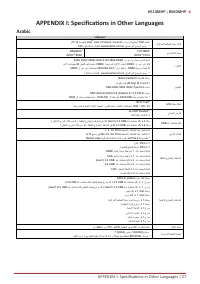
APPENDIX I: Specifications in Other Languages | 27 H510MHP l B560MHP APPENDIX I: Specifications in Other Languages Arabic تﺎﻔﺻاﻮﻤﻟا ﺔﻳﺰآﺮﻤﻟا ﺔﺠﻟﺎﻌﻤﻟا ةﺪﺣو ةﺪﻋﺎﻗ ﺬﺧﺄﻤﻟا 1200 ىد مإ ﻪﻳا ﺞﻟﺎﻌﻤﻟ Intel ® Core / Pentium / Celeron (11/10 ﻞ������ﻴﺠﻟا ) * ﻊﻗﻮﻤﻟا ﻰﻟإ عﻮﺟﺮﻟا ﻰﺟﺮﻳ www.biostar.com.tw ﺞﻟﺎﻌﻤﻟا ﻢﻋد ...
Page 28 - 8 | APPENDIX I: Specifications in Other Languages; German
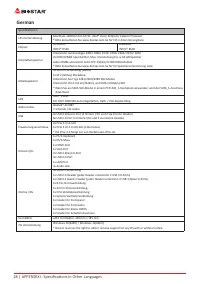
28 | APPENDIX I: Specifications in Other Languages German Spezifikationen CPU-Unterstützung Anschluss-1200 für den 10/11. Intel® Core/ Pentium/ Celeron Prozessor* Bitte konsultieren Sie www.biostar.com.tw für CPU-Unterstützungsliste Chipset H510MHPINTEL® H510 B560MHPINTEL® B560 Festplattenspeicher U...
Page 29 - APPENDIX I: Specifications in Other Languages | 29; Russian
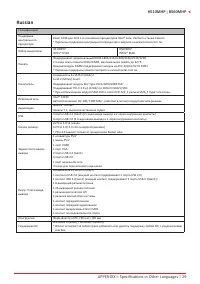
APPENDIX I: Specifications in Other Languages | 29 H510MHP l B560MHP Russian СпецификацииПоддержка центрального процессора Сокет 1200 для 10/11-го поколения процессоров Intel® Core, Pentium а также Celeron* Перечень поддержки центрального процессора смотрите на www.biostar.com.tw. Набор микросхем H5...
Page 30 - 0 | APPENDIX I: Specifications in Other Languages; Spanish
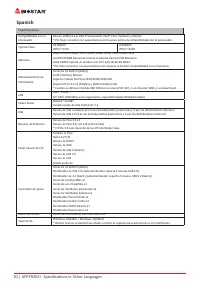
30 | APPENDIX I: Specifications in Other Languages Spanish EspecificacionesCompatibilidad con el procesador Ranura 1200 para el 10/11º procesador Intel® Core, Pentium y Celeron* Por favor consultar con www.biostar.com.tw para la lista de compatibilidad con el procesador. Tipo de Placa H510MHPINTEL® ...
Page 31 - APPENDIX I: Specifications in Other Languages | 31; Thai
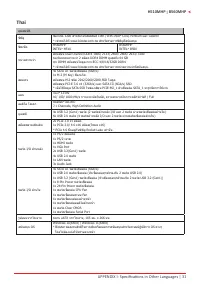
APPENDIX I: Specifications in Other Languages | 31 H510MHP l B560MHP Thai คุณสมบัติ ซีพียู ซ็อกเก็ต 1200 สำ�หรับโปรเซสเซอร์ 10th /11th Intel ® Core, Pentium และ Celeron * เข้�ชมได้ที่ www.biostar.com.tw สำ�หรับร�ยก�รซีพียูที่สนับสนุน ชิพเซ็ต H560MHPINTEL ® H510 B560MHPINTEL ® B560 หน่วยคว�มจำ� สนับส...
Page 32 - 2 | APPENDIX I: Specifications in Other Languages; Japan
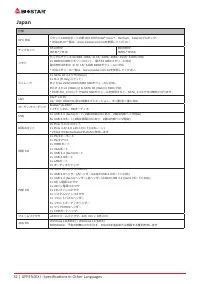
32 | APPENDIX I: Specifications in Other Languages Japan 仕様 CPU 対応 ソケット1200サポートの第10/11世代Intel ® Core™、Pentium、Celeronプロセッサー * 対応CPUの一覧は、www.biostar.com.twを参照してください チップセット H510MHPINTEL ® H510 B560MHPINTEL ® B560 メモリ デュアルチャンネルDDR4 1866/ 2133/ 2400/ 2666/ 2933/ 3200に対応2x DDR4 DIMMメモリースロット、最大64 GBのメモリーに...
Page 33 - Информация FCC и авторское право; без обязательства заранее уведомлять какую-либо сторону.
Информация FCC и авторское право Это оборудование было протестировано и признано соответствующим ограничениям для цифровых устройств класса B в соответствии с частью 15 правил Федеральной комиссии по связи США (FCC). Эти ограничения разработаны для обеспечения разумной защиты от вредных помех при ус...
Page 34 - Содержание; Информация FCC и авторское право ��������������������������������������������������������������������
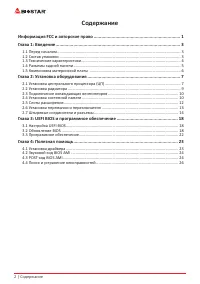
2 | Содержание Содержание Информация FCC и авторское право �������������������������������������������������������������������� 1 Глава 1: Введение �������������������������������������������������������������������������������������������������� 3 1.1 Перед началом ....................................
Page 36 - Технические характеристики
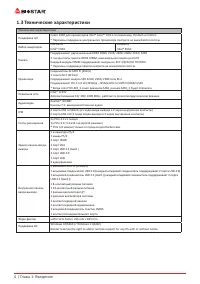
4 | Глава 1: Введение 1�3 Технические характеристики Технические характеристики Поддержка ЦП Сокет 1200 для процессоров Intel® Core™ 10/11-го поколения, Pentium и Celeron* Перечень поддержки центрального процессора смотрите на www.biostar.com.tw. Набор микросхем H510MHPIntel® H510 B560MHPIntel® B560...
Page 37 - Разъемы задней панели
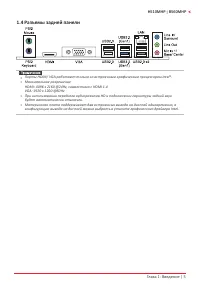
Глава 1: Введение | 5 H510MHP l B560MHP 1�4 Разъемы задней панели » » Порты HDMI/ VGA работают только со встроенным графическим процессором Intel®. » » Максимальное разрешение HDMI: 4096 x 2160 @24Hz, совместимо с HDMI 1.4 VGA: 1920 x 1200 @60Hz » » При использовании переднего аудиоразъема HD и...
Page 38 - �5 Компоновка материнской платы
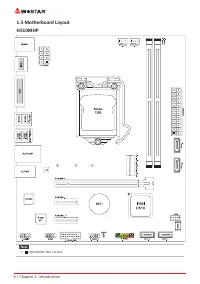
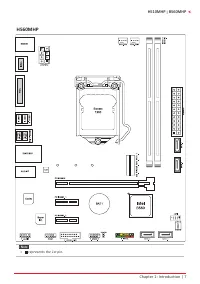
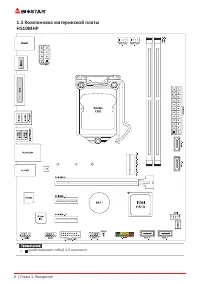
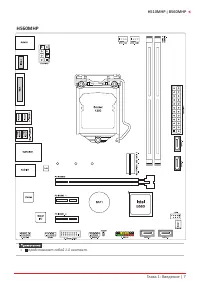
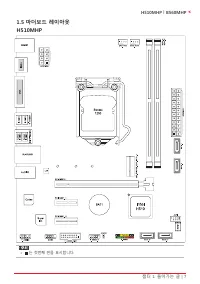
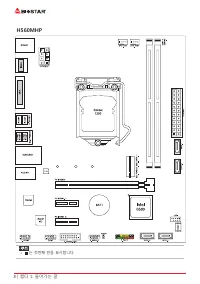
6 | Глава 1: Введение 1�5 Компоновка материнской платы H510MHP » » представляет собой 1-й контакт.
Page 40 - Глава 2: Установка оборудования; �1 Установка центрального процессора (ЦП); Шаг 1: Найдите сокет ЦП на материнской плате.
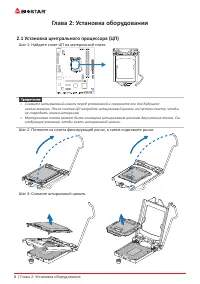
8 | Глава 2: Установка оборудования Глава 2: Установка оборудования 2�1 Установка центрального процессора (ЦП) Шаг 1: Найдите сокет ЦП на материнской плате. » » Снимите штырьковый цоколь перед установкой и сохраните его для будущего использования. После снятия ЦП накройте штырьковый цоколь на пуст...
Page 41 - наклоняя и не сдвигая процессор в сокете.
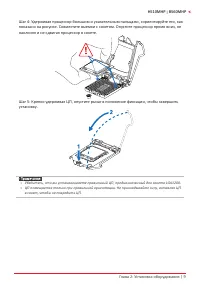
Глава 2: Установка оборудования | 9 H510MHP l B560MHP Шаг 4: Удерживая процессор большим и указательным пальцами, сориентируйте его, как показано на рисунке. Совместите выемки с сокетом. Опустите процессор прямо вниз, не наклоняя и не сдвигая процессор в сокете. Шаг 5: Крепко удерживая ЦП, опустите ...
Page 42 - �2 Установка радиатора; к разъему вентилятора ЦП.
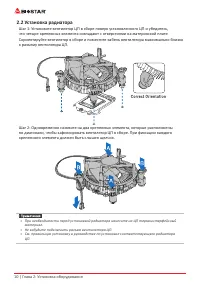
10 | Глава 2: Установка оборудования 2�2 Установка радиатора Шаг 1: Установите вентилятор ЦП в сборе поверх установленного ЦП и убедитесь, что четыре крепежных элемента совпадают с отверстиями на материнской плате. Сориентируйте вентилятор в сборе и поместите кабель вентилятора максимально близко к ...
Page 43 - �3 Подключение охлаждающих вентиляторов; от производителя вентилятора.; CPU_FAN: Штыревой соединитель вентилятора ЦП; SYS_FAN1: Штыревой соединитель вентилятора системы; �4 Установка системной памяти; Модули DDR4
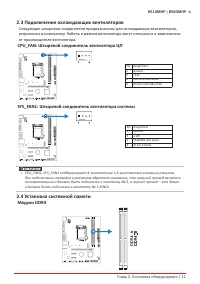
Глава 2: Установка оборудования | 11 H510MHP l B560MHP 2�3 Подключение охлаждающих вентиляторов Следующие штыревые соединители предназначены для охлаждающих вентиляторов, встроенных в компьютер. Кабель и разъем вентилятора могут отличаться в зависимости от производителя вентилятора. CPU_FAN: Штырево...
Page 44 - защелкнулисьи модуль DIMM установился должным образом.; Емкость памяти; Расположение; Установка двухканальной памяти; Статус двойного
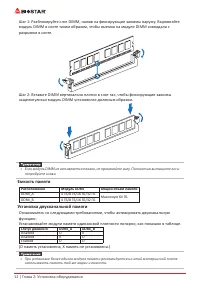
12 | Глава 2: Установка оборудования Шаг 1: Разблокируйте слот DIMM, нажав на фиксирующие зажимы наружу. Выровняйте модуль DIMM в слоте таким образом, чтобы выемка на модуле DIMM совпадала с разрывом в слоте. Шаг 2: Вставьте DIMM вертикально плотно в слот так, чтобы фиксирующие зажимы защелкнулисьи ...
Page 45 - �5 Слоты расширения; Установка карты расширения; устанавливать эту карту в компьютер.
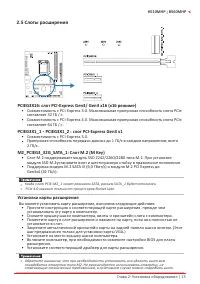
Глава 2: Установка оборудования | 13 H510MHP l B560MHP 2�5 Слоты расширения PCIEG3X16: слот PCI-Express Gen3/ Gen4 x16 (x16 режиме) • Совместимость с PCI-Express 3.0. Максимальная пропускная способность слота PCIe составляет 32 ГБ / с. • Совместимость с PCI-Express 4.0. Максимальная пропускная спо...
Page 46 - �6 Настройка переключателя; JCMOS1: Перемычка очистки CMOS; Указания по очистке CMOS:; Отсоедините питание переменного тока.
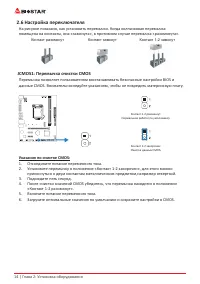
14 | Глава 2: Установка оборудования 2�6 Настройка переключателя На рисунке показано, как установить перемычки. Когда колпачковая перемычка помещена на контакты, она «замкнута», в противном случае перемычка «разомкнута». Контакт разомкнут Контакт замкнут Контакт 1-2 замкнут JCMOS1: Перемычка очистки...
Page 47 - �7 Штыревые соединители и разъемы; ATXPWR1: разъем источника питания ATX; правильной ориентации.; ATXPWR2: разъем источника питания ATX
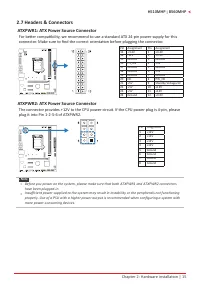
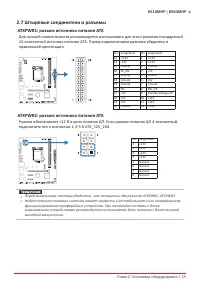
Глава 2: Установка оборудования | 15 H510MHP l B560MHP 2�7 Штыревые соединители и разъемы ATXPWR1: разъем источника питания ATX Для лучшей совместимости рекомендуется использовать для этого разъема стандартный 24-контактный источник питания ATX. Перед подключением разъема убедитесь в правильной орие...
Page 48 - PANEL: штыревой соединитель передней панели; Эти разъемы подключаются к жестким дискам SATA через кабели SATA.; панели; периферийным устройствам.
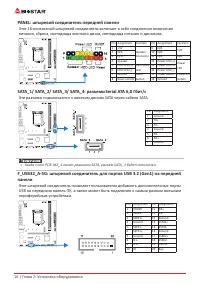
16 | Глава 2: Установка оборудования PANEL: штыревой соединитель передней панели Этот 16-контактный штыревой соединитель включает в себя соединения включения питания, сброса, светодиода жесткого диска, светодиода питания и динамика. Pin Assignment Function Pin Assignment Function 1 +5V Speaker Conne...
Page 49 - F_AUDIO: штыревой соединитель аудио передней панели
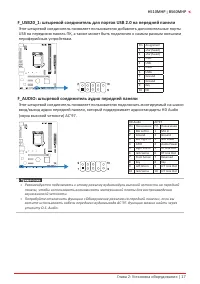
Глава 2: Установка оборудования | 17 H510MHP l B560MHP F_USB20_1: штыревой соединитель для портов USB 2�0 на передней панели Этот штыревой соединитель позволяет пользователю добавлять дополнительные порты USB на переднюю панель ПК, а также может быть подключен к самым разным внешним периферийным уст...
Page 50 - COM1: разъем последовательного порта
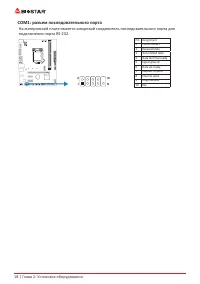
18 | Глава 2: Установка оборудования COM1: разъем последовательного порта На материнской плате имеется штыревой соединитель последовательного порта для подключения порта RS-232. Pin Assignment1 Carrier detect 2 Received data 3 Transmitted data 4 Data terminal ready 5 Signal ground 6 Data set ready 7...
Page 51 - Глава 3: UEFI BIOS и программное обеспечение | 19; Глава 3: UEFI BIOS и программное обеспечение; �1 Настройка UEFI BIOS
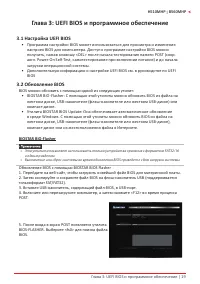
Глава 3: UEFI BIOS и программное обеспечение | 19 H510MHP l B560MHP Глава 3: UEFI BIOS и программное обеспечение 3�1 Настройка UEFI BIOS • Программа настройки BIOS может использоваться для просмотра и изменения настроек BIOS для компьютера. Доступ к программе настройки BIOS можно получить, нажав кл...
Page 52 - 0 | Глава 3: UEFI BIOS и программное обеспечение
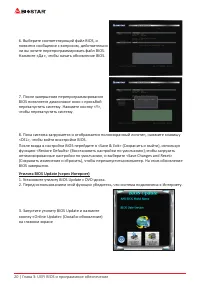
20 | Глава 3: UEFI BIOS и программное обеспечение 6. Выберите соответствующий файл BIOS, и появится сообщение с вопросом, действительно ли вы хотите перепрограммировать файл BIOS. Нажмите «Да», чтобы начать обновление BIOS. 7. После завершения перепрограммирования BIOS появляется диалоговое окно с п...
Page 53 - Глава 3: UEFI BIOS и программное обеспечение | 21
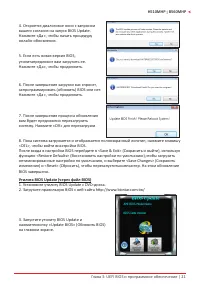
Глава 3: UEFI BIOS и программное обеспечение | 21 H510MHP l B560MHP 4. Откроется диалоговое окно с запросом вашего согласия на запуск BIOS Update. Нажмите «Да», чтобы начать процедуру онлайн-обновления. 5. Если есть новая версия BIOS, утилитапредложит вам загрузить ее. Нажмите «Да», чтобы продолжить...
Page 54 - 2 | Глава 3: UEFI BIOS и программное обеспечение; Резервное копирование BIOS
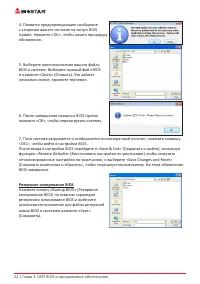
22 | Глава 3: UEFI BIOS и программное обеспечение 4. Появится предупреждающее сообщение с запросом вашего согласия на запуск BIOS Update. Нажмите «OK», чтобы начать процедуру обновления. 5. Выберите местоположение вашего файла BIOS в системе. Выберите нужный файл BIOS и нажмите «Open» (Открыть). Это...
Page 55 - Глава 3: UEFI BIOS и программное обеспечение | 23; �3 Программное обеспечение; Установка программного обеспечения; установки драйвера, если включена функция автозапуска.; Запуск программного обеспечения; Утилита BIOScreen
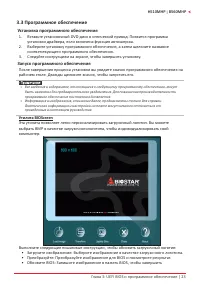
Глава 3: UEFI BIOS и программное обеспечение | 23 H510MHP l B560MHP 3�3 Программное обеспечение Установка программного обеспечения 1. Вставьте установочный DVD-диск в оптический привод. Появится программа установки драйвера, если включена функция автозапуска. 2. Выберите установку программного обесп...
Page 56 - Глава 4: Полезная помощь; Установка драйвера
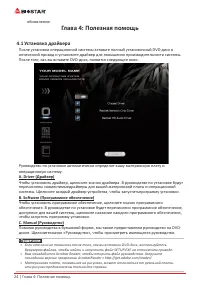
24 | Глава 4: Полезная помощь обновление. Глава 4: Полезная помощь 4�1 Установка драйвера После установки операционной системы вставьте полный установочный DVD-диск в оптический привод и установите драйвер для повышения производительности системы. После того, как вы вставите DVD-диск, появится следу...
Page 57 - Звуковой код BIOS AMI; Звуковые коды загрузочного блока; Звуковые POST-коды BIOS; Количество; Код Описание
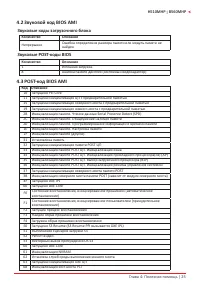
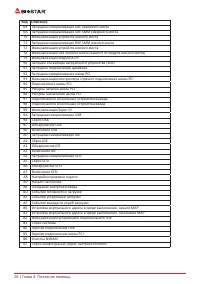
Глава 4: Полезная помощь | 25 H510MHP l B560MHP 4�2 Звуковой код BIOS AMI Звуковые коды загрузочного блока Количество Описание Непрерывно Ошибка определения размера памяти или модуль памяти не найден Звуковые POST-коды BIOS Количество Описание 1 Успешная загрузка. 8 Ошибка памяти дисплея (системный ...
Page 59 - Поиск и устранение неисправностей; Неисправность; Перегрев ЦП; это означает, что активирована функция защиты ЦП.
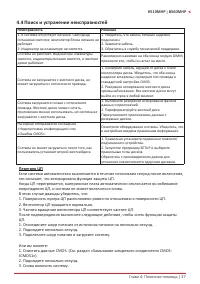
Глава 4: Полезная помощь | 27 H510MHP l B560MHP 4�4 Поиск и устранение неисправностей Неисправность Решение 1. В системе отсутствует питание. Светодиод питанияне светится; вентилятор блока питания не работает 2. Индикатор на клавиатуре не светится. 1. Убедитесь, что кабель питания надежно подключен....
Page 60 - Эта страница намеренно оставлена пустой.
28 | Глава 4: Полезная помощь Эта страница намеренно оставлена пустой.
Page 61 - 정전기방지 조작 규칙
FCC조항 이기기는FCC조항제15부에 의해 심사되며 Class B급디지털장치제한에부합됩니다. 이조항은설치중에발생할수있는유해무선주파수간섭을제한하고 합리적인예방조치를제공합니다.이기기는사용시무선주파수방사선이발생될 수 있으므로본설명서에따라설치및사용을 하지않는경우무선통신장치와의간섭이 발생할 수 있습니다. 다만특정설치시간섭이발생될 수 있습니다. 본기기를끄거나재시작시여전히라디오나 TV 수신에간섭하는 경우사용자는아래사항 중한가지또는여러가지방법을사용하여전파간섭을줄일수있습니다: • 재설치또는수신안테나를조절합니다.• 본기기와수신설비간의거리를증가합니다....
Page 63 - 목차; 챕터 1: 들어가는 글 ������������������������������������������������������������������������������������������������
목차 | 3 H510MHP l B560MHP 목차 챕터 1: 들어가는 글 ������������������������������������������������������������������������������������������������ 4 1.1 시작하기에 앞서 ................................................................................................................................4 1.2 패키지 체크리스트 ......
Page 64 - 패키지 체크리스트
4 | 챕터 1: 들어가는 글 챕터 1: 들어가는 글 1�1 시작하기에 앞서 우선,바이오스타제품을선택해주셔서감사합니다. 메인보드를설치하기 전에아래의내용을준수하고있는지확인 바랍니다: • 작업에적합한조명아래건조하고안정적인작업환경을갖추시기 바랍니다.• 작업전컴퓨터전원콘센트의연결을차단시키시기 바랍니다.• 정전기방지비닐에서메인보드를꺼내기전, 접지설비에안전하게접촉하거나정전기를제 거하는접지용손목스트랩을사용하여적절히접지하시기바랍니다. • 필요한경우가아니면마더보드상의부품또는보드의후면과의접촉을피하시기 바랍니다. 보드의모서리를잡고보드를구부리지마십시오....
Page 72 - �4 시스템 메모리 설치; DDR4 모듈
12 | 챕터 2: 하드웨어 설치 2�3 쿨링 팬 연결 쿨링 팬 헤더에 쿨링 팬을 연결하여 컴퓨터에 장착하게 됩니다. 팬 케이블과 커넥터는 팬 제조사에 따라 달라질 수 있습니다. CPU_FAN: CPU 팬 헤더 핀 배열 1 Ground 2 +12V 3 FAN RPM rate sense 4 AI Fan Control (By Fan) SYS_FAN1: 시스템 팬 헤더 핀 배열 1 Ground 2 +12V 3 FAN RPM rate sense 4 AI Fan Control (By Fan) » CPU_FAN1/ SYS_FAN1 은4-pin...
Page 73 - 메모리 용량; DIMM소켓 위치; 듀얼 채널 메모리 설치; 듀얼 채널 상태
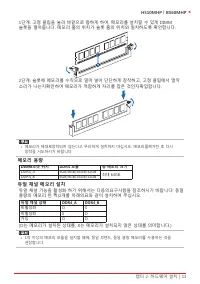
챕터 2: 하드웨어 설치 | 13 H510MHP l B560MHP 1단계: 고정 클립을 눌러 바깥으로 향하게 하여, 메모리를 설치할 수 있게 DIMM 슬롯을 열어줍니다. 메모리 홈의 위치가 슬롯 홈의 위치와 일치하도록 확인합니다. 2단계: 슬롯에 메모리를 수직으로 밀어 넣어 단단하게 장착하고, 고정 클립에서 딸깍 소리가 나는지확인하여 메모리가 적합하게 자리를 잡은 것인지확입합니다. » 메모리가 제대로장착되지 않는다고 무리하게 설치하지 마십시오. 메모리를제거한 후 다시 장착을 시도하시기 바랍니다. 메모리 용량 DIMM소켓 위치 DDR...
Page 74 - 확장 카드 설치
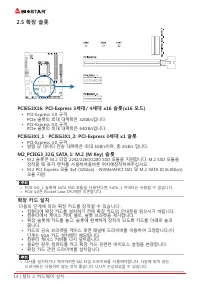
14 | 챕터 2: 하드웨어 설치 2�5 확장 슬롯 PCIEG3X16: PCI-Express 3세대/ 4세대 x16 슬롯(x16 모드) • PCI-Express 3.0 규격. PCIe 슬롯의 최대 대역폭은 32GB/s입니다. • PCI-Express 4.0 규격. PCIe 슬롯의 최대 대역폭은 64GB/s입니다. PCIEG3X1_1 ` PCIEG3X1_2: PCI-Express 3세대 x1 슬롯 • PCI-Express 3.0 규격. • 방향 당 데이터 전송 대역폭은 최대 1GB/s이며, 총 2GB/s 입니다. M2_PCIEG3_3...
Page 77 - 이 커넥터들은 SATA 케이블을 통해 SATA 하드 디스크 드라이브에 연결됩니다.
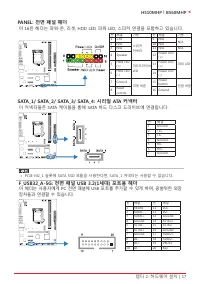
챕터 2: 하드웨어 설치 | 17 H510MHP l B560MHP PANEL: 전면 패널 헤더 이 16핀 헤더는 파워-온, 리셋, HDD LED, 파워 LED, 스피커 연결을 포함하고 있습니다. 핀 배열 기능 핀 배열 기능 1 +5V 스피커커넥터 9 N/A N/A 2 N/A 10 N/A 3 N/A 11 N/A N/A 4 Speaker 12 Power LED (+) 파워 LED 5 HDD LED (+) 하드드라이브 LED 13 Power LED (+) 6 HDD LED (-) 14 Power LED (-) 7 Ground 리셋 버튼 ...
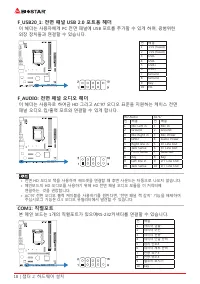
Page 78 - 본 메인 보드는 1개의 직렬포트가 있으며RS-232커넥터를 연결할 수 있습니다.
18 | 챕터 2: 하드웨어 설치 F_USB20_1: 전면 패널 USB 2�0 포트용 헤더 이 헤더는 사용자에게 PC 전면 패널에 USB 포트를 추가할 수 있게 하며, 광범위한 외장 장치들과 연결할 수 있습니다. 핀 배열 1 +5V (fused) 2 +5V (fused) 3 USB- 4 USB- 5 USB+ 6 USB+ 7 Ground 8 Ground 9 Key 10 NC F_AUDIO: 전면 패널 오디오 헤더 이 헤더는 사용자로 하여금 HD 그리고 AC’97 오디오 표준을 지원하는 케이스 전면 패널 오디오 입/출력 포트와 연결할 ...
Page 79 - �1 UEFI 바이오스 설정; • 바이오스 설정 프로그램은 컴퓨터의 바이오스 설정을 보거나 변경할 때 사용됩니다.
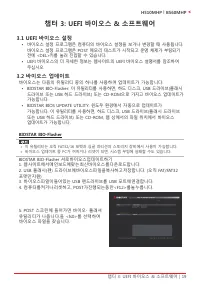
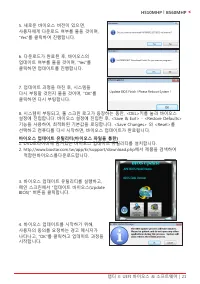
챕터 3: UEFI 바이오스 & 소프트웨어 | 19 H510MHP l B560MHP 챕터 3: UEFI 바이오스 & 소프트웨어 3�1 UEFI 바이오스 설정 • 바이오스 설정 프로그램은 컴퓨터의 바이오스 설정을 보거나 변경할 때 사용됩니다. 바이오스 설정 프로그램은 POST 메모리 테스트가 시작되고 운영 체제가 부팅되기 전에 <DEL>키를 눌러 진입할 수 있습니다. • UEFI 바이오스의 더 자세한 정보는 웹사이트의 UEFI 바이오스 설명서를 참조하여 주십시오. 3�2 바이오스 업데이트 바이오스는 다음의 유...
Page 82 - 바이오스의 백업
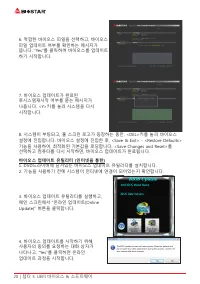
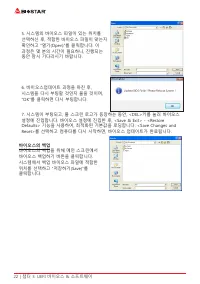
22 | 챕터 3: UEFI 바이오스 & 소프트웨어 5. 시스템의 바이오스 파일이 있는 위치를 선택하신 후, 적합한 바이오스 파일이 맞는지 확인하고 “열기(Open)”를 클릭합니다. 이 과정은 몇 분의 시간이 필요하니, 진행되는 동안 잠시 기다리시기 바랍니다. 6. 바이오스업데이트 과정을 마친 후, 시스템을 다시 부팅할 것인지 물을 것이며, “OK”를 클릭하면 다시 부팅합니다. 7. 시스템이 부팅되고, 풀 스크린 로고가 등장하는 동안, <DEL>키를 눌러 바이오스 설정에 진입합니다. 바이오스 설정에 진입한 후, &...
Page 83 - 소프트웨어의 설치; 광학 드라이브에 시작 DVD를 넣은 후, 자동 실행 기능이 활성화 되면 드라이버; 소프트웨어의 실행; 부트 로고를 업데이트 하기 위해 아래 지시사항을 순서대로 준수하시기 바랍니다 :
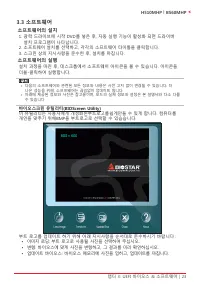
챕터 3: UEFI 바이오스 & 소프트웨어 | 23 H510MHP l B560MHP 3�3 소프트웨어 소프트웨어의 설치 1. 광학 드라이브에 시작 DVD를 넣은 후, 자동 실행 기능이 활성화 되면 드라이버 설치 프로그램이 나타납니다. 2. 소프트웨어 설치를 선택하고, 각각의 소프트웨어 타이틀을 클릭합니다.3. 스크린 상의 지시사항을 준수한 후, 설치를 마칩니다. 소프트웨어의 실행 설치 과정을 마친 후, 데스크톱에서 소프트웨어 아이콘을 볼 수 있습니다. 아이콘을 더블-클릭하여 실행합니다. » 다음의 소프트웨어와 관련된 모든 정...
Page 84 - 설정 가이드는 사용자의 마더보드와 운영 체제를 자동으로 감지합니다.; A� 드라이버 설치
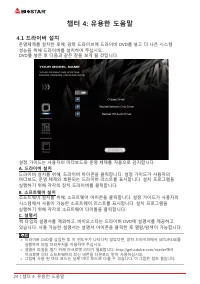
24 | 챕터 4: 유용한 도움말 챕터 4: 유용한 도움말 4�1 드라이버 설치 운영체제를 설치한 후에, 광학 드라이브에 드라이버 DVD를 넣고 더 나은 시스템 성능을 위해 드라이버를 설치하여 주십시오.DVD를 넣은 후 다음과 같은 창을 보게 될 것입니다. 설정 가이드는 사용자의 마더보드와 운영 체제를 자동으로 감지합니다. A� 드라이버 설치 드라이버 설치를 위해, 드라이버 아이콘을 클릭합니다. 설정 가이드가 사용자의 마더보드, 운영 체제와 호환되는 드라이버 리스트를 표시합니다. 설치 프로그램을 실행하기 위해 각각의 장치 드라이버를...
Page 85 - AMI 바이오스 비프 코드; 부트 블록 비프 코드; POST 바이오스 비프 코드; 비프음 횟수; �3 AMI 바이오스 포스트 코드; 코드 설명
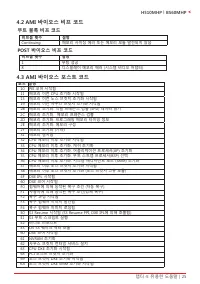
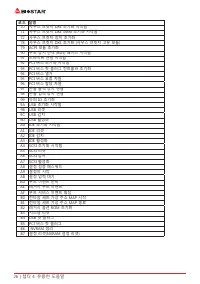
챕터 4: 유용한 도움말 | 25 H510MHP l B560MHP 4�2 AMI 바이오스 비프 코드 부트 블록 비프 코드 비프음 횟수 설명 Continuing 메모리 사이징 에러 또는 메모리 모듈 발견되지 않음 POST 바이오스 비프 코드 비프음 횟수 설명 1 부팅 성공 8 디스플레이 메모리 에러 (시스템 비디오 어댑터) 4�3 AMI 바이오스 포스트 코드 코드 설명 10 PEI 코어 시작됨11 메모리 이전 CPU 초기화 시작됨15 메모리 이전 노스 브릿지 초기화 시작됨19 메모리 이전 사우스 브릿지 초기화 시작됨2B 메모리 초기화...
Page 87 - 전원 케이블이 제대로 연결되어 있는지
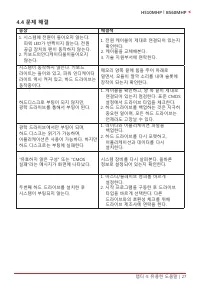
챕터 4: 유용한 도움말 | 27 H510MHP l B560MHP 4�4 문제 해결 증상 해결책 1. 시스템에 전원이 들어오지 않는다. 파워 LED가 반짝이지 않는다; 전원 공급 장치의 팬이 동작하지 않는다. 2. 키보드의인디케이터불이들어오지 않는다. 1. 전원 케이블이 제대로 연결되어 있는지 확인한다. 2. 케이블을 교체해본다.3. 기술 지원부서에 연락한다. 시스템이 동작하지 않는다. 키보드 라이트는 들어와 있고, 파워 인디케이터 라이트 역시 켜져 있고, 하드 드라이브는 동작중이다. 메모리 양쪽 끝에 힘을 주어 아래로 밀면서, 모...
Page 88 - 이 페이지는 의도적으로 비워 둔 것입니다




 Biostar A68N-2100K User Manual
 Biostar B450NH User Manual
 Biostar B550 User Manual
 Biostar B550MH User Manual
 Biostar B550MX/E PRO User Manual
 Biostar B550T User Manual
 Biostar B560MH-E 2.0 User Manual
 Biostar B660GTA User Manual
 Biostar B660GTQ User Manual
 Biostar B660MX-E PRO User Manual
 Biostar B760 User Manual
 Biostar H61MHV3 User Manual
 Biostar H81MHV3 3.0 User Manual
 Biostar H610 User Manual
 Biostar J4125 User Manual
 Biostar Z490 User Manual