Biostar A68N-2100K - User Manual

Biostar A68N-2100K Motherboard – User Manual, read for free online in PDF format. We hope this helps you resolve any issues you may have. If you have further questions, please contact us through the contact form.
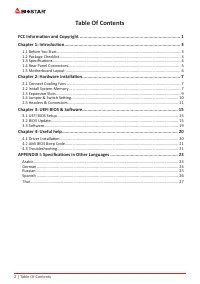
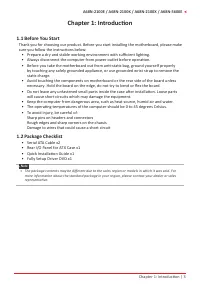
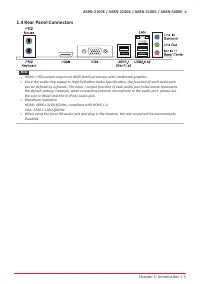
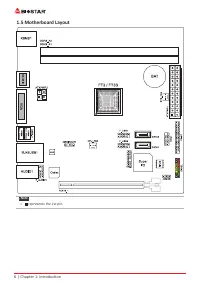
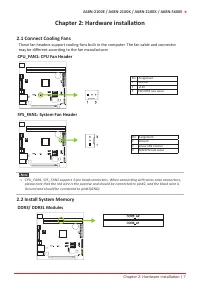
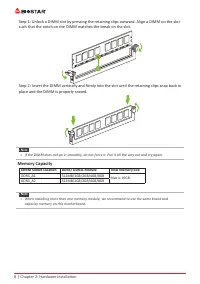
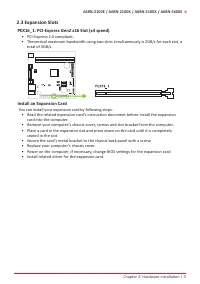
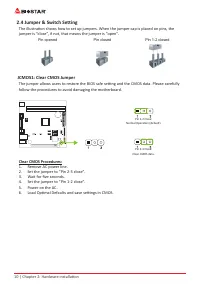
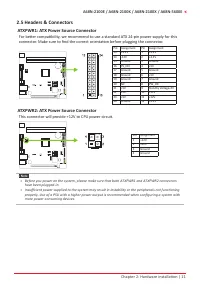
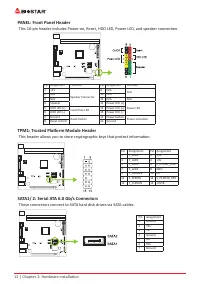
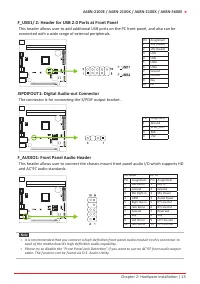
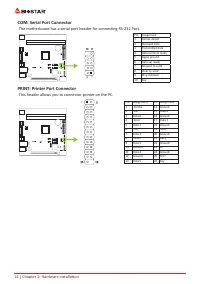
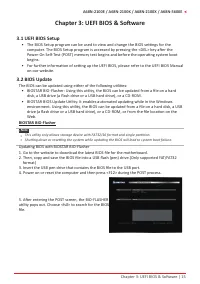
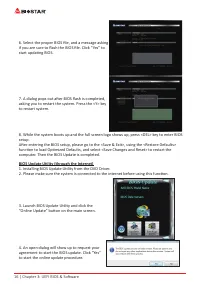
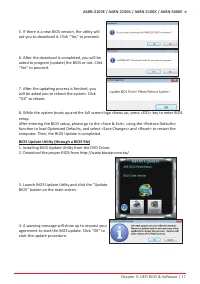
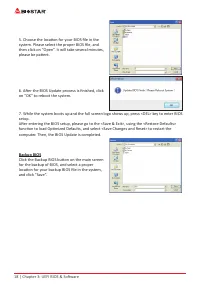
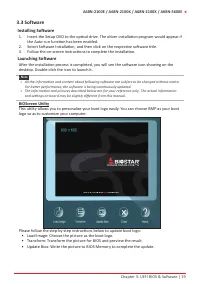
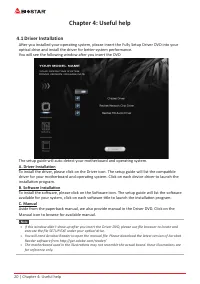
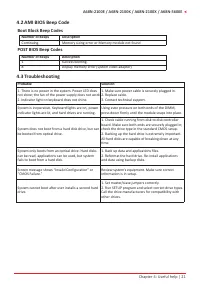
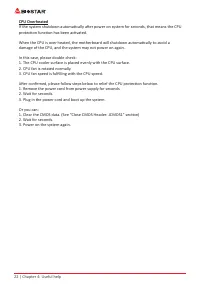
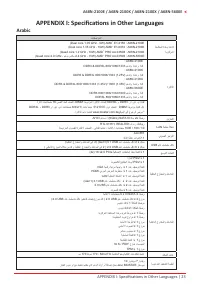
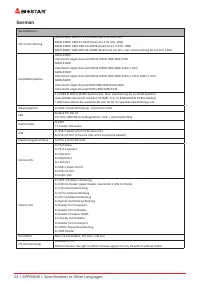
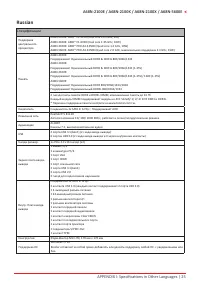
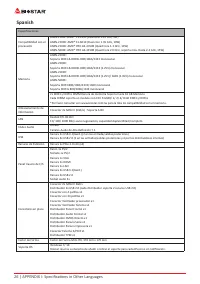
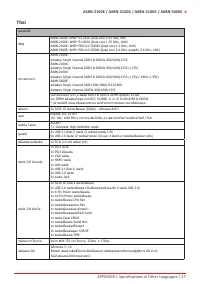

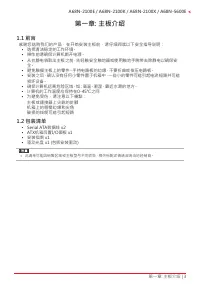
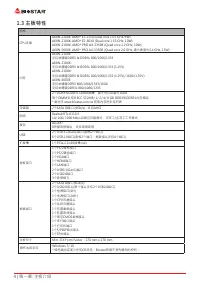
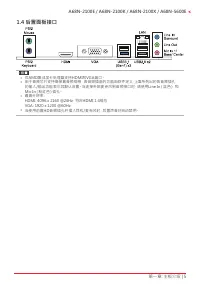
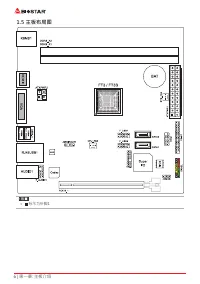
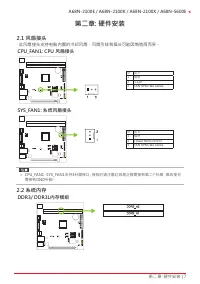
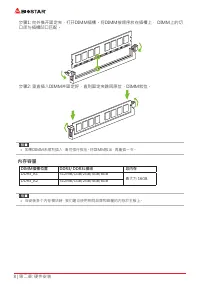
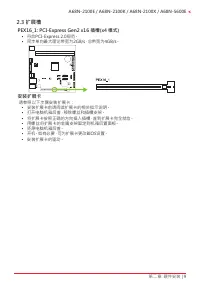
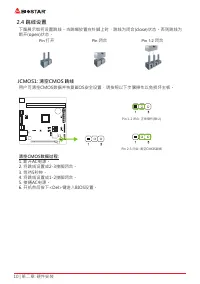
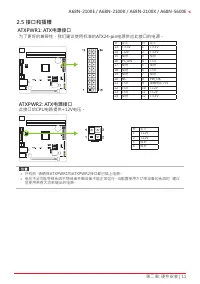
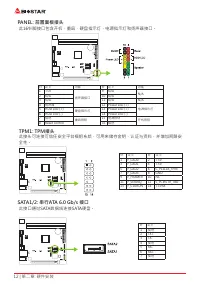
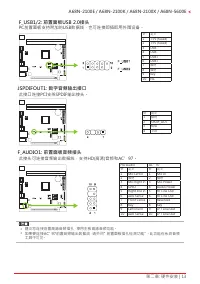
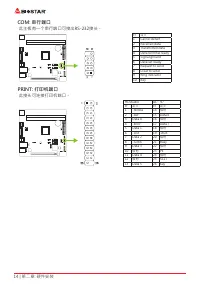
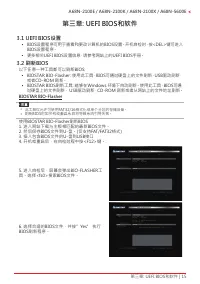
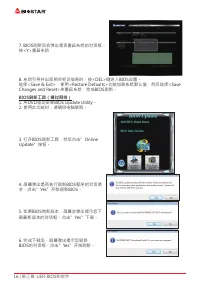
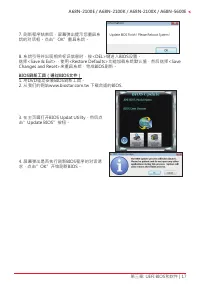
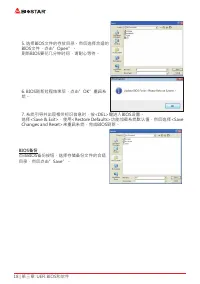
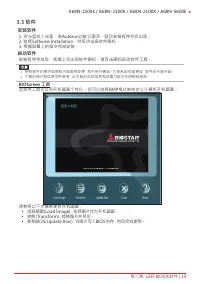
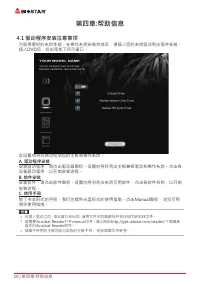
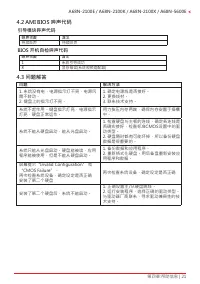
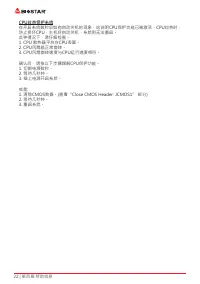
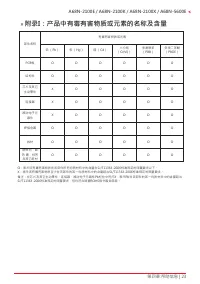
Table of Contents:
- Page 2 – | Table Of Contents; Table Of Contents; FCC Information and Copyright; Driver Installation; APPENDIX I: Specifications in Other Languages
- Page 3 – Chapter 1: Introduction; Before You Start; sure you follow the instructions below:; Package Checklist; • Serial ATA Cable x2
- Page 5 – Rear Panel Connectors
- Page 6 – Motherboard Layout
- Page 7 – Chapter 2: Hardware installation; Connect Cooling Fans; may be different according to the fan manufacturer.; Install System Memory
- Page 8 – Memory Capacity; DIMM Socket Location
- Page 9 – Install an Expansion Card; You can install your expansion card by following steps:
- Page 10 – JCMOS1: Clear CMOS Jumper; follow the procedures to avoid damaging the motherboard.; Clear CMOS Procedures:; Load Optimal Defaults and save settings in CMOS.
- Page 11 – ATXPWR1: ATX Power Source Connector; This connector will provide +12V to CPU power circuit.
- Page 12 – PANEL: Front Panel Header; TPM1: Trusted Platform Module Header; These connectors connect to SATA hard disk drives via SATA cables.
- Page 13 – The connector is for connecting the S/PDIF output bracket.
- Page 14 – COM: Serial Port Connector; PRINT: Printer Port Connector; This header allows you to connector printer on the PC.
- Page 15 – The BIOS can be updated using either of the following utilities:; Updating BIOS with BIOSTAR BIO-Flasher
- Page 16 – computer. Then the BIOS Update is completed.; BIOS Update Utility (through the Internet); An open dialog will show up to request your
- Page 17 – BIOS Update Utility (through a BIOS file); A warning message will show up to request your
- Page 18 – then click on “Open”. It will take several minutes,; Backup BIOS; for the backup of BIOS, and select a proper
- Page 19 – Installing Software; Follow the on-screen instructions to complete the installation.; Launching Software; BIOScreen Utility; logo so as to customize your computer.
- Page 20 – Chapter 4: Useful help; Driver Installation; You will see the following window after you insert the DVD; A. Driver Installation; installation program.; B. Software Installation; Manual icon to browse for available manual.
- Page 21 – AMI BIOS Beep Code; Boot Block Beep Codes; POST BIOS Beep Codes; Number of Beeps; Troubleshooting; Probable
- Page 22 – CPU Overheated; protection function has been activated.
- Page 23 – Arabic
- Page 24 – German
- Page 25 – Russian
- Page 26 – Spanish
- Page 27 – Thai
- Page 29 – 防静电操作规则
- Page 30 – 目录; 第一章: 主板介绍 �������������������������������������������������������������������������������������������������������
- Page 32 – 主板特性
- Page 35 – 此风扇接头支持电脑内置的冷却风扇,风扇引线和插头可能因制造商而异。
- Page 36 – 内存容量; DIMM插槽位置
- Page 37 – 安装扩展卡
- Page 38 – 下图展示如何设置跳线。当跳帽放置在针脚上时,跳线为闭合(close)状态。否则跳线为; 打开; 闭合
- Page 39 – 为了更好的兼容性,我们建议使用标准的ATX24-pin电源供应此接口的电源。
- Page 43 – �1 UEFI BIOS设置
- Page 44 – BIOS刷新工具(通过网络)
- Page 45 – BIOS刷新工具(通过BIOS文件)
- Page 46 – BIOS备份
- Page 47 – BIOScreen 工具
- Page 48 – 驱动程序安装注意事项; A� 驱动程序安装
- Page 49 – AMI BIOS 哔声代码; 引导模块哔声代码; BIOS 开机自检哔声代码; 哔声次数; 问题
- Page 50 – CPU过热保护系统; 在开启系统数秒后如有自动关机的现象,这说明CPU保护功能已被激活。CPU过热时,
- Page 51 – 附录I:产品中有毒有害物质或元素的名称及含量
FCC Information and Copyright
This equipment has been tested and found to comply with the limits of a Class B digital device,
pursuant to Part 15 of the FCC Rules. These limits are designed to provide reasonable protection
against harmful interference in a residential installation. This equipment generates, uses, and can
radiate radio frequency energy and, if not installed and used in accordance with the instructions,
may cause harmful interference to radio communications. There is no guarantee that interference
will not occur in a particular installation.
The vendor makes no representations or warranties with respect to the contents here and
specially disclaims any implied warranties of merchantability or fitness for any purpose. Further
the vendor reserves the right to revise this publication and to make changes to the contents here
without obligation to notify any party beforehand.
Duplication of this publication, in part or in whole, is not allowed without first obtaining the
vendor’s approval in writing.
The content of this user’s manual is subject to be changed without notice and we will not be
responsible for any mistakes found in this user’s manual. All the brand and product names are
trademarks of their respective companies.
Dichiarazione di conformità sintetica
Ai sensi dell’art. 2 comma 3 del D.M. 275 del
30/10/2002
Si dichiara che questo prodotto è conforme
alle normative vigenti e soddisfa i requisiti
essenziali richiesti dalle direttive
2004/108/CE, 2006/95/CE e 1999/05/CE
quando ad esso applicabili
Short Declaration of conformity
We declare this product is complying with the
laws in force and meeting all the essential
requirements as specified by the directives
2004/108/CE, 2006/95/CE and 1999/05/CE
whenever these laws may be applied
"Loading the manual" means you need to wait until the file loads and becomes available for online reading. Some manuals are very large, and the time they take to appear depends on your internet speed.
Was this manual helpful?
About this manual
- Brand
- Biostar
- Model
- A68N-2100K
- Document type
- User Manual
- Category
- Motherboard
- Language(s)
- English
- Pages
- 51
- File size
- 2.5 MB
- Format
Summary
2 | Table Of Contents Table Of Contents FCC Information and Copyright ������������������������������������������������������������������������������� 1 Chapter 1: Introduction ������������������������������������������������������������������������������������������� 3 1.1 Before You Start ............
Chapter 1: Introduction | 3 A68N-2100E / A68N-2100K / A68N-2100X / A68N-5600E Chapter 1: Introduction 1�1 Before You Start Thank you for choosing our product. Before you start installing the motherboard, please make sure you follow the instructions below: • Prepare a dry and stable working environm...
Chapter 1: Introduction | 5 A68N-2100E / A68N-2100K / A68N-2100X / A68N-5600E 1.4 Rear Panel Connectors Note » HDMI / VGA output require an AMD family processor with intedrated graphics. » Since the audio chip supports High Definition Audio Specification, the function of each audio jack can be d...
Ask a question
Related manuals
More Biostar Motherboards models
 Biostar B450NH User Manual
 Biostar B550 User Manual
 Biostar B550MH User Manual
 Biostar B550MX/E PRO User Manual
 Biostar B550T User Manual
 Biostar B560MH-E 2.0 User Manual
 Biostar B660GTA User Manual
 Biostar B660GTQ User Manual
 Biostar B660MX-E PRO User Manual
 Biostar B760 User Manual
 Biostar H61MHV3 User Manual
 Biostar H81MHV3 3.0 User Manual
 Biostar H510 User Manual
 Biostar H610 User Manual
 Biostar J4125 User Manual
 Biostar Z490 User Manual