Page 2 - To avoid electrical shock, do not open the cabinet.; WARNING
WARNING To avoid electrical shock, do not open the cabinet. Refer servicing to qualified personnel only. This product is intended for ages 6 and up. Avoid prolonged use of the PSP ™ system. To help prevent eye strain, take a break of about 15 minutes during every hour of play. If you experienc...
Page 3 - Photosensitivity
GB WARNING Photosensitivity Always play in a well lit environment. Take regular breaks, 15 minutes every hour. Avoid playing when tired or suffering from lack of sleep. Some individuals are sensitive to flashing or flickering lights or geometric shapes and patterns, may have an undetected epileptic ...
Page 4 - System Software
WARNING System Software The System Software included within this product is subject to a limited licence from Sony Computer Entertainment Inc. Refer to http://www.scei.co.jp/psp-eula/ for further details. About national export control This product may fall within the scope of national export control...
Page 6 - Table of contents; Preparation
Table of contents Table of contents WARNING······················································ 2 Precautions ···················································· 8 Checking the package contents ··················· 12 Things you can do with the PSP ™ system ··· 14 Preparation Part names and functi...
Page 7 - PSP; Viewing on a PC; Support
Table of contents PSP ™ system documentation You can find information about the PSP ™ system in this manual as well as online. • Instruction Manual (this document) This manual explains hardware features and provides basic information about how to set up and operate the PSP ™ system, including instru...
Page 8 - Accessory compatibility; Safety; Precautions; Use and handling
Precautions Before using this product, carefully read this manual and retain it for future reference. Accessory compatibility Do not use accessories or peripherals that are intended for another model of the PSP ™ system, as these accessories/ peripherals may not be compatible with your system. Visit...
Page 9 - AC adaptor use
GB Precautions Do not throw, drop or step on the system or accessories, and do not subject the devices to strong physical shock. Sitting down with the PSP ™ system in a pocket or placing the system in the bottom of a backpack along with heavy objects may cause damage to the system. Do not forcib...
Page 10 - LCD screen
10 Precautions LCD screen The LCD screen is made of glass and may crack if subjected to excessive force. Pixels that are not lit or are continuously lit may appear in certain locations on the LCD screen. The appearance of such spots is a normal occurrence associated with LCD screens and is not a...
Page 12 - Checking the package contents; customer service helpline. Details are found within the contact
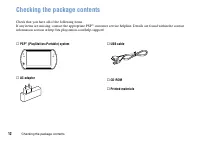
1 Checking the package contents Checking the package contents Check that you have all of the following items.If any items are missing, contact the appropriate PSP ™ customer service helpline. Details are found within the contact information section at http://eu.playstation.com/help-support/. PSP ™...
Page 14 - Things you can do with the PSP; Wireless networking feature; Store and use the; Equipped with system storage; system and the controller for the PS3
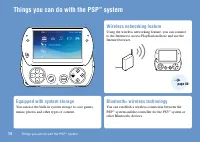
Things you can do with the PSP ™ system 1 Things you can do with the PSP ™ system Wireless networking feature Using the wireless networking feature, you can connect to the Internet to access PlayStation ® Store and use the Internet browser. page 0 Equipped with system storage You can use the built-i...
Page 15 - Download and play games; PlayStation; Update the system software; Watch video that has been imported to your PC.; Browse photos; page
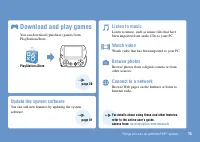
Things you can do with the PSP ™ system 1 Download and play games You can download (purchase) games from PlayStation ® Store. PlayStation ® Store Update the system software You can add new features by updating the system software. Listen to music Listen to music, such as music files that have been i...
Page 16 - Part names and functions; With the display panel closed; System bottom
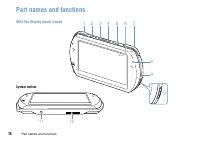
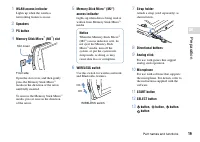
1 Part names and functions Preparation Part names and functions With the display panel closed System bottom 12 11 1 8 9 10 2 3 4 5 6 7
Page 18 - With the display panel open; Opening the display panel
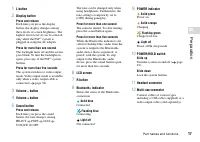
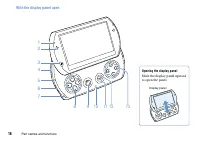
1 Part names and functions With the display panel open Opening the display panel Slide the display panel upward to open the panel. Display panel SELECT STAR T 1 9 8 11 10 12 13 2 34 567
Page 20 - Charging the battery; Before using the PSP; Plug the USB cable into the AC adaptor.
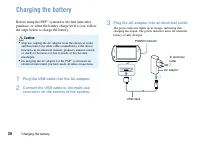
0 Charging the battery Charging the battery Before using the PSP ™ system for the first time after purchase, or when the battery charge level is low, follow the steps below to charge the battery. Caution Stop use, unplug the AC adaptor from the electrical outlet and disconnect any other cables imm...
Page 21 - Information about the battery charge; When there is little battery charge left, the; Estimating the battery charge time
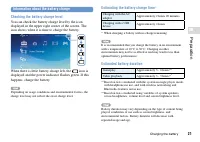
1 GB Prepar ation Charging the battery Information about the battery charge Checking the battery charge level You can check the battery charge level by the icon displayed in the upper right corner of the screen. The icon shows when it is time to charge the battery. When there is little battery charg...
Page 22 - Battery life; customer service helpline. Details; Charging methods; Charging with an AC adaptor
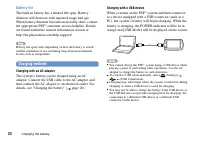
Charging the battery Battery life The built-in battery has a limited life span. Battery duration will decrease with repeated usage and age. When battery duration becomes noticeably short, contact the appropriate PSP ™ customer service helpline. Details are found within the contact information sectio...
Page 23 - Turning the system on and off; Turning the system on; Turning the system off; Slide up and hold the POWER/HOLD switch; Putting the system in sleep mode; Clearing sleep mode
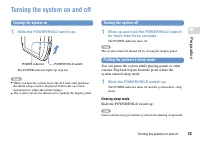
GB Prepar ation Turning the system on and off Turning the system on and off Turning the system on 1 Slide the POWER/HOLD switch up. POWER/HOLD switch POWER indicator The POWER indicator lights up in green. When you turn the system on for the first time after purchase, the initial setup screen is d...
Page 24 - Basic operations; Using the XMB; The PSP; Select a category using the
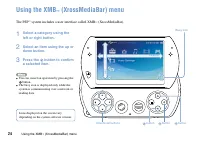
Using the XMB ™ (XrossMediaBar) menu Basic operations Using the XMB ™ (XrossMediaBar) menu The PSP ™ system includes a user interface called XMB ™ (XrossMediaBar). 1 Select a category using the left or right button. 2 Select an item using the up or down button. 3 Press the button to confirm a select...
Page 25 - Categories
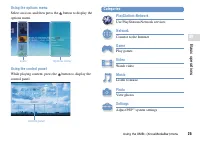
GB Basic oper ations Using the XMB ™ (XrossMediaBar) menu Using the options menu Select an icon, and then press the button to display the options menu. Icons Options menu Using the control panel While playing content, press the button to display the control panel. Control panel Categories PlayStatio...
Page 26 - Using the on-screen keyboard; List of keys
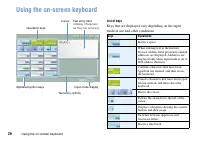
Using the on-screen keyboard Using the on-screen keyboard List of keys Keys that are displayed vary depending on the input mode in use and other conditions. keys Explanation Inserts a space When entering text in the Internet browser address field, previously entered addresses are displayed. Addresse...
Page 27 - Switching the input mode; Entering characters
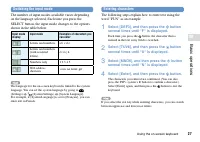
GB Basic oper ations Using the on-screen keyboard Switching the input mode The number of input modes available varies depending on the language selected. Each time you press the SELECT button, the input mode changes to the options shown in the table below. Input mode display Input mode Examples of c...
Page 28 - Games; Playing games; Games for use on the PSP
Playing games Games Playing games Games for use on the PSP ™ system are downloaded from PlayStation ® Store. PlayStation ® Store is an online shop where you can download (purchase) products such as games or video content.
Page 29 - You can download games in the following ways.; Media Go; Using a PC; Downloading games using a PC; Install Media Go; page 0
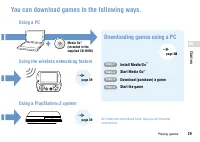
GB Games Playing games You can download games in the following ways. Media Go ™ (included in the supplied CD-ROM) Using a PC Using the wireless networking feature Using a PlayStation ® system All methods described here require an Internet connection. Downloading games using a PC Step 1 Install Media...
Page 30 - application on the PC.; What is Media Go; Insert the supplied CD-ROM into your PC.
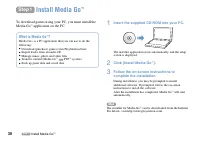
0 Step 1 Install Media Go ™ Step 1 Install Media Go ™ Step 1 Install Media Go ™ To download games using your PC, you must install the Media Go ™ application on the PC. What is Media Go ™ ? Media Go ™ is a PC application that you can use to do the following: Download (purchase) games from PlayStati...
Page 31 - Start Media Go; Start Media Go; Follow the step below to start the Media Go; Double click the (Media Go) icon on your
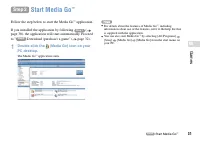
1 GB Games Step 2 Start Media Go ™ Step 2 Start Media Go ™ Step 2 Start Media Go ™ Follow the step below to start the Media Go ™ application. If you installed the application by following Step 1 ( page 30), the application will start automatically. Proceed to " Step 3 Download (purchase) a game&...
Page 32 - Create a PlayStation
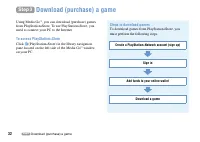
Step 3 Download (purchase) a game Step 3 Download (purchase) a game Step 3 Download (purchase) a game Using Media Go ™ , you can download (purchase) games from PlayStation ® Store. To use PlayStation ® Store, you need to connect your PC to the Internet. To access PlayStation ® Store Click (PlayStati...
Page 33 - Creating a PlayStation; From the Media Go; Master account
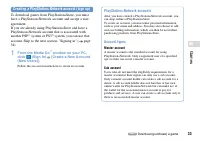
GB Games Step 3 Download (purchase) a game Creating a PlayStation ® Network account (sign up) To download games from PlayStation ® Store, you must have a PlayStation ® Network account and accept a user agreement.If you are already using PlayStation ® Store and have a PlayStation ® Network account th...
Page 34 - Signing in; To sign out; Wallet usage by sub account holders
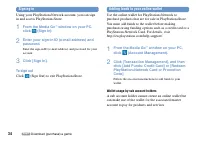
Step 3 Download (purchase) a game Signing in Using your PlayStation ® Network account, you can sign in and access PlayStation ® Store. 1 From the Media Go ™ window on your PC, click (Sign In). 2 Enter your sign-in ID (e-mail address) and password. Enter the sign-in ID (e-mail address) and password f...
Page 35 - Downloading a game; Notice; Turn on your PSP
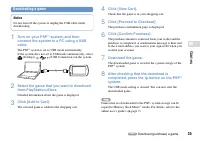
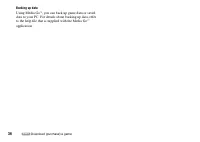
GB Games Step 3 Download (purchase) a game Downloading a game Notice Do not turn off the system or unplug the USB cable while downloading. 1 Turn on your PSP ™ system, and then connect the system to a PC using a USB cable. The PSP ™ system is set to USB mode automatically. If the system does not set...
Page 37 - Start the game; Start the game; On your PSP; To quit the game; Press the PS button on the PSP; To pause the game
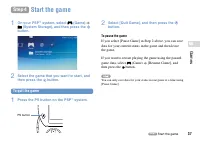
GB Games Step 4 Start the game Step 4 Start the game Step 4 Start the game 1 On your PSP ™ system, select (Game) (System Storage), and then press the button. 2 Select the game that you want to start, and then press the button. To quit the game 1 Press the PS button on the PSP ™ system. PS button 2 S...
Page 38 - Outputting video from a game to a TV
Step 4 Start the game Outputting video from a game to a TV You can output game video to a TV using a video output cable* (sold separately). Select an appropriate video output cable for the TV in use. For details, refer to the online user’s guide ( page 7). * Use a video output cable that is compatib...
Page 39 - Downloading games using the PSP; Using the wireless networking feature on the
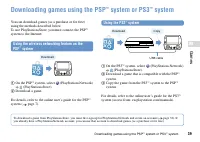
GB Games Downloading games using the PSP ™ system or PS3 ™ system Downloading games using the PSP ™ system or PS ™ system You can download games (as a purchase or for free) using the methods described below. To use PlayStation ® Store, you must connect the PSP ™ system to the Internet. Using the wir...
Page 40 - Network; Using the wireless networking feature; Browse Web pages on the Internet; Example of a network configuration; Network gateway device such as a DSL modem
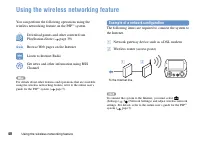
0 Network Using the wireless networking feature Using the wireless networking feature You can perform the following operations using the wireless networking feature on the PSP ™ system. Download games and other content from PlayStation ® Store ( page 39) Browse Web pages on the Internet Listen to In...
Page 41 - Updating the system software; System software updates; Checking the system software version; If you select; Update methods; Perform a network update using the PSP; Update using a PC
1 GB Netw or k Updating the system software Updating the system software Software updates may include security patches, new or revised settings and features, and other items, which will change your current operating system. It is recommended that you always maintain your system to use the latest ver...
Page 42 - Before requesting service; Power, battery and charging issues
Support Before requesting service Before requesting service Go through this section if you experience difficulty in operating the PSP ™ system. Should any problem persist, please visit our Help and Support pages at http://eu.playstation.com/help-support/. Power, battery and charging issues The PSP ™...
Page 43 - Suppor; Picture
GB Suppor t Before requesting service Picture The screen suddenly turns dark. If (Power Save Settings) [Backlight Auto-Off] has been set, the LCD screen’s backlight will automatically turn off if the system is left inactive for the set amount of time. If (Power Save Settings) [Auto Sleep] has be...
Page 44 - Memory Stick Micro
Before requesting service When headphones or a video output cable is connected, no sound is output from the PSP ™ system speakers. A Bluetooth ® device may be connected and set to output audio. If you want audio to be output from the system speakers or wired headphones, press the sound button on...
Page 45 - The system does not recognise a video file.; Music; The system does not recognise a music file.; Photo; Images do not display.; A connection to the network cannot be established.
GB Suppor t Before requesting service The system does not recognise a video file. Video data of types that are not compatible with the PSP ™ system will not be recognised. If the file name or folder name is changed, or if the file or folder is moved to another location using a PC, the system may...
Page 46 - Bluetooth
Before requesting service If a device that causes radio interference such as a microwave oven is nearby, system communications may not work properly. The Web page does not display properly. Certain content, such as content that requires specialized software, may not display properly on some Web ...
Page 48 - GUARANTEE; GUARANTEE; system. This Guarantee does not cover; IMPORTANT; If you need to claim under this Guarantee, please call
GUARANTEE GUARANTEE GUARANTEE Thank you for buying this Product. The term "Product" means the PSP ™ system. This Guarantee does not cover any software whether or not packaged with the Product. The system software pre-installed on the PSP ™ system is licensed to you, not sold, and is for use ...
Page 50 - Additional information; Parental control; To reset the password; Select; To set the parental control level; Select; Using the directional buttons, enter the 4-
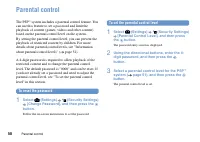
0 Additional information Parental control Parental control The PSP ™ system includes a parental control feature. You can use this feature to set a password and limit the playback of content (games, videos and other content) based on the parental control level on the system. By setting the parental c...
Page 51 - Information about parental control levels; system; Parental control levels on the PSP
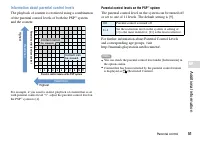
1 GB Additional inf or mation Parental control Information about parental control levels The playback of content is restricted using a combination of the parental control levels of both the PSP ™ system and the content. 1 2 3 4 5 6 7 8 9 10 1110 987654321 11 Highest Restr iction Parental control lev...
Page 52 - Parental control for the Internet browser; Parental control for PlayStation
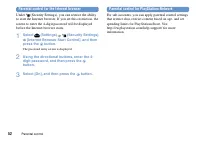
Parental control Parental control for the Internet browser Under (Security Settings), you can restrict the ability to start the Internet browser. If you set this restriction, the screen to enter the 4-digit password will be displayed before the Internet browser starts. 1 Select (Settings) (Security ...
Page 53 - Before disposing of or transferring the PSP; Before disposing of or giving your PSP
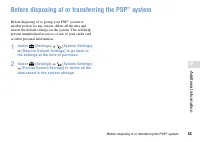
GB Additional inf or mation Before disposing of or transferring the PSP ™ system Before disposing of or transferring the PSP ™ system Before disposing of or giving your PSP ™ system to another person for any reason, delete all the data and restore the default settings on the system. This will help p...
Page 54 - Specifications
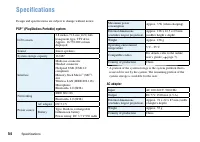
Specifications Specifications Design and specifications are subject to change without notice. PSP ™ (PlayStation ® Portable) system LCD screen 3.8 inches / 9.6 cm (16:9) full- transparent type, TFT drive Approx. 16,770,000 colours displayed Sound Stereo speakers System storage capacity 16 GB* Interf...
Page 55 - Compatible media; Notices about Memory Stick Micro
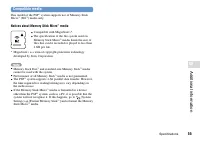
GB Additional inf or mation Specifications Compatible media This model of the PSP ™ system supports use of Memory Stick Micro ™ (M2 ™ ) media only. Notices about Memory Stick Micro ™ media Compatible with MagicGate ™ *. The specification of the file system used on Memory Stick Micro ™ media limi...
Page 56 - Copyright and trademarks
Copyright and trademarks Copyright and trademarks " ", "PlayStation", " " and " " are registered trademarks of Sony Computer Entertainment Inc. Also, "PS3" and " " are trademarks of the same company. "XMB" and "xross media bar" are trad...
Page 60 - Правовая информация; ПPEДУПPEЖДEHИE
60 ПPEДУПPEЖДEHИE Bо избeжaниe поpaжeния элeктpичecким током нe откpывaйтe коpпyc устройства. Для peмонтa обpaщaйтecь только к квaлифициpовaнномy cпeциaлиcтy. Продукт предназначен для пользователей от 6 лет. Старайтесь не использовать систему PSP ™ слишком долго. Для предотвращения усталости гла...
Page 61 - Фоточувствительность
61 RU ПPEДУПPEЖДEHИE Фоточувствительность Всегда играйте в хорошо освещенном помещении. Каждый час делайте перерыв на 15 минут. Не играйте, если вы устали или страдаете от недосыпания. Некоторые люди чувствительны к вспышкам света, мерцающему свету или к геометрическим формам и рисункам, и могут име...
Page 62 - Системное программное обеспечение
62 ПPEДУПPEЖДEHИE Системное программное обеспечение На системное программное обеспечение, входящее в состав данного продукта, распространяется действие ограниченной лицензии Sony Computer Entertainment Inc. Подробнее см. на веб-сайте http://www.scei.co.jp/psp-eula/. Контроль над экспортом Это издели...
Page 64 - Содержание; Подготовка
64 Содержание Содержание ПPEДУПPEЖДEHИE·································· 60 Меры·предосторожности··························· 66 Проверка·содержимого·упаковки············· 71 Возможности·системы·PSP ™ ····················· 72 Подготовка Названия·и·функции·компонентов·············74 Зарядка·батареи··...
Page 65 - Сведения о документации к системе PSP; Информацию о системе PSP; • Руководство по эксплуатации (этот документ); • Руководство пользователя; Просмотр на компьютере; Поддержка
65 Содержание 65 Сведения о документации к системе PSP ™ Информацию о системе PSP ™ вы можете найти в данном руководстве пользователя, а также в его сетевой версии. • Руководство по эксплуатации (этот документ) В данном руководстве описаны характеристики оборудования и представлены базовые сведения ...
Page 66 - Совместимость аксессуаров; Безопасность; Меры предосторожности; Использование и обслуживание
66 Меры·предосторожности Перед использованием устройства внимательно прочитайте это руководство и сохраните его для дальнейшего пользования. Совместимость аксессуаров Не используйте аксессуары или принадлежности, предназначенные для другой модели системы PSP ™ , поскольку эти аксессуары и принадлежн...
Page 67 - Использование адаптера переменного тока
67 RU Меры·предосторожности Не оставляйте систему или принадлежности в машине с закрытыми окнами (особенно в летнее время). Не подвергайте систему и принадлежности воздействию сигаретного дыма, пыли или пара. Не допускайте попадания внутрь системы жидкости или мелких предметов. Не устанавлив...
Page 69 - Записываемые данные
69 RU Меры·предосторожности Записываемые данные Во избежание потери или повреждения данных при использовании карты Memory Stick Micro ™ соблюдайте следующее: Не вынимайте карту Memory Stick Micro ™ и не выключайте систему в процессе загрузки, сохранения данных или форматирования карты. Не исполь...
Page 70 - Перед использованием мини-джойстика; Футляры и чехлы
70 Меры·предосторожности Перед использованием мини-джойстика Не пытайтесь убрать мини-джойстик с передней панели системы, это может привести к повреждению системы и травме. Для достижения наилучших результатов выберите (Настройки) (Настройки системы), затем перемещайте мини-джойстик круговыми дв...
Page 71 - Проверка содержимого упаковки; Система PSP
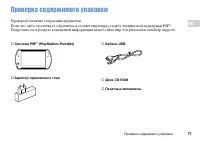
71 RU Проверка·содержимого·упаковки Проверка содержимого упаковки Проверьте наличие следующих предметов.Если что-либо отсутствует, обратитесь в соответствующую службу технической поддержки PSP ™ . Подробнее см. в разделе контактной информации на веб-сайте http://eu.playstation.com/help-support/. С...
Page 72 - Возможности системы PSP; Беспроводная связь; и контроллером для
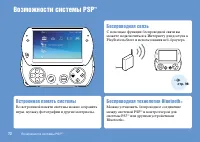
Возможности·системы·PSP ™ · 72 Возможности системы PSP ™ Беспроводная связь С помощью функции беспроводной связи вы можете подключиться к Интернету для доступа к PlayStation ® Store и использования веб-браузера. Встроенная память системы Во встроенной памяти системы можно сохранять игры, музыку, фот...
Page 73 - Загрузка и запуск игр; Обновление системного ПО
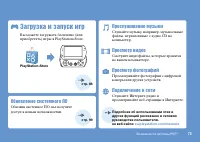
Возможности·системы·PSP ™ · 73 Загрузка и запуск игр Вы можете загружать бесплатно (или приобретать) игры в PlayStation ® Store. PlayStation ® Store Обновление системного ПО Обновив системное ПО, вы получите доступ к новым возможностям. Прослушивание музыки Слушайте музыку, например, музыкальные фай...
Page 74 - Названия и функции компонентов; Экранная панель закрыта; Нижняя панель системы
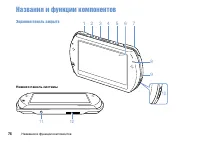
74 Названия·и·функции·компонентов Подготовка Названия и функции компонентов Экранная панель закрыта Нижняя панель системы 12 11 1 8 9 10 2 3 4 5 6 7
Page 75 - отовка
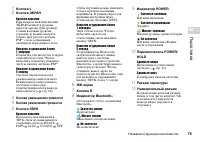
75 Подг отовка RU Названия·и·функции·компонентов 1 Кнопка L 2 Кнопка ЭКРАН Краткое нажатие При каждом нажатии кнопки ЭКРАН меняется уровень яркости экрана (три уровня). Самый высокий уровень (уровень 4) можно выбрать только при работе системы PSP ™ с подсоединенным адаптером переменного тока. Нажати...
Page 76 - Экранная панель открыта
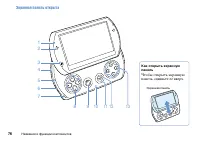
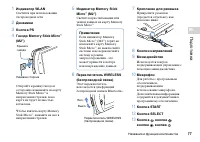
76 Названия·и·функции·компонентов Экранная панель открыта Как открыть экранную панель Чтобы открыть экранную панель, сдвиньте ее вверх. Экранная·панель SELECT STAR T 1 9 8 11 10 12 13 2 34 567
Page 78 - Зарядка батареи; Перед первым использованием системы PSP; Подсоедините кабель USB к адаптеру
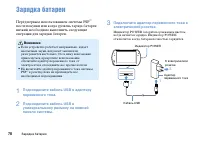
78 Зарядка·батареи Зарядка батареи Перед первым использованием системы PSP ™ после покупки или когда уровень заряда батареи низкий, необходимо выполнить следующие операции для зарядки батареи. Внимание Если устройство работает неправильно, издает необычные звуки, испускает запахи или разогревается...
Page 79 - Проверка уровня заряда батареи; Ожидаемое время зарядки батареи; Ожидаемое время работы батареи
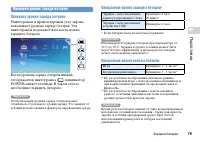
79 Подг отовка RU Зарядка·батареи Проверка уровня заряда батареи Проверка уровня заряда батареи Пиктограмма в правом верхнем углу экрана показывает уровень заряда батареи. Эта пиктограмма подскажет вам, когда нужно зарядить батарею. Когда уровень заряда батареи низкий, отображается пиктограмма , и и...
Page 80 - Срок службы батареи; Способы зарядки батареи; Зарядка с использованием устройства USB
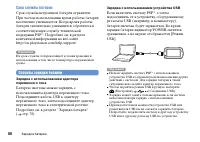
80 Зарядка·батареи Срок службы батареи Срок службы встроенной батареи ограничен. При частом использовании время работы батареи постепенно уменьшается. Когда время работы батареи значительно уменьшится, обратитесь в соответствующую службу технической поддержки PSP ™ . Подробнее см. в разделе контактн...
Page 81 - Включение и выключение системы; Включение системы; Выключение системы; Режим энергосбережения; Во время игры или при воспроизведении в; Сдвиньте переключатель POWER/HOLD; Выход из режима энергосбережения
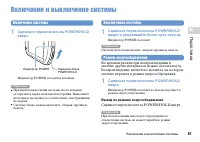
81 Подг отовка RU Включение·и·выключение·системы Включение и выключение системы Включение системы 1 Сдвиньте переключатель POWER/HOLD вверх. Переключатель·POWER/HOLD· Индикатор·POWER· Индикатор POWER загорится зеленым. Подсказки При первом включении системы после покупки отобразится экран начально...
Page 82 - Основные операции; Использование XMB; Пользовательский интерфейс системы PSP; Выберите категорию с
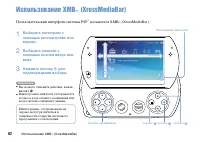
82 Использование·XMB ™ ·(XrossMediaBar) Основные операции Использование XMB ™ (XrossMediaBar) Пользовательский интерфейс системы PSP ™ называется XMB ™ (XrossMediaBar). 1 Выберите категорию с помощью кнопки влево или вправо. 2 Выберите элемент с помощью кнопки вверх или вниз. 3 Нажмите кнопку для по...
Page 83 - Категории
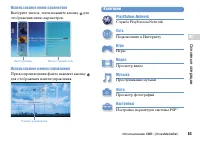
83 Основные ·опер ации RU Использование·XMB ™ ·(XrossMediaBar) Использование меню параметров Выберите значок, затем нажмите кнопку для отображения меню параметров. Пиктограммы Меню·параметров Использование панели управления При воспроизведении файла нажмите кнопку для отображения панели управления. ...
Page 84 - Использование экранной клавиатуры; Список клавиш
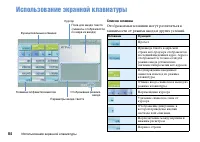
84 Использование·экранной·клавиатуры Использование экранной клавиатуры Список клавиш Отображаемые клавиши могут различаться в зависимости от режима ввода и других условий. Клавиши Функция Пробел При вводе текста в адресной строке веб-браузера отображается последний введенный адрес. Адреса отображают...
Page 85 - Переключение режима ввода; Ввод символов
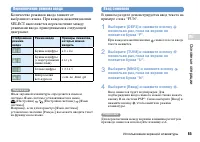
85 Основные ·опер ации RU Использование·экранной·клавиатуры Переключение режима ввода Количество режимов ввода зависит от выбранного языка. При каждом нажатии кнопки SELECT выполняется переключение между режимами ввода, приведенными в следующей диаграмме. Отображение режима ввода Режим ввода Примеры...
Page 86 - Игры; Игры; Игры для системы PSP
86 86 Игры Игры Игры Игры для системы PSP ™ загружаются из PlayStation ® Store. PlayStation ® Store·–·это· сетевой·магазин,·где·можно·загрузить·(приобрести)·такие·материалы,·как·игры·и·видеозаписи.
Page 87 - Игры можно загружать одним из следующих способов.; С помощью ПК; Загрузка игр с помощью ПК; Установка Media Go
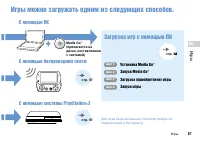
87 Игры RU Игры Игры можно загружать одним из следующих способов. Media Go ™ (прилагается на диске, поставляемом с системой) С помощью ПК С помощью беспроводной связи С помощью системы PlayStation ® 3 Для·всех·перечисленных·способов·требуется·подключение·к·Интернету. Загрузка игр с помощью ПК Шаг 1 ...
Page 88 - Что такое Media Go
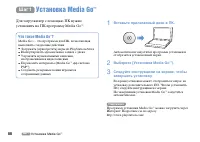
88 Шаг 1 ·Установка·Media·Go ™ Шаг 1 Установка Media Go ™ Шаг 1 Установка Media Go ™ Для загрузки игр с помощью ПК нужно установить на ПК программу Media Go ™ . Что такое Media Go ™ ? Media Go ™ – это программа для ПК, позволяющая выполнять следующие действия: Загружать (приобретать) игры из PlayS...
Page 89 - Запуск Media Go; Если для установки программы был выполнен; Дважды щелкните на пиктограмме
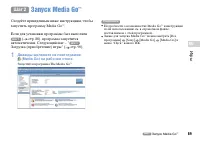
89 Игры RU Шаг 2 ·Запуск·Media·Go ™ Шаг 2 Запуск Media Go ™ Шаг 2 Запуск Media Go ™ Следуйте приведенным ниже инструкциям, чтобы запустить программу Media Go ™ . Если для установки программы был выполнен Шаг 1 ( стр. 88), программа запустится автоматически. Следующий шаг – " Шаг 3 Загрузка (прио...
Page 90 - Создать учетную запись
90 Шаг 3 ·Загрузка·(приобретение)·игры Шаг 3 Загрузка (приобретение) игры Шаг 3 Загрузка (приобретение) игры С помощью Media Go ™ вы можете загружать бесплатно (или приобретать) игры в PlayStation ® Store. Для использования PlayStation ® Store необходимо подключить ПК к Интернету. Вход в PlayStation...
Page 91 - Создание учетной записи PlayStation; Основная учетная запись
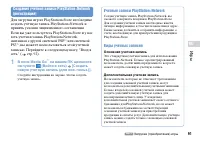
91 Игры RU Шаг 3 ·Загрузка·(приобретение)·игры Создание учетной записи PlayStation ® Network (регистрация) Для загрузки игр из PlayStation ® Store необходимо создать учетную запись PlayStation ® Network и принять условия лицензионного соглашения.Если вы уже пользуетесь PlayStation ® Store и у вас ес...
Page 92 - Вход в сеть; Выход из сети
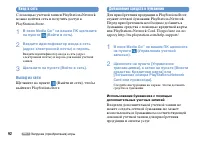
92 Шаг 3 ·Загрузка·(приобретение)·игры Вход в сеть С помощью учетной записи PlayStation ® Network можно войти в сеть и получить доступ к PlayStation ® Store. 1 В окне Media Go ™ на вашем ПК щелкните на пункте (Войти в сеть). 2 Введите идентификатор входа в сеть (адрес электронной почты) и пароль. Вв...
Page 93 - Загрузка игры; Примечание; Включите систему PSP
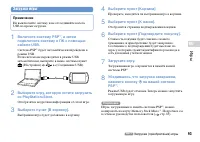
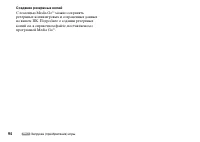
93 Игры RU Шаг 3 ·Загрузка·(приобретение)·игры Загрузка игры Примечание Не выключайте систему и не отсоединяйте кабель USB во время загрузки. 1 Включите систему PSP ™ , а затем подключите систему к ПК с помощью кабеля USB. Система PSP ™ будет автоматически переведена в режим USB. Если система не пер...
Page 95 - Запуск игры; Выход из игры; Приостановка игры
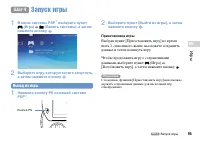
95 Игры RU Шаг 4 ·Запуск·игры Шаг 4 Запуск игры Шаг 4 Запуск игры 1 В меню системы PSP ™ выберите пункт (Игра) (Память системы), а затем нажмите кнопку . 2 Выберите игру, которую хотите запустить, а затем нажмите кнопку . Выход из игры 1 Нажмите кнопку PS на вашей системе PSP ™ . Кнопка·PS· 2 Выбери...
Page 96 - Передача видео из игры на телевизор
96 Шаг 4 ·Запуск·игры Передача видео из игры на телевизор Видео из игры можно передать на телевизор с помощью кабеля вывода видео* (продается отдельно). Выберите кабель вывода видео, подходящий к вашему телевизору. Подробнее см. в сетевом руководстве пользователя ( стр. 65). * Используйте кабель выв...
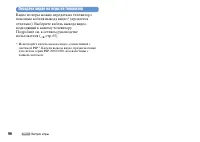
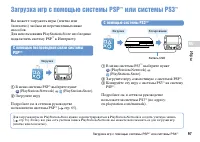
Page 97 - Загрузка игр с помощью системы PSP; С помощью беспроводной связи системы; С помощью системы PS3
97 Игры RU Загрузка·игр·с·помощью·системы·PSP ™ ·или·системы·PS3 ™ Загрузка игр с помощью системы PSP ™ или системы PS3 ™ Вы можете загружать игры (платно или бесплатно) любым из перечисленных ниже способов. Для использования PlayStation ® Store необходимо подключить систему PSP ™ к Интернету. С пом...
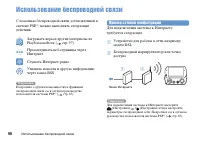
Page 98 - Сеть; Использование беспроводной связи; , можно выполнять следующие; Пример сетевой конфигурации
98 Сеть Использование·беспроводной·связи Использование беспроводной связи С помощью беспроводной связи, установленной в системе PSP ™ , можно выполнять следующие действия. Загружать игры и другие материалы из PlayStation ® Store ( стр. 97) Просматривать веб-страницы через Интернет Слушать Интернет-р...
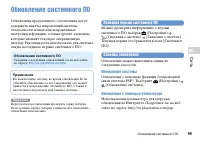
Page 99 - Обновления системного ПО; Проверка версии системного ПО
99 Сеть RU Обновление·системного·ПО Обновление системного ПО Обновления программного обеспечения могут содержать пакеты исправлений системы безопасности, новые или исправленные настройки и функции, а также другие элементы, которые изменят текущую операционную систему. Рекомендуется использовать для ...
Page 100 - Перед обращением в службу; Проблемы с питанием, аккумулятором и
100 Поддержка Перед·обращением·в·службу Перед обращением в службу Обратитесь к этому разделу при возникновении проблем при использовании системы PSP ™ . Если устранить проблемы не удалось, посетите наш веб-сайт справки и поддержки по адресу http://eu.playstation.com/help-support/. Проблемы с питание...
Page 101 - жка; Изображение; Экран неожиданно гаснет.
101 Поддер жка RU Перед·обращением·в·службу Система PSP ™ деформирована. На батарее в системе PSP ™ со временем может образоваться выпуклость. Обратитесь в местную службу поддержки пользователей системы PSP ™ . Подробнее см. в разделе контактной информации на веб-сайте http://eu.playstation.com/he...
Page 102 - Звук
102 Перед·обращением·в·службу Когда система PSP ™ подключена к телевизору, экран системы PSP ™ внезапно гаснет. Если установлен параметр (Настройки подсоединенного экрана) [Хранитель экрана], то хранитель экрана автоматически активируется, если в течение определенного периода времени не производил...
Page 103 - Видео
103 Поддер жка RU Перед·обращением·в·службу Система не распознает карту Memory Stick Micro ™ . Если форматирование карты Memory Stick Micro ™ выполнено с помощью ПК, система PSP ™ может ее не распознать. В этом случае скопируйте на компьютер данные, которые необходимо сохранить, а затем выберите (...
Page 104 - Невозможно установить сетевое соединение.; Устройство Bluetooth
104 Перед·обращением·в·службу пользователя ( стр. 65). Система может не распознать измененное имя файла или папки. Изображения, несовместимые с системой PSP ™ , не будут распознаваться. Сеть Невозможно установить сетевое соединение. Проверьте, что переключатель WIRELESS (беспроводной связи), р...
Page 105 - Другие неисправности; Система не работает должным образом.
105 Поддер жка RU Перед·обращением·в·службу Проверьте, включено ли устройство Bluetooth ® . Если на устройстве Bluetooth ® был выполнен сброс, нужно заново зарегистрировать устройство для использования с системой. Устройство Bluetooth ® не воспроизводит звук. Проверьте, не отключен ли звук в у...
Page 106 - Устанавливается дата и время по умолчанию.
106 Перед·обращением·в·службу При переноске системы PSP ™ из холодного помещения в теплое на ней может образоваться влага. В этом случае система может работать некорректно. Выключите и отсоедините систему и не используйте ее в течение нескольких часов. Если система продолжает работать некорректно,...
Page 107 - ГАРАНТИЯ; ГАРАНТИЯ; . Даная гарантия не распространяется на
107 Поддер жка RU ГАРАНТИЯ ГАРАНТИЯ ГАРАНТИЯ Благодарим вас за приобретение данного Продукта. Под термином "Продукт" подразумевается игровая компьютерная система PSP ™ . Даная гарантия не распространяется на какое-либо программное обеспечение, поставляемое отдельно или совместно с Продуктом....
Page 108 - ВАЖНАЯ ИНФОРМАЦИЯ
108 ГАРАНТИЯ ВАЖНАЯ ИНФОРМАЦИЯ 1. Если потребуется претензию по настоящей Гарантии, обратитесь в местную службу поддержки потребителей (контактная информация приведена в отдельно прилагаемой листовке), чтобы получить инструкции по возврату и иные консультации. 2. Данная Гарантия действует только: i....
Page 109 - iii. любые переделки, настройки или изменения
109 Поддер жка RU ГАРАНТИЯ iii. любые переделки, настройки или изменения данного Продукта, выполненные по любым причинам, независимо от того, правильно или неправильно они выполнены; iv. техническое обслуживание или ремонт, выполненные организацией технического обслуживания, не уполномоченной компан...
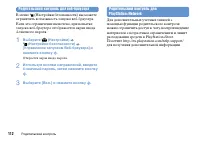
Page 110 - Родительский контроль; Сброс пароля; Установка уровня родительского контроля; Используя кнопки направлений, введите
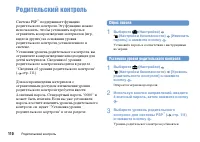
110 Дополнительная информация Родительский·контроль Родительский контроль Система PSP ™ поддерживает функцию родительского контроля. Эту функцию можно использовать, чтобы установить пароль и ограничить воспроизведение материалов (игр, видео и других) на основании уровня родительского контроля, устан...
Page 111 - Сведения об уровнях родительского контроля; Уровни родительского контроля в системе PSP
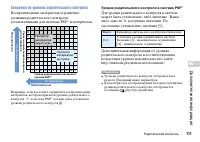
111 Допо лнительная ·информация RU Родительский·контроль Сведения об уровнях родительского контроля Воспроизведение материалов ограничено уровнями родительского контроля, установленными для системы PSP ™ и материалов. 1 2 3 4 5 6 7 8 9 10 1110 987654321 11 Мак симальное Огр аничение Уровень ро дител...
Page 112 - Родительский контроль для веб-браузера
112 Родительский·контроль Родительский контроль для веб-браузера В меню (Настройки безопасности) вы можете ограничить возможность запуска веб-браузера. Если это ограничение включено, при попытке запуска веб-браузера отображается экран ввода 4-значного пароля. 1 Выберите (Настройки) (Настройки безопа...
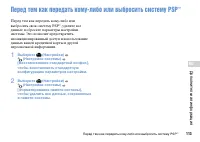
Page 113 - Перед тем как передать кому-либо или выбросить систему PSP; Выберите
113 Допо лнительная ·информация RU Перед·тем·как·передать·кому-либо·или·выбросить·систему·PSP ™ Перед тем как передать кому-либо или выбросить систему PSP ™ Перед тем как передать кому-либо или выбросить свою систему PSP ™ , удалите все данные и сбросьте параметры настройки системы. Это позволит пре...
Page 114 - Технические характеристики
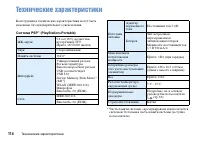
114 Технические·характеристики Технические характеристики Конструкция и технические характеристики могут быть изменены без предварительного уведомления. Система PSP ™ (PlayStation ® Portable) ЖК-экран 9,6 см (16:9), полностью прозрачный, TFT Прибл. 16770000 цветов Звук Стереодинамики Память системы ...
Page 115 - Адаптер переменного тока; Совместимые карты; Примечания о картах Memory Stick Micro
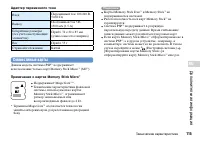
115 Допо лнительная ·информация RU Технические·характеристики Адаптер переменного тока Вход Переменный ток 100-240 В, 50/60 Гц Выход Постоянный ток 5 В, 1500 мА (1,5 А) Габаритные размеры (без учета выступающих элементов) Прибл. 74 × 22 × 87 мм (длина × высота × ширина) Вес Прибл. 55 г Страна изгото...
Page 116 - Объекты авторских прав и товарные знаки
116 Объекты·авторских·прав·и·товарные·знаки Объекты авторских прав и товарные знаки " ", "PlayStation", " " и " " являются зарегистрированными товарными знаками Sony Computer Entertainment Inc. "PS3" и " " являются товарными знаками этой же компании. &...