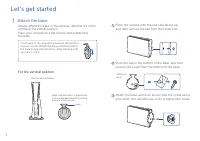
Page 2 - Let’s get started; For the vertical position
2 Hook With the base attached Make sure the hook is in the position as illustrated below before attaching the base to the console. You’ll need to reconfigure the base for the position of your console. Rotate the top and bottom part of the base in opposite directions. Keep rotating until you hear a “...
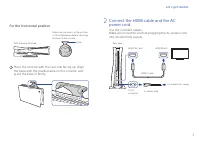
Page 3 - Connect the HDMI cable and the AC; For the horizontal position
3 2 Connect the HDMI cable and the AC power cord. Use the included cables. Make all connections before plugging the AC power cord into an electricity supply. For the horizontal position 1 Place the console with the rear side facing up. Align the base with the marked area on the console, and press th...
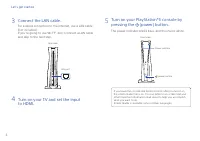
Page 4 - Connect the LAN cable.
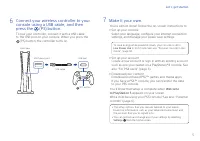
4 Let’s get started 3 Connect the LAN cable. For a wired connection to the internet, use a LAN cable (not included).If you’re going to use Wi-Fi®, don’t connect a LAN cable and skip to the next step. 4 Turn on your TV and set the input to HDMI. 5 Turn on your PlayStation®5 console by pressing the (p...
Page 6 - Play some PS4 games on your PS5 console; Transfer data from a PS4 console to your
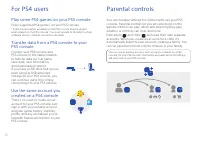
6 Parental controls You can manage settings for children who use your PS5 console. Parental controls let you set restrictions on the games children can play, when and how long they play, whether or not they can chat, and more.Each adult ( ) and child ( ) will need their own separate accounts. When y...
Page 7 - Create an account for a child; Review and change your parental control settings; Game rating icons
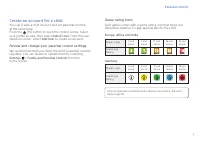
7 Create an account for a child You can create a child account and set parental controls at the same time.Press the (PS) button to open the control centre. Select your profile picture, then select Switch User . From the user selection screen, select Add User to create an account. Review and change y...
Page 8 - What’s on the screen; Home screen; Switch home screens; Hub
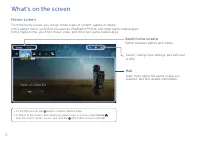
8 What’s on the screen Home screen From the home screen, you can go to two types of content: games or media.In the games home, you’ll find your games, PlayStation™Store, and other game-related apps. In the media home, you’ll find music, video, and other non-game related apps. Switch home screens Swi...
Page 9 - Control centre; Cards
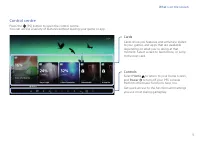
9 What’s on the screen Control centre Press the (PS) button to open the control centre.You can access a variety of features without leaving your game or app. Cards Cards show you features and activities related to your games and apps that are available depending on what you’re doing at that moment. ...
Page 10 - Let’s play; Play a game from a disc; Eject the disc; Play a digital game
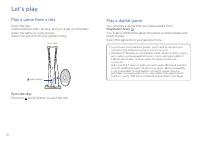
10 Let’s play Play a game from a disc Insert the disc. Game data will start copying, and you’ll get a notification when the game is ready to play.Select the game from your games home. Front view (eject) button Eject the disc Press the (eject) button to eject the disc. Play a digital game You can pla...
Page 11 - Use your controller; Charge your controller; Mute your microphone; Turn on your PS5 console with a controller
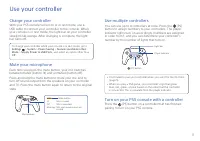
11 Use your controller Charge your controller With your PS5 console turned on or in rest mode, use a USB cable to connect your controller to the console. When your console is in rest mode, the light bar on your controller slowly blinks orange. After charging is complete, the light bar turns off. To ...
Page 12 - Shutting down; Caution; Put your console in rest mode; Turn off your console completely; Power indicator
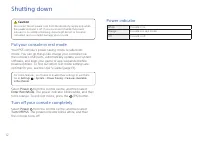
12 Shutting down Caution Disconnect the AC power cord from the electricity supply only when the power indicator is off. If you disconnect it while the power indicator is on solidly or blinking, data might be lost or become corrupted, and you might damage your console. Put your console in rest mode Y...
Page 13 - Further information; Safety Guide; Customer Support Website
13 Further information Safety Guide Learn how to use your PS5 console safely with the supplied Safety Guide. This printed manual also contains product warranty terms and information about specifications. Be sure to read it before using your console. User’s Guide Find out about everything your PS5 co...