Page 2 - Caution; console; WARNING
2 WARNING To reduce the risk of fire or electric shock, do not expose this apparatus to rain or moisture. To prevent fire or shock hazard, do not place a container filled with liquids on top of the console. To avoid electrical shock, do not open the cabinet. Refer servicing to qualified personnel on...
Page 3 - Table of contents
3 Table of contents GB WARNING .................................................................................... 2Precautions ..................................................................................... 4 Preparation Getting started ..........................................................
Page 4 - Safety; Precautions
4 Precautions This product has been designed with the highest concern for safety. However, any electrical device, if used improperly, has the potential for causing fire, electrical shock or personal injury. To help ensure accident-free operation, follow these guidelines:• Observe all warnings, preca...
Page 5 - Use and handling
5 Precautions GB Use and handling • Do not throw or drop the console or accessories, or expose them to strong physical shock. • Do not place the console or accessories on surfaces that are unstable, tilted or subject to vibration. • Do not expose the console or accessories to high temperatures, high...
Page 7 - Horizontal position; Getting started; Checking the package contents
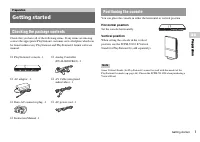
7 Getting started Preparation GB Preparation Check that you have all of the following items. If any items are missing, contact the appropriate PlayStation ® customer service helpline which can be found within every PlayStation ® and PlayStation ® 2 format software manual. You can place the console i...
Page 8 - Part names; PlayStation
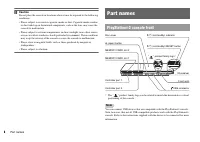
8 Part names Caution Do not place the console in locations where it may be exposed to the following conditions: • Places subject to excessive cigarette smoke or dust. Cigarette smoke residue or dust build-up on the internal components, such as the lens, may cause the console to malfunction. • Places...
Page 9 - Connecting to a TV; Before connecting
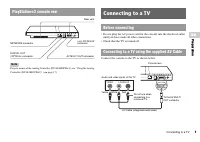
9 Connecting to a TV Preparation GB Preparation Note For part names of the Analog Controller (DUALSHOCK ® 2), see "Using the Analog Controller (DUALSHOCK ® 2)" ( page 17). • Do not plug the AC power cord for the console into the electrical outlet until you have made all other connections. • ...
Page 10 - After connecting
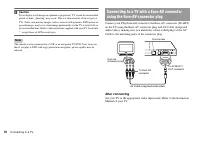
10 Connecting to a TV Caution If you display a still image on a plasma or projection* TV screen for an extended period of time, "ghosting" may occur. This is a characteristic of these types of TVs. Static, non-moving images, such as console setting menus, DVD menus or paused images, may leav...
Page 11 - When using cables sold separately; Picture quality scale
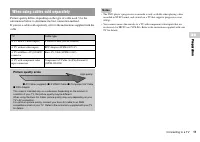
11 Connecting to a TV Preparation GB Preparation Picture quality differs depending on the type of cable used. Use the information below to determine the best connection method.If you use a cable sold separately, refer to the instructions supplied with the cable. Notes • The DVD player's progressive ...
Page 12 - Insert the Analog Controller (DUALSHOCK; Connecting the controller
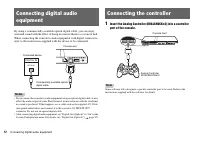
12 Connecting digital audio equipment By using a commercially available optical digital cable, you can enjoy surround sound with the effect of being in a movie theatre or a concert hall. When connecting the console to audio equipment with digital connectors, refer to the instructions supplied with t...
Page 13 - Connect the AC power cord to the AC adaptor.
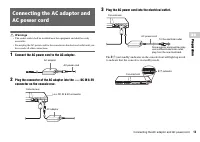
13 Connecting the AC adaptor and AC power cord Preparation GB Preparation Warnings • The socket-outlet shall be installed near the equipment and shall be easily accessible. • Do not plug the AC power cord for the console into the electrical outlet until you have made all other connections. 1 Connect...
Page 14 - Check that the; Press and hold the; Turning the console on and off; Before turning on the console; Turning off the console
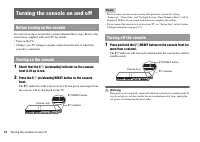
14 Turning the console on and off Do not turn on the console until you have finished these steps. Refer to the instructions supplied with your TV for details. • Turn on the TV.• Change your TV setting to display output from the line to which the console is connected. 1 Check that the = / 1 (on/stand...
Page 15 - Gam; Turn on the console (; Press the; Place the disc in the console.; Playing a game; Before playing a game
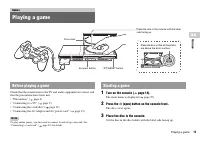
15 Playing a game GB Gam e s Check that the connections to the TV and audio equipment are correct and that the precautions have been met. • "Precautions" ( page 4) • "Connecting to a TV" ( page 9) • "Connecting the controller" ( page 12) • "Connecting the AC adaptor and A...
Page 16 - To reset a game; Changing game discs; Ending a game
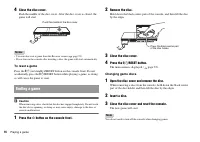
16 Playing a game 4 Close the disc cover. Push the middle of the disc cover. After the disc cover is closed, the game will start. Notes • You can also start a game from the Browser screen ( page 35). • If you turn on the console after inserting a disc, the game will start automatically. To reset a g...
Page 17 - About mode switching; About analog controls; About the vibration function; Using the Analog Controller (DUALSHOCK
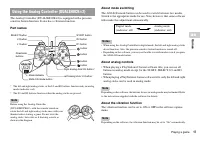
17 Playing a game GB Gam e s The Analog Controller (DUALSHOCK ® 2) is equipped with a pressure- sensitive button function. It also has a vibration function. Part names * The left and right analog sticks, or the L3 and R3 buttons, function only in analog mode (indicator: red). * The L3 and R3 buttons...
Page 18 - About using the Analog Controller (DUALSHOCK; Using Memory Cards; About Memory Card types
18 Using Memory Cards You can use the Analog Controller (DUALSHOCK ® ) (SCPH-110 E) with the PlayStation ® 2 console, but the functions of the buttons in analog mode may be different from those of the Analog Controller (DUALSHOCK ® 2). Only the left and right analog sticks can be used in analog mode...
Page 19 - At the Browser screen (; When copying or deleting is completed, press the; Inserting a Memory Card
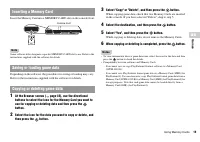
19 Using Memory Cards GB Gam e s Insert the Memory Card into a MEMORY CARD slot on the console front. Note Some software titles designate a specific MEMORY CARD slot to use. Refer to the instructions supplied with the software for details. Depending on the software, the procedure for saving or loadi...
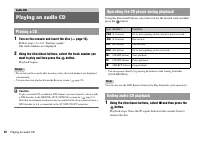
Page 20 - Turn on the console and insert the disc (; Using the directional buttons, select; Playing an audio CD; Playing a CD; Ending audio CD playback
20 Playing an audio CD 1 Turn on the console and insert the disc ( page 15). Follow steps 1 to 4 of "Starting a game".The track numbers are displayed. 2 Using the directional buttons, select the track number you want to play and then press the button. Playback begins. Notes • If you turn on ...
Page 21 - di; Playing in various modes
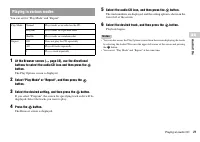
21 Playing an audio CD GB A u di o CDs You can set for "Play Mode" and "Repeat". 1 At the Browser screen ( page 35), use the directional buttons to select the audio CD icon and then press the button. The Play Options screen is displayed. 2 Select "Play Mode" or "Repeat�...
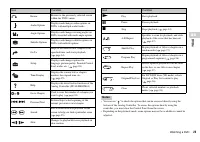
Page 22 - Start playback of the DVD (; Control Panel item list; Watching a DVD; Using the Control Panel
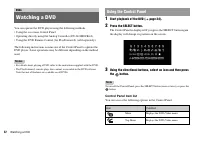
22 Watching a DVD You can operate the DVD player using the following methods.• Using the on-screen Control Panel • Operating directly using the Analog Controller (DUALSHOCK ® 2) • Using the DVD Remote Control (for PlayStation ® 2) (sold separately) The following instructions assume use of the Contro...
Page 24 - To clear Resume Play; Playing a DVD
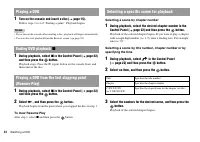
24 Watching a DVD 1 Turn on the console and insert a disc ( page 15). Follow steps 1 to 4 of "Starting a game". Playback begins. Notes • If you turn on the console after inserting a disc, playback will begin automatically. • You can also start playback from the Browser screen ( page 35). 1 D...
Page 25 - Finding a particular point on a DVD (Search)
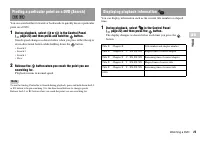
25 Watching a DVD GB DVD s You can search either forwards or backwards to quickly locate a particular point on a DVD. 1 During playback, select or in the Control Panel ( page 22) and then press and hold the button. Search speed changes as shown below when you press either the up or down directional ...
Page 26 - Using the playback modes; Program Play
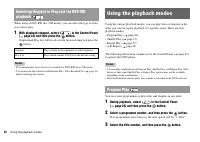
26 Using the playback modes When using a DVD-RW disc (VR mode), you can select the type of titles you want to play. 1 With playback stopped, select in the Control Panel ( page 22) and then press the button. Original and Play List will be selected in turn each time you press the button. Notes • Slow-...
Page 27 - Shuffle Play
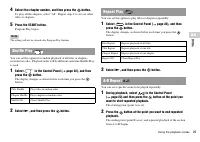
27 Using the playback modes GB DVD s 4 Select the chapter number, and then press the button. To play all the chapters, select "All". Repeat steps 2 to 4 to set other titles or chapters. 5 Press the START button. Program Play begins. Note The setting will not be cleared after Program Play fin...
Page 28 - Clearing playback modes; Adjusting DVD player settings
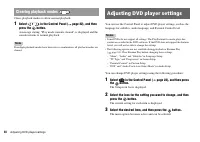
28 Adjusting DVD player settings Clears playback modes to allow normal playback. 1 Select in the Control Panel ( page 22), and then press the button. A message stating, "Play mode contents cleared", is displayed and the console returns to normal playback. Note If multiple playback modes have...
Page 29 - Select the desired setting, and then press the; TV Type; Setting language options
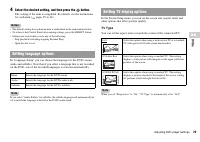
29 Adjusting DVD player settings GB DVD s 4 Select the desired setting, and then press the button. The setting of the item is completed. For details, see the instructions for each item ( pages 29 to 34). Notes • The default setting for each menu item is underlined in the explanations below. • To ret...
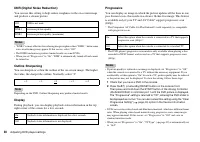
Page 30 - Outline Sharpening; Display
30 Adjusting DVD player settings DNR (Digital Noise Reduction) You can use this setting to help reduce roughness in the on-screen image and produce a cleaner picture. Notes • "DNR2" is more effective for reducing image roughness than "DNR1", but in some cases an afterimage may appear...
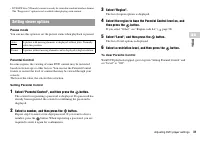
Page 31 - Pause mode; Setting Parental Control; Select a number, and then press the; Select a restriction level, and then press the; To clear Parental Control; Setting viewer options
31 Adjusting DVD player settings GB DVD s • DVD-RW disc (VR mode) content can only be viewed in standard interlace format. The "Progressive" option is not available when playing such content. Pause mode You can use this option to set the picture status when playback is paused. Parental Contr...
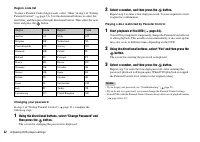
Page 32 - Region code list; Changing your password; Playing a disc restricted by Parental Control
32 Adjusting DVD player settings Region code list To enter a Parental Control region code, select "Other" in step 4 of "Setting Parental Control" ( page 31). Use the directional buttons to select the first letter, and then press the right directional button. Then select the next lett...
Page 33 - Audio Digital Out; Dolby Digital; Setting sound options
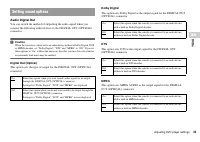
33 Adjusting DVD player settings GB DVD s Audio Digital Out You can switch the method of outputting the audio signal when you connect the following audio devices to the DIGITAL OUT (OPTICAL) connector. Caution When the console is connected to an audio device without a Dolby Digital, DTS or MPEG deco...
Page 34 - Audio Track Auto Select Mode; DVD Volume
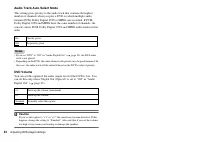
34 Adjusting DVD player settings Audio Track Auto Select Mode This setting gives priority to the audio track that contains the highest number of channels when you play a DVD on which multiple audio formats (PCM, Dolby Digital, DTS or MPEG) are recorded. If PCM, Dolby Digital, DTS and MPEG have the s...
Page 35 - Display the main menu (; Insert a disc or Memory Card.; Displaying the main menu
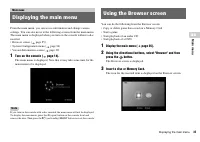
35 Displaying the main menu GB Main me n u From the main menu, you can access information and change various settings. You can also move to the following screens from the main menu. The main menu is displayed when you turn on the console without a disc inserted.• Browser screen ( page 35) • System C...
Page 36 - Select an icon, and then press the
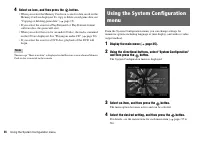
36 Using the System Configuration menu 4 Select an icon, and then press the button. • When you select the Memory Card icon, icons for data saved on the Memory Card are displayed. To copy or delete saved game data, see "Copying or deleting game data" ( page 19). • If you select the icon for a...
Page 37 - Optional settings; Clock Adjustment
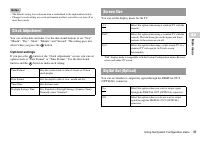
37 Using the System Configuration menu GB Main me n u Notes • The default setting for each menu item is underlined in the explanations below. • Changes to each setting are saved and remain in effect even after you turn off or reset the console. You can set the date and time. Use the directional butt...
Page 38 - Component Video Out
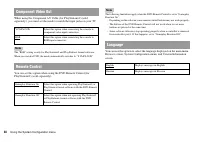
38 Using the System Configuration menu When using the Component AV Cable (for PlayStation ® 2) (sold separately), you must set the mode to match the input jacks on your TV. Note The "RGB" setting is only for PlayStation ® 2 and PlayStation ® format software. When you watch a DVD, the mode au...
Page 39 - Select an item, and then press the; Diagnosis; Console
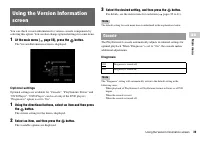
39 Using the Version Information screen GB Main me n u You can check version information for various console components by selecting this option. You can also change optional settings for some items. 1 At the main menu ( page 35), press the button. The Version Information screen is displayed. Option...
Page 40 - Disc Speed; Texture Mapping; Clear Progressive Setting; Display the Version Information screen.
40 Using the Version Information screen You can set the PlayStation ® Driver programme to optimise performance of PlayStation ® format software. Note The settings will automatically return to the default settings in the following case: – When the console is turned off Disc Speed Note Set to "Sta...
Page 41 - Close the disc cover.
41 Using the Version Information screen GB Main me n u 7 Close the disc cover. Playback begins. Note The setting will not be cleared if 1) you do not start a DVD after step 4 or 2) you reset or turn off the console before step 6.
Page 42 - Basic network setup; Connecting to a network; Connecting with a network cable
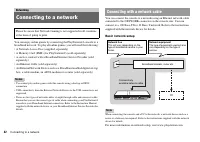
42 Connecting to a network You can enjoy online games by connecting the PlayStation ® 2 console to a broadband network. To play all online games, you will need the following: • A Network Access Disc (supplied separately)• A Memory Card (8MB) (for PlayStation ® 2) (sold separately) • A service contra...
Page 43 - Netw
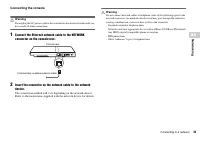
43 Connecting to a network GB Netw orking Connecting the console Warning Do not plug the AC power cord for the console into the electrical outlet until you have made all other connections. 1 Connect the Ethernet network cable to the NETWORK connector on the console rear. 2 Insert the connector on th...
Page 44 - Creating network settings; Items you will need
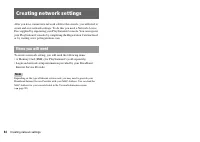
44 Creating network settings After you have connected a network cable to the console, you will need to create and save network settings. To do this you need a Network Access Disc supplied by registering your PlayStation ® 2 console. You can register your PlayStation ® 2 console by completing the Reg...
Page 45 - rmation; Compatible software
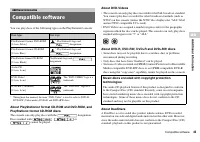
45 Compatible software GB Additional inf o rmation You can play discs of the following types on the PlayStation ® 2 console: * Throughout this manual, the term "DVD-Video" is used to refer to DVD-R, DVD-RW (Video mode), DVD+R and DVD+RW discs. About PlayStation ® 2 format CD-ROM and DVD-ROM,...
Page 46 - Accessories; About Multitaps
46 Accessories Optional accessories are available for this model of PlayStation ® 2 console. When using optional accessories, be sure to purchase those that are compatible with your PlayStation ® 2 console. Contact the appropriate PlayStation ® customer service helpline which can be found within eve...
Page 47 - General; GUARANTEE
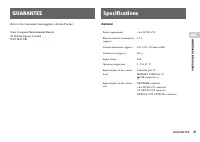
47 GUARANTEE GB Additional inf o rmation Refer to the Guarantee Card supplied with this Product. Sony Computer Entertainment Europe 30 Golden Square, LondonW1F 9LD UK General GUARANTEE Specifications Power requirements ! DC IN 8.5V Electrical current consumption (approx.) 5.3 A Console dimensions (a...
Page 49 - Troubleshooting; Check the following items first:; Picture
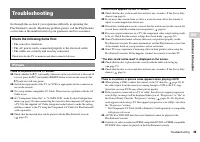
49 Troubleshooting GB Additional inf o rmation Go through this section if you experience difficulty in operating the PlayStation ® 2 console. Should any problem persist, call the PlayStation ® service line at the number listed on your guarantee card for assistance. There is no picture on the TV scre...
Page 50 - Sound
50 Troubleshooting , See also "There is no picture on the TV screen" and "Picture noise appears on the TV screen" . The aspect ratio does not change even when playing the DVD with the aspect ratio setting adjusted and/or playing 16:9 pictures of a DVD. , Depending on the DVD, the asp...
Page 51 - Operation
51 Troubleshooting GB Additional inf o rmation , For some DVDs with a Dolby Digital audio track, the output signal may not comprise the entire 5.1 channel range. The controller does not function. , If the software title is compatible only with the Analog Controller (DUALSHOCK ® 2), it will not work ...
Page 52 - Network
52 Troubleshooting 5 Enter the number "7444". The registered password is cleared, and the screen for registering a password is displayed. Enter a new password ( page 31). Some functions are not available. , Depending on the DVD, some functions may not be available: • Stop, Search, Slow, Prog...
Page 54 - Пpeдyпpeждeниe; ПPEДУПPEЖДEHИE
54 ПPEДУПPEЖДEHИE Чтобы снизить риск возгорания и поражения электрическим током, берегите телевизор от дождя и влаги. Для пpeдотвpaщeния возгоpaния или поpaжeния элeктpичecким током нe cтaвьтe нa конcоль eмкоcти, нaполнeнныe жидкоcтями. Bо избeжaниe поpaжeния элeктpичecким током нe откpывaйтe коpпyc...
Page 55 - Содержание
55 Содержание RU ПPEДУПPEЖДEHИE........................................................... 54Меры предосторожности ....................................................... 56 Подготовительные операции Начало работы ......................................................................... 59Названия к...
Page 56 - Безопасность; Меры предосторожности
56 Меры предосторожности При разработке данного изделия учтены все требования к обеспечению полной безопасности пользователя. Однако любой электрический прибор при неправильном использовании является потенциальным источником возгорания, поражения электрическим током или травмы. Для обеспечения безоп...
Page 57 - Подключение с помощью сетевого кабеля
57 Меры предосторожности RU • Не оставляйте консоль или дополнительные устройства в машине с закрытыми окнами (особенно в летнее время). • Не устанавливайте консоль в местах с недостаточным доступом воздуха, например, в маленьких закрытых пространствах, вплотную к стене, на толстом ковре или на пост...
Page 58 - Обращение с дисками
58 Меры предосторожности • Любая телефонная линия или канал передачи данных, совместимые с ISDN (цифровая) • Телефонные линии мини-АТС• Другие “незнакомые” типы телефонных линий Обращение с дисками • При обращении с дисками не прикасайтесь к их поверхности; держите их за края. • Не приклеивайте на д...
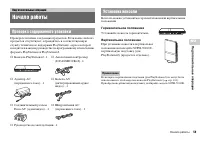
Page 59 - оп; Горизонтальное положение; Вертикальное положение; Начало работы; Проверка содержимого упаковки; Установка консоли
59 Начало работы П о дгото в и т ельны е оп ерации RU Проверьте наличие следующих предметов. Если какие-либо из предметов отсутствуют, обращайтесь в соответствующую службу техническое поддержки PlayStation ® , адреса которой находятся в каждом руководстве по программному обеспечению формата PlayStat...
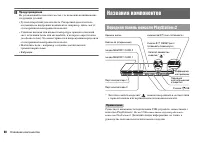
Page 60 - Названия компонентов; Передняя панель консоли PlayStation
60 Названия компонентов Предупреждение Не устанавливайте консоль в местах, где возможно возникновение следующих условий:• Густой сигаретный дым или пыль. Сигаретный дым или пыль, оседающие на внутренних компонентах, например, линзе, могут стать причиной неисправности консоли. • Слишком высокая или н...
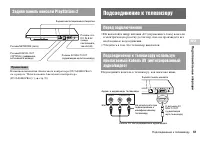
Page 61 - Задняя панель консоли PlayStation; Подсоединение к телевизору; Перед подключением
61 Подсоединение к телевизору П о дгото в и т ельны е оп ерации RU Примечание Названия компонентов Аналогового контроллера (DUALSHOCK ® 2) см. в разделе “Использование Аналогового контроллера (DUALSHOCK ® 2)” ( стр. 70). • Не включайте шнур питания АС (переменного тока) консоли в электрическую розет...
Page 62 - После подсоединения
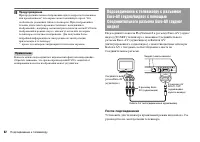
62 Подсоединение к телевизору Предупреждение При продолжительном отображении одного кадра на плазменном или проекционном* телеэкране может возникнуть ореол. Это особенность указанных типов телевизоров. При отображении в течение длительного времени статичных, неподвижных изображений – например, меню ...
Page 63 - Шкала качества изображения
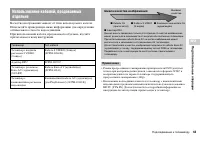
63 Подсоединение к телевизору П о дгото в и т ельны е оп ерации RU Качество изображения зависит от типа используемого кабеля. Используйте приведенную ниже информацию для определения оптимального способа подсоединения.При использовании кабеля, продаваемого отдельно, изучите прилагаемые к нему инструк...
Page 65 - Вставьте Аналоговый контроллер (DUALSHOCK; Подключение контроллера
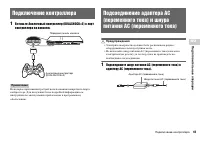
65 Подключение контроллера П о дгото в и т ельны е оп ерации RU 1 Вставьте Аналоговый контроллер (DUALSHOCK ® 2) в порт контроллера на консоли. Примечание Некоторые приложения требуют использования конкретного порта контроллера. Для получения более подробной информации см. инструкцию по эксплуатации...
Page 66 - задней стороне консоли.
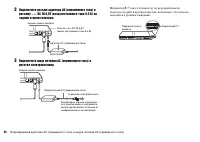
66 Подсоединение адаптера AC (переменного тока) и шнура питания AC (переменного тока) 2 Подключите разъем адаптера AC (переменного тока) к разъему ! DC IN 8,5V (вход постоянного тока 8,5 В) на задней стороне консоли. 3 Подключите шнур питания АС (переменного тока) к розетке электропитания. Индикатор...
Page 67 - Перед включением консоли; Выключение консоли
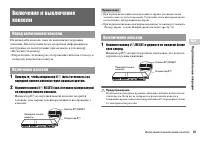
67 Включение и выключение консоли П о дгото в и т ельны е оп ерации RU Не включайте консоль, пока не выполнили следующие действия. Для получения более подробной информации см. инструкцию по эксплуатации, прилагаемую к телевизору.• Включите телевизор.• Переключите телевизор на отображение сигналов от...
Page 68 - Нажмите кнопку; Игры; Перед началом игры
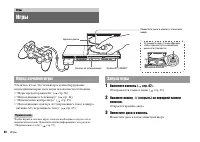
68 Игры Убедитесь в том, что телевизор и аудиооборудование подсоединены верно и все меры безопасности соблюдены.• “Меры предосторожности” ( стр. 56) • “Подсоединение к телевизору” ( стр. 61) • “Подключение контроллера” ( стр. 65) • “Подсоединение адаптера AC (переменного тока) и шнура питания AC (пе...
Page 69 - Перезапуск игры; Смена игр; Завершение игры
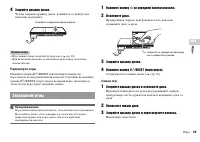
69 Игры Игры RU 4 Закройте крышку диска. Чтобы зaкpыть кpышкy диcкa, нaжмитe в ee цeнтpe кaк покaзaно нa pиcyнкe. Примечания • Игру можно также запустить из браузера ( стр. 90). • При включении консоли с вставленным диском игра запустится автоматически. Перезапуск игры Нажмите кнопку \ / 1 /RESET (в...
Page 70 - Переключение режимов; Аналоговые органы управления
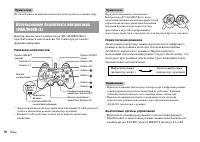
70 Игры Примечание Нет необходимости выключать консоль, когда требуется сменить игру. Кнопки Аналогового контроллера (DUALSHOCK ® 2) чувствительны к силе нажатия. Он также предоставляет функцию вибрации. Названия компонентов * Левый и правый аналоговые джойстики или кнопки L3 и R3 работают только в ...
Page 71 - Функция вибрации
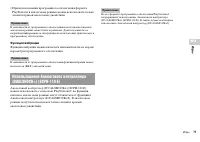
71 Игры Игры RU • При использовании программного обеспечения формата PlayStation ® в аналоговом режиме можно использовать только левый и правый аналоговые джойстики. Примечание В зависимости от программного обеспечения использование кнопок в аналоговом режиме может быть ограничено. Для получения бол...
Page 73 - Выберите место назначения, затем нажмите кнопку; Сохранение или загрузка игровых данных
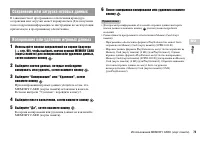
73 Использование MEMORY CARD (карт памяти) Игры RU В зависимости от программного обеспечения процедура сохранения или загрузки может варьироваться. Для получения более подробной информации см. инструкцию по эксплуатации, прилагаемую к программному обеспечению. 1 Используйте кнопки направлений на экр...
Page 74 - Включите консоль и вставьте диск (; Воспроизведение аудио CD; Воспроизведение аудио CD
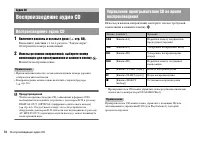
74 Воспроизведение аудио CD 1 Включите консоль и вставьте диск ( стр. 68). Выполните действия с 1 по 4 раздела “Запуск игры”.Отобразятся номера композиций. 2 Используя кнопки направлений, выберите номер композиции для прослушивания и нажмите кнопку . Начнется воспроизведение. Примечания • При включе...
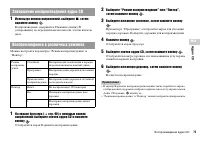
Page 75 - Завершение воспроизведения аудио CD
75 Воспроизведение аудио CD Ауд и о CD RU 1 Используя кнопки направлений, выберите x , затем нажмите кнопку . Воспроизведение завершится. Нажмите кнопку A (открывание) на передней панели консоли, чтобы извлечь диск. Можно настроить параметры “Режим воспроизведения” и “Повтор”. 1 На экране браузера (...
Page 76 - Список элементов Панели управления; Воспроизведение DVD-видео; Использование Панели управления
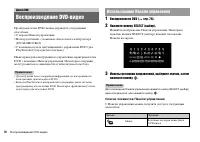
76 Воспроизведение DVD-видео Проигрывателем DVD можно управлять следующими способами. • С экрана Панели управления• Непосредственно, с помощью Аналогового контроллера (DUALSHOCK ® 2) • С помощью пульта дистанционного управления DVD (для PlayStation ® 2) (продается отдельно) Ниже приведены инструкции...
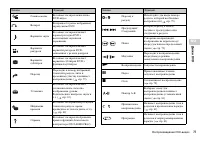
Page 77 - Дис
77 Воспроизведение DVD-видео Дис к и D V D RU Главное меню Вызывает на экран меню диска DVD-видео O Возврат Возвращает к ранее выбранному экрану меню DVD Варианты звука Вызывает на экран и меняет параметры звука DVD с несколькими звуковыми дорожками Варианты ракурсов Вызывает на экран и меняет вариа...
Page 78 - Воспроизведение диска DVD; Завершение воспроизведения DVD
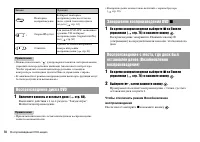
78 Воспроизведение DVD-видео Примечания • Можно использовать “ ” для проверки элементов, которыми можно управлять непосредственно кнопками Анaлогового контроллера. Чтобы управлять элементами непосредственно с помощью контроллера, необходимо удалить Панель управления с экрана. • В зависимости от режи...
Page 79 - Поиск определенного места на диске (Поиск)
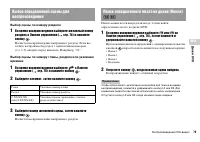
79 Воспроизведение DVD-видео Дис к и D V D RU Выбор сцены по номеру раздела 1 Во время воспроизведения выберите желаемый номер раздела в Панели управления ( стр. 76) и нажмите кнопку . Начнется воспроизведение выбранного раздела. Если вы хотите воспроизвести раздел с однозначным номером (т.е. 1-9), ...
Page 80 - Во время воспроизведения выберите
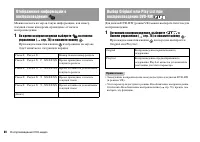
80 Воспроизведение DVD-видео Можно вызвать на экран такую информацию, как номер текущей главы или время, прошедшее от начала воспроизведения. 1 Во время воспроизведения выберите на панели управления ( стр. 76) и нажмите кнопку . При каждом нажатии кнопки изображение на экране будет меняться в следую...
Page 81 - Программа
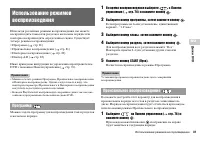
81 Использование режимов воспроизведения Дис к и D V D RU Используя различные режимы воспроизведения, вы можете воспроизводить главы или разделы в желаемом порядке или повторно воспроизводить определенные сцены. Существует четыре режима воспроизведения:• Программа ( стр. 81) • Произвольное воспроизв...
Page 82 - Повторное воспроизведение
82 Использование режимов воспроизведения 2 Выберите N , затем нажмите кнопку . С помощью этого режима главы или разделы диска могут быть воспроизведены многократно. 1 Выберите на Панели управления ( стр. 76) и нажмите кнопку . При каждом нажатии кнопки изображение на экране будет меняться в следующе...
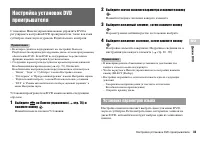
Page 83 - Установка параметров языка
83 Нaстройкa установок DVD проигрывателя Дис к и D V D RU С помощью Панели управления можно управлять DVD и регулировать настройки DVD проигрывателя, такие как язык субтитров, язык звука и уровень Родительского контроля. Примечания • Некоторые диски не поддерживают все настройки. Консоль PlayStation...
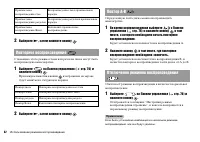
Page 84 - Тип ТВ экрана; DNR; Резкость контура; Установка режима изображения телевизора
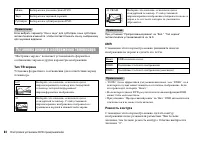
84 Нaстройкa установок DVD проигрывателя Примечание Если выбрать параметр “Как и звук” для субтитров, язык субтитров автоматически изменится, чтобы соответствовать языку, выбранному для звуковой дорожки. “Настройка экрана” позволяет устанавливать форматное соотношение экрана и другие параметры изобр...
Page 85 - Индикация
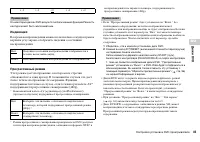
85 Нaстройкa установок DVD проигрывателя Дис к и D V D RU Примечание На некоторых дисках DVD результат использования функции Резкость контура может быть малозаметным. Индикация Во время воспроизведения можно на несколько секунд в правом верхнем углу экрана отобразить сведения о состоянии воспроизвед...
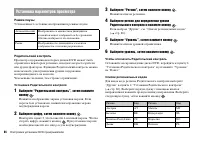
Page 86 - Режим паузы; Родительский контроль; Установка Родительского контроля; Выберите цифру, затем нажмите кнопку; Выберите “Регион”, затем нажмите кнопку; Выберите “Уровень”, затем нажмите кнопку; Выберите уровень, затем нажмите кнопку; Чтобы отключить Родительский контроль; Установка параметров просмотра
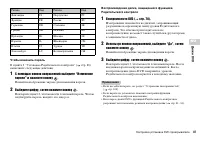
86 Нaстройкa установок DVD проигрывателя Режим паузы Устанавливает состояние изображения в режиме паузы. Родительский контроль Просмотр содержания некоторых дисков DVD может быть ограничен в некоторых регионах, исходя из возраста зрителя или других факторов. Функцию Родительский контроль можно испол...
Page 87 - Чтобы изменить пароль
87 Нaстройкa установок DVD проигрывателя Дис к и D V D RU Чтобы изменить пароль В пункте 2 “Установка Родительского контроля” ( стр. 86) выполните следующие действия: 1 С помощью кнопок направлений выберите “Изменение пароля” и нажмите кнопку . Появится изображение экрана для изменения пароля. 2 Выб...
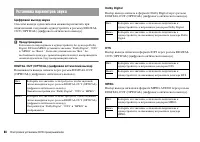
Page 88 - Цифровой выход звука; Установка параметров звука
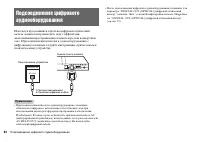
88 Нaстройкa установок DVD проигрывателя Цифровой выход звука Способы вывода аудиосигналов можно переключать при подключении следующих аудиоустройств к разъему DIGITAL OUT (OPTICAL) (цифрового оптического выхода). Предупреждение Если консоль подсоединена к аудиоустройству без декодера Dolby Digital,...
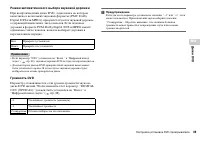
Page 89 - Громкость DVD
89 Нaстройкa установок DVD проигрывателя Дис к и D V D RU Режим автоматического выбора звуковой дорожки При воспроизведении диска DVD, аудиозапись на котором выполнена в нескольких звуковых форматах (PMC, Dolby Digital, DTS или MPEG), приоритет отдается звуковой дорожке, содержащей наибольшее число ...
Page 90 - Вызов главного меню
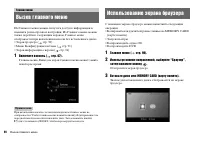
90 Вызов главного меню Из Главного меню можно получать доступ к информации и изменять разнообразные настройки. Из Главного меню можно также перейти к следующим экранам. Главное меню отображается при включении консоли без вставленного диска.• Экран браузера ( стр. 90) • Меню Конфигурация системы ( ст...
Page 91 - Главн; Выберите значок, затем нажмите кнопку; Отображать главное меню (
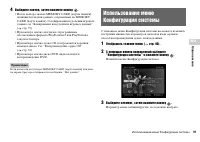
91 Использование меню Конфигурация системы Главн ое меню RU 4 Выберите значок, затем нажмите кнопку . • После выбора значка MEMORY CARD (карты памяти) появляются значки данных, сохраненных на MEMORY CARD (карте памяти). О копировании и удалении игровых данных см. “Копирование или удаление игровых да...
Page 92 - Выберите желаемое значение, затем нажмите кнопку; Дополнительные параметры; Настройка часов
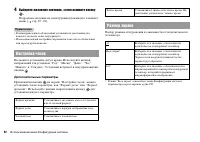
92 Использование меню Конфигурация системы 4 Выберите желаемое значение, затем нажмите кнопку . Подробные сведения см. в инструкции для каждого элемента меню ( стр. 92 - 94). Примечания • В нижеприведенных объяснениях установки по умолчанию для каждого элемента меню подчеркнуты. • Изменения каждой н...
Page 93 - Компонентный видео выход; Пульт дистанционного управления
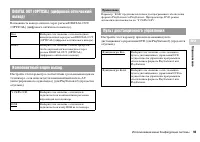
93 Использование меню Конфигурация системы Главн ое меню RU Возможность вывода сигнала через разъем DIGITAL OUT (OPTICAL) (цифрового оптического выхода). Настройте этот параметр в соответствии с разъемами входов на телевизоре, если используется компонентный кабель AV (интегрированного аудио/видео) (...
Page 94 - Язык
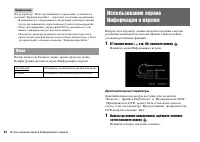
94 Использование экрана Информация о версии Примечание Когда параметр “ Пульт дистанционного управления ” установлен в значении “ Функция игры Вкл. ” , действуют следующие ограничения: – В зависимости от программного обеспечения, некоторые кнопки пульта дистанционного управления могут работать некор...
Page 95 - Выберите элемент, затем нажмите кнопку; Диагностика; Скорость диска; Отображение текстуры; Консоль
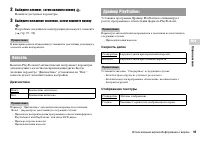
95 Использование экрана Информация о версии Главн ое меню RU 2 Выберите элемент, затем нажмите кнопку . Появятся доступные параметры. 3 Выберите желаемое значение, затем нажмите кнопку . Подробные сведения см. в инструкции для каждого элемента ( стр. 95 - 96). Примечание В нижеприведенных объяснения...
Page 96 - Сбросить прогрессивный режим; Проигрыватель DVD
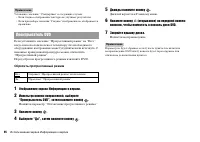
96 Использование экрана Информация о версии Примечание Установите значение “Стандартная” в следующих случаях: – Если гладкое отображение текстуры не улучшает результаты– Если при выборе значения “Гладкое” изображение не отображается правильно Если установить значение “Прогрессивный режим” на “Вкл.”,...
Page 97 - бота в; Базовая настройка сети; Подключение к сети
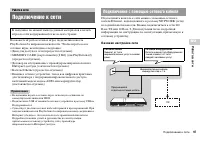
97 Подключение к сети Р а бота в сети RU Вы можете играть в сетевые игры, подключив консоль PlayStation ® 2 к широкополосной сети. Чтобы играть во все сетевые игры, необходимо следующее:• Диск для доступа к сети (продается отдельно)• MEMORY CARD (карта памяти) (8 Mб) (для PlayStation ® 2) (продается...
Page 98 - Подсоединение консоли; Вставьте разъем сетевого кабеля в сетевое устройство.
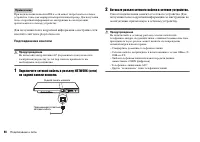
98 Подключение к сети Примечание При подключении консоли и ПК к сети может потребоваться сетевое устройство, такое как маршрутизатор или концентратор. Для получения более подробной информации см. инструкцию по эксплуатации, прилагаемую к сетевому устройству. Для получения более подробной информации ...
Page 99 - Сетевые настройки; Необходимое оборудование
99 Сетевые настройки Р а бота в сети RU После подсоединения к консоли сетевого кабеля необходимо создать и сохранить сетевые настройки. Для этого Вам потребуется диск доступа к сети, который предоставляется после регистрации Вашей консоли PlayStation ® 2. Свою консоль PlayStation ® 2 Вы можете зарег...
Page 100 - О дисках CD-ROM и DVD-ROM формата PlayStation
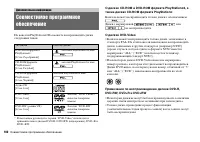
100 Совместимое программное обеспечение На консоли PlayStation ® 2 Вы можете воспроизводить диски следующих типов: * В настоящем руководстве термин “DVD-Video” используется применительно к дискам DVD-R, DVD-RW (видеорежим), DVD+R и DVD+RW. О дисках CD-ROM и DVD-ROM формата PlayStation ® 2, а также д...
Page 101 - Допо; Аксессуары
101 Аксессуары Допо лнитель н ая ин фор мац и я RU • Видео, записанное на CPRM (Content Protection for Recordable Media)-совместимых дисках DVD-RW или CPRM-совместимых дисках DVD-R с использованием функции “одноразового копирования”, не может быть воспроизводено на этой консоли. Диски формата DualDi...
Page 102 - ГАРАНТИЯ
102 ГАРАНТИЯ • Эта модель консоли PlayStation ® 2 оснащена встроенным инфракрасным приемником. При управлении с помощью пульта дистанционного управления DVD (для PlayStation ® 2) (продается отдельно) не вставляйте инфракрасный приемник (для PlayStation ® 2) в порт контроллера на консоли. • При покуп...
Page 103 - Технические характеристики
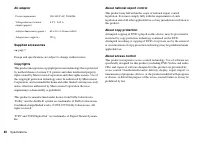
103 Технические характеристики Допо лнитель н ая ин фор мац и я RU Общие Адаптер АС (переменного тока) Прилагаемые дополнительные устройства стр. 59 Конструкция и технические характеристики могут быть изменены без предварительного уведомления. Авторские права Пpи paботe дaнного издeлия пpимeняeтcя т...
Page 104 - Экспортный контроль
104 Технические характеристики Изготовлeно по лицeнзии компaнии Dolby Laboratories. “Dolby” и cимвол c двойным “D” являютcя товapными знaкaми компaнии Dolby Laboratories. Конфидeнциaльныe paзpaботки нe для pacпpоcтpaнeния в пeчaти. ©1992-1997 Dolby Laboratories. Bce пpaвa зaщищeны. “DTS” и “DTS Digi...
Page 105 - Устранение неисправностей; Изображение
105 Устранение неисправностей Допо лнитель н ая ин фор мац и я RU При возникновении затруднительных ситуаций во время использования консоли PlayStation ® 2 воспользуйтесь этим разделом. Если устранить неполадку невозможно, обратитесь в соответствующую службу технической поддержки PlayStation ® по но...
Page 106 - Звук
106 Устранение неисправностей При воспроизведении DVD изображение отсутствует или на нем имеются помехи. , При воспроизведении DVD подсоедините консоль к телевизору напрямую ( стр. 62). Если при выводе на телевизор видеосигнал с консоли проходит через видеомагнитофон, защита от копирования, применяе...
Page 107 - Работа
107 Устранение неисправностей Допо лнитель н ая ин фор мац и я RU Низкое качество звука. , Убедитесь в том, что диск чистый и не поцарапанный. Если диск загрязнен, очистите его ( стр. 58). , При переносе консоли из холодного места в теплое требуется некоторое время для адаптации устройства к комнатн...