Sony PlayStation 5 - User Manual

Sony PlayStation 5 Gaming Console – User Manual, read for free online in PDF format. We hope this helps you resolve any issues you may have. If you have further questions, please contact us through the contact form.
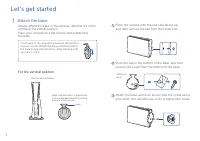
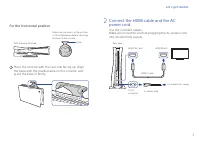
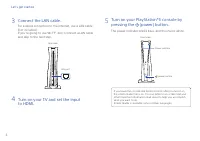
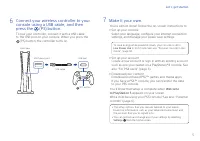
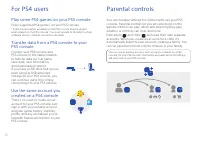
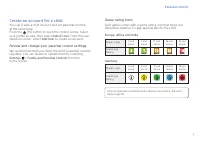
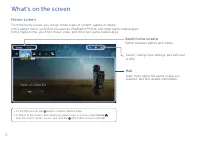
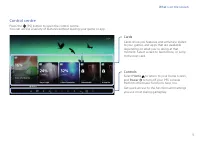
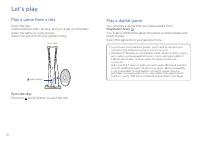
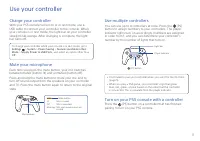
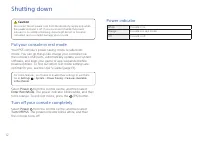

Table of Contents:
- Page 2 – Let’s get started; For the vertical position
- Page 3 – Connect the HDMI cable and the AC; For the horizontal position
- Page 4 – Connect the LAN cable.
- Page 6 – Play some PS4 games on your PS5 console; Transfer data from a PS4 console to your
- Page 7 – Create an account for a child; Review and change your parental control settings; Game rating icons
- Page 8 – What’s on the screen; Home screen; Switch home screens; Hub
- Page 9 – Control centre; Cards
- Page 10 – Let’s play; Play a game from a disc; Eject the disc; Play a digital game
- Page 11 – Use your controller; Charge your controller; Mute your microphone; Turn on your PS5 console with a controller
- Page 12 – Shutting down; Caution; Put your console in rest mode; Turn off your console completely; Power indicator
- Page 13 – Further information; Safety Guide; Customer Support Website
CFI-1216A
P l a y S t a t i o n®5
Quick Start Guide
7035241
"Loading the manual" means you need to wait until the file loads and becomes available for online reading. Some manuals are very large, and the time they take to appear depends on your internet speed.
Was this manual helpful?
About this manual
- Brand
- Sony
- Model
- PlayStation 5
- Document type
- User Manual
- Category
- Gaming Console
- Language(s)
- English
- Pages
- 14
- File size
- 12 MB
- Format
Summary
2 Hook With the base attached Make sure the hook is in the position as illustrated below before attaching the base to the console. You’ll need to reconfigure the base for the position of your console. Rotate the top and bottom part of the base in opposite directions. Keep rotating until you hear a “...
3 2 Connect the HDMI cable and the AC power cord. Use the included cables. Make all connections before plugging the AC power cord into an electricity supply. For the horizontal position 1 Place the console with the rear side facing up. Align the base with the marked area on the console, and press th...
4 Let’s get started 3 Connect the LAN cable. For a wired connection to the internet, use a LAN cable (not included).If you’re going to use Wi-Fi®, don’t connect a LAN cable and skip to the next step. 4 Turn on your TV and set the input to HDMI. 5 Turn on your PlayStation®5 console by pressing the (p...
Ask a question
Related manuals
More Sony Gaming Consoles models
Other Sony appliances
- Sony 2 Manual
 Sony 3 Manual
 Sony 4-138-358-42(1) Manual
 Sony 4-153-621-13(1) Manual
 Sony 4-165-489-11(1) Manual
 Sony 4-170-060-12(1) Manual
 Sony 4-170-539-11(1) Manual
 Sony 4-175-274-11(1) Manual
 Sony 4-180-179-14(1) Manual
- Sony 6 Manual
- Sony 7 Manual
 Sony 9 Manual
 Sony 16 Manual
 Sony 16-50mm Manual
 Sony 16mm F/2.8 Manual
 Sony 27 Manual
 Sony 32BX320 Manual