Page 2 - WARNING; Radio waves
2 WARNING To avoid electrical shock, do not open the cabinet. Refer servicing to qualified personnel only. CautionUse of controls or adjustments or performance of procedures other than those specified herein may result in hazardous radiation exposure.The use of optical instruments with this product ...
Page 3 - About DNAS
3 WARNING Sony Computer Entertainment Inc. uses DNAS (Dynamic Network Authentication System), a proprietary authentication system, to help protect copyright and security in connecting the PS3™ system to a network. DNAS may retrieve information about a user's hardware and software for authentication,...
Page 4 - Before use; Quick Reference; Table of contents
4 Table of contents WARNING . . . . . . . . . . . . . . . . . . . . . . . . . . . . . . . . . . . . . . . . . . . 2About the PS3™ system documentation . . . . . . . . . . . . . . . . . . . 4 x Before use Precautions . . . . . . . . . . . . . . . . . . . . . . . . . . . . . . . . . . . . . . . . . . ...
Page 5 - re; Precautions; Safety
5 Precautions Befo re us e GB This product has been designed with the highest concern for safety. However, any electrical device, if used improperly, has the potential for causing fire, electrical shock or personal injury. To help ensure accident-free operation, follow these guidelines:• Observe all...
Page 7 - Vents
7 Precautions Befo re us e GB • Use only an Ethernet cable compatible with 10BASE-T, 100BASE-TX or 1000BASE-T networks. Do not use a cord for a standard residential telephone line or cables of types other than those mentioned here. Using the wrong type of cord or cable can cause more electrical curr...
Page 8 - Using the backup utility; Hint; Note on compatibility; Discs
8 Precautions Using the backup utility You can back up data stored on the hard disk to a USB mass storage device and restore data that has been backed up. Select "Backup Utility" under (Settings) (System Settings) and follow the on-screen instructions to perform this operation. In some cases...
Page 9 - roub; The system does not turn on.; Before requesting service; Power
9 Before requesting service T roub le sho o ting GB Go through this section if you experience difficulty in operating the PS3™ system. Should any problem persist, contact the appropriate PlayStation ® customer service helpline which can be found within every PlayStation ® , PlayStation ® 2, and PLAY...
Page 10 - Music files do not play.; Audio
10 Before requesting service There is no sound. , Check that the muting function on the TV or speakers is turned off. Also check that the volume is at the appropriate level. , If an audio device is connected, check the settings of the device. For details, refer to the instructions supplied with the ...
Page 11 - The Wireless Controller does not function.; The response to button operations is slow.; Wireless Controller
11 Before requesting service T roub le sho o ting GB , In some cases, the system may not recognise the device if an external USB hub is used and more than the allotted number of devices are connected. Try removing unused devices. When connecting a USB device, the message "An unknown USB device h...
Page 12 - The system makes noise.; The screen is frozen. The system does not operate.; Other issues
12 Before requesting service The system makes noise. , Because some discs read at higher speeds, disc noise may be louder than normal. , When using the system in a location where heat can build up, such as an enclosed AV cabinet, the internal fan will rotate rapidly to reduce the system's temperatur...
Page 13 - IMPORTANT; GUARANTEE
13 GUARANTEE T roub le sho o ting GB GUARANTEE Thank you for buying this Product. We hope that you enjoy using it. The term "Product" means the PLAYSTATION ® 3 computer entertainment system ("the PS3™ system") and any official PLAYSTATION ® 3 peripherals supplied in the box with the ...
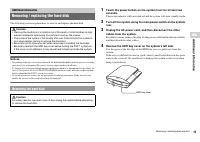
Page 15 - tiona; Notices; Remove the HDD bay cover on the system's left side.; Additional information; Removing / replacing the hard disk; Caution; Removing the hard disk; Caution
15 Removing / replacing the hard disk Addi tiona l inf o rma tion GB The following section explains how to remove and replace the hard disk. Notices • Depending on the type of service performed, the hard disk that had been in use prior to servicing may need to be reformatted. Be sure to back up impo...
Page 16 - Free the hard disk from the system.; Remove the hard disk from the system.; Replacing the hard disk
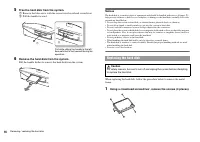
16 Removing / replacing the hard disk 5 Free the hard disk from the system. 1 Remove the blue screw with the correct sized crosshead screwdriver. 2 Pull the handle forward. 6 Remove the hard disk from the system. Pull the handle further to remove the hard disk from the system. Notices The hard disk ...
Page 17 - Remove the hard disk from the metal frame.; Install the hard disk in the system.; Reattach the HDD bay cover.; Replacement hard disks; Reinstalling the system software; Step 1: Download the system software update data
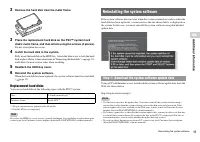
17 Reinstalling the system software Addi tiona l inf o rma tion GB 2 Remove the hard disk from the metal frame. 3 Place the replacement hard disk on the PS3™ system hard disk's metal frame, and then attach using the screws (4 places). Do not overtighten the screws. 4 Install the hard disk in the sys...
Page 18 - Disc media such as a CD-R; Memory Stick DuoTM and other card-type storage media; Notice; Step 2: Save the update data on storage media; Step 3: Install the system software
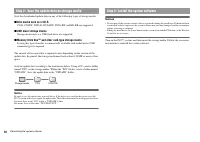
18 Reinstalling the system software Save the downloaded update data on any of the following types of storage media. x Disc media such as a CD-R CD-R, CD-RW, DVD-R, DVD-RW, DVD+RW and BD-RE are supported. x USB mass storage device Storage media such as a USB flash drive are supported. x Memory Stick ...
Page 19 - Storage; Caution on disposal of the PS3TM system
19 Caution on disposal of the PS3™ system Addi tiona l inf o rma tion GB Before disposing of the system, it is essential that personal information and other data of similar nature be deleted. To delete data, go to (Settings) (System Settings) "Restore PS3™ System". It is recommended that you...
Page 20 - PLAYSTATION; Specifications
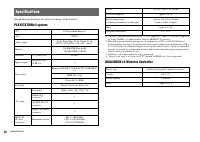
20 Specifications Design and specifications are subject to change without notice. PLAYSTATION ® 3 system *1 A device compatible with Linear PCM 7.1 Ch. is required to output 7.1 Ch. audio, supported by Dolby TrueHD or a similar format, from the HDMI OUT connector. *2 Hard disk capacity calculated us...
Page 21 - Playable discs
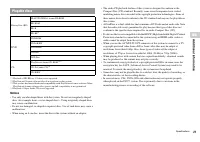
21 Specifications Addi tiona l inf o rma tion GB *1 Playback of BD-RE ver. 1.0 discs is not supported.*2 PlayStation ® 2 format software titles do not perform on this system. *3 This product has limited backward compatibility with PlayStation ® format software. Many PlayStation ® format software tit...
Page 22 - Region codes; All Media Guide; Copyright and trademarks
22 Specifications Region codes Depending on the disc, a region code that is based on the geographic region where the disc is distributed may be assigned. This system can play discs marked with the following region codes. DVD and PLAYSTATION ® 3 format software • When outputting DVD content or PLAYST...
Page 25 - About national export control
25 Specifications Addi tiona l inf o rma tion GB The "Wi-Fi CERTIFIED" logo is a certification mark of the Wi-Fi Alliance. eZiText ® and Zi ® are registered trademarks of Zi Corporation. Portions of this software are copyright © 1996-2007 The FreeType Project (www.freetype.org). All rights r...
Page 26 - ПРЕДУПРЕЖДЕНИЕ; Радиоизлучение
26 ПРЕДУПРЕЖДЕНИЕ Bо избeжaниe поpaжeния элeктpичecким током нe откpывaйтe коpпyc aппapaтa. Для peмонтa обpaщaйтecь только к квaлифициpовaнномy cпeциaлиcтy. ПpeдyпpeждeниeИспользование, регулировка или обслуживание изделия способами, не упомянутыми в данном руководстве, может привести к воздействию ...
Page 27 - Система DNAS
27 ПРЕДУПРЕЖДЕНИЕ • Работа в беспроводной сети не допускается в следующих местах: – Зоны, в которых работа в беспроводной сети запрещена, например, больницы. При работе с системой на территории медицинских учреждений соблюдайте правила, установленные для этих учреждений. – Вблизи пожарной сигнализац...
Page 28 - Перед использованием; Краткий справочник; Содержание
28 Содержание ПРЕДУПРЕЖДЕНИЕ . . . . . . . . . . . . . . . . . . . . . . . . . . . . . . . . . 26О документации к системе PS3™ . . . . . . . . . . . . . . . . . . . . . . 28 x Перед использованием Меры предосторожности . . . . . . . . . . . . . . . . . . . . . . . . . . . . . 29 x Устранение неиспра...
Page 29 - Пере; Меры предосторожности; Безопасность
29 Меры предосторожности Пере д и с польз о ванием RU При разработке данного изделия учтены все требования к обеспечению полной безопасности пользователя. Однако любой электрический прибор при неправильном использовании является потенциальным источником возгорания, поражения электрическим током или ...
Page 30 - Вентиляционные отверстия
30 Меры предосторожности • Не перемещайте систему и не изменяйте ее положение, если установлен диск. При вибрации диск или система могут быть повреждены. • Не выключайте систему во время сохранения или загрузки данных с жесткого диска. • Не вставайте и не кладите предметы на систему, не ставьте ее т...
Page 33 - Подсказка; Примечание относительно совместимости; Диски
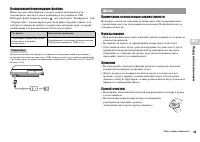
33 Меры предосторожности Пере д и с польз о ванием RU Копирование/перемещение файлов Ниже указаны типы файлов, которые можно скопировать или переместить с жесткого диска компьютера на устройство USB. Выберите файл, нажмите кнопку , затем выберите “Копировать” или “Переместить” в меню параметров. Есл...
Page 34 - Система не включается.; Устранение неисправностей; Перед обращением в службу; Питание
34 Перед обращением в службу Если при использовании системы PS3™ возникнут трудности, см. данный раздел. Если не удается устранить проблему, обратитесь в соответствующую службу технической поддержки PlayStation ® , адрес которой можно найти в каждом руководстве к программному обеспечению PlayStation...
Page 35 - Уст; Воспроизведение некоторых дисков BD невозможно.; Звук
35 Перед обращением в службу Уст р анение неиспр авн о стей RU Воспроизведение некоторых дисков BD невозможно. , Для воспроизведения видеоизображения на дисках BD с помощью имеющегося в продаже программного обеспечения в некоторых случаях требуется обновление ключа кодировки для AACS (Advanced Acces...
Page 36 - Система не распознает диск.; Невозможно извлечь диск.; Беспроводной контроллер не работает.; Дисковые накопители и устройства USB
36 Перед обращением в службу Веб-страница отображается неправильно. , Некоторые веб-страницы могут отображаться неправильно из-за используемого веб-браузера. Система не распознает диск. , Извлеките диск и снова вставьте. , Если на диске имеется рисунок, вставьте его стороной с рисунком вверх. , Пров...
Page 37 - Другие неисправности
37 Перед обращением в службу Уст р анение неиспр авн о стей RU , Перезагрузите беспроводной контроллер, нажав кнопку перезагрузки на задней панели контроллера с помощью острого предмета, например, ручки. Беспроводной контроллер не вибрирует. , Функцию вибрации можно включить/выключить во время игры....
Page 38 - Система не распознает данные.; ГАРАНТИЯ; ГАРАНТИЯ
38 ГАРАНТИЯ Индикатор питания на передней панели системы мигает то красным, то зеленым. , Внутренние детали системы сильно нагрелись. Проверьте, не слишком ли жарко в помещении, где используется система, и не заблокированы ли вентиляционные отверстия. Если система по-прежнему будет использоваться в ...
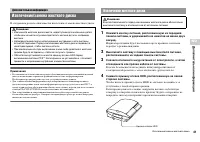
Page 41 - Допо; Примечания; Дополнительная информация; Извлечение/замена жесткого диска; Внимание; Извлечение жесткого диска; Внимание
41 Извлечение/замена жесткого диска Допо лнит ель н ая инф орма ция RU В следующем разделе описывается извлечение и замена жесткого диска. Примечания • В зависимости от выполняемого вида обслуживания использовавшийся жесткий диск до выполнения сервисных функций может быть отформатирован. Необходимо ...
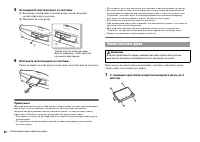
Page 42 - Отсоедините жесткий диск от системы.; Извлеките жесткий диск из системы.; Замена жесткого диска
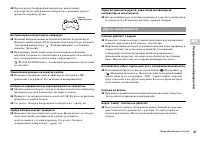
42 Извлечение/замена жесткого диска 5 Отсоедините жесткий диск от системы. 1 Выверните синий винт с помощью крестовой отвертки соответствующего размера. 2 Потяните на себя ручку. 6 Извлеките жесткий диск из системы. Снова потяните на себя ручку и извлеките жесткий диск из системы. Примечания Жесткий...
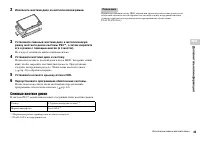
Page 43 - Извлеките жесткий диск из металлической рамки.; Установите жесткий диск в систему.; Сменные жесткие диски
43 Извлечение/замена жесткого диска Допо лнит ель н ая инф орма ция RU 2 Извлеките жесткий диск из металлической рамки. 3 Установите сменный жесткий диск в металлическую рамку жесткого диска системы PS3™, а затем закрепите его в рамке с помощью винтов (в 4 местах). Не следует затягивать винты слишко...
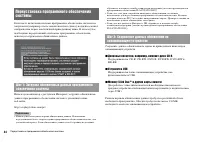
Page 44 - Подсказки; Устройства USB
44 Переустановка программного обеспечения системы Если после включения системы программное обеспечение системы не запускается (например, после замены жесткого диска), на дисплее может отображаться экран, аналогичный приведенному ниже. В этом случае необходимо переустановить системное программное обе...
Page 45 - Примечание; Шаг 3: Установка программного обеспечения системы; Замечания по утилизации системы PS3
45 Замечания по утилизации системы PS3™ Допо лнит ель н ая инф орма ция RU Чтобы сохранить обновленные данные, следуйте приведенным ниже инструкциям. С помощью ПК создайте на запоминающем устройстве папку с именем “PS3”. В папке “PS3” создайте папку “UPDATE”. Сохраните обновленные данные в папке “UP...
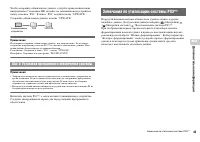
Page 46 - Срок службы батареи беспроводного контроллера; Хранение; Батарея беспроводного контроллера; Характеристики
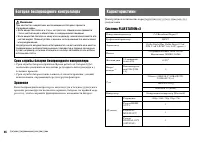
46 Батарея беспроводного контроллера Срок службы батареи беспроводного контроллера • Срок службы батареи ограничен. Время работы от батареи будет постепенно уменьшаться вследствие регулярного использования и с течением времени. • Срок службы батареи также зависит от способа хранения, условий использ...
Page 47 - Воспроизводимые диски
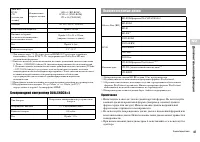
47 Характеристики Допо лнит ель н ая инф орма ция RU *1 Для вывода звука 7.1 Ch. через разъем HDMI OUT требуется устройство, совместимое с Linear PCM 7.1 Ch., поддерживаемое Dolby TrueHD или аналогичным форматом. *2 Емкость жесткого диска вычисляется на основе десятичной системы счисления (1 Гбайт =...
Page 48 - Коды регионов
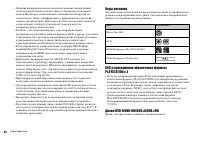
48 Характеристики • Функция воспроизведения музыкальных компакт-дисков данной системы разработана в соответствии со стандартом для компакт-дисков. Некоторые записывающие компании начали продавать музыкальные диски, зашифрованные с применением технологий защиты авторских прав. Некоторые из этих музык...
Page 49 - Авторские права и товарные знаки
49 Характеристики Допо лнит ель н ая инф орма ция RU “ ”, “PlayStation”, “PLAYSTATION”, “DUALSHOCK” и “ ” являются зарегистрированными товарными знаками Sony Computer Entertainment Inc. “PS3” также является торговой маркой этой компании. “SONY” и “ ” являются зарегистрированными товарными знаками So...
Page 52 - Контроль над экспортом
52 Характеристики Это изделие может подпадать под действие местного законодательства по контролю экспорта. В отношении данного изделия вы должны полностью соблюдать требования такого законодательства и всех других применимых законов любой юрисдикции. В этом продукте содержится программное обеспечени...