Page 2 - RA‐6000 Stereo Integrated Amplifier; Important Safety Instructions
2 RA‑6000 Stereo Integrated Amplifier Rotel products are designed to comply with international directives on the Restriction of Hazardous Substances (RoHS) in electrical and electronic equipment and the disposal of Waste Electrical and Electronic Equipment (WEEE). The crossed wheelie bin symbol indi...
Page 3 - w e r; Figure 1‐1: Controls and Connections; Органы
3 A B 1 2 q = - 0 9 u 7 6 4 3 8 i [ o 5 w e r y t p Figure 1‑1: Controls and Connections Commandes et Branchements Bedienelemente und Anschlüsse Controles y Conexiones Bedieningselementen en aansluitingen Controlli e connessioniControlli e connessioni Kontroller och anslutningar Органы управления и ...
Page 4 - Figure 1‐2: Controls and Connections
4 RA‑6000 Stereo Integrated Amplifier A B 1 2 q = - 0 9 u 7 6 4 3 8 i [ o 5 w e r y t p 0 : aptX™ HD Bluetooth Use for wireless streaming via Bluetooth. - : Digital Signal Inputs Connect to coaxial or optical PCM outputs of the source component. = : Network Port q : PC-USB Input w : EXT REM IN Jack ...
Page 5 - Télécommande infrarouge RR‐AX200
5 RR-AX200 MENU A D E FH K L A B I G J O M N C Figure 2: RR‑AX200 Remote Control Télécommande infrarouge RR‑AX200 Fernbedienung RR‑AX200 Mando a Distancia RR‑AX200 Afstandsbediening RR‑AX200Telecomando RR‑AX200RR‑AX200 fjärrkontroll Пульт ДУ RR-AX200 A : Power Button Activate or deactivate the unit....
Page 6 - Analoge ingangen en luidsprekeruitgangen
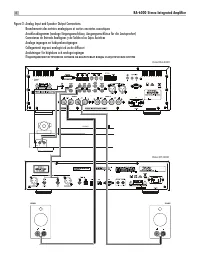
6 RA‑6000 Stereo Integrated Amplifier PHONO GND R L Rotel DT-6000 Rotel RA-6000 SPEAKER SPEAKER Figure 3: Analog Input and Speaker Output Connections Branchements des entrées analogiques et sorties enceintes acoustiques Anschlussdiagramm (analoge Eingangsanschlüsse, Ausgangsanschlüsse für die Lautsp...
Page 7 - Entrées numériques et Branchements des sorties trigger 12 V; Цифровой вход и выход 12-В триггерного сигнала
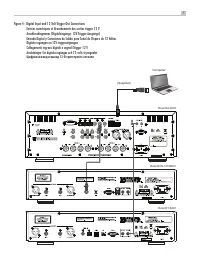
7 Computer Rotel DT-6000 Rotel RA-6000 (Supplied) Rotel RCD-1572MKII Figure 4: Digital Input and 12 Volt Trigger Out Connections Entrées numériques et Branchements des sorties trigger 12 V Anschlussdiagramm (Digitaleingänge, 12V‑Trigger‑Ausgänge) Entrada Digital y Conexiones de Salida para Señal de ...
Page 9 - LJÊÌ ̊ Á‡Ï ̃‡ÌËfl
9 Important Notes When making connections be sure to: 4 Turn off all the components in the system before hooking up any components, including loudspeakers. 4 Turn off all components in the system before changing any of the connections to the system. It is also recommended that you: 4 Turn the volume...
Page 10 - About Rotel
10 RA‑6000 Stereo Integrated Amplifier About Rotel Our story began over 60 years ago. Over the decades, we have received hundreds of awards for our products and satisfied hundreds of thousands of people who take their entertainment seriously - like you! Rotel was founded by a family whose passionate...
Page 11 - Getting Started; The RR‐AX200 Remote Control; AC Power and Control
11 Getting Started Thank you for purchasing the Rotel RA-6000 Stereo Integrated Amplifier. When used in a high-quality music audio system, your Rotel product will provide years of musical enjoyment. The RA-6000 is a full featured, high performance component. All aspects of the design have been optim...
Page 12 - Input Signal Connections
12 RA‑6000 Stereo Integrated Amplifier NOTE: Some products are intended for sale in more than one country and as such are supplied with more than one AC cord. Please only use the one appropriate for your country/region. Because of its relatively high power rating, the RA-6000 can draw considerable c...
Page 14 - Source Input Selector; Dimmer Control; Display; PC‐USB Input; EXT REM IN Jack
14 RA‑6000 Stereo Integrated Amplifier NOTE: These settings are saved permanently including after powering off the RA‑6000. To temporarily change the Bass and Treble settings from the remote control, press the BASS or TREB button B , then press the up/down/left/right J arrow buttons on the remote to...
Page 15 - Network Connection
15 NOTE: This setting is stored permanently even after the RA‑6000 is powered off. • TREBLE: TREBLE level can be changed to desired settings. (For more information refer to Bass and Treble Control section.) NOTE: This setting is stored permanently even after the RA‑6000 is powered off. • BALANCE: Ch...
Page 17 - Troubleshooting; Power Indicator Is Not Illuminated
17 • The new software will be downloaded from the Internet. The RA-6000 will power cycle when the software update is complete. NOTE: Do NOT power off the RA‑6000 during the software update process. NOTE: It is recommended to Reset Factory Defaults after the software update is complete. • FACTORY DEF...
Page 18 - Specifications
18 RA‑6000 Stereo Integrated Amplifier Specifications Maximum Power Output Maximum Power Output 350 watts/channel, 4 ohms Continuous Power Output Continuous Power Output 200 watts/channel, 8 ohms Total Harmonic Distortion Total Harmonic Distortion < 0.0075% Intermodulation Distortion Intermodulat...
Page 19 - Remarques importantes concernant la sécurité
19 Vous devez réserver un espace libre d’une dizaine de centimètres minimum autour de l’appareil. ATTENTION : La prise d’alimentation située à l’arrière constitue le principal moyen pour déconnecter l’appareil du secteur. Cet équipement doit être positionné dans un espace ouvert qui permet de garder...
Page 20 - RA‐ 6000 Amplificateur Stéréo Intégré; A propos de Rotel
20 RA‑ 6000 Amplificateur Stéréo Intégré A propos de Rotel Notre histoire commence il y a environ 60 ans. Depuis, au fil des années, nous avons reçu des centaines de prix et de récompenses, et satisfait des centaines de milliers de personnes – comme vous ! Rotel a été fondée par une famille passionn...
Page 21 - Français; Mise en route; Quelques précautions préalables; Installation
21 Français La valeur d’impédance d’une enceinte acoustique correspond à la résistance électrique – ou la charge – qu’elle présente quand elle est reliée à l’amplificateur. Le plus souvent c’est 8 ohms ou 4 ohms. Plus l’impédance est basse, et plus l’enceinte aura besoin de puissance. Par exemple, u...
Page 22 - ÈRE; Alimentation secteur et commandes; Connexions d’entrée du signal
22 RA‑ 6000 Amplificateur Stéréo Intégré Télécommande infrarouge RR‑AX200 Les commandes peuvent être effectuées depuis les boutons de la face avant, ou via la télécommande RR-AX200 fournie avec votre appareil. Dans ce manuel, les lettres et nombres entourés d’un carré se réfèrent aux commandes exécu...
Page 23 - Connexion des sorties; Sorties pour enceintes acoustiques; Sortie Casque; Récepteur de la télécommande
23 Français Entrées Numériques - Voir Figure 4 Il existe trois jeux d’entrées numériques libellées 1, 2, et 3 pour COAXIAL et OPTICAL respectivement. Branchez les sorties coaxiales ou optiques PCM de votre source aux prises correspondantes. Les signaux numériques seront alors décodés, convertis, et ...
Page 24 - Afficheur; Contrôle de volume
24 RA‑ 6000 Amplificateur Stéréo Intégré Afficheur 3 L’écran d’affichage du panneau avant indique le nom de la source en cours, le niveau du volume et les réglages courant de tonalité. L’écran permet d’accéder aux options de configuration et le menu de configuration de l’amplificateur. Entrée USB en...
Page 25 - Prise jack pour télécommande externe; Luminosité de l’écran; Luminosité des LED; Entrée pour PC‐USB
25 Français Être testé par Roon signifie que Rotel et Roon ont collaboré pour vous garantir la meilleure expérience en utilisant le logiciel Roon et le RA-6000 ensemble, afin que vous puissiez simplement profiter de la musique. La connexion PC-USB du RA-6000 prend également en charge le rendu MQA et...
Page 26 - Circuit de protection
26 RA‑ 6000 Amplificateur Stéréo Intégré Circuit de protection Votre amplificateur dispose d’un circuit de protection, à la fois thermique et contre les surcharges de courant, qui protège votre RA-6000 des dommages pouvant survenir dans des conditions extrêmes d’utilisations ou non-conformes. Ce cir...
Page 28 - Problèmes de fonctionnement; L’indicateur de mise sous tension n’est pas allumé
28 RA‑ 6000 Amplificateur Stéréo Intégré REMARQUE : POWER ON Volume Max ne s’applique pas aux sources auxquelles ont été appliquées un gain fixe (Fixed Gain). • SOFTWARE VERSION : Affiche la version logicielle courante du RA-6000. • PC-USB VERSION : Affiche la version logicielle courante du processe...
Page 29 - Spécifications
29 Français “Made for iPod,” et “Made for iPhone,” signifie qu’un appareil ou accessoire électronique a été conçu pour être connecté spécifiquement à l’iPod ou à l’iPhone, respectivement, et qu’il a été certifié par le fabricant pour répondre aux normes de performances requises par Apple. Apple n’es...
Page 30 - RA‐6000 Stereo‐Vollverstärker; Wichtige Sicherheitshinweise
30 RA‑6000 Stereo‑Vollverstärker Stellen Sie sicher, dass um das Gerät ein Freiraum von 10 cm gewährleistet ist. WARNUNG: Die Verbindung mit dem Netz kann nur über den Netzeingang an der Geräterückseite unterbrochen werden. Das Gerät muss so aufgestellt werden, dass der Netzeingang frei zugänglich i...
Page 31 - Deutsch; Die Firma Rotel
31 Deutsch Die Firma Rotel Unsere Geschichte begann vor über 60 Jahren. In den folgenden Jahrzehnten haben wir Hunderte von Auszeichnungen für unsere Produkte erhalten und unzähligen Menschen echten Hörgenuss bereitet, denen gute Unterhaltung wichtig ist. Rotel wurde von einer Familie gegründet, der...
Page 32 - Zu dieser Anleitung; Einige Vorsichtsmaßnahmen; Aufstellung des Gerätes; Fernbedienung RR‐AX200; LICHT‐Taste; Batterien der Fernbedienung
32 RA‑6000 Stereo‑Vollverstärker Daher sind Rotel-Verstärker so ausgelegt, dass sie mit jedem Lautsprecher mit einer Impedanz zwischen 8 und 4 Ohm arbeiten können, wobei alle Kanäle dabei die angegebene Ausgangsleistung liefern. Da das Rotel-Design so optimiert wurde, dass der gleichzeitige Betrieb ...
Page 33 - Netzspannung und Bedienung
33 Deutsch Netzspannung und Bedienung Netzeingang [ Der RA-6000 wird von Rotel so eingestellt, dass er der in Ihrem Land üblichen Netzspannung von 230 Volt/50 Hz entspricht. Die Einstellung ist an der Geräterückseite angegeben. HINWEIS: Sollten Sie mit Ihrem RA‑6000 in ein anderes Land umziehen, kan...
Page 34 - Auswahl der Lautsprecher
34 RA‑6000 Stereo‑Vollverstärker Lautsprecherausgänge o Siehe Figure (Abbildung) 3 Der RA-6000 verfügt an der Rückseite über zwei Paar jeweils mit SPEAKER A und SPEAKER B gekennzeichnete Lautsprecherausgänge. Über den Lautsprecherwahlschalter 7 an der Gerätefront oder die Tasten K auf der Fernbedien...
Page 35 - Audiofunktionen
35 Deutsch Audiofunktionen Lautstärkeeinstellung 4 E Drehen Sie den Lautstärkeregler nach rechts, um die Lautstärke zu erhöhen und nach links, um die Lautstärke zu reduzieren. Oder nutzen Sie die VOL-Taste, um durch Drücken des Pfeils nach oben die Lautstärke zu erhöhen oder die Lautstärke durch Drü...
Page 36 - Schutzschaltung
36 RA‑6000 Stereo‑Vollverstärker ermöglichen sowohl eine statische als auch eine DHCP IP-Adressierung. Im Kapitel „Settings-Menü“ erhalten Sie unter NETWORK weitere Informationen. Die Netzwerkverbindung ermöglicht das Herunterladen von Software-Updates aus dem Internet und die IP-Steuerung für die I...
Page 38 - Bei Störungen; Die Betriebsanzeige leuchtet nicht
38 RA‑6000 Stereo‑Vollverstärker • AC POWER OPTION: Wenn ON eingestellt ist, wird das Gerät eingeschaltet, wenn der POWER-Schalter auf der Vorderseite gedrückt wird. Bei Einstellung auf STANDBY wechselt das Gerät in den Standby-Modus und kann durch Drücken der ON-Taste auf der Fernbedienung aktivier...
Page 39 - Technische Daten; Austauschen der Sicherung
39 Deutsch Technische Daten Maximale ausgangsleistung Maximale ausgangsleistung 350 Watt/Kanal, 4 Ohm Dauerausgangsleistung Dauerausgangsleistung 200 Watt/Kanal, 8 Ohm Gesamtklirrfaktor Gesamtklirrfaktor < 0,0075 % Intermodulationsverzerrung Intermodulationsverzerrung (60 Hz : 7 kHz, 4:1) < 0,...
Page 40 - RA‐6000 Amplificador Integrado Estereofónico; Instrucciones de Seguridad Importantes
40 RA‑6000 Amplificador Integrado Estereofónico En ningún caso debe impedirse la ventilación del aparato cubriendo las aberturas destinadas a tal efecto con objetos tales como periódicos, manteles, cortinas, etc.No se deben colocar sobre el aparato fuentes de llama desnuda, como por ejemplo velas en...
Page 41 - Español; Acerca de Rotel
41 Español Acerca de Rotel Nuestra historia empezó hace más de 60 años. A lo largo de todas estas décadas, hemos recibido cientos de premios por nuestros productos y satisfecho a centenares de miles de clientes que se toman muy en serio, al igual que usted, sus momentos de ocio. Rotel fue fundada po...
Page 42 - Para Empezar; Algunas Precauciones; Colocación
42 RA‑6000 Amplificador Integrado Estereofónico Cuando compare las especificaciones correspondientes a distintos productos, debería observar que la potencia de salida es a menudo expresada de otras maneras, por lo que es muy posible que la comparación pura y dura entre cifras no proceda. Por ejemplo...
Page 43 - Mando a Distancia RR‐AX200; Alimentación y Control; Conexión de la Señal de Entrada
43 Español El RA-6000 se suministra de serie con un mando a distancia RR-AX200. A fin de que aproveche plenamente las posibilidades que le ofrece dicho mando, le recomendamos que coloque el RA-6000 en lugares desde los que la señal de infrarrojos procedente de aquél pueda alcanzar el Sensor de Contr...
Page 44 - Conexiones de Salida; Salidas para la Conexión de las Cajas Acústicas
44 RA‑6000 Amplificador Integrado Estereofónico Los canales Izquierdo (“Left”) y Derecho (“Right”) están claramente identificados y deberían ser conectados a los terminales pertinentes de las fuentes correspondientes. Los conectores RCA correspondientes al canal Izquierdo son de color blanco, mientr...
Page 45 - Control VOLUME
45 Español (girándolas en sentido antihorario) las tuercas de fijación hexagonales y a continuación coloque los conectores alrededor de los terminales de conexión a las cajas acústicas o el cable pelado en el orificio transversal que hay en los mismos. Gire en sentido horario las tuercas de fijación...
Page 46 - Toma EXT REM IN; Control de Selección de la Fuente de Entrada; Control Dimmer; Atenuación de la Luminosidad del Visualizador de Funciones; Atenuación del Indicadors de Funciones; Entrada PC‐USB
46 RA‑6000 Amplificador Integrado Estereofónico soporta la frecuencia de muestreo de 384 kHz y que usted dispone de archivos de audio muestreados a dicha frecuencia con el fin de que puedan ser reproducidos adecuadamente. Asimismo, es posible que usted tenga que configurar el controlador (driver”) d...
Page 47 - Conexión a Redes
47 Español Conexión a Redes = El RA-6000 puede ser añadido a una red utilizando el conector NETWORK = de su panel posterior. Las configuraciones NETWORK permiten tanto el direccionamiento estático como el DHCP IP. Para más información sobre la configuración de la dirección IP, le rogamos que consult...
Page 49 - Problemas y Posibles Soluciones; El Indicador Luminoso de Puesta en Marcha No Se Activa
49 Español • DISPLAY DIMMER: Atenúa el brillo del visualizador de funciones. NOTA: Este ajuste se aguarda permanentemente, es decir incluso después de desactivar por completo el RA‑6000. • POWER LED DIMMER: Atenúa el brillo del Indicador luminoso Power y los indicadores luminoso anteriores el select...
Page 50 - Características Técnicas; Imposible Establecer la Conexión Bluetooth
50 RA‑6000 Amplificador Integrado Estereofónico Características Técnicas Potencia Máxima de Salida Potencia Máxima de Salida 350 vatios/canal, 4 ohmios Potencia Continua de Salida Potencia Continua de Salida 200 vatios/canal, 8 ohmios Distorsión Armónica Total Distorsión Armónica Total < 0’0075% ...
Page 51 - Nederlands; Belangrijke veiligheidsaanwijzingen
51 Nederlands Opmerking De RS232‑aansluiting mag alleen worden gebruikt door bevoegde personen. WAARSCHUWING: Er bevinden zich geen onderdelen in het apparaat waaraan de gebruiker onderhoud kan of moet uitvoeren. Laat onderhoud altijd door erkende onderhoudsmonteurs uitvoeren. WAARSCHUWING: Om het r...
Page 52 - RA‐6000 Geïntegreerde stereoversterker; Over Rotel
52 RA‑6000 Geïntegreerde stereoversterker Over Rotel Ons verhaal is meer dan 60 jaar geleden begonnen. Door de jaren heen hebben we met onze producten honderden prijzen gewonnen en hebben honderdduizenden mensen van onze producten kunnen genieten. Mensen die net als u hoogwaardige apparatuur voor ho...
Page 53 - Aan de slag; Enkele voorzorgsmaatregelen; Plaatsing; De afstandsbediening RR‐AX200; LIGHT‐knop; Batterijen voor de afstandsbediening
53 Nederlands vermogen de luidspreker nodig heeft. Een luidspreker van 4 ohm vraagt tweemaal zo veel vermogen als een luidspreker van 8 ohm. De versterkers van Rotel kunnen echter alle luidsprekerimpedanties van 8 tot 4 ohm aan, waarbij alle kanalen op vol vermogen kunnen werken. Omdat de ontwerpen ...
Page 54 - Aansluiting op het lichtnet en bediening; Ingangssignaalaansluitingen; Uitgangen
54 RA‑6000 Geïntegreerde stereoversterker kan de RA-6000 niet meer altijd goed met de afstandsbediening bediend worden. Vervang de batterijen dan. Aansluiting op het lichtnet en bediening AC‑voedingsingang [ In de fabriek is de RA-6000 geconfigureerd voor de specifieke netspanning in het land van aa...
Page 55 - Luidsprekerselectie
55 Nederlands Luidsprekeruitgangen o Zie afbeelding 3 De RA-6000 heeft twee stellen luidsprekeruitgangen: SPEAKER A en SPEAKER B. De luidsprekeruitgangen worden geregeld door de schakelaar 7 op het voorpaneel en de knoppen K op de afstandsbediening. Luidsprekerselectie Als er slechts één stel luidsp...
Page 56 - Geluidsregelaars
56 RA‑6000 Geïntegreerde stereoversterker Geluidsregelaars VOLUME‑regeling 4 E Draai de knop rechtsom (met de klok mee) om het geluid harder weer te geven of linksom (tegen de klok in) om het geluid zachter weer te geven. Druk op de afstandsbediening op de knop voor volume + of – om het geluid harde...
Page 57 - Netwerkverbinding
57 Nederlands Netwerkverbinding = De RA-6000 kan op een netwerk worden aangesloten met de ingang NETWORK op het achterpaneel = . De netwerkconfiguraties maken zowel het gebruik van statische als DHCP IP-adressen mogelijk. Zie het onderdeel Network in het hoofdstuk over het Instellingenmenu hieronder...
Page 59 - Problemen oplossen; De AAN/UIT‐indicator brandt niet
59 Nederlands • AC POWER OPTION: Indien ingesteld op ON, wordt het apparaat ingeschakeld wanneer op de POWER-schakelaar op het voorpaneel wordt gedrukt. Indien ingesteld op STANDBY, gaat het apparaat naar de stand-bymodus en kan het worden geactiveerd door op de AAN-knop op de afstandsbediening te d...
Page 60 - De zekering vervangen
60 RA‑6000 Geïntegreerde stereoversterker De zekering vervangen Als een ander apparaat wel op het stopcontact werkt, maar de AAN/UIT-indicator nog steeds niet verlicht wordt als de stekker van de RA-6000 in het stopcontact wordt gestoken, is het mogelijk dat de inwendige zekering kapot is. Neem in d...
Page 61 - Specificaties
“Made for iPod” en “Made for iPhone” betekent dat een elektronisch accessoire specifiek is ontworpen voor aansluiting op respectievelijk een iPod of een iPhone en dat door de ontwikkelaar is verklaard dat aan de prestatienormen van Apple wordt voldaan. Apple is niet verantwoordelijk voor de werking ...
Page 62 - RA‐6000 Amplificatore integrato stereo; Importanti informazioni di sicurezza
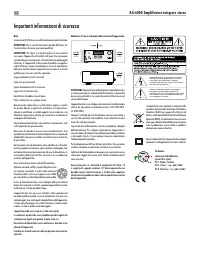
62 RA‑6000 Amplificatore integrato stereo Mantenere 10 cm circa di spazio libero attorno all’apparecchio. ATTENZIONE: La presa del cavo di alimentazione sul pannello posteriore è il mezzo principale per scollegarlo dall’alimentazione. L’apparecchio deve essere posizionato in uno spazio che permetta ...
Page 63 - Italiano; Alcune informazioni su Rotel
63 Italiano Alcune informazioni su Rotel La nostra storia ha avuto inizio 60 anni fa. Nel corso del tempo abbiamo ricevuto centinaia di riconoscimenti per la qualità dei nostri prodotti e soddisfatto centinaia di migliaia di audiofili ed amanti della musica. Proprio come voi! Rotel è stata fondata d...
Page 64 - Per cominciare; Alcune precauzioni; Posizionamento; Batterie del telecomandor
64 RA‑6000 Amplificatore integrato stereo Gli amplificatori Rotel sono progettati per lavorare con ogni diffusore di impedenza nominale compresa tra 4 e 8 ohm e con tutti i canali in funzione alla massima potenza. Dal momento che ogni progetto è ottimizzato per utilizzare contemporaneamente tutti i ...
Page 65 - Alimentazione AC e comandi; Collegamento segnali d’ingresso; Collegamenti uscite
65 Italiano Alimentazione AC e comandi Ingresso alimentazione [ L’apparecchio è configurato in fabbrica per funzionare alla tensione di alimentazione del Paese in cui è stato acquistato (120 o 230 V AC con frequenza di rete 50 o 60 Hz). La tensione di alimentazione preimpostata è indicata su un ades...
Page 66 - Selezione dei diffusori; Volume
66 RA‑6000 Amplificatore integrato stereo Uscite diffusori o Vedi Figura 3 L’RA-6000 è dotato di due gruppi di morsetti marcati “SPEAKER A” e “SPEAKER B” per il collegamento di altrettante coppie di diffusori. I pulsanti SPEAKERS 7 sul pannello frontale ed i corrispondenti tasti K sul telecomando co...
Page 67 - Controllo luminosità display
67 Italiano Bilanciamento 9 B Tramite il bilanciamento è possibile ritoccare l’emissione dei canali sinistro e destro. In condizioni normali dovrebbe essere lasciato su “0” (impostazione di fabbrica), tuttavia nel caso di lievi differenze tra i canali dovuti alla sorgente oppure se la posizione d’as...
Page 68 - Circuiti di protezione
68 RA‑6000 Amplificatore integrato stereo Per maggiori informazioni sulla connessione alle reti locali contattare il vostro rivenditore Rotel. Circuiti di protezione L’RA-6000 è dotato di protezioni sia termiche, sia contro sovracorrenti in uscita per salvaguardare l’amplificatore in condizioni di f...
Page 71 - Risoluzione dei problemi; L’indicatore di accensione non si illumina
71 Italiano Risoluzione dei problemi La maggior parte dei problemi nei sistemi audio è dovuta a collegamenti non corretti o regolazioni errate. Se si riscontrano problemi, isolare l’area interessata, verificare le impostazioni, quindi determinarne la causa ed apportare le necessarie correzioni. Qual...
Page 72 - Caratteristiche tecniche
“Made for iPod” e “Made for iPhone” significano che un dispositivo elettronico accessorio è stato progettato specificamente per essere utilizzato con un iPod o iPhone ed è certificato dai suoi sviluppatori conforme agli standard Apple. Apple non è responsabile del funzionamento di questo accessorio,...
Page 73 - Svenska; Viktig säkerhetsinformation
73 Svenska Se till att det alltid finns 10 cm fritt utrymme runt apparaten. VARNING! Strömkabeln på baksidan fungerar som huvudströmbrytare. Apparaten måste placeras så att strömkabeln är åtkomlig. Apparaten måste vara ansluten till ett vägguttag enligt markeringen på apparatens baksida (230V, 50Hz)...
Page 74 - RA‐6000 Integrerad stereoförstärkare; Om Rotel
74 RA‑6000 Integrerad stereoförstärkare Om Rotel Vår historia började för mer än 60 år sedan. Under alla år sedan dess har våra produkter belönats med hundratals utmärkelser och roat hundratusentals människor som tar sin underhållning på allvar – precis som du! Rotel grundades av en familj med ett p...
Page 75 - Introduktion; Ström och strömfunktioner
75 Svenska Introduktion Tack för att du har köpt den integrerade stereoförstärkaren Rotel RA-6000. I en musikanläggning av hög kvalitet kommer den att ge dig många års musikalisk njutning. RA-6000 är en förstärkare med många funktioner och höga prestanda. Den har utformats och optimerats för att kun...
Page 76 - Anslutningar för insignaler
76 RA‑6000 Integrerad stereoförstärkare På grund av RA-6000:s relativt höga effekt kan den dra mycket ström. Den bör därför anslutas direkt till ett vägguttag. Använd inte någon förlängningskabel. Du kan använda en kraftig grendosa, men bara under förutsättning att den klarar att lämna den ström som...
Page 77 - Anslutning av högtalare; Volymkontroll; Förbikoppling av tonkontroller; Bas och diskant
77 Svenska kabeln vara genomskinlig och ha olika färger på själva ledarna (koppar och silver). Var konsekvent när du ansluter kablarna och använd alltid samma markering för polaritet på högtalarna och på förstärkaren. Anslutning av högtalare o Stäng av alla komponenter i anläggningen innan du anslut...
Page 78 - Ingångsväljare; Displayens ljusstyrka; Dämpa displayen; PC‐USB‐ingång; EXT REM IN‐ingång
78 RA‑6000 Integrerad stereoförstärkare OBS! Inställningarna sparas permanent även om du stänger av RA‑ 6000. Om du vill ändra tonkontrollerna tillfälligt tr ycker du på BASS- och TREBLE-knapparna B på fjärrkontrollen och ändrar sedan värdet med pil-knapparna J . OBS! Bas och diskant förändringar är...
Page 79 - Nätverksanslutning
79 Svenska OBS! Dessa inställningar lagras permanent och finns kvar även om förstärkaren stängs av. • BALANCE-menyn: Ändrar Left/Right-balansen. (Läs mer i avsnittet Balans.) OBS! Denna Inställning lagras permanent och finns kvar även om förstärkaren stängs av. • HT BYPASS: Detta alternativ aktivera...
Page 81 - Felsökning; Säkring
81 Svenska OBS! Stäng INTE av RA‑6000 under uppdateringen. OBS! När uppdateringen är färdig rekommenderar vi att du gör en fabriksåterställning. • FACTORY DEFAULT: Här kan du återställa enheten till det tillstånd den ursprungligen hade när den lämnade fabriken. Tryck på plus-knappen på fronten eller...
Page 82 - Specifikationer
82 RA‑6000 Integrerad stereoförstärkare ”Made for iPod” och ”Made for iPhone” innebär att en produkt har utformats särskilt för att kunna anslutas till iPod eller iPhone, samtidigt som utvecklaren bekräftat att de uppfyller Apples prestandastandarder. Apple ansvarar ej för den här enhetens funktione...
Page 83 - Русский; Важные инструкции по безопасности
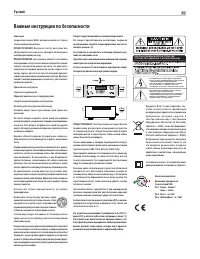
83 Русский Аппарат следует использовать в нетропическом климате. Н е с л е д у е т п р е п я т с т в о в а т ь в е н т и л я ц и и , з а к р ы в а я вентиляционные отверстия такими предметами, как газеты, скатерти, шторы и т. Д. На устройстве не должно быть источников открытого огня, таких как зажже...
Page 84 - RA‐6000 Интегрированный стерео усилитель; О компании ROTEL
84 RA‑6000 Интегрированный стерео усилитель О компании ROTEL История нашей компании началась почти 60 лет назад. За прошедшие десятилетия мы получили сотни наград за наши продукты и сделали счастливыми сотни тысяч людей, которые относятся к своим развлечениям вполне серьезно – так же, как вы! Компан...
Page 85 - Первые шаги; Некоторые предосторожности; Размещение
85 Русский Импеданс акус тических сис тем показывает, каково элек трическое сопротивление или нагрузка, подк лючаемая на выход усилителя, и обычно она равняется 8 Ом или 4 Ома. Чем ниже импеданс, тем большая мощность потребуется для колонки. В результате, акустическая система с сопротивлением 4 Ом н...
Page 86 - Питание усилителя и управление; Подсоединение входных сигналов; Выходные разъемы
86 RA‑6000 Интегрированный стерео усилитель Установка батарей в пульт Д в е б а та р е й к и т и п а A A ( п р и л а га ю тс я ) н у ж н о у с та н о в и т ь п е р е д использованием пульта. Для их установки снимите крышку на задней стороне RR-AX200. Установите батареи, в отсеке, как показано на рис...
Page 87 - Выбор акустических систем
87 Русский ПРИМЕЧАНИЕ: Регуляторы громкости, баланса и тембра влияют на сигнал, поступающий на выходы предусилителя. Подсоединение акустических систем o См. Рис. 3 Усилитель RA-6000имеет две пары выходов на колонки, обозначенных SPEAKER A и SPEAKER B. Э ти выходы на колонки контролируютс я переключа...
Page 88 - Аудио регулировки
88 RA‑6000 Интегрированный стерео усилитель Аудио регулировки Регулятор громкости VOLUME 4 E Чтобы повысить громкость, поверните регулятор VOLUME по часовой стрелке, чтобы понизить – против часовой стрелки. На пульте пользуйтесь кнопками Volume + и – для повышения и понижения громкости. Нажимайте на...
Page 89 - Сетевой разъем
89 Русский Сетевой разъем = RA-6000 можно подсоединить к сети, используя разъем NETWORK = . Конфигурация NETWORK позволяет осуществлять как статическую STATIC, так и динамическую DHCP IP адресацию. См. Раздел «Network» этой инструкции в меню установок Setting Menu, как сконфигурировать IP адрес. Сет...
Page 91 - Обнаружение и устранение неисправностей; Не светится индикатор питания
91 Русский • AC POWER OPTION: Если установлено значение ON, устройство будет включаться при нажатии переключателя POWER на передней панели. Если установлено значение STANDBY, устройство перейдет в режим ожидания и может быть активировано нажатием кнопки ON на пульте дистанционного управления. «ON.» ...
Page 92 - Технические характеристики; Нет звука
92 RA‑6000 Интегрированный стерео усилитель Технические характеристики Максимальная вых. мощность Максимальная вых. мощность 350 Вт/канал Непр. вых. мощность Непр. вых. мощность 200 Вт/канал Общие гармонич. искажения THD Общие гармонич. искажения THD < 0,0075% Интермодуляционные искажения Интермо...