Page 3 - is not suitable for very dark or black; DO NOT; use on or around the eyes, eyebrows or; SKIN CHART; THE SKIN CHART; HAIR COLOUR; SKIN CHART; HAIR COLOUR
WARNING: i-LIGHT ® is not suitable for very dark or black skin, white/grey or very light blonde/red hair.For facial use: Only suitable for female facial usebelow the cheekbone. DO NOT use on or around the eyes, eyebrows or eyelashes. Doing so can cause serious andpermanent eye injury. THE SKIN CHART...
Page 4 - IMPORTANT SAFETY INSTRUCTIONS; WARNING – TO REDUCE THE RISK OF BURNS, ELECTROCUTION, FIRE, OR; shall not be made by persons under 18.
IMPORTANT SAFETY INSTRUCTIONS WARNING – TO REDUCE THE RISK OF BURNS, ELECTROCUTION, FIRE, OR INJURY TO PERSONS: 1. Use this appliance only for its intended use described in this manual.2. Do not use if it is damaged or malfunctions.3. Do not leave the appliance unattended while plugged in.4. Keep th...
Page 5 - WARNINGS AND SAFETY INFORMATION; permanent eye injury.
WARNINGS AND SAFETY INFORMATION 5 IMPORTANT SAFET Y CAUTIONS Before you start using i-LIGHT ® : Be sure to read all Warnings and Safet y Information. Before you begin, check to see if i-LIGHT ® is suitable for you. Use the skin and hair chart at the front of this manual (page 2) and the integrated s...
Page 7 - use over or near fillings or dental implants.
7 CAUTION: Avoid treating areas that contain only vellus hairs (very thin, fine hair known as “peach fuzz”) as this may result in undesired hair re-growth.• If you’ve had professional or clinical or self-administered laser or IPL or electrolysis hair removal treatments, wait at least 6 months before...
Page 8 - i-LIGHT® KEY FEATURES; Figure1
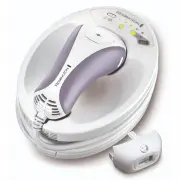
i-LIGHT ® PRO+ FACE & BODY KEY FEATURES 8 i-LIGHT® KEY FEATURES Figure1 20 19 1 18 10 11 17 12 13 14 2 3 4 4 5 6 7 8 9 16 12 15 14 4 13 13
Page 9 - Be patient when first using your i-LIGHT
SUB HEADING 9 SUB HEADING KEY FEATURES GETTING STARTED 1. Power Switch2. Power Inlet3. Base Unit4. Hand Piece5. Flash Button6. Energy Level Selection Button7. Cool Down Mode Indicator8. Bulb Status Indicator Display9. Energy Level Indicator10. Skin Tone Sensor11. Hand Piece Cord12. Flash Window13. S...
Page 10 - GETTING ACQUAINTED WITH i-LIGHT; dermatologists and salons use, optimised for personal treatment.; What to expect from i-LIGHT; LIGHT; GETTING ACQUAINTED WITH i-LIGHT®; What to expect from i-LIGHT®
10 GETTING ACQUAINTED WITH i-LIGHT ® PRO + FACE & BODY What is i-LIGHT ® ? The i-LIGHT ® PRO+ Face & Body system is a revolutionary light-based device designed for the removal of unwanted body hair and female facial hair at ho me.i-LIGHT ® PRO+ Face & Body utilises similar clinically-pro...
Page 11 - TREATMENT REGIME; not improve efficacy but increases the risk of skin irritation.; WARNINGS AND SAFETY PRECAUTIONS; IMPORTANT SAFETY CAUTIONS; Anagen Phase; Active Growth
11 TREATMENT REGIME Hair grows in a cycle of 3 different phrases which lasts 18-24 months (Fig 3). Only hairs in the active growth phase are susceptible to treatment, which is why multiple treatments are required for optimal results (Fig 3). It’s important to continue with the full treatment regime ...
Page 12 - FAMILIARISE YOURSELF WITH YOUR i-LIGHT; Familiarise yourself with the features of your new i-LIGHT; PREPARING FOR USE; PREPARING FOR USE; Flash Window with built-in UV skin protection
FAMILIARISE YOURSELF WITH YOUR i-LIGHT ® PRO FACE & BODY Familiarise yourself with the features of your new i-LIGHT ® PRO Face & Body device. Flash Window with built-in UV skin protection • WARNING: always inspect the Flash Window before use to ensure there is no damage to the lens (Fig 4).•...
Page 13 - Attachments
, Flash Button • The Flash Button is located on the hand piece. This is used to activate a flash. , Skin Tone Sensor • Will only allow usage on suitable skin tones. , Attachments : • Body attachment for large areas below the neck. • Facial attachment for female facial use below the cheekbone. Body A...
Page 14 - will remain switched on.; Prepare Your Skin For Treatment; Press both buttons and gently pull to remove the attachment.; and your hair colour is susceptible to treatment with i-LIGHT®.; effective if the hair has been pulled out.
Attachment Release Buttons • Press both buttons and gently pull to remove the attachment (Fig 10). Check Your Skin Tone • Consult the skin and hair chart at the front of this manual (page 2) to ensure your skin is in the suitable range and your hair colour is susceptible to treatment with i-LIGHT ® ...
Page 16 - one more time. Repeat this process until you and; Changing Attachments; PRO Face & Body comes with two; To Change Attachments:; TREATMENT
TREATMENT 4. Press the Flash Button to deliver a flash. • Mild to moderate discomfort is normal. If a flash delivered at Energy Level 1 feels tolerable, increase to Energy Level 2. Move the device to a different spot and ash the i-LIGHT ® one more time. Repeat this process until you and the setting ...
Page 17 - How To Treat
17 2. Hold the attachment with one hand while pressing both Attachment Release Buttons with the other hand and pull gently (Fig 16). 3. Gently push the other attachment back into the Hand Piece making sure both side tabs click into place. NOTE: the longer tab (with gold circuits) must be on top to p...
Page 18 - Body Treatment; TREATMENT TIPS
18 • For Multi-Flash Mode, keep your finger on the Flash Button to keep it depressed and glide to the next area being sure to keep the Skin Contact Sensors fully engaged. The next flash will be delivered automatically after 3 seconds. NOTE: During Multi-Flash Mode if you let go of the Flash Button o...
Page 19 - Facial Treatment
19 • You may notice that bony areas, such as elbows, shins and ankles, are more sensitive during treatment.• This is normal and should not be cause for alarm. To avoid this sensitivity, try stretching the skin away from the bony area during treatment. Facial Treatment • Test on a patch of skin - sin...
Page 20 - Storage; TROUBLESHOOTING; take part in contact sports for 24 hours after treatment.; Signs that the bulb needs replacing:; INFINITY BULB
20 INFINITY BULB • • The bulb in this device is guaranteed to last for the entire warranty period as communicated on the warranty details at the rear of this manual. • In the extremely unlikely event that your bulb becomes empty, please contact your local Remington Service centre who will provide ...
Page 21 - PRO+ Face & Body is a high voltage device. Never immerse in; Always read these instructions fully before using the i-LIGHT; The power switch is ON, but the unit is not working.; Service Centre for further assistance.
21 provided. Use a small hand-held vacuum to remove dust and debris from the hand piece vents. WARNING: If the Flash Window is cracked or broken, the unit must not be used. Never scratch the filter glass or the metallic surface inside the Treatment Head. CAUTION: The i-LIGHT ® PRO+ Face & Body i...
Page 23 - SOUNDS; FREQUENTLY ASKED QUESTIONS; Q. What areas of my body can I treat with i-LIGHT
SOUNDS Not full contact. Flash button was pressed while the skin contact sensor was not fully engaged. Replace bulb. Bulb is missing or needs to be replaced. Skin contact sensors stuck. Flash button was pressed after the skin contact sensor had been engaged since unit start up. Skin contact sensor m...
Page 24 - Q. Do I need eye protection while using i-LIGHT; PRO+ Face & Body features a safety system; ENVIRONMENTAL PROTECTION
24 Another reason for continued growth could be that the area was missed during a treat-ment. Repeat the treatment regime when you notice regrowth. Q. Why can’t I use i-LIGHT ® PRO+ Face & Body after recent sun exposure? A. Sun exposure causes high levels of melanin to be present and exposes the...
Page 26 - WARRANTY AGAINST DEFECTS
Spectrum Brands Australia Pty Ltd and Spectrum Brands New Zealand Limited WARRANTY AGAINST DEFECTS In this warranty: Australian Consumer Law means the Australian consumer law set out in Schedule 2 to the Competition and Consumer Act 2010; CGA means the New Zealand Consumer Guarantees Act 1993; Goods...
Page 28 - Contact us or the Supplier for further details.; Spectrum Brands Australia Pty Ltd; Money Back Offer
Part No. T22-0003384 REMINGTON SERVICE HOTLINE New Zealand 0800 736 776 (toll free) AUTHORISED REPAIR CENTRES Visit www.remington-products.com.au for Authorised repair centre details.Remington ® and i-LIGHT ® are registered trademarks of Spectrum Brands, Inc., or one of its subsidiaries. Made in Chi...