Page 2 - Table of Contents
2 En Before You Start....................................................................................... 3 Getting Started ........................................................................................ 4 Radio................................................................................
Page 3 - The Safety of Your Ears is in Your Hands; WARNING; CAUTION; Before You Start
3 En Eng lis h Thank you for purchasing this PIONEER product To ensure proper use, please read through this manual before using this product. It is especially important that you read and observe WARNING s and CAUTION s in this manual. Please keep the manual in a safe and accessible place for future ...
Page 4 - Remote Control; Getting Started; Basic operation
4 En For warranty information please see the Limited Warranty sheet included with this unit. MVH-X370BT * This button is referred to as DISP in this manual. Remote Control U.S.A. Pioneer Electronics (USA) Inc.CUSTOMER SUPPORT DIVISIONP.O. Box 1760Long Beach, CA 90801-1760800-421-1404 CANADA Pioneer ...
Page 5 - Frequently used operations; Detaching the front panel; Detach
5 En Eng lis h Frequently used operations * When this unit’s blue/white lead is connected to the vehicle’s auto-antenna relay control terminal, the vehicle’s antenna extends when this unit’s source is turned on. To retract the antenna, turn the source off. Display indication Detach the front panel t...
Page 6 - Canceling the demonstration display (DEMO OFF)
6 En WARNING • Keep the battery out of the reach of children. Should the battery be swallowed, consult a doctor immediately. • Do not expose the battery or remote control to excessive heat such as direct sunlight or fire. CAUTION • There is a potential danger of explosion if the battery is incorrect...
Page 7 - To seek a station manually; AUX; Radio; Receiving preset stations
7 En Eng lis h The tuner frequencies on this unit are allocated for use in North America. Use in other areas may result in poor reception. 1 Press SRC / OFF to select [RADIO]. 2 Press BAND / to select the band from [FM1], [FM2], [FM3] or [AM]. 3 Press a number button ( 1 / to 6 / ). TIP The / button...
Page 8 - Link play mode; iPod control; Operations
8 En NOTE If [AUX] is set to [OFF] in the SYSTEM settings, [AUX] cannot be selected as a source. You can make various adjustments in the FUNCTION settings (page 13).Note that the following operations do not work for an AUX device. To operate an AUX device, use the device itself. * Compressed audio f...
Page 9 - Connection menu; Bluetooth; Bluetooth connection
9 En Eng lis h The MIXTRAX function creates a non-stop mix of your music library, accompanied by illumination effects. For details on MIXTRAX settings, see page 15. NOTES • This function is not compatible with an Android device connected via MTP. • When USB is selected as a source and the MIXTRAX fu...
Page 11 - Basic operations; Bluetooth audio; App Mode; Playback of an application via the unit
11 En Eng lis h *1 The contacts on your phone will normally be transferred automatically when the phone is connected. If they are not, use your phone to transfer the contacts. *2 If two phones are connected, this function does not work on incoming calls that are received while one of the phones is b...
Page 12 - Pandora®; Listening to Pandora
12 En 2 Press the M.C. dial to display the main menu. 3 Turn the M.C. dial to select [SYSTEM], then press to confirm. 4 Turn the M.C. dial to select [APP CONN.SET], then press to confirm. 5 Turn the M.C. dial to select one of the below, then press to confirm. • Select [WIRED] for iPhone. • Select [B...
Page 13 - Settings; FUNCTION settings; AUDIO settings
13 En Eng lis h You can adjust various settings in the main menu. 1 Press the M.C. dial to display the main menu. 2 Turn the M.C. dial to select one of the categories below, then press to confirm. • FUNCTION settings (page 13) • AUDIO settings (page 13) • SYSTEM settings (page 14) • ILLUMINATION set...
Page 14 - SYSTEM settings
14 En *1 Not available when [SUB.W/SUB.W] is selected in [SP-P/O MODE] in the INITIAL settings (page 6).*2 Not available when [REAR/REAR] is selected in [SP-P/O MODE] in the INITIAL settings (page 6).*3 Not available when [OFF] is selected in [SUB.W]. You can also access to these menus when the unit...
Page 15 - ILLUMINATION settings; MIXTRAX settings
15 En Eng lis h ILLUMINATION settings Menu Item Description DIM SETTING [SYNC CLOCK], [MANUAL] Change the display brightness. BRIGHTNESS [1] to [10] Change the display brightness.The available setting ranges differ depending on [DIM SETTING]. MIXTRAX settings Menu Item Description SHORT MODE [1.0 MI...
Page 16 - Connections/Installation; Connections; This unit
16 En WARNING • Use speakers over 50 W (output value) and between 4 Ω to 8 Ω (impedance value). Do not use 1 Ω to 3 Ω speakers for this unit. • The black cable is ground. When installing this unit or power amp (sold separately), make sure to connect the ground wire first. Ensure that the ground wire...
Page 17 - Installation; Using the included bracket
17 En Eng lis h When using a subwoofer of 70 W (2 Ω), be sure to connect the subwoofer to the violet and violet/black leads of this unit. Do not connect anything to the green and green/black leads.Not used.Subwoofer (4 Ω) × 2 NOTE Change the initial menu of this unit. Refer to [SP-P/O MODE] (page 6)...
Page 18 - To secure the front panel; To install on the sun visor; Installing the microphone
18 En To secure the front panel The front panel can be secured with the supplied screw. The microphone should be placed directly in front of the driver at a suitable distance to pick up their voice clearly. CAUTION It is extremely dangerous to allow the microphone lead to become wound around the ste...
Page 19 - Common; Additional Information; Troubleshooting; Bluetooth device
19 En Eng lis h The display automatically returns to the normal display. → No operations have been made for about 30 seconds.– Perform an operation. The repeat play range changes unexpectedly. → Depending on the repeat play range, the selected range may change when another folder or track is being s...
Page 20 - Handling guidelines
20 En INOPERABLE → The operation was disabled.– Run the same command for another track. TRY LATER → Unable to save thumb rating. → Unable to save BookMark. → Unable to add station.– Try again later. MAINTENANCE → Pandora system is undergoing maintenance.– Try again later. SKIP LIMIT → Due to music l...
Page 21 - WMA files; iPod compatibility; Example of a hierarchy; Sequence of audio files
21 En Eng lis h WMA files MP3 files WAV files • WAV file formats cannot be connected via MTP. USB device • There may be a slight delay when starting playback of audio files on a USB storage device with numerous folder hierarchies. This unit supports only the following iPod models. Supported iPod sof...
Page 22 - Specifications
22 En General Power source: 14.4 V DC (10.8 V to 15.1 V allowable) Grounding system: Negative typeMaximum current consumption: 10.0 ADimensions ( W × H × D): DINChassis: 178 mm × 50 mm × 97 mm (7 in. × 2 in. × 3-7/8 in.)Nose: 188 mm × 58 mm × 17 mm (7-3/8 in.× 2-1/4 in.× 5/8 in.)DChassis: 178 mm × 5...
Page 24 - Table des matières; À propos de ce manuel :
2 Fr Avant de commencer ............................................................................. 3 Pour commencer ..................................................................................... 4 Radio...........................................................................................
Page 25 - La protection de votre ouïe est entre vos mains; ATTENTION; Avant de commencer
3 Fr Fr a n ça is Nous vous remercions d’avoir acheté cet appareil PIONEER Pour garantir une utilisation adéquate, lisez bien ce mode d’emploi avant d’utiliser cet appareil. Il est particulièrement important de lire et respecter les indications AVERTISSEMENT et MISE EN GARDE de ce mode d’emploi. Con...
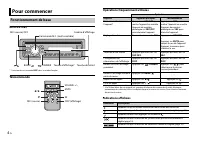
Page 26 - Télécommande; Pour commencer; Fonctionnement de base
4 Fr MVH-X370BT * Cette touche est nommée DISP dans ce mode d’emploi. Télécommande Opérations fréquemment utilisées * Si le fil bleu/blanc de cet appareil est connecté à la borne de commande du relais d’antenne automatique du véhicule, celle-ci se déploie lorsque la source est activée. Pour rétracte...
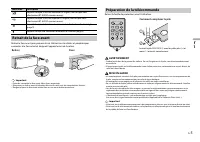
Page 27 - AVERTISSEMENT; Retrait de la face avant; Retirer; Préparation de la télécommande; Comment remplacer la pile
5 Fr Fr a n ça is Retirez la face avant pour prévenir le vol. Retirez tous les câbles et périphériques connectés à la face avant et éteignez l’appareil avant de la retirer. Important • Évitez de soumettre la face avant à des chocs importants. • N’exposez pas la face avant à la lumière directe du sol...
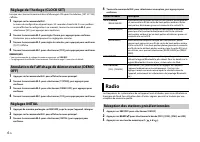
Page 28 - Réglages INITIAL; Réception des stations présélectionnées
6 Fr Lorsque vous tournez le commutateur d’allumage à ON après l’installation, [SET UP :YES] s’affiche. 1 Appuyez sur la commande M.C. . Le menu de configuration disparaît après 30 secondes d’inactivité. Si vous préférez ne pas effectuer la configuration à ce moment, tournez la commande M.C. pour sé...
Page 29 - Pour rechercher une station manuellement; Pour enregistrer des stations manuellement; Lecture
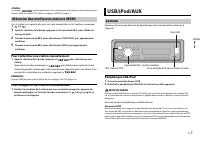
7 Fr Fr a n ça is CONSEIL Les touches / peuvent également servir à sélectionner une station présélectionnée lorsque l’option [SEEK] est réglée à [PCH] dans les réglages FUNCTION (page 14). Les six stations au signal le plus puissant sont enregistrées sur les touches numériques ( 1 / à 6 / ). 1 Après...
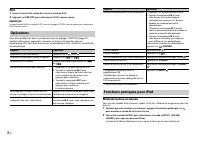
Page 30 - Mode de lecture en liaison; Opérations
8 Fr AUX 1 Insérez la mini-fiche stéréo dans la prise d’entrée AUX. 2 Appuyez sur SRC / OFF pour sélectionner [AUX] comme source. REMARQUE Lorsque l’option [AUX] est réglée à [OFF] dans les réglages SYSTEM, vous ne pouvez pas sélectionner [AUX] comme source. Vous pouvez effectuer divers ajustements ...
Page 31 - Contrôle à l’aide d’un iPod; Connexion Bluetooth
9 Fr Fr a n ça is REMARQUE La chanson/l’album sélectionné pourrait être annulé si vous utilisez des fonctions autres que celles du mode de lecture en liaison (avance et retour rapide, par exemple). Contrôle à l’aide d’un iPod Vous pouvez contrôler l’appareil au moyen d’un iPod connecté.Les modèles d...
Page 32 - Téléphone Bluetooth
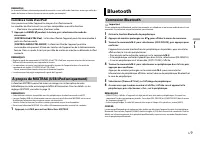
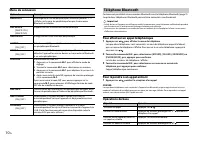
10 Fr Menu de connexion Commencez par établir une connexion Bluetooth avec le téléphone Bluetooth (page 9). Jusqu’à deux téléphones Bluetooth peuvent être connectés simultanément. Important • Le fait de laisser l’appareil en veille pour établir la connexion à votre téléphone via Bluetooth pendant qu...
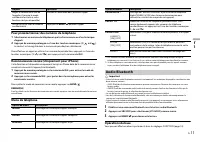
Page 33 - Pour présélectionner des numéros de téléphone; Opérations de base; Audio Bluetooth
11 Fr Fr a n ça is Pour présélectionner des numéros de téléphone 1 Sélectionnez un numéro de téléphone à partir d’un annuaire ou d’un historique d’appels. 2 Appuyez de manière prolongée sur l’une des touches numériques ( 1 / à 6 / ). Le contact est enregistré dans le numéro de présélection sélection...
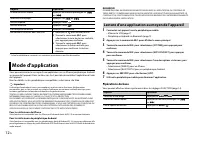
Page 34 - Mode d’application; Lecture d’une application au moyen de l’appareil
12 Fr * Selon le périphérique connecté, ces opérations pourraient ne pas être disponibles. Vous pouvez écouter la musique d’une application sur un iPhone/périphérique Android au moyen de l’appareil. Dans certains cas, il est possible de contrôler l’application à l’aide de l’appareil. Pour les détail...
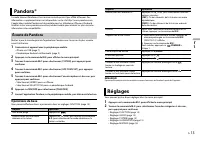
Page 35 - Écoute de Pandora; Réglages
13 Fr Fr a n ça is La radio Internet Pandora est un service musical qui n’est pas affilié à Pioneer. Des informations supplémentaires sont disponibles sur le site http://www.pandora.com.L’application mobile Pandora est disponible pour les téléphones iPhone et Android. Veuillez visiter www.pandora.co...
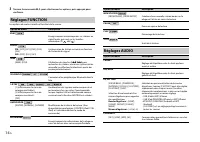
Page 36 - Réglages FUNCTION; Réglages AUDIO
14 Fr 3 Tournez la commande M.C. pour sélectionner les options, puis appuyez pour confirmer. Les options de menu varient en fonction de la source. Réglages FUNCTION Option de menu Description BSM Enregistrement automatique des six stations au signal le plus puissant sur les touches numériques ( 1 / ...
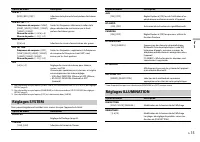
Page 37 - Réglages SYSTEM; Réglages ILLUMINATION
15 Fr Fr a n ça is *1 Non disponible lorsque l’option [SUB.W/SUB.W] est sélectionnée dans [SP-P/O MODE] des réglages INITIAL (page 6). *2 Non disponible lorsque l’option [REAR/REAR] est sélectionnée dans [SP-P/O MODE] des réglages INITIAL (page 6). *3 Non disponible lorsque l’option [OFF] est sélect...
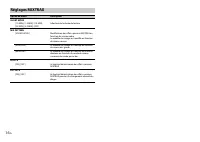
Page 38 - Réglages MIXTRAX
16 Fr Réglages MIXTRAX Option de menu Description SHORT MODE [1.0 MIN], [1.5 MIN], [2.0 MIN], [2.5 MIN], [3.0 MIN], [OFF] Sélection de la durée de lecture. MIX PATTERN [SOUND LEVEL] Modification des effets spéciaux MIXTRAX en fonction du niveau audio.Le modèle de mixage est modifié en fonction du ni...
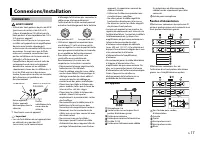
Page 39 - Connexions/Installation; Connexions; Cet appareil
17 Fr Fr a n ça is AVERTISSEMENT • Utilisez des haut-parleurs de plus de 50 W (puissance de sortie) et de 4 Ω à 8 Ω (valeur d’impédance). N’utilisez pas de haut-parleurs d’une impédance de 1 Ω à 3 Ω avec cet appareil. • Le câble noir est la masse. Lorsque vous installez cet appareil ou un amplificat...
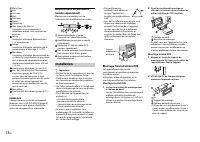
Page 40 - Montage frontal/arrière DIN; Montage frontal DIN
18 Fr Blanc/noirGrisGris/noirVertVert/noirVioletViolet/noirNoir (masse du châssis)Connectez à un emplacement métallique propre, non recouvert de peinture.JauneConnectez à la borne d’alimentation 12 V permanente.RougeConnectez à la borne contrôlée par le commutateur d’allumage (12 V CC).Bleu/blancCon...
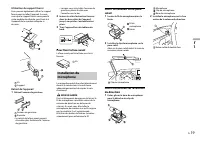
Page 41 - Utilisation du support fourni; Pour fixer la face avant
19 Fr Fr a n ça is Utilisation du support fourni Vous pouvez également utiliser le support fourni pour installer l’appareil. Assurez-vous que le support fourni correspond à votre modèle de véhicule, puis fixez-le à l’appareil de la manière indiquée ci-dessous. VisSupport Retrait de l’appareil 1 Reti...
Page 42 - Informations complémentaires; Dépannage
20 Fr L’écran retourne automatiquement à l’affichage normal. → Vous n’avez exécuté aucune opération pendant 30 secondes.– Effectuez une opération. L’étendue de la lecture répétée change de manière inattendue. → Selon l’étendue de la lecture répétée, l’étendue sélectionnée pourrait changer lors de la...
Page 43 - Périphérique Bluetooth; Applications; Périphérique de stockage USB
21 Fr Fr a n ça is Périphérique Bluetooth ERROR-10 → Coupure de l’alimentation au niveau du module Bluetooth de l’appareil.– Tournez le commutateur d’allumage à OFF, puis ramenez-le à ACC ou ON. Pandora ERROR-19 → Échec de communication.– Déconnectez le câble du périphérique. Lorsque le menu princip...
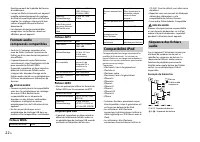
Page 44 - Fichiers WMA; Exemple de hiérarchie; Compatibilité iPod
22 Fr fonctionnement de la pédale de frein ou d’accélérateur. • Lorsqu’un iPod est connecté, cet appareil modifie automatiquement des réglages du iPod tels que l’égalisation et la lecture répétée. Ces réglages retournent à leurs valeurs d’origine lorsque le iPod est déconnecté. • Les données de text...
Page 48 - Índice; Acerca de este manual:
2 Es Antes de comenzar ................................................................................. 3 Introducción ............................................................................................. 4 Radio..................................................................................
Page 49 - ADVERTENCIA; Antes de comenzar
3 Es Españ o l Gracias por adquirir este producto PIONEER. Para asegurar un uso correcto, lea este manual por completo antes de usar el producto. Es de especial importancia que lea y cumpla con las ADVERTENCIAS y PRECAUCIONES de este manual. Conserve el manual en un lugar seguro y de fácil acceso pa...
Page 50 - Control remoto; Introducción; Funcionamiento básico
4 Es MVH-X370BT * Este botón se menciona como DISP en este manual. Control remoto Operaciones frecuentes * Cuando el cable azul/blanco de la unidad está conectado al terminal de control del relé de la antena automática del vehículo, la antena del vehículo se extiende cuando se enciende la alimentaci...
Page 51 - Extracción del panel frontal; Extracción; Preparación del control remoto; Cómo sustituir la pila
5 Es Españ o l Extraiga el panel frontal para evitar robos. Quite los cables y dispositivos conectados al panel frontal y apague la unidad antes de extraerlo. Importante • Evite que el panel frontal sufra golpes excesivos. • Mantenga el panel frontal alejado de la luz solar directa y las altas tempe...
Page 52 - Ajustes de INITIAL; Recibir las estaciones predefinidas
6 Es Después de la instalación, al girar la llave de encendido hasta la posición ON, aparecerá [SET UP :YES] en la pantalla. 1 Presione el dial M.C. . El menú de configuración desaparece después de 30 segundos de inactividad. Si prefiere no realizar la configuración en este momento, gire el dial M.C...
Page 53 - Para buscar una estación manualmente; Para almacenar estaciones manualmente; PRECAUCIÓN; Reproducción
7 Es Españ o l Las seis estaciones con mejor recepción se almacenan en los botones de números (de 1 / a 6 / ). 1 Después de seleccionar la banda, presione el dial M.C. para mostrar el menú principal. 2 Gire el dial M.C. para seleccionar [FUNCTION] y presione para confirmar. 3 Gire el dial M.C. para ...
Page 54 - Modo de reproducción relacionada; Operaciones
8 Es AUX 1 Inserte la miniclavija estéreo en la toma de entrada AUX. 2 Presione SRC / OFF para seleccionar [AUX] como origen. NOTA Si [AUX] se establece para [OFF] en los ajustes SYSTEM, no se puede seleccionar [AUX] como fuente. Puede realizar varias modificaciones en los ajustes de FUNCTION (págin...
Page 55 - Control con el iPod; Conexión Bluetooth
9 Es Españ o l Control con el iPod Puede controlar la unidad mediante un iPod conectado.Los modelos de iPod siguientes no son compatibles con esta función. – iPod nano 1ª generación, iPod con video 1 Presione BAND / durante la reproducción y seleccione el modo de control. [ CONTROL iPod/CTRL iPod ]:...
Page 56 - Teléfono Bluetooth
10 Es Menú de conexión En primer lugar, establezca una conexión Bluetooth con el teléfono Bluetooth (página 9). Se puede conectar simultáneamente hasta dos teléfonos Bluetooth. Importante • Dejar la unidad en espera para conectarla al teléfono a través de Bluetooth mientras el motor no está en march...
Page 58 - Modo de aplicaciones
12 Es Funcionamiento básico Puede realizar varias modificaciones en los ajustes de FUNCTION (página 14). * Según el dispositivo conectado, es posible que estas operaciones no estén disponibles. Puede disfrutar de escuchar una aplicación en un iPhone/dispositivo Android a través de la unidad. En algu...
Page 59 - Escuchar Pandora; Ajustes
13 Es Españ o l La radio por Internet Pandora es un servicio de música que no está afiliado a Pioneer. Puede obtener más información en http://www.pandora.com.La aplicación móvil Pandora está disponible para teléfonos iPhone y Android. Visite www.pandora.com/everywhere/mobile para obtener la informa...
Page 60 - Ajustes de FUNCTION; Ajustes de AUDIO
14 Es Los elementos del menú varían según el origen. Ajustes de FUNCTION Elemento del menú Descripción BSM Almacena automáticamente las seis estaciones con mejor recepción en los botones de números (de 1 / a 6 / ). LOCAL FM: [OFF], [LV1], [LV2], [LV3], [LV4] AM: [OFF], [LV1], [LV2] Restringe la esta...
Page 61 - Ajustes de SYSTEM; Ajustes de ILLUMINATION
15 Es Españ o l *1 No está disponible cuando [SUB.W/SUB.W] está seleccionado en [SP-P/O MODE] en los ajustes de INITIAL (página 6). *2 No está disponible cuando [REAR/REAR] está seleccionado en [SP-P/O MODE] en los ajustes de INITIAL (página 6). *3 No está disponible cuando [OFF] está seleccionado e...
Page 62 - Ajustes de MIXTRAX
16 Es Ajustes de MIXTRAX Elemento del menú Descripción SHORT MODE [1.0 MIN], [1.5 MIN], [2.0 MIN], [2.5 MIN], [3.0 MIN], [OFF] Seleccione la duración de la reproducción. MIX PATTERN [SOUND LEVEL] Cambia los efectos especiales MIXTRAX según el nivel de audio.El patrón de mezcla cambia según el nivel ...
Page 63 - Conexiones/instalación; Conexiones; Esta unidad
17 Es Españ o l ADVERTENCIA • Utilice altavoces con más de 50 W (valor de salida) y entre 4 y 8 Ω (valor de impedancia). No utilice altavoces de 1 a 3 Ω con esta unidad. • El cable negro es la tierra. Al instalar esta unidad o un amplificador de potencia (se vende por separado), asegúrese de conecta...
Page 64 - Instalación; Montaje DIN delantero/trasero; Montaje DIN delantero
18 Es Violeta/negroNegro (tierra de la carrocería)Conéctelo a una ubicación metálica limpia y sin pintura.AmarilloConéctelo al terminal de alimentación constante de 12 V.RojoConéctelo al terminal controlado por la llave de encendido (12 V cc).Azul/blancoConéctelo al terminal de control del sistema d...
Page 65 - Extracción de la unidad; Para asegurar el panel frontal; Para instalarlo en la visera; Instalación del micrófono
19 Es Españ o l Extracción de la unidad 1 Quite el anillo de ajuste. Anillo de ajustePestaña con muesca • Quitar el panel frontal permite un acceso más sencillo al anillo de ajuste. • Cuando vuelva a colocar el anillo de ajuste, oriente la pestaña con muesca hacia abajo. 2 Inserte las llaves de extr...
Page 66 - Comunes; Información adicional; Solución de problemas; Dispositivo Bluetooth
20 Es La pantalla vuelve automáticamente a la pantalla normal. → No se ha efectuado ninguna operación en 30 segundos aproximadamente.– Realice una operación. El rango de repetición de reproducción cambia inesperadamente. → Según el rango de repetición de reproducción, el rango seleccionado puede cam...
Page 67 - Pandora; Aplicaciones; Pautas de manipulación
21 Es Españ o l – Gire la llave de encendido a la posición OFF y nuevamente a ACC u ON. Pandora ERROR-19 → Error de comunicación.– Desconecte el cable del dispositivo. Una vez que se muestre el menú principal del dispositivo, vuelva a conectar el dispositivo y reinícielo. START UP APP → La aplicació...
Page 68 - Archivos WMA; Ejemplo de una jerarquía
22 Es • Solo se pueden mostrar los primeros 32 caracteres del nombre de archivo (incluida la extensión del archivo) o el nombre de la carpeta. • Es posible que la unidad no funcione correctamente según la aplicación usada para codificar los archivos WMA. • Puede existir un leve retraso al comienzo d...
Page 69 - Especificaciones
23 Es Españ o l WMA Windows Media es una marca registrada o una marca de fábrica de Microsoft Corporation en los Estados Unidos y/u otros países.Este producto incluye tecnología propiedad de Microsoft Corporation, y no se puede usar ni distribuir sin una licencia de Microsoft Licensing, Inc. iPod &a...











 Pioneer MVH S320BT User Manual
 Pioneer MVH S322BT User Manual
 Pioneer MVH S420BT User Manual
 Pioneer MVH S600BS User Manual
 Pioneer MVH S622BS User Manual
 Pioneer MVH S720BHS User Manual
 Pioneer N-30AE Manual
 Pioneer N-50 Manual
 Pioneer N30 Manual
 Pioneer ND BC010 User Manual
 Pioneer ND BC8 User Manual