Page 2 - Contents; Warning and Safety instructions
Contents 2 Warning and Safety instructions ............................................................................... 6 Sustainability and environmental protection .......................................................... 15 Familiarisation ........................................................
Page 3 - Operation
Contents 3 Operation ........................................................................................................................ 37 Safety notes for operation............................................................................................. 37 Switching the hob on ..............
Page 7 - Correct application; This hob is intended for domestic use and use in other similar
Warning and Safety instructions 7 Correct application This hob is intended for domestic use and use in other similar environments. This hob is not intended for outdoor use. It is intended for domestic use only to cook food and keep it warm. Any other use is not supported by the manufacturer an...
Page 8 - Safety with children
Warning and Safety instructions 8 Safety with children Children under 8 years of age must be kept away from the hob unless they are constantly supervised. Children over 8 years of age may use the hob without supervision if its operation has been clearly explained to them and they are ableto use ...
Page 9 - Technical safety
Warning and Safety instructions 9 Technical safety Unauthorised installation, maintenance and repairs can cause considerable danger for the user. Installation, maintenance andrepairs must only be carried out by a Miele authorised technician. Damage to the hob can compromise your safety. Check th...
Page 11 - Correct use
Warning and Safety instructions 11 Correct use The hob gets hot when in use and remains hot for a while after being switched off. There is a danger of burning until the residual heatindicators go out. Oil and fat can overheat and catch fire. Do not leave the hob unattended when cooking with oil ...
Page 14 - Cleaning and care; Do not use a steam cleaning appliance to clean this hob.
Warning and Safety instructions 14 Cleaning and care Do not use a steam cleaning appliance to clean this hob. The steam could reach electrical components and cause a shortcircuit. If the hob is built in over a pyrolytic oven, the hob should not be used whilst the pyrolytic process is being carri...
Page 15 - Sustainability and environmental protection; Energy saving tips; - Cook in covered pots and pans if; Disposing of your old appliance
Sustainability and environmental protection 15 Energy saving tips - Cook in covered pots and pans if possible. This prevents heat escapingunnecessarily. - Cook with as little water as possible.- Once food has come to the boil or the pan is hot for frying, reduce the heatto a lower power level. - Use...
Page 16 - Familiarisation; Your hob
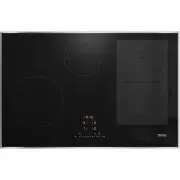
Familiarisation 16 Your hob KM 7404 FX, KM 7464 FR, KM 7464 FL, KM 7466 FR, KM 7466 FL a Cooking zone with TwinBooster b Cooking zone with TwinBooster c PowerFlex cooking zone with TwinBoostercan be combined with PowerFlex cooking zone to form PowerFlex cooking area d PowerFlex cooking zone with T...
Page 19 - Controls and display; Hob On/Off sensor control
Familiarisation 19 Controls and display g b d e a b f h i k j c l m p o n a Hob On/Off sensor control b Numerical display sensor controls– To set the power level– To set the times c PowerFlex cooking zones sensor controlFor manual connection/disconnection of PowerFlex cooking zones d Stop&Go s...
Page 21 - Cooking zones; Total
Familiarisation 21 Cooking zones KM 7404 FX, KM 7464 FR, KM 7464 FL, KM 7466 FR, KM 7466 FL Cooking zone Size in cm 1 Max. rating in watts for 230 V 2 Linked cooking zone 3 Ø 14–19 – NormalTwinBooster, level 1TwinBooster, level 2 1850 2500 3000 10–16 – NormalTwinBooster, level 1TwinBooster, ...
Page 24 - Power management; Total power; If you wish to cook a large quantity
Familiarisation 24 Power management Total power The hob has a maximum total permittedpower consumption which cannot beexceeded for safety reasons. You canreduce the maximum total permittedpower consumption (see “Adjustingsettings”).The higher the total permitted powerconsumption of the hob, the more...
Page 25 - Operating principles; Hob when switched off; Sensor controls and indicators; Selecting a cooking zone; : if only one of the cooking
Familiarisation 25 Operating principles Hob when switched off When the hob is switched off, you canonly see the printed symbols for thesensor controls and the numericaldisplay. More sensor controls light upwhen the hob is switched on. Operation a Sensor controls and indicators This ceramic glass hob...
Page 26 - Networking
Familiarisation 26 Networking Your hob is equipped with an integratedWiFi module. The hob can be connectedto your home WiFi network or simply toyour Miele cooker hood. Miele@home After installing the Miele app on amobile device, you can do the following: - Call up information on the operating status...
Page 27 - Functions; Use this function when the control
Familiarisation 27 Functions Con@ctivity 3.0 Con@ctivity 3.0 is the directcommunication system between yourhob and a Miele cooker hood.Communication is achieved by meansof networking. Con@ctivity 3.0 enablesthe cooker hood to operateautomatically depending on theoperating status of your hob.Further ...
Page 29 - Sensor controls are covered
Familiarisation 29 Safety switch-off Sensor controls are covered Your hob will switch off automatically ifone or several of the sensor controlsremain covered for longer than10 seconds, for example, by fingercontact, food boiling over or by anobject. will appear in the timer display for a few seco...
Page 30 - Overheating protection
Familiarisation 30 Overheating protection In order to prevent the hob from beingdamaged by excessive temperatures,the overheating protection mechanismintervenes in one of the following ways: Overheating protection measures - If the Booster function is switched on, it will stop. - The set power level...
Page 31 - Commissioning; Unpacking the hob
Commissioning 31 Unpacking the hob Please stick the data plate for theappliance, supplied with thisdocumentation, in the space providedin the “Customer ServiceDepartment” section of this booklet. Remove any protective foil andstickers. Cleaning the hob for the firsttime Before using for the fi...
Page 32 - Installing the Miele app; or from the; Setting up Miele@home
Commissioning 32 Miele@home Installing the Miele app The ability to use the Miele appdepends on the availability of theMiele@home service in your country.For information about availability, pleasevisit www.miele.com.The Miele app is available free of chargefrom the Apple App Store ® or from the Goog...
Page 33 - Connecting via the Miele app
Commissioning 33 Connecting via the Miele app - A home WiFi network is available.- The signal of your WiFi network is sufficiently strong in the placewhere your hob is installed. - There is no direct WiFi connection between the hob and a Mielecooker hood (Con@ctivity 3.0). - The Miele app is install...
Page 34 - Cancelling the process; Touch any sensor control.; Resetting settings; is displayed in the timer
Commissioning 34 Cancelling the process Touch any sensor control. Resetting settings Reset the settings if you are disposingof your hob, selling it or putting a usedhob into operation. This is the only wayto ensure that all personal data hasbeen removed and the previous ownerwill no longer be able...
Page 35 - Availability of the WiFi connection; - Miele cooker hood with
Commissioning 35 Establishing a direct connectionwith the cooker hood The hob requires max. 2 W in networkedstandby. Availability of the WiFi connection The WiFi connection shares a frequencyrange with other appliances (includingmicrowave ovens and remote controltoys). This can give rise to sporadic...
Page 37 - Safety notes for operation; Risk of fire with overheated food.
Operation 37 Safety notes for operation Risk of fire with overheated food. Unattended food can overheat and catch alight.Do not leave the hob unattended whilst it is being used. Risk of burning due to hot cooking zones. The cooking zones will be hot after use.Do not touch the cooking zones while...
Page 38 - Switching the hob on; Touch the; Switching the hob off; sensor; Switching off a cooking zone; Positioning cookware
Operation 38 Switching the hob on Touch the sensor control. Further sensor controls will light up. If no further entry is made, the hob willswitch itself off after a few seconds forsafety reasons. Switching off a cooking zone/the hob Switching the hob off To switch off the hob and all thecook...
Page 39 - Power level; Setting the power level
Operation 39 PowerFlex cooking area Power level Setting the power level Permanent pan recognition is activatedas standard (see “Adjusting settings”).When the hob is switched on and youplace an item of cookware on a cookingzone, the cooking zone indicator startsto flash. Place the cookware on the c...
Page 40 - Booster; Activating the Booster
Operation 40 Booster Activating the Booster When the Booster function is activated,the settings for the linked cooking zonemay be changed (see “Familiarisation –Power management”).You can use the Booster: - On any cooking zone on either side or - On both cooking zones on one side or - On a PowerFlex...
Page 41 - Continued
Operation 41 Auto heat-up The heat-up time depends on whichcontinued cooking setting has beenchosen: Continued cooking setting* Heat-up time [min:sec] 1 Approx. 0:15 1. Approx. 0:15 2 Approx. 0:15 2. Approx. 0:15 3 Approx. 0:25 3. Approx. 0:25 4 Approx. 0:50 4. Approx. 0:50 5 Approx. 2:00 5. Approx....
Page 42 - Timer; Setting timer durations
Operation 42 Timer Setting timer durations A duration of between 1 minute ( : ) and 9 hours 59 minutes ( : ) can be set.Durations of up to 59 minutes areshown in minutes (00:59) and durationsof more than 60 minutes are shown inhours and minutes.Durations are entered using thenumerical display ...
Page 44 - System lock; Activating the system lock; Safety lock; Activating the safety lock
Operation 44 System lock Activating the system lock All sensor controls are locked. A setminute minder time will continue tocount down. Touch the sensor control for 6 seconds. The seconds can be seen countingdown in the timer display. When thistime has elapsed, will appear in the timer dis...
Page 45 - Activating the Recall function; Switch the hob on again.; Tips for keeping food warm; - Nutrients are lost when food is; Hob data; Displaying the software version; numbers appear in the timer display:
Operation 45 Activating the Recall function Switch the hob on again. Immediately after switching the hobon, touch one of the flashing cookingzone sensor controls. Activating /deactivating theKeeping warm function The Keeping warm function cannot beused to reheat food that has gone cold. Touch ...
Page 46 - alternating with
Operation 46 Activating /deactivating demomode Switch the hob on. Press the 0 and 2 sensor controls onthe numerical display at the sametime for 6 seconds. The following will flash in the timerdisplay for a few seconds: - alternating with (demo mode activated) or - alternating with (...
Page 47 - Setting ranges for the power levels
Setting ranges for the power levels 47 The hob is programmed with 9 power levels at the factory. If you wish to fine-tune asetting, you can extend the power level range to 17 power levels (see “Adjustingsettings”). Setting range Factory setting (9 power levels) Extended setting (17 power levels) Mel...
Page 48 - Good to know; How induction hobs work
Good to know 48 How induction hobs work An induction coil is located under eachinduction cooking zone. The coil createsa magnetic field that reacts directly withthe base of the pan and heats it up. Thecooking zone itself is heated upindirectly by the heat given off by thepan.An induction cooking zon...
Page 49 - Pans; Suitable cookware; - Stainless steel cookware with a; Testing pans
Good to know 49 Pans Suitable cookware - Stainless steel cookware with a magnetic base - Enamelled steel cookware- Cast iron Please be aware that the properties ofthe cookware base can affect theevenness with which the food heats up(e.g. when making pancakes). The baseof the pan must be able to dist...
Page 50 - Cookware tips; - Position the cookware as centrally as
Good to know 50 Cookware tips - Position the cookware as centrally as possible on the relevant cookingzone/cooking area. - To make optimum use of the cooking zones, choose cookware with asuitable base diameter (see“Familiarisation – Cooking zonedata”). If a pan is too small, it will notbe recognised...
Page 51 - Adjusting settings; Accessing programming mode
Adjusting settings 51 Accessing programming mode The hob is switched off. Touch and hold the and sensor controls until the + sensor control lights up and appears in the timer display. After a few seconds : (Programme 01) will flash alternately with : (Code) in the timer display. S...
Page 54 - Safety notes on cleaning and care; Risk of burns due to hot surfaces.
Cleaning and care 54 Safety notes on cleaning and care Risk of burns due to hot surfaces. All parts of the hob may be hot after use.Switch the hob off.Allow the hob to cool down before cleaning it. All surfaces could be discoloured or damaged if unsuitable cleaningagents are used or if residues fr...
Page 55 - When to clean; Clean the hob after every use.; Removing light soiling; cleaners and cream cleaners
Cleaning and care 55 When to clean Clean the hob after every use. Removing light soiling Clean the entire ceramic surface ofthe hob with a damp, soft cloth and asolution of water and a little washing-up liquid. Please follow the cleaningagent manufacturer ’s instructions. Removing stubborn soili...
Page 56 - Troubleshooting; Messages in the display
Troubleshooting 56 Messages in the display Problem Cause and remedy The symbol lights up or flashes alternately withthe set power level or in one of the cookingzone indicators. No cookware is present on the cooking zone. Unsuitable cookware is present on the cooking zone. The diameter of the bas...
Page 57 - The fan is blocked or defective.
Troubleshooting 57 Problem Cause and remedy will flash alternately with , or in the timer display. The fan is blocked or defective. Make sure it has not been blocked by an object. Remove the obstruction. If this fault message continues to appear in thedisplay, contact the Cu...
Page 58 - Unexpected behaviour; Problem
Troubleshooting 58 Unexpected behaviour Problem Cause and remedy The sensors show in-creased sensitivity or failto react. The sensitivity level of the sensors has changed. Make sure that there is no direct light (from the sunor from an artificial source) falling onto the hob. Thearea surrounding t...
Page 59 - Allow the hob to cool down.
Troubleshooting 59 Problem Cause and remedy The Booster level hasdeactivated early auto-matically. The overheating protection mechanism has beenactivated. Allow the hob to cool down. Rectify the causes of the overheating (see“Familiarisation – Overheating protection”). Check that the hob is wo...
Page 60 - Unsatisfactory results; General problems or technical faults
Troubleshooting 60 Unsatisfactory results Problem Cause and remedy The food in the pan doesnot heat up when theAuto heat-up function isswitched on. A large amount of food is being heated up. Start cooking at the highest power level and thenturn down to a lower one manually later on. The pan is not...
Page 61 - After sales service; Contact in the event of a fault
After sales service 61 Information to help you rectify faults yourself and about Miele spare parts can befound at www.miele.com/service. Contact in the event of a fault In the event of a fault which you cannot remedy yourself, please contact your Mieledealer or Miele Customer Service. You can book a...
Page 62 - Note for test institutes
After sales service 62 Note for test institutes Test food acc. to EN 60350-2 9 power levels are programmed at the factory.For testing in accordance with the above standard, programme the hob to theextended power level setting (see “Adjusting settings”). Test food Pan base (mm) Lid Power level Pre-...
Page 63 - Optional accessories; Cookware; Microfibre cloth
Optional accessories 63 Cookware Miele offers a wide range of cookware.These have all been optimised for Mieleappliances in terms of functionality anddimensions. Detailed information isprovided on the Miele website. Cleaning and care products Ceramic and stainless steel hobcleaner 250 ml Removes hea...
Page 64 - Installation; Safety notes for installation
Installation *INSTALLATION* 64 Safety notes for installation Risk of damage from incorrect installation. Incorrect installation can cause damage to the hob.The hob must only be installed by a qualified specialist. Risk of electric shock from mains voltage. Incorrect connection to the mains suppl...
Page 65 - Additional safety notes for surface-mounted installation; Damage caused by incorrect installation.
Installation *INSTALLATION* 65 Additional safety notes for surface-mounted installation Damage caused by incorrect installation. Using sealant under the hob could result in damage to the hob andthe worktop if the hob ever needs to be removed.Do not use sealant between the hob and the worktop.The s...
Page 66 - Additional safety notes for flush-fit installation; Damage from unsuitable sealant.
Installation *INSTALLATION* 66 Additional safety notes for flush-fit installation Damage from unsuitable sealant. Unsuitable sealant can damage natural stone.For natural stone worktops and natural stone tiles, only use siliconesealant that is specially formulated for natural stone. Follow themanuf...
Page 67 - Safety distances; Safety distance above the hob; - The safety distance specified by the
Installation *INSTALLATION* 67 Safety distances Safety distance above the hob The following must be ensured betweenthe hob and the cooker hood above it: - The safety distance specified by the manufacturer of the cooker hood mustbe maintained. - When two or more appliances which have different safety...
Page 68 - back
Installation *INSTALLATION* 68 Safety distance behind and to the sideof the hob The minimum safety distances shownbelow must be maintained between theappliance and a tall unit or wall: - Between the back of the worktop cut-out and the rear edge of theworktop:50 mm and - On the right side bet...
Page 69 - Safety distance underneath the hob; Without intermediate shelf or base; accommodating the
Installation *INSTALLATION* 69 Safety distance underneath the hob To install the hob while maintaining thesafety distances, you can choose from3 variants: 1. Without intermediate shelf or base panel 2. With intermediate shelf3. With an air intake-optimised base panel Further instructions are describ...
Page 70 - Without intermediate shelf or base panel; The dimensions in brackets are recommendations.; Front
Installation *INSTALLATION* 70 1. Without intermediate shelf or base panel To ensure sufficient ventilation to the hob, a minimum safety distance must be leftbetween the underside of the hob and any drawer or oven.The minimum safety distance between the underside 1 of the hob and: - Upper edge of dr...
Page 71 - underside
Installation *INSTALLATION* 71 3. Air intake-optimised base panel The performance of the hob depends on the ventilation.The air intake-optimised base panel has openings where the fans are positioned.This section contains instructions for creating an air intake-optimised base panel. ≤ 40 mm ≥ 45 mm ≥...
Page 72 - Positions and cut-outs of the ventilation openings; Middle of the cut-out height; Distance from the middle of the cut-out in mm
Installation *INSTALLATION* 72 Positions and cut-outs of the ventilation openings Y1.1 X1.1 X2.1 Y2.1 Not to scale. View from above. Surface-mounted cut-out shown.Also applies to flush-fit installation. a Middle of the cut-out height b Middle of the cut-out width c Cut-out for fan, round (Ø 55–70 mm...
Page 73 - Safety distance from the niche cladding; Masonry; combustible; 0 mm – dimension x
Installation *INSTALLATION* 73 Safety distance from the niche cladding If niche cladding is installed, a minimum safety distance must be maintainedbetween the worktop cut-out and the cladding. High temperatures can alter ordamage these materials. Flush-fit installation Surface-mounted installation a...
Page 74 - Building-in dimensions for surface-mounted installation
Installation *INSTALLATION* 74 Building-in dimensions for surface-mounted installation KM 7464 FR, KM 7466 FR All dimensions are given in mm. a Front b Mains connection boxThe mains connection cable (L = 1440 mm) is supplied loose
Page 80 - Installation dimensions for flush-fit installation
Installation *INSTALLATION* 80 Installation dimensions for flush-fit installation KM 7404 FX All dimensions are given in mm. a Front b Mains connection boxThe mains connection cable (L = 1440 mm) is supplied loose c Stepped cut-out, natural stone worktop d Wooden batten 13 mm (not supplied)
Page 86 - Installing a surface-mounted hob; Risk of damage from incorrect
Installation *INSTALLATION* 86 Installing a surface-mountedhob Preparing the worktop for surface-mounted installation Remember to maintain the minimumsafety distances (see “Installation –Safety distances”). Create the worktop cut-out. Wooden worktops:Seal any cut surfaces with a specialvarnish...
Page 87 - Installing a flush-fit hob
Installation *INSTALLATION* 87 Installing the hob flush with theworktop Preparing the worktop for flush-fitinstallation Create the worktop cut-out.Remember to maintain the minimumsafety distances (see “Installation –Safety distances”). Solid wood and tiled worktops:Fix the wooden battens 5,5 mmb...
Page 88 - Electrical connection; Total power rating; See data plate; Connection data
Installation *INSTALLATION* 88 Electrical connection Risk of damage from incorrect connection.Unauthorised installation,maintenance and repairs can causeconsiderable danger for the user.Miele cannot be held liable fordamage or injury caused byunauthorised installation,maintenance or repair work, o...
Page 89 - Risk of electric shock.
Installation *INSTALLATION* 89 Disconnecting from the mains Risk of electric shock. There is a risk of electric shock if theappliance is connected to the mainssupply during repair or service work.After disconnection, ensure theappliance cannot be switched backon by mistake. To disconnect the appli...
Page 90 - Wiring diagram; a b c d e
Installation *INSTALLATION* 90 Wiring diagram Some connection methods are notpermitted in all installation locations.Ensure compliance with nationalregulations and any additionalregulations issued by the localelectricity provider. The maximum load per connected liveconductor is 3650 W.The first and ...
Page 91 - Product data sheets
Installation *INSTALLATION* 91 Product data sheets The following data sheets apply to the models described in this operatinginstruction manual. Information for domestic electric hobs In acc. with regulation (EU) No. 66/2014 MIELE Model name/identifier KM 7404 FX Number of cooking zones and/or areas ...
Page 94 - EU Conformity declaration; UK Conformity declaration; manuals and enter the name of the product or the serial number; Statement of Compliance; Paul Wright
Installation *INSTALLATION* 94 EU Conformity declaration Miele hereby declares that this ceramic induction hob complies with Directive2014/53/EU. The complete text of the EU declaration of conformity is available from one of thefollowing internet addresses: - Products, Download from www.miele.ie- Fo...
Page 95 - United Kingdom
United Kingdom Miele Co. Ltd., Fairacres, Marcham Road, Abingdon, Oxon, OX14 1TWTel: 0330 160 6600, Internet: www.miele.co.uk, E-mail: [email protected] Australia Miele Australia Pty. Ltd.ACN 005 635 398ABN 96 005 635 398Level 4, 141 Camberwell RoadHawthorn East, VIC 3123Tel: 1300 464 353E-mail: [em...


 Miele 04 950 470 Manual
 Miele 07 682 190 Manual
 Miele 09 798 350 Manual
 Miele 09 900 700 Manual
 Miele 10 014 160 Manual
 Miele 217 Manual
 Miele 2013 Manual
 Miele 2819i Manual
 Miele 10502220 User Manual
 Miele 10639470 User Manual
 Miele 11423630 User Manual
 Miele 11502710 User Manual
 Miele 11502940 User Manual
 Miele 11614040 User Manual