Page 3 - Contents
Description of the appliance . . . . . . . . . . . . . . . . . . . . . . . . . . . . . . . . . . . . . . . . . 5 Models . . . . . . . . . . . . . . . . . . . . . . . . . . . . . . . . . . . . . . . . . . . . . . . . . . . . . . . . . . . 5 KM 6200 . . . . . . . . . . . . . . . . . . . . . . . . . . ...
Page 5 - Models; abd; Description of the appliance
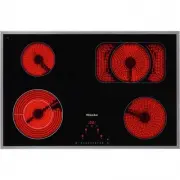
Models KM 6200 abd Single cooking zones c Vario cooking zone with ExtraSpeed e Controls Description of the appliance 5
Page 10 - Controls
Page 11 - PS
Sensors a For switching the hob on and off b Numerical keypad- For setting the power level- For setting the time c Safety lock d Switching on the extended cooking area e For selecting the cooking zone f Stop and Go g - For selecting the timer- For switching between the timer functions- For selecting...
Page 12 - Cooking zones
Cooking zones Cookingzone KM 6200 KM 6202 / KM 6203 C in cm Rating in watts for 230 V C in cm Rating in watts for 230 V y 18.0 1800 10.0 / 18.0 600 / 1800 w 14.5 1200 14.5 1200 x 12.0 / 21.0 1200 / 2900 12.0 / 21.0 1200 / 2900 z 14.5 1200 14.5 1200 Total: 7100 Total: 7100 Cookingzone KM 6204 / KM 62...
Page 14 - Warning and Safety instructions
This appliance complies with all relevant safety requirements.Inappropriate use can, however, lead to personal injury anddamage to property. To avoid the risk of accidents and damage to the appliance,please read these instructions carefully before installation andbefore using it for the first time. ...
Page 15 - Correct application; This hob is not designed for commercial use. It is intended for
Correct application ~ This hob is not designed for commercial use. It is intended for use in domestic households and similar working and residentialenvironments. ~ The appliance is not intended for outdoor use. ~ It is intended for domestic use only to cook food and keep it warm. Any other use is no...
Page 16 - Safety with children
Safety with children ~ Children under 8 years of age must be kept away from the appliance unless they are constantly supervised. ~ Children 8 years and older may only use the appliance if they have been shown how to use it in a safe way and understand thehazards involved. ~ Children must not be allo...
Page 17 - Technical safety
Technical safety ~ Installation, maintenance and repairs may only be carried out by a Miele-authorised person. Installation, maintenance and repairs byunqualified persons could be dangerous. ~ A damaged appliance can be dangerous. Check the appliance for visible signs of damage. Do not use a damaged...
Page 19 - Correct use
Correct use ~ Oil and fat can overheat and catch fire. Do not leave the appliance unattended when cooking with oil or fat.If oil or fat does catch fire, do not attempt to put out the flames withwater. Disconnect the appliance from the mains and use a suitablefire blanket, saucepan lid, damp towel or...
Page 21 - Cleaning and care
~ Grains of salt, sugar and sand (e.g. from cleaning vegetables) can cause scratches if they get under pan bases. Make sure thatthe ceramic surface is clean before placing pans on it. ~ Even a light object could cause damage in certain circumstances. Do not drop anything on the ceramic surface. ~ Pl...
Page 22 - Caring for the environment
Disposal of the packingmaterial The transport and protective packinghas been selected from materialswhich are environmentally friendly fordisposal and should be recycled. Recycling the packaging reduces theuse of raw materials in themanufacturing process and alsoreduces the amount of waste in landfi...
Page 23 - Cleaning for the first time; Remove any protective wrapping and adhesive labels.; Before using for the first time
Please stick the extra data plate for the appliance suppliedwith this documentation in the space provided in the "Aftersales service, data plate" section of this booklet. Cleaning for the first time ^ Remove any protective wrapping and adhesive labels. ^ Before using for the first time, clea...
Page 24 - How the cooking zones work
Single circle cooking zones have one heating element, whilstdouble circle (vario) cooking zones and extended zones havetwo. Depending on model, the heating elements may beseparated by an isolating ring. Each cooking zone has overheating protection (atemperature limiter), which stops the ceramic surf...
Page 25 - Operating principals; Operation
Operating principals The hob is equipped with electronic sensor controls whichreact to finger contact. To operate the hob, touch the relevant sensor. Each time youtouch a sensor, an audible tone sounds. In order to set or alter a power level or the time (dependingon model), the cooking zones and the...
Page 26 - Switching on; To switch the hob on; Touch the; Activating the cooking zones; will flash in the cooking zone display.; Setting the power level; Touch the appropriate number on the numerical keypad.; Extended power level range; Touch the area between the numbers.
Switching on The hob must be switched on before any of the zones can beused. Do not leave the appliance unattended whilst it is beingused. To switch the hob on ^ Touch the s sensor. 0 will appear in each of the cooking zone displays. If no further entry is made, the hob will switch itself off after ...
Page 27 - Altering the power level; Touch the sensor for selecting the cooking zone you want.
Altering the power level ^ Touch the sensor for selecting the cooking zone you want. The power level will flash in the cooking zone display. ^ Set the power level you want by touching the relevantnumber on the numerical keypad. If only one of the cooking zones is in operation, you canalter the power...
Page 28 - Settings
Settings The appliance is delivered with 9 power levels programmed as standard. If youwish to fine-tune a setting, you can extend the power level range (see"Programming"). The intermediate setting will be represented by an illuminated dotnext to the number. Cooking process Settings* Standard...
Page 30 - Continued; * The continued cooking settings with a dot after the number
Continued cooking setting* Heat-up time in minutes and seconds (approx.) 1 1 : 20 1. 2 : 00 2 2 : 45 2. 3 : 25 3 4 : 05 3. 4 : 45 4 5 : 30 4. 6 : 10 5 6 : 50 5. 7 : 10 6 1 : 20 6. 2 : 00 7 2 : 45 7. 2 : 45 8 2 : 45 8. 2 : 45 9 - * The continued cooking settings with a dot after the number are only a...
Page 31 - Outer ring of a vario/extended zone; Switching on manually
Outer ring of a vario/extended zone When switching on a two ring, three ring and ExtraSpeedcooking zone the second heating ring is automaticallyswitched on. The second heating ring of an extendedcooking zone and the ExtendedPlus zone and the outer ringof a three ring zone must be manually switched o...
Page 32 - Switching off the extended cooking area
ExtendedPlus zone (depending on model) ^ Touch the sensor for selecting the front right cooking zone. ^ Select the power level you want. ^ While the power level is flashing, touch the n sensor. The selected power setting is shown in the front right cookingzone display, the rear right cooking zone di...
Page 33 - Switching off and residual heat indicators; Switching off a cooking zone; will flash in the cooking zone display for a few seconds. If; Switching off the hob; Residual heat indicator
Switching off and residual heat indicators Switching off a cooking zone ^ Touch the sensor for selecting the cooking zone you wanttwice. A 0 will flash in the cooking zone display for a few seconds. If the cooking zone is still hot, residual heat will then beindicated in the display. Switching off t...
Page 34 - Suitable pans
– Most suitable The best pans for use on a ceramic hob are those with athick base which is very slightly concave when cold. Whenheated, the base flattens to rest evenly on the hob,optimising the conduction of the heat. cold hot – Less suitable Pans made of glass, ceramic or stoneware are lesssuitabl...
Page 35 - Tips on saving energy
– Check that the diameter of the pan base is wide enough for the cooking zone so that heat is not lost unnecessarily. too small suitable – Use a pan lid whenever possible to minimise heat loss. uncovered covered – Select a smaller pan when cooking small quantities. A small pan on a small cooking zon...
Page 36 - Timer
The hob must be switched on to use the timer. The timer can be used for two different functions: – to set the minute minder – to set a cooking zone to switch off automatically. You can select a time from 1 minute ( 01 ) to 9 hours ( 9^ ). A time of up to 99 minutes is set and displayed in minutes.Ex...
Page 37 - Minute minder; To set the minute minder time
Minute minder To set the minute minder time Minutes Example: You want to set 15 minutes. ^ Switch the hob on. ^ Touch the m sensor. 00 will appear in the timer display. The 0 on the right will flash. Enter the tens first and then the units. ^ Touch the number on the numerical keypad whichcorresponds...
Page 38 - Hours
Hours Whole hours are set by touching the relevant number on thenumerical keypad.Half hours are set by touching the area between the relevanttwo numbers.Example: You want to set 2 hours 30 minutes. ^ Switch the hob on. ^ Touch the m sensor. 00 will appear in the timer display. The 0 on the right wil...
Page 39 - To change the minute minder time; To delete the minute minder time
To change the minute minder time ^ Touch the m sensor. ^ Set the time you want, as described above. To delete the minute minder time ^ Touch the m sensor until 00 appears in the timer display. Timer 39
Page 40 - To switch a cooking zone off automatically
To switch a cooking zone off automatically You can set a time at the end of which a cooking zone willswitch off automatically.All the cooking zones can be programmed at the same time. If the time programmed is longer than the maximumoperational time allowed, the cooking zone will switch offafter the...
Page 41 - To use both timer functions at the same time; minute minder as well
To use both timer functions at the same time The minute minder and automatic switch-off functions can beused at the same time. If you have programmed in one or more switch-off times, andwould like to use the minute minder as well : Touch the m sensor repeatedly until the indicator lamps for the cook...
Page 42 - Safety lock / System lock; safety lock; LC; Safety features
Safety lock / System lock Keep children away from the hob for their own safety. Your appliance is equipped with a safety lock to prevent thehob and the cooking zones being switched on or any settingsbeing altered. The safety lock is set with the hob switched on. When activated: – The cooking zone po...
Page 43 - To activate the system lock; To deactivate the system lock
To activate the system lock ^ Touch the $ sensor until the relevant indicator lamp comes on. The indicator lamp will go out after a short while. You can alter the setting from one-finger to three-fingeroperation (see "Programming") to make it harder for childrento operate the appliance. To d...
Page 44 - Stop and Go; - the minute minder will continue without interruption.; Activating; Deactivating
Stop and Go Your appliance has a Stop and Go feature which, whenactivated, reduces the power of all cooking zones in use topower level 1. When Stop and Go is activated, the cookingzone power levels and the setting of the timer cannot bealtered and the hob can only be switched off. When Stop and Go i...
Page 45 - Safety switch-off if the sensors are covered; will flash in the timer display.; Safety switch-off with an over-long cooking time
Safety switch-off Safety switch-off if the sensors are covered Your hob will switch off automatically if one or several of thesensors remain covered for more than about 13 seconds, forexample by finger contact, food boiling over, or by an objectsuch as an oven glove or a tea towel.An F will flash in...
Page 46 - * Factory default setting
Power level* Maximum operating time in hours Safety setting 0* h : min Safety setting 1 h : min Safety setting 2 h : min 1 10:00 8:00 5:00 1. 10:00 7:00 4:00 2 / 2. 5:00 4:00 3:00 3 / 3. 5:00 3:30 2:00 4 / 4. 4:00 2:00 1:30 5 / 5. 3:00 1:30 1:00 6 / 6. 2:00 1:00 0:30 7 / 7. 2:00 0:42 0:24 8 2:00 0:3...
Page 47 - Overheating/pan protection; pan
Overheating/pan protection Each zone is equipped with an overheating protectionmechanism (internal temperature limiter). The ExtraSpeed cooking zone is also equipped with panprotection. If you wish to use it you will need to alter thesetting (see "Programming / Pre-heat"). If the heating ele...
Page 49 - Spots; caused by limescale, water and aluminium residues; sugar, plastic or aluminium foil; spill or fall onto
Do not use washing-up liquid to clean the ceramic surface.Washing-up liquid will not remove all soiling and deposits.It will form an invisible coating which will cause permanentdiscolouration of the ceramic surface.Clean the hob regularly with a suitable ceramic hobcleaner. Wipe all coarse soiling o...
Page 50 - Programming
You can change the default settings of the programmeoptions (see chart). Several settings can be altered insuccession. After selecting programming mode, P (Programme) and S (Status) will appear in the timer display. On hobs with 3cooking zones, an additional indicator will appear at the rearleft. Th...
Page 53 - The mains fuse has tripped. Reset the trip switch in the; Problem solving guide
With the help of the following notes, minor faults in the performance of theappliance, some of which may result from incorrect operation can be put rightwithout contacting the Service Department. saving you both time and money. The following guide may help you to find the reason for a fault, and to ...
Page 56 - FE; flashes alternately
Problem Possible cause Remedy The sensors areover-sensitive or do notreact at all. The sensitivity level ofthe sensors haschanged. Make sure that there is nodirect light (from the sun orfrom an artificial source)falling onto the hob and thatthe surrounding area is nottoo dark. Make sure that there i...
Page 57 - To test the power level
You can test the power level of a cooking zone by measuringhow long it takes to bring a specific amount of water to theboil. The pan (and lid) must be stainless steel or enamel. Thediameter of the pan must match the cooking zone, and beflat-bottomed or slightly concave. ^ Take a note of the diameter...
Page 58 - * Max. time under unfavourable conditions
C Cooking zone in cm Rating in watts for 230 V Quantity of water in litres Time* in minutes 10.0 600 0.5 11.0 12.0 700 / 750 1.0 13.0 12.0 1200** 1.0 11.0 14.5 1000 / 1100 1.0 9.0 14.5 1200 1.0 8.5 14.5 1500** 1.0 7.0 17.0 1500 1.5 9.5 18.0 1700 / 1800 1.5 9.0 21.0 2000 2.0 10.5 21.0 2200 / 2300 2.0...
Page 59 - Cleaning products; Removes finger marks and light soiling.; Optional accessories
Miele offer a comprehensive range of useful accessories aswell as cleaning and conditioning products for yourappliance. These can be ordered online at: or from Miele (see back cover for contact details) Cleaning products Ceramic and stainless steel hob cleaner250 ml Removes heavy soiling, limescale ...
Page 60 - The; Miele; system allows communication-enabled; Con; is the communication between the hob and the
Miele | home system The Miele { home system allows communication-enabled appliances to send operating and status information to adisplay appliance via the household electrical supply system(Powerline Technology). SuperVision appliances can display status information fromother domestic appliances. Fo...
Page 62 - Communication module XKM 2000 DA
Con | ctivity a Communication module XKM 2000 DA b Communication module XKM 2100 KM c Electrical supply (Powerline) Optional accessories 62
Page 63 - Signing on the hob
Signing on the hob If you want to sign the hob – on to the Miele { home system, first prepare the signing on procedure on the master appliance (see the "Miele | home" fitting and installation instructions) – on to the Con | ctivity system, first sign on the cooker hood (see the "Con | ct...
Page 64 - Signing off the hob
Signing off the hob If you want to sign off from the Miele { home system, first prepare the signing off procedure on the master appliance(see the "Miele | home" fitting and installation instructions). ^ With the hob switched off, touch the s and $ sensors at the same time until the safety lo...
Page 65 - Electrical connection
All electrical work should be carriedout by a suitably qualified andcompetent person, in strictaccordance with current local andnational safety regulations (BS 7671in the UK). Installation, repairs and other workby unqualified persons could bedangerous. The manufacturercannot be held liable forunaut...
Page 66 - Wiring diagram
The electrical safety of this appliancecan only be guaranteed whencontinuity is complete between it andan effective earthing system, whichcomplies with current local and nationalsafety regulations. It is most importantthat this basic safety requirement ispresent and regularly tested and wherethere i...
Page 67 - – your Miele dealer, or; Guarantee; After sales service, data plate
In the event of any faults which you cannot remedy yourself, please contact: – your Miele dealer, or – Miele (see back cover for contact details). Please note that telephone calls may be monitored and recorded for trainingpurposes (UK only). When contacting your Dealer or Miele, please quote the mod...



 Miele 04 950 470 Manual
 Miele 07 682 190 Manual
 Miele 09 798 350 Manual
 Miele 09 900 700 Manual
 Miele 10 014 160 Manual
 Miele 217 Manual
 Miele 2013 Manual
 Miele 2819i Manual
 Miele 10502220 User Manual
 Miele 10639470 User Manual
 Miele 11423630 User Manual
 Miele 11502710 User Manual
 Miele 11502940 User Manual
 Miele 11614040 User Manual