MartinLogan SISTINE4XC - User Manual

MartinLogan SISTINE4XC Speaker – User Manual, read for free online in PDF format. We hope this helps you resolve any issues you may have. If you have further questions, please contact us through the contact form.





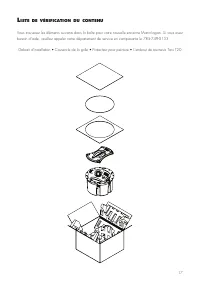
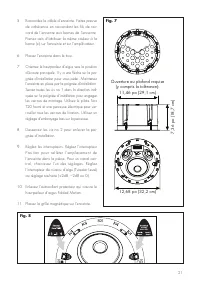
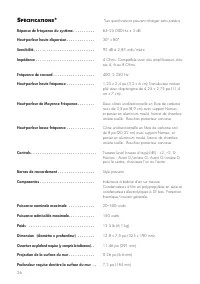


Table of Contents:
- Page 3 – • Install Template
- Page 7 – Required opening
- Page 8 – How do I clean my speakers?; requentLY
- Page 9 – The appointed MartinLogan distributor for any; WARRANTY INFORMATION; Limited Warranty and Duration; eneraL
- Page 11 – Warranty Outside of the United States and Canada; Refurbished Products Warranty Information; Each refurbished product:
- Page 12 – *Specifications are subject to change without notice.; PeCiFiCations
- Page 15 – m a n u e l d e l ’ u t i l i s a t e u r
- Page 16 – incendie s’il ne suit pas les instructions.
- Page 18 – A V E R T I S S E M E N T !; É t e i g n e z
- Page 20 – AVERTISSEMENT; einturer; M I S E E N G A R D E !; nstaLLation
- Page 21 – Ouverture au plafond requise
- Page 22 – Aucune sortie; Assurez-vous que la prise murale fonctionne.; Manque de graves ou mauvaise image; Utilisez; oire
- Page 23 – Merci d’avoir acheté un produit MartinLogan. Tous
- Page 26 – *Les spécifications peuvent changer sans préavis.; PéCiFiCations; Profondeur requise derrière la surface du mur . .
u s e r ’ s m a n u a l
®
"Loading the manual" means you need to wait until the file loads and becomes available for online reading. Some manuals are very large, and the time they take to appear depends on your internet speed.
Summary
3 C ontent C heCk L ist You will find the following items enclosed for your new MartinLogan loudspeaker. Should you require assistance, please call our service department at (785) 749-0133. • Install Template • Grille Cover • Paint Shield • Torx T20 Driver
7 the speaker. Take great care to assign the same color to the (+) terminal on both the speaker and the amplifier. 6 Place the speaker in the hole. 7 Orient the tweeter so it is pointing towards the primary listening position. There is an arrow on the installation handle to help with this. Hold the ...
8 No Output • Check that all your system components are turned on, are not muted, and that your bal-ance control (if applicable) correct. • Check to make sure your power outlet at the wall is working. • Check your power cords, speaker wires, and interconnecting cables. • Check to make sure no headph...