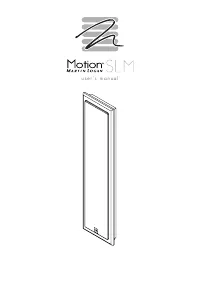
MartinLogan MOTSLM - User Manual
MartinLogan MOTSLM Speaker – User Manual, read for free online in PDF format. We hope this helps you resolve any issues you may have. If you have further questions, please contact us through the contact form.

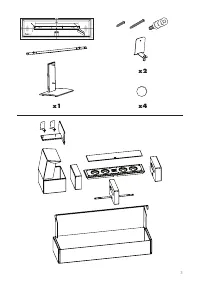


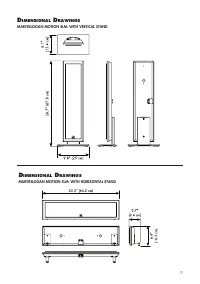

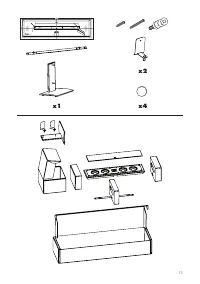
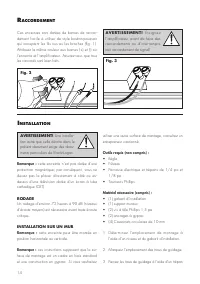
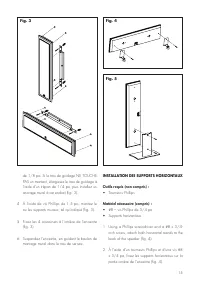
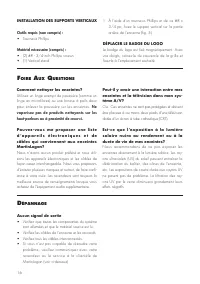
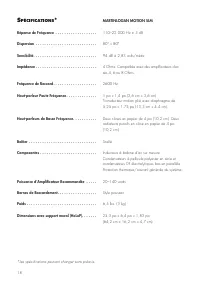
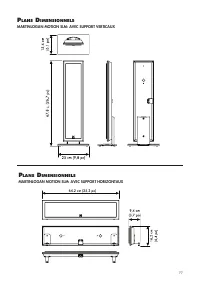
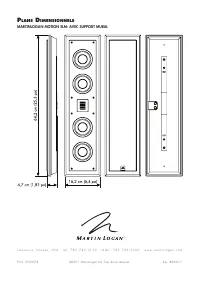
Table of Contents:
- Page 5 – Hang the speaker, guiding the wall mount bolts; INSTALLING THE HORIZONTAL STANDS; INSTALLING THE VERTICAL STAND; • Phillips screwdriver
- Page 6 – • Check that all system components are turned; roubleshooting; Using a Phillips screwdriver and two #8 x; MOVING THE LOGO BADGE
- Page 8 – peCiFiCations; Sealed
- Page 9 – MARTINLOGAN MOTION SLM: WITH VERTICAL STAND; imensional; MARTINLOGAN MOTION SLM: WITH HORIZONTAL STAND
- Page 10 – MARTINLOGAN MOTION SLM: WITH WALL BRACKET
- Page 11 – g u i d e d e l ’ u t i l i s a t e u r
- Page 15 – INSTALLATION DES SUPPORTS HORIZONTAUX
- Page 16 – INSTALLATION DES SUPPORTS VERTICAUX; • Tournevis Phillips; DÉPLACER LE BADGE DU LOGO; • Vérifiez que toutes les composantes du système; épannage
- Page 18 – péCiFiCations; Scellé
- Page 19 – MARTINLOGAN MOTION SLM: AVEC SUPPORT VERTICAUX; lans; MARTINLOGAN MOTION SLM: AVEC SUPPORT HORIZONTAUX
- Page 20 – MARTINLOGAN MOTION SLM: AVEC SUPPORT MURAL
u s e r ’ s m a n u a l
"Loading the manual" means you need to wait until the file loads and becomes available for online reading. Some manuals are very large, and the time they take to appear depends on your internet speed.
Summary
5 4 Using the 1.5-inch Phillips screws, mount the wall bracket(s) as shown (fig. 3) . 5 Attach the 4 pads to the back of the speaker (fig 3). 6 Hang the speaker, guiding the wall mount bolts into the keyholes. INSTALLING THE HORIZONTAL STANDS Required.tools.(not.included): • Phillips screwdriver Req...
6 How do I clean my speakers? Use a dust free cloth (such as a micro fiber cloth) or a soft brush to remove dust from your speakers. . Do.not.spray.any.kind.of.cleaning.agent.on.or.in.close.proximity.to.the.drivers . Could you suggest a list of suitable elec-tronics and cables ideal for MartinLogan ...
8 s peCiFiCations * Frequency.Response . . . . . . . . . . . . . . . . . . . . . Dispersion. . . . . . . . . . . . . . . . . . . . . . . . . . . . . Sensitivity . . . . . . . . . . . . . . . . . . . . . . . . . . . . . Impedance . . . . . . . . . . . . . . . . . . . . . . . . . . . . Crossover.Frequ...