Logitech G502 - Manual
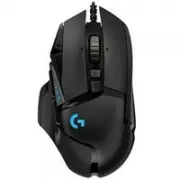
Logitech G502 Computer Mouse – Manual, read for free online in PDF format. We hope this helps you resolve any issues you may have. If you have further questions, please contact us through the contact form.


Table of Contents:
- Page 3 – English 3; On; USB
- Page 4 – English; To adjust the weight and balance of
- Page 5 – English 5; You can place up to five 3.6 gram weights
- Page 6 – English
- Page 7 – English 7; 1 fully programmable buttons
- Page 8 – English; DPI values
- Page 9 – English 9
- Page 12 – If the mouse doesn’t work
- Page 17 – 1 boutons entièrement programmables
- Page 22 – Si la souris ne fonctionne pas
Logitech® G502 Proteus Core
Setup Guide
Guide d’installation
"Loading the manual" means you need to wait until the file loads and becomes available for online reading. Some manuals are very large, and the time they take to appear depends on your internet speed.
Was this manual helpful?
About this manual
- Brand
- Logitech
- Model
- G502
- Document type
- Manual
- Category
- Computer Mouse
- Language(s)
- English, French
- Pages
- 24
- File size
- 1 MB
- Format
Other Manuals for Logitech G502
Summary
English 3 1 2 Your G502 is ready to play games. If you would like to customize your G502, refer to the next section. 3 You can customize the three onboard profiles of the G502—surface tuning, button programming, and tracking behavior—using the Logitech Gaming Software. Download this free software a...
4 English 4 To adjust the weight and balance of your G502, first open the weight door by grasping the mouse firmly in your right hand and pulling the blue tab down with your left thumb.
English 5 5 You can place up to five 3.6 gram weights in a number of different orientations. Experiment with different positions for the weights to find an overall weight and balance that feels right for you.


