Page 3 - PACKAGE CONTENTS
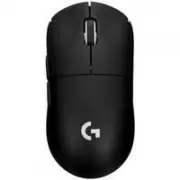
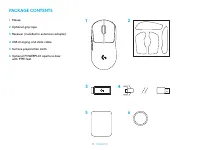
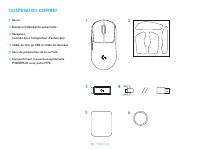
3 ENGLISH PACKAGE CONTENTS 1 5 3 4 2 6 1 Mouse 2 Optional grip tape 3 Receiver (installed in extension adapter) 4 USB charging and data cable 5 Surface preparation cloth 6 Optional POWERPLAY aperture door with PTFE foot
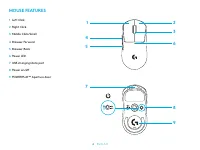
Page 4 - MOUSE FEATURES
4 ENGLISH MOUSE FEATURES 1 Left Click 2 Right Click 3 Middle Click/Scroll 4 Browser Forward 5 Browser Back 6 Power LED 7 USB charging/data port 8 Power on/off 9 POWERPLAY™ Aperture door 2 8 9 3 6 1 7 45
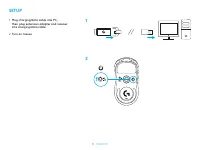
Page 5 - SETUP; then plug extension adapter and receiver
5 ENGLISH SETUP 1 Plug charging/data cable into PC, then plug extension adapter and receiver into charging/data cable 2 Turn on mouse 1 2
Page 6 - To configure mouse settings like DPI, download G HUB software from
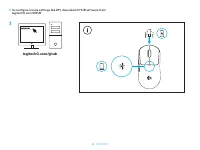
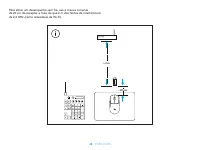
6 ENGLISH 3 To configure mouse settings like DPI, download G HUB software from logitechG com/GHUB 3 logitechG.com/ghub
Page 7 - For optimal wireless performance, use mouse within 20cm of
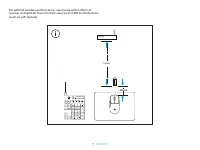
7 ENGLISH > 2 m ~ 20 cm For optimal wireless performance, use mouse within 20cm of receiver and greater than 2m from sources of 2.4GHz interference (such as wifi routers).
Page 8 - To install optional grip tape, first clean surface of mouse with
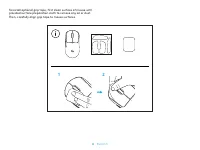
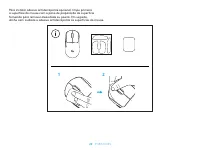
8 ENGLISH To install optional grip tape, first clean surface of mouse with provided surface preparation cloth to remove any oil or dust. Then, carefully align grip tape to mouse surfaces. 1 2
Page 9 - with the Logitech G POWERPLAY wireless charging system.; PTFE
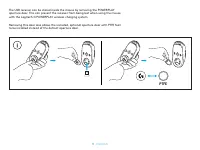
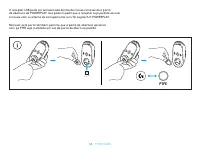
9 ENGLISH The USB receiver can be stored inside the mouse by removing the POWERPLAY aperture door. This can prevent the receiver from being lost when using the mouse with the Logitech G POWERPLAY wireless charging system. Removing this door also allows the included, optional aperture door with PTFE ...
Page 10 - CONTENU DU COFFRET
10 FRANÇAIS CONTENU DU COFFRET 1 5 3 4 2 6 1 Souris 2 Bande antidérapante optionnelle 3 Récepteur (installé dans l’adaptateur d’extension) 4 Câble de charge USB et câble de données 5 Tissu de préparation de la surface 6 Compartiment à ouverture optionnelle POWERPLAY avec patin PTFE
Page 11 - CARACTÉRISTIQUES DE LA SOURIS
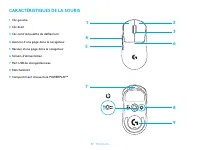
11 FRANÇAIS CARACTÉRISTIQUES DE LA SOURIS 1 Clic gauche 2 Clic droit 3 Clic central/roulette de défilement 4 Avancer d’une page dans le navigateur 5 Reculer d’une page dans le navigateur 6 Témoin d'alimentation 7 Port USB de charge/données 8 Marche/Arrêt 9 Compartiment d’ouverture POWERPLAY™ 2 8 9 3...
Page 12 - INSTALLATION; Connectez le câble de charge/données
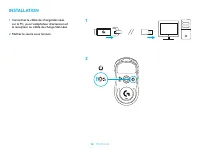
12 FRANÇAIS INSTALLATION 1 Connectez le câble de charge/données sur le PC, puis l’adaptateur d’extension et le récepteur au câble de charge/données 2 Mettez la souris sous tension 1 2
Page 13 - Pour configurer les paramètres de la souris, comme sa résolution,
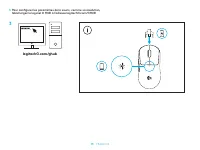
13 FRANÇAIS 3 Pour configurer les paramètres de la souris, comme sa résolution, téléchargez le logiciel G HUB à l’adresse logitechG com/GHUB 3 logitechG.com/ghub
Page 14 - Pour bénéficier de performances optimales en mode sans fil,
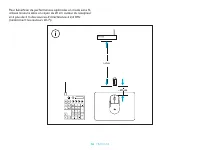
14 FRANÇAIS > 2 m ~ 20 cm Pour bénéficier de performances optimales en mode sans fil, utilisez la souris dans un rayon de 20 cm autour du récepteur et à plus de 2 m des sources d’interférence à 2,4 GHz (notamment les routeurs Wi-Fi).
Page 15 - nettoyer la surface de la souris avec le tissu de préparation
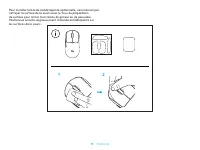
15 FRANÇAIS Pour installer la bande antidérapante optionnelle, commencez par nettoyer la surface de la souris avec le tissu de préparation de surface pour retirer tout résidu de graisse ou de poussière. Positionnez ensuite soigneusement la bande antidérapante sur les surfaces de la souris. 1 2
Page 16 - Logitech G POWERPLAY.
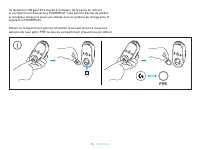
16 FRANÇAIS Le récepteur USB peut être stocké à l’intérieur de la souris en retirant le compartiment d’ouverture POWERPLAY. Cela permet d’éviter de perdre le récepteur lorsque la souris est utilisée avec le système de charge sans fil Logitech G POWERPLAY. Retirer ce compartiment permet d’installer l...
Page 17 - CONTENIDO DE LA CAJA
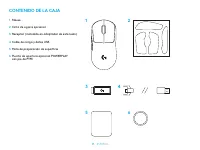
17 ESPAÑOL CONTENIDO DE LA CAJA 1 5 3 4 2 6 1 Mouse 2 Cinta de agarre opcional 3 Receptor (instalado en adaptador de extensión) 4 Cable de carga y datos USB 5 Paño de preparación de superficie 6 Puerta de apertura opcional POWERPLAY con pie de PTFE
Page 18 - CARACTERÍSTICAS DEL MOUSE
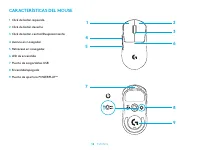
18 ESPAÑOL CARACTERÍSTICAS DEL MOUSE 1 Click de botón izquierdo 2 Click de botón derecho 3 Click de botón central/Desplazamiento 4 Avance en navegador 5 Retroceso en navegador 6 LED de encendido 7 Puerto de carga/datos USB 8 Encendido/apagado 9 Puerta de apertura POWERPLAY™ 2 8 9 3 6 1 7 45
Page 19 - PROCEDIMIENTO; Conecta el cable de carga/datos a la PC,
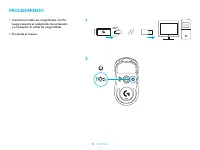
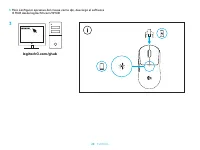
19 ESPAÑOL PROCEDIMIENTO 1 Conecta el cable de carga/datos a la PC, luego conecta el adaptador de extensión y el receptor al cable de carga/datos 2 Enciende el mouse 1 2
Page 20 - Para configurar opciones del mouse como dpi, descarga el software
20 ESPAÑOL 3 Para configurar opciones del mouse como dpi, descarga el software G HUB desde logitechG com/GHUB 3 logitechG.com/ghub
Page 21 - Para un óptimo rendimiento inalámbrico, usa el mouse a menos de
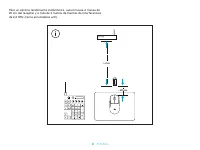
21 ESPAÑOL > 2 m ~ 20 cm Para un óptimo rendimiento inalámbrico, usa el mouse a menos de 20 cm del receptor y a más de 2 metros de fuentes de interferencias de 2,4 GHz (como enrutadores wifi).
Page 22 - del mouse con el paño de preparación de superficie suministrado
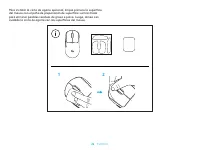
22 ESPAÑOL Para instalar la cinta de agarre opcional, limpia primero la superficie del mouse con el paño de preparación de superficie suministrado para eliminar posibles residuos de grasa o polvo. Luego, alinea con cuidado la cinta de agarre con las superficies del mouse. 1 2
Page 23 - el mouse con el sistema inalámbrico de carga Logitech G POWERPLAY.
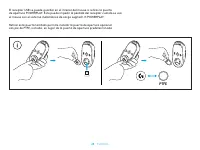
23 ESPAÑOL El receptor USB se puede guardar en el interior del mouse si retiras la puerta de apertura POWERPLAY. Esto puede impedir la pérdida del receptor cuando se usa el mouse con el sistema inalámbrico de carga Logitech G POWERPLAY. Retirar esta puerta también permite instalar la puerta de ape...
Page 24 - CONTEÚDO DA EMBALAGEM
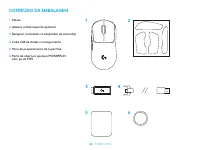
24 PORTUGUÊS CONTEÚDO DA EMBALAGEM 1 5 3 4 2 6 1 Mouse 2 Adesivo antiderrapante opcional 3 Receptor (instalado no adaptador de extensão) 4 Cabo USB de dados e carregamento 5 Pano de preparamento de superfície 6 Porta de abertura opcional POWERPLAY com pé de PTFE
Page 25 - RECURSOS DO MOUSE
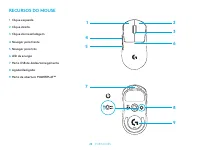
25 PORTUGUÊS RECURSOS DO MOUSE 1 Clique esquerdo 2 Clique direito 3 Clique do meio/rolagem 4 Navegar para frente 5 Navegar para trás 6 LED de energia 7 Porta USB de dados/carregamento 8 Ligado/desligado 9 Porta de abertura POWERPLAY™ 2 8 9 3 6 1 7 45
Page 26 - CONFIGURAÇÃO; Conecte o cabo de dados/carregamento no
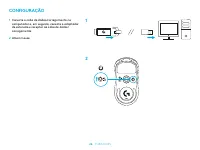
26 PORTUGUÊS CONFIGURAÇÃO 1 Conecte o cabo de dados/carregamento no computador e, em seguida, conecte o adaptador de extensão e receptor ao cabo de dados/ carregamento 2 Ativar mouse 1 2
Page 27 - Para configurar as configurações de mouse, como DPI,
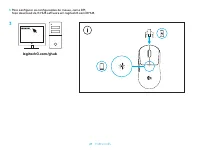
27 PORTUGUÊS 3 Para configurar as configurações de mouse, como DPI, faça download do G HUB software em logitechG com/GHUB 3 logitechG.com/ghub
Page 28 - Para obter um desempenho sem fio, use o mouse a menos
28 PORTUGUÊS > 2 m ~ 20 cm Para obter um desempenho sem fio, use o mouse a menos de 20 cm do receptor e mais do que 2 m das fontes de interferência de 2,4 GHz (como roteadores de Wi-Fi).
Page 29 - Para instalar adesivo antiderrapante opcional, limpe primeiro
29 PORTUGUÊS Para instalar adesivo antiderrapante opcional, limpe primeiro a superfície do mouse com o pano de preparação de superfície fornecida para remover oleosidade ou poeira. Em seguida, alinhe com cuidado o adesivo antiderrapante às superfícies do mouse. 1 2
Page 30 - o mouse com o sistema de carregamento sem fio Logitech G POWERPLAY.
30 PORTUGUÊS O receptor USB pode ser armazenado dentro do mouse removendo a porta de abertura do POWERPLAY. Isso pode impedir que o receptor seja perdido ao usar o mouse com o sistema de carregamento sem fio Logitech G POWERPLAY. Remover esta porta também permite que a porta de abertura opcional c...