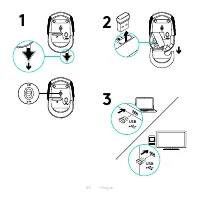
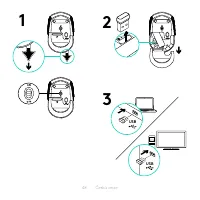
Page 2 - Languages; Ελληνικά
2 Languages English 3 Deutsch 6 Français 9 Italiano 12 Español 15 Português 18 Nederlands 21 Svenska 24 Dansk 27 Norsk 30 Suomi 33 Ελληνικά 36 По-русски 39 Po polsku 42 Magyar 45 Česká verze 48 Slovenčina 51 Українська 54 Eesti 57 Latviski 60 Lietuvių 63 Български 66 Hrvatski 69 Srpski 72 Slovenščin...
Page 4 - Features
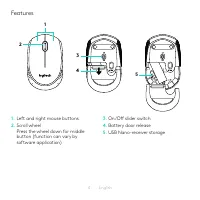
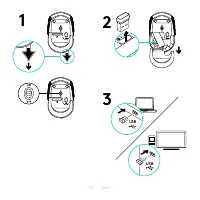
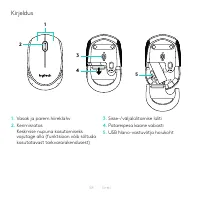
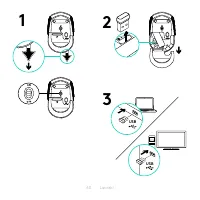
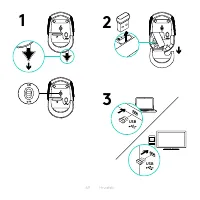
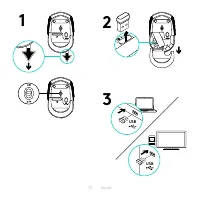
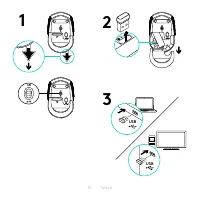
4 English Features 1. Left and right mouse buttons 2. Scroll wheel Press the wheel down for middle button (function can vary by software application) 3. On/Off slider switch 4. Battery door release 5. USB Nano-receiver storage 1 3 4 2 5
Page 5 - Help with setup: Mouse is not working
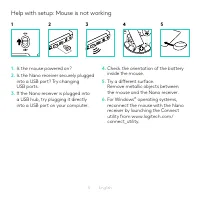
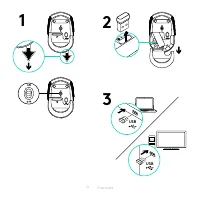
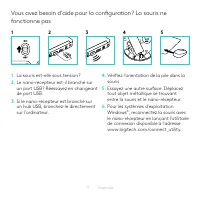
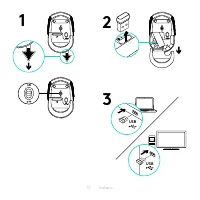
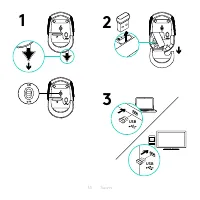
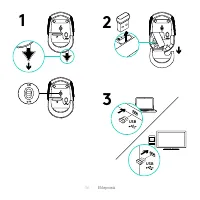
5 English Help with setup: Mouse is not working 1. Is the mouse powered on? 2. Is the Nano receiver securely plugged into a USB port? Try changing USB ports 3. If the Nano receiver is plugged into a USB hub, try plugging it directly into a USB port on your computer 4. Check the orientation of the ba...
Page 7 - Funktionen
7 Deutsch Funktionen 1. Linke und rechte Maustaste 2. Scrollrad Drücken Sie das Scrollrad, um die Funktion der mittleren Taste (Funktion je nach Anwendung unterschiedlich) auszuführen 3. Ein-/Ausschalter 4. Batteriefachdeckel-Entriegelung 5. USB-Nano-Empfängerfach 1 3 4 2 5
Page 8 - Probleme bei der Einrichtung: Die Maus funktioniert nicht
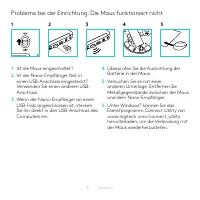
8 Deutsch Probleme bei der Einrichtung: Die Maus funktioniert nicht 1. Ist die Maus eingeschaltet? 2. Ist der Nano-Empfänger fest in einen USB-Anschluss eingesteckt? Verwenden Sie einen anderen USB- Anschluss 3. Wenn der Nano-Empfänger an einen USB-Hub angeschlossen ist, stecken Sie ihn direkt in de...
Page 10 - Fonctionnalités
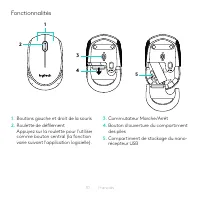
10 Français Fonctionnalités 1. Boutons gauche et droit de la souris 2. Roulette de défilement Appuyez sur la roulette pour l'utiliser comme bouton central (la fonction varie suivant l'application logicielle) 3. Commutateur Marche/Arrêt 4. Bouton d'ouverture du compartiment des piles 5. Compartiment ...
Page 13 - Caratteristiche
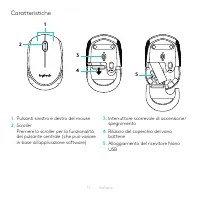
13 Italiano Caratteristiche 1. Pulsanti sinistro e destro del mouse 2. Scroller Premere lo scroller per la funzionalità del pulsante centrale (che può variare in base all'applicazione software) 3. Interruttore scorrevole di accensione/ spegnimento 4. Rilascio del coperchio del vano batterie 5. Allog...
Page 14 - Assistenza per la configurazione: Il mouse non funziona
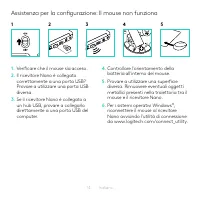
14 Italiano Assistenza per la configurazione: Il mouse non funziona 1. Verificare che il mouse sia acceso 2. Il ricevitore Nano è collegato correttamente a una porta USB? Provare a utilizzare una porta USB diversa 3. Se il ricevitore Nano è collegato a un hub USB, provare a collegarlo direttamente a...
Page 16 - Componentes
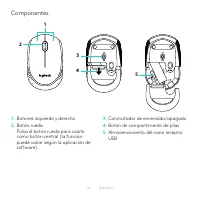
16 Español Componentes 1. Botones izquierdo y derecho 2. Botón rueda Pulsa el botón rueda para usarlo como botón central (la función puede variar según la aplicación de software) 3. Conmutador de encendido/apagado 4. Botón de compartimento de pilas 5. Almacenamiento del nano receptor USB 1 3 4 2 5
Page 17 - Ayuda con la instalación: El ratón no funciona
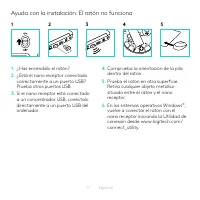
17 Español Ayuda con la instalación: El ratón no funciona 1. ¿Has encendido el ratón? 2. ¿Está el nano receptor conectado correctamente a un puerto USB? Prueba otros puertos USB 3. Si el nano receptor está conectado a un concentrador USB, conéctalo directamente a un puerto USB del ordenador 4. Compr...
Page 19 - Características
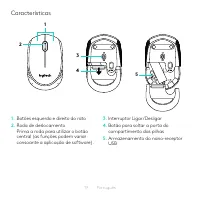
19 Português Características 1. Botões esquerdo e direito do rato 2. Roda de deslocamento Prima a roda para utilizar o botão central (as funções podem variar consoante a aplicação de software) 3. Interruptor Ligar/Desligar 4. Botão para soltar a porta do compartimento das pilhas 5. Armazenamento do ...
Page 20 - Ajuda com a configuração: O rato não funciona
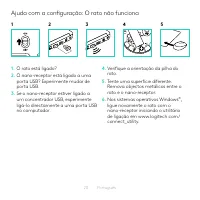
20 Português Ajuda com a configuração: O rato não funciona 1. O rato está ligado? 2. O nano-receptor está ligado a uma porta USB? Experimente mudar de porta USB 3. Se o nano-receptor estiver ligado a um concentrador USB, experimente ligá-lo directamente a uma porta USB no computador 4. Verifique a o...
Page 22 - Kenmerken
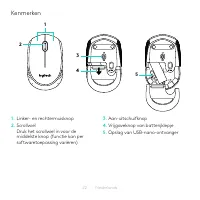
22 Nederlands Kenmerken 1. Linker- en rechtermuisknop 2. Scrollwiel Druk het scrollwiel in voor de middelste knop (functie kan per softwaretoepassing variëren) 3. Aan-uitschuifknop 4. Vrijgaveknop van batterijklepje 5. Opslag van USB-nano-ontvanger 1 3 4 2 5
Page 25 - Funktioner
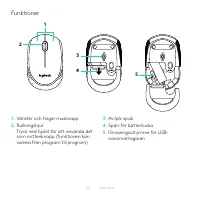
25 Svenska Funktioner 1. Vänster och höger musknapp 2. Rullningshjul Tryck ned hjulet för att använda det som mittenknapp (funktionen kan variera från program till program) 3. Av/på-spak 4. Spärr för batterilucka 5. Förvaringsutrymme för USB- nanomottagaren 1 3 4 2 5
Page 26 - Installationshjälp: Musen fungerar inte
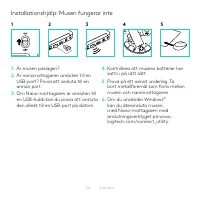
26 Svenska Installationshjälp: Musen fungerar inte 1. Är musen påslagen? 2. Är nanomottagaren ansluten till en USB-port? Prova att ansluta till en annan port 3. Om Nano-mottagaren är ansluten till en USB-hubb kan du prova att ansluta den direkt till en USB-port på datorn 4. Kontrollera att musens ba...
Page 29 - Hjælp til konfigurationen: Musen virker ikke
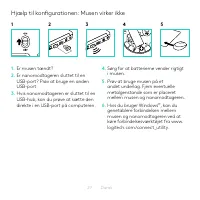
29 Dansk Hjælp til konfigurationen: Musen virker ikke 1. Er musen tændt? 2. Er nanomodtageren sluttet til en USB-port? Prøv at bruge en anden USB-port 3. Hvis nanomodtageren er sluttet til en USB-hub, kan du prøve at sætte den direkte i en USB-port på computeren 4. Sørg for at batterierne vender rig...
Page 31 - Funksjoner
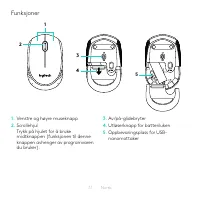
31 Norsk Funksjoner 1. Venstre og høyre museknapp 2. Scrollehjul Trykk på hjulet for å bruke midtknappen (funksjonen til denne knappen avhenger av programvaren du bruker) 3. Av/på-glidebryter 4. Utløserknapp for batteriluken 5. Oppbevaringsplass for USB- nanomottaker 1 3 4 2 5
Page 32 - Hjelp med konfigureringen: Musen fungerer ikke
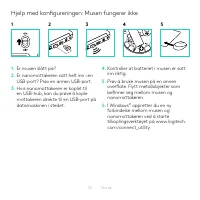
32 Norsk Hjelp med konfigureringen: Musen fungerer ikke 1. Er musen slått på? 2. Er nanomottakeren satt helt inn i en USB-port? Prøv en annen USB-port 3. Hvis nanomottakeren er koplet til en USB-hub, kan du prøve å kople mottakeren direkte til en USB-port på datamaskinen i stedet 4. Kontroller at ba...
Page 34 - Ominaisuudet
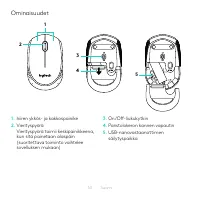
34 Suomi Ominaisuudet 1. hiiren ykkös- ja kakkospainike 2. Vierityspyörä Vierityspyörä toimii keskipainikkeena, kun sitä painetaan alaspäin (suoritettava toiminto vaihtelee sovelluksen mukaan) 3. On/Off-liukukytkin 4. Paristolokeron kannen vapautin 5. USB-nanovastaanottimen säilytyspaikka 1 3 4 2 5
Page 35 - Vinkkejä käyttöönottoon: Hiiri ei toimi
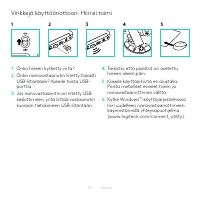
35 Suomi Vinkkejä käyttöönottoon: Hiiri ei toimi 1. Onko hiireen kytketty virta? 2. Onko nanovastaanotin liitetty tiukasti USB-liitäntään? Kokeile toista USB- porttia 3. Jos nanovastaanotin on liitetty USB- keskittimeen, yritä liittää vastaanotin suoraan tietokoneen USB-liitäntään 4. Tarkista, että ...
Page 37 - Χαρακτηριστικά; Αριστερό και δεξιό κουμπί ποντικιού
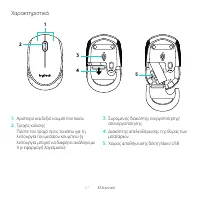
37 Ελληνvικά Χαρακτηριστικά 1. Αριστερό και δεξιό κουμπί ποντικιού 2. Τροχός κύλισης Πιέστε τον τροχό προς τα κάτω για τη λειτουργία του μεσαίου κουμπιού (η λειτουργία μπορεί να διαφέρει ανάλογα με την εφαρμογή λογισμικού) 3. Συρόμενος διακόπτης ενεργοποίησης/απενεργοποίησης 4. Διακόπτης απελευθέρωσ...
Page 38 - Βοήθεια με την εγκατάσταση: Το ποντίκι δεν λειτουργεί; Έχετε ενεργοποιήσει το ποντίκι
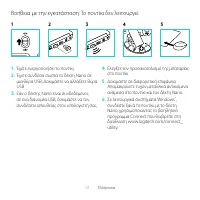
38 Ελληνvικά Βοήθεια με την εγκατάσταση: Το ποντίκι δεν λειτουργεί 1. Έχετε ενεργοποιήσει το ποντίκι; 2. Έχετε συνδέσει σωστά το δέκτη Nano σε μια θύρα USB; Δοκιμάστε να αλλάξετε θύρα USB. 3. Εάν ο δέκτης Nano είναι συνδεδεμένος σε ένα διανομέα USB, δοκιμάστε να τον συνδέσετε απευθείας στον υπολογισ...
Page 40 - Возможности; Левая и правая кнопки мыши
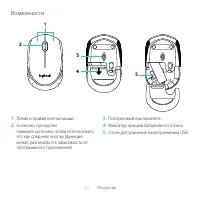
40 По-русски Возможности 1. Левая и правая кнопки мыши 2. Колесико прокрутки Нажмите колесико, чтобы использовать его как среднюю кнопку (функция может различаться в зависимости от программного приложения) 3. Ползунковый выключатель 4. Фиксатор крышки батарейного отсека 5. Отсек для хранения нанопри...
Page 41 - Помощь в настройке. Мышь не работает
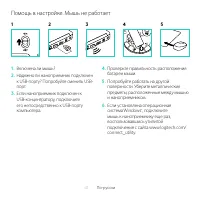
41 По-русски Помощь в настройке. Мышь не работает 1. Включена ли мышь? 2. Надежно ли наноприемник подключен к USB-порту? Попробуйте сменить USB-порт. 3. Если наноприемник подключен к USB-концентратору, подключите его непосредственно к USB-порту компьютера. 4. Проверьте правильность расположения бата...
Page 43 - Funkcje
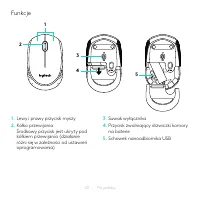
43 Po polsku Funkcje 1. Lewy i prawy przycisk myszy 2. Kółko przewijania Środkowy przycisk jest ukryty pod kółkiem przewijania (działanie różni się w zależności od ustawień oprogramowania) 3. Suwak wyłącznika 4. Przycisk zwalniający drzwiczki komory na baterie 5. Schowek nanoodbiornika USB 1 3 4 2 5
Page 44 - Pomoc dotycząca instalacji: Mysz nie działa
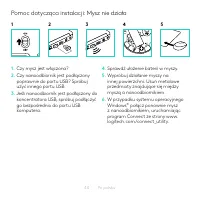
44 Po polsku Pomoc dotycząca instalacji: Mysz nie działa 1. Czy mysz jest włączona? 2. Czy nanoodbiornik jest podłączony poprawnie do portu USB? Spróbuj użyć innego portu USB 3. Jeśli nanoodbiornik jest podłączony do koncentratora USB, spróbuj podłączyć go bezpośrednio do portu USB komputera 4. Spra...
Page 46 - Jellemzők
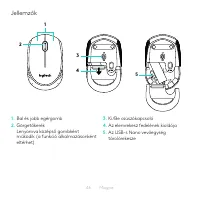
46 Magyar Jellemzők 1. Bal és jobb egérgomb 2. Görgetőkerék Lenyomva középső gombként működik (a funkció alkalmazásonként eltérhet) 3. Ki/Be csúszókapcsoló 4. Az elemrekesz fedelének kioldója 5. Az USB-s Nano vevőegység tárolórekesze 1 3 4 2 5
Page 47 - Segítség az üzembe helyezéshez: Az egér nem működik
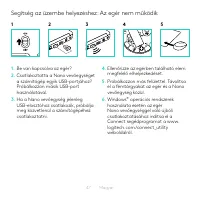
47 Magyar Segítség az üzembe helyezéshez: Az egér nem működik 1. Be van kapcsolva az egér? 2. Csatlakoztatta a Nano vevőegységet a számítógép egyik USB-portjához? Próbálkozzon másik USB-port használatával 3. Ha a Nano vevőegység jelenleg USB-elosztóhoz csatlakozik, próbálja meg közvetlenül a számí...
Page 49 - Funkce
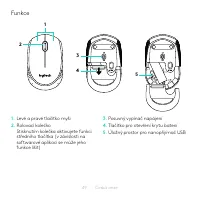
49 Česká verze Funkce 1. Levé a pravé tlačítko myši 2. Rolovací kolečko Stisknutím kolečka aktivujete funkci středního tlačítka (v závislosti na softwarové aplikaci se může jeho funkce lišit) 3. Posuvný vypínač napájení 4. Tlačítko pro otevření krytu baterií 5. Úložný prostor pro nanopřijímač USB 1 ...
Page 50 - Pomoc při instalaci: Myš nefunguje
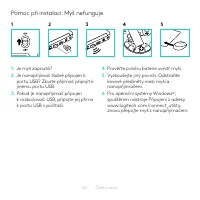
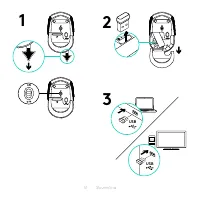
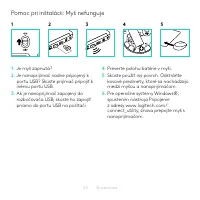
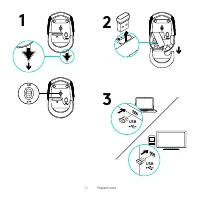
50 Česká verze Pomoc při instalaci: Myš nefunguje 1. Je myš zapnutá? 2. Je nanopřijímač řádně připojen k portu USB? Zkuste přijímač připojit k jinému portu USB 3. Pokud je nanopřijímač připojen k rozbočovači USB, připojte jej přímo k portu USB v počítači 4. Prověřte polohu baterie uvnitř myši 5. Vyz...
Page 52 - Funkcie
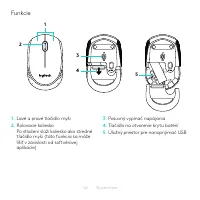
52 Slovenčina Funkcie 1. Ľavé a pravé tlačidlo myši 2. Rolovacie koliesko Po stlačení slúži koliesko ako stredné tlačidlo myši (táto funkcia sa môže líšiť v závislosti od softvérovej aplikácie) 3. Posuvný vypínač napájania 4. Tlačidlo na otvorenie krytu batérií 5. Úložný priestor pre nanoprijímač US...
Page 53 - Pomoc pri inštalácii: Myš nefunguje
53 Slovenčina Pomoc pri inštalácii: Myš nefunguje 1. Je myš zapnutá? 2. Je nanoprijímač riadne pripojený k portu USB? Skúste prijímač pripojiť k inému portu USB 3. Ak je nanoprijímač zapojený do rozbočovača USB, skúste ho zapojiť priamo do portu USB na počítači 4. Preverte polohu batérie v myši 5. S...
Page 55 - Функції; Ліва та права кнопки миші
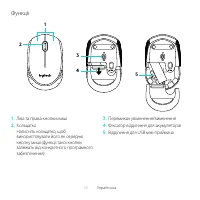
55 Українська Функції 1. Ліва та права кнопки миші 2. Коліщатко Натисніть коліщатко, щоб використовувати його як середню кнопку миші (функції такої кнопки залежать від конкретного програмного забезпечення) 3. Перемикач увімкнення/вимкнення 4. Фіксатор відділення для акумуляторів 5. Відділення для US...
Page 56 - Довідка з настроювання. Миша не працює; Якщо інстальовано ОС Windows
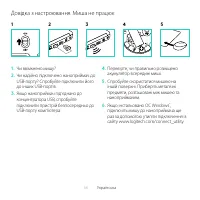
56 Українська Довідка з настроювання. Миша не працює 1. Чи ввімкнено мишу? 2. Чи надійно підключено наноприймач до USB-порту? Спробуйте підключити його до інших USB-портів. 3. Якщо наноприймач під’єднано до концентратора USB, спробуйте підключити пристрій безпосередньо до USB-порту комп’ютера. 4. Пе...
Page 58 - Kirjeldus
58 Eesti Kirjeldus 1. Vasak ja parem hiireklahv 2. Kerimisratas Keskmise nupuna kasutamiseks vajutage alla (funktsioon võib sõltuda kasutatavast tarkvararakendusest) 3. Sisse-/väljalülitamise lüliti 4. Patareipesa kaane vabasti 5. USB Nano-vastuvõtja hoiukoht 1 3 4 2 5
Page 59 - Abiks kasutamisel: Hiir ei tööta
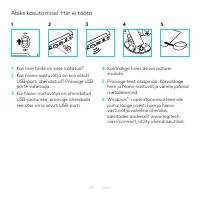
59 Eesti Abiks kasutamisel: Hiir ei tööta 1. Kas hiire toide on sisse lülitatud? 2. Kas Nano-vastuvõtja on korralikult USB-porti ühendatud? Proovige USB- porte vahetada 3. Kui Nano-vastuvõtja on ühendatud USB-jaoturisse, proovige ühendada see otse oma arvuti USB-porti 4. Kontrollige hiires asuva...
Page 61 - Apraksts
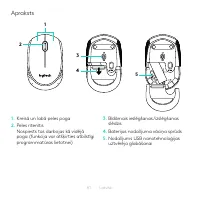
61 Latviski Apraksts 1. Kreisā un labā peles poga 2. Peles ritenītis Nospiests tas darbojas kā vidējā poga (funkcija var atšķirties atbilstīgi programmatūras lietotnei) 3. Bīdāmais ieslēgšanas /izslēgšanas slēdzis 4. Baterijas nodalījuma vāciņa sprūds 5. Nodalījums USB nanotehnoloģijas uztvērēja gla...
Page 62 - Palīdzība uzstādīšanā Pele nedarbojas
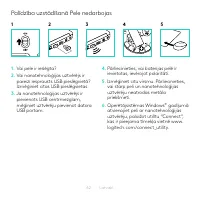
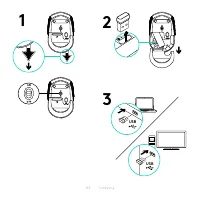
62 Latviski Palīdzība uzstādīšanā Pele nedarbojas 1. Vai pele ir ieslēgta? 2. Vai nanotehnoloģijas uztvērējs ir pareizi iesprausts USB pieslēgvietā? Izmēģiniet citas USB pieslēgvietas 3. Ja nanotehnoloģijas uztvērējs ir pievienots USB centrmezglam, mēģiniet uztvērēju pievienot datora USB portam 4. P...
Page 64 - Funkcijos
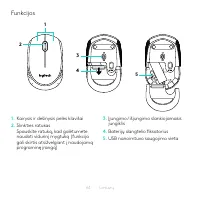
64 Lietuvių Funkcijos 1. Kairysis ir dešinysis pelės klavišai 2. Slinkties ratukas Spauskite ratuką, kad galėtumėte naudoti vidurinį mygtuką (funkcija gali skirtis atsižvelgiant į naudojamą programinę įrangą) 3. Įjungimo / išjungimo slankiojamasis jungiklis 4. Baterijų dangtelio fiksatorius 5. USB n...
Page 65 - Reikia pagalbos nustatant? Pelė neveikia
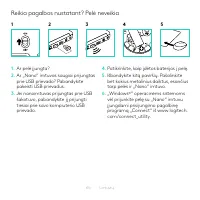
65 Lietuvių Reikia pagalbos nustatant? Pelė neveikia 1. Ar pelė įjungta? 2. Ar „Nano“ imtuvas saugiai prijungtas prie USB prievado? Pabandykite pakeisti USB prievadus 3. Jei nanoimtuvas prijungtas prie USB šakotuvo, pabandykite jį prijungti tiesiai prie savo kompiuterio USB prievado 4. Patikrinkite,...
Page 67 - Функции; Ляв и десен бутон на мишката
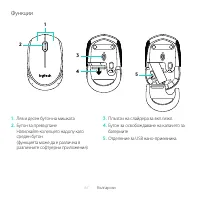
67 Български Функции 1. Ляв и десен бутон на мишката 2. Бутон за превъртане Натискайте колелцето надолу като среден бутон (функцията може да е различна в различните софтуерни приложения) 3. Плъзгач на слайдера за вкл./изкл. 4. Бутон за освобождаване на капачето за батериите 5. Отделение за USB нано-...
Page 68 - Помощ с настройката: Мишката не работи; Включена ли е мишката?
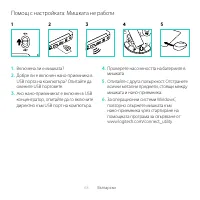
68 Български Помощ с настройката: Мишката не работи 1. Включена ли е мишката? 2. Добре ли е включен нано-приемника в USB порта на компютъра? Опитайте да смените USB портовете. 3. Ако нано-приемникът е включен в USB концентратор, опитайте да го включите директно към USB порт на компютъра. 4. Проверет...
Page 70 - Značajke
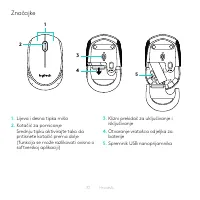
70 Hrvatski Značajke 1. Lijeva i desna tipka miša 2. Kotačić za pomicanje Srednju tipku aktivirajte tako da pritisnete kotačić prema dolje (funkcija se može razlikovati ovisno o softverskoj aplikaciji) 3. Klizni prekidač za uključivanje i isključivanje 4. Otvaranje vratašca odjeljka za baterije 5. S...
Page 71 - Pomoć pri postavljanju: Miš ne radi
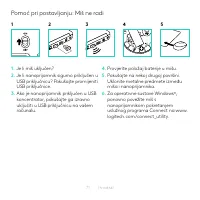
71 Hrvatski Pomoć pri postavljanju: Miš ne radi 1. Je li miš uključen? 2. Je li nanoprijamnik sigurno priključen u USB priključnicu? Pokušajte promijeniti USB priključnice 3. Ako je nanoprijamnik priključen u USB koncentrator, pokušajte ga izravno uključiti u USB priključnicu na vašem računalu 4. Pr...
Page 73 - Funkcije
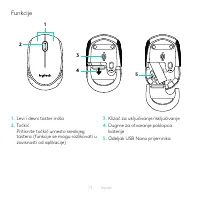
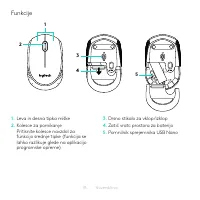
73 Srpski Funkcije 1. Levi i desni taster miša 2. Točkić Pritisnite točkić umesto srednjeg tastera (funkcije se mogu razlikovati u zavisnosti od aplikacije) 3. Klizač za uključivanje/isključivanje 4. Dugme za otvaranje poklopca baterije 5. Odeljak USB Nano prijemnika 1 3 4 2 5
Page 74 - Pomoć za podešavanje: Miš ne radi
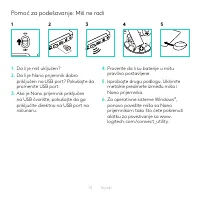
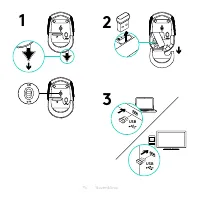
74 Srpski Pomoć za podešavanje: Miš ne radi 1. Da li je miš uključen? 2. Da li je Nano prijemnik dobro priključen na USB port? Pokušajte da promenite USB port 3. Ako je Nano prijemnik priključen na USB čvorište, pokušajte da ga priključite direktno na USB port na računaru 4. Proverite da li su bater...
Page 77 - Pomoč pri namestitvi: Miška ne deluje
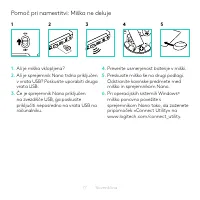
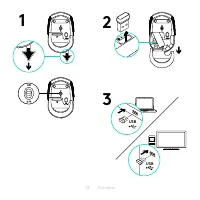
77 Slovenščina Pomoč pri namestitvi: Miška ne deluje 1. Ali je miška vklopljena? 2. Ali je sprejemnik Nano trdno priključen v vrata USB? Poskusite uporabiti druga vrata USB 3. Če je sprejemnik Nano priključen na zvezdišče USB, ga poskusite priključiti neposredno na vrata USB na računalniku 4. Prever...
Page 79 - Caracteristici
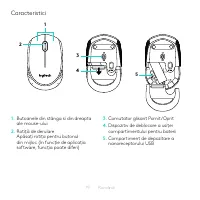
79 Română Caracteristici 1. Butoanele din stânga şi din dreapta ale mouse-ului 2. Rotiţă de derulare Apăsaţi rotiţa pentru butonul din mijloc (în funcţie de aplicaţia software, funcţia poate diferi) 3. Comutator glisant Pornit /Oprit 4. Dispozitiv de deblocare a uşiţei compartimentului pentru bateri...
Page 80 - Ajutor pentru configurare: Mouse-ul nu funcţionează
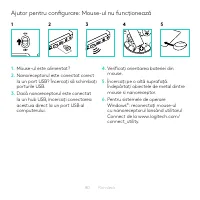
80 Română Ajutor pentru configurare: Mouse-ul nu funcţionează 1. Mouse-ul este alimentat? 2. Nanoreceptorul este conectat corect la un port USB? Încercaţi să schimbaţi porturile USB 3. Dacă nanoreceptorul este conectat la un hub USB, încercaţi conectarea acestuia direct la un port USB al computerulu...
Page 82 - Özellikler
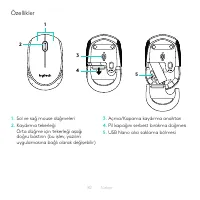
82 Türkçe Özellikler 1. Sol ve sağ mouse düğmeleri 2. Kaydırma tekerleği Orta düğme için tekerleği aşağı doğru bastırın (bu işlev, yazılım uygulamasına bağlı olarak değişebilir) 3. Açma/Kapama kaydırma anahtarı 4. Pil kapağını serbest bırakma düğmesi 5. USB Nano alıcı saklama bölmesi 1 3 4 2 5
Page 83 - Kurulum yardımı: Mouse çalışmıyor
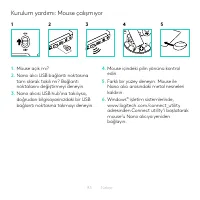
83 Türkçe Kurulum yardımı: Mouse çalışmıyor 1. Mouse açık mı? 2. Nano alıcı USB bağlantı noktasına tam olarak takılı mı? Bağlantı noktalarını değiştirmeyi deneyin 3. Nano alıcısı USB hub’ına takılıysa, doğrudan bilgisayarınızdaki bir USB bağlantı noktasına takmayı deneyin 4. Mouse içindeki pilin yön...
Page 84 - ةيبرعلا
Page 85 - تازيملا
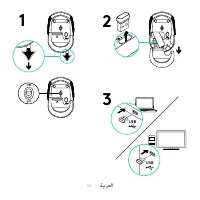
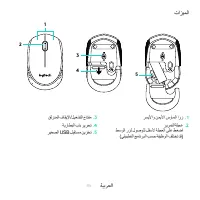
85 ةيبرعلا تازيملا 1 . رسيلأاو نميلأا سواملا ارز 2 . ريرمتلا ةلجع طسولا رزل لوصولل لفسلأ ةلجعلا ىلع طغضا )يقيبطتلا جمانربلا بسح ةفيظولا فلتخت دق( 3 . قلزنملا فاقيلإا/ليغشتلا حاتفم 4 . ةيراطبلا باب ريرحت 5 . ريغصلا USB لِبقتسم نيزخت 1 3 4 2 5
Page 86 - لمعي لا سواملا :دادعلإا يف ةدعاسملا
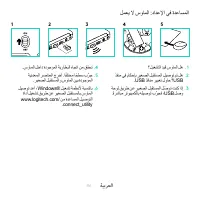
86 ةيبرعلا لمعي لا سواملا :دادعلإا يف ةدعاسملا 1 . ؟ليغشتلا ديق سواملا له 2 . ذفنم يف ماكحإب ريغصلا لبقتسملا ليصوت مت له USB ذفانم رييغت لواح ؟ USB 3 . ةحول قيرط نع ريغصلا لِبقتسملا ل ّصوت تنك اذإ .ًةرشابم رتويبمكلاب هليصوت ب ِّرجف ، USB لصو 4 . .سواملا لخاد ةدوجوملا ةيراطبلا هاجتا نم ققحت 5 . ةيندع...
Page 88 - תונוכת; Nano USB
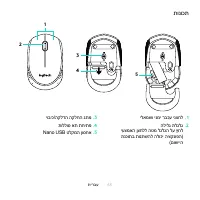
תירבע 88 תונוכת 1 . ילאמשו ינמי רבכע ינצחל 2 . הלילג תלגלג יעצמאה ןצחלל הטמ לגלגה לע ץחל תנכותב תונתשהל הלוכי היצקנופה( )םושייה 3 . יוביכ/הקלדה הקלחה גתמ 4 . תוללוס את תחיתפ 5 . Nano USB טלקמה ןוסחא 1 3 4 2 5
Page 89 - דבוע וניא רבכעה :הנקתהב הרזע
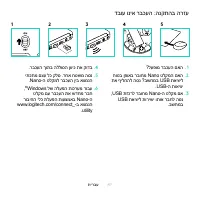
תירבע 89 דבוע וניא רבכעה :הנקתהב הרזע 1 . ?לעפומ רבכעה םאה 2 . חוטב ןפואב רבוחמ Nano טלקמה םאה תא ףילחהל הסנ ?בשחמב USB תאיציל USB -ה תואיצי 3 . ,USB תזכרל רבוחמ Nano -ה טלקמ םא USB תאיציל תורישי ותוא רבחל הסנ .בשחמב 4 . .רבכעה ךותב הללוסה ןוויכ תא קודב 5 . יתכתמ םצע לכ קלס .רחא חטשמ הסנ Nano -ה טלק...