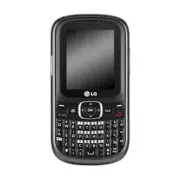
Page 2 - P h o n e O ve r v i ew
2 P h o n e O ve r v i ew 1. Earpiece Lets you hear the caller. 2. LCD Screen Displays messages and status icons. 3. Left Option Key Use to access the main menu from the Home screen or the functionimmediately above it. 4. Camera Key Press this key to open the Camera function. 5. SEND Key Use to plac...
Page 4 - Phone Overview; Qwerty Keypad
4 Phone Overview Qwerty Keypad Your phone features a QWERTY keypad, specifically designed foreasy and comfortable text entry. The QWERTY keypad uses astandard layout. 1. Function Key allows you enter the alternate character (such as $ for the Wkey) on the QWERTY keyboard. To lockthe Function Key (as...
Page 5 - Prepaid; Contacts; Menus Overview; Menu Access; Press
Prepaid 1. Add Airtime 2. My Phone Number 3. My Balances Info 4. Airtime Display 5. Serial Number 6. Code Entry Mode Contacts 1. New Contact 2. Contact List 3. Groups 4. My vCard 5. Speed Dials Messages 1. New Text Message 2. New Picture Message 3. Inbox 4. Outbox 5. Drafts 6. Voicemail 7. Templates...
Page 8 - The Battery; Installing the Battery; Removing the Battery; Remove the battery cover by; Note; G ett i n g S ta r te d w i t h Yo u r P h o n e
The Battery The phone comes with arechargeable battery. The batterycharge level is shown at the topright corner of the LCD screen. Installing the Battery 1. Remove the battery cover by pressing down on the top-center of the battery cover,then sliding the coverdownward. 2. Alight the battery contacts...
Page 9 - Charging the Battery; Warning! Use only the charger; B attery Charge Level; Turning the Phone On; Install a charged battery or
Charging the Battery To use the charger providedwith your phone. Warning! Use only the charger provided with the phone. Using any charger other than the one included with the LG501C may damage your phone or battery. 1. Plug one end of the adapter into the phone’s charger/accessory port and the other...
Page 10 - Turning the Phone Off; Signal Strength; Menu; Making Calls; Getting Started with Your Phone
2. Press for about 2 seconds until the LCDscreen lights up. Turning the Phone Off 1. Press and hold until the LCD screen turns off. Signal Strength Call quality depends on thesignal strength in your area.The signal strength is indicatedon the screen as the number ofbars on the signal strengthicon . ...
Page 12 - Lock Mode; Unlock; Mute Function; Mute; Quick Volume Adjustment; Quick Access to Convenient Features
Lock Mode Sets your phone to require a4-digit Lock Code in order touse the phone. To quickly lock your phone press for three seconds and then enter your LockCode. To unlock, press the Right Option Key Unlock and enter the Lock Code. Mute Function The Mute function is availableduring a phone call. To...
Page 13 - Caller ID; OR
put the active call on hold whileyou answer the other incomingcall. Check with your cellularservice provider for informationabout this function. 1. During a call, press to answer the incoming call(Call Waiting). 2. Press again to switch between calls. Caller ID Caller ID displays the phonenumber or ...
Page 14 - Text Input; Key Functions; Left Option Key; Entering and Editing Information
Text Input You can customize and entertext in many of the functions inyour phone, including, but notlimited to: Calendar, Contactsand messages. While enteringtext, the following are youroptions: Key Functions Left Option Key : Press to select one ofthe following text inputmodes: T9 Word: T9WORD/ T9W...
Page 15 - Contacts in Your Phone’s Memory; Save
15 Contacts in Your Phone’s Memory The Basics of StoringContacts Entries 1. From the Home screen, enter the phone numberyou want to save (up to 48digits). 2. Press Save . 3. Select either Add New Contact or Update Existing . 4. Use to highlight a Label and press . Mobile 1/ Home 1/ Office1/ Mobile 2...
Page 17 - Contacts Options
9. Enter additional number(s) and press Save . Searching Your Phone’sMemory The LG501C phone is able toperform a dynamic search ofthe contents in your phone’sContact List. A dynamic searchcompares entered letters ornumbers on the keypad againstthe entries in your Contacts. Amatching list is displaye...
Page 24 - Customize Your Text
The Basics of Sending a TextMessage 1. Press , , . 2. Enter the recipient's address in the To : field. 3. Press to access the text field. 4. Use the keypad to enter your message. 5. Press Send . A confirmation message isdisplayed. Select Recipient(s) UsingOptions 1. Press , , . 2. With the To : fiel...
Page 25 - Message Icon Reference; Inbox
1. Press , , . 2. Enter the recipient's address in the To : field. 3. Use or press to access the text field. 4. Press the Right Option Key Options. 5. Use to highlight an option and press . Insert Templates / Signature/ Name & Number Save As Drafts/Templates Priority Level High/ Normal Cancel Ca...
Page 26 - New Picture Message
2. New Picture Message Allows you send messages withtext, image and audioattachments. 1. Press , , . 2. Enter the recipient's address or press the Right OptionKey Options to search for contacts and press to select the desiredcontact. 3. Use to access the Subject and Text fields. 4. Enter your subjec...
Page 32 - and
8. Settings Allows you to configureMessages settings. 1. Press , , . 2. Use to highlight Entry Mode/ Signature and press . 3. Use to highlight one of the submenus and press to select it. Message Settings Sub-MenuDescriptions 1. Entry Mode Allows you to select thedefault input methodbetween T9Word, A...
Page 33 - to highlight an; Recent Calls; Send Key
Recent Calls The Recent Calls menu is a listof the last phone numbers orContacts entries for calls youdialed, received, or missed. It iscontinually updated as newnumbers are added to thebeginning of the list and theoldest entries are removedfrom the bottom of the list. 1. Missed Calls Allows you to ...
Page 34 - Games
5. Call Timer Allows you to view the durationof selected calls. 1. Press , , . 2. Use to highlight one of the following call types: Last Call / Home Calls / Roam Calls / All Calls 6. Data Counter Allows you to view the amountof received and sent data. 1. Press , , . 2. Use to scroll through the list...
Page 35 - An air time charges prompt; Browser
Browser The Browser feature allows youto view Internet content.Accessibility and selectionswithin this feature aredependent upon your serviceprovider. For specificinformation on the Web, contactyour service provider. 1. Start Browser Allows you to initiate an Websession. 1. Press , . 2. An air time ...
Page 38 - Multimedia
● Multishot Off/ 3 shots/ 6 shots 3. Press the Left Option Key Gallery to access My Images or press the Right Option Key Options for the following options: ● Options Tab Color Effects Color/ Sepia/ Mono/ Negative White Balance Auto/ Sunny/ Cloudy/ Tungsten/ Fluorescent Night Mode On / Off Self Timer...
Page 42 - Yes; Voice Command
From the Home screen, pressthe Voice Command Key on the keypad and say"Voicemail". 2. The phone will announce any new Voicemail(s). 1.3 Missed Calls You can hear details aboutmissed calls. 1. Press , , , . OR From the Home screen, pressthe Voice Command Key on the keypad and say "MissedC...
Page 44 - My Schedule; Set; Voice Command/ My Schedule
1. Press , , . 2. Select an option. Voice Command/ Answer/Digit Dial 3. Follow the prompts to train the voice recognitionfunction. 5. Best Match Allows you to choose whetherthe phone displays 1 or up tothe 4 closest matches whenusing the “Call <Name> or<Number>” function. 1. Press , , . ...
Page 46 - Bluetooth; wireless technology is; My Schedule/ Bluetooth
3. Notepad Allows you to add, read, edit,and erase notes to yourself. 1. Press , , . 2. Press the Left Option Key New to write a new note. 3. Type the note, then press Save . A confirmation messagedisplays briefly, then displaysyour list of notes. Bluetooth The LG501C is compatible withdevices that ...
Page 47 - Search
1. Paired Devices Pairing is the process thatallows the handset to locate,establish and register 1-to-1connection with the targetdevice. To pair a new Bluetooth ® device 1. Press , , . 2. Follow the Bluetooth ® accessory instructions to setthe device to pairing mode. 3. Press the Left Option Key Sea...
Page 49 - Tools; Reset
Tools Your phone is equipped withhelpful tools, including:Calculator, Ez Tip CalculatorWorld Clock, Stopwatch, andUnit Converter. 1. Calculator Allows you to perform simplemathematical calculations. 1. Press , , . 2. Enter the desired data. ● Use keypad to enternumbers. ● Use to enter decimals. ● Us...
Page 51 - to select the; Settings; All Calls
5. Unit Converter Allows you to convert units ofCurrency, Area, Length, Mass,Temperature, Volume andVelocity. 1. Press , , . 2. Select a unit type. 3. Use to select the known unit type and enterthe unit amount. Theconversions will becalculated automatically. Settings 1. Sound Options to customize yo...
Page 56 - Camera Restriction
2.8 Word Prediction Allows you to activate wordprediction, a function that usesyour past text entries to predictwhat your next word will be. 1. Press , , , . 2. Use to highlight On / Off , then press . 3. Security The Security menu allows you tosecure the phone electronically. 3.1 Lock Phone Keeps y...
Page 59 - TTY
typed characters to voice.Voice can also be translatedinto characters and thendisplayed on the TTY. 1. Press , , , . 2. Read the displayed message and press to continue. 3. Use to highlight TTY Full/ TTY + Talk/ TTY +Hear/ TTY Off and press . 5. System The System menu allows you todesignate specific...
Page 61 - Fo r Yo u r S a f ety; Important Information; Safety Instructions; To reduce the
61 Fo r Yo u r S a f ety Important Information This user guide containsimportant information on the useand operation of this phone.Please read all the informationcarefully for optimal performanceand to prevent any damage to ormisuse of the phone. Anychanges or modifications notexpressly approved in ...
Page 62 - For Your Safety; Please read the; Safety Information
62 For Your Safety phone. Turn off your phone in amedical facility or at a gasstation. Never place your phonein a microwave oven as this willcause the battery to explode. IMPORTANT! Please read the TIA SAFETY INFORMATION onpage 68 before using yourphone. Safety Information Read these simple guidelin...
Page 63 - Read this
● Do not tap the screen witha sharp object; otherwise, itmay damage the phone. ● Do not expose the phone toliquid or moisture. ● Use the accessories like anearphone cautiously. Do nottouch the antennaunnecessarily. Memory card informationand care ● The memory card cannot beused for recordingcopyrigh...
Page 64 - CAUTION
CAUTION Use only the supplied andapproved antenna. Use ofunauthorized antennas ormodifications could impair callquality, damage the phone, voidyour warranty and/or result inviolation of FCC regulations. Donot use the phone with adamaged antenna. If a damagedantenna comes into contactwith skin, a min...
Page 66 - Cautions for Battery
66 For Your Safety Cautions for Battery ● Do not disassemble or opencrush, bend or deform,puncture or shred. ● Do not modify orremanufacture, attempt toinsert foreign objects intothe battery, immerse orexpose to water or otherliquids, expose to fire,explosion or other hazard. ● Only use the battery ...
Page 68 - TIA Safety Information
particularly imperative whenattempting to cross the street. TIA Safety Information Provided herein is the completeTIA Safety Information forWireless Handheld phones.Inclusion of the text coveringPacemakers, Hearing Aids, andOther Medical Devices isrequired in the owner’s manualfor CTIA Certification...
Page 69 - Hold; Driving; S a f ety G u i d e l i n es
Radiation Protection andMeasurements; InternationalCommission on Non-IonizingRadiation Protection Thedesign of your phone complieswith the FCC guidelines (andthose standards). Antenna Care Use only the supplied or anapproved replacement antenna.Unauthorized antennas,modifications, or attachmentscoul...
Page 70 - Persons with pacemakers:; Safety Guidelines
● Use hands-free operation, ifavailable; ● Pull off the road and parkbefore making or answeringa call if driving conditions sorequire. Electronic Devices Most modern electronicequipment is shielded from RFsignals. However, certainelectronic equipment may notbe shielded against the RFsignals from you...
Page 75 - General Notice; Do not paint your phone.
General Notice ● Using a damaged battery orplacing a battery in yourmouth may cause seriousinjury. ● Do not place items containingmagnetic components suchas a credit card, phone card,bank book or subway ticketnear your phone. Themagnetism of the phone maydamage the data stored inthe magnetic strip. ...
Page 76 - FDA Consumer Update; Do wireless phones pose a
phone might be deleted dueto careless use, repair of thephone, or upgrade of thesoftware. Please backup yourimportant phone numbers.(Ring tones, text messages,voice messages, pictures,and videos could also bedeleted.) The manufactureris not liable for damage dueto the loss of data. ● When you use th...
Page 77 - What is the FDA’s role
exposures have not found anybiological effects. Some studieshave suggested that somebiological effects may occur,but such findings have notbeen confirmed by additionalresearch. In some cases, otherresearchers have had difficultyin reproducing those studies,or in determining the reasonsfor inconsiste...
Page 82 - How can I find out how
investigators around the worldto ensure that high priorityanimal studies are conducted toaddress important questionsabout the effects of exposure toradiofrequency energy (RF). TheFDA has been a leadingparticipant in the World HealthOrganization InternationalElectromagnetic Fields (EMF)Project since ...
Page 83 - What has the FDA done to
Federal CommunicationsCommission (FCC) guidelinesthat limit radio frequency energy(RF) exposures. The FCCestablished these guidelines inconsultation with the FDA andthe other federal health andsafety agencies. The FCC limitfor RF exposure from wirelesstelephones is set at a SpecificAbsorption Rate (...
Page 84 - What steps can I take to
and engineers. The standard,‘Recommended Practice forDetermining the Spatial- PeakSpecific Absorption Rate (SAR)in the Human Body Due toWireless CommunicationsDevices: ExperimentalTechniques,’ sets forth the firstconsistent test methodology formeasuring the rate at which RF isdeposited in the heads ...
Page 86 - What about wireless
wireless phone use by childrenwas strictly precautionary; it wasnot based on scientific evidencethat any health hazard exists. 11. What about wireless phone interference withmedical equipment? Radio frequency energy (RF)from wireless phones can interactwith some electronic devices. Forthis reason, t...
Page 87 - 0 Driver Safety Tips
medical devices. Shouldharmful interference be foundto occur, the FDA will conducttesting to assess the interferenceand work to resolve the problem. 12. Where can I find additional information? For additional information,please refer to the followingresources: FDA web page onwireless phones(http://w...
Page 93 - When some mobile phones are
after searching on FCC IDBEJUN200. Additionalinformation on SpecificAbsorption Rates (SAR) can befound on the CellularTelecommunications IndustryAssociation (CTIA) website athttp://www.ctia.org * In the United States andCanada, the SAR limit formobile phones used by thepublic is 1.6 watts/kg (W/kg)a...
Page 95 - Ac c es s o r i es; attery Charger; Standard battery is available.
95 Ac c es s o r i es There are a variety of accessories available for your mobile phone.Consult your local dealer for availability. Optional items are soldseparately. B attery Charger The battery charger allows you to chargeyour phone. B attery Standard battery is available. LG501C_TRF_Eng1.0_11040...
Page 96 - L i m i te d Wa r ra n ty S tate m e n t
96 1. WHAT THIS WARRANTYCOVERS: LG offers you a limitedwarranty that the enclosedsubscriber unit and itsenclosed accessories will befree from defects in materialand workmanship, according tothe following terms andconditions: (1) The limited warranty for the product extends forTWELVE (12) MONTHSbegin...
Page 98 - Limited Warranty Statement
98 Limited Warranty Statement (4) That the Customer Service Department at LG was notnotified by consumer ofthe alleged defect ormalfunction of the productduring the applicablelimited warranty period. (5) Products which have had the serial number removedor made illegible. (6) This limited warranty is...
Page 100 - . Please call or write
100 Limited Warranty Statement 5. HOW TO GETWARRANTY SERVICE: To obtain warranty service,please call or fax to thefollowing telephone numbersfrom anywhere in thecontinental United States: Tel. 1-800-793-8896 or Fax.1-800-448-4026 Or visit http://us.lgservice.com.Correspondence may also bemailed to: ...
Page 101 - I n d ex
101 123 10 Driver Safety Tips87 A Accessories 95Adapter (Charger)Cautions 67Add Airtime 20Aircraft 71Airplane Mode 58Airtime Display 20Alarm Clock 44Alert Type 52All Calls 33Announce Alert 43Answer Options 57Antenna Care 69Auto Keyguard 54Auto Retry(=AutoRedial) 58Avoid damage toyour hearing 67 B Ba...
Page 104 - Index
Screen Icons 10Searching YourPhone’s Memory 17Security 56Serial Number 20Service Alerts 53Settings 32, 51Signal Strength 10Sound 51Sounds 40Speed Dialing 13Speed Dials 23Start Browser 35Start Command 41Stopwatch 50System 59 T Take Photo 37Templates 31Text Input 14The Basics of StoringContacts Entrie...