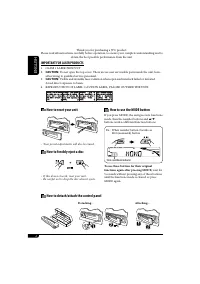
Page 2 - ENGLISH; How to use the MODE button; How to forcibly eject a disc; How to detach/attach the control panel; IMPORTANT FOR LASER PRODUCTS
2 ENGLISH How to use the MODE button If you press MODE, the unit goes into functions mode, then the number buttons and 5 / ∞ buttons work as different function buttons. Ex.: When number button 2 works as MO (monaural) button. To use these buttons for their original functions again after pressing MOD...
Page 3 - How to read this manual; CONTENTS; Remote controller —
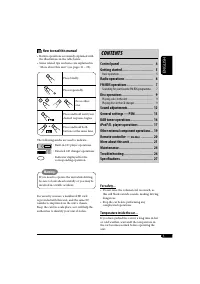
ENGLISH 3 How to read this manual • Button operations are mainly explained with the illustrations in the table below. • Some related tips and notes are explained in “More about this unit” (see pages 21 – 23). Press briefly. Press repeatedly. Press either one. Press and hold until your desired respon...
Page 4 - Control panel; Display window; Parts identification
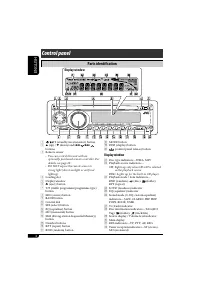
4 ENGLISH 1 (standby/on attenuator) button 2 5 (up) / ∞ (down) and 4 / ¢ buttons 3 Remote sensor • You can control this unit with an optionally purchased remote controller. For details, see page 20. • DO NOT expose the remote sensor to strong light (direct sunlight or artificial lighting). 4 Loading...
Page 5 - To turn off the power; Basic settings; Canceling the display; Getting started; Basic operations; • For DAB tuner; Caution on volume setting:
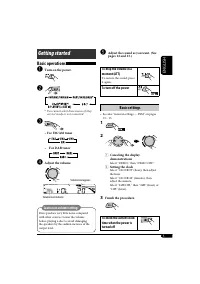
ENGLISH 5 @ Adjust the sound as you want. (See pages 12 and 13.) To drop the volume in a moment (ATT) To restore the sound, press it again. To turn off the power Basic settings • See also “General settings — PSM” on pages 13 – 15. 1 2 1 Canceling the display demonstrations Select “DEMO,” then “DEMO ...
Page 6 - Storing stations in memory; FM station automatic presetting —; Radio operations; Start searching for a station.; To tune in to a station manually
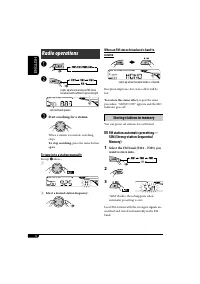
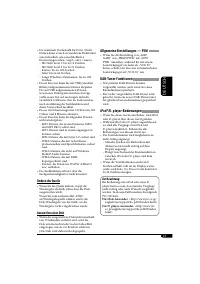
6 ENGLISH When an FM stereo broadcast is hard to receive Reception improves, but stereo effect will be lost. To restore the stereo effect, repeat the same procedure. “MONO OFF” appears and the MO indicator goes off. Storing stations in memory You can preset six stations for each band. FM station aut...
Page 7 - Manual presetting; Listening to a preset station; FM RDS operations; What you can do with RDS; Select one of your favorite preset
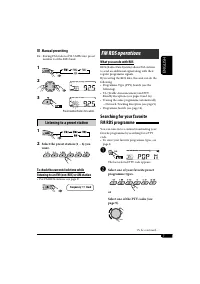
7 ENGLISH Manual presetting Ex.: Storing FM station of 92.5 MHz into preset number 4 of the FM1 band. 1 2 3 Listening to a preset station 1 2 Select the preset station (1 – 6) you want. To check the current clock time while listening to an FM (non-RDS) or AM station • For FM RDS stations, see page 9...
Page 8 - Using the standby receptions; TA Standby Reception; Storing your favorite programme
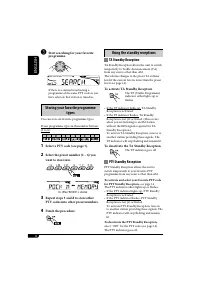
8 ENGLISH Using the standby receptions TA Standby Reception TA Standby Reception allows the unit to switch temporarily to Traffic Announcement (TA) from any source other than AM. The volume changes to the preset TA volume level if the current level is lower than the preset level (see page 14). To ac...
Page 9 - Tracing the same programme—; PTY codes; Disc operations; Playing a disc in the unit
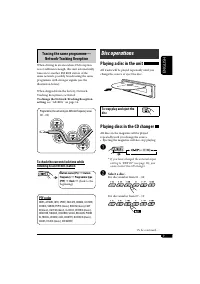
9 ENGLISH Tracing the same programme— Network-Tracking Reception When driving in an area where FM reception is not sufficient enough, this unit automatically tunes in to another FM RDS station of the same network, possibly broadcasting the same programme with stronger signals (see the illustration b...
Page 10 - About MP3 and WMA discs
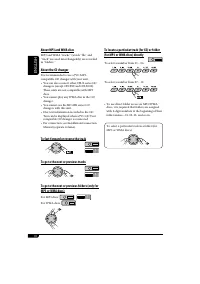
10 ENGLISH About MP3 and WMA discs MP3 and WMA “tracks” (words “file” and “track” are used interchangeably) are recorded in “folders.” About the CD changer It is recommended to use a JVC MP3-compatible CD changer with your unit.• You can also connect other CH-X series CD changers (except CH-X99 and ...
Page 11 - Other main functions; Skipping tracks quickly during play; Changing the display information; While playing an audio CD or a CD Text; • When “TAG DISP” is set to
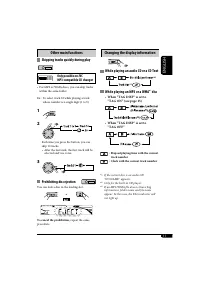
11 ENGLISH Other main functions Skipping tracks quickly during play Only possible on JVC MP3-compatible CD changer • For MP3 or WMA discs, you can skip tracks within the same folder. Ex.: To select track 32 while playing a track whose number is a single digit (1 to 9) 1 2 Each time you press the but...
Page 12 - Selecting the playback modes; Select your desired playback mode.; Sound adjustments; Adjusting the sound
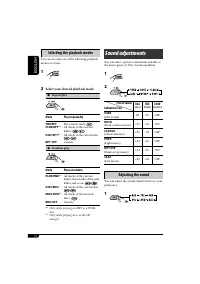
12 ENGLISH Selecting the playback modes You can use only one of the following playback modes at a time. 1 2 Select your desired playback mode. 7 Repeat play Mode Plays repeatedly TRK RPT : The current track. FLDR RPT * 1 : All tracks of the current folder. DISC RPT * 2 : All tracks of the current di...
Page 13 - General settings — PSM
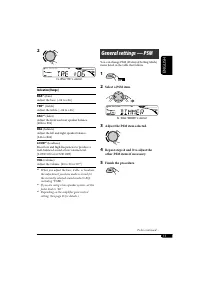
ENGLISH 13 2 Indication [Range] BAS * 1 (bass) Adjust the bass. [–06 to +06] TRE * 1 (treble) Adjust the treble. [–06 to +06] FAD * 2 (fader) Adjust the front and rear speaker balance. [R06 to F06] BAL (balance) Adjust the left and right speaker balance. [L06 to R06] LOUD * 1 (loudness) Boost low an...
Page 14 - Indications
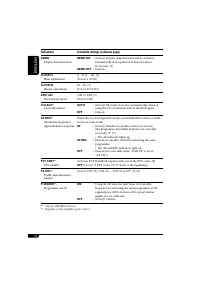
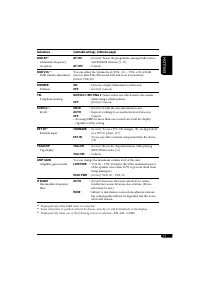
14 ENGLISH Indications Selectable settings, [reference page] DEMO Display demonstration DEMO ON : [Initial]; Display demonstration will be activated automatically if no operation is done for about 20 seconds, [5]. DEMO OFF : Cancels. CLOCK H Hour adjustment 0 – 23 (1 – 12), [5] [Initial: 0 (0:00)] C...
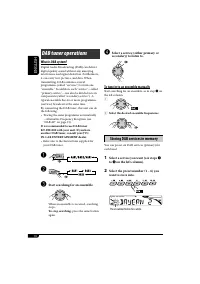
Page 16 - Select a service (either primary or; To tune in to an ensemble manually; Storing DAB services in memory; Select a service you want (see steps; DAB tuner operations; Start searching for an ensemble.
16 ENGLISH ⁄ Select a service (either primary or secondary) to listen to. To tune in to an ensemble manually Start searching for an ensemble, as in step ! on the left column. 1 2 Select the desired ensemble frequencies. Storing DAB services in memory You can preset six DAB services (primary) for eac...
Page 17 - Tuning in to a preset DAB service; Select the preset DAB service
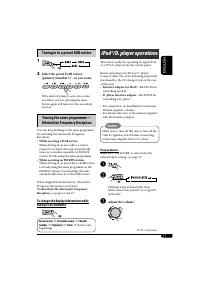
ENGLISH 17 Tuning in to a preset DAB service 1 2 Select the preset DAB service (primary) number (1 – 6) you want. If the selected primary service has some secondary services, pressing the same button again will tune in to the secondary services. Tracing the same programme— Alternative Frequency Rece...
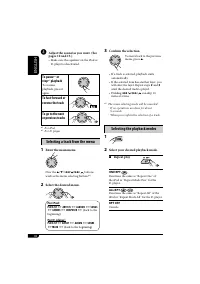
Page 18 - To pause; Selecting a track from the menu; Enter the main menu.
18 ENGLISH ⁄ Adjust the sound as you want. (See pages 12 and 13.) • Make sure the equalizer on the iPod or D. player is deactivated. To pause * 1 or stop * 2 playback To resume playback, press it again. To fast-forward or reverse the track To go to the next or previous tracks * 1 For iPod * 2 For D....
Page 19 - Random play
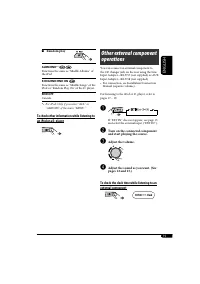
ENGLISH 19 Other external component operations You can connect an external component to the CD changer jack on the rear using the Line Input Adapter—KS-U57 (not supplied) or AUX Input Adapter—KS-U58 (not supplied).• For connection, see Installation/Connection Manual (separate volume). For listening ...
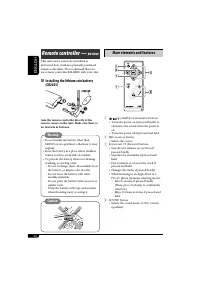
Page 20 - Main elements and features; Installing the lithium coin battery
20 ENGLISH Main elements and features 1 (standby/on attenuator) button • Turns the power on if pressed briefly or attenuates the sound when the power is on. • Turns the power off if pressed and held. 2 SRC (source) button • Selects the source. 3 R (reverse) / F (forward) buttons • Searches for stati...
Page 21 - More about this unit; Turning on the power; Tuner operations
ENGLISH 21 More about this unit Basic operations Turning on the power • By pressing SRC button on the unit, you can also turn on the power. If the source is ready, playback also starts. Turning off the power • If you turn off the power while listening to a disc, disc play will start from where playb...
Page 22 - Playing an MP3/WMA disc; Caution for DualDisc playback
22 ENGLISH • This unit can play back multi-session discs; however, unclosed sessions will be skipped while playing. • Some CD-Rs or CD-RWs may not play back on this unit because of their disc characteristics, or for the following reasons:– Discs are dirty or scratched.– Moisture condensation occurs ...
Page 23 - Changing the source; General settings—PSM
ENGLISH 23 • The maximum number of characters for file/ folder names vary among the disc format used (includes 4 extension characters—<.mp3> or <.wma>).– ISO 9660 Level 1: up to 12 characters– ISO 9660 Level 2: up to 31 characters– Romeo: up to 128 characters– Joliet: up to 64 characters...
Page 24 - Troubleshooting; How to clean the connectors; To keep discs clean; Symptoms
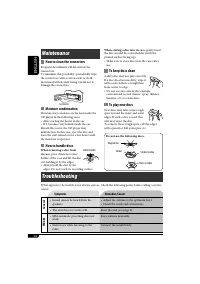
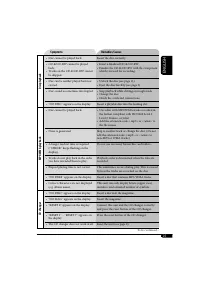
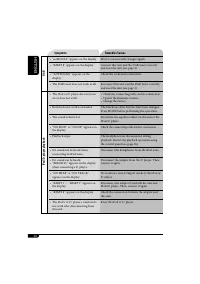
24 ENGLISH Troubleshooting What appears to be trouble is not always serious. Check the following points before calling a service center. Maintenance How to clean the connectors Frequent detachment will deteriorate the connectors.To minimize this possibility, periodically wipe the connectors with a c...
Page 27 - Specifications; AUDIO AMPLIFIER SECTION
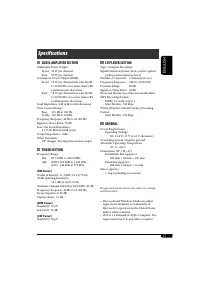
ENGLISH 27 Specifications AUDIO AMPLIFIER SECTION Maximum Power Output: Front: 50 W per channel Rear: 50 W per channel Continuous Power Output (RMS): Front: 19 W per channel into 4 Ω , 40 Hz to 20 000 Hz at no more than 0.8% total harmonic distortion. Rear: 19 W per channel into 4 Ω , 40 Hz to 20 00...
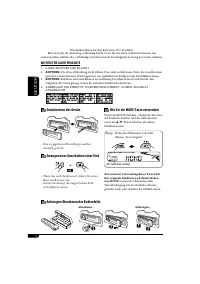
Page 28 - DEUTSCH; Wie Sie die MODE-Taste verwenden; Anbringen/Abnehmen des Bedienfelds; Zwangsweises Ausschieben einer Disk; WICHTIG FÜR LASER-PRODUKTE
2 DEUTSCH Wie Sie die MODE-Taste verwenden Wenn Sie MODE drücken, schaltet der Receiver auf Funktion-Modus, und die Zifferntasten sowie die 5 / ∞ -Tasten arbeiten als andere Funktionstasten. Beisp.: Wenn die Zifferntaste 2 als MO (Mono)-Taste fungiert. Zur erneuten Verwendung dieser Tasten für ihre ...
Page 29 - Wie Sie diese Anleitung lesen; INHALT; Fernbedienung —
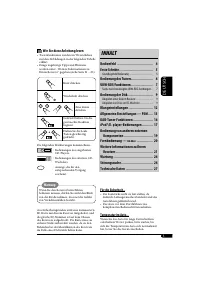
DEUTSCH 3 Wie Sie diese Anleitung lesen • Tastenfunktionen werden im Wesentlichen mit den Abbildungen in der folgenden Tabelle erklärt. • Einige zugehörige Tipps und Hinweise werden unter „Weitere Informationen zu Ihrem Receiver“ gegeben (siehe Seite 21 – 23). Kurz drücken. Wiederholt drücken. Eine ...
Page 30 - Bedienfeld; Displayfenster; Beschreibung der Teile
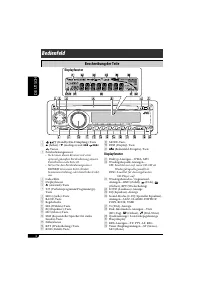
4 DEUTSCH 1 (Standby/Ein-Dämpfung)-Taste 2 5 (höher) / ∞ (niedriger) und 4 / ¢ -Tasten 3 Fernbedienungssensor • Sie können diesen Receiver mit einer optional gekauften Fernbedienung steuern. Einzelheiten siehe Seite 20. • Setzen Sie den Fernbedienungssensor KEINEM intensiven Licht (direkte Sonnenein...
Page 31 - Grundlegende Einstellungen; Erste Schritte; Grundlegende Bedienung
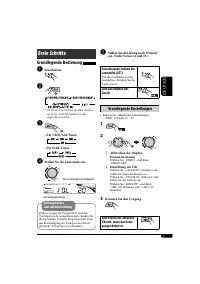
DEUTSCH 5 @ Stellen Sie den Klang nach Wunsch ein. (Siehe Seiten 12 und 13). Zum abrupten Senken der Lautstärke (ATT) Um die Lautstärke wieder anzuheben, drücken Sie die Taste erneut. Zum Ausschalten des Geräts Grundlegende Einstellungen • Siehe auch „Allgemeine Einstellungen — PSM“ auf Seite 13 – 1...
Page 32 - Speichern von Sendern; Automatische Voreinstellung von; Wählen Sie den UKW-; Bedienung des Tuners; Starten Sie den Sendersuchlauf.; So stellen Sie manuell Sender ein
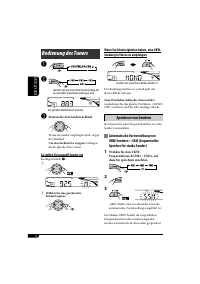
6 DEUTSCH Wenn Sie Schwierigkeiten haben, eine UKW-Sendung in Stereo zu empfangen Der Empfang wird besser, jedoch geht der Stereo-Effekt verloren. Zum Wiederherstellen des Stereoeffekts wiederholen Sie das gleiche Verfahren. „MONO OFF“ erscheint, und die MO-Anzeige erlischt. Speichern von Sendern Si...
Page 33 - Manuelle Voreinstellung; Hören eines Festsenders; Wählen Sie den gewünschten; Funktionen von RDS; Wählen Sie einen ihrer bevorzugten
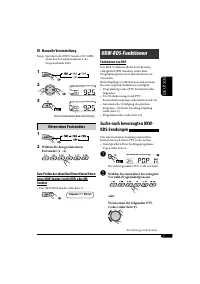
DEUTSCH 7 Manuelle Voreinstellung Beisp.: Speichern des UKW-Senders 92,5 MHz unter der Festsendernummer 4 des Frequenzbands FM1. 1 2 3 Hören eines Festsenders 1 2 Wählen Sie den gewünschten Festsender (1 – 6). Zum Prüfen der aktuellen Uhrzeit beim Hören eines UKW-Senders (nicht RDS) oder AM-Senders ...
Page 34 - Verwenden des Standbyempfangs; Speichern Ihrer bevorzugten
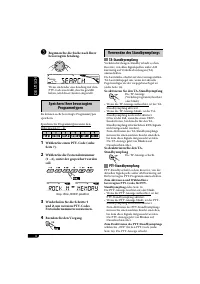
8 DEUTSCH Verwenden des Standbyempfangs TA-Standbyempfang Verkehrsdurchsagen-Standby erlaubt es dem Receiver, von allen Signalquellen außer AM kurzzeitig auf Verkehrsdurchsagen (TA) umzuschalten.Die Lautstärke schaltet auf den voreingestellten TA-Lautstärkepegel um, wenn der aktuelle Pegel niedriger...
Page 35 - Verfolgen des gleichen Programms; Bedienung der Disk; Abspielen einer Disk im Receiver; Wählen Sie eine Disk.
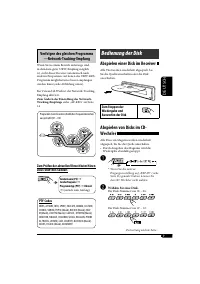
DEUTSCH 9 Verfolgen des gleichen Programms —Network-Tracking-Empfang Wenn Sie in einem Bereich unterwegs sind, in dem kein guter UKW-Empfang möglich ist, sucht dieser Receiver automatisch nach anderen Frequenzen, auf denen das UKW-RDS-Programm möglicherweise besser empfangen werden kann (siehe Abbil...
Page 36 - So spulen Sie Titel vor oder zurück
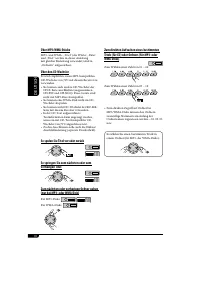
10 DEUTSCH Über MP3/WMA-Stücke MP3- und WMA- „Titel“ (die Wörter „Datei“ und „Titel“ werden in dieser Anleitung mit gleicher Bedeutung verwendet) sind in „Ordnern“ aufgezeichnet. Über den CD-Wechsler Es wird empfohlen, einen MP3-kompatiblen CD-Wechsler von JVC mit diesem Receiver zu verwenden.• Sie ...
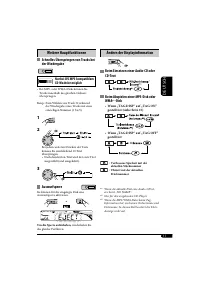
Page 37 - Weitere Hauptfunktionen; Nur bei JVC MP3-kompatiblem; Ändern der Displayinformation; • Wenn „TAG DISP“ auf „TAG ON“
DEUTSCH 11 Weitere Hauptfunktionen Schnelles Überspringen von Tracks bei der Wiedergabe Nur bei JVC MP3-kompatiblem CD-Wechsler möglich • Bei MP3- oder WMA-Disks können Sie Tracks innerhalb des gleichen Ordners überspringen. Beisp.: Zum Wählen von Track 32 während der Wiedergabe eines Tracks mit ein...
Page 38 - Auswählen von Wiedergabemodi; Wählen Sie Ihren gewünschten; Klangeinstellungen; Einstellen des Klangs
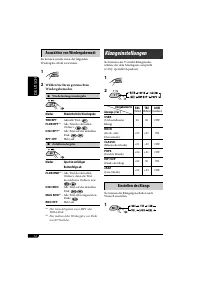
12 DEUTSCH Auswählen von Wiedergabemodi Sie können jeweils einen der folgenden Wiedergabe-Modi verwenden. 1 2 Wählen Sie Ihren gewünschten Wiedergabemodus. 7 Wiederholungswiedergabe Modus Wiederholt die Wiedergabe TRK RPT : Aktuelle Titel. FLDR RPT * 1 : Alle Titel des aktuellen Ordners. DISC RPT * ...
Page 39 - Stellen Sie den gewählten PSM-
DEUTSCH 13 2 Anzeige [Bereich] BAS * 1 (Tiefen) Stellen Sie die Tiefen ein. [von –06 bis +06] TRE * 1 (Höhen) Stellen Sie die Höhen ein. [von –06 bis +06] FAD * 2 (Fader) Stellen Sie die Balance zwischen vorderen und hinteren Lautsprechern ein. [von R06 bis F06] BAL (Balance) Stellen Sie die Balance...
Page 40 - Anzeigen
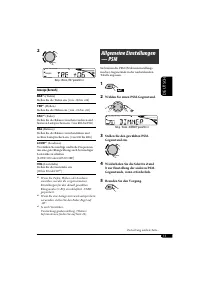
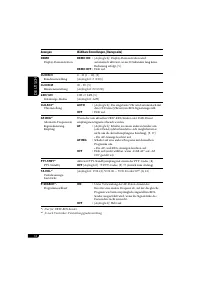
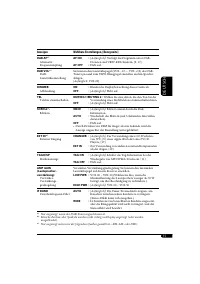
14 DEUTSCH Anzeigen Wählbare Einstellungen, [Bezugsseite] DEMO Display-Demonstration DEMO ON : [Anfänglich]; Display-Demonstration wird automatisch aktiviert, wenn 20 Sekunden lang keine Bedienung erfolgt, [5]. DEMO OFF : Hebt auf. CLOCK H Stundeneinstellung 0 – 23 (1 – 12), [5] [Anfänglich: 0 (0:00...
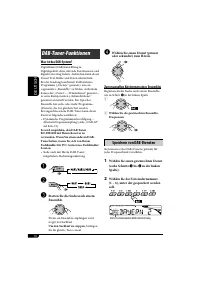
Page 42 - Zum manuellen Abstimmen eines Ensembles; Speichern von DAB-Diensten
16 DEUTSCH ⁄ Wählen Sie einen Dienst (primär oder sekundär) zum Hören. Zum manuellen Abstimmen eines Ensembles Beginnen Sie die Suche nach einem Ensemble, wie in Schritt ! in der linken Spalte. 1 2 Wählen Sie die gewünschten Ensemble-Frequenzen . Speichern von DAB-Diensten Sie können sechs DAB-Diens...
Page 43 - Empfang eines voreingestellten; Wählen Sie die gewünschte DAB-; Dynamische Programmverfolgung; Stellen Sie die Lautstärke ein.
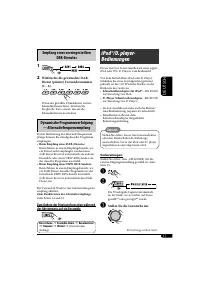
DEUTSCH 17 Empfang eines voreingestellten DAB-Dienstes 1 2 Wählen Sie die gewünschte DAB- Dienst (primär) Festsendernummer (1 – 6). Wenn der gewählte Primärdienst weitere Sekundärdienste bietet, drücken Sie die gleiche Taste erneut, um auf die Sekundärdienste zu schalten. Dynamische Programmverfolgu...
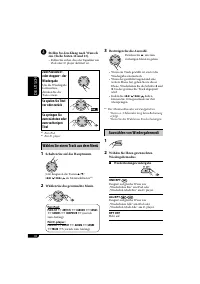
Page 44 - Zum Pausieren; Wählen Sie einen Track aus dem Menü
18 DEUTSCH ⁄ Stellen Sie den Klang nach Wunsch ein. (Siehe Seiten 12 und 13). • Stellen Sie sicher, dass der Equalizer am iPod oder D. player aktiviert ist. Zum Pausieren * 1 oder stoppen * 2 der Wiedergabe Um die Wiedergabe fortzusetzen, drücken Sie die Taste erneut. So spulen Sie Titel vor oder zu...
Page 45 - Zufallswiedergabe
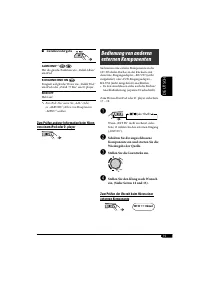
DEUTSCH 19 Bedienung von anderen externen Komponenten Sie können eine externe Komponente an die CD-Wechsler-Buchse an der Rückseite mit dem Line-Eingangsadapter—KS-U57 (nicht mitgeliefert) oder AUX-Eingangsadapter—KS-U58 (nicht mitgeliefert) anschließen.• Zu den Anschlüssen siehe auch die Einbau/ An...
Page 46 - Hauptelemente und Merkmale; Einsetzen der Lithiumknopfbatterie
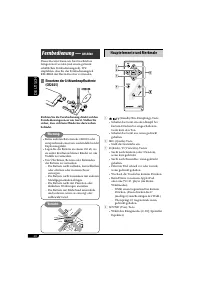
20 DEUTSCH Hauptelemente und Merkmale 1 (Standby/Ein-Dämpfung)-Taste • Schaltet das Gerät ein oder dämpft bei kurzem Drücken bei eingeschaltetem Gerät kurz den Ton. • Schaltet das Gerät aus, wenn gedrückt gehalten. 2 SRC (Quelle)-Taste • Stellt die Lautstärke ein. 3 R (Rück) / F (Vorwärts)-Tasten • ...
Page 47 - Einschalten
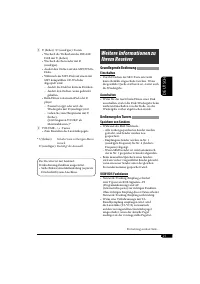
DEUTSCH 21 Weitere Informationen zu Ihrem Receiver Grundlegende Bedienung Einschalten • Durch Drücken der SRC-Taste am Gerät kann ebenfalls eingeschaltet werden. Wenn die gewählte Quelle startbereit ist, startet auch die Wiedergabe. Ausschalten • Wenn Sie das Gerät beim Hören einer Disk ausschalten,...
Page 48 - Achtung bei DualDisc-Wiedergabe
22 DEUTSCH • Dieser Receiver kann Multi-Session-Disks abspielen; nicht abgeschlossene Sessions werden aber bei der Wiedergabe übersprungen. • Manche CD-Rs oder CD-RWs können sich auf diesem Gerät aufgrund ihrer Disk-Eigenschaften oder aus den folgenden Gründen nicht abspielen lassen:– Disks sind sch...
Page 49 - Ändern der Quelle; Allgemeine Einstellungen — PSM
DEUTSCH 23 • Die maximale Zeichenzahl für Datei-/Order- Namen kann je nach verwendetem Diskformat unterschiedlich sein (einschließlich 4 Erweiterungszeichen <.mp3> oder <.wma>).– ISO 9660 Level 1: bis zu 12 Zeichen– ISO 9660 Level 2: bis zu 31 Zeichen– Romeo: bis zu 128 Zeichen– Joliet: ...
Page 50 - Wartung; Reinigen der Anschlüsse; Symptome; Störungssuche
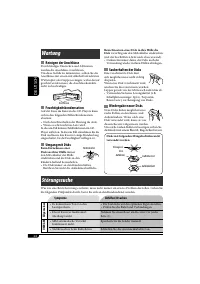
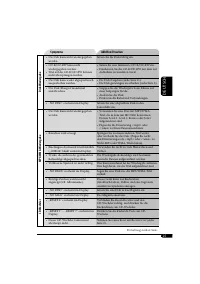
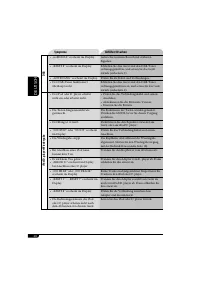
24 DEUTSCH Wartung Reinigen der Anschlüsse Durch häufiges Einstecken und Abtrennen werden die Anschlüsse verschlissen.Um diese Gefahr zu minimieren, sollten Sie die Anschlüsse mit einem mit Alkohol befeuchteten Wattetupfer oder Lappen reinigen, wobei darauf geachtet werden muss, die Anschlusskontakt...
Page 53 - Technische Daten; AUDIO-VERSTÄRKERSEKTION
DEUTSCH 27 Technische Daten AUDIO-VERSTÄRKERSEKTION Max. Ausgangsleistung: Vorne: 50 W pro Kanal Hinten: 50 W pro Kanal Sinus-Ausgangsleistung (eff.): Vorne: 19 W pro Kanal an 4 Ω , 40 Hz bis 20 000 Hz bei nicht mehr als 0,8% Klirrfaktor. Hinten: 19 W pro Kanal an 4 Ω , 40 Hz bis 20 000 Hz bei nicht...
Page 54 - РУCCKИЙ; Как пользоваться кнопкой MODE; Принудительное извлечение диска; Отсоединение и подключение панели управления; ВАЖНО ДЛЯ ЛАЗЕРНОЙ АППАРАТУРЫ
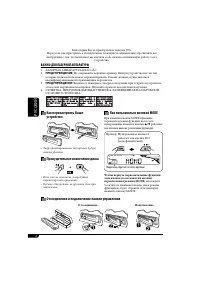
2 РУCCKИЙ Как пользоваться кнопкой MODE При нажатии кнопки MODE приемник переходит в режим функций, после чего нумерованные кнопки и кнопки 5 / ∞ работают как кнопки вызова различных функций. Пример: Нумерованная кнопка 2 работает как кнопка МО (монофонический). Чтобы вернуть первоначальные функции ...
Page 55 - Как пользоваться данным; CОДЕРЖАНИЕ; Пульт дистанционного управления
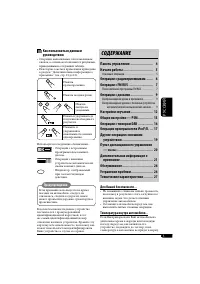
РУCCKИЙ 3 Как пользоваться данным руководством • Операции, выполняемые с использованием кнопок, в основном обозначаются рисунками, приведенными в следующей таблице. • Некоторые советы и примечания приведены в разделе “Дополнительная информация о приемнике” (см. стр. 21 до 23). Нажать кратковременно....
Page 56 - Панель управления; Окно дисплея; Расположение кнопок
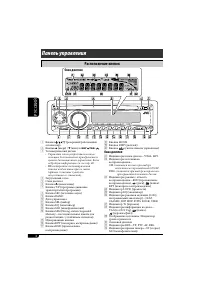
4 РУCCKИЙ 1 Кнопка (резервный/работающий аттенюатор) 2 Кнопки 5 (вверх) / ∞ (вниз) и 4 / ¢ 3 Телеметрический датчик • Управлять этим устройством можно с помощью дополнительно приобретенного пульта дистанционного управления. Более подробную информацию см. на стр. 20. • НЕ подвергайте телеметрический ...
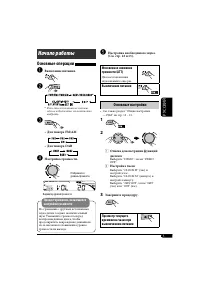
Page 57 - Выключение питания; Основные настройки; Начало работы; Основные операции
РУCCKИЙ 5 @ Настройка необходимого звука. (Cм. стр. 12 и 13). Мгновенное снижение громкости (ATT) Для восстановления звука нажмите еще раз. Выключение питания Основные настройки • См. также раздел “Общие настройки — PSM” на стр. 13 – 15. 1 2 1 Отмена демонстрации функций дисплея Выберите “DEMO”, зат...
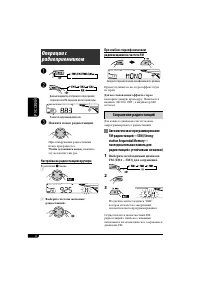
Page 58 - Сохранение радиостанций; Автоматическое программирование; Выберите необходимый диапазон; Настройка на радиостанцию вручную
6 РУCCKИЙ При слабом стереофоническом радиовещании на частоте FM Прием улучшается, но стереоэффект будет потерян. Для восстановления эффекта стерео повторите данную процедуру. Появляется надпись “MONO OFF”, а индикатор MO исчезает. Сохранение радиостанций Для каждого диапазона частот можно запрограм...
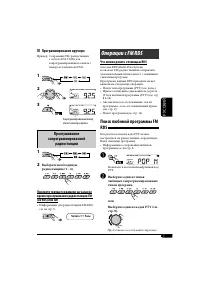
Page 59 - Программирование вручную; Прослушивание; Выберите необходимую; Операции с FM RDS; Что можно делать с помощью RDS; Выберите один из типов
РУCCKИЙ 7 Программирование вручную Пример: Сохранение FM-радиостанции с частотой 92,5 МГц для запрограммированного канала с номером 4 диапазона FM1. 1 2 3 Прослушивание запрограммированной радиостанции 1 2 Выберите необходимую радиостанцию (1 – 6). Просмотр текущего времени на часах во время прослуш...
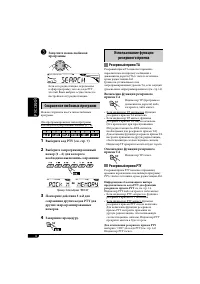
Page 60 - Использование функции; Резервный прием TA; Запустите поиск любимой; Сохранение любимых программ; Выберите запрограммированный
8 РУCCKИЙ Использование функции резервного приема Резервный прием TA Резервный прием TA позволяет временно переключаться на передачу сообщений о движении на дорогах (TA) с любого источника, кроме радиостанции AM.Громкость устанавливается на запрограммированный уровень TA, если текущий уровень ниже з...
Page 61 - Отслеживание той же программы; Коды PTY; Операции с дисками
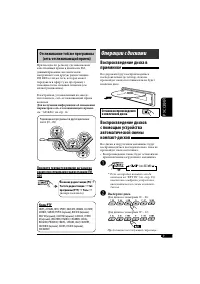
РУCCKИЙ 9 Отслеживание той же программы (сеть-отслеживающий прием) При поездке по региону, где невозможен качественный прием в диапазоне FM, данный приемник автоматически настраивается на другую радиостанцию FM RDS в той же сети, которая может передавать в эфир ту же программу с помощью более сильны...
Page 62 - О дисках MP3 и WMA
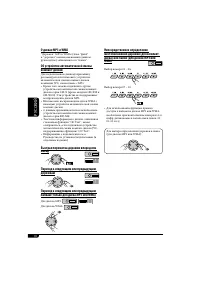
10 РУCCKИЙ О дисках MP3 и WMA “Дорожки” MP3 и WMA (слова “файл” и “дорожка” взаимозаменяемы в данном руководстве) записываются в “папки”. Об устройстве автоматической смены компакт-дисков Для подключения к данному приемнику рекомендуется использовать устройство автоматической смены компакт-дисков ко...
Page 63 - Другие основные функции; Изменение информации на дисплее; • Если для параметра “TAG DISP”
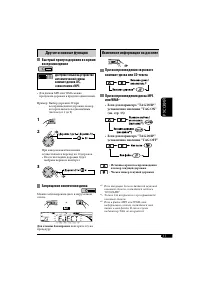
РУCCKИЙ 11 Другие основные функции Быстрый пропуск дорожек во время воспроизведения Доступно только на устройстве автоматической-смены компакт-дисков JVC, совместимом с MP3 • Для дисков MP3 или WMA можно пропускать дорожки в пределах одной папки. Пример: Выбор дорожки 32 при воспроизведении дорожки,...
Page 64 - Выбор режимов воспроизведения; Выберите необходимый режим; Настройки звучания; Настройка звучания; Запрограммированные
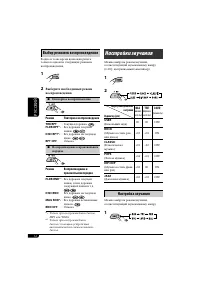
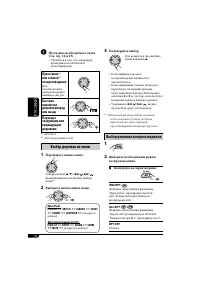
12 РУCCKИЙ Выбор режимов воспроизведения В одно и то же время возможна работа только в одном из следующих режимов воспроизведения. 1 2 Выберите необходимый режим воспроизведения. 7 Повторное воспроизведение Режим Повторное воспроизведение TRK RPT : Текущая дорожка. FLDR RPT * 1 : Все дорожки текущей...
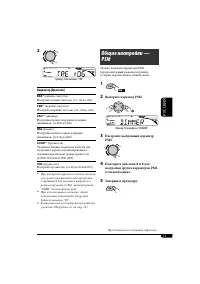
Page 65 - Выберите параметр PSM.
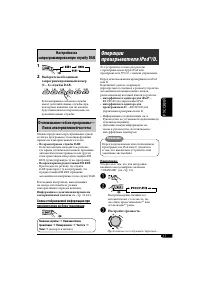
РУCCKИЙ 13 2 Индикатор [Диапазон] BAS * 1 (низкие частоты) Настройте низкие частоты. [от –06 до +06] TRE * 1 (верхние частоты) Настройте верхние частоты. [от –06 до +06] FAD * 2 (микшер) Настройка баланса передних и задних динамиков. [от R06 до F06] BAL (баланс) Настройка баланса левых и правых дина...
Page 66 - Индикация
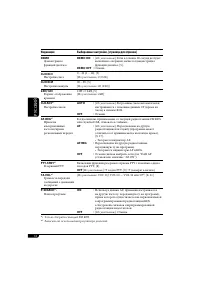
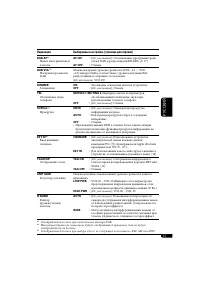
14 РУCCKИЙ Индикация Выбираемые настройки, [страница для справки] DEMO Демонстрация функций дисплея DEMO ON : [По умолчанию]; Если в течение 20 секунд не будет выполнено операций, начнется демонстрация функций дисплея, [5]. DEMO OFF : Отмена. CLOCK H Настройка часа 0 – 23 (1 – 12), [5] [По умолчанию...
Page 68 - Выберите службу (основную; Настройка на блок трансляции вручную; Сохранение служб DAB в памяти; действия; Что такое система “DAB”?; Запустите поиск блока
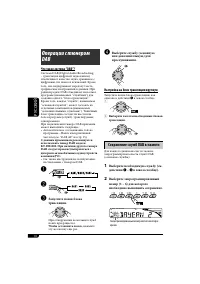
16 РУCCKИЙ ⁄ Выберите службу (основную или дополнительную) для прослушивания. Настройка на блок трансляции вручную Запустите поиск блока трансляции, как описано в действии ! в левом столбце. 1 2 Выберите частоты необходимых блоков трансляции. Сохранение служб DAB в памяти Для каждого диапазона часто...
Page 69 - Настройка на; Выберите необходимый; Отслеживание той же программы—; Настройте громкость.
РУCCKИЙ 17 Настройка на запрограммированную службу DAB 1 2 Выберите необходимый запрограммированный номер (1 – 6) службы DAB. Если выбранная основная службы имеет дополнительные службы, при повторном нажатии той же кнопки будет выполняться переключение на дополнительные службы. Отслеживание той же п...
Page 70 - Настройка необходимого звука.; Приостанов; Выбор дорожки из меню; Перейдите главное меню.
18 РУCCKИЙ ⁄ Настройка необходимого звука. (Cм. стр. 12 и 13). • Убедитесь в том, что эквалайзер проигрывателя iPod или D. дезактивирован. Приостанов * 1 или останов * 2 воспроизведения Для возобновления воспроизведения нажмите еще раз. Быстрая перемотка дорожки вперед или назад Переход к следующим ...
Page 71 - Воспроизведение в
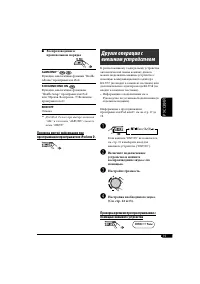
РУCCKИЙ 19 Другие операции с внешним устройством К расположенному сзади разъему устройства автоматической смены компакт-дисков можно подключить внешнее устройство с помощью коммуникационного адаптера KS-U57 (не входит в комплект поставки) или дополнительного адаптера входа KS-U58 (не входит в компле...
Page 72 - Основные элементы и функции; Установка литиевой батареи-
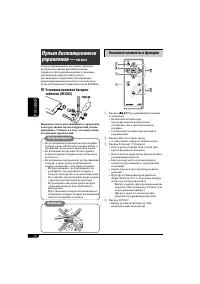
20 РУCCKИЙ Основные элементы и функции 1 Кнопка (резервный/работающий аттенюатор) • Включение питания при кратковременном нажатии или ослабление звука при включенном питании. • Отключение питания при нажатии и удерживании. 2 Кнопка SRC (источник звука) • Осуществляет выбор источника звука. 3 Кнопки ...
Page 73 - Включение питания; Операции с тюнером
РУCCKИЙ 21 Дополнительная информация о приемнике Основные операции Включение питания • Для включения питания приемника также можно использовать кнопку SRC. Если источник готов, воспроизведение также начинается. Выключение питания • Если питание отключается во время прослушивания диска, при последующ...
Page 74 - Воспроизведение диска MP3/WMA; Общие сведения
22 РУCCKИЙ • На данном приемнике возможно воспроизведение дисков с несколькими сеансами записи; однако, незавершенные сеансы будут пропускаться при воспроизведении. • Некоторые компакт-диски однократной или многократной записи не воспроизводятся на данном приемнике в связи с их особенностями, а такж...
Page 75 - Смена источника звука; Общие настройки — PSM
РУCCKИЙ 23 • Максимальное количество символов для названий файлов или папок зависит от используемого формата диска (включая 4 символа расширения <.mp3> или <.wma>).– ISO 9660 Level 1: до 12 символов– ISO 9660 Level 2: до 31 символов– Romeo: до 128 символов– Joliet: до 64 символов– Длинно...
Page 76 - Устранение проблем; Очистка разъемов; Хранение дисков в чистом виде; Симптомы
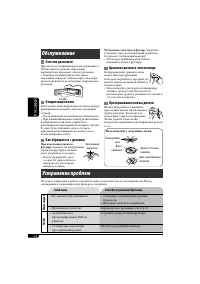
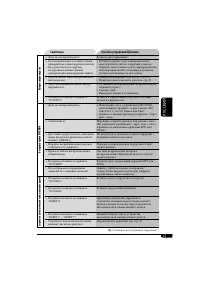
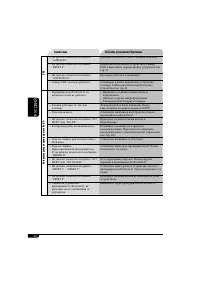
24 РУCCKИЙ Устранение проблем Не всякое нарушение в работе устройства является результатом его неисправности. Перед обращением в сервисный центр проверьте следующее. Обслуживание Очистка разъемов При частом отсоединении разъемы загрязняются.Чтобы снизить уровень загрязнения, периодически проводите о...
Page 79 - Технические характеристики; БЛОК УСИЛИТЕЛЕЙ ЗВУКА
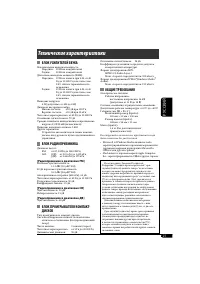
РУCCKИЙ 27 Технические характеристики БЛОК УСИЛИТЕЛЕЙ ЗВУКА Максимальная выходная мощность: Передние: 50 Вт на каждый канал Задние: 50 Вт на каждый канал Длительная выходная мощность (RMS): Передние: 19 Вт на канал в при 4 Ω , от 40 Гц до 20 000 Гц и не более чем 0,8% общего гармонического искажения...
Page 80 - Having TROUBLE with operation?; Please reset your unit; Refer to page of How to reset your unit; Haben Sie PROBLEME mit dem Betrieb?; Bitte setzen Sie Ihr Gerät zurück; Siehe Seite Zurücksetzen des Geräts; Затруднения при эксплуатации?; Пожалуйста, перезагрузите Ваше устройство; Для получения информации о перезагрузке Вашего устройства
EN, GE, RU 1105DTSMDTJEIN Having TROUBLE with operation? Please reset your unit Refer to page of How to reset your unit Haben Sie PROBLEME mit dem Betrieb? Bitte setzen Sie Ihr Gerät zurück Siehe Seite Zurücksetzen des Geräts Затруднения при эксплуатации? Пожалуйста, перезагрузите Ваше устройство Дл...