Page 2 - Amazon Echo and Google Home device to control the unit.; Note; downloaded here anytime:; SEARCH “HONEYWELL AIR COMFORT”
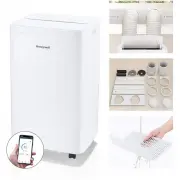
EN For Model HW4CEDVWW0 Smart Portable Air Conditioner with Wi-Fi Connectivity The Smart Portable Air Conditioner has added features to allow you to operate the Air Conditioner remotely using a smart device and to use voice commands through an Amazon Echo and Google Home device to control the unit. ...
Page 3 - IMPORTANT SAFETY INSTRUCTIONS. READ CAREFULLY AND
EN • •••••••• ••• •• • DO NOT operate the unit with a damaged plug or loose wall outlet. If the supply cord is damaged, it must be replaced by the manufacturer, its service agent, or similarly qualified persons in order to avoid a hazard.DO NOT cover the air intake and exhaust when in use.DO NOT pla...
Page 6 - WARNING
EN EN SYMBOL NOTE EXPLANATION WARNING This symbol shows that this appliance uses a flammable refrigerant. If the refrigerant is leaked and exposed to an external ignition source, there is a risk of fire. CAUTION This symbol shows that the operation manual should be read carefully. CAUTION This symbo...
Page 9 - THANK YOU
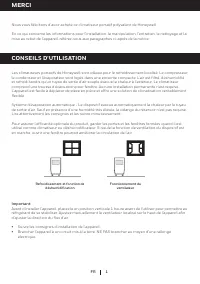
1 EN Cooling and Dehumidifying Operation Fan Operation THANK YOU USER TIPS Congratulations on your purchase of this Honeywell Portable Air Conditioner. Regarding the information pertaining to the installation, handling, servicing, cleaning, and disposal of the appliance, please refer to the below se...
Page 10 - PARTS DESCRIPTION; 0) Lower Drain Plug with Plastic Cap
2 PARTS DESCRIPTION EN 2 3 1 4 5 6 7 8 1) Air Outlet 7) Remote Control 2) Control Panel (Includes signal receptor) 8) Power Supply Cord 3) Handle 9) Air Inlet 4) Casters 10) Lower Drain Plug with Plastic Cap (Air Conditioning Mode) 5) Upper Grill and Dust Filter 6) Air Exhaust Outlet 9 10
Page 11 - INSTALLATION; Window Bracket Kit
3 EN INSTALLATION It is important that the installation instructions below are followed for successful installation of thisPortable Air Conditioner. Please call Customer Support if you have any difficulties or questions regarding these installation procedures. Installation Kit: 1. Window Bracket Kit...
Page 13 - and follow the instructions below.
5 EN INSTALLATION (CONTINUED) Adjust the length of the window bracket in accordance with the height or width of the window frame.When the length is set, tighten the Adjustable Knobs (preinstalled on the window bracket) to ensure the window bracket is secured in the desired position. Use one or all t...
Page 16 - THE MINIMUM AIR SPACE
8 IMPORTANT: Do not change or lengthen the Exhaust Hose as this could cause the unit to malfunction. NOT RECOMMENDED RECOMMENDED 31.5" (80 cm) MA X. 14" (36 cm) MA X. 40" (102 cm) The supplied Exhaust Hoses have a diameter of 5.9" (15 cm) and can be extended from 12" to 47" (...
Page 17 - The Power Control turns the unit on and off; POWER CONTROL; Press the; FUNCTION BUTTONS
9 USE & OPERATION CONTROL PANEL EN (3) (4) (5) (6) (1) (7) (2) (8) ^THIS IS ONLY FOR MODEL HW4CEDVWW0 NOTE: For detailed instructions to set up your Portable Air Conditioner for connected operation from your smartphone or tablet, a separate user manual can be downloaded at: http://honeywellairco...
Page 20 - REMOTE CONTROL
12 EN USE & OPERATION (CONTINUED) REMOTE CONTROL AUTO/LOW/MED/HIGH Power Control ON/OFF Fan Speed Control Timer Control In running mode: Auto switch offIn stand-by mode: Auto switch onPress - or + button to adjust the time setting for 1 hour intervals. Temperature/Timer Set Used for adjusting th...
Page 21 - CLEANING & MAINTENANCE; Appliance Maintenance:; If the appliance will not be used for a long time, follow these steps:; Dust Filter Maintenance:
13 CLEANING & MAINTENANCE Appliance Maintenance: Turn off the appliance before disconnecting the power supply.Only clean the appliance with a soft dry cloth. 1.2. End of Season Storage & Maintenance: If the appliance will not be used for a long time, follow these steps: Be sure to drain the ...
Page 22 - WATER CONDENSATE DRAINAGE; Manual Draining in Cooling, Dehumidifying Modes; Water may need to be drained in high-humidity areas.
14 EN WATER CONDENSATE DRAINAGE Plastic Cap and Lower Drain Plug^ Shallow Pan (Not included) Wooden Board Height: up to 1" Large Pan (Not included) Plastic Cap and Lower Drain Plug ^External Dia.: 17 mm Unplug the unit from power source.Place a shallow pan under the lower rubber drain plug.See d...
Page 23 - Continuous Draining in Dehumidifier Mode
15 WATER CONDENSATE DRAINAGE (CONTINUED) Drain Tube (Not included) Drain Plug # # External Dia.: 17 mm EN Unplug the unit from power source.Remove the lower rubber drain plug.Some residual water may spill so please have a pan tocollect the water. Connect the drain connector to a 3/4" hose or sta...
Page 24 - TROUBLESHOOTING GUIDE; PROBLEM; Change remote control batteries.
16 TROUBLESHOOTING GUIDE EN PROBLEM POSSIBLE CAUSE SOLUTION The air conditioningunit does not start No electricity. Check for power. Batteries in the remote control need to be replaced. Change remote control batteries. The power cord is not properly plugged in. Remove and reconnect the power cord. T...
Page 26 - Temperature sensor open circuit/short circuit.; ERROR CODE GUIDE
18 EN EN TROUBLESHOOTING GUIDE (CONTINUED) ERROR CODE ERROR POSSIBLE CAUSE "E1" Temperature sensor open circuit/short circuit. "E2" (for cooling and heating model) Copper tube sensor open circuit/short circuit. "Lo" Temperature is below 32°F (-9°C). “Hi” Temperature is over 9...
Page 27 - WiFi; Echo et Google Home pour contrôler l’unité.; Un réseau Wi-Fi de 2,4 GHz est requis pour une conn; iOS 9.0 ou une version ultérieure
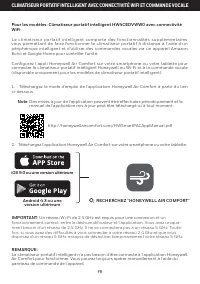
FR Pour les modèles: Climatiseur portatif intelligent HW4CEDVWW0 avec connectivité WiFi . Le climatiseur por tatif intelligent compor te des fonctionnalités supplémentaires vous permettant de faire fonctionner le climatiseur portatif à distance à l’aide d’un périphérique intelligent et d’utiliser de...
Page 28 - IMPORTANTES INSTRUCTIONS DE SÉCURITÉ. LIRE
FR SÉCURITÉ • •• • •• ••• • •• LISEZ ET CONSERVEZ CES INSTRUCTIONS IMPORTANTES INSTRUCTIONS DE SÉCURITÉ. LIRE ATTENTIVEMENT ET CONSERVER POUR S'Y RÉFÉRER ULTÉRIEUREMENT. EN CAS D'INCOHÉRENCE OU DE CONFLIT ENTRE LA VERSION ANGLAISE ET TOUTE AUTRE VERSION LINGUISTIQUE DU CONTENU DE CE DOCUMENT, LA VER...
Page 32 - SYMBOLE; REMARQUE; EXPLICATION; ATTENTION
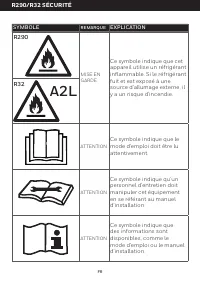
FR SYMBOLE REMARQUE EXPLICATION MISE EN GARDE Ce symbole indique que cet appareil utilise un réfrigérant inflammable. Si le réfrigérant fuit et est exposé à une source d'allumage externe, il y a un risque d'incendie. ATTENTION Ce symbole indique que le mode d'emploi doit être lu attentivement. ATTEN...
Page 33 - La quantité maximale de charge de réfrigérant n'est pas; Avertissements supplémentaires pour les appareils avec gaz
FR R290/R32 SÉCURITÉ Lisez attentivement les instructions avant d'utiliser l'appareil.Le gaz réfr igérant R290/R32 est conforme aux UL60335-2-40 / UL60335-1.Cet appareil contient un certain nombre de grammes (voirl'étiquette signalétique à l'arrière de l'appareil) de gaz réfrigérant R290/R32. La qua...
Page 34 - Conformité aux règles de transport.
FR Ce marquage indique que ce produit ne doit pas être éliminé avec les autres déchets ménagers dans toute US. Pour prévenir tout effet nocif potentiel pour l'environnement ou la santé humaine provenant d'une mise au rebut incontrôlée, procéder au recyclage responsable afin de promouvoir la réutilis...
Page 36 - DESCRIPTION DES PIÈCES; ) Panneau de commande
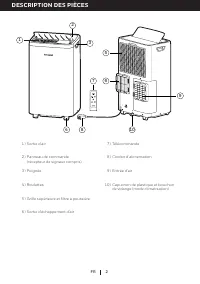
2 DESCRIPTION DES PIÈCES FR 1) Sortie d’air 7) Télécommande 2) Panneau de commande (récepteur de signaux compris) 8) Cordon d’alimentation 3) Poignée 9) Entrée d'air 4) Roulettes 10) Capuchon de plastique et bouchon de vidange (mode climatisation) 5) Grille supérieure et filtre à poussière 6) Sortie...
Page 37 - Trousse de supports
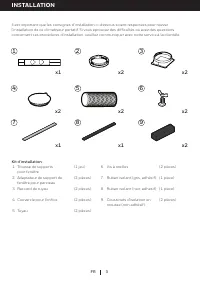
3 FR INSTALLATION Il est important que les consignes d’installation ci-dessous soient respectées pour réussir l’installation de ce climatiseur portatif. Si vous éprouvez des difficultés ou avez des questions concernant ces procédures d’installation, veuillez communiquer avec notre service à la clien...
Page 38 - Étapes de l’installation:; Le tuyau d'évacuation
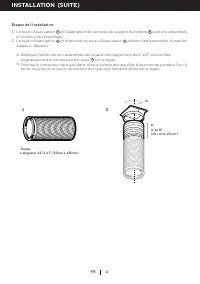
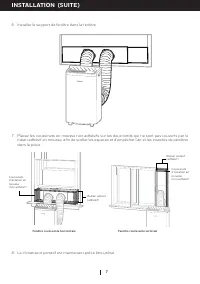
4 FR Étapes de l’installation: Tuyau: Longueur: 12" à 47" (30cm à 120cm) Le tuyau d'évacuation 5 et l'adaptateur de panneau du support de fenêtre 2 sont pré-assemblés à l'intérieur de l'emballage.Le tuyau d'évacuation 5 et le raccord du tuyau d'évacuation 3 doivent être assemblés. Suivez les...
Page 39 - pièce du support de fenêtre ou les trois s’il y a lieu.
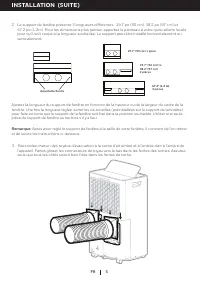
5 2. Le support de fenêtre présente 3 longueurs différentes : 19.7 po (50 cm), 38.2 po (97 cm) et 47.2 po (1.2m). Pour les dimensions plus petites, apportez le panneau à votre quincaillerie locale pour qu'il soit coupé à la longueur souhaitée. Le support peut être installé horizontalement ou vertica...
Page 42 - DÉCONSEILLÉ; L'ESPACE AÉRIEN MINIMUM
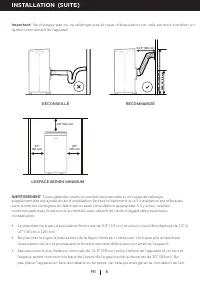
8 MA X. 14" (36 cm) MA X. 40" (102 cm) INSTALLATION (SUITE) Important: Ne changez pas ou ne rallongez pas le tuyau d'évacuation car cela pourrait entraîner un dysfonctionnement de l'appareil. DÉCONSEILLÉ RECOMMANDÉ 31.5" (80 cm) MA X. 14" (36 cm) FR MA X. 40" (102 cm) Le diamètre...
Page 43 - UTILISATION ET FONCTIONNEMENT; PANNEAU DE COMMANDE TACTILE
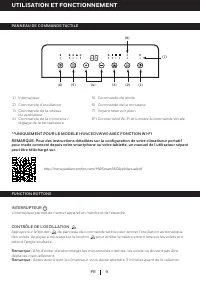
9 FR (3) (4) (5) (6) (1) (7) (2) (8) ^ ^UNIQUEMENT POUR LE MODÈLE HW4CEDVWW0 AVEC FONCTION WI-FI http://honeywellaircomfort.com/HWSmartPACAppManual.pdf 1) Interrupteur 5) Commande du mode 2) Commande d'oscillation 6) Commande de la minuterie 3) Commande de la vitesse du ventilateur 7) Voyant réservo...
Page 46 - TÉLÉCOMMANDE; Automatique
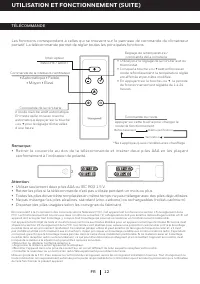
12 FR UTILISATION ET FONCTIONNEMENT (SUITE) TÉLÉCOMMANDE Les fonctions correspondent à celles qui se trouvent sur le panneau de commande du climatiseur portatif. La télécommande permet de régler toutes les principales fonctions. Remarque: Retirer le couvercle au dos de l a télécommande et insérer de...
Page 47 - NETTOYAGE ET ENTRETIEN; Entretien de l’appareil:
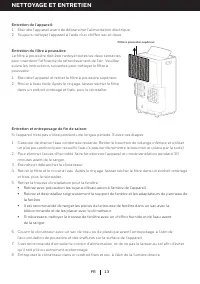
13 NETTOYAGE ET ENTRETIEN FR Filtre à poussière supérieur Entretien de l’appareil: Éteindre l'appareil avant de débrancher l'alimentation électrique.Toujours nettoyer l’appareil à l’aide d’un chiffon sec et doux. 1.2. Éteindre l'appareil et retirer le filtre à poussière supérieur.Rincer à l’eau tièd...
Page 48 - VIDANGE DE L’EAU DE CONDENSATION; Évacuation manuelle pendant les modes de refroidissement,
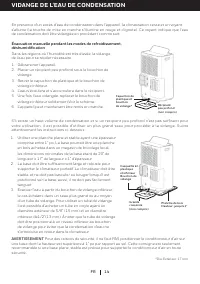
14 FR VIDANGE DE L’EAU DE CONDENSATION Capuchon de plastique et bouchon de vidange^ Récipient peu profond (non compris) Débrancher l’appareil.Placer un récipient peu profond sous le bouchon devidange. Retirer le capuchon de plastique et le bouchon devidange inférieur.L’eau s’écoulera et s’accumulera...
Page 49 - Vidange continue en mode déshumidification
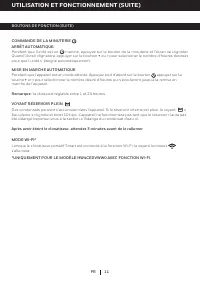
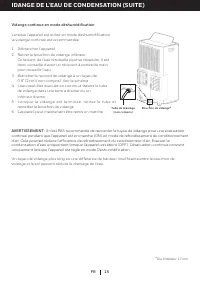
15 IDANGE DE L’EAU DE CONDENSATION (SUITE) Débrancher l’appareil.Retirer le bouchon de vidange inférieur.Ce faisant, de l’eau résiduelle peut se répandre. Il estdonc conseillé d’avoir un récipient à portée de mainpour recueillir l’eau.Brancher le raccord de vidange à un tuyau de0,8" (2cm) (non c...
Page 50 - GUIDE DE DÉPANNAGE; PROBLÈME; Changer les piles de la télécommande.
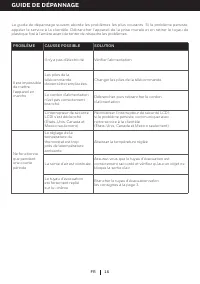
16 FR Le guide de dépannage suivant aborde les problèmes les plus courants. Si le problème persiste, appeler le service à la clientèle. Débrancher l’appareil de la prise murale et en retirer le tuyau de plastique fixé à l’arrière avant de tenter de résoudre les problèmes. GUIDE DE DÉPANNAGE PROBLÈME...
Page 51 - S’assurer que la fenêtre ou la porte est fermée.
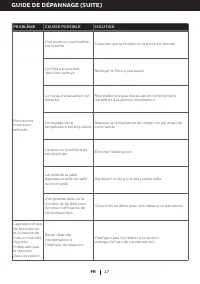
17 FR GUIDE DE DÉPANNAGE (SUITE) FR PROBLÈME CAUSSE POSSIBLE SOLUTION Fonctionne, mais sans refroidir Une porte ou une fenêtre est ouverte. S’assurer que la fenêtre ou la porte est fermée. Le filtre à poussière doit être nettoyé. Nettoyer le filtre à poussière. Le tuyau d'évacuation est détaché. Réi...
Page 52 - de refroidissement
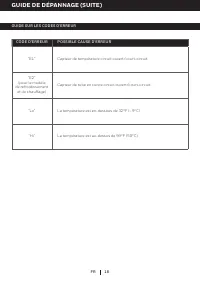
18 FR GUIDE SUR LES CODES D'ERREUR GUIDE DE DÉPANNAGE (SUITE) CODE D'ERREUR POSSIBLE CAUSE D'ERREUR "E1" Capteur de température circuit ouvert/court-circuit. "E2" (pour le modèle de refroidissement et de chauffage) Capteur de tube en cuivre circuit ouvert/court-circuit. "Lo" ...
Page 54 - MEDIDAS DE SEGURIDAD IMPORTANTES LEA DETENIDAMENTE
ES SEGURIDAD • • • • •• ••• • •• NO utilice la unidad con un enchufe o una toma de corriente dañados. Si el cable de alimentación estuviera dañado, deberá ser reemplazado por el fabricante, su servicio técnico o una persona debidamente calificada para ello con el fin de evitar situaciones de peligro...
Page 58 - ADVERTENCIA; ATENCIÓN
ES SÍMBOLO NOTA SIGNIFICADO ADVERTENCIA Este símbolo indica que el aparato utiliza un refrigerante inflamable. Peligro de incendio si se produce una fuga del refrigerante y queda expuesto a una fuente externa de ignición. ATENCIÓN Este símbolo indica que el manual de instrucciones debe leerse con de...
Page 59 - La cantidad máxima de carga de refrigerante no es; Advertencias adicionales para unidades con refrigerante de gas
ES Leer cuidadosamente las instrucciones antes de usar la unidad.El gas refrigerante R290/R32 cumple con las directivas ambientales UL60335-2-40 / UL60335-1.Este aparato contiene una cierta cantidad de gramos (consultar la etiqueta en la parte posterior de la unidad) de gas refrigerante R290/R32 . L...
Page 60 - debe cumplir con las normativas de transporte.; • Las reparaciones deben realizarse siguiendo las
ES Esta marca indica que este producto no debería desecharse con otro artículo del hogar como residuos. Para evitar posibles daños al medio ambiente o la salud humana derivados de la eliminación no controlada de residuos, reciclelo de manera responsable para promover la reutilización sostenible de l...
Page 62 - DESCRIPCIÓN DE PARTES
2 ES 1) Salida de Aire 7) Control Remoto 2) Panel de Control (Incluye Receptor de Señal) 8) Cable de Corriente Eléctrica y Clavija con Protección de Voltaje 3) Manija 9) Entrada de aire 4) Ruedas 10) Tapón de Drenaje Inferior con tapa de Plástico (Modo Aire Acondicionado) 5) Rejilla superior y filtr...
Page 63 - INSTALACIÓN
3 ES INSTALACIÓN Es importante que las instrucciones de instalación se sigan para la correcta instalación de este aireacondicionado portátil. Por favor llamar al Centro de Atención a Clientes si usted tiene cualquier dificultad o duda con respecto a estos procedimientos de instalación. Kit de Instal...
Page 64 - Pasos de la Instalación:; El ducto de escape
4 ES INSTALACIÓN (CONTINUACIÓN) Pasos de la Instalación: Manguera: Longitud: 12" to 47" (30 cm to 120 cm) El ducto de escape 5 y el adaptador del panel del soporte de la ventana 2 están premontados dentro del paquete.El ducto de escape 5 y el conector del ducto de escape 3 requieren montaje....
Page 65 - una o las dos piezas según su necesidad.
5 2. Hay 3 longitudes diferentes para el soporte de la ventana, 19.7 pulgadas (50cm), 38.2 pulgadas (97cm) y 47.2 pulgadas (1.2m). Para tamaños inferiores a los indicados, lleve el panel a su ferretería local para que lo corten a la longitud que necesita. El soporte se puede instalar en horizontal o...
Page 68 - EL ESPACIO DE AIRE MÍNIMO
8 INSTALACIÓN (CONTINUACIÓN) IMPORTANTE: No cambie ni alargue el ducto de escape, ya que podría provocar un mal funcionamiento de la unidad. NO RECOMENDADO RECOMENDADO 31.5" (80 cm) MA X. 14" (36 cm) ES MA X. 40" (102 cm) La manguera de salida proporcionada tiene un salida de 5.9" (1...
Page 69 - USO Y OPERACIÓN; PANEL DE CONTROL
9 (3) (4) (5) (6) (1) (7) (2) (8) http://honeywellaircomfort.com/HWSmartPACAppManual.pdf 1) Control de encendido/apagado 5) Selector de modo 2) Control de oscilación 6) Control del temporizador 3) Control de la velocidad del ventilador 7) Luz de tanque lleno 4) Controles de ajuste del temporizador y...
Page 70 - Se usan para ajustar el temporizador y termostato.; SELECTOR DE MODO; Al presionar ambos botones
10 ES USO Y OPERACIÓN (CONTINUACIÓN) BOTONES DE FUNCIONES (CONTINUACIÓN) 4 niveles: Automático , Baja , Medio y Alta . Ventilador AutomáticoPulse el botón + o - para seleccionar la temperatura que desee. Pulse el botón Modo para seleccionar el modo de aire acondicionado o calefacción. Después de pul...
Page 71 - Cuando el; ^ESTO ES SOLO PARA MODELOS HW4CEDVWW0 CON FUNCIÓN WI-FI
11 ES USO Y OPERACIÓN (CONTINUACIÓN) BOTONES DE FUNCIONES (CONTINUACIÓN) APAGADO AUTOMÁTICO: Mientras la unidad esté funcionando, presionar el botón y el display parpadeará. Mientras el display esté parpadeando, presionar el botón + o - para seleccionar el número de horas que deseé. La unidad se apa...
Page 72 - CONTROL REMOTO; Automático
12 ES USO Y OPERACIÓN (CONTINUACIÓN) CONTROL REMOTO Las funciones trabajan igual que los controles del aire acondicionado portátil. Todas las funciones de las teclas se puede acceder desde el control remoto. • Automático • Baja • Medio • Alta Control de Encendido Encendido / Apagado Control de Veloc...
Page 73 - LIMPIEZA Y MANTENIMIENTO; Mantenimiento de la unidad:; Si la unidad no se usará por un periodo prolongado de tiempo:; Mantenimiento para el Filtro de Polvo:
13 LIMPIEZA Y MANTENIMIENTO ES Mantenimiento de la unidad: Apague la unidad andes de desconectarla de la toma de corriente eléctrica.Limpie con un lienzo suave y seco. 1.2. Almacenamiento y Mantenimiento al Terminar la Temporada: Si la unidad no se usará por un periodo prolongado de tiempo: Asegúres...
Page 74 - DRENADO DE AGUA; Drenado Manual en Enfriamiento. Modo Deshumidificador; Es necesario drenar el agua en áreas de muy alta humedad.
14 ES DRENADO DE AGUA ^ External Dia.: 17 mm Cuando la unidad tiene un exceso de agua de condensación dentro de la unidad, el equipo dejará defuncionar y mostrará una luz de advertencia. ( el botón de encendido parpadeará con una luz roja) Este error indicará que el agua necesita ser drenada de acue...
Page 76 - GUÍA DE SOLUCIONES; PROBLEMA; Revisar la corriente eléctrica.
16 GUÍA DE SOLUCIONES ES La siguiente guía solución de problemas aborda los problemas más comunes. Si los problemaspersisten, llame a servicio al cliente. Desconecte el aparato de la corriente eléctrica antes de intentarreparar cualquier problema. PROBLEMA POSIBLE CAUSA SOLUCIÓN El equipo de aireaco...
Page 77 - Retirar los filtros de polvo y lavarlos.
17 GUÍA DE SOLUCIONES (CONTINUACIÓN) ES PROBLEMA POSIBLE CAUSA SOLUCIÓN Funciona pero no enfría Una puerta o ventanaestá abierta. Cerrar cualquier puerta o ventana que se encuentreabierta. El filtro de polvo está sucio. Retirar los filtros de polvo y lavarlos. La manguera desalida de aire estádescon...
Page 78 - Sensor de temperatura circuito abierto / cortocircuito.
18 ES GUÍA DE SOLUCIONES (CONTINUACIÓN) GUÍA PARA CODIGO DE ERROR CODIGO DE ERROR CAUSA DE POSIBLE ERROR "E1" Sensor de temperatura circuito abierto / cortocircuito. "E2" (para el modelo de refrigeración y calefacción*) Sensor de tubo de cobre circuito abierto / cortocircuito. "L...