Honeywell HF2CESVWK8 - User Manual
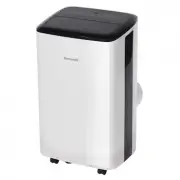
Honeywell HF2CESVWK8 Air Conditioner – User Manual, read for free online in PDF format. We hope this helps you resolve any issues you may have. If you have further questions, please contact us through the contact form.


Table of Contents:
- Page 2 – INTRODUCTION; HE SMART APP CONNECTION INTRODUCTION...................................................1-20
- Page 3 – Smart APP Connection Instruction; Download HE Smart; Please download
- Page 4 – Register a user account in HE Smart; email or mobile number.
- Page 5 – Login to your user account; Once you have registered and created an account, click
- Page 7 – under CF Mode; You can match the devices by following the instructions on the app.; When “CF” appears on the product display, press “Next Step” to continue
- Page 9 – screens press “Done” to finish.
- Page 10 – appears on the product display.; under AP Mode; If “AP” instead of “CF”
- Page 14 – users, then back to the; Device; app control interface.
- Page 15 – Click the ON/OFF button to adjust the settings.
- Page 21 – Set your Echo speaker by Alexa APP
- Page 27 – Attention
- Page 30 – Set up Google Home with Google Home App; After login, in the Home page, click “Add” to set up a new device.
- Page 31 – from your
- Page 33 – Link HE Smart account in Home Control; Enter the Google Home account menu,
- Page 36 – turn on the Window AC
Please read the manual carefully before using the product and keep it for future reference.
Please make sure the HE Smart app is run on 2.4GHz Wi-Fi network when connecting, otherwise the connection will fail.
"Loading the manual" means you need to wait until the file loads and becomes available for online reading. Some manuals are very large, and the time they take to appear depends on your internet speed.
Summary
INTRODUCTION 36 2 HE SMART APP CONNECTION INTRODUCTION……………………………………………1-20 QUICK GUIDE OF WORKING WITH AMAZON ALEXA…………………………………..21-29 QUICK GUIDE OF WORKING WITH GOOGLE HOME………………………………… …. 30-
3 Smart APP Connection Instruction 1. Download HE Smart APP Please download HE Smart APP first : Please scan the QR Code or search “HE Smart” in the App Store or Google Play Store to install the app.
4 2. Register a user account in HE Smart When using the App for the first time, you need to register an account. Click “Register” button to continue. You can register with your email or mobile number.