Honeywell HTF400 - User Manual
Honeywell HTF400 – User Manual, read for free online in PDF format. We hope this helps you resolve any issues you may have. If you have further questions, please contact us through the contact form.



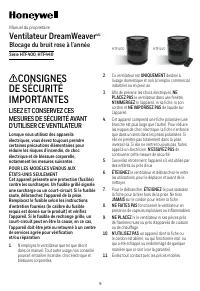
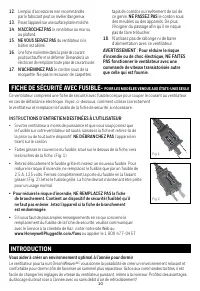
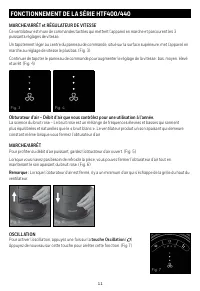
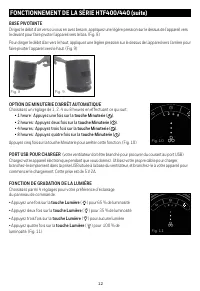
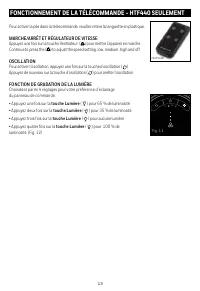




Table of Contents:
- Page 2 – USER SERVICING INSTRUCTIONS; DO NOT; To reduce the; To reduce the risk of fire, DO NOT replace attached plug.; Helping to create your optimal sleep environment year-round
- Page 3 – close the air shutter.; OSCILLATION; To activate the Oscillation feature, press the; Press the; Oscillation button
- Page 4 – • 2 hours: Press the; USB CHARGING PORT
- Page 5 – HTF440 ONLY REMOTE-CONTROL OPERATION
- Page 6 – CUSTOMER SERVICE; Questions or comments; the receiver is connected.; Operation is subject to the following 2 conditions:
- Page 7 – YEAR LIMITED WARRANTY; Please go to
- Page 9 – LISEZ ET CONSERVEZ CES; Ventilateur DreamWeaver; Blocage du bruit rose à l’année
- Page 10 – INSTRU; NE DÉBRANCHEZ PAS; FICHE DE SÉCURITÉ AVEC FUSIBLE-; INTRODUCTION
- Page 11 – MARCHE/ARRÊT et RÉGULATEUR DE VITESSE; constant même lorsque vous fermez l’obturateur d’air.; Pour activer l’oscillation, appuyez une fois sur la; touche Oscillation
- Page 12 – Choisissez un réglage de 1, 2, 4 ou 8 heures en effectuant ce qui suit :; PORT USB POUR CHARGER; Choisissez parmi 4 réglages pour votre préférence d’éclairage
- Page 13 – FONCTIONNEMENT DE LA TÉLÉCOMMANDE - HTF440 SEULEMENT; MARCHE/ARRÊT ET RÉGULATEUR DE VITESSE; • Appuyez deux fois sur la; touche Lumière; • Appuyez trois fois sur la; touche Lumière; • Appuyez quatre fois sur la; touche Lumière
- Page 14 – ENTRETIEN ET RANGEMENT; JAMAIS; N’ENROULEZ PAS; au moyen de l’une ou plusieurs des mesures suivantes :; Questions ou commentaires
- Page 17 – LEA Y GUARDE ESTAS INSTRUCCIONES; Ventilador para Dormir DreamWeaver
- Page 18 – ENCHUFE CON FUSIBLE DE SEGURIDAD - SÓLO PARA MODELOS DE EE.UU.; desconecte tirando del cable.; Para Reducir el Riesgo de Incendio, NO reemplace el enchufe; al Cliente de Kaz visitando nuestro sitio web en; INTRODUCCIÓN
- Page 19 – ENCENDIDO/APAGADO y CONTROL DE VELOCIDAD; constante incluso cuando cierre el obturador de aire.; OSCILACIÓN; de Oscilación
- Page 21 – OPERACIÓN DEL CONTROL REMOTO SÓLO HFT440; de plástico de extracción.; ENCENDIDO/APAGADO Y CONTROL DE VELOCIDAD; la característica de Oscilación.; CARACTERÍSTICA DE ATENUACIÓN DE LUZ
- Page 22 – LIMPIEZA Y ALMACENAJE; sumerja en agua el ventilador y; NUNCA; permita que gotee agua dentro de la cubierta del motor.; NO; Almacene el ventilador en un lugar fresco y seco.; no deseado del dispositivo.; Preguntas o comentarios
- Page 23 – AÑO DE GARANTIA LIMITADA; Por favor visite nuestra página
1
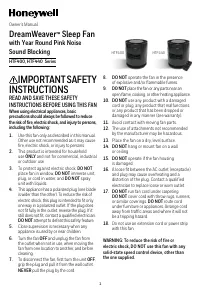
IMPORTANT SAFETY
INSTRUCTIONS
READ AND SAVE THESE SAFETY
INSTRUCTIONS BEFORE USING THIS FAN
When using electrical appliances, basic
precautions should always be followed to reduce
the risk of fire, electric shock, and injury to persons,
including the following:
1.
Use this fan only as described in this manual.
Other use not recommended as it may cause
fire, electric shock, or injury to persons.
2.
This product is intended for household
use
ONLY
and not for commercial, industrial
or outdoor use.
3.
To protect against electric shock,
DO NOT
place fan in window,
DO NOT
immerse unit,
plug, or cord in water, and
DO NOT
spray
unit with liquids.
4.
This appliance has a polarized plug (one blade
is wider than the other). To reduce the risk of
electric shock, this plug is intended to fit only
one way in a polarized outlet. If the plug does
not fit fully in the outlet, reverse the plug. If it
still does not fit, contact a qualified electrician.
DO NOT
attempt to defeat this safety feature.
5.
Close supervision is necessary when any
appliance is used by or near children.
6.
Turn the fan
OFF
and unplug the fan from
the outlet when not in use, when moving the
fan from one location to another, and before
cleaning.
7.
To disconnect the fan, first turn the unit
OFF
,
grip the plug and pull it from the wall outlet.
NEVER
pull the plug by the cord.
8.
DO NOT
operate the fan in the presence
of explosive and/or flammable fumes.
9.
DO NOT
place the fan or any parts near an
open flame, cooking, or other heating appliance.
10.
DO NOT
use any product with a damaged
cord or plug, any product that malfunctions,
or any product that has been dropped or
damaged in any manner (see warranty).
11.
Avoid contact with moving fan parts.
12.
The use of attachments not recommended
by the manufacturer may be hazardous.
13.
Place the fan on a dry, level surface.
14.
DO NOT
hang or mount fan on a wall
or ceiling.
15.
DO NOT
operate if the fan housing
is damaged.
16.
A loose fit between the AC outlet (receptacle)
and plug may cause overheating and a
distortion of the plug. Contact a qualified
electrician to replace loose or worn outlet.
17.
DO NOT
run fan cord under carpeting.
DO NOT
cover cord with throw rugs, runners,
or similar coverings.
DO NOT
route cord
under furniture or appliances. Arrange cord
away from traffic areas and where it will not
be a tripping hazard.
18.
Do not use an extension cord or power strip
with this fan.
WARNING: To reduce the risk of fire or
electric shock, DO NOT use this fan with any
solid-state speed control device, other than
the one supplied.
DreamWeaver
™
Sleep Fan
with Year Round Pink Noise
Sound Blocking
HTF400, HTF440 Series
Owner’s Manual
HTF400
HTF440
"Loading the manual" means you need to wait until the file loads and becomes available for online reading. Some manuals are very large, and the time they take to appear depends on your internet speed.
Summary
2 This fan features a fused safety plug which is designed to cut off electric current to the fan if an electrical fault occurs. Please see below for more information on how to properly use your fan and replace the safety plug fuse, if needed. FUSED SAFETY PLUG - FOR US MODELS ONLY INTRODUCTION USER ...
3 HTF400/440 SERIES OPERATION ON/OFF and SPEED CONTROL This fan features Quick Tap controls that turn the fan on and cycle through the 3 powerful speed settings.A light tap in the center of the control panel, located on the top surface will turn the power on at the lowest speed setting. (Fig 3) Cont...
4 HTF400/440 SERIES OPERATION (continued) PIVOTING BASE Direct airflow where you need it, apply light pressure to the top of the unit towards the front edge to pivot the unit down. (Fig 8) To direct the airflow up, apply light pressure to the top of the unit towards the back edge pivoting the unit u...


