Page 2 - Important safety instruction
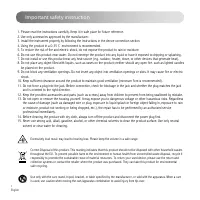
1 English Important safety instruction Excessively loud music may lead to hearing loss. Please keep the volume in a safe range. Correct Disposal of this product. This marking indicates that this product should not be disposed with other household wastes throughout the EU. To prevent possible harm to...
Page 3 - For wireless product:
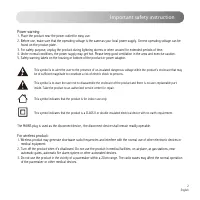
2 English Important safety instruction This symbol is to alert the user to the presence of un-insulated dangerous voltage within the product's enclosure that may be of sufficient magnitude to constitute a risk of electric shock to persons. This symbol is to warn the user not to disassemble the enclo...
Page 4 - Box Contents
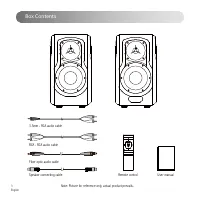
Box Contents 3 English Remote control User manual 3.5mm - RCA audio cable RCA - RCA audio cable Fiber optic audio cable Speaker connecting cable Note: Picture for reference only, actual product prevails.
Page 5 - Illustration
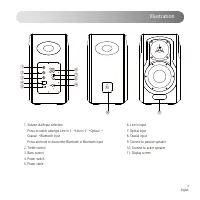
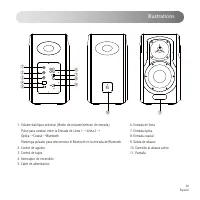
4 English Illustration 1. Volume dial/Input selection Press to switch amongst Line in 1 → Line in 2 → Optical → Coaxial → Bluetooth input Press and hold to disconnect Bluetooth in Bluetooth input2. Treble control3. Bass control4. Power switch5. Power cable ⑦ ⑥ ⑧⑨ ⑩ ⑪ ② ① ③ ④ ⑤ 6. Line in input7. Opt...
Page 6 - Remote Control
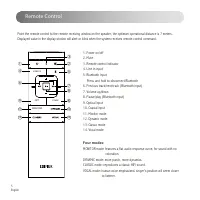
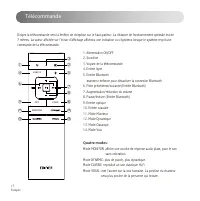
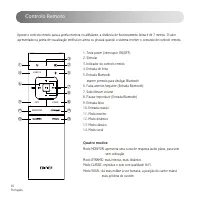
5 English Remote Control Four modes: MONITOR mode: features a flat audio response curve, for sound with no coloration.DYNAMIC mode: more punch, more dynamics.CLASSIC mode: reproduces a classic HIFI sound.VOCAL mode: human voice emphasized, singer’s position will seem closer to listener. 1. Power on/...
Page 8 - Connectivity Illustration
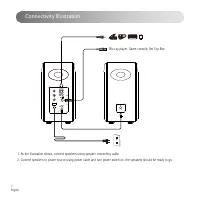
7 English Connectivity Illustration 1. As the illustration shows, connect speakers using speaker connecting cable.2. Connect speakers to power source using power cable and turn power switch on, the speakers should be ready to go. Blu-ray player, Game console, Set Top Box
Page 9 - Line In Input
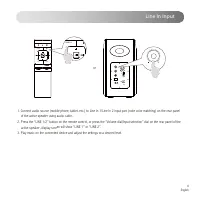
8 English Line In Input 1. Connect audio source (mobile phone, tablet, etc.) to Line In 1/Line In 2 input port (note color matching) on the rear panel of the active speaker using audio cable.2. Press the “LINE 1/2” button on the remote control, or press the “Volume dial/Input selection” dial on the ...
Page 10 - Optical / Coaxial Input
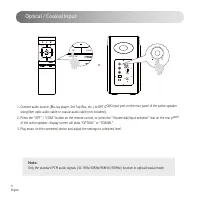
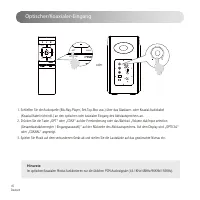
9 English Optical / Coaxial Input 1. Connect audio source (Blu-ray player, Set Top Box, etc.) to OPT/COAX input port on the rear panel of the active speaker using fiber optic audio cable or coaxial audio cable (not included).2. Press the “OPT” / “COAX” button on the remote control, or press the “Vol...
Page 11 - Bluetooth Input
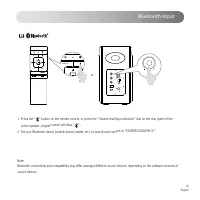
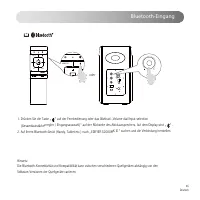
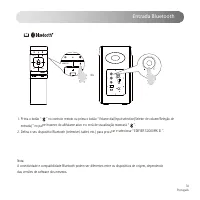
10 English Bluetooth Input 1. Press the “ ” button on the remote control, or press the “Volume dial/Input selection” dial on the rear panel of the active speaker, display screen will show “ ” .2. Set your Bluetooth device (mobile phone, tablet, etc.) to search and connect to “EDIFIER S2000MK Ⅲ ”. MO...
Page 12 - Specifications
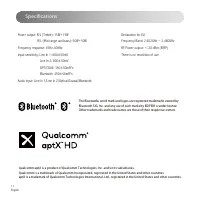
11 English Power output: R/L (Treble): 15W+15W R/L (Mid-range and bass): 50W+50W Frequency response: 45Hz-40KHz Input sensitivity: Line In 1: 600±50mV Line In 2: 800±50mV OPT/COAX: 350±50mFFs Bluetooth: 450±50mFFs Audio input: Line In 1/Line In 2/Optical/Coaxial/Bluetooth Specifications Declaration ...
Page 13 - Troubleshooting; No sound; Cannot connect via Bluetooth; The S2000MK does not turn on
12 English Troubleshooting No sound • Check if the speaker is ON . • Try to turn up the volume using either the master volume control or remote control. • Ensure the audio cables are firmly connected and the input i s set correctly on the speakers. • Check if there is a signal output from the audio ...
Page 14 - Consignes de securite importantes
Consignes de securite importantes 13 Français L'écoute de musique à volume extrême de manière prolongée peut affecter l'audition de l'utilisateur. Veillez à régler le volume à un niveau adéquat. Élimination correcte de ce produit. Ce symbole avise qu’en Europe, ce produit ne doit pas être éliminé av...
Page 15 - Avertissement sur l'alimentation électrique:
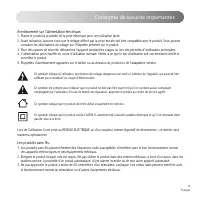
Consignes de securite importantes 14 Français Ce symbole indique à l'utilisateur la présence de voltage dangereux non isolé à l'intérieur de l'appareil, qui pourrait être suffisant pour constituer un risque d'électrocution. Ce symbole est présent pour indiquer que le produit ne doit pas être ouvert ...
Page 16 - Contenu du produit; Manuel d’utilisateur
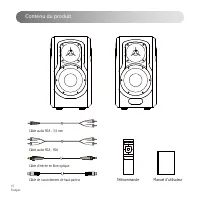
15 Français Contenu du produit Manuel d’utilisateur Télécommande Câble audio RCA - 3,5 mm Câble audio RCA - RCA Câble d’entrée en fibre optique Câble de raccordement de haut-parleur
Page 17 - Illustrations
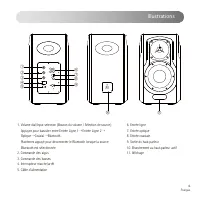
16 Français Illustrations 1. Volume dial/Input selection (Bouton du volume / Sélection de source) Appuyez pour basculer entre Entrée Ligne 1 → Entrée Ligne 2 → Optique → Coaxial → Bluetooth Maintenez appuyé pour déconnecter le Bluetooth lorsque la source Bluetooth est sélectionnée2. Commande des aig...
Page 18 - Télécommande
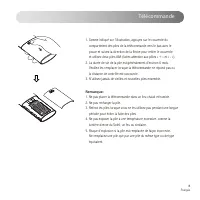
17 Français Télécommande 1. Alimentation ON/OFF2. Sourdine3. Voyant de la télécommande4. Entrée ligne5. Entrée Bluetooth maintenir enfoncé pour désactiver la connexion Bluetooth6. Piste précédente/suivante (Entrée Bluetooth) 7. Augmentation/réduction du volume8. Pause/lecture (Entrée Bluetooth) 9. E...
Page 20 - Connexions
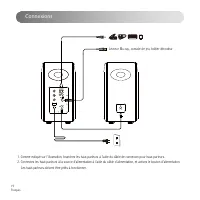
19 Français Connexions 1. Comme indiqué sur l’illustration, branchez les haut-parleurs à l’aide du câble de connexion pour haut-parleurs.2. Connectez les haut-parleurs à la source d’alimentation à l’aide du câble d’alimentation, et activez le bouton d’alimentation. Les haut-parleurs doivent être prê...
Page 21 - Entrée Ligne
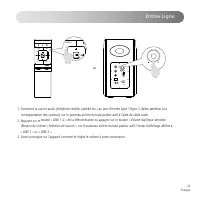
20 Français Entrée Ligne 1. Connectez la source audio (téléphone mobile, tablette etc.) au port d’entrée ligne 1/ligne 2 (faites attention à la correspondance des couleurs) sur le panneau arrière du haut-parleur actif à l’aide du câble audio.2. Appuyez sur le bouton « LINE 1/2 » de la télécommande o...
Page 22 - Entrée Optique/Coaxiale
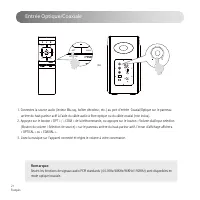
21 Français Entrée Optique/Coaxiale 1. Connectez la source audio (lecteur Blu-ray, boîtier décodeur, etc.) au port d’entrée Coaxial/Optique sur le panneau arrière du haut-parleur actif à l’aide du câble audio à fibre optique ou du câble coaxial (non inclus).2. Appuyez sur le bouton « OPT » / « COAX ...
Page 23 - Entrée Bluetooth
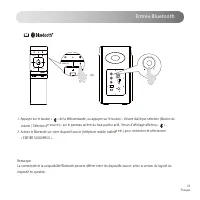
22 Français Entrée Bluetooth 1. Appuyez sur le bouton « » de la télécommande, ou appuyez sur le bouton « Volume dial/Input selection (Bouton du volume / Sélection de source) » sur le panneau arrière du haut-parleur actif, l’écran d’affichage affichera « » .2. Activez le Bluetooth sur votre dispositi...
Page 24 - Caractéristiques techniques
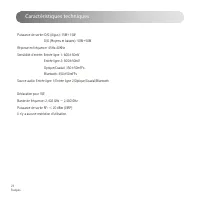
23 Français Caractéristiques techniques Puissance de sortie: D/G (Aigus): 15W+15W D/G (Moyens et basses): 50W+50W Réponse en fréquence: 45Hz-40KHz Sensibilité d’entrée: Entrée ligne 1: 600±50mV Entrée ligne 2: 800±50mV Optique/Coaxial: 350±50mFFs Bluetooth: 450±50mFFs Source audio: Entrée ligne 1/En...
Page 25 - Dépannage; Pas de son; Connexion par Bluetooth impossible; possible de démarrer le S2000MK
24 Français Dépannage Pas de son • Assure z-vous que les enceintes sont allumées. • Essayez de monter le volume en utilisant le réglage de volume principal ou la télécommande. • Vérifiez que les câbles audio sont bien connectés et que l’entrée est correctement réglée sur les haut-parleurs. • Vérifie...
Page 26 - Importantes instrucciones sobre seguridad
25 Español Importantes instrucciones sobre seguridad La música excesivamente alta puede provocar pérdida de audición. Mantenga el volumen en una gama segura. Elimine este producto adecuadamente. No deseche el producto con residuos domésticos. Para evitar que la eliminación incontrolada de residuos c...
Page 27 - Advertencia de alimentación:
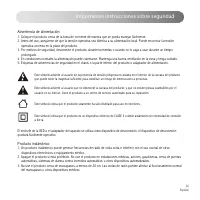
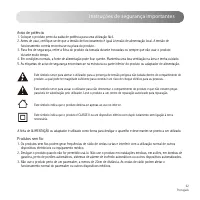
26 Español Importantes instrucciones sobre seguridad Este símbolo advierte al usuario de la presencia de tensión peligrosa no aislada en el interior de la carcasa del producto que puede tener la magnitud suficiente para constituir un riesgo de electrocución a personas. Este símbolo advierte al usuar...
Page 28 - Contenido de la caja; Manual de usuario
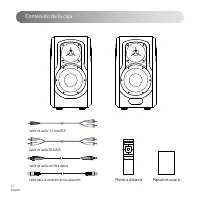
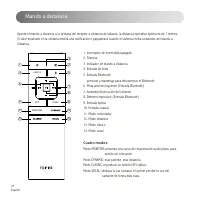
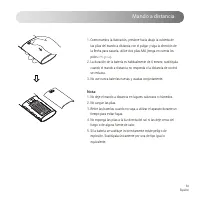
27 Español Contenido de la caja Manual de usuario Mando a distancia Cable de audio 3,5 mm-RCA Cable de audio RCA-RCA Cable de audio de fibra óptica Cable para la conexión de los altavoces
Page 30 - Mando a distancia
29 Español Mando a distancia 1. Interruptor de encendido/apagado2. Silenciar3. Indicador de mando a distancia4. Entrada de línea5. Entrada Bluetooth presione y mantenga para desconectar el Bluetooth6. Pista anterior/siguiente (Entrada Bluetooth)7. Aumento/disminución del volumen8. Detener/reproducir...
Page 32 - Conexiones
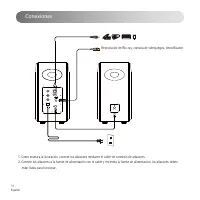
31 Español Conexiones 1. Como muestra la ilustración, conecte los altavoces mediante el cable de conexión de altavoces.2. Conecte los altavoces a la fuente de alimentación con el cable y encienda la fuente de alimentación, los altavoces deben estar listos para funcionar. Reproductor de Blu-ray, cons...
Page 33 - Entrada de Línea
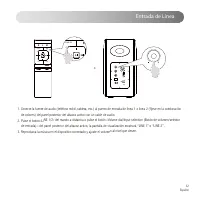
32 Español Entrada de Línea 1. Conecte la fuente de audio (teléfono móvil, tableta, etc.) al puerto de entrada de línea 1 o línea 2 (fíjese en la combinación de colores) del panel posterior del altavoz activo con un cable de audio.2. Pulse el botón «LINE 1/2» del mando a distancia o pulse el botón «...
Page 34 - Entrada Óptica/Coaxial
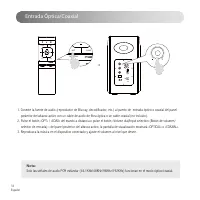
33 Español Entrada Óptica/Coaxial 1. Conecte la fuente de audio (reproductor de Blu-ray, decodificador, etc.) al puerto de entrada óptico o coaxial del panel posterior del altavoz activo con un cable de audio de fibra óptica o un cable coaxial (no incluido).2. Pulse el botón «OPT» / «COAX» del mando...
Page 35 - Entrada Bluetooth
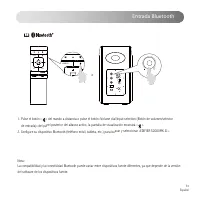
34 Español Entrada Bluetooth 1. Pulse el botón « » del mando a distancia o pulse el botón «Volume dial/Input selection (Botón de volumen/selector de entrada)» del panel posterior del altavoz activo, la pantalla de visualización mostrará « ».2. Configure su dispositivo Bluetooth (teléfono móvil, tabl...
Page 36 - Especificaciones
35 Español Especificaciones Potencia de salida: D/I (Agudos): 15W+15W D/I (Medios y bajos): 50W+50W Respuesta de frecuencia: 45Hz-40KHz Sensibilidad de entrada: Entrada de línea 1: 600±50mV Entrada de línea 2: 800±50mV Óptica/Coaxial: 350±50mFFs Bluetooth: 450±50mFFs Entradas de audio: Entrada de lí...
Page 37 - Resolución de problemas; No hay sonido; No se puede conectar a través de Bluetooth; El S2000MK no se enciende
36 Español Resolución de problemas No hay sonido • Com pruebe que el altavoz esté activado. • Intente subir el volumen con el botón de control de volumen general o con el mando a distancia. • Asegúr ese de que los cables de audio están correctamente conectados y la entrada a los altavoces está ajust...
Page 38 - Wichtige sicherheitshinweise
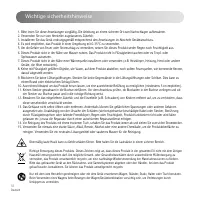
37 Deutsch Wichtige sicherheitshinweise Übermäßig laute Musik kann zu Gehörschäden führen. Bitte halten Sie die Lautstärke in einem sicheren Bereich. Richtige Entsorgung dieses Produkts. Dieses Zeichen zeigt an, dass dieses Produkt in der gesamten EU nicht mit dem übrigen Hausmüll entsorgt werden da...
Page 39 - Das drahtlose Produkt:
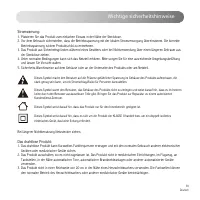
38 Deutsch Wichtige sicherheitshinweise Dieses Symbol macht den Benutzer auf die Präsenz gefährlicher Spannung im Gehäuse des Produkts aufmerksam, die stark genug sein kann, um ein Stromschlag-Risiko für Personen darzustellen. Dieses Symbol warnt den Benutzer, das Gehäuse des Produkts nicht zu zerle...
Page 40 - Schachtelinhalt; Bedienungsanleitung
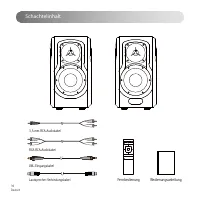
39 Deutsch Schachtelinhalt Bedienungsanleitung Fernbedienung 3,5-mm-RCA-Audiokabel RCA-RCA-Audiokabel LWL-Eingangskabel Lautsprecher-Verbindungskabel
Page 41 - Illustrationen
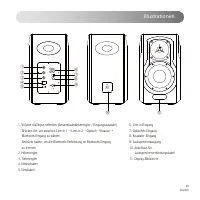
40 Deutsch Illustrationen 1. Volume dial/Input selection (Gesamtlautstärkenregler / Eingangsauswahl) Drücken Sie, um zwischen Line-in 1 → Line-in 2 → Optisch → Koaxial → Bluetooth-Eingang zu wählen Gedrückt halten, um die Bluetooth-Verbindung im Bluetooth-Eingang zu trennen2. Höhenregler3. Tiefenreg...
Page 42 - Fernbedienung
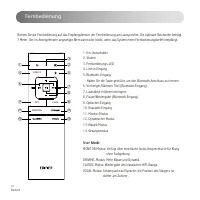
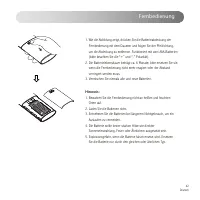
41 Deutsch Fernbedienung 1. Ein-/Ausschalter2. Stumm3. Fernbedienungs-LED4. Line-in-Eingang5. Bluetooth-Eingang Halten Sie die Taste gedrückt, um den Bluetooth-Anschluss zu trennen6. Vorheriger/Nächster Titel (Bluetooth-Eingang)7. Lautstärke erhöhen/verringern8. Pause/Wiedergabe (Bluetooth-Eingang)9...
Page 44 - Anschluss
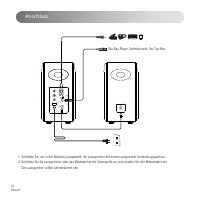
43 Deutsch Anschluss 1. Schließen Sie, wie in der Abbildung dargestellt, die Lautsprecher mit einem Lautsprecher-Verbindungskabel an.2. Schließen Sie die Lautsprecher über das Netzkabel an die Stromquelle an und schalten Sie den Netzschalter ein. Die Lautsprecher sollten betriebsbereit sein. Blu-Ray...
Page 48 - Technische Daten
47 Deutsch Technische Daten Leistung: R/L (Hochtöne): 15W+15W R/L (Mittel-und Tieftonbereich): 50W+50W Frequenzgang: 45Hz-40KHz Eingangsempfindlichkeit: Line-in 1-Eingang: 600±50mV Line-in 2-Eingang: 800±50mV Optischer/Koaxialer: 350±50mFFs Bluetooth: 450±50mFFs Audioeingänge: Line-in 1-/Line-in 2-/...
Page 49 - Fehlerbehebung; Kein Ton; Keine Verbindung über Bluetooth möglich; Der S2000MK lässt sich nicht einschalten
48 Deutsch Fehlerbehebung Kein Ton • Überprüfen , ob der Lautsprecher eingeschaltet ist. • Versuchen Sie entweder über den Master-Lautstärkeregler oder die Fernbedienung die Lautstärke zu erhöhen. • Sorgen Sie dafür, dass die Audiokabel fest angeschlossen und die Eingabeeinstellungen des Lautspreche...
Page 50 - Istruzioni importanti sulla sicurezza
49 Italiano Istruzioni importanti sulla sicurezza La musica eccessivamente alta può portare a perdita dell'udito. Tener il volume ad un livello sicuro. Il corretto smaltimento di questo prodotto. Questo simbolo indica che questo prodotto non deve essere smaltito insieme agli altri rifiuti domestici ...
Page 52 - Contenuto della confezione; Manuale dell’utente
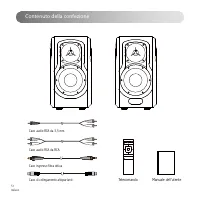
51 Italiano Contenuto della confezione Manuale dell’utente Telecomando Cavo audio RCA da 3,5 mm Cavo audio RCA da RCA Cavo ingresso fibra ottica Cavo di collegamento altoparlanti
Page 53 - Illustrazioni
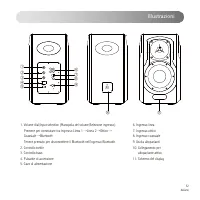
52 Italiano Illustrazioni 1. Volume dial/Input selection (Manopola del volume/Selezione ingresso) Premere per commutare tra Ingresso Linea 1 → Linea 2 → Ottico → Coassiale → Bluetooth Tenere premuto per disconnettere il Bluetooth nell'ingresso Bluetooth2. Controllo treble3. Controllo bass4. Pulsante...
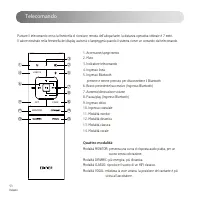
Page 54 - Telecomando
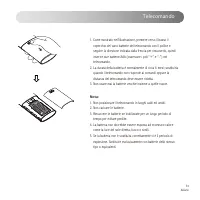
53 Italiano Telecomando 1. Accensione/spegnimento2. Muto3. Indicatore telecomando4. Ingresso linea5. Ingresso Bluetooth premere e tenere premuto per disconnettere il Bluetooth6. Brano precedente/successivo (Ingresso Bluetooth)7. Aumento/diminuzione volume8. Pausa/play (Ingresso Bluetooth)9. Ingresso...
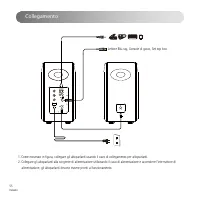
Page 56 - Collegamento
55 Italiano Collegamento 1. Come mostrato in figura, collegare gli altoparlanti usando il cavo di collegamento per altoparlanti.2. Collegare gli altoparlanti alla sorgente di alimentazione utilizzando il cavo di alimentazione e accendere l'interruttore di alimentazione, gli altoparlanti devono esser...
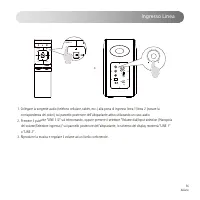
Page 57 - Ingresso Linea
56 Italiano Ingresso Linea 1. Collegare la sorgente audio (telefono cellulare, tablet, ecc.) alla porta di ingresso linea 1/linea 2 (notare la corrispondenza dei colori) sul pannello posteriore dell'altoparlante attivo utilizzando un cavo audio.2. Premere il pulsante "LINE 1/2" sul telecoman...
Page 58 - Ingresso Ottico/Coassiale
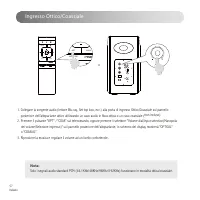
57 Italiano Ingresso Ottico/Coassiale 1. Collegare la sorgente audio (lettore Blu-ray, Set top box, ecc.) alla porta di ingresso Ottico/Coassiale sul pannello posteriore dell'altoparlante attivo utilizzando un cavo audio in fibra ottica o un cavo coassiale (non incluso).2. Premere il pulsante "O...
Page 59 - Ingresso Bluetooth
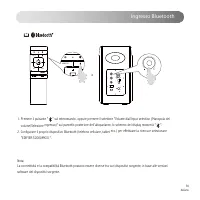
58 Italiano Ingresso Bluetooth 1. Premere il pulsante " " sul telecomando, oppure premere il selettore "Volume dial/Input selection (Manopola del volume/Selezione ingresso)" sul pannello posteriore dell'altoparlante, lo schermo del display mostrerà " ".2. Configurare il propr...
Page 60 - Specifiche
59 Italiano Specifiche Potenza di uscita: R/L (Alti): 15W+15W R/L (Gamma media e bassi): 50W+50W Risposta in frequenza: 45Hz-40KHz Sensibilità ingresso: Ingresso linea 1: 600±50mV Ingresso linea 2: 800±50mV Ottico/Coassiale: 350±50mFFs Bluetooth: 450±50mFFs Ingresso audio: Ingresso linea 1/Ingresso ...
Page 61 - Risoluzione dei problemi; Nessun suono; Impossibile collegarsi tramite Bluetooth; Rumore proveniente dagli altoparlanti
60 Italiano Risoluzione dei problemi Nessun suono • Ve rificare se gli altoparlanti sono in stato ON. • Provare ad attivare il volume usando il controllo del volume principale o il telecomando. • Assicurarsi ch e i cavi audio siano ben collegati e che l'ingresso sia impostato correttamente sugli alt...
Page 62 - Instruções de segurança importantes
61 Por tuguês Instruções de segurança importantes A música excessivamente alta pode conduzir à perda de audição. Por favor, mantenha o volume num nível seguro. Este símbolo no produto ou na embalagem indica que este não deve ser eliminado juntamente com o lixo doméstico. Em vez disso, deve entregá-l...
Page 64 - Conteúdo da caixa; Manual do utilizador
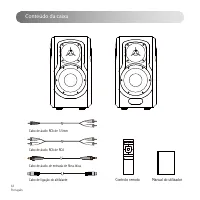
63 Por tuguês Conteúdo da caixa Manual do utilizador Controlo remoto Cabo de áudio RCA de 3,5mm Cabo de áudio RCA de RCA Cabo de áudio de entrada de fibra ótica Cabo de ligação do altifalante
Page 65 - Ilustrações
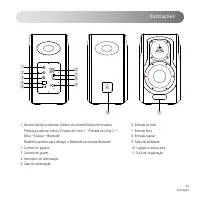
64 Por tuguês Ilustrações 1. Volume dial/Input selection (Seletor de volume/Seleção de entrada) Prima para alternar entre a Entrada de Linha 1 → Entrada de Linha 2 → Ótica → Coaxial → Bluetooth Mantenha premido para desligar o Bluetooth na entrada Bluetooth2. Controlo de agudos3. Controlo de graves4...
Page 66 - Controlo Remoto
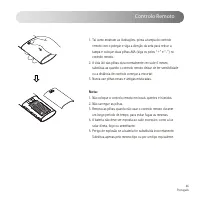
65 Por tuguês Controlo Remoto 1. Tecla power (interruptor ON/OFF)2. Silenciar3. Indicador do controlo remoto4. Entrada de linha5. Entrada Bluetooth manter premido para desligar Bluetooth6. Faixa anterior/seguinte (Entrada Bluetooth)7. Subir/descer volume8. Pausar/reproduzir (Entrada Bluetooth)9. Ent...
Page 68 - Ligação
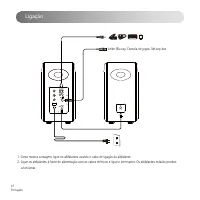
67 Por tuguês Ligação 1. Como mostra a imagem, ligue os altifalantes usando o cabo de ligação do altifalante.2. Ligue os altifalantes à fonte de alimentação com os cabos elétricos e ligue o interruptor. Os altifalantes estarão prontos a funcionar. Leitor Blu-ray, Consola de jogos, Set-top-box
Page 69 - Entrada de Linha
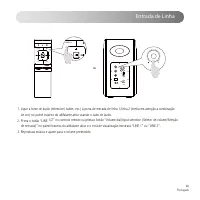
68 Por tuguês Entrada de Linha 1. Ligue a fonte de áudio (telemóvel, tablet, etc.) à porta de entrada de linha 1/linha 2 (tenha em atenção a combinação de cor) no painel traseiro do altifalante ativo usando o cabo de áudio.2. Prima o botão “LINE 1/2” no controlo remoto ou prima o botão “Volume dial/...
Page 70 - Entrada Ótica/Coaxial
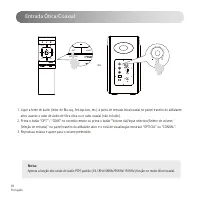
69 Por tuguês Entrada Ótica/Coaxial 1. Ligue a fonte de áudio (leitor de Blu-ray, Set-top-box, etc.) à porta de entrada ótica/coaxial no painel traseiro do altifalante ativo usando o cabo de áudio de fibra ótica ou o cabo coaxial (não incluído).2. Prima o botão “OPT” / “COAX” no controlo remoto ou p...
Page 72 - Especificações
71 Por tuguês Especificações Saída de potência: D/E (Agudos): 15W+15W D/E (Médio alcance e graves): 50W+50W Resposta de frequência: 45Hz-40KHz Sensibilidade de entrada: Entrada Line in 1: 600±50mV Entrada Line in 2: 800±50mV Ótico/Coaxial: 350±50mFFs Bluetooth: 450±50mFFs Entrada de áudio: Entrada L...
Page 73 - Resolução de problemas; Sem som; Não é possível ligar por Bluetooth; Ruído proveniente das colunas
72 Por tuguês Resolução de problemas Sem som • Verifique se o altifalante está LIGADO. • Tente aumentar o volume utilizando o controlo do volume principal ou o controlo remoto. • Certifique-se de que os cabos de áudio estão bem ligados e que a entrada está corretamente selecionada nos altifalantes. ...



 Edifier B700 User Manual
 Edifier D12 User Manual
 Edifier G2II User Manual
 Edifier G4 TE User Manual
 Edifier G33 User Manual
 Edifier G2000 User Manual
 Edifier GM5 User Manual
 Edifier GT4 S User Manual
 Edifier K800 User Manual
 Edifier MP100 Plus User Manual
 Edifier MP230 User Manual
 Edifier MS50A User Manual
 Edifier P180 User Manual
 Edifier P180 Plus User Manual