Page 2 - EN Important safety instruction
Excessively loud music may lead to hearing loss. Please keep the volume in a safe range. Correct Disposal of this product. This marking indicates that this product should not be disposed with other household wastes throughout the EU. To prevent possible harm to the environment or human health from u...
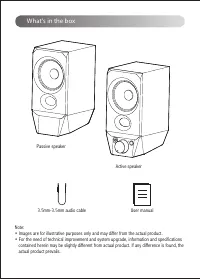
Page 3 - What’s in the box
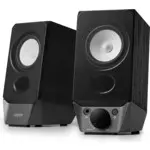
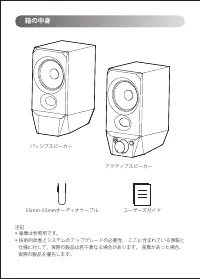
Passive speaker Active speaker Note: • Images are for illustrative purposes only and may differ from the actual product. • For the need of technical improvement and system upgrade, information and specifications contained herein may be slightly different from actual product. If any difference is fou...
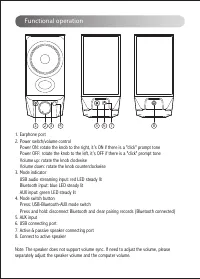
Page 4 - Functional operation; Active & passive speaker connecting port
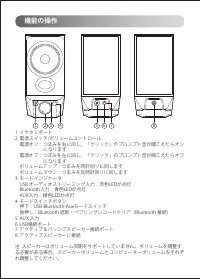
Functional operation 1. Earphone port2. Power switch/volume control Power ON: rotate the knob to the right, it’s ON if there is a "click" prompt tone Power OFF: rotate the knob to the left, it’s OFF if there is a "click" prompt tone Volume up: rotate the knob clockwise Volume down: r...
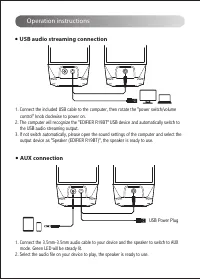
Page 5 - Operation instructions; USB Power Plug
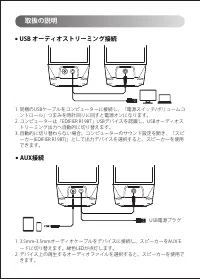
1. Connect the included USB cable to the computer, then rotate the "power switch/volume control" knob clockwise to power on. 2. The computer will recognize the "EDIFIER R19BT" USB device and automatically switch to the USB audio streaming output.3. If not switch automatically, please...
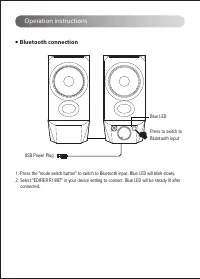
Page 6 - Bluetooth connection; Blue LED
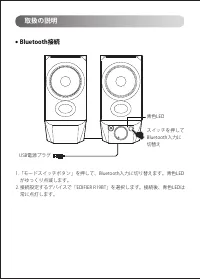
1. Press the "mode switch button" to switch to Bluetooth input. Blue LED will blink slowly.2. Select "EDIFIER R19BT" in your device setting to connect. Blue LED will be steady lit after connected. Bluetooth connection ● Operation instructions Press to switch to Blutetooth input Blue ...
Page 7 - • Try another Bluetooth device for connection.; Noise coming from speakers; Specifications
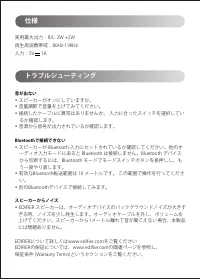
Power output: R/L: 2W+2W Frequency response: 80Hz-19KHz Input: 5V 1A No sound • Check if the speaker is ON.• Try to turn up the volume using the volume control.• Ensure the audio cables are firmly connected and the input is set correctly on the speakers.• Check if there is a signal output from the a...
Page 9 - FR Consignes de securite importantes
L'écoute de musique à volume extrême de manière prolongée peut affecter l'audition de l'utilisateur. Veillez à régler le volume à un niveau adéquat. Élimination correcte de ce produit. Ce symbole avise qu’en Europe, ce produit ne doit pas être éliminé avec les autres déchets ménagers.Recyclez-le de ...
Page 10 - Contenu de la boîte
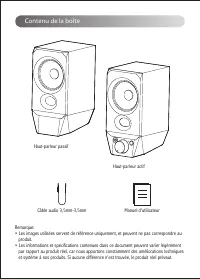
Haut-parleur passif Haut-parleur actif Remarque: • Les images utilisées servent de référence uniquement, et peuvent ne pas correspondre au produit. • Les informations et spécifications contenues dans ce document peuvent varier légèrement par rapport au produit réel, car nous apportons constamment de...
Page 11 - Fonctionnement
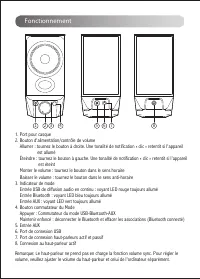
Fonctionnement 1. Port pour casque2. Bouton d'alimentation/contrôle de volume Allumer : tournez le bouton à droite. Une tonalité de notification « clic » retentit si l'appareil est allumé Éteindre : tournez le bouton à gauche. Une tonalité de notification « clic » retentit si l'appareil est éteint M...
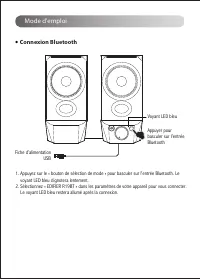
Page 13 - Connexion Bluetooth; Voyant LED bleu
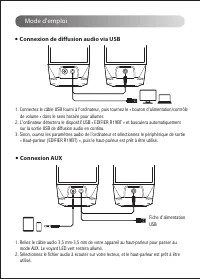
1. Appuyez sur le « bouton de sélection de mode » pour basculer sur l'entrée Bluetooth. Le voyant LED bleu clignotera lentement.2. Sélectionnez « EDIFIER R19BT » dans les paramètres de votre appareil pour vous connecter. Le voyant LED bleu restera allumé après la connexion. Connexion Bluetooth ● Mod...
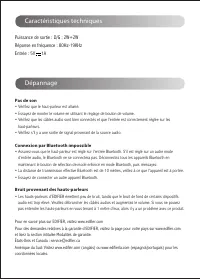
Page 14 - Pas de son; Connexion par Bluetooth impossible; Caractéristiques techniques
Puissance de sortie : D/G : 2W+2W Réponse en fréquence : 80Hz-19KHz Entrée : 5V 1A Pas de son • Vérifiez que le haut-parleur est allumé.• Essayez de monter le volume en utilisant le réglage de bouton de volume. • Vérifiez que les câbles audio sont bien connectés et que l’entrée est correctement régl...
Page 16 - ES Importantes instrucciones sobre seguridad
La música excesivamente alta puede provocar pérdida de audición. Mantenga el volumen en una gama segura. Elimine este producto adecuadamente. No deseche el producto con residuos domésticos. Para evitar que la eliminación incontrolada de residuos contamine el entorno natural o dañe la salud humana, e...
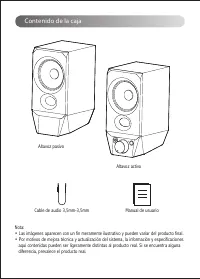
Page 17 - Contenido de la caja
Altavoz pasivo Altavoz activo Nota: • Las imágenes aparecen con un fin meramente ilustrativo y pueden variar del producto final. • Por motivos de mejora técnica y actualización del sistema, la información y especificaciones aquí contenidas pueden ser ligeramente distintas al producto real. Si se enc...
Page 18 - Uso funcional; Nota
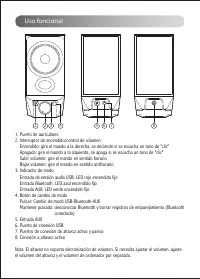
Uso funcional 1. Puerto de auriculares2. Interruptor de encendido/control de volumen Encendido: gire el mando a la derecha, se enciende si se escucha un tono de "clic" Apagado: gire el mando a la izquierda, se apaga si se escucha un tono de "clic" Subir volumen: gire el mando en sent...
Page 19 - Instrucciones de funcionamiento; Conexión de transmisión de audio USB
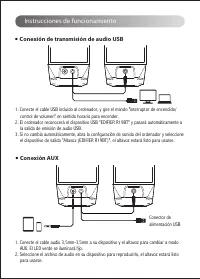
Instrucciones de funcionamiento 1. Conecte el cable USB incluido al ordenador, y gire el mando "interruptor de encendido/ control de volumen" en sentido horario para encender. 2. El ordenador reconocerá el dispositivo USB "EDIFIER R19BT" y pasará automáticamente a la salida de emisió...
Page 20 - Conexión Bluetooth; LED azul
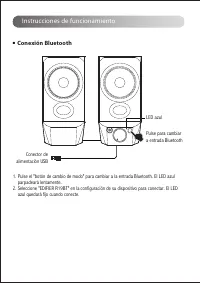
1. Pulse el "botón de cambio de modo" para cambiar a la entrada Bluetooth. El LED azul parpadeará lentamente.2. Seleccione "EDIFIER R19BT" en la configuración de su dispositivo para conectar. El LED azul quedará fijo cuando conecte. Conexión Bluetooth ● Instrucciones de funcionamient...
Page 21 - No hay sonido; No se puede conectar a través de Bluetooth; Ruido procedente de los altavoces; Especificaciones
Potencia de salida: D/I: 2W+2W Respuesta de frecuencia: 80Hz-19KHz Entrada: 5V 1A No hay sonido • Compruebe que el altavoz esté activado. • Intente subir el volumen con el botón de control de volumen. • Asegúrese de que los cables de audio están correctamente conectados y la entrada a los altavoces ...
Page 23 - DE Wichtige sicherheitshinweise
Übermäßig laute Musik kann zu Gehörschäden führen. Bitte halten Sie die Lautstärke in einem sicheren Bereich. Richtige Entsorgung dieses Produkts. Dieses Zeichen zeigt an, dass dieses Produkt in der gesamten EU nicht mit dem übrigen Hausmüll entsorgt werden darf. Um mögliche Umwelt- oder Gesundheits...
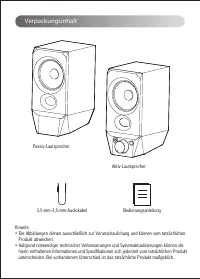
Page 24 - Verpackungsinhalt
Passiv-Lautsprecher Aktiv-Lautsprecher Hinweis: • Die Abbildungen dienen ausschließlich zur Veranschaulichung und können vom tatsächlichen Produkt abweichen. • Aufgrund notwendiger technischer Verbesserungen und Systemaktualisierungen können die hierin enthaltenen Informationen und Spezifikationen s...
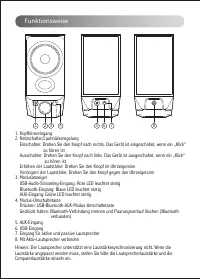
Page 25 - Funktionsweise
Funktionsweise 1. Kopfhörereingang2. Netzschalter/Lautstärkeregelung Einschalten: Drehen Sie den Knopf nach rechts. Das Gerät ist eingeschaltet, wenn ein „Klick“ zu hören ist Ausschalten: Drehen Sie den Knopf nach links. Das Gerät ist ausgeschaltet, wenn ein „Klick“ zu hören ist Erhöhen der Lautstär...
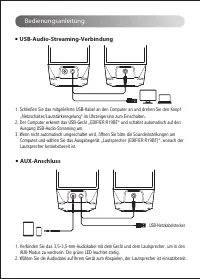
Page 26 - Bedienungsanleitung
Bedienungsanleitung 1. Schließen Sie das mitgelieferte USB-Kabel an den Computer an und drehen Sie den Knopf „Netzschalter/Lautstärkeregelung“ im Uhrzeigersinn zum Einschalten. 2. Der Computer erkennt das USB-Gerät „EDIFIER R19BT“ und schaltet automatisch auf den Ausgang USB-Audio-Streaming um.3. We...
Page 27 - Blaue LED
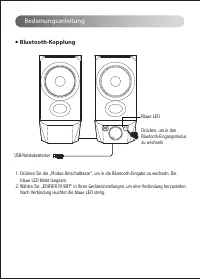
1. Drücken Sie die „Modus-Umschalttaste“, um in die Bluetooth-Eingabe zu wechseln. Die blaue LED blinkt langsam.2. Wählen Sie „EDIFIER R19BT“ in Ihren Geräteeinstellungen, um eine Verbindung herzustellen. Nach Verbindung leuchtet die blaue LED stetig. Bluetooth-Kopplung ● Bedienungsanleitung Drücken...
Page 28 - Kein Ton; Keine Verbindung über Bluetooth möglich; Aus den Lautsprechern wird ein Rauschen ausgesendet; Technische Daten
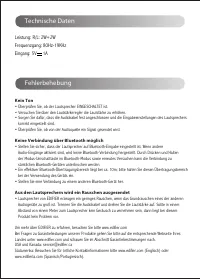
Leistung: R/L: 2W+2W Frequenzgang: 80Hz-19KHz Eingang: 5V 1A Kein Ton • Überprüfen Sie, ob der Lautsprecher EINGESCHALTET ist.• Versuchen Sie über den Lautstärkeregler die Lautstärke zu erhöhen. • Sorgen Sie dafür, dass die Audiokabel fest angeschlossen und die Eingabeeinstellungen des Lautsprechers...
Page 30 - IT Istruzioni importanti sulla sicurezza
La musica eccessivamente alta può portare a perdita dell'udito. Tener il volume ad un livello sicuro. Il corretto smaltimento di questo prodotto. Questo simbolo indica che questo prodotto non deve essere smaltito insieme agli altri rifiuti domestici in tutta la UE. Per prevenire possibili danni all’...
Page 31 - Contenuto della confezione
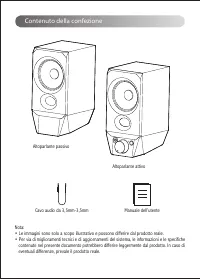
Altoparlante passivo Altoparlante attivo Nota: • Le immagini sono solo a scopo illustrativo e possono differire dal prodotto reale. • Per via di miglioramenti tecnici e di aggiornamenti del sistema, le informazioni e le specifiche contenute nel presente documento potrebbero differire leggermente dal...
Page 32 - Utilizzo delle funzioni
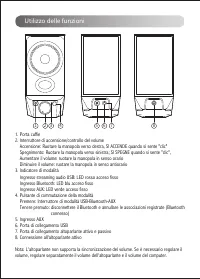
Utilizzo delle funzioni 1. Porta cuffie2. Interruttore di accensione/controllo del volume Accensione: Ruotare la manopola verso destra, SI ACCENDE quando si sente "clic" Spegnimento: Ruotare la manopola verso sinistra; SI SPEGNE quando si sente "clic", Aumentare il volume: ruotare la...
Page 33 - Connettore USB
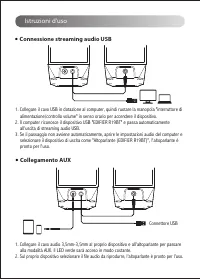
Istruzioni d'uso 1. Collegare il cavo USB in dotazione al computer, quindi ruotare la manopola "interruttore di alimentazione/controllo volume" in senso orario per accendere il dispositivo. 2. Il computer riconosce il dispositivo USB "EDIFIER R19BT" e passa automaticamente all'uscita...
Page 34 - Connessione Bluetooth; LED blu
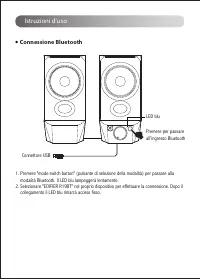
1. Premere "mode switch button" (pulsante di selezione della modalità) per passare alla modalità Bluetooth. Il LED blu lampeggerà lentamente.2. Selezionare "EDIFIER R19BT" nel proprio dispositivo per effettuare la connessione. Dopo il collegamento il LED blu rimarrà acceso fisso. Con...
Page 35 - Nessun suono; Impossibile collegarsi tramite Bluetooth; Specifiche
Potenza di uscita: R/L: 2W+2W Risposta in frequenza: 80Hz-19KHz Ingresso: 5V 1A Nessun suono • Verificare se gli altoparlanti sono in stato ON.• Provare ad attivare il volume usando il controllo del volume. • Assicurarsi che i cavi audio siano ben collegati e che l'ingresso sia impostato correttamen...
Page 37 - PT Instruções de segurança importantes
A música excessivamente alta pode conduzir à perda de audição. Por favor, mantenha o volume num nível seguro. Este símbolo no produto ou na embalagem indica que este não deve ser eliminado juntamente com o lixo doméstico. Em vez disso, deve entregá-lo num ponto de recolha apropriado para a reciclage...
Page 38 - Conteúdo da caixa
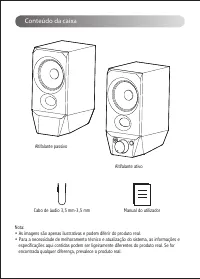
Altifalante passivo Altifalante ativo Nota: • As imagens são apenas ilustrativas e podem diferir do produto real. • Para a necessidade de melhoramento técnico e atualização do sistema, as informações e especificações aqui contidas podem ser ligeiramente diferentes do produto real. Se for encontrada ...
Page 39 - Operação funcional
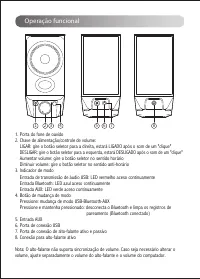
Operação funcional 1. Porta do fone de ouvido2. Chave de alimentação/controle de volume: LIGAR: gire o botão seletor para a direita, estará LIGADO após o som de um "clique" DESLIGAR: gire o botão seletor para a esquerda, estará DESLIGADO após o som de um "clique" Aumentar volume: gir...
Page 40 - Instruções de funcionamento; Conexão de transmissão de áudio USB
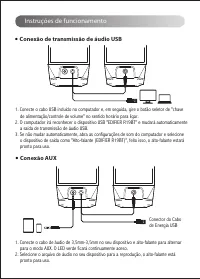
Instruções de funcionamento 1. Conecte o cabo USB incluído no computador e, em seguida, gire o botão seletor de "chave de alimentação/controle de volume" no sentido horário para ligar. 2. O computador irá reconhecer o dispositivo USB "EDIFIER R19BT" e mudará automaticamente a saída d...
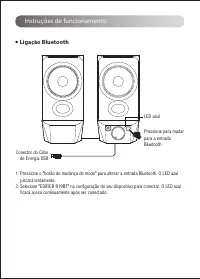
Page 41 - Ligação Bluetooth
1. Pressione o "botão de mudança de modo" para alterar a entrada Bluetooth. O LED azul piscará lentamente.2. Selecione "EDIFIER R19BT" na configuração do seu dispositivo para conectar. O LED azul ficará aceso continuamente após ser conectado. Ligação Bluetooth ● Instruções de funcion...
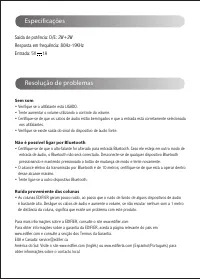
Page 42 - Sem som; Não é possível ligar por Bluetooth; Ruído proveniente das colunas; Especificações
Saída de potência: D/E: 2W+2W Resposta em frequência: 80Hz-19KHz Entrada: 5V 1A Sem som • Verifique se o altifalante está LIGADO. • Tente aumentar o volume utilizando o controle do volume. • Certifique-se de que os cabos de áudio estão bem ligados e que a entrada está corretamente selecionada nos al...
Page 44 - JP 安全上の重要事項
音楽の音量に注意してください。聴覚を損なうことがあります。音量は安全な範囲に 保ってください。 この記号は、法令や規制に従い、本機を廃棄またはリサイクルすることを示します。 • 説明書をよく読み、いつでも読めるように適切に保管してください。 • メーカーが指定した付属品/アクセサリーを使用してください。 • 本機を正しく接続するため、接続図の説明に従ってください。 • 本機は0-35℃の環境で使用することをおすすめします。本製品は0〜35℃の環境で配送およ び保管することをおすすめします。 • 火災、感電のおそれを少なくするため、雨天下を含め湿気の多い場所には本機を置かないで ...
Page 45 - 箱の中身
パッシブスピーカー アクティブスピーカー 注記: • 画像は参照用です。 • 技術的改善とシステムのアップグレードの必要性、 ここに含まれている情報と 仕様に対して、実際の製品は若干異なる場合があります。 差異があった場合、 実際の製品を優先します。 ユーザーズガイド 3.5mm-3.5mmオーディオケーブル 箱の中身
Page 46 - 機能の操作
機能の操作 1. イヤホンポート 2. 電源スイッチ/ボリュームコントロール 電源オン:つまみを右に回し、「クリック」のプロンプト音が聞こえたらオン になります 電源オフ:つまみを左に回し、「クリック」のプロンプト音が聞こえたらオフ になります ボリュームアップ:つまみを時計回りに回します ボリュームダウン:つまみを反時計回りに回します 3. モードインジケータ USB オーディオストリーミング入力:赤色LEDが点灯 Bluetooth入力:青色L...
Page 47 - 取扱の説明; USB オーディオストリーミング接続
取扱の説明 1. 同梱のUSBケーブルをコンピューターに接続し、「電源スイッチ/ボリュームコ ントロール」つまみを時計回りに回すと電源オンになります。 2. コンピューターは「EDIFIER R19BT」USBデバイスを認識し、USBオーディオス トリーミング出力へ自動的に切り替えます。 3. 自動的に切り替わらない場合、コンピューターのサウンド設定を開き、「スピ ーカー(EDIFIER R19BT)」として出力デバイスを選択すると、スピーカーを使用 できます。 USB オーディオストリーミング接続 ● 1. 3.5mm-3.5mmオーディオケーブルをデバイス...
Page 48 - Bluetooth接続
1.「モードスイッチボタン」を押して、Bluetooth入力に切り替えます。青色LED がゆっくり点滅します。2. 接続設定するデバイスで「EDIFIER R19BT」を選択します。接続後、青色LEDは 常に点灯します。 Bluetooth接続 ● 取扱の説明 スイッチを押してBluetooth入力に切替え 青色LED USB電源プラグ
Page 49 - 仕様
実用最大出力:R/L: 2W +2W再生周波数帯域:80Hz-19KHz入力:5V 1A 音が出ない • スピーカーがオンにしていますか。 • 音量調節で音量を上げてみてください。 • 接続したケーブルに異常はありませんか、 入力に合ったスイッチを選択してい るか確認します。 • 音源から信号が出力されているか確認します。 Bluetoothで接続できない • スピーカーが Bluetooth 入力にセットされているか確認してください。他のオ ーディオ入力モードにあると Bluetooth は接続しません。Bluetooth デバイス から切断するには、Blue...
Page 50 - ご注意
@Edif ierglobal @Edif ier̲Global @Edif ier̲Global モデル: EDF100039 Edif ier International LimitedP.O. Box 6264General Post Off iceHong Kong 電話: +852 2522 6989 ファックス: +852 2522 1989 www.edif ier.com© 2022 Edif ier International Limited. 禁無断転載 印刷: 中国 ご注意 本書に記載の情報は、技術の改良、システムのアップグレードなどのため、予告なく変更されることがあります...
Page 51 - There is no restriction of use.
Declaration for EUFrequency Band: 2.402GHz ~ 2.480GHzRF Power output: ≤ 10 dBm (EIRP) There is no restriction of use. Hereby, Edifier International Limited declares that the radio equipment type EDF100039 is in compliance with Directive 2014/53/EU. The full text of the EU declaration of conformity i...







 Edifier B700 User Manual
 Edifier D12 User Manual
 Edifier G2II User Manual
 Edifier G4 TE User Manual
 Edifier G33 User Manual
 Edifier G2000 User Manual
 Edifier GM5 User Manual
 Edifier GT4 S User Manual
 Edifier K800 User Manual
 Edifier MP100 Plus User Manual
 Edifier MP230 User Manual
 Edifier MS50A User Manual
 Edifier P180 User Manual
 Edifier P180 Plus User Manual