DeLonghi ESAM04110B - User Manual
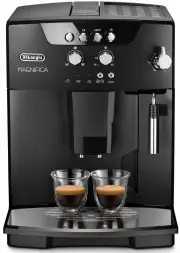
DeLonghi ESAM04110B Coffee Machine – User Manual, read for free online in PDF format. We hope this helps you resolve any issues you may have. If you have further questions, please contact us through the contact form.


Table of Contents:
- Page 8 – CONTENTS
- Page 9 – INTRODUCTION; Symbols used in these instructions; SAFETY; Fundamental safety warnings
- Page 10 – Description of the appliance
- Page 11 – ECO; PRELIMINARY CHECKS; Checking the appliance; TURNING THE APPLIANCE ON
- Page 12 – TURNING THE APPLIANCE OFF; ENERGY SAVING; MAKING COFFEE; Selecting the coffee taste
- Page 14 – UÊ iÛiÀÊ ÕÃiÊ ÀiÊ Ì >Ê iÊ iÛiÊ; MAKING CAPPUCCINO; Cleaning the cappuccino maker after use.; Important! Danger of burns
- Page 15 – Cleaning the coffee maker; UÊ Ê ÌÊ ÕÃiÊ iÌ>Ê LiVÌÃÊ ÌÊ ÀiÛiÊ iVÀÕ; Cleaning the coffee grounds container
- Page 17 – DESCALING; SETTING WATER HARDNESS; Measuring water hardness
- Page 18 – Set water hardness; TECHNICAL SPECIFICATION
- Page 21 – TROUBLESHOOTING; PROBLEM; The coffee is not hot; The milk is not frothed
- Page 22 – ELECTRICAL REQUIREMENTS; when the machine is not in use.; Warning - this appliance must be earthed
"Loading the manual" means you need to wait until the file loads and becomes available for online reading. Some manuals are very large, and the time they take to appear depends on your internet speed.
Was this manual helpful?
About this manual
- Brand
- DeLonghi
- Model
- ESAM04110B
- Document type
- User Manual
- Category
- Coffee Machine
- Language(s)
- English
- Pages
- 22
- File size
- 1.6 MB
- Format
Summary
6 CONTENTS INTRODUCTION .................................. 7 Symbols used in these instructions ................. 7Letters in brackets ............................................ 7Troubleshooting and repairs ............................. 7 S AFETY ............................................ 7 Fund...
7 INTRODUCTION Thank you for choosing the ESAM04.110 Bean to cup coffee maker.To get the best result of your new coffee machi-ne please readthese instructions carefully before use. This should ensure optimum results and maximum safety. Symbols used in these instructions Important warnings are identi...
8 DESIGNATED USE This appliance is designed and made to prepare coffee and heat drinks. All other use is considered improper.This appliance is not suitable for commercial use.The manufacturer is not liable for damage deri-ving from improper use of the appliance. This is a household appliance only. I...
Ask a question
Related manuals
Popular DeLonghi Coffee Machines

More DeLonghi Coffee Machines models
 DeLonghi EN650.B User Manual
 DeLonghi EN650.W User Manual
 DeLonghi EN750MB User Manual
 DeLonghi ENV120W User Manual
 DeLonghi ENV155TAE User Manual
 DeLonghi ENV300B User Manual
 DeLonghi ESAM 2000 Manual
 DeLonghi ESAM3000 User Manual
 DeLonghi ESAM6600 User Manual
 DeLonghi ETAM29660SB User Manual
 DeLonghi ICM 15250 User Manual
 DeLonghi ICM17210 User Manual
 DeLonghi Nespresso ENV120.W User Manual
 DeLonghi CAM51025MB User Manual
 DeLonghi EC230 User Manual
 DeLonghi EC260BK User Manual
 DeLonghi EC680BK User Manual
 DeLonghi EC680R User Manual