Page 3 - DellTM PowerEdgeTM 840 Systems; Getting Started
w w w . d e l l . c o m | s u p p o r t . d e l l . c o m Dell™ PowerEdge™ 840 Systems Getting Started With Your System
Page 5 - System Features
Getting Started With Your System 3 System Features This section describes the major hardware and software features of your system. It also provides information about other documents you may need when setting up your system and how to obtain technical assistance. Major hardware and software features ...
Page 6 - Supported Operating Systems
4 Getting Started With Your System • One 3.5-inch CD, DVD, or combination CD-RW/DVD in a peripheral drive bay. NOTE: DVD devices are data only. • Support for the following internal hard-drive configurations: – Up to four internal, 1-inch, SATA hard drives with integrated drive controllers. – Up to f...
Page 7 - Other Information You May Need; Obtaining Technical Assistance
Getting Started With Your System 5 Other Information You May Need CAUTION: The Product Information Guide provides important safety and regulatory information. Warranty information may be included within this document or as a separate document. • The Hardware Owner’s Manual provides information about...
Page 8 - Installation and Configuration; Unpacking the System
6 Getting Started With Your System Installation and Configuration CAUTION: Before performing the following procedure, read and follow the safety instructions and important regulatory information in your Product Information Guide . This section describes the steps to set up your system for the first ...
Page 9 - Connecting the Keyboard, Mouse, and Monitor
Getting Started With Your System 7 Connecting the Keyboard, Mouse, and Monitor Connect the keyboard, mouse, and monitor (optional). The connectors on the back of your system have icons indicating which cable to plug into each connector. Be sure to tighten the screws (if any) on the monitor's cable c...
Page 10 - Turning on the System; Complete the 0perating System Setup
8 Getting Started With Your System Turning on the System Turn on the system and monitor (optional). Press the power button on the system and the monitor. The power indicators should light. Adjust the monitor’s controls until the displayed image is satisfactory. Complete the 0perating System Setup If...
Page 11 - Technical Specifications
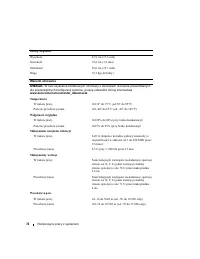
Getting Started With Your System 9 Technical Specifications Processor Processor type One Intel ® Core ™ 2 Duo processor or One Intel Celeron ® D, 300 sequence or One Intel Pentium ® 4, 600 sequence Expansion Buses Bus type PCIe, PCI-X, PCI Expansion slots PCIe One 3.3-V, x1 One 3.3-V, x8 PCI-X Two f...
Page 15 - Začínáme se systémem
w w w . d e l l . c o m | s u p p o r t . d e l l . c o m Dell™ PowerEdge™ 840 Systems Začínáme se systémem
Page 16 - Poznámky, upozornění a výstrahí
Poznámky, upozornění a výstrahí POZNÁMKA: POZNÁMKA označuje důležitou informaci, s jejíž pomocí lépe využijete svůj počítač. UPOZORNĚNÍ: UPOZORNĚNÍ poukazuje na možnost poškození hardwaru nebo ztráty dat a poskytuje návod, jak se danému problému vyhnout. POZOR: Výstraha („POZOR“) poukazuje na riziko...
Page 17 - Systémové funkce
Začínáme se systémem 15 Systémové funkce V této části jsou popsány hlavní hardwarové a softwarové funkce vašeho systému. Jsou v ní obsaženy i informace o doplňujících dokumentech, které příp. potřebujete při instalaci systému, a informace k odborné pomoci. Hlavní hardwarové a softwarové funkce systé...
Page 18 - Podporované operační systémy
16 Začínáme se systémem • Jedna 3,5 palcová CD, DVD mechanika nebo CD-RW/DVD kombo v periferní přihrádce disku. POZNÁMKA: DVD zařízení jsou určena pouze pro data. • Podpora pro následující interní konfigurace pevných disků: – až čtyři interní, 1 palec vysoké, SATA pevné disky s integrovanými diskový...
Page 19 - Další užitečné informace; Odborná pomoc
Začínáme se systémem 17 Další užitečné informace POZOR: Informační příručka výrobku obsahuje důležité bezpečnostní a právní informace. Informace o záruce je součástí tohoto dokumentu nebo je přiložena samostatně. • Uživatelská příručka k hardwaru obsahuje informaci o funkcích systému a popisuje řeše...
Page 20 - Instalace a konfigurace; Rozbalení systému
18 Začínáme se systémem Instalace a konfigurace POZOR: Před provedením následujícího postupu si pročtěte a postupujte podle bezpečnostních pokynů a důležitých předpisů uvedených v Informační příručce výrobku . V této části jsou popsány kroky, které je nutné provést při první instalaci vašeho systému...
Page 21 - Připojení klávesnice, myši a monitoru
Začínáme se systémem 19 Připojení klávesnice, myši a monitoru Připojte klávesnici, myš a monitor (volitelné). Konektory na zadní straně systému mají ikony znázorňující, který kabel připojit ke kterému konektoru. Zajistěte, aby šrouby na konektoru kabelu monitoru byly dobře dotaženy (je-li jimi konek...
Page 22 - Zapnutí systému; Dokončení nastavení operačního systému
20 Začínáme se systémem Zapnutí systému Zapněte systém a monitor (volitelný). Stiskněte vypínač na systému a na monitoru. Kontrolky napájení by se měly rozsvítit. Upravte ovládací prvky monitoru tak, aby byl obraz uspokojivý. Dokončení nastavení operačního systému Jestliže jste zakoupili systém s př...
Page 23 - Technická specifikace
Začínáme se systémem 21 Technická specifikace Procesor Typ procesoru jeden procesor Intel ® Core ™ 2 Duo nebo jeden procesor Intel Celeron ® D, řada 300 nebo jeden procesor Intel Pentium ® 4, řada 600 Rozšiřovací sběrnice Typ sběrnice PCIe, PCI-X, PCI Rozšiřovací sloty PCIe jeden 3,3 V, x1 jeden 3,3...
Page 27 - Systèmes DellTM PowerEdgeTM 840; Guide de mise
w w w . d e l l . c o m | s u p p o r t . d e l l . c o m Systèmes Dell™ PowerEdge™ 840 Guide de mise en route
Page 28 - Remarques, avis et précautions
Remarques, avis et précautions REMARQUE : une REMARQUE indique des informations importantes qui peuvent vous aider à mieux utiliser votre ordinateur. AVIS : un AVIS vous avertit d'un risque de dommage matériel ou de perte de données et vous indique comment éviter le problème. PRÉCAUTION : une PRÉCAU...
Page 29 - Caractéristiques du système
Guide de mise en route 27 Caractéristiques du système Cette section décrit les principales caractéristiques du système sur le plan matériel et logiciel. Elle contient également des informations sur les autres documents utiles à la configuration du système et sur l'obtention d'assistance technique. L...
Page 30 - Systèmes d'exploitation pris en charge
28 Guide de mise en route • Un lecteur 3,5 pouces de CD, DVD ou CD-RW/DVD dans une baie de périphérique REMARQUE : les périphériques DVD sont uniquement des périphériques de données. • Prise en charge des configurations suivantes pour disques durs internes : – Jusqu'à quatre disques durs SATA intern...
Page 31 - Autres informations utiles; Obtention d'une assistance technique
Guide de mise en route 29 • Red Hat Enterprise Linux ES (version 4) pour Intel EM64T • SUSE ® Linux Enterprise Server 9 avec Service Pack 2 ou suivant pour Intel EM64T • SUSE Linux Enterprise Server 10 pour Intel EM64T Autres informations utiles PRÉCAUTION : le document Product Information Guide (Gu...
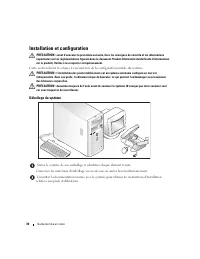
Page 32 - Installation et configuration; Déballage du système
30 Guide de mise en route Installation et configuration PRÉCAUTION : avant d'exécuter la procédure suivante, lisez les consignes de sécurité et les informations importantes sur les réglementations figurant dans le document Product Information Guide (Guide d'informations sur le produit). Veillez à le...
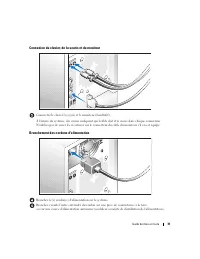
Page 33 - Connexion du clavier, de la souris et du moniteur
Guide de mise en route 31 Connexion du clavier, de la souris et du moniteur Connectez le clavier, la souris et le moniteur (facultatif). À l'arrière du système, des icônes indiquent quel câble doit être inséré dans chaque connecteur. N'oubliez pas de serrer les vis situées sur le connecteur du câble...
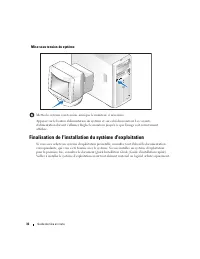
Page 34 - Mise sous tension du système; Finalisation de l'installation du système d'exploitation
32 Guide de mise en route Mise sous tension du système Mettez le système sous tension, ainsi que le moniteur, si nécessaire. Appuyez sur le bouton d'alimentation du système et sur celui du moniteur. Les voyants d'alimentation doivent s'allumer. Réglez le moniteur jusqu'à ce que l'image soit correcte...
Page 35 - Spécifications techniques
Guide de mise en route 33 Spécifications techniques Processeur Type de processeur Intel ® Core ™ 2 Duo ou Intel Celeron ® D, séquence 300 ou Intel Pentium ® 4, séquence 600 Bus d'extension Type de bus PCIe, PCI-X, PCI Logements d'extension PCIe x1 / 3,3 V : un x8 / 3,3 V : un PCI-X Pleine longueur/p...
Page 39 - DellTM PowerEdgeTM 840-Systeme; Erste Schritte
w w w . d e l l . c o m | s u p p o r t . d e l l . c o m Dell™ PowerEdge™ 840-Systeme Erste Schritte mit dem System
Page 40 - Anmerkungen, Hinweise und Warnungen
Anmerkungen, Hinweise und Warnungen ANMERKUNG: Eine ANMERKUNG macht auf wichtige Informationen aufmerksam, die die Arbeit mit dem Computer erleichtern. HINWEIS: Ein HINWEIS warnt vor möglichen Beschädigungen der Hardware oder vor Datenverlust und zeigt auf, wie derartige Probleme vermieden werden kö...
Page 41 - Systemmerkmale
Erste Schritte mit dem System 39 Systemmerkmale In diesem Kapitel sind die wesentlichen Hardware- und Softwaremerkmale des Systems beschrieben. Ferner erhalten Sie Informationen über weitere nützliche Dokumente, die zur Einrichtung des Systems benötigt werden. Hier erfahren Sie auch, wie Sie technis...
Page 42 - Unterstützte Betriebssysteme
40 Erste Schritte mit dem System • Ein 3,5-Zoll CD- oder DVD- Laufwerk oder eine CD-RW/DVD-Kombination in einem Peripherie-laufwerkschacht ANMERKUNG: DVD-Geräte sind reine Datenlaufwerke. • Folgende interne Festplattenkonfigurationen werden unterstützt: – Bis zu vier interne 1 Zoll hohe SATA-Festpla...
Page 43 - Weitere nützliche Informationen; Technische Unterstützung
Erste Schritte mit dem System 41 • Red Hat Enterprise Linux ES (Version 4) für Intel Extended Memory 64 Technologie (Intel EM64T) • SUSE ® Linux Enterprise Server 9 (Service Pack 2 oder höher) für Intel EM64T • SUSE Linux Enterprise Server 10 für Intel EM64T Weitere nützliche Informationen VORSICHT:...
Page 44 - Installation und Konfiguration; Auspacken des Systems
42 Erste Schritte mit dem System Installation und Konfiguration VORSICHT: Bevor Sie mit dem folgenden Vorgang beginnen, lesen und befolgen Sie die Sicherheitshinweise und die Betriebsbestimmungen im Product Information Guide (Produktinformationshandbuch). In diesem Abschnitt ist die erstmalige Einri...
Page 45 - Anschließen von Tastatur, Maus und Bildschirm
Erste Schritte mit dem System 43 Anschließen von Tastatur, Maus und Bildschirm Schließen Sie die Tastatur, die Maus und den Bildschirm (optional) an. Die Anschlüsse auf der Rückseite des Systems sind mit Symbolen gekennzeichnet, mit denen sich die entsprechenden Kabel zuordnen lassen. Denken Sie dar...
Page 46 - Einschalten des Systems; Einrichten des Betriebssystems
44 Erste Schritte mit dem System Einschalten des Systems Schalten Sie das System und den Bildschirm (optional) ein. Drücken Sie den Netzschalter am System und am Bildschirm. Daraufhin sollten die Betriebs-anzeigen aufleuchten. Stellen Sie den Bildschirm ein, bis die Anzeige zufriedenstellend ist. Ei...
Page 47 - Technische Daten
Erste Schritte mit dem System 45 Technische Daten Prozessor Prozessortyp Ein Prozessor Intel ® Core ™ 2 Duo oder Ein Prozessor Intel Celeron ® D, 300 Sequence oder Ein Prozessor Intel Pentium ® 4, 600 Sequence Erweiterungsbusse Bustyp PCIe, PCI-X, PCI Erweiterungssteckplätze PCIe Ein Steckplatz mit ...
Page 52 - Σημείωση, Ειδοποίηση και Προσοχή
Σηµείωση, Ειδοποίηση και Προσοχή ΣΗΜΕΙΩΣΗ: Η ένδειξη ΣΗΜΕΙΩΣΗ υποδεικνύει σηµαντικές πληροφορίες που σας βοηθούν να χρησιµοποιήσετε πιο σωστά τον υπολογιστή σας. ΕΙ∆ΟΠΟΙΗΣΗ: Η ένδειξη ΕΙ∆ΟΠΟΙΗΣΗ υποδεικνύει είτε πιθανή βλάβη του υλικού είτε απώλεια δεδοµένων και σας πληροφορεί πώς να αποφύγετε το πρ...
Page 53 - Χαρακτηριστικά συστήματος
Τα πρώτα βήµατα µε το σύστηµά σας 51 Χαρακτηριστικά συστήµατος Η ενότητα αυτή περιγράφει τα κύρια χαρακτηριστικά λογισµικού και υλικού του συστήµατός σας. Παρέχει επίσης πληροφορίες σχετικά µε άλλα έγγραφα που ενδέχεται να χρειαστείτε για τη ρύθµιση του συστήµατός σας και σχετικά µε τον τρόπο λήψης ...
Page 54 - Λειτουργικά συστήματα που υποστηρίζονται
52 Τα πρώτα βήµατα µε το σύστηµά σας • Μια µονάδα CD, DVD 3,5 ιντσών ή µια µονάδα συνδυασµού CD-RW/DVD σε ένα περιφερειακό φατνίο µονάδας. ΣΗΜΕΙΩΣΗ: Οι µονάδες DVD είναι µόνο για δεδοµένα. • Υποστήριξη για τις ακόλουθες διαµορφώσεις εσωτερικών µονάδων σκληρού δίσκου: – Έως τέσσερις εσωτερικές µονάδε...
Page 55 - Άλλες πληροφορίες που ενδέχεται να χρειαστείτε; Λήψη τεχνικής βοήθειας
Τα πρώτα βήµατα µε το σύστηµά σας 53 • Red Hat Enterprise Linux ES (έκδοση 4) για την τεχνολογία Extended Memory 64 της Intel (Intel EM64T) • SUSE ® Linux Enterprise Server 9 (Service Pack 2 ή νεότερο) για Intel EM64T • SUSE Linux Enterprise Server 10 για Intel EM64T Άλλες πληροφορίες που ενδέχεται ...
Page 56 - Εγκατάσταση και διαμόρφωση; Άνοιγμα της συσκευασίας του συστήματος
54 Τα πρώτα βήµατα µε το σύστηµά σας Εγκατάσταση και διαµόρφωση ΠΡΟΣΟΧΗ: Προτού πραγµατοποιήσετε την παρακάτω διαδικασία, διαβάστε και ακολουθήστε τις οδηγίες ασφαλείας και τους σηµαντικούς ρυθµιστικούς κανόνες στον Οδηγό πληροφοριών προϊόντος . Η ενότητα αυτή περιγράφει τα βήµατα για την αρχική ρύθ...
Page 57 - Σύνδεση πληκτρολογίου, ποντικιού και οθόνης
Τα πρώτα βήµατα µε το σύστηµά σας 55 Σύνδεση πληκτρολογίου, ποντικιού και οθόνης Συνδέστε το πληκτρολόγιο, το ποντίκι και την οθόνη (προαιρετική). Οι συζευκτήρες στο πίσω µέρος του συστήµατος έχουν εικονίδια τα οποία υποδεικνύουν το καλώδιο που συνδέεται σε κάθε συζευκτήρα. Πρέπει να σφίξετε τις βίδ...
Page 58 - Θέση του συστήματος σε λειτουργία; Ολοκλήρωση της εγκατάστασης του λειτουργικού
56 Τα πρώτα βήµατα µε το σύστηµά σας Θέση του συστήµατος σε λειτουργία Θέστε σε λειτουργία το σύστηµα και την οθόνη (προαιρετικά). Πιέστε το κουµπί λειτουργίας στο σύστηµα και την οθόνη. Πρέπει να ανάψουν οι ενδείξεις λειτουργίας. Ρυθµίστε τα κουµπιά ελέγχου της οθόνης ώσπου η εικόνα που εµφανίζεται...
Page 59 - Τεχνικές προδιαγραφές
Τα πρώτα βήµατα µε το σύστηµά σας 57 Τεχνικές προδιαγραφές Επεξεργαστής Τύπος επεξεργαστή Ενας επεξεργαστης Intel ® Core ™ 2 Duo ηΕνας επεξεργαστης Intel Celeron ® D, της σειρας 300ηΕνας επεξεργαστης Intel Pentium ® 4, της σειρας 600 ∆ίαυλοι επέκτασης Τύπος διαύλου PCIe, PCI-X, PCI Υποδοχές επέκταση...
Page 63 - Systemy DellTM PowerEdgeTM 840; Rozpoczęcie pracy
w w w . d e l l . c o m | s u p p o r t . d e l l . c o m Systemy Dell™ PowerEdge™ 840 Rozpoczęcie pracy z systemem
Page 64 - Uwagi, pouczenia i ostrzeżenia
Uwagi, pouczenia i ostrzeżenia UWAGA: UWAGA oznacza ważną informację pozwalającą na lepsze wykorzystanie możliwości komputera. POUCZENIE: POUCZENIE wskazuje na możliwość uszkodzenia sprzętu lub utraty danych i informuje o sposobie uniknięcia problemu. OSTRZEŻENIE: OSTRZEŻENIE wskazuje na możliwość w...
Page 65 - Funkcje systemu
Rozpoczęcie pracy z systemem 63 Funkcje systemu Ta sekcja opisuje najważniejsze cechy sprzętu i oprogramowania wchodzącego w skład systemu. Dostarcza ona również informacji o innych dokumentach niezbędnych podczas konfiguracji systemu oraz informuje o sposobie uzyskania pomocy technicznej. Sprzęt i ...
Page 66 - Obsługiwane systemy operacyjne
64 Rozpoczęcie pracy z systemem • Jeden 3,5 calowy napęd CD, DV lub napęd combo CD-RW/DVD we wnęce na napęd peryferyjny. UWAGA: Urządzenia DVD są przeznaczone wyłącznie dla danych. • Obsługa następujących konfiguracji wewnętrznych dysków twardych: – maksymalnie cztery wewnętrzne 1 calowe dyski tward...
Page 67 - Inne przydatne informacje; Uzyskiwanie pomocy technicznej
Rozpoczęcie pracy z systemem 65 • Red Hat® Enterprise Linux ES (wersja 4) dla technologii Intel Extended Memory 64 (Intel EM64T) • SUSE ® Linux Enterprise Server 9 (Service Pack 2 lub wersja późniejsza) dla Intel EM64T • SUSE® Linux Enterprise Server 10 dla Intel EM64T Inne przydatne informacje OSTR...
Page 68 - Instalacja i konfiguracja; Rozpakowanie zestawu komputerowego
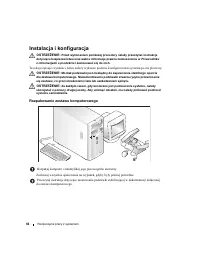
66 Rozpoczęcie pracy z systemem Instalacja i konfiguracja OSTRZEŻENIE: Przed wykonaniem poniższej procedury należy przeczytać instrukcje dotyczące bezpieczeństwa oraz ważne informacje prawne zamieszczone w Przewodniku z informacjami o produkcie i zastosować się do nich. Ta sekcja opisuje czynności, ...
Page 69 - Podłączanie klawiatury, myszy i monitora
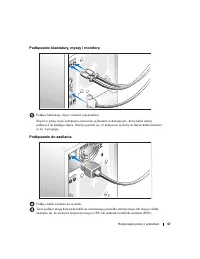
Rozpoczęcie pracy z systemem 67 Podłączanie klawiatury, myszy i monitora Podłącz klawiaturę, mysz i monitor (opcjonalnie). Złącza w tylnej części komputera oznaczone są ikonami wskazującymi , który kabel należy podłączyć do każdego złącza. Należy upewnić się, że dokręcone są śruby na złączu kabla mo...
Page 70 - Włączanie komputera; Skonfiguruj system operacyjny
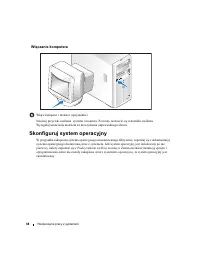
68 Rozpoczęcie pracy z systemem Włączanie komputera Włącz komputer i monitor (opcjonalnie). Naciśnij przyciski zasilania systemu i monitora. Powinny zaświecić się wskaźniki zasilania. Wyreguluj ustawienia monitora aż do uzyskania odpowiedniego obrazu. Skonfiguruj system operacyjny W przypadku zakupi...
Page 71 - Specyfikacja techniczna
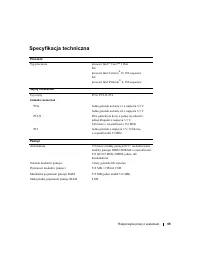
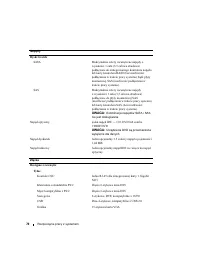
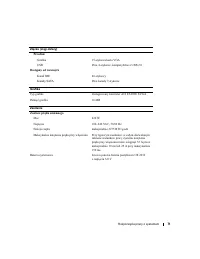
Rozpoczęcie pracy z systemem 69 Specyfikacja techniczna Procesor Typ procesora procesor Intel ® Core ™ 2 Duo lub procesor Intel Celeron ® D, 300 sequence lub procesor Intel Pentium ® 4, 600 sequence. Szyny rozszerzeń Typ szyny PCIe, PCI-X, PCI Gniazda rozszerzeń PCIe Jedno gniazdo na kartę x1 o napi...
Page 75 - Системы DellTM PowerEdgeTM 840; Начало работы
w w w . d e l l . c o m | s u p p o r t . d e l l . c o m Системы Dell™ PowerEdge™ 840 Начало работы с системой
Page 76 - Примечания, символы внимания и предупреждения
Примечания, символы внимания и предупреждения ПРИМЕЧАНИЕ: Подзаголовок ПРИМЕЧАНИЕ указывает на важную информацию, которая поможет использовать компьютер более эффективно. ВНИМАНИЕ: “ВНИМАНИЕ” указывает на возможность повреждения оборудования или потери данных и объясняет, как этого избежать. ПРЕДУПР...
Page 77 - Компоненты системы
Начало работы с системой 75 Компоненты системы В этом разделе описываются основные характеристики аппаратного и программного обеспечения системы. Кроме того, в ней содержится информация о других документах, которые могут быть полезны при настройке системы, и о порядке получения технической поддержки...
Page 78 - Поддерживаемые операционные системы
76 Начало работы с системой • Один 3,5 дюймовый дисковод компакт-дисков, дисков DVD или комбинированное устройство CD-RW/DVD в периферийном отсеке дисковода. ПРИМЕЧАНИЕ: Дисководы DVD предназначены только для данных. • Поддержка следующих конфигураций внутренних жестких дисков: – до четырех 1-дюймов...
Page 79 - Дополнительная полезная информация; Порядок получения технической поддержки
Начало работы с системой 77 • Red Hat Enterprise Linux ES (версия 4) для технологии Extended Memory 64 компании Intel (Intel EM64T) • SUSE ® Linux Enterprise Server 9 (Service Pack 2 или более поздней версии) для Intel EM64T • SUSE Linux Enterprise Server 10 для Intel EM64T Дополнительная полезная и...
Page 80 - Установка и настройка; Распаковка системы
78 Начало работы с системой Установка и настройка ПРЕДУПРЕЖДЕНИЕ: Перед выполнением описанных ниже процедур ознакомьтесь с инструкциями по технике безопасности и важной нормативной информацией, содержащейся в документе Информационное руководство по продуктам . В данном разделе описываются действия п...
Page 81 - Подключение клавиатуры, мыши и монитора
Начало работы с системой 79 Подключение клавиатуры, мыши и монитора Подключите клавиатуру, мышь и монитор (дополнительно). Разъемы на задней панели системы снабжены значками, позволяющими определить правильное подключение кабелей. На разъеме кабеля монитора необходимо затянуть винты (если они имеютс...
Page 82 - Включение системы; Завершение установки операционной системы
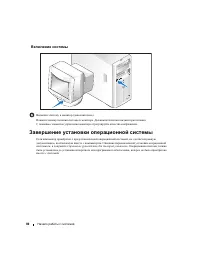
80 Начало работы с системой Включение системы Включите систему и монитор (дополнительно). Нажмите кнопку питания системы и монитора. Должны включиться индикаторы питания. С помощью элементов управления монитора отрегулируйте качество изображения. Завершение установки операционной системы Если компью...
Page 83 - Технические характеристики
Начало работы с системой 81 Технические характеристики Процессор Тип процессора Один процессор Intel ® Core ™ 2 Duo или один процессор Intel Celeron ® D серии 300 или Один процессор Intel Pentium ® 4 серии 600 Шины расширения Тип шины PCIe, PCI-X, PCI Разъемы расширения PCIe Один разъем x1 с питание...
Page 87 - Sistemas DellTM PowerEdgeTM 840; Procedimientos iniciales
w w w . d e l l . c o m | s u p p o r t . d e l l . c o m Sistemas Dell™ PowerEdge™ 840 Procedimientos iniciales con el sistema
Page 88 - Notas, avisos y precauciones
Notas, avisos y precauciones NOTA: una NOTA proporciona información importante que le ayudará a utilizar mejor el ordenador. AVISO: un AVISO indica la posibilidad de daños en el hardware o la pérdida de datos, e informa de cómo evitar el problema. PRECAUCIÓN: un mensaje de PRECAUCIÓN indica el riesg...
Page 89 - Componentes del sistema
Procedimientos iniciales con el sistema 87 Componentes del sistema En esta sección se describen los principales componentes de hardware y software del sistema. También se ofrece información sobre otros documentos que puede necesitar para instalar el sistema y sobre cómo obtener asistencia técnica. L...
Page 91 - Sistemas operativos admitidos; Otra información útil
Procedimientos iniciales con el sistema 89 Sistemas operativos admitidos El sistema admite los sistemas operativos siguientes: • Microsoft Windows Server ™ 2003, Standard Edition y Web Edition • Microsoft Windows Server 2003, Standard Edition de 64 bits • Red Hat ® Enterprise Linux ES (versión 3) pa...
Page 92 - Obtención de asistencia técnica; Instalación y configuración; Desembalaje del sistema
90 Procedimientos iniciales con el sistema Obtención de asistencia técnica Si no comprende algún procedimiento descrito en esta guía o si el sistema no funciona del modo esperado, consulte el Manual del propietario del hardware . Tiene a su disposición el servicio de formación y certificación Dell p...
Page 93 - Conexión del teclado, el ratón y el monitor
Procedimientos iniciales con el sistema 91 Conexión del teclado, el ratón y el monitor Conecte el teclado, el ratón y el monitor (opcional). Los conectores de la parte posterior del sistema tienen iconos que indican qué cable enchufar a cada conector. Asegúrese de apretar los tornillos (si los hubie...
Page 94 - Encendido del sistema; Finalización de la configuración del sistema operativo
92 Procedimientos iniciales con el sistema Encendido del sistema Encienda el sistema y el monitor (opcional). Presione el botón de encendido del sistema y del monitor. Deberán encenderse los indicadores de alimentación. Ajuste los controles del monitor hasta que la imagen mostrada sea satisfactoria....
Page 95 - Especificaciones técnicas
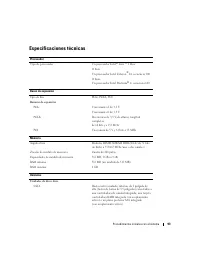
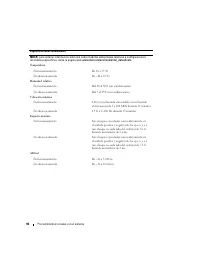
Procedimientos iniciales con el sistema 93 Especificaciones técnicas Procesador Tipo de procesador Un procesador Intel ® Core ™ 2 Duo O bien: Un procesador Intel Celeron ® D, secuencia 300 O bien: Un procesador Intel Pentium ® 4, secuencia 600 Buses de expansión Tipo de bus PCIe, PCI-X, PCI Ranuras ...
Page 99 - הביבס יאנת
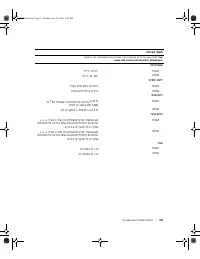
108 | תכרעמה םע הדובעה תליחת הביבס יאנת הצע : תויפיצפס תכרעמ תורוצת רובע תויתביבס תודימ לע ףסונ עדימל , תבותכב רקב www.dell.com/environmental_datasheets . הרוטרפמט 10° דע 35°C הלעפה -40° ע ד 65°C וסחא תיסחי תוחל 20% דע 80% ) יוביע אלל ( הלעפה 5% דע 95% ) יוביע אלל ( וסחא יברמ טטר 0.26 G ) סוניס יצח ...
Page 100 - ואדיו; תויזיפ תודימ
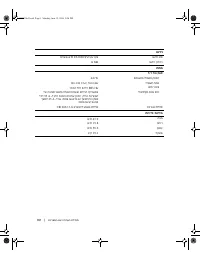
תכרעמה םע הדובעה תליחת | 107 ואדיו רקב ATI ES1000 SVGA בלושמ ואדיו גוס 16 MB ואדיו ורכיז חתמ ז חוכ קפס " ח 420 W יטאווב ילמשח קפסה 100–240 VAC, 50/60 Hz ילמשח חתמ 2275 BTU/hr רתויה לכל וח רוזיפ לש הביבס יאנתב הלעפה חווטבו יליגר וק יאנתב הלוכ תכרעמה , ל עיגי סנכנה רזהש כתיי 55 A לכל שמל חוכ קפס 1...
Page 101 - םיננוכ; םירבחמ
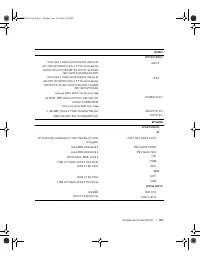
106 | תכרעמה םע הדובעה תליחת םיננוכ יננוכ יחישק יימינפ יננוכ העברא דע , הבוגב 1 ניא ' ) גד form factor , לדוג 3.5 ניא ' ( נוכ רקבל ירבוחמה מ רקב סיטרכל וא בלוש RAID ) ח רוביח אלל ( וא גוסמ א חולל SAS ) ח רוביח ( SATA יימינפ יננוכ העברא דע , הבוגב 1 ניא ' ) גד form factor , לדוג 3.5 ניא ' ( א חולל יר...
Page 102 - םיינכט םיטרפמ; דבעמ; הבחרה קיפא; ןורכיז
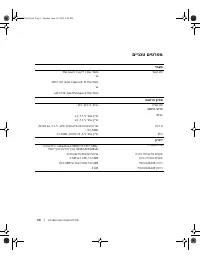
תכרעמה םע הדובעה תליחת | 105 םיינכט םיטרפמ דבעמ דבעמ Intel® Core™ 2 Duo דחא דבעמ גוס וא דבעמ דחא Intel Celeron® D , הרדס 300 וא דבעמ דחא Intel Pentium 4 , הרדס 600 הבחרה קיפא PCIe , PCI-X , PCI קיפא גוס הבחרה יצירח דחא ירח 3.3-V , x1 PCIe דחא ירח 3.3-V , x8 אלמ רואו אלמ הבוגב יצירח ינש , 3.3-V , 64 ...
Page 103 - תכרעמה תקלדה; הריהמה הנקתהה ירדמ
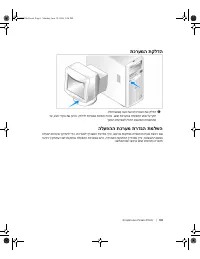
104 | תכרעמה םע הדובעה תליחת תכרעמה תקלדה 6 גצה תאו תכרעמה תא קלדה ) ילנויצפוא .( גצבו תכרעמב הלעפהה גתמ לע חל . מה תורונ קולדל תורומא חת . גצה ירקב תא נווכ , דע נוצר תועיבשל היהת תגצומה הנומתהש . הלעפהה תכרעמ תרדגה תמלשה שארמ תנקתומ הלעפה תכרעמ תשכר א , תכרעמל רוצמה דועיתב ייע . הלעפה תכרעמ יקתהל י...
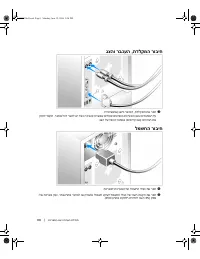
Page 104 - תדלקמה רוביח
תכרעמה םע הדובעה תליחת | 103 תדלקמה רוביח , גצהו רבכעה 3 תדלקמה תא רבח , גצהו רבכעה ) ילנויצפוא .( רבחמ לכל רבחל שי לבכ הזיא ינייצמש ילמס יעיפומ תכרעמה בגב ירבחמה לע . קזחל דפקה יגרבה תא ) ימייק א ( גצה לש לבכה רבחמב . ה רוביח למשח 4 תכרעמל תכרעמה לש למשחה ילבכ תא רבח . 5 רחא חתמ רוקמל וא קראומ ילמש...
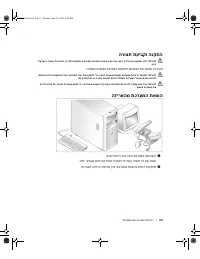
Page 105 - הרוצת תעיבקו הנקתה; הנושארה עפב תכרעמה תנקתהל יבלשה תא ראתמ הז יעס; הזיראהמ תכרעמה תאצוה; יטירפה לכ תא ההזו תכרעמה תא אצוה
102 | תכרעמה םע הדובעה תליחת הרוצת תעיבקו הנקתה תוריהז : אבה ךילהה תא עצבתש ינפל , טבה תוארוה תא ארק ב תונקתה עדימ תאו תוחי רצומה לע עדימה ךירדמ , לע לעפו - ןהיפ . הנושארה עפב תכרעמה תנקתהל יבלשה תא ראתמ הז יעס . תוריהז : תכרעמב תוילגרה תנקתה tower תכרעמל ביצי סיסב קפסל ידכ השורד תיאמצע . תמרוג תויל...
Page 106 - ךל עייסל יושעש ףסונ עדימ; הרמוחה לש ילעבה ירדמ; ינכט עויס תלבק; ילעבל ירדמ
תכרעמה םע הדובעה תליחת | 101 ךל עייסל יושעש ףסונ עדימ תוריהז : רצומה לע עדימה ךירדמ תונקתו תוחיטב אשונב בושח עדימ קפסמ . וא הז ךמסמב לולכ תוירחאה לע עדימש ןכתיי דרפנ ךמסמב . הרמוחה לש ילעבה ירדמ תכרעמה תונוכת לע עדימ קפסמ , כ ראתמו תויעב רותפל דצי תכרעמב , תכרעמה יביכר תא ילחהל וא יקתהלו . הרמוחה לש...
Page 107 - הרמוחה לש ילעבל ירדמ; תוכמתנ הלעפה תוכרעמ
100 | תכרעמה םע הדובעה תליחת הצע : יננוכ רשאכ קר תכמתנ םח רוביח תלוכי SATA וא SAS רקב סיטרכל םירבוחמ SAS םא חולל וא ילנויצפוא . ילנויצפוא קוחרמ השיג רקב ) DRAC 4 ( קוחרמ תוכרעמ לוהינל . ירח תבייחמ וז תורשפא PCI ידועיי . חוכ קפס 420-W דחא . תויפיצפס תונוכת לע סונ עדימ תלבקל , האר " יטרפמ יינכט .&...
Page 108 - תכרעמה תונוכת
תכרעמה םע הדובעה תליחת | 99 תכרעמה תונוכת תכרעמה לש תויזכרמה הנכותהו הרמוחה תונוכת תא ראתמ הז יעס . לע עדימ ג ללוכ הז יעס תכרעמה תנקתה תעב קקדזהל יושע התא הלש ירחא יכמסמ , ינכט עויס לבקל דציכו . הנכותהו הרמוחה תונוכת תוללוכ תכרעמה לש תויזכרמה : יאבה ידבעמהמ דחא : - דחא דבעמ Intel® Core™ 2 Duo - דבעמ...
Page 110 - תוכרעמ
תוכרעמ Dell™ PowerEdge™ 840 תכרעמה םע הדובעה תליחת w w w . d e l l . c o m | s u p p o r t . d e l l . c o m HJ031bk0.book Page 1 Monday, June 19, 2006 5:06 PM






















 Dell PowerEdge 350 User Manual
 Dell PowerEdge 650 User Manual
 Dell PowerEdge 700 User Manual
 Dell PowerEdge 750 User Manual
 Dell PowerEdge 800 User Manual
 Dell PowerEdge 830 User Manual
 Dell PowerEdge 850 User Manual
 Dell PowerEdge 860 Quick Guide
 Dell PowerEdge 1550 User Manual
 Dell PowerEdge 1600SC User Manual
 Dell PowerEdge 1750 Troubleshooting Guide