Page 2 - IMPORTANT SAFETY INSTRUCTIONS; PRECAUTIONS; Be sure to follow the instructions; If you notice any abnormality; WARNING
i En The above warning is located on the rear of the unit. Explanation of Graphical Symbols The lightning flash with arrowhead symbol within an equilateral triangle is intended to alert the user to the presence of uninsulated “dangerous voltage” within the product’s enclosure that may be of sufficie...
Page 3 - ii; English; CAUTION
ii En English • If you plan not to use the product for a long period of time, remove the power cord plug from the AC outlets.Otherwise, fire or damage to the product may be caused. Do not disassemble • Do not modify or disassemble this product. Otherwise, fire, electrical shock, injury or damage to ...
Page 4 - iii; Precautions for use; NOTICE; Important information; NOTE
iii En • Before turning on the power to or using this product, set the volume level to minimum. Before turning off the power to this product, set the volume levels of this product and all connected devices to minimum.Otherwise, hearing loss or damage to the product may be caused. • When turning on t...
Page 5 - CONTENTS; About this manual; USEFUL FEATURES
1 En E ngl ish USEFUL FEATURES ................................... 1SUPPLIED ACCESSORIES......................... 1CONTROLS AND FUNCTIONS ................. 2 Front panel ........................................................2Rear panel .........................................................4Remo...
Page 6 - CONTROLS AND FUNCTIONS; Front panel
2 En 1 A (power) switch Turns on and off the power of this unit. Even when this unit is turned off, this unit consumes a small amount of power. 2 Power indicator 3 Remote control sensor Receives infrared signals from the remote control. 4 PHONES jack Connect your headphones. 5 SPEAKERS selector 6 BA...
Page 7 - ngl; PURE DIRECT button and indicator
CONTROLS AND FUNCTIONS 3 En E ngl ish 8 BALANCE control Adjusts the sound output balance of the left and right speakers to compensate for sound imbalances. If you rotate the BALANCE control to the end of L (left) or R (right), the opposite side of channel is muted. 9 LOUDNESS control Retain a full t...
Page 8 - Rear panel
CONTROLS AND FUNCTIONS 4 En 1 CD input jacks Used to connect a CD player (see page 9). 2 PHONO jacks and GND terminal Used to connect a turntable that uses an MM cartridge, and to ground the terminal (see page 9). 3 Audio input/output jacks Used to connect external components, such as a tuner, etc (...
Page 10 - Infrared signal transmitter; AMP; CD
CONTROLS AND FUNCTIONS 6 En 1 Infrared signal transmitter Sends infrared signals. 2 A AMP Turns this unit on, or sets it to standby mode. 3 OPEN/CLOSE Opens/closes the disc tray of the Yamaha CD player.Refer to the owner’s manual of your CD player for details. Even when using a Yamaha CD player, cer...
Page 12 - Installing batteries; Notes on remote control and batteries
CONTROLS AND FUNCTIONS 8 En ■ Installing batteries ■ Operation range Point the remote control at the remote control sensor on this unit and remain within the operating range shown below. ■ Notes on remote control and batteries • The area between the remote control and this unit must be clear of larg...
Page 13 - CONNECTIONS; Connecting speakers and source components
9 En E ngl ish Make sure to connect L (left) to L, R (right) to R, “+” to “+” and “–” to “–”. If the connections are faulty, no sound will be heard from the speakers, and if the polarity of the speaker connections is incorrect, the sound will be unnatural and lack bass. Refer to the owner’s manual f...
Page 14 - REC jacks; Connecting speaker cables; Connecting power cable
10 En CONNECTIONS ■ REC jacks • The audio signals are not output via the LINE 2 REC or LINE 3 REC output jacks when LINE 2 or LINE 3 is selected with the INPUT selector. • The VOLUME, BASS, TREBLE, BALANCE and LOUDNESS controls and the CD DIRECT function (or the PURE DIRECT function) have no effect ...
Page 15 - Play the selected input source.; PLAYBACK; Playing a source
11 En E ngl ish 1 Rotate the VOLUME control on the front panel fully counter-clockwise so as not to play sounds loud suddenly. 2 Press A (power) switch on the front panel inward to turn on this unit. 3 Rotate the INPUT selector on the front panel (or press one of the Input selector buttons on the re...
Page 16 - AFTER lowering the; Adjusting to the desired sound; CD Direct Amp feature
12 En PLAYBACK ■ Making it easier to hear the high- and low-frequency ranges even at low volume (LOUDNESS) Enjoy natural sound even at low volume by lowering the mid-range sound level and compensating for the human ears’ loss of sensitivity to high- and low-frequency ranges at low volume. If the CD ...
Page 17 - TROUBLESHOOTING
13 En E ngl ish Refer to the chart below if this unit does not function properly. If the problem you are experiencing is not listed below or if the instructions below do not help, turn off this unit, disconnect the power cable, and then contact the nearest authorized Yamaha dealer or service center....
Page 19 - SPECIFICATIONS
15 En E ngl ish AUDIO SECTION SPECIFICATIONS Item A-S701 A-S501 A-S301 Minimum RMS output power 8 Ω , 20 Hz to 20 kHz, 0.019% THD 100 W + 100 W 85 W + 85 W 60 W + 60 W 6 Ω , 20 Hz to 20 kHz, 0.038% THD (Except for Asia and China models) 120 W + 120 W 100 W + 100 W 70 W + 70 W Dynamic power per chann...
Page 20 - GENERAL
16 En SPECIFICATIONS GENERAL * The contents of this manual apply to the latest specifications as of the publishing date. To obtain the latest manual, access the Yamaha website then download the manual file. Signal to noise ratio (IHF-A network) PHONO (MM) (5 mV input shorted) 82 dB or more CD, etc. ...
Page 22 - PRÉCAUTIONS D’USAGE; En cas d’anomalie; AT T E N T I O N; AVERTISSEMENT
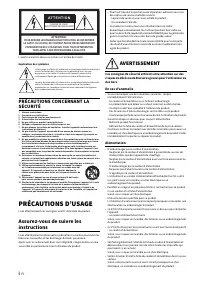
i Fr L’avertissement ci-dessus est situé sur l’arrière de l’unité. Explication des symboles L’éclair avec une flèche à l’intérieur d’un triangle équilatéral est destiné à attirer l’attention de l’utilisateur sur la présence d’une « tension dangereuse » non isolée à l’intérieur de l’appareil, pouvant...
Page 23 - Fran; ATTENTION
ii Fr Fran çai s • Insérez la fiche du cordon d’alimentation dans une prise secteur visible et facilement accessible.En cas de problème ou de dysfonctionnement, vous devez être en mesure de débrancher immédiatement la fiche d’alimentation de la prise secteur. Même lorsque l’interrupteur d’alimentati...
Page 24 - Précautions d’emploi; AVIS; Informations importantes
iii Fr • (A-S701, A-S501) Pour transporter ou déplacer ce produit, veillez à toujours vous faire aider par au moins une personne.Toute tentative de soulever le produit effectuée par une personne seule ou des personnes ne disposant pas de la force nécessaire pourrait causer des blessures au dos. En o...
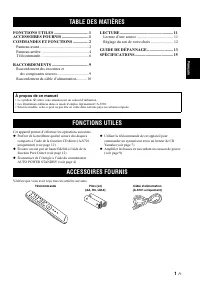
Page 25 - TABLE DES MATIÈRES; À propos de ce manuel; FONCTIONS UTILES
1 Fr Français FONCTIONS UTILES .................................. 1ACCESSOIRES FOURNIS .......................... 1COMMANDES ET FONCTIONS ............... 2 Panneau avant ...................................................2Panneau arrière .................................................4Télécommande...
Page 26 - COMMANDES ET FONCTIONS; Panneau avant
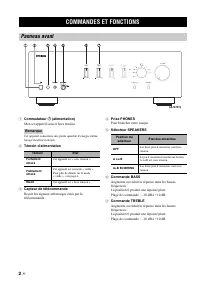
2 Fr 1 Commutateur A (alimentation) Met cet appareil sous et hors tension. Cet appareil consomme une petite quantité d’énergie même lorsqu’il est hors tension. 2 Témoin d’alimentation 3 Capteur de télécommande Reçoit les signaux infrarouges émis par la télécommande. 4 Prise PHONES Pour brancher votr...
Page 27 - Français; Touche et témoin PURE DIRECT
COMMANDES ET FONCTIONS 3 Fr Français 8 Commande BALANCE Équilibre le son reproduit par les enceintes gauche et droite afin de compenser le déséquilibre sonore. Si vous tournez la commande BALANCE jusqu’à l’extrémité de L (gauche) ou R (droite), le son du côté opposé du canal est désactivé. 9 Command...
Page 28 - Panneau arrière
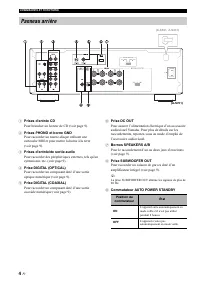
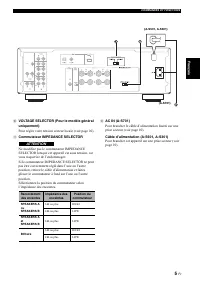
COMMANDES ET FONCTIONS 4 Fr 1 Prises d’entrée CD Pour brancher un lecteur de CD (voir page 9). 2 Prises PHONO et borne GND Pour raccorder un tourne-disque utilisant une cartouche MM et pour mettre la borne à la terre (voir page 9). 3 Prises d’entrée/de sortie audio Pour raccorder des périphériques e...
Page 30 - Émetteur de signal infrarouge
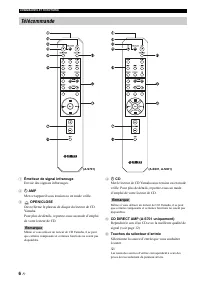
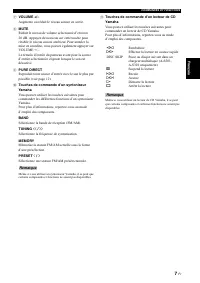
COMMANDES ET FONCTIONS 6 Fr 1 Émetteur de signal infrarouge Envoie des signaux infrarouges. 2 A AMP Met cet appareil sous tension ou en mode veille. 3 OPEN/CLOSE Ouvre/ferme le plateau de disque du lecteur de CD Yamaha.Pour plus de détails, reportez-vous au mode d’emploi de votre lecteur de CD. Même...
Page 32 - Installation des piles; Remarques sur la télécommande et les piles
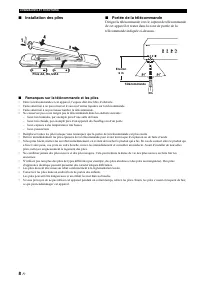
COMMANDES ET FONCTIONS 8 Fr ■ Installation des piles ■ Portée de la télécommande Dirigez la télécommande vers le capteur de télécommande de cet appareil et restez dans la zone de portée de la télécommande indiquée ci-dessous. ■ Remarques sur la télécommande et les piles • Entre la télécommande et ce...
Page 33 - RACCORDEMENTS; Raccordement des enceintes et des composants sources
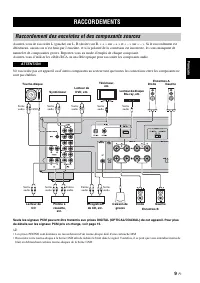
9 Fr Français Assurez-vous de raccorder L (gauche) sur L, R (droite) sur R, « + » sur « + » et « – » sur « – ». Si le raccordement est défectueux, aucun son n’est émis par l’enceinte, et si la polarité de la connexion est incorrecte, les sons manquent de naturel et de composantes graves. Reportez-vo...
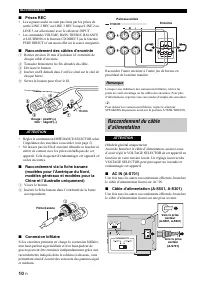
Page 34 - Prises REC; Raccordement des câbles d’enceinte; Connexion bifilaire
10 Fr RACCORDEMENTS ■ Prises REC • Les signaux audio ne sont pas émis par les prises de sortie LINE 2 REC ou LINE 3 REC lorsque LINE 2 ou LINE 3 est sélectionné avec le sélecteur INPUT. • Les commandes VOLUME, BASS, TREBLE, BALANCE et LOUDNESS et la fonction CD DIRECT (ou la fonction PURE DIRECT) n’...
Page 35 - LECTURE; Lecture d’une source
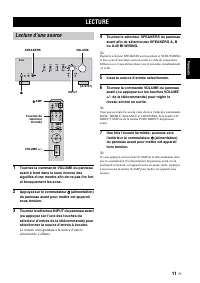
11 Fr Français 1 Tournez la commande VOLUME du panneau avant à fond dans le sens inverse des aiguilles d’une montre afin de ne pas lire fort et brusquement les sons. 2 Appuyez sur le commutateur A (alimentation) du panneau avant pour mettre cet appareil sous tension. 3 Tournez le sélecteur INPUT du ...
Page 36 - APRÈS avoir réduit; Réglage du son de votre choix; Fonction CD Direct Amp
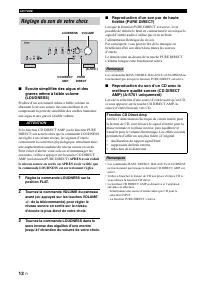
12 Fr LECTURE ■ Écoute simplifiée des aigus et des graves même à faible volume (LOUDNESS) Profitez d’un son naturel même à faible volume en abaissant le niveau sonore des sons médium et en compensant la perte de sensibilité des oreilles humaines aux aigus et aux graves à faible volume. Si la fonctio...
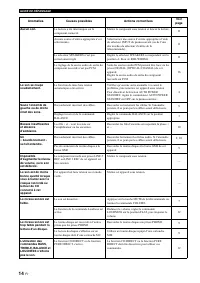
Page 37 - GUIDE DE DÉPANNAGE
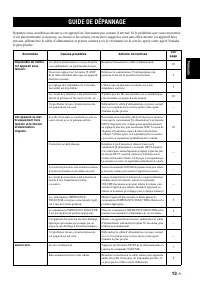
13 Fr Français Reportez-vous au tableau suivant si cet appareil ne fonctionne pas comme il devrait. Si le problème que vous rencontrez n’est pas mentionné ci-dessous, ou encore si les actions correctives suggérées sont sans effet, mettez cet appareil hors tension, débranchez le câble d’alimentation ...
Page 39 - SPÉCIFICATIONS
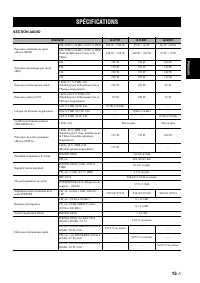
15 Fr Français SECTION AUDIO SPÉCIFICATIONS Élément A-S701 A-S501 A-S301 Puissance minimale de sortie efficace (RMS) 8 Ω , 20 Hz à 20 kHz, 0,019 % THD 100 W + 100 W 85 W + 85 W 60 W + 60 W 6 Ω , 20 Hz à 20 kHz, 0,038 % THD (Sauf modèles pour l’Asie et la Chine) 120 W + 120 W 100 W + 100 W 70 W + 70 ...
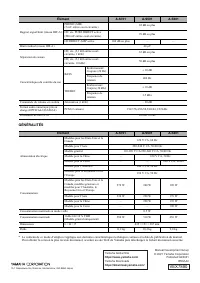
Page 40 - GÉNÉRALITÉS
16 Fr SPÉCIFICATIONS Yamaha Global Site https://www.yamaha.com/ Yamaha Downloads https://download.yamaha.com/ VEX7880 Manual Development Group © 2021 Yamaha Corporation Published 06/2021 IPEM-A0 10-1 Nakazawa-cho, Naka-ku, Hamamatsu, 430-8650 Japan GÉNÉRALITÉS * Le contenu de ce mode d’emploi s’appl...