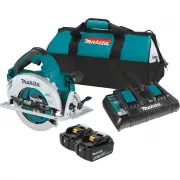
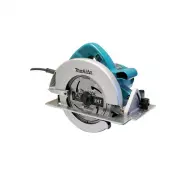
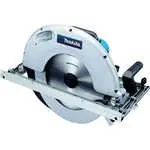
Page 2 - SPECIFICATIONS; Applicable battery cartridge and charger; SAFETY WARNINGS; General power tool safety warnings; Save all warnings and instruc-
2 ENGLISH ENGLISH (Original instructions) SPECIFICATIONS Model: XSH06 XSH07 Blade diameter 185 mm (7-1/4″) Max. Cutting depth at 0° 66.0 mm (2-5/8″) at 45° bevel 45.5 mm (1-13/16″) at 56° bevel 34.0 mm (1-5/16″) No load speed 6,000 /min Overall length 342 mm (13-1/2″) Rated voltage D.C. 36 V Net wei...
Page 4 - Cordless circular saw safety
4 ENGLISH 3. Follow instruction for lubricating and chang- ing accessories. 4. Do not modify or attempt to repair the appli- ance or the battery pack except as indicated in the instructions for use and care. Cordless circular saw safety warnings Cutting procedures 1. DANGER: Keep hands away from cut...
Page 6 - Symbols; Important safety instructions for; SAVE THESE INSTRUCTIONS.
6 ENGLISH 8. Some material contains chemicals which may be toxic. Take caution to prevent dust inhala- tion and skin contact. Follow material supplier safety data. 9. Do not stop the blades by lateral pressure on the saw blade. 10. Do not use any abrasive wheels. 11. Only use the saw blade with the ...
Page 7 - Tips for maintaining maximum; FUNCTIONAL; Installing or removing battery
7 ENGLISH Tips for maintaining maximum battery life 1. Charge the battery cartridge before completely discharged. Always stop tool operation and charge the battery cartridge when you notice less tool power. 2. Never recharge a fully charged battery car- tridge. Overcharging shortens the battery serv...
Page 8 - Tool / battery protection system
8 ENGLISH 2 1 3 4 ► 1. Lever 2. Red indicator 3. Button 4. Battery cartridge Before removing the battery cartridge, loosen the lever for depth adjustment to lower the tool base. Then slide the battery from the tool while sliding the button on the front of the cartridge. To install the battery cartri...
Page 9 - Indicating the remaining battery capacity; Switch action; Automatic speed change function
9 ENGLISH Indicating the remaining battery capacity Only for battery cartridges with the indicator 1 2 ► 1. Indicator lamps 2. Check button Press the check button on the battery cartridge to indi - cate the remaining battery capacity. The indicator lamps light up for a few seconds. Indicator lamps R...
Page 10 - Adjusting depth of cut; Bevel cutting; Positive stopper
10 ENGLISH Mode indicator status Operation mode On Off Blinking High speed mode High torque mode Overload alert Adjusting depth of cut CAUTION: After adjusting the depth of cut, always tighten the lever securely. Loosen the lever on the depth guide and move the base up or down. At the desired depth ...
Page 11 - Electric brake
11 ENGLISH Lighting the lamp CAUTION: Do not look in the light or see the source of light directly. To turn on the lamp without running the tool, pull the switch trigger without pressing the lock-off button. To turn on the lamp with the tool running, press and hold the lock-off button and pull the s...
Page 12 - ASSEMBLY; Hex wrench storage
12 ENGLISH ASSEMBLY CAUTION: Always be sure that the tool is switched off and the battery cartridge is removed before carrying out any work on the tool. Hex wrench storage When not in use, store the hex wrench as shown in the figure to keep it from being lost. 1 ► 1. Hex wrench Removing or installin...
Page 13 - OPERATION
13 ENGLISH For tool without the ring 1 2 3 4 5 ► 1. Mounting shaft 2. Inner flange 3. Circular saw blade 4. Outer flange 5. Hex bolt For tool with the ring 1 2 3 4 5 6 15.88 15.88 15.88 ► 1. Mounting shaft 2. Inner flange 3. Circular saw blade 4. Outer flange 5. Hex bolt 6. Ring WARNING: BE SURE TO ...
Page 15 - What you can do with the wireless
15 ENGLISH WIRELESS ACTIVATION FUNCTION For XSH07 only What you can do with the wireless activation function The wireless activation function enables clean and com- fortable operation. By connecting a supported vacuum cleaner to the tool, you can run the vacuum cleaner automatically along with the s...
Page 16 - Tool registration for the vacuum
16 ENGLISH After removing the wireless unit, keep it in the supplied case or a static-free container. NOTICE: Always use the hooks on the back of the lid when removing the wireless unit. If the hooks do not catch the wireless unit, close the lid completely and open it slowly again. Tool registration...
Page 18 - Description of the wireless activation lamp status
18 ENGLISH Description of the wireless activation lamp status 1 ► 1. Wireless activation lamp The wireless activation lamp shows the status of the wireless activation function. Refer to the table below for the meaning of the lamp status. Status Wireless activation lamp Description Color On Blinking ...
Page 20 - Troubleshooting for wireless activation function
20 ENGLISH Troubleshooting for wireless activation function Before asking for repairs, conduct your own inspection first. If you find a problem that is not explained in the manual, do not attempt to dismantle the tool. Instead, ask Makita Authorized Service Centers, always using Makita replace - men...
Page 21 - MAINTENANCE; Adjusting 0°-cut accuracy; OPTIONAL; MAKITA LIMITED WARRANTY
21 ENGLISH MAINTENANCE CAUTION: Always be sure that the tool is switched off and the battery cartridge is removed before attempting to perform inspection or maintenance. CAUTION: Clean out the upper and lower guards to ensure there is no accumulated saw- dust which may impede the operation of the lo...
Page 22 - ESPECIFICACIONES; Cartucho de batería y cargador aplicables; ADVERTENCIAS DE; Advertencias generales de seguridad; Conserve todas las advertencias e ins-
22 ESPAÑOL ESPAÑOL (Instrucciones originales) ESPECIFICACIONES Modelo: XSH06 XSH07 Diámetro del disco 185 mm (7-1/4″) Profundidad de corte máxima a 0° 66,0 mm (2-5/8″) bisel a 45° 45,5 mm (1-13/16″) bisel a 56° 34,0 mm (1-5/16″) Velocidad sin carga 6 000 r/min Longitud total 342 mm (13-1/2″) Tensión...
Page 26 - GUARDE ESTAS
26 ESPAÑOL 5. Para revisar el protector inferior, ábralo manualmente, suéltelo y vea que cierre. Revise también que el mango retráctil no toque el alojamiento de la herramienta. Dejar el disco expuesto es MUY PELIGROSO y puede ocasio - nar lesiones personales graves. Advertencias de seguridad adicio...
Page 28 - DESCRIPCIÓN DEL; Instalación o extracción del
28 ESPAÑOL 8. La unidad inalámbrica puede producir campos electromagnéticos (CEM), sin embargo éstos no son dañinos para el usuario. 9. La unidad inalámbrica es un instrumento de precisión. Tenga cuidado de no dejar caer ni golpear la unidad inalámbrica. 10. Evite tocar la terminal de la unidad inal...
Page 29 - Sistema de protección para la; Indicación de la capacidad restante
29 ESPAÑOL Para colocar el cartucho de batería, alinee la lengüeta sobre el cartucho de batería con la ranura en la carcasa y deslice en su lugar. Inserte por completo hasta que se fije en su lugar con un pequeño clic. Si puede ver el indicador rojo del lado superior del botón, esto indica que no ha...
Page 30 - Accionamiento del interruptor; Función de cambio de velocidad
30 ESPAÑOL Luces indicadoras Capacidad restante Iluminadas Apagadas Parpadeando 75% a 100% 50% a 75% 25% a 50% 0% a 25% Cargar la batería. La batería pudo haber funcionado mal. NOTA: Dependiendo de las condiciones de uso y la temperatura ambiente, la indicación podrá diferir ligeramente de la capaci...
Page 31 - Ajuste de la profundidad de corte; Corte en bisel; Tope de seguridad
31 ESPAÑOL Ajuste de la profundidad de corte PRECAUCIÓN: Después de ajustar la pro- fundidad de corte, siempre apriete la palanca firmemente. Afloje la palanca en la guía de profundidad y mueva la base hacia arriba o hacia abajo. En la profundidad de corte deseada, fije la base apretando la palanca....
Page 32 - Gancho; Freno eléctrico
32 ESPAÑOL 1 ► 1. Lámpara NOTA: Utilice un paño seco para quitar la suciedad de la lente de la lámpara. Tenga cuidado de no rayar la lente de la lámpara ya que la iluminación podría disminuir. Gancho Accesorio opcional PRECAUCIÓN: Retire siempre la batería cuando vaya a colgar la herramienta con el ...
Page 33 - MONTAJE; Almacenamiento de la llave Allen
33 ESPAÑOL MONTAJE PRECAUCIÓN: Asegúrese siempre de que la herramienta esté apagada y el cartucho de batería haya sido extraído antes de realizar cualquier trabajo en la misma. Almacenamiento de la llave Allen (hexagonal) Cuando no la utilice, guarde la llave hexagonal como se muestra en la figura p...
Page 34 - Limpieza del protector del disco; OPERACIÓN
34 ESPAÑOL Para la herramienta sin anillo 1 2 3 4 5 ► 1. Eje de montaje 2. Brida interior 3. Disco de la sierra circular 4. Brida exterior 5. Perno hexagonal Para la herramienta con anillo 1 2 3 4 5 6 15.88 15.88 15.88 ► 1. Eje de montaje 2. Brida interior 3. Disco de la sierra circular 4. Brida ext...
Page 35 - Conexión con cordeles (correas de
35 ESPAÑOL Sujete firmemente la herramienta. La herramienta está provista de empuñadura delantera y mango trasero. Utilice ambos para sujetar de forma óptima la herramienta. Si ambas manos están sujetando la sierra, éstas no podrán ser cortadas por el disco de la sierra circular. Coloque la base sob...
Page 36 - Lo que puede hacer con la función
36 ESPAÑOL 1 ► 1. Orificio para el cordel (correa de atadura) FUNCIÓN DE ACTIVACIÓN INALÁMBRICA Para el modelo XSH07 únicamente Lo que puede hacer con la función de activación inalámbrica La función de activación inalámbrica permite una ope- ración limpia y cómoda. Si conecta a la herramienta una as...
Page 37 - Registro de la herramienta para la
37 ESPAÑOL Cuando extraiga la unidad inalámbrica, abra la tapa lentamente. Los ganchos en la parte posterior de la tapa levantarán la unidad inalámbrica mientras usted jala hacia arriba la tapa. 2 1 3 ► 1. Unidad inalámbrica 2. Gancho 3. Tapa Una vez extraída la unidad inalámbrica, guárdela en el es...
Page 42 - MANTENIMIENTO; Ajuste de la precisión del corte a 0°
42 ESPAÑOL Estado de la anomalía Causa probable (avería) Remedio La aspiradora no funciona junto con el interruptor de la herramienta. La unidad inalámbrica no está instalada en la herramienta. La unidad inalámbrica está instalada incorrectamente en la herramienta. Instale la unidad inalámbrica corr...
Page 43 - GARANTÍA LIMITADA DE MAKITA; Ésta Garantía no aplica para México
43 ESPAÑOL ACCESORIOS OPCIONALES PRECAUCIÓN: Estos accesorios o aditamen- tos están recomendados para utilizarse con su herramienta Makita especificada en este manual. El empleo de cualquier otro accesorio o aditamento puede conllevar el riesgo de lesiones personales. Utilice los accesorios o aditam...
Page 44 - Makita Corporation
Some dust created by power sanding, sawing, grinding, drilling, and other construction activities contains chemicals known to the State of California to cause cancer, birth defects or other reproductive harm. Some examples of these chemicals are: • lead from lead-based paints, • crystalline silica f...