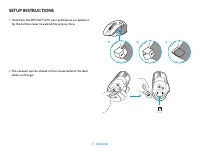
Page 3 - SETUP INSTRUCTIONS; Orientate the DPI Shift to fit your preference or replace it
3 ENGLISH SETUP INSTRUCTIONS 1 Orientate the DPI Shift to fit your preference or replace it by the button cover to extend the grip surface 2 The receiver can be stored in the mouse behind the door when on the go a b c
Page 4 - The LIGHTSPEED Wireless receiver can also be plugged
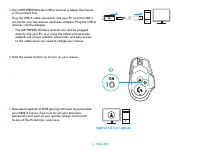
4 ENGLISH logitechG.com/ghub 3 The LIGHTSPEED Wireless USB-A receiver is below the mouse in the product tray Plug the USB-A cable connector into your PC and the USB-C connector into the receiver extension adapter Plug the USB-A receiver into the adapter – The LIGHTSPEED Wireless receiver can also be...
Page 5 - To charge your mouse, disconnect the cable from the adapter
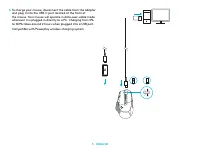
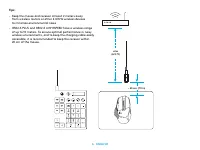
5 ENGLISH 6 To charge your mouse, disconnect the cable from the adapter and plug it into the USB-C port located at the front of the mouse Your mouse will operate in data-over-cable mode whenever it is plugged in directly to a PC Charging from 0% to 100% takes around 2 hours when plugged into a USB p...
Page 7 - MOUSE FEATURES
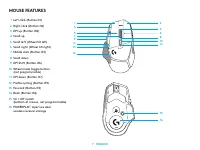
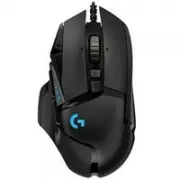
7 ENGLISH MOUSE FEATURES 1 Left click (Button G1) 2 Right click (Button G2) 3 DPI up (Button G8) 4 Scroll up 5 Scroll left (Wheel tilt left) 6 Scroll right (Wheel tilt right) 7 Middle click (Button G3) 8 Scroll down 9 DPI Shift (Button G6) 10 Wheel mode toggle button (not programmable) 11 DPI down (...
Page 8 - ONBOARD PROFILES BY DEFAULT
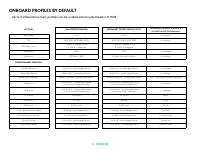
8 ENGLISH SETTINGS Report Rate DPI DPI steps colors Default DPI G6 button PROGRAMMABLE CONTROLS Left Main Button Right Main Button Middle Wheel Button G4 Button G5 Button G7 Button G8 Button G9 Button Scroll right (wheel tilt right) Scroll left (wheel tilt left) Wheel Scroll Up Wheel Scroll Down MAI...
Page 9 - PROFILE, DPI SELECTION AND DPI SHIFT; When the DPI Shift button is pressed: the mouse displays the color; FREQUENTLY ASKED QUESTIONS
9 ENGLISH PROFILE, DPI SELECTION AND DPI SHIFT When the DPI Shift button is pressed: the mouse displays the color associated with the DPI shift speed, when released the mouse displays the DPI setting color that was used prior to this action DPI and profile selection are communicated using lighting o...
Page 10 - BATTERY LIFE
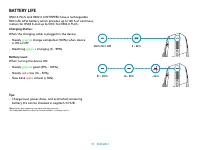
10 ENGLISH Charging Status:When the charging cable is plugged in the device: : – Steady green = charge completed (100%) when device is ON or OFF – Breathing green = charging (0 - 99%) Battery level: : When turning the device ON: – Steady green = good (31% - 100%) – Steady red = low (16 – 30%) – Slow...
Page 11 - INSTRUCTIONS D'INSTALLATION; Positionnez le bouton de changement de résolution
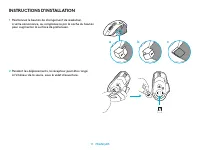
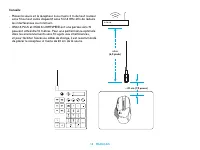
11 FRANÇAIS INSTRUCTIONS D'INSTALLATION 1 Positionnez le bouton de changement de résolution à votre convenance, ou remplacez-le par le cache du bouton pour augmenter la surface de préhension 2 Pendant les déplacements, le récepteur peut être rangé à l’intérieur de la souris, sous le volet d’ouvertur...
Page 12 - Le récepteur sans fil LIGHTSPEED peut également être
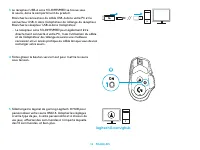
12 FRANÇAIS logitechG.com/ghub 3 Le récepteur USB-A sans fil LIGHTSPEED se trouve sous la souris, dans le compartiment du produit Branchez le connecteur du câble USB-A dans votre PC et le connecteur USB-C dans l’adaptateur de rallonge du récepteur Branchez le récepteur USB-A dans l’adaptateur – Le r...
Page 13 - Compatible avec le système de recharge sans fil Powerplay
13 FRANÇAIS 6 Pour charger votre souris, déconnectez le câble de l’adaptateur et branchez-le dans le port USB-C situé à l’avant de la souris La souris passe automatiquement en mode transmission de données par câble lorsqu'elle est branchée au PC La recharge de 0 à 100% prend environ 2 heures lorsque...
Page 15 - CARACTÉRISTIQUES DE LA SOURIS
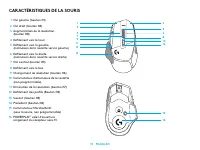
15 FRANÇAIS CARACTÉRISTIQUES DE LA SOURIS 1 Clic gauche (bouton G1) 2 Clic droit (bouton G2) 3 Augmentation de la résolution (bouton G8) 4 Défilement vers le haut 5 Défilement vers la gauche (inclinaison de la roulette vers la gauche) 6 Défilement vers la droite (inclinaison de la roulette vers la d...
Page 16 - PROFILS ENREGISTRÉS PAR DÉFAUT
16 FRANÇAIS PARAMÈTRES Taux de rapport Résolution Couleurs de réglage PPP Résolution par défaut Bouton G6 COMMANDES PROGRAMMABLES Bouton principal gauche Bouton principal droit Bouton de molette de défilement Bouton G4 Bouton G5 Bouton G7 Bouton G8 Bouton G9 Défilement vers la droite (inclinaison de...
Page 17 - PROFIL, SÉLECTION PPP ET CHANGEMENT DE RÉSOLUTION; QUESTIONS FRÉQUENTES
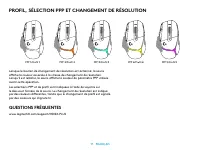
17 FRANÇAIS PROFIL, SÉLECTION PPP ET CHANGEMENT DE RÉSOLUTION Lorsque le bouton de changement de résolution est actionné: la souris affiche la couleur associée à la vitesse de changement de résolution Lorsqu’il est relâché, la souris affiche la couleur de paramètre PPP utilisée avant cette opération...
Page 18 - continu; Niveau de la batterie:; Vert; LONGÉVITÉ DE LA PILE
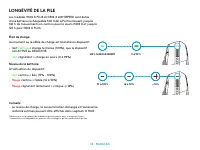
18 FRANÇAIS État de charge:Au moment où le câble de charge est branché au dispositif: : – Vert continu = charge terminée (100%), que le dispositif soit ACTIVÉ ou DÉSACTIVÉ – Vert clignotant = charge en cours (0 à 99%) Niveau de la batterie: : À l’activation du dispositif: – Vert continu = bon (31% -...
Page 19 - INSTRUCCIONES DE INSTALACIÓN
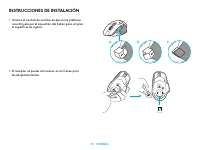
19 ESPAÑOL INSTRUCCIONES DE INSTALACIÓN 1 Orienta el control de cambio de dpi como prefieras o sustitúyelo por el capuchón del botón para ampliar la superficie de agarre 2 El receptor se puede almacenar en el mouse para los desplazamientos a b c
Page 20 - El receptor LIGHTSPEED inalámbrico también se puede
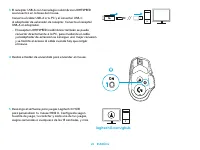
20 ESPAÑOL logitechG.com/ghub 3 El receptor USB-A con tecnología inalámbrica LIGHTSPEED se encuentra en la base del mouse Conecta el cable USB-A a tu PC y el conector USB-C al adaptador de extensión de receptor Conecta el receptor USB-A al adaptador – El receptor LIGHTSPEED inalámbrico también s...
Page 21 - Compatible con el sistema inalámbrico de carga Powerplay
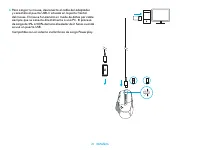
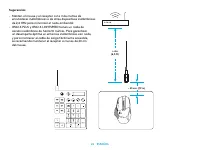
21 ESPAÑOL 6 Para cargar tu mouse, desconecta el cable del adaptador y conéctalo al puerto USB-C situado en la parte frontal del mouse El mouse funcionará en modo de datos por cable siempre que se conecte directamente a una PC El proceso de carga de 0% a 100% demora alrededor de 2 horas cuando s...
Page 23 - CARACTERÍSTICAS DEL MOUSE
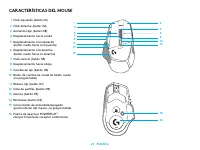
23 ESPAÑOL CARACTERÍSTICAS DEL MOUSE 1 Click izquierdo (botón G1) 2 Click derecho (botón G2) 3 Aumentar dpi (botón G8) 4 Desplazamiento hacia arriba 5 Desplazamiento a la izquierda (botón rueda hacia la izquierda) 6 Desplazamiento a la derecha (botón rueda hacia la derecha) 7 Click central (botón G3...
Page 24 - PERFILES INTEGRADOS DE FORMA PREDETERMINADA
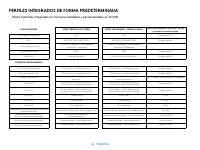
24 ESPAÑOL CONFIGURACIÓN Velocidad de respuesta DPI Colores de pasos de dpi DPI predeterminado Botón G6 CONTROLES PROGRAMABLES Botón principal izquierdo Botón principal derecho Botón rueda central Botón G4 Botón G5 Botón G7 Botón G8 Botón G9 Desplazamiento a la derecha (botón rueda hacia la derecha)...
Page 25 - PERFIL, SELECCIÓN DE DPI Y CAMBIO DE DPI; PREGUNTAS MÁS FRECUENTES
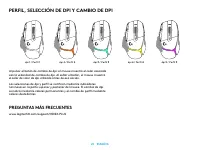
25 ESPAÑOL PERFIL, SELECCIÓN DE DPI Y CAMBIO DE DPI Al pulsar el botón de cambio de dpi: el mouse muestra el color asociado con la velocidad de cambio de dpi Al soltar el botón, el mouse muestra el color de valor de dpi utilizado antes de esa acción Las selecciones de dpi y perfil se notifican m...
Page 26 - Nivel de carga; Verde; DURACIÓN DE BATERÍAS
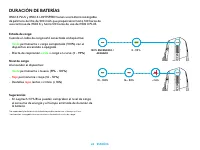
26 ESPAÑOL Estado de carga:Cuando el cable de carga está conectado al dispositivo: – Verde permanente = carga completada (100%) con el dispositivo encendido o apagado – Efecto de respiración verde = carga en curso (0 - 99%) Nivel de carga : Al encender el dispositivo: – Verde permanente = bueno (31%...
Page 27 - INSTRUÇÕES DE CONFIGURAÇÃO; Oriente o DPI Shift para se ajustar à sua preferência
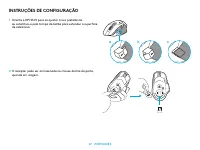
27 PORTUGUÊS INSTRUÇÕES DE CONFIGURAÇÃO 1 Oriente o DPI Shift para se ajustar à sua preferência ou substitua-o pela tampa do botão para estender a superfície de aderência 2 O receptor pode ser armazenado no mouse dentro da porta, quando em viagem a b c
Page 28 - O receptor LIGHTSPEED Wireless também pode ser
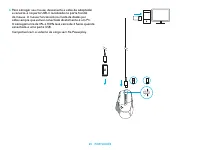
28 PORTUGUÊS logitechG.com/ghub 3 O receptor LIGHTSPEED Wireless USB-A está embaixo do mouse na bandeja do produto Conecte o conector do cabo USB-A em seu PC e o conector USB-C no adaptador de extensão do receptor Insira o receptor USB-A no adaptador – O receptor LIGHTSPEED Wireless também pode ser ...
Page 29 - Compatível com o sistema de carga sem fio Powerplay
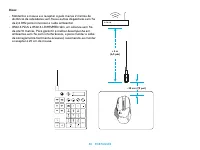
29 PORTUGUÊS 6 Para carregar seu mouse, desconecte o cabo do adaptador e conecte-o na porta USB-C localizada na parte frontal do mouse O mouse funcionará no modo de dados por cabo sempre que estiver conectado diretamente a um PC O carregamento de 0% a 100% leva cerca de 2 horas quando conectado a um...
Page 31 - RECURSOS DO MOUSE
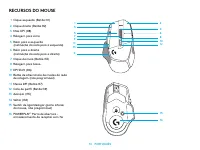
31 PORTUGUÊS RECURSOS DO MOUSE 1 Clique esquerdo (Botão G1) 2 Clique direito (Botão G2) 3 Mais DPI (G8) 4 Rolagem para cima 5 Rolar para a esquerda (inclinação da roda para a esquerda) 6 Rolar para a direita (inclinação da roda para a direita) 7 Clique do meio (Botão G3) 8 Rolagem para baixo 9 DPI S...
Page 32 - PERFIS A BORDO POR PADRÃO
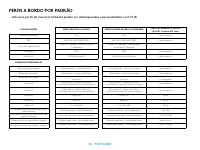
32 PORTUGUÊS CONFIGURAÇÕES Taxa de transmissão DPI Cores das etapas de DPI DPI padrão Botão G6 CONTROLES PROGRAMÁVEIS Botão principal esquerdo Botão principal direito Botão de roda central Botão G4 Botão G5 Botão G7 Botão G8 Botão G9 Rolar para a direita (inclinação da roda para a direita) Rolar par...
Page 33 - PERFIL, SELEÇÃO DE DPI E DPI SHIFT; na parte superior e na parte posterior do mouse A mudança de DPI é; PERGUNTAS FREQUENTES
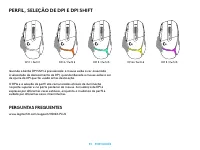
33 PORTUGUÊS PERFIL, SELEÇÃO DE DPI E DPI SHIFT Quando o botão DPI Shift é pressionado: o mouse exibe a cor associada à velocidade de deslocamento do DPI, quando liberado o mouse exibe a cor de ajuste do DPI que foi usada antes desta ação O DPIe e a seleção do perfil são comunicadas através de ilumi...
Page 34 - verde; DURAÇÃO DA BATERIA
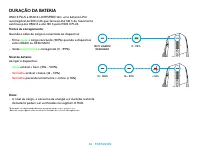
34 PORTUGUÊS Status de carregamento:Quando o cabo de carga é conectado ao dispositivo: : – Firme verde = carga concluída (100%) quando o dispositivo está LIGADO ou DESLIGADO – Verde intermitente = carregando (0 - 99%) Nível de bateria: : Ao ligar o dispositivo: – Verde estável = bom (31% - 100%) – V...