Page 2 - Contents
69-1725-1 2 Contents Prepare for Installation................................................................... 3 Follow Important Instructions ......................................................... 5 Remove Old Thermostat................................................................ 6 Follow ...
Page 3 - Step 1. Prepare for Installation; Check that the following items are included:; WALLPLATE
3 69-1725-1 Step 1. Prepare for Installation 1. Check that the following items are included: If any of the items shown above are missing, call Honeywell Customer Care at 1-800-468-1502 before returning the thermostat to the store. CAUTION TURN OFF POWER to system at the furnace, or at the fuse/circu...
Page 5 - Step 2. Follow Important Instructions; Do not connect the wires to the new thermostat based on wire; OLD THERMOSTAT; RED; DO NOT WIRE
5 69-1725-1 Step 2. Follow Important Instructions 1. Do not connect the wires to the new thermostat based on wire color because damage can occur to the heating and/or cooling system. These Installation Instructions explain later how to use the enclosed wire labels to correctly mark the wires connect...
Page 6 - Step 3. Remove Old Thermostat; Turn off power at the heating and/or cooling system or; MERCURY NOTICE
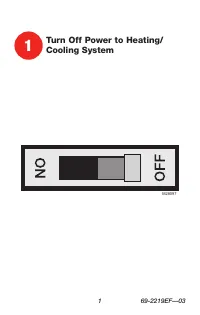
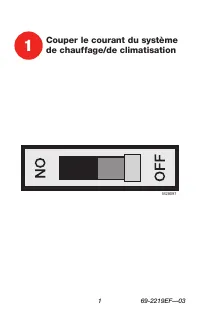
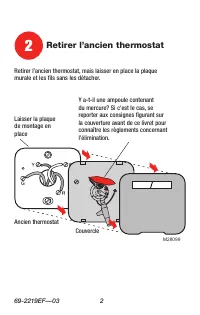
69-1725-1 6 Step 3. Remove Old Thermostat 1. Turn off power at the heating and/or cooling system or fuse/circuit breaker panel. 2. Remove the cover from the old thermostat. 3. Remove the old thermostat from the wall or wallplate. Do not remove the wires. MERCURY NOTICE If you are replacing a thermos...
Page 7 - Step 4. Follow Special Instructions; two; WIRE HOLE
7 69-1725-1 Step 4. Follow Special Instructions 1. If you have two C and/or C1 wires connected to your old thermostat, do not connect them to your new thermostat. 2. Disconnect the C and/or C1 wires. Make sure they do not touch each other or any other wires. 3. Wrap the bare end of each C and/or C1 ...
Page 8 - If you have only; one; C and/or C1 wire connected to your old
69-1725-1 8 Step 4. Follow Special Instructions (Cont) 4. If you have only one C and/or C1 wire connected to your old thermostat, connect this wire to C on the new thermostat. Visit www.honeywell.com/yourhome or call Honeywell Customer Care at 1-800-468-1502 before returning the thermostat to the st...
Page 10 - Step 5. Label Old Thermostat Wires; RC
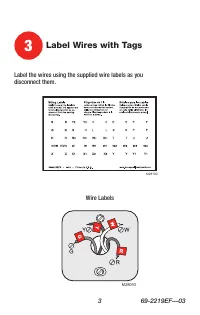
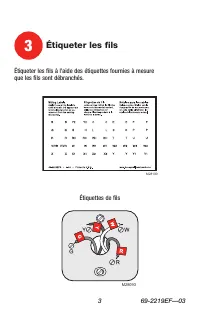
69-1725-1 10 Step 5. Label Old Thermostat Wires 1. As you disconnect each wire, use the enclosed wire labels to wrap a wire label around each wire that matches the letter designation. Do not allow the wires to fall into the wall opening after the wires are disconnected. 2. Remove any remaining part ...
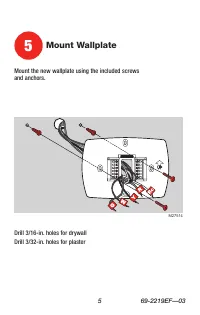
Page 11 - Step 6. Mount New Wallplate to Wall; Separate the wallplate from the thermostat as shown.
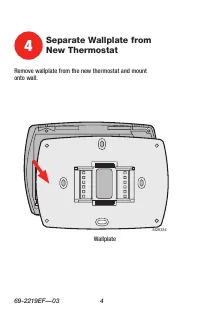
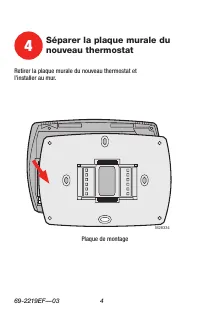
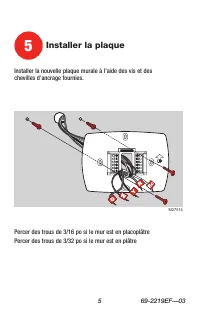
11 69-1725-1 Step 6. Mount New Wallplate to Wall 1. Separate the wallplate from the thermostat as shown. THERMOSTAT WALLPLATE WIRE HOLE M22202
Page 12 - Pass the labeled wires through the wire hole on the wallplate.; WALL OPENING
69-1725-1 12 Step 6. Mount New Wallplate to Wall (Cont) 2. Pass the labeled wires through the wire hole on the wallplate. M22203 WALL OPENING LABELED WIRES WALLPLATE WIRE HOLE
Page 15 - Step 7. Connect Wires to New Wallplate; CONVENTIONAL; SCREW TERMINALS
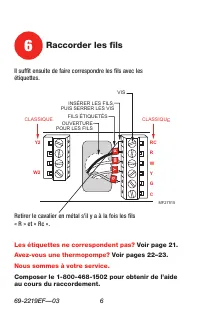
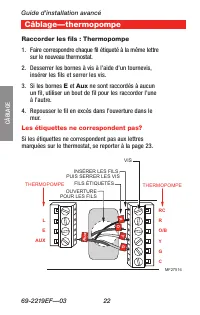
15 69-1725-1 Step 7. Connect Wires to New Wallplate 1. Match the labeled wires to the letter designations on the wallplate. 2. Select the correct letter designations to follow for your system. If you have a standard heating and/or cooling system, use the CONVENTIONAL letter designations. If you have...
Page 19 - Be sure to read the note referenced in the numbered; HEAT PUMP
19 69-1725-1 Step 7. Connect Wires to New Wallplate (Cont) 8. Compare letter designations on your old and new thermostats. Use the information below if you are wiring a HEAT PUMP System. Be sure to read the note referenced in the numbered triangles above. These numbered notes appear on the next page...
Page 20 - Leave metal jumper wire between RC and R in place.; NOTES FOR HEAT PUMP SYSTEMS
69-1725-1 20 Step 7. Connect Wires to New Wallplate (Cont) 1 M22245 Leave metal jumper wire between RC and R in place. If the old thermostat had separate wires on both the V and VR, some system modification is required. Call your local heating and cooling contractor for assistance. If the old thermo...
Page 21 - Push excess wire back into the wall opening. Keep wires in the
21 69-1725-1 Step 7. Connect Wires to New Wallplate (Cont) 9. Push excess wire back into the wall opening. Keep wires in the shaded area. WALLPLATE M22211 WALL OPENING WIRE SHADED AREA
Page 22 - Step 8. Install Batteries; Install three fresh AAA alkaline batteries on the back of the; BACK OF THERMOSTAT
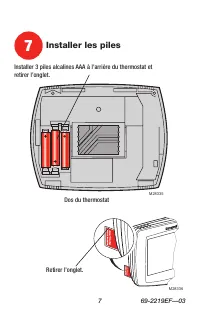
69-1725-1 22 Step 8. Install Batteries 1. Install three fresh AAA alkaline batteries on the back of the thermostat as marked on the thermostat. 2. Remove the tab labeled “Remove during installation” in the lower right corner of the thermostat back. BACK OF THERMOSTAT M22212 BATTERIES (3) + + + + + R...
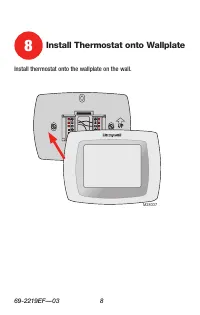
Page 23 - Step 9. Attach New Thermostat to Wallplate; Align the screw blocks with the pins on the back of the; PINS ON
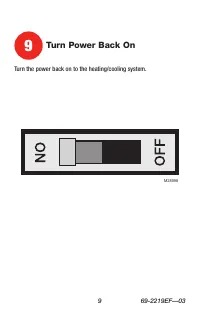
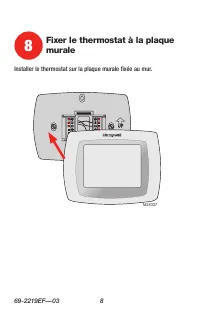
23 69-1725-1 Step 9. Attach New Thermostat to Wallplate 1. Align the screw blocks with the pins on the back of the thermostat. 2. Push the thermostat straight onto the wallplate until it snaps into place. 3. Turn on the power at the heating and/or cooling system or fuse/ circuit breaker panel. If th...
Page 24 - Step 10. Set the Calendar; day in memory for up to ten years, under normal use, once the
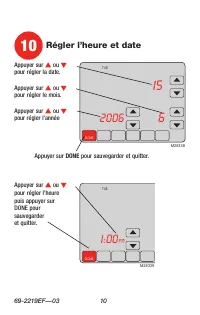
69-1725-1 24 Step 10. Set the Calendar This thermostat is designed to automatically keep current time and day in memory for up to ten years, under normal use, once the calendar is set. When the thermostat is first powered, the display is ready to set the calendar. 1. Use the arrow keys to set the ye...
Page 25 - Use the arrow keys to set the current time.
25 69-1725-1 Step 10. Set the Calendar (Cont) 3. Use the arrow keys to set the current time. 4. Press the Done key. DONE MON WED THU FRI SAT AAT M22227 USE ARROWS TO SET TIME
Page 26 - Step 11. Configure Installer Setup; Use the Installer Setup Menu to match your new thermostat to
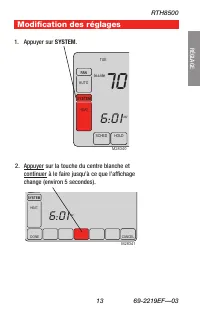
69-1725-1 26 Step 11. Configure Installer Setup 1. Use the Installer Setup Menu to match your new thermostat to your heating and/or cooling system. Follow the steps in this section to set up your thermostat. 2. Press and release the System key. SCHED HOLD CLOCK SCREEN FAN ON AUTO AM THU SYSTEM EM HE...
Page 28 - Date; Installer
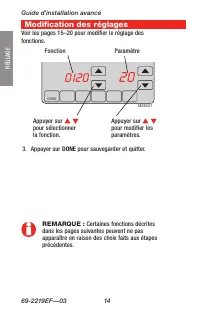
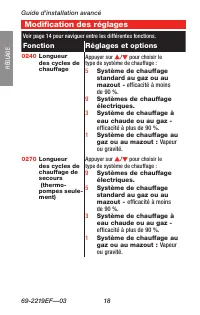
69-1725-1 28 11. Configure Installer Setup (Cont) 5. Press the Up or Down arrows to the right of the two-digit number in the lower right corner of the screen to select your setting for Installer Setup Number 0120 below. 6. After you select your setting, press the Up arrow key to the right of 0120 to...
Page 29 - - Multistage Heat Pumps
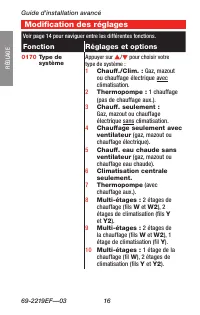
29 69-1725-1 Step 11. Configure Installer Setup (Cont) 8. Press the Up or Down arrows to select your setting for Installer Setup Number 0170. 9. After you select your setting, press the Up arrow to go to the next Installer Setup Number. M22216 0170 System Type Selection 1 - Heating and Cooling (Conv...
Page 30 - Fan Control
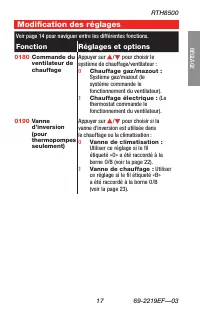
69-1725-1 30 Step 11. Configure Installer Setup (Cont) 10. If you do not have a number 0180 on the left side of your display, go to the next page. 11. If you have a number 0180 on the left side of your display, press the Up or Down arrow to select your setting for Installer Setup Number 0180. 12. Af...
Page 31 - Heat Pump
31 69-1725-1 Step 11. Configure Installer Setup (Cont) 13. If you do not have a number 0190 on the left side of your display, go to the next page. 14. If you have a number 0190 on the left side of your display, press the Up or Down arrow to select your setting for Installer Setup Number 0190. 15. Af...
Page 32 - Heating
69-1725-1 32 Step 11. Configure Installer Setup (Cont) 16. If you do not have a number 0240 on the left side of your display, go to the next page. 17. If you have a number 0240 on the left side of your display, press the Up or Down arrow to select your setting for Installer Setup Number 0240. 18. Af...
Page 33 - Temperature
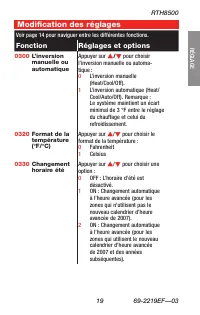
33 69-1725-1 Step 11. Configure Installer Setup (Cont) 19. Press the Up or Down arrow to select your setting for Installer Setup Number 0320. 20. After you select your setting, press the Up arrow to go to the next Installer Setup Number. M22218 0320 UP ARROW DOWN ARROW SETTING PRESS TO EXITINSTALLER...
Page 34 - not adjust for Daylight Savings Time.
69-1725-1 34 Step 11. Configure Installer Setup (Cont) 21. Press the Up or Down arrow to select your setting for Installer Setup Number 0330. 22. After you select your setting, press the Up arrow to go to the next Installer Setup Number. M22219 0330 UP ARROW DOWN ARROW SETTING PRESS TO EXITINSTALLER...
Page 36 - Adaptive
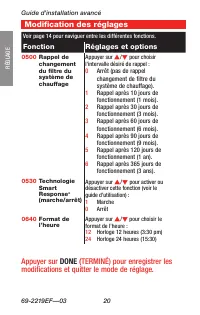
69-1725-1 36 Step 11. Configure Installer Setup (Cont) 25. Press the Up or Down arrow to select your setting for Installer Setup Number 0530. 26. After you select your setting, press the Up arrow to go to the next Installer Setup Number. M22221 0530 UP ARROW DOWN ARROW SETTING PRESS TO EXITINSTALLER...
Page 37 - Clock
37 69-1725-1 Step 11. Configure Installer Setup (Cont) 27. Press the Up or Down arrow to select your setting for Installer Setup Number 0640. 28. After you select your setting, press the Done key to exit the Installer Setup and save your settings. 29. Congratulations! The installation of the thermos...
Page 40 - Heat
69-1725-1 40 Set System Setting Set System Setting Press the System button to select Heat, Off or Cool: Heat —Thermostat controls the heating system. Off —Both the heating and cooling systems are off. Cool —Thermostat controls the cooling system. Em. Heat (Heat Pump Systems with Auxiliary Heat)— The...
Page 41 - Set Fan Setting; Press the Fan button to select Auto or On:; Auto; —Normal setting for most homes. The fan runs only; On; —The fan runs continuously. Use this setting for
41 69-1725-1 Set System Setting (Cont) Set Fan Setting Press the Fan button to select Auto or On: Auto —Normal setting for most homes. The fan runs only when the heating or cooling system is on. On —The fan runs continuously. Use this setting for improved air circulation or for more efficient air cl...
Page 43 - Program Your Heating and Cooling Schedule (Cont); OK TO PICK MULTIPLE DAYS
43 69-1725-1 Program Your Heating and Cooling Schedule (Cont) 2. Press Edit key. SCHED SCHED HOLD HOLD CLOCK SCREEN DONE WAKE LEAVE RETURN SLEEP CANCEL MON TUE WED THU FRI SAT SUN AM PM PM FAN AUTO SYSTEM EM HEAT HEAT OFF COOLAUTO CANCEL PERIOD HEAT COOL Following Schedule Inside Set To OK TO PICK M...
Page 44 - OK
69-1725-1 44 Program Your Heating and Cooling Schedule (Cont) 3. It is OK to pick multiple days. Select any combination of days to edit. These days are scheduled with the same times and temperatures. Check marks appear next to days selected. 4. Press Wake key. Once pressed, Wake flashes to show it i...
Page 45 - When complete, press Done key. “Saving Changes” appears on; SAVING
45 69-1725-1 Program Your Heating and Cooling Schedule (Cont) 9. When complete, press Done key. “Saving Changes” appears on the screen to indicate changes are being saved to the day(s) modified. 10. To set a Program Schedule for the remaining days of the week, repeat steps 1-9. Example: If Mon-Fri w...
Page 46 - Cancel a Schedule Period
69-1725-1 46 Cancel a Schedule Period NOTE: You may want to cancel a period to match your lifestyle; for example, if someone is always home during the day on Tuesday, you can cancel the Leave and Return periods (the thermostat would then control to the Wake temperature until the Sleep period). 1. Pr...
Page 47 - Use the arrows to set the current time.
47 69-1725-1 Set Time Set Time 1. Press Clock. 2. Use the arrows to set the current time. 3. Press the Done key. The current day of the week should already be set correctly. If not, see Step 11, Configure Installer Setup. DONE CANCEL TUE AM M19958
Page 48 - Set Temperature Overrides
69-1725-1 48 Set Temperature Overrides Hold Temperature Until (Temporary Hold) Hold temperature temporarily until the next scheduled period time or until the time the user sets. 1. Press the Up or Down arrow next to the temperature you want to adjust. “Hold Temperature Until” time appears on the scr...
Page 49 - Permanent Hold
49 69-1725-1 Set Temperature Overrides (Cont) Permanent Hold Permanent Hold changes the temperature setting until Permanent Hold is cancelled. 1. Press the Hold key. “Permanent Hold” appears on the screen. 2. Press the Up or Down arrow next to the temperature you want to set during “Hold.” 3. Press ...
Page 50 - Vacation Hold
69-1725-1 50 Set Temperature Overrides (Cont) Vacation Hold Changes temperature setting for a designated number of days. 1. Press the Up and Down arrow keys to set the desired tempera- ture while away on vacation. Notice that “Hold Temperature Until” time is shown on the screen. (This is the time th...
Page 51 - Clean Your Thermostat Screen; OK TO
51 69-1725-1 Clean Your Thermostat Screen 1. Press the Screen key. The thermostat locks out all touch keys for 30 seconds to allow for cleaning. 2. Use a damp cloth slightly moistened with water or household glass cleaner to clean the screen. 3. Repeat the above steps, as necessary. 4. Press the Don...
Page 52 - CHANGE FILTER; OK TO PICK MULTIPLE DAYS SCREEN LOCKED
69-1725-1 52 Use Your Filter Timer The Filter Timer notifies you when to change your furnace filter. Reset Filter Timer 1. “Change Filter” appears on the screen when the filter timer expires. 2. Press the Reset key to restart the filter timer. View or Reset Timer Settings Before They Expire 1. Press...
Page 53 - Understanding Temperature Recovery Feature
53 69-1725-1 Understanding Temperature Recovery Feature Your thermostat comes with a feature called Adaptive Intelligent Recovery™, which eliminates all guesswork when setting your schedule. How long does it take the furnace to warm your house in the morning before you get out of bed or how long doe...
Page 54 - Replace Batteries; When the LO Battery indicator is flashing, replace the
69-1725-1 54 Replace Batteries 1. When the LO Battery indicator is flashing, replace the batteries promptly with three fresh AAA alkaline batteries 2. Remove thermostat from the wallplate by pulling straight out. M19963 M22243 WALL
Page 55 - Remove the old batteries and insert three fresh AAA alkaline
55 69-1725-1 Replace Batteries (Cont) 3. Remove the old batteries and insert three fresh AAA alkaline batteries, as marked on the thermostat. BACK OF THERMOSTAT M22212 BATTERIES (3) + + + + +
Page 57 - Review Battery Tips
57 69-1725-1 Review Battery Tips 1. Replace the batteries as soon as LO Batt flashes in the display. The LO Battery indicator flashes in the display one month before the batteries run down completely. 2. Always use fresh AAA alkaline batteries. Non-alkaline batteries do not last as long and can leak...
Page 58 - Built-in Compressor Protection
69-1725-1 58 Built-in Compressor Protection The RTH8500D Thermostat has built-in compressor protection (minimum-off timer) that prevents the compressor from restarting too early after a shutdown. The minimum-off timer is activated after the compressor turns off. If there is a call during the minimum...
Page 59 - Troubleshooting Tips
59 69-1725-1 Troubleshooting Tips If . . . Then . . . Key to the right of the Screen key is blank. Verify that this key remains blank unless you set the Furnace Filter Change Reminder. See Installer Setup Number 0500 in Step 11. Display is blank. Check that fresh AAA alkaline batteries are installed...
Page 62 - Customer Assistance; For assistance with your Honeywell product, please visit
69-1725-1 62 Customer Assistance For assistance with your Honeywell product, please visit www.honeywell.com/yourhome or call Honeywell Customer Care toll free at 1-800-468-1502.
Page 63 - Limited One-Year Warranty; write Retail Products
63 69-1725-1 Limited One-Year Warranty Honeywell warrants this product, excluding battery, to be free from defects in the workmanship or materials, under normal use and service, for a period of one (1) year from the date of purchase by the consumer. If, at any time during the warranty period, the pr...
Page 64 - Automation and Control Solutions; Honeywell International Inc.
69-1725-1 G.H. Rev. 10-04 www.honeywell.com/yourhome Automation and Control Solutions Honeywell International Inc. Honeywell Limited-Honeywell Limitée 1985 Douglas Drive North 35 Dynamic Drive Golden Valley, MN 55422 Scarborough, OntarioM1V 4Z9