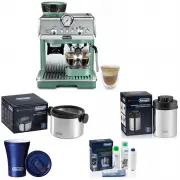
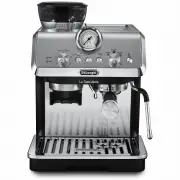
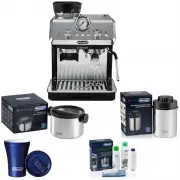
Page 5 - Maintenance required lights; Description of the accessories; Accessories in the Starter Set:
5 1. INTRODUCTION Thank you for choosing this bean to cup espresso and cappuc-cino machine. Take a few minutes to read this Instruction for Use. This will avoid all risks and damage to the appliance. 1.1 Letters in brackets The letters in brackets refer to the legend in the description of the applia...
Page 6 - Accessories with certain models only:; SETTING UP THE APPLIANCE
6 C4. Water softener filter (*certain models only) C5. Cleaning brushC6. Power cordC7. Descaling spout (keep the spout safely after each use) Accessories with certain models only: C8. Coffee pot (*certain models only)C9. Travel mug (*certain models only) 2.4 Description of the milk container" (p...
Page 8 - Coffee temperature
8 In the settings menu (B6), the symbol indicating the connection status alternates with the other symbols (e.g. descaling, etc.) Symbol on homepage MeaningThe appliance is connected The appliance is connected to the home Wi-Fi, but there is no network, or the cloud cannot be reached -- Connection d...
Page 9 - Water hardness; The appliance performs a rinse cycle with hot water from
9 4. Press " ← " to save the new selection and go back to the homepage (B). 6.9 General 1. Press the settings menu (B6);2. Select "General";Here you can enable or disable the following functions with a simple touch: - "Beep": when enabled, the appliance beeps whenever an oper...
Page 10 - Making coffee using pre-ground coffee; LONG
10 7. MAKING COFFEE U 7.1 Making coffee using coffee beans Important! Do not use green, caramelised or candied coffee beans as they could stick to the coffee mill and make it unusable.1. Place 1 or 2 cups under the coffee spouts (A14); 2. Lower the spouts as near as possible to the cup (fig. 13). Th...
Page 11 - * The quantities indicated are approximate and may vary ac-
11 Quantity Aroma 2. After setting the parameters, press "Start". The appliance starts making the coffee and the image of the selected beverage appears on the display, together with a progress bar which gradually fills as the operation proceeds and a description of each individual phase (gri...
Page 12 - MILK
12 4. Place the coffee pot (C8) under the spouts (fig. 18). Press "OK";5. The appliance proceeds with delivery and the image of the selected beverage appears on the display (B5), together with a progress bar which gradually fills as the operation proceeds and a description of each individual...
Page 14 - Clean
14 10.4 Customising the beverages To deliver a customised milk-based beverage, proceed as follows: 1. Press (B3)at the bottom of the image correspond- ing to the desired beverage. The parameters that can be customised according to your tastes appear on the display (B5): Quantity Aroma Coffee type 2....
Page 15 - Important; Cleaning the travel mug after use
15 4. Select up to 2 ingredients in the required order of delivery, then press "Next"; 5. Select the preferences for the selected ingredients, then press "Next"; 6. Press "OK" to start preparation;7. When the required quantity of the ingredient being deliv- ered is reached, p...
Page 17 - Important! Danger of burns
17 COFFEE 180 ml 100-240 ml LONG 160 ml 115-250 ml DOPPIO+ 120 ml 80-180 ml AMERICANO 150 ml 70-480 ml TEA 150 ml 20-420 ml HOT WATER 250 ml 20-420 ml 61x.7y models only LONG BLACK 200 ml 90-480 ml OVER ICE 100 ml 40-240 ml 15. SELECTING YOUR PERSONAL PROFILE U According to the model, you can memori...
Page 18 - Danger of electric shock!; Cleaning the water tank
18 when you make the next coffees, the grounds container will fill up more than expected and clog the machine. 16.4 Cleaning the drip tray and drip tray grille Important! The drip tray (A24) is fitted with a level indicator (A23) (red) showing the amount of water it contains (fig. 33). Before the in...
Page 20 - Insert; Please note: washing by hand; To descale
20 44 45 Insert 3. Turn the froth adjustment dial (D3) clockwise to the "In- sert" position (fig. 45) and pull; 4. Turn and remove the milk container connector (D5)(fig. 46). 46 47 5. All components and the container are dishwasher safe, placing them in the top basket. If you do not have a d...
Page 21 - Important! Danger of; SETTING WATER HARDNESS
21 Please note: washing by hand Washing in a dishwasher guarantees the perfect hygiene of all the milk container components. When washing by hand, wash all components of the milk container thoroughly withhot water and immerse them in a basin of hot water for 30 minutes before proceeding as described...
Page 23 - DISPLAYED MESSAGE
23 Beans container capacity: 500g Frequency: 2400 - 2500 MHz Maximum transmission power 20 mW De'Longhi reserves the right to modify the technical specification and styling of its products at any moment, without compromis-ing their functionality and quality. 20.1 Tips for Energy Saving • To reduce e...
Page 25 - Insert descaling spout
25 DISPLAYED MESSAGE POSSIBLE CAUSE REMEDY Insert descaling spout The descaling spout (C7) is not correctly in place or is missing. Insert the spout and push as far as it will go (fig. 7). The appliance emits a beep (if the beep function is enabled). Insert milk container The milk container (D) is n...
Page 28 - TROUBLESHOOTING; PROBLEM
28 22. TROUBLESHOOTING U Below is a list of some of the possible malfunctions. If the problem cannot be resolved as described, contact customer services. PROBLEM POSSIBLE CAUSE REMEDY The appliance does not come on The power cord connector (C6) is not in- serted correctly. Insert the connector as fa...