Page 2 - NOTE TO USER; Steam cooking; Overview; fl
NOTE TO USER EN 4 Steam cooking Overview Steam cooking presents nothing but advantages if you follow the instructions for use. Healthy and natural, steam cooking preserves the full fl avour of foods. A delicate sauce or aromatic herb seasonings add that something extra that makes the difference. Thi...
Page 3 - DESCRIPTION; The Appliance
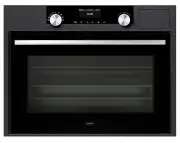
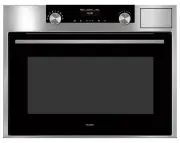
DESCRIPTION EN 5 The Appliance Display Control panel Water intake tube Steam generator Tank Gutter Close-up of control panel 1. Duration and temperature selection button 2. Time and temperature adjustment button (-) 3. Time and temperature adjustment button (+) 4. Start/Stop button 5. Keypad locking...
Page 4 - Accessories; t into each other
DESCRIPTION EN 6 Accessories Perforated stainless steel dish (Fig. 1)Pierced stainless steel cooking dish to prevent contact between food and the condensation water.Stainless steel dish (Fig. 2)Stainless steel dish for recovering condensation water. Comments: When steaming vegetables, potatoes. fi s...
Page 5 - Removable tank; ed water or water treated by a water decalci
DESCRIPTION EN 7 Removable tank Tank that allows for independent water supply to the steamer. Its capacity is approximately one litre (maximum level). Tap water can sometimes be too hard. Lightly mineralised, still, bottled water will be more effective in cleaning your oven. Using demineralised wate...
Page 6 - INSTALLATION; Before connecting the steamer; Electrical connections; the electrical installation has suf; Warning
INSTALLATION EN 8 Before connecting the steamer Warning Ensure that your appliance has not suffered any damage during transport (deformed seal or door, etc.). If you see any kind of damage, before doing anything else, contact your retailer. In order to easily locate the reference information for you...
Page 7 - It is dangerous for anyone other than a quali
INSTALLATION EN 9 If the steamer malfunctions in any way, unplug the appliance or remove the fuse corresponding to the sector where the oven is hooked up. It is dangerous for anyone other than a quali fi ed person to perform maintenance operations or repairs. Build-in 1. Place the appliance in the n...
Page 8 - Demo mode; Activating; Deactivating; Con
INSTALLATION EN 10 Demo mode Activating Fig. 1 Fig. 2 Set the time to 00:00, see “Setting the clock” on page 11. Con fi rm with button START. Press the DURATION AND TEMPERATURE SELECTION and - buttons simultaneously for 10 seconds until “DEMO ON” is displayed. The demo mode is activated. Deactivatin...
Page 9 - USE; Setting the clock; If the time is not con
USE EN 11 Setting the clock Fig. 1 Fig. 2 Fig. 3 Press the TEMPERATURE/TIME button until the clock flashes (2 seconds). Press the + or - buttons to set the time. Confirm with the START button. Comments: If the time is not con fi rmed using the START button, it is automatically saved after one minute...
Page 10 - Programming for immediate steaming; Steam cooking at 100°C
USE EN 12 Programming for immediate steaming Operating principle The water contained in the tank arrives in the cavity via a pipe. This water is transformed into steam when it comes into contact with a hot surface located in the lower part of the cavity: this is the steam generator. There is no need...
Page 11 - Programming for immediate steaming with temperature change
USE EN 13 Fig. 3 Confirm using the START button (Fig. 3). The symbol STEAM COOKING symbol and °C light up. When the temperature has been reached (appr. 10 minutes), the 100°C display stops fl ashing and a beep is emitted. Programming for immediate steaming with temperature change Fig. 1 Fig. 2 Fig. ...
Page 12 - Changing steaming temperature; Changing the steaming time; Cancelling steaming in progress
USE EN 14 Fig. 4 When the temperature has been reached, the 80°C display stops flashing (Fig. 4) and a beep is emitted. Comments: To avoid compromising steaming results, do not open the appliance door during cooking. Changing steaming temperature During steaming, you can adjust the steaming temperat...
Page 13 - Locking display; This error is speci
USE EN 15 Locking display It is possible to lock the display. The lock can only be used after steaming, when the time of day is displayed. Open your steamer door, press the START/STOP button and hold for several seconds. A beep is emitted and a padlock appears on the screen. From this moment on, no ...
Page 14 - Using the timer; Timer
USE EN 16 Using the timer Timer Your steamer is equipped with an electronic timer that can be used independent of the steamer functions. Fig. 1 Fig. 2 Press the + or - button for a few seconds.0m00s flashes. Set the duration required (max. 59 mins 50 seconds) by pressing the +/- buttons.Confirm by p...
Page 15 - COOKING CHART; Functions; For cooking fragile food
COOKING CHART EN 17 Functions Temperature °C Steaming Steaming Examples Steam cooking mode most often used For cooking fragile food Delicate whole fish (trout) The meat remains iridescent, the collagen does not appear Cooking delicate fish (sardine fillets, red mullet) For cooking fragile food, frui...
Page 16 - Steaming chart; Food whatever the; Vegetables
COOKING CHART EN 18 Steaming chart Food whatever the quantity Times °C Preparations Notes Vegetables Artichokes (small) 40 to 45 min. 100 Placed upside down in the dish • These times depend on the type, size and freshness of the vegetables. Follow the indications that appear in the “Preparations” co...
Page 17 - puddings
COOKING CHART EN 19 Food whatever the quantity Times °C Preparations Notes Fruits, puddings Apples/pears/peaches 10 to 15 min. 90 Whole, peeled • Times depend on ripeness. Compote 25 min. 95 Fruit in strips Custard creams 10 min. 90 In ramekins Fish Northern pike 25 to 30 min. 85 Whole (1 kg) • *Ste...
Page 18 - Eggs
COOKING CHART EN 20 Food whatever the quantity Times °C Preparations Notes Eggs Start with very fresh eggs kept at room temperature 7 min. 100 Boiled: placed directly on the grid. 8 min. 100 Softboiled: placed directly on the grid. 10 to 12 min. 100 Hard-boiled 5 to 6 min. 100 Sunny side up: broken ...
Page 19 - MAINTENANCE; Caring for your steamer; Maintenance; The steamer should not be cleaned with a steam cleaner.
MAINTENANCE EN 21 Caring for your steamer Maintenance Cavity (after each use) Wipe the cavity with a dry cloth after the steam generator has cooled or let the cavity air dry by leaving the door open. Water intake tube (once a month) Remove the water intake tube by turning it toward you.Remove any ha...
Page 20 - Changing the interior lighting
MAINTENANCE EN 22 Changing the interior lighting The bulb is located at the back right of your steamer’s cavity. Disconnect your steamer before performing any task on the bulb to avoid the risk of electric shock. • Turn the view port a quarter turn to the left. • Unscrew the bulb in the same directi...
Page 21 - Handling malfunctions; Possible Causes; Your display does not light up.
MAINTENANCE EN 23 Handling malfunctions You Notice That... Possible Causes What Should You Do? Your display does not light up. Steamer is not connected to power source. Electronic board is not functioning. • Check that the appliance is receiving electricity (good fuse). • Call the Service Department...
Page 22 - NOTE