Page 3 - Overview; You may need your Internet access information.
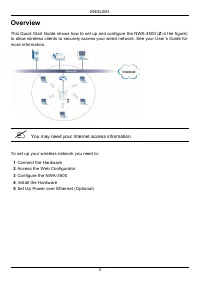
ENGLISH 3 Overview This Quick Start Guide shows how to set up and configure the NWA-3500 ( Z in the figure) to allow wireless clients to securely access your wired network. See your User’s Guide for more information. " You may need your Internet access information. To set up your wireless networ...
Page 4 - Connect the Hardware; ETHERNET; port to an Ethernet jack with network
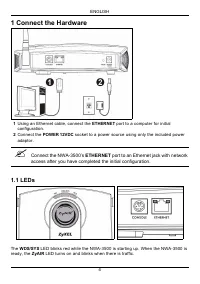
ENGLISH 4 1 Connect the Hardware 1 Using an Ethernet cable, connect the ETHERNET port to a computer for initial configuration. 2 Connect the POWER 12VDC socket to a power source using only the included power adaptor. " Connect the NWA-3500’s ETHERNET port to an Ethernet jack with network access ...
Page 5 - ZyAIR; Access the Web Configurator; Set Up Your Computer’s IP Address
ENGLISH 5 One of the ETHERNET LEDs on the RJ-45 ETHERNET port turns on if the ETHERNET port is properly connected, and blinks when there is traffic. The green ETHERNET LED turns on if the connection is at 10Mbps, and the yellow ETHERNET LED turns on if the connection is at 100Mbps. V If the ZyAIR LE...
Page 6 - Log Into the Web Configurator; port for; Login; Apply
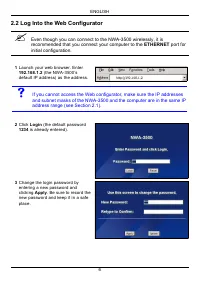
ENGLISH 6 2.2 Log Into the Web Configurator " Even though you can connect to the NWA-3500 wirelessly, it is recommended that you connect your computer to the ETHERNET port for initial configuration. 1 Launch your web browser. Enter 192.168.1.2 (the NWA-3500’s default IP address) as the address. ...
Page 7 - RESET; Ignore; MAIN MENU
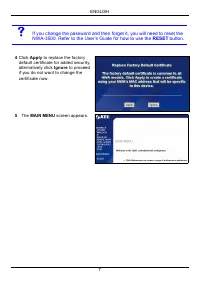
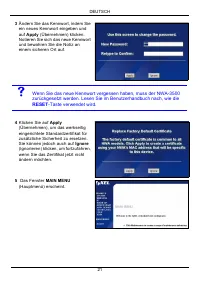
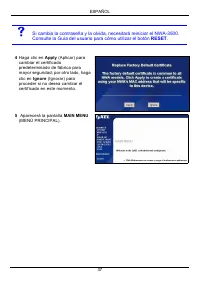
ENGLISH 7 V If you change the password and then forget it, you will need to reset the NWA-3500. Refer to the User’s Guide for how to use the RESET button. 4 Click Apply to replace the factory default certificate for added security; alternatively click Ignore to proceed if you do not want to change t...
Page 8 - Configure System Settings; SYSTEM
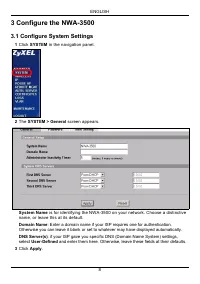
ENGLISH 8 3 Configure the NWA-3500 3.1 Configure System Settings 1 Click SYSTEM in the navigation panel. 2 The SYSTEM > General screen appears. System Name is for identifying the NWA-3500 on your network. Choose a distinctive name, or leave this at its default. Domain Name : Enter a domain name i...
Page 9 - Configure Wireless Settings
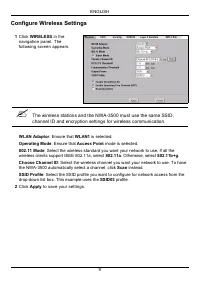
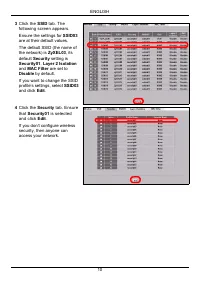
ENGLISH 9 Configure Wireless Settings 1 Click WIRELESS in the navigation panel. The following screen appears. " The wireless stations and the NWA-3500 must use the same SSID, channel ID and encryption settings for wireless communication. WLAN Adaptor : Ensure that WLAN1 is selected. Operating Mo...
Page 11 - Security Mode; None
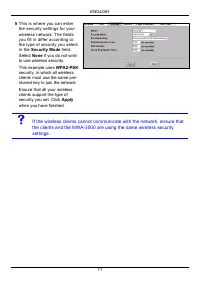
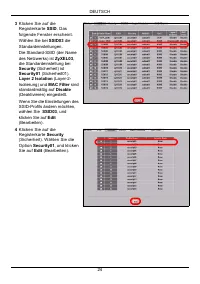
ENGLISH 11 5 This is where you can enter the security settings for your wireless network. The fields you fill in differ according to the type of security you select in the Security Mode field. Select None if you do not wish to use wireless security.This example uses WPA2-PSK security, in which all w...
Page 12 - Configure IP Settings; Get; , check your DHCP server to determine the IP
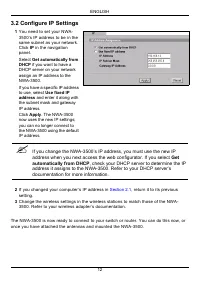
ENGLISH 12 3.2 Configure IP Settings The NWA-3500 is now ready to connect to your switch or router. You can do this now, or once you have attached the antennas and mounted the NWA-3500. 1 You need to set your NWA-3500’s IP address to be in the same subnet as your network. Click IP in the navigation ...
Page 13 - Install the Hardware; Attaching Antennas
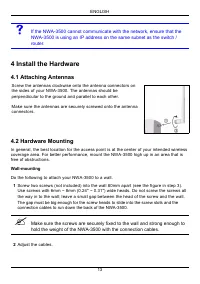
ENGLISH 13 V If the NWA-3500 cannot communicate with the network, ensure that the NWA-3500 is using an IP address on the same subnet as the switch / router. 4 Install the Hardware 4.1 Attaching Antennas 4.2 Hardware Mounting In general, the best location for the access point is at the center of your...
Page 15 - You can connect the NWA-3500 to PoE via the; port AND to a; port before you disconnect the; Procedure to View a Product’s Certification(s)
ENGLISH 15 " You can connect the NWA-3500 to PoE via the ETHERNET port AND to a power source via the POWER 12VDC port. If you do so, do not disconnect the ETHERNET port before you disconnect the POWER 12VDC port. This causes the NWA-3500 to restart. 6 Procedure to View a Product’s Certification(...
Page 17 - Übersicht; Halten Sie die Daten für Ihren Internetzugang bereit.
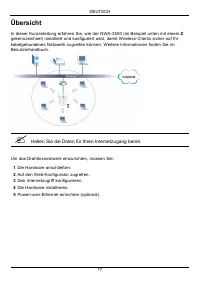
DEUTSCH 17 Übersicht In dieser Kurzanleitung erfahren Sie, wie der NWA-3500 (im Beispiel unten mit einem Z gekennzeichnet) installiert und konfiguriert wird, damit Wireless-Clients sicher auf Ihr kabelgebundenes Netzwerk zugreifen können. Weitere Informationen finden Sie im Benutzerhandbuch. " H...
Page 18 - Anschließen der Hardware; -Anschluss des NWA-3500 mit einem Ethernetanschluss mit
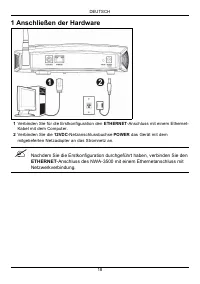
DEUTSCH 18 1 Anschließen der Hardware 1 Verbinden Sie für die Erstkonfiguration den ETHERNET -Anschluss mit einem Ethernet- Kabel mit dem Computer. 2 Verbinden Sie die 12VDC -Netzanschlussbuchse POWER das Gerät mit dem mitgelieferten Netzadapter an das Stromnetz an. " Nachdem Sie die Erstkonfigu...
Page 19 - nicht leuchtet, prüfen Sie, ob der richtige; Kabelverbindungen am; Zugreifen auf den Web-Konfigurator
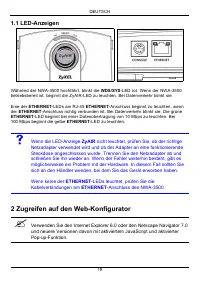
DEUTSCH 19 1.1 LED-Anzeigen Während der NWA-3500 hochfährt, blinkt die WDS/SYS -LED rot. Wenn der NWA-3500 betriebsbereit ist, beginnt die ZyAIR-LED zu leuchten. Bei Datenverkehr blinkt sie. Eine der ETHERNET -LEDs am RJ-45 ETHERNET -Anschluss beginnt zu leuchten, wenn der ETHERNET -Anschluss richti...
Page 20 - Einrichten der IP-Adresse des Computers; Anschluss an den Computer anzuschließen.
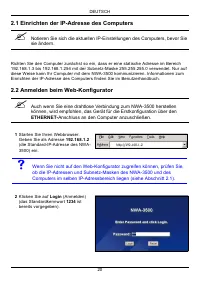
DEUTSCH 20 2.1 Einrichten der IP-Adresse des Computers " Notieren Sie sich die aktuellen IP-Einstellungen des Computers, bevor Sie sie ändern. Richten Sie den Computer zunächst so ein, dass er eine statische Adresse im Bereich 192.168.1.3 bis 192.168.1.254 mit der Subnetz-Maske 255.255.255.0 ver...
Page 22 - Konfigurieren der Systemeinstellungen
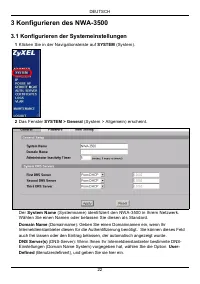
DEUTSCH 22 3 Konfigurieren des NWA-3500 3.1 Konfigurieren der Systemeinstellungen 1 Klicken Sie in der Navigationsleiste auf SYSTEM (System). 2 Das Fenster SYSTEM > General (System > Allgemein) erscheint. Der System Name (Systemname) identifiziert den NWA-3500 in Ihrem Netzwerk. Wählen Sie ein...
Page 23 - Konfigurieren der Drahtloseinstellungen
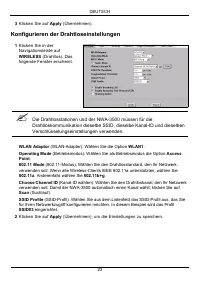
DEUTSCH 23 Konfigurieren der Drahtloseinstellungen 3 Klicken Sie auf Apply (Übernehmen). 1 Klicken Sie in der Navigationsleiste auf WIRELESS (Drahtlos). Das folgende Fenster erscheint. " Die Drahtlosstationen und der NWA-3500 müssen für die Drahtloskommunikation dieselbe SSID, dieselbe Kanal-ID ...
Page 27 - IP
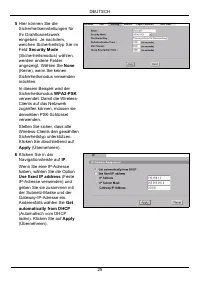
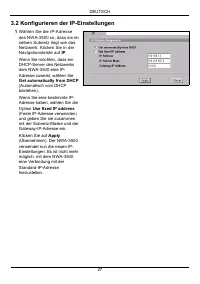
DEUTSCH 27 3.2 Konfigurieren der IP-Einstellungen 1 Wählen Sie die IP-Adresse des NWA-3500 so, dass sie im selben Subnetz liegt wie das Netzwerk. Klicken Sie in der Navigationsleiste auf IP . Wenn Sie möchten, dass ein DHCP-Server des Netzwerks dem NWA-3500 eine IP-Adresse zuweist, wählen Sie Get au...
Page 28 - Get automatically from DHCP
DEUTSCH 28 Der NWA-3500 kann jetzt eine Verbindung zu Ihrem Switch oder Router herstellen. Das können Sie bereits jetzt tun oder wenn Sie die Antennen angebracht und den NWA-3500 installiert haben. V Wenn der NWA-3500 nicht mit dem Netzwerk kommunizieren kann, stellen Sie sicher, dass der NWA-3500 e...
Page 29 - Installieren der Hardware; Anschließen der Antennen; Frei stehend
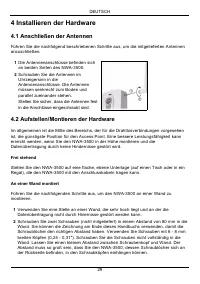
DEUTSCH 29 4 Installieren der Hardware 4.1 Anschließen der Antennen Führen Sie die nachfolgend beschriebenen Schritte aus, um die mitgelieferten Antennen anzuschließen. 4.2 Aufstellen/Montieren der Hardware Im allgemeinen ist die Mitte des Bereichs, der für die Drahtlosverbindungen vorgesehen ist, d...
Page 31 - Sie können den NWA-3500 über den; Funktion mit Strom versorgen UND ihn direkt über den Anschluss; -Anschluss und dann erst vom; POWER; Schritte zum Ansehen von Produktzertifizierung(en)
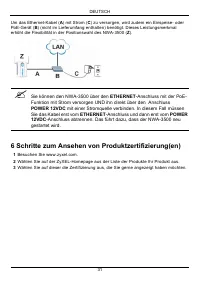
DEUTSCH 31 Um das Ethernet-Kabel ( A ) mit Strom ( C ) zu versorgen, wird zudem ein Einspeise- oder PoE-Gerät ( B ) (nicht im Lieferumfang enthalten) benötigt. Dieses Leistungsmerkmal erhöht die Flexibilität in der Positionswahl des NWA-3500 ( Z ). " Sie können den NWA-3500 über den ETHERNET -An...
Page 33 - Vista previa; Puede que necesite su acceso a Internet para más información.
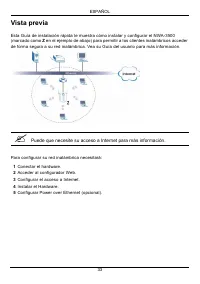
ESPAÑOL 33 Vista previa Esta Guía de instalación rápida le muestra cómo instalar y configurar el NWA-3500 (marcado como Z en el ejemplo de abajo) para permitir a los clientes inalámbricos acceder de forma segura a su red inalámbrica. Vea su Guía del usuario para más información. " Puede que nece...
Page 34 - Conectar el hardware; del NWA-3500 a una clavija Ethernet con
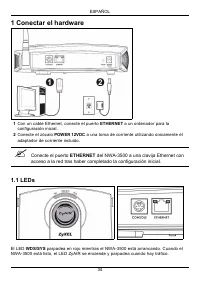
ESPAÑOL 34 1 Conectar el hardware 1 Con un cable Ethernet, conecte el puerto ETHERNET a un ordenador para la configuración inicial. 2 Conecte el zócalo POWER 12VDC a una toma de corriente utilizando únicamente el adaptador de corriente incluido. " Conecte el puerto ETHERNET del NWA-3500 a una cl...
Page 35 - no se enciende, asegúrese de utilizar el adaptador de; se enciende, compruebe la conexión del cable; Acceder al Configurador Web; Configurar la dirección IP de su ordenador
ESPAÑOL 35 Uno de los LEDs ETHERNET del puerto RJ-45 ETHERNET se enciende si el puerto ETHERNET está correctamente conectado y parpadea cuando hay tráfico. El LED verde ETHERNET se enciende si la conexión es a 10Mbps y el LED amarillo ETHERNET se enciende si la conexión es a 100Mbps. V Si el LED ZyA...
Page 36 - Acceda al Configurador Web; para la
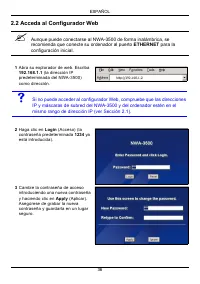
ESPAÑOL 36 2.2 Acceda al Configurador Web " Aunque puede conectarse al NWA-3500 de forma inalámbrica, se recomienda que conecte su ordenador al puerto ETHERNET para la configuración inicial. 1 Abra su explorador de web. Escriba 192.168.1.1 (la dirección IP predeterminada del NWA-3500) como direc...
Page 38 - Ajustar la configuración del sistema; System Name; Domain Name
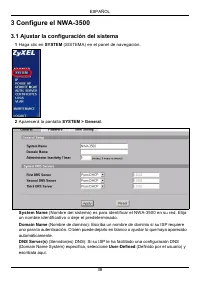
ESPAÑOL 38 3 Configure el NWA-3500 3.1 Ajustar la configuración del sistema 1 Haga clic en SYSTEM (SISTEMA) en el panel de navegación. 2 Aparecerá la pantalla SYSTEM > General . System Name (Nombre del sistema) es para identificar el NWA-3500 en su red. Elija un nombre identificativo o deje el pr...
Page 39 - Ajustar la configuración inalámbrica; WLAN Adaptor
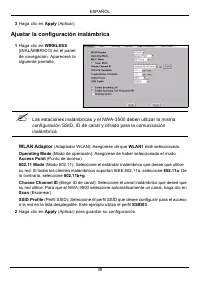
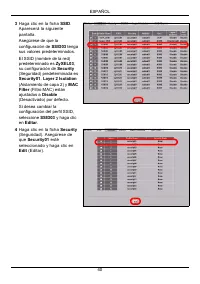
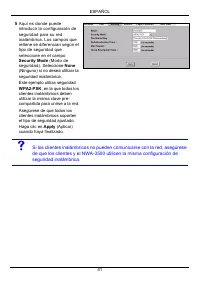
ESPAÑOL 39 Ajustar la configuración inalámbrica 3 Haga clic en Apply (Aplicar). 1 Haga clic en WIRELESS (INALÁMBRICO) en el panel de navegación. Aparecerá la siguiente pantalla. " Las estaciones inalámbricas y el NWA-3500 deben utilizar la misma configuración SSID, ID de canal y cifrado para la ...
Page 42 - Ajustar la configuración IP; Get automatically; (Obtener automáticamente de
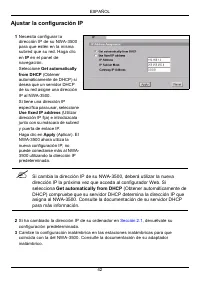
ESPAÑOL 42 Ajustar la configuración IP 1 Necesita configurar la dirección IP de su NWA-3500 para que estén en la misma subred que su red. Haga clic en IP en el panel de navegación.Seleccione Get automatically from DHCP (Obtener automáticamente de DHCP) si desea que un servidor DHCP de su red asigne ...
Page 43 - Instalar el Hardware; Conectar las antenas; Instalación del montaje para hardware; Libre y de pie; Asegúrese de que las antenas estén
ESPAÑOL 43 El NWA-3500 ya está listo para conectarse a su switch o router. Puede hacerlo ahora o una vez colocadas las antenas y montado el NWA-3500. V Si el NWA-3500 no puede comunicarse con la red, compruebe que el NWA-3500 utiliza una dirección IP en la misma subred que el switch / router. 4 Inst...
Page 44 - con los
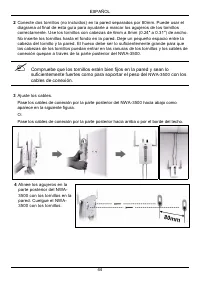
ESPAÑOL 44 2 Conecte dos tornillos (no incluidos) en la pared separados por 80mm. Puede usar el diagrama al final de esta guía para ayudarle a marcar los agujeros de los tornillos correctamente. Use los tornillos con cabezas de 6mm a 8mm (0.24" a 0.31") de ancho. No inserte los tornillos has...
Page 45 - Puede conectar el NWA-3500 a PoE a través del puerto; Y a; antes de desconectar el puerto
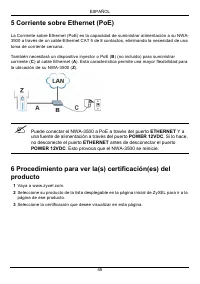
ESPAÑOL 45 5 Corriente sobre Ethernet (PoE) La Corriente sobre Ethernet (PoE) es la capacidad de suministrar alimentación a su NWA-3500 a través de un cable Ethernet CAT 5 de 8 contactos, eliminando la necesidad de una toma de corriente cercana. También necesitará un dispositivo inyector o PoE ( B )...
Page 47 - Présentation; Vous aurez peut-être besoin de vos informations d'accès à Internet.
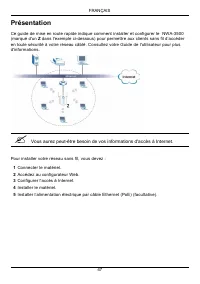
FRANÇAIS 47 Présentation Ce guide de mise en route rapide indique comment installer et configurer le NWA-3500 (marqué d'un Z dans l'exemple ci-dessous) pour permettre aux clients sans fil d’accéder en toute sécurité à votre réseau câblé. Consultez votre Guide de l'utilisateur pour plus d'information...
Page 48 - Connecter le matériel; du NWA-3500 à une prise Ethernet avec
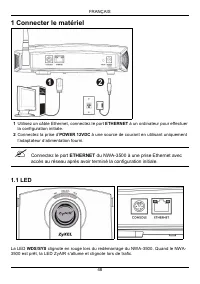
FRANÇAIS 48 1 Connecter le matériel 1 Utilisez un câble Ethernet, connectez le port ETHERNET à un ordinateur pour effectuer la configuration initiale. 2 Connectez la prise d’ POWER 12VDC à une source de courant en utilisant uniquement l’adaptateur d’alimentation fourni. " Connectez le port ETHER...
Page 49 - ne s'allume pas, vérifiez que vous utilisez l’adaptateur; ne s'allume, vérifiez la connexion du câble au; Accéder au configurateur Web.; Paramétrez l'adresse IP de votre ordinateur
FRANÇAIS 49 Une des LED ETHERNET du port RJ-45 ETHERNET s'allume si le port ETHERNET est correctement connecté et clignote lors du trafic. La LED ETHERNET verte s'allume si la connexion est à 10Mbps, et la LED ETHERNET jaune s'allume si la connexion est à 100Mbps. V Si la LED ZyAIR ne s'allume pas, ...
Page 50 - Ouvrez une session dans le configurateur Web; pour la
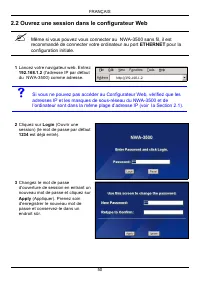
FRANÇAIS 50 2.2 Ouvrez une session dans le configurateur Web " Même si vous pouvez vous connecter au NWA-3500 sans fil, il est recommandé de connecter votre ordinateur au port ETHERNET pour la configuration initiale. 1 Lancez votre navigateur web. Entrez 192.168.1.2 (l'adresse IP par défaut du N...
Page 51 - RÉINITIALISER
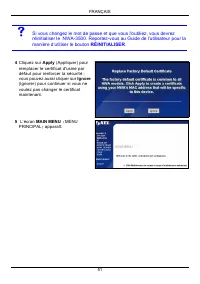
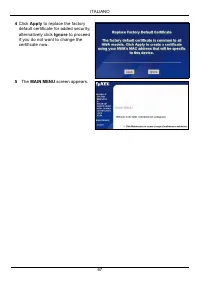
FRANÇAIS 51 V Si vous changez le mot de passe et que vous l'oubliez, vous devrez réinitialiser le NWA-3500. Reportez-vous au Guide de l’utilisateur pour la manière d’utiliser le bouton RÉINITIALISER . 4 Cliquez sur Apply (Appliquer) pour remplacer le certificat d'usine par défaut pour renforcer la s...
Page 52 - Configurer les paramètres du système; System
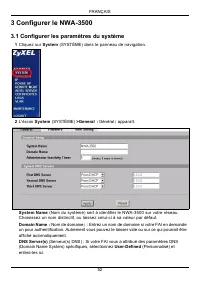
FRANÇAIS 52 3 Configurer le NWA-3500 3.1 Configurer les paramètres du système 1 Cliquez sur System (SYSTÈME) dans le panneau de navigation. 2 L'écran System (SYSTÈME) >General ( Général ) apparaît. System Name (Nom du système) sert à identifier le NWA-3500 sur votre réseau. Choisissez un nom dist...
Page 53 - Configurer les paramètres sans fil
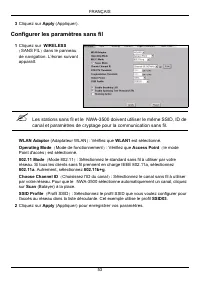
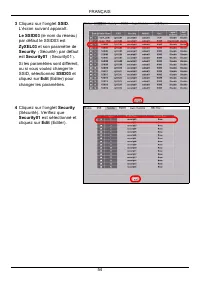
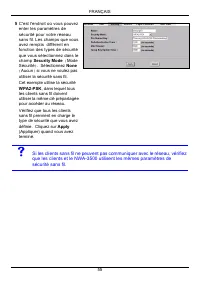
FRANÇAIS 53 Configurer les paramètres sans fil 3 Cliquez sur Apply (Appliquer). 1 Cliquez sur WIRELESS ( SANS FIL ) dans le panneau de navigation. L’écran suivant apparaît. " Les stations sans fil et le NWA-3500 doivent utiliser le même SSID, ID de canal et paramètres de cryptage pour la communi...
Page 56 - Configurer les paramètres IP
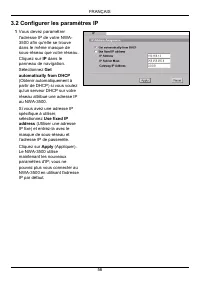
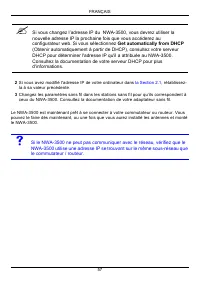
FRANÇAIS 56 3.2 Configurer les paramètres IP 1 Vous devez paramétrer l'adresse IP de votre NWA-3500 afin qu'elle se trouve dans le même masque de sous-réseau que votre réseau. Cliquez sur IP dans le panneau de navigation.Sélectionnez Get automatically from DHCP (Obtenir automatiquement à partir de D...
Page 58 - Installer le matériel; Connecter les antennes; Montage mural; avec les câbles de connexion.
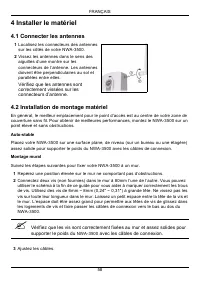
FRANÇAIS 58 4 Installer le matériel 4.1 Connecter les antennes 4.2 Installation de montage matériel En général, le meilleur emplacement pour le point d’accès est au centre de votre zone de couverture sans fil. Pour obtenir de meilleures performances, montez le NWA-3500 sur un point élevé et sans obs...
Page 59 - PoE (Alimentation électrique par câble Ethernet)
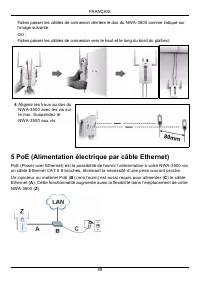
FRANÇAIS 59 Faites passer les câbles de connexion derrière le dos du NWA-3500 comme indiqué sur l’image suivante. OU :Faites passer les câbles de connexion vers le haut et le long du bord du plafond. 5 PoE (Alimentation électrique par câble Ethernet) PoE (Power over Ethernet) est la possibilité de f...
Page 60 - Vous pouvez connecter le NWA-3500 à PoE via le port; ET à; avant de déconnecter le port
FRANÇAIS 60 " Vous pouvez connecter le NWA-3500 à PoE via le port ETHERNET ET à une source d'alimentation via le port POWER 12VDC . Dans ce cas, ne déconnectez pas le port ETHERNET avant de déconnecter le port POWER 12VDC . Cela entraîne le redémarrage du NWA-3500. 6 Procédure pour afficher la (...
Page 61 - Cenni generali
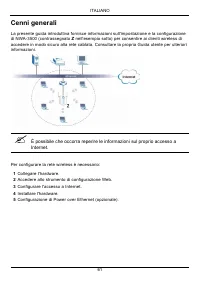
ITALIANO 61 Cenni generali La presente guida introduttiva fornisce informazioni sull'impostazione e la configurazione di NWA-3500 (contrassegnato Z nell'esempio sotto) per consentire ai clienti wireless di accedere in modo sicuro alla rete cablata. Consultare la propria Guida utente per ulteriori in...
Page 62 - Collegamento dell'hardware; di NWA-3500 a un jack Ethernet con
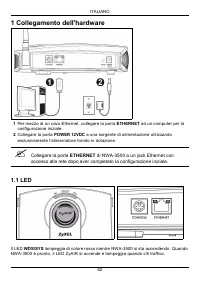
ITALIANO 62 1 Collegamento dell'hardware 1 Per mezzo di un cavo Ethernet, collegare la porta ETHERNET ad un computer per la configurazione iniziale. 2 Collegare la porta POWER 12VDC a una sorgente di alimentazione utilizzando esclusivamente l'alimentatore fornito in dotazione. " Collegare la por...
Page 63 - non si accende, assicurarsi di utilizzare l’alimentatore; si accende, controllare il collegamento; Accedere allo strumento di configurazione Web; Impostare l'indirizzo IP del computer
ITALIANO 63 Uno dei LED ETHERNET sulla porta ETHERNET RJ-45 si accende se la porta ETHERNET è correttamente collegata, lampeggiando quando c'è traffico dati. Il LED ETHERNET verde si accende se il collegamento è a 10 Mbps, mentre il LED ETHERNET giallo si accende se il collegamento è a 100 Mbps. V S...
Page 64 - Eseguire il login nello strumento di configurazione Web; per la
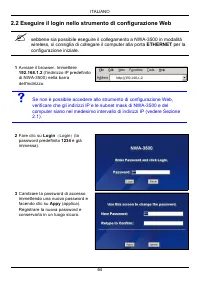
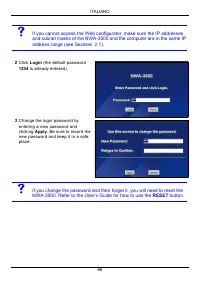
ITALIANO 64 2.2 Eseguire il login nello strumento di configurazione Web " sebbene sia possibile eseguire il collegamento a NWA-3500 in modalità wireless, si consiglia di collegare il computer alla porta ETHERNET per la configurazione iniziale. 1 Avviare il browser. Immettere 192.168.1.2 (l'indir...
Page 65 - Log Into the Web Configurator; MAIN
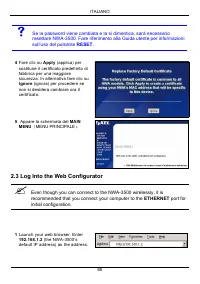
ITALIANO 65 2.3 Log Into the Web Configurator " Even though you can connect to the NWA-3500 wirelessly, it is recommended that you connect your computer to the ETHERNET port for initial configuration. V Se la password viene cambiata e la si dimentica, sarà necessario resettare NWA-3500. Fare rif...
Page 68 - Configura le impostazioni del sistema
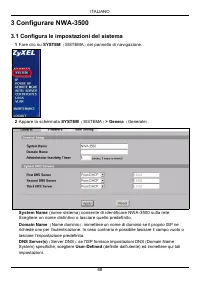
ITALIANO 68 3 Configurare NWA-3500 3.1 Configura le impostazioni del sistema 1 Fare clic su SYSTEM ( SISTEMA ) nel pannello di navigazione. 2 Appare la schermata SYSTEM ( SISTEMA ) > Genera ( Generale ) . System Name (nome sistema) consente di identificare NWA-3500 sulla rete. Scegliere un nome d...
Page 69 - Configura impostazioni Wireless
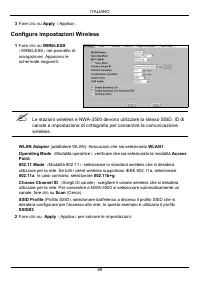
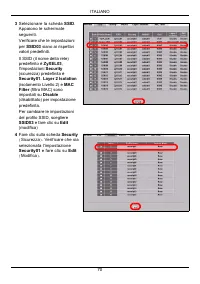
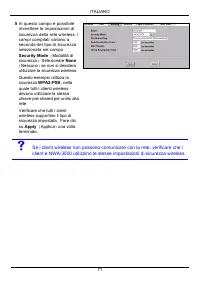
ITALIANO 69 Configura impostazioni Wireless 3 Fare clic su Apply ( Applica ) . 1 Fare clic su WIRELESS ( WIRELESS ) nel pannello di navigazione. Appaiono le schermate seguenti. " Le stazioni wireless e NWA-3500 devono utilizzare lo stesso SSID, ID di canale e impostazione di crittografia per con...
Page 72 - Configura impostazioni IP
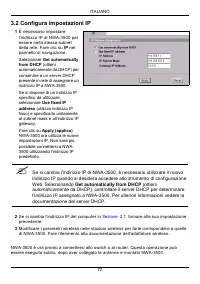
ITALIANO 72 3.2 Configura impostazioni IP NWA-3500 è ora pronto a connettersi allo switch o al router. Questa operazione può essere eseguita subito, dopo aver collegato le antenne e montato NWA-3500. 1 È necessario impostare l'indirizzo IP di NWA-3500 per essere nella stessa subnet della rete. Fare ...
Page 73 - Installazione dell'hardware; Collegamento delle antenne; Posizione libera
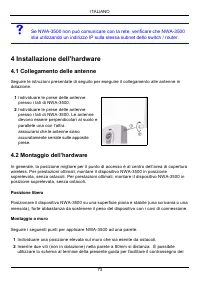
ITALIANO 73 V Se NWA-3500 non può comunicare con la rete, verificare che NWA-3500 stia utilizzando un indirizzo IP sulla stessa subnet dello switch / router. 4 Installazione dell'hardware 4.1 Collegamento delle antenne Seguire le istruzioni presentate di seguito per eseguire il collegamento alle ant...
Page 74 - con i cavi di
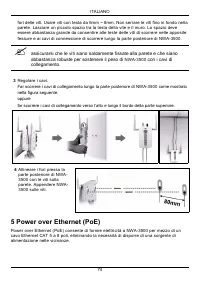
ITALIANO 74 fori delle viti. Usare viti con testa da 6mm ~ 8mm. Non serrare le viti fino in fondo nella parete. Lasciare un piccolo spazio tra la testa della vite e il muro. Lo spazio deve essere abbastanza grande da consentire alle teste delle viti di scorrere nelle apposite fessure e ai cavi di co...
Page 75 - Non è possibile collegare NWA-3500 a PoE tramite la porta; nonché a una sorgente di alimentazione tramite la porta; prima di
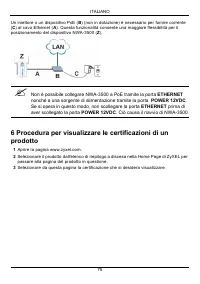
ITALIANO 75 Un iniettore o un dispositivo PoE ( B ) (non in dotazione) è necessario per fornire corrente ( C ) al cavo Ethernet ( A ). Questa funzionalità consente una maggiore flessibilità per il posizionamento del dispositivo NWA-3500 ( Z ). " Non è possibile collegare NWA-3500 a PoE tramite l...
Page 77 - Обзор
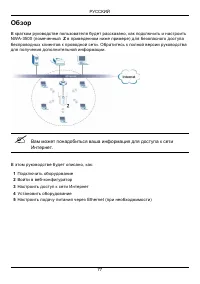
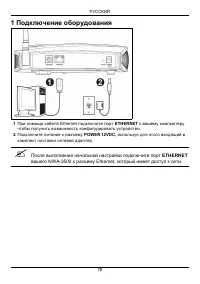
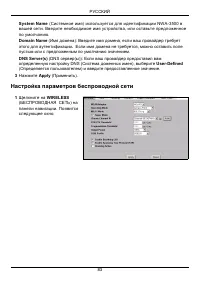
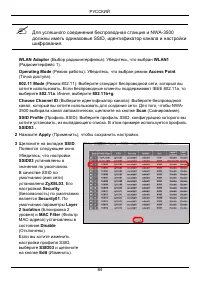
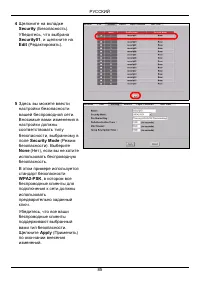
РУССКИЙ 77 Обзор В кратком руководстве пользователя будет рассказано , как подключить и настроить NWA-3500 ( помеченный Z в приведенном ниже примере ) для безопасного доступа беспроводных клиентов к проводной сети . Обратитесь к полной версии руководства для получения дополнительной информации . �...
Page 79 - Доступ; Internet Explorer
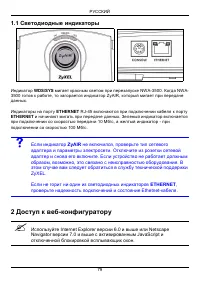
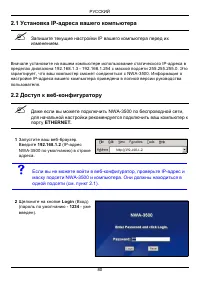
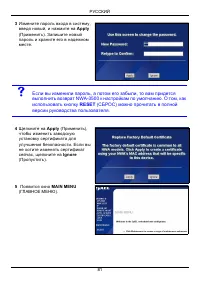
РУССКИЙ 79 1.1 Светодиодные индикаторы Индикатор WDS/SYS мигает красным светом при перезапуске NWA-3500. Когда NWA- 3500 готов к работе , то загорается индикатор ZyAIR, который мигает при передаче данных . Индикаторы на порту ETHERNET RJ-45 включаются при подключении кабеля к порту ETHERNET и начина...
Page 82 - Конфигурирование; Настройка
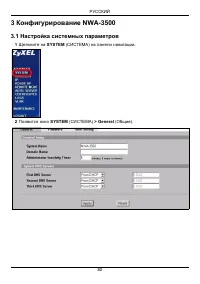
РУССКИЙ 82 3 Конфигурирование NWA-3500 3.1 Настройка системных параметров 1 Щелкните на SYSTEM ( СИСТЕМА ) на панели навигации . 2 Появится окно SYSTEM ( СИСТЕМА ) > General ( Общие ).
Page 88 - Подключение; Незакрепленное
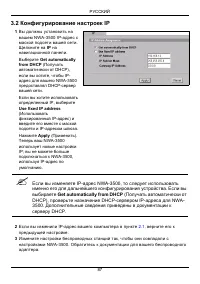
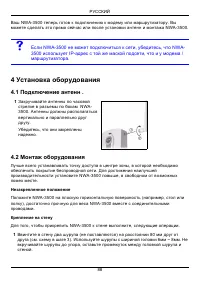
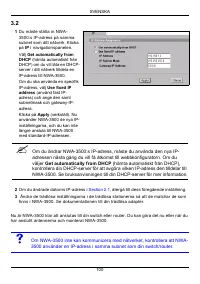
РУССКИЙ 88 Ваш NWA-3500 теперь готов к подключению к модему или маршрутизатору . Вы можете сделать это прямо сейчас или после установки антенн и монтажа NWA-3500. V Если NWA-3500 не может подключиться к сети , убедитесь , что NWA- 3500 использует IP- адрес с той же маской подсети , что и у модема / ...
Page 90 - PoE; Процедура
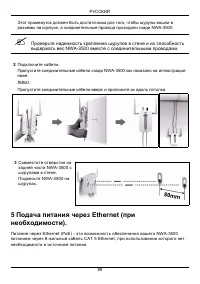
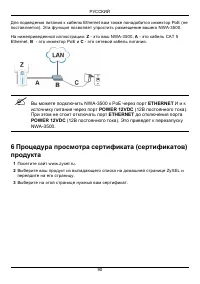
РУССКИЙ 90 Для подведения питания к кабелю Ethernet вам также понадобится инжектор PoE ( не поставляется ). Эта функция позволяет упростить размещение вашего NWA-3500. На нижеприведенной иллюстрации : Z - это ваш NWA-3500, A - это кабель CAT 5 Ethernet, B - это инжектор PoE и C - это сетевой кабель ...
Page 91 - Översikt; Eventuellt behöver du din Internet-anslutningsinformation.
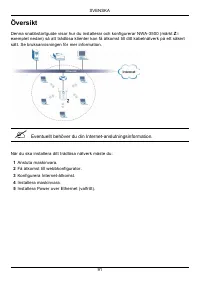
SVENSKA 91 Översikt Denna snabbstartguide visar hur du installerar och konfigurerar NWA-3500 (märkt Z i exemplet nedan) så att trådlösa klienter kan få åtkomst till ditt kabelnätverk på ett säkert sätt. Se bruksanvisningen för mer information. " Eventuellt behöver du din Internet-anslutningsinfo...
Page 92 - Ansluta maskinvara
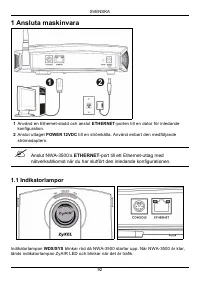
SVENSKA 92 1 Ansluta maskinvara 1 Använd en Ethernet-sladd och anslut ETHERNET -porten till en dator för inledande konfiguration. 2 Anslut uttaget POWER 12VDC till en strömkälla. Använd enbart den medföljande strömadaptern. " Anslut NWA-3500:s ETHERNET -port till ett Ethernet-uttag med nätverkså...
Page 93 - Om indikatorlampan; inte tänds, kontrollera att du använder rätt; Få åtkomst till webbkonfigurator
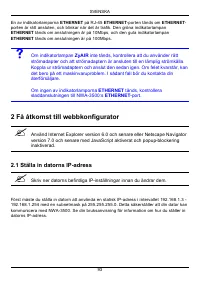
SVENSKA 93 En av indikatorlamporna ETHERNET på RJ-45 ETHERNET -porten tänds om ETHERNET - porten är rätt ansluten, och blinkar när det är trafik. Den gröna indikatorlampan ETHERNET tänds om anslutningen är på 10Mbps, och den gula indikatorlampan ETHERNET tänds om anslutningen är på 100Mbps. V Om ind...
Page 94 - Logga in i webbkonfigurator
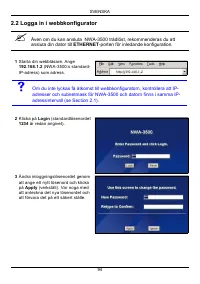
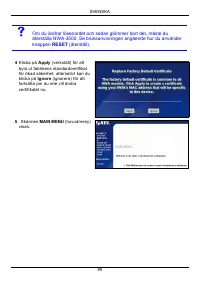
SVENSKA 94 2.2 Logga in i webbkonfigurator " Även om du kan ansluta NWA-3500 trådlöst, rekommenderas du att ansluta din dator till ETHERNET -porten för inledande konfiguration. 1 Starta din webbläsare. Ange 192.168.1.2 (NWA-3500:s standard- IP-adress) som adress. V Om du inte lyckas få åtkomst t...
Page 96 - Konfigurera systeminställningar
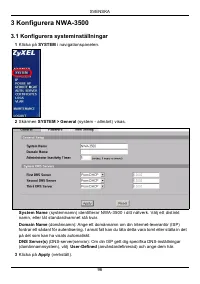
SVENSKA 96 3 Konfigurera NWA-3500 3.1 Konfigurera systeminställningar 1 Klicka på SYSTEM i navigationspanelen. 2 Skärmen SYSTEM > General (system - allmänt) visas. System Name (systemnamn) identifierar NWA-3500 i ditt nätverk. Välj ett distinkt namn, eller låt standardnamnet stå kvar. Domain Name...
Page 97 - Konfigurera trådlösa inställningar
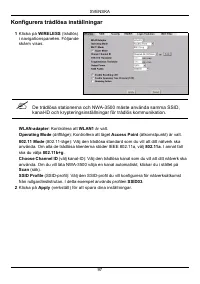
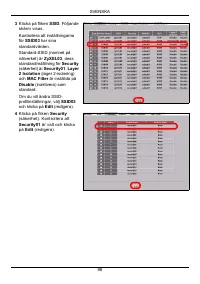
SVENSKA 97 Konfigurera trådlösa inställningar 1 Klicka på WIRELESS (trådlös) i navigationspanelen. Följande skärm visas. " De trådlösa stationerna och NWA-3500 måste använda samma SSID, kanal-ID och krypteringsinställningar för trådlös kommunikation. WLAN-adapter : Kontrollera att WLAN1 är valt....
Page 99 - Konfigurera IP-inställningar
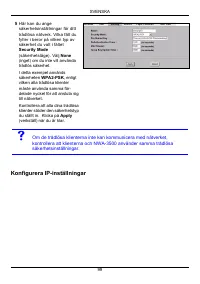
SVENSKA 99 Konfigurera IP-inställningar 5 Här kan du ange säkerhetsinställningar för ditt trådlösa nätverk. Vilka fält du fyller i beror på vilken typ av säkerhet du valt i fältet Security Mode (säkerhetsläge). Välj None (inget) om du inte vill använda trådlös säkerhet.I detta exempel används säkerh...
Page 101 - Installera maskinvaran; Montera maskinvara; Fristående
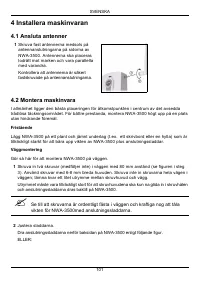
SVENSKA 101 4 Installera maskinvaran 4.1 Ansluta antenner 4.2 Montera maskinvara I allmänhet ligger den bästa placeringen för åtkomstpunkten i centrum av det avsedda trådlösa täckningsområdet. För bättre prestanda, montera NWA-3500 högt upp på en plats utan hindrande föremål. Fristående Lägg NWA-350...
Page 102 - Installera Power over Ethernet (valfritt)
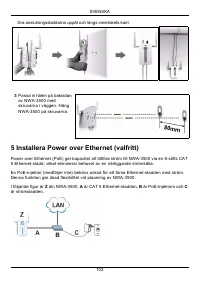
SVENSKA 102 Dra anslutningssladdarna uppåt och längs innertakets kant. 5 Installera Power over Ethernet (valfritt) Power over Ethernet (PoE) ger kapacitet att tillföra ström till NWA-3500 via en 8-stifts CAT 5 Ethernet-sladd, vilket eliminerar behovet av en närliggande strömkälla. En PoE-injektor (m...
Page 103 - Du kan ansluta NWA-3500 till PoE via; strömkälla via; -porten innan du har kopplat bort; Procedur för att visa en produkts certifikat
SVENSKA 103 " Du kan ansluta NWA-3500 till PoE via ETHERNET -porten OCH till en strömkälla via POWER 12VDC -porten. Om du gör detta, koppla inte bort ETHERNET -porten innan du har kopplat bort POWER 12VDC -porten. Detta får NWA-3500 att starta om. 6 Procedur för att visa en produkts certifikat 1...
Page 105 - 概述; 可能会需要
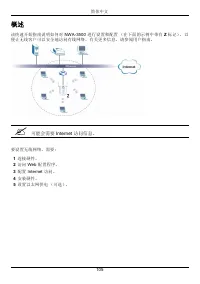
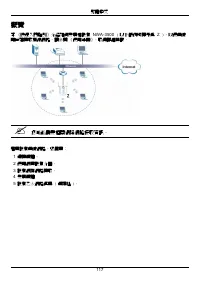
简体中文 105 概述 该快速开始指南说明如何对 NWA-3500 进行设置和配置 (在下面的示例中带有 Z 标记),以 便让无线客户可以安全地访问有线网络。有关更多信息,请参阅用户指南。 " 可能会需要 Internet 访问信息。 要设置无线网络,需要: 1 连接硬件。 2 访问 Web 配置程序。 3 配置 Internet 访问。 4 安装硬件。 5 设置以太网供电 (可选)。 简体中文
Page 106 - 连接硬件; 端口连; 指示灯
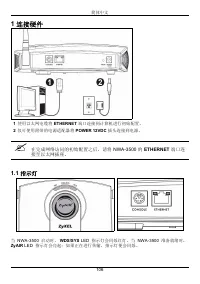
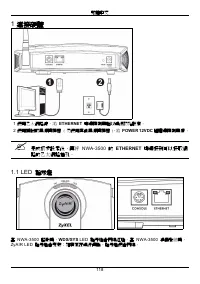
简体中文 106 1 连接硬件 1 使用以太网电缆将 ETHERNET 端口连接到计算机进行初始配置。 2 仅可使用附带的电源适配器将 POWER 12VDC 插头连接到电源。 " 在完成网络访问的初始配置之后,请将 NWA-3500 的 ETHERNET 端口连 接至以太网插座。 1.1 指示灯 当 NWA-3500 启动时, WDS/SYS LED 指示灯会闪烁红灯。当 NWA-3500 准备就绪时, ZyAIR LED 指示灯会亮起;如果正在进行传输,指示灯便会闪烁。
Page 107 - 如果; 指示灯不亮,则请确保使用了正确的电源适配器,以及已将电; 端口缆线连接状况。; 访问; Internet Explorer 6.0; 设置计算机的; 地址; 登录到; 配置程序
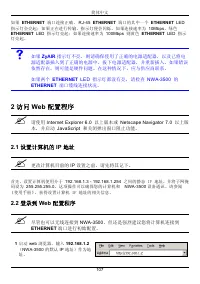
简体中文 107 如果 ETHERNET 端口连接正确, RJ-45 ETHERNET 端口的其中一个 ETHERNET LED 指示灯会亮起;如果正在进行传输,指示灯便会闪烁。如果连接速率为 10Mbps ,绿色 ETHERNET LED 指示灯亮起;如果连接速率为 100Mbps 则黄色 ETHERNET LED 指示 灯亮起。 V 如果 ZyAIR 指示灯不亮,则请确保使用了正确的电源适配器,以及已将电 源适配器插入到了正确的电源中。拔下电源适配器,并重新插入。如果错误依然存在,则可能是硬件问题。在这种情况下,应与供应商联系。 如果两个 ETHERNET LED 指示灯都没有亮,请检查 ...
Page 111 - 配置无线设置; 无线电台与
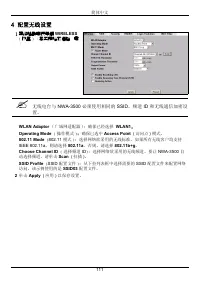
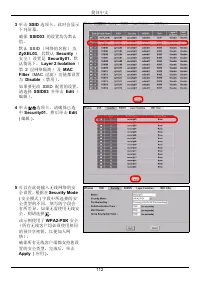
简体中文 111 4 配置无线设置 1 婓絳瑤醱啣笢等僻 WIRELESS ( 拸盄 ) ﹝森奀頗珆尨狟蹈 躉 ﹝ " 无线电台与 NWA-3500 必须使用相同的 SSID 、频道 ID 和无线通信加密设 置。 WLAN Adaptor ( 广域网适配器 ):确保已经选择 WLAN1 。 Operating Mode ( 操作模式 ) :确保已选中 Access Point ( 访问点 ) 模式。 802.11 Mode ( 802.11 模式 ) :选择网络欲采用的无线标准。如果所有无线客户均支持 IEEE 802.11a ,则请选择 802.11a 。否则,请选择 802.11b...
Page 113 - 果无线客户端无法与网络通讯,请确保客户端使用的无线安全设置与
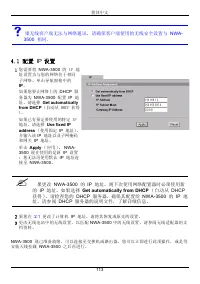
简体中文 113 4.1 配置 IP 设置 NWA-3500 现已准备就绪,可以连接至交换机或路由器。您可以立即进行此项操作,或是等 安装天线挂载 NWA-3500 之后再进行。 V 果无线客户端无法与网络通讯,请确保客户端使用的无线安全设置与 NWA- 3500 相同。 1 您需要将 NWA-3500 的 IP 地 址设置为与您的网络位于相同子网络。单击导航窗格中的 IP 。 如果您要让网络上的 DHCP 服 务器为 NWA-3500 配置 IP 地 址,请选择 Get automatically from DHCP ( 自动从 DHCP 获得 )。 如果已有预定要使用的特定 IP 地址,请...
Page 114 - 安装硬件; 安装天线; 请确保将螺丝钉牢固地固定在墙壁上,且足以承受
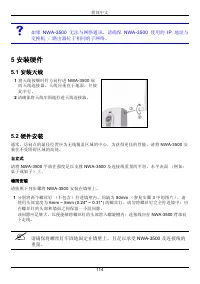
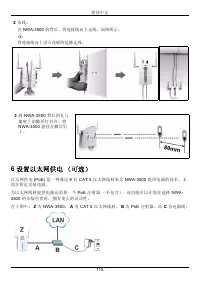
简体中文 114 V 如果 NWA-3500 无法与网络通讯,请确保 NWA-3500 使用的 IP 地址与 交换机 / 路由器位于相同的子网络。 5 安装硬件 5.1 安装天线 5.2 硬件安装 通常,访问点的最佳位置应为无线覆盖区域的中心。为获得更佳的性能,请将 NWA-3500 安 装在不受阻碍区域的高处。 自立式 请将 NWA-3500 平放在强度足以支撑 NWA-3500 及连接线重量的平坦、水平表面 (例如: 桌子或架子)上。 墙面安装 请依照下列步骤将 NWA-3500 安装在墙壁上。 1 分别将两个螺丝钉 (不包含)拧进墙壁内,间隔为 80mm (参见步骤 3 中的图片)。请 ...
Page 115 - 设置以太网供电 (可选)
简体中文 115 2 布线。 在 NWA-3500 的背后,将连接线向下走线,如图所示。 或: 将连接线向上沿天花板的边缘走线。 6 设置以太网供电 (可选) 以太网供电 (PoE) 是一种通过 8 针 CAT 5 以太网线材来为 NWA-3500 提供电源的技术,无 需在附近安装电源。 为以太网线材提供电源还需要一个 PoE 注射器 (不包含)。该功能可以让您在选择 NWA- 3500 的安装位置时,拥有更大的灵活性。 在下图中, Z 为 NWA-3500 , A 为 CAT 5 以太网线材, B 为 PoE 注射器,而 C 为电源线。 3 将 NWA-3500 背后的孔与 墙壁上的螺丝钉对...
Page 116 - 查看产品证书的步骤
简体中文 116 " 您可以通过 ETHERNET 端口将 NWA-3500 连接至 PoE 以及通过 POWER 12VDC 端口连接至电源。进行上述操作时,若尚未中断 POWER 12VDC 端口的连接,请勿中断 ETHERNET 端口的连接, 否则会导致 NWA-3500 重新启动。 7 查看产品证书的步骤 1 先访问 www.zyxel.com 。 2 在 ZyXEL 主页的下拉列表框中选择产品,以进入产品页面。 3 在该页中选择要查看的证书。
Page 117 - 概覽; 您可能需要相關網際網路接取資訊。
繁體中文 117 概覽 本 《快速入門指引》介紹如何安裝和設定 NWA-3500 ( 以下範例均標示為 Z ),以便無線 用戶端接取有線網路。請參閱 《使用手冊》,取得詳細資訊。 " 您可能需要相關網際網路接取資訊。 若要設定無線網路,您需要: 1 連接硬體。 2 使用網頁設定介面。 3 設定網際網路接取。 4 安裝硬體 5 設定乙太網路供電 ( 選擇性 )。 繁體中文
Page 118 - 連接硬體; 埠連接到可以接取網; 指示燈
繁體中文 118 1 連接硬體 1 使用乙太網路線,將 ETHERNET 埠連接到電腦以進行初始設定。 2 使用隨附的電源轉接器 ( 勿使用其他電源轉接器 ),將 POWER 12VDC 插槽連接到電源 。 " 完成初步設定後,再將 NWA-3500 的 ETHERNET 埠連接到可以接取網 路的乙太網路插孔。 1.1 LED 指示燈 當 NWA-3500 啟動時, WDS/SYS LED 指示燈會閃爍紅燈。當 NWA-3500 準備就緒時, ZyAIR LED 指示燈會亮起;如果正在進行傳輸,指示燈便會閃爍。
Page 119 - 埠纜線連接狀況。確認電腦的網路卡運作正常。; 使用網頁設定介面; 設定電腦的
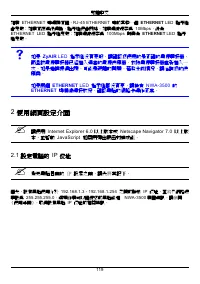
繁體中文 119 如果 ETHERNET 埠連接正確, RJ-45 ETHERNET 埠的其中一個 ETHERNET LED 指示燈 會亮起;如果正在進行傳輸,指示燈便會閃爍。如果連線速率為 10Mbps ,綠色 ETHERNET LED 指示燈亮起;如果連線速率為 100Mbps 則黃色 ETHERNET LED 指示 燈亮起。 V 如果 ZyAIR LED 指示燈沒有亮起,請確認您使用的是正確的電源轉接器, 而且該電源轉接器已經插入適當的電源供應器。拔除電源轉接器重新插入一次。如果錯誤持續出現,可能是硬體的問題。若發生此情況,請洽詢您的供應商。 如果兩個 ETHERNET LED 指示燈都...
Page 120 - 登入至網路設定介面; 即使已能無線連接至; 如果無法使用網路設定介面,請確認
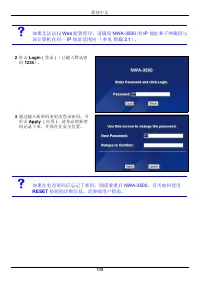
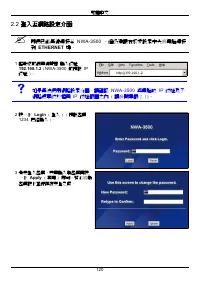
繁體中文 120 2.2 登入至網路設定介面 " 即使已能無線連接至 NWA-3500 ,但仍建議在初步設定中先將電腦連接 到 ETHERNET 埠。 1 啟動您的網頁瀏覽器 輸入位址 192.168.1.2 ( NWA-3500 的預設 IP 位址 )。 V 如果無法使用網路設定介面,請確認 NWA-3500 與電腦的 IP 位址及子 網路遮罩位於相同 IP 位址範圍之內 ( 請參閱章節 2.1)。 2 按一下 Login ( 登入 ) ( 預設密碼 1234 已經輸入 )。 3 變更登入密碼,只要輸入新密碼再按一下 Apply ( 套用 ) 即可。務必將新 密碼記下並保存在安全之處...
Page 121 - 如果變更密碼之後卻忘記新密碼,就需要重新設定
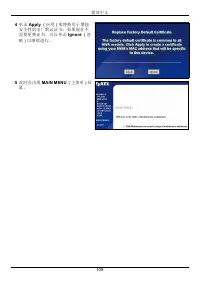
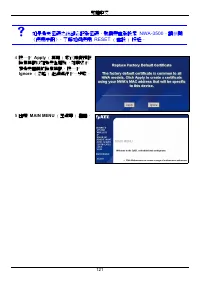
繁體中文 121 V 如果變更密碼之後卻忘記新密碼,就需要重新設定 NWA-3500 。請參閱 《使用手冊》,了解如何使用 RESET ( 重設 ) 按鈕。 4 按一下 Apply ( 套用 ) 取代原廠預設 檢定資訊以加強安全措施,如果您不想變更目前的檢定資訊,按一下 Ignore ( 忽略 ) 繼續進行下一步驟。 5 出現 MAIN MENU ( 主選單 ) 畫面。
Page 122 - 設定; 設定系統設定
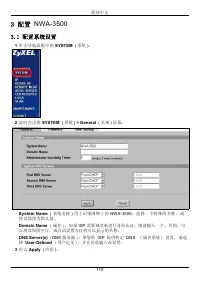
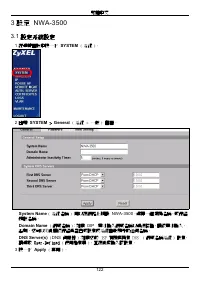
繁體中文 122 3 設定 NWA-3500 3.1 設定系統設定 1 在導覽面板中按一下 SYSTEM ( 系統 )。 2 出現 SYSTEM > General ( 系統 > 一般 ) 畫面。 System Name ( 系統名稱 ) 用以在網路上辨識 NWA-3500 。選擇一個獨特名稱,或保留 預設名稱。 Domain Name ( 網域名稱 ):如果 ISP 要求輸入網域名稱以進行認證,請依要求輸入, 否則,您可以將此欄位保留為空白或設定成系統自動顯示的任何名稱。 DNS Server(s) ( DNS 伺服器 ):如果您的 ISP 有提供特定 DNS ( 網域名稱系統 ...
Page 123 - 設定無線設定; 無線用戶端與
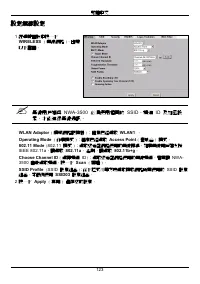
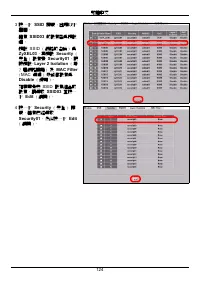
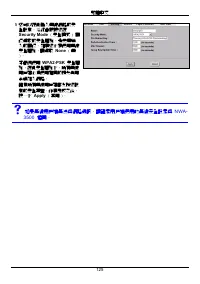
繁體中文 123 設定無線設定 1 在導覽面板中按一下 WIRELESS ( 無線網路 )。出現 以下畫面。 " 無線用戶端與 NWA-3500 必須使用相同的 SSID 、頻道 ID 及加密設 定,才能進行無線通訊。 WLAN Adaptor ( 廣域網路配接器 ):確定已經選取 WLAN1 。 Operating Mode ( 作業模式 ):確定已經選取 Access Point ( 基地台 ) 模式。 802.11 Mode ( 802.11 模式 ):選取您希望網路使用的無線標準。如果無線用戶端支援 IEEE 802.11a ,請選取 802.11a , 否則,請選取 802....
Page 126 - DHCP
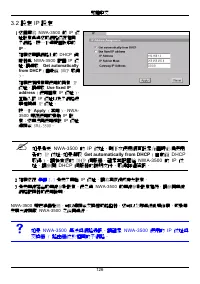
繁體中文 126 3.2 設定 IP 設定 NWA-3500 現已準備就緒,可以連接至交換器或路由器。您可以立即進行此項作業,或是等 安裝天線掛載 NWA-3500 之後再進行。 V 如果 NWA-3500 無法與網路通訊,請確定 NWA-3500 使用的 IP 位址與 交換器 / 路由器位於相同的子網路。 1 您需要將 NWA-3500 的 IP 位 址設定為與您的網路位在相同子網路。按一下導覽面板中的 IP 。 如果您要讓網路上的 DHCP 伺 服器為 NWA-3500 配置 IP 位 址,請選取 Get automatically from DHCP ( 自動從 DHCP 取得 )。 如...
Page 127 - 安裝硬體; 安裝天線; 確認螺絲釘已確實固定在牆上,可支撐
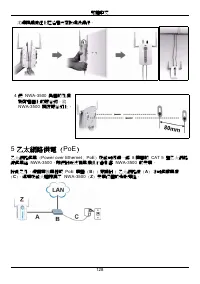
繁體中文 127 4 安裝硬體 4.1 安裝天線 依照以下步驟連接隨附的天線。 4.2 硬體安裝 一般而言,無線網路基地台最好的放置地點是無線網路覆蓋區域的中央。若要使 NWA-3500 發揮較佳效能,請將它安裝在高處沒有障礙物的地方。 直立式安裝 將 NWA-3500 放置在平坦的水平表面 ( 桌面或架上 ),此表面必須能夠支撐 NWA-3500 和 連接纜線的全部重量。 壁掛式安裝 依照以下步驟將 NWA-3500 固定在牆面上。 1 在牆上找出一個沒有障礙物干擾的高處位置。 2 在該位置鎖上兩支螺絲釘 ( 非隨附 ),兩者距離須相隔 80mm 。您可以利用本手冊最後面 的圖示正確標出螺絲...
Page 129 - 如何查看產品認證資料
繁體中文 129 " 您可以透過 ETHERNET 埠將 NWA-3500 連接至 PoE 以及透過 POWER 12VDC 埠連接至電源。進行上述作業時,若尚未中斷 POWER 12VDC 埠的連接,則勿中斷 ETHERNET 埠的連接, 否則會導致 NWA- 3500 重新開機。 6 如何查看產品認證資料 1 前往 www.zyxel.com 。 2 在 ZyXEL 首頁的下拉式清單方塊選取您的產品,進入該產品的網頁。 3 在此頁選取您想查看的認證資料。