Zyxel NBG334W - Manuals
Zyxel NBG334W Router – User Manual, Manual in PDF format online.
Manuals:
User Manual Zyxel NBG334W
Summary
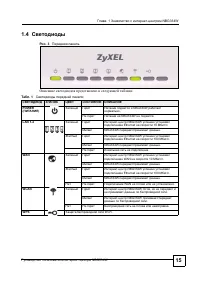
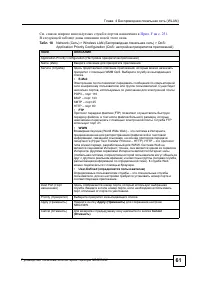
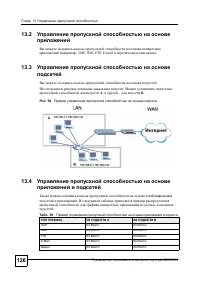
- NBG334W 3 , NBG334W Web- . TCP/IP. A ZyXEL zyxel.ru , ua.zyxel.com – zyxel.kz – . , , , . • . . • Web- web- . A NBG334W ZyXEL NetFriend. • - - . • Web- ZyXEL • , . zyxel.ru .
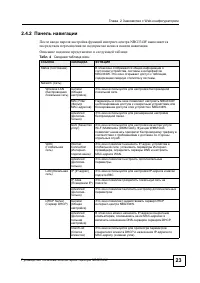
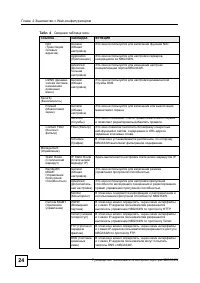
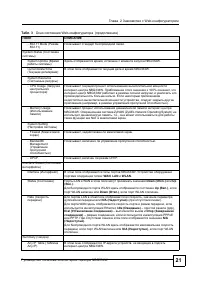
, - NBG334W 5 , : P « » , . A « » ( , ), , . • - NBG334W « », « » « » NBG334W. • , , . • , , [ENTER] « » « » . • « ...» , [ENTER]. « » , . • ( >) . , Maintenance ( ) > Log ( ) > Log Setting ( ) , Maintenance ( ) , Log ( ) , Log Setting ( ) . • « », « » . , « » ( ) 1000, 1024, «M» ...
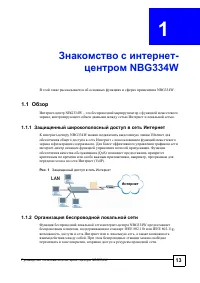
- NBG334W 13 1 - NBG334W NBG334W. 1.1 - NBG334W – , . 1.1.1 - NBG334W Ethernet . - . (QoS) , , (VoIP). . 1 1.1.2 - NBG334W , IEEE 802.11b IEEE 802.11g, , . , .
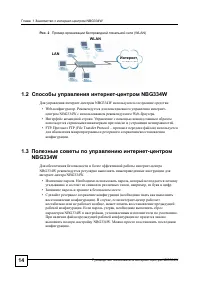
1 - NBG334W - NBG334W 14 . 2 (WLAN) 1.2 - NBG334W - NBG334W : • Web- . - NBG334W Web- . • . . • FTP. FTP (File Transfer Protocol – ) / . 1.3 - NBG334W - NBG334W - NBG334W. • . , , , . • . • ( ). , - , . , NBG334W , . NBG334W. . WLAN LAN
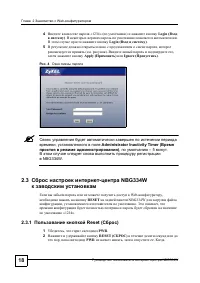
2 Web- - NBG334W 18 4 «1234» ( ) Login ( ) . . Login ( ) . 5 , ( . ). , Apply ( ) Ignore ( ) . . 4 A , Administrator Inactivity Timer ( ) , – 5 . NBG334W. 2.3 - NBG334W Web- , RESET NBG334W , . , «1234». 2.3.1 Reset ( ) 1 , PWR . 2 RESET ( ) , PWR , .
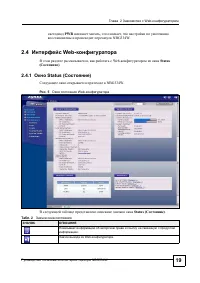
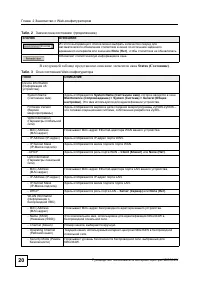
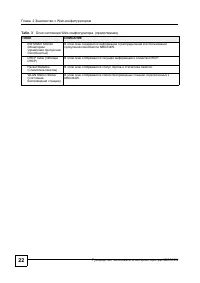
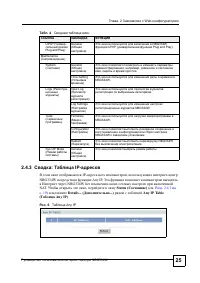
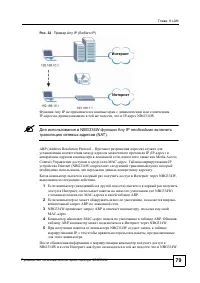
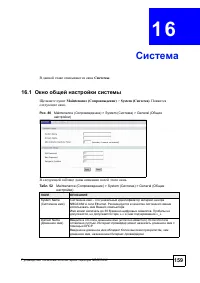
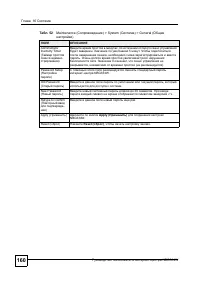
2 Web- - NBG334W 25 2.4.3 : IP- IP- , - NBG334W Any IP. NBG334W NAT. , Status ( ) ( . . 2.4.1 . 19 ) Details... ( ...) Any IP Table ( Any IP) . . 6 Any IP UPnP ( - Plug and Play) General ( ) NBG334W UPnP ( Plug and Play). Maintenance ( ) System ( ) General ( ) , , , . Time Setting ( ) NBG334W. Logs ...
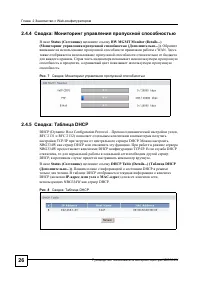
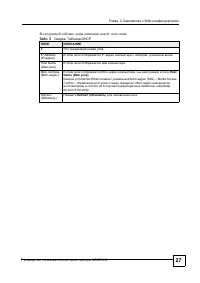
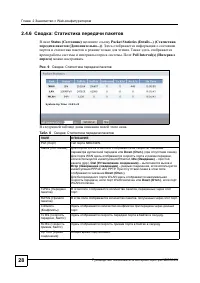
2 Web- - NBG334W 26 2.4.4 : Status ( ) BW MGMT Monitor (Details...) ( ( ...)) . WAN. . , . . 7 : 2.4.5 : DHCP DHCP (Dynamic Host Configuration Protocol – , RFC 2131 RFC 2132) TCP/IP DHCP. NBG334W DHCP . NBG334W DHCP TCP/IP. DHCP , DHCP, . Status ( ) DHCP Table (Details...) ( DHCP ( ...)) . DHCP . ...
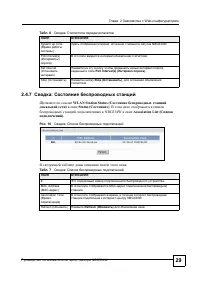
2 Web- - NBG334W 29 2.4.7 : WLAN Station Status ( ) Status ( ) . , NBG334W Association List ( ) . . 10 : . System up Time ( ) , NBG334W. Poll Interval(s) ( ( ) ) . Set Interval ( ) , , Poll Interval(s) ( ) . Stop ( ) Stop ( ) , . . 6 : . 7 : # . MAC Address (MAC- ) MAC- . Association Time ( ) , - ...
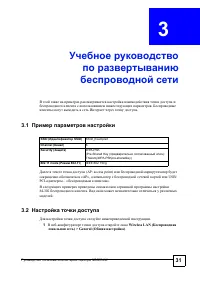
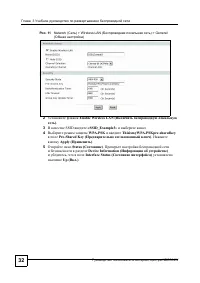
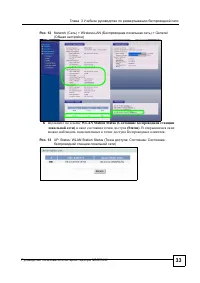
3 - NBG334W 32 . 11 Network ( ) > Wireless LAN ( ) > General ( ) 2 Enable Wireless LAN ( ) . 3 SSID «SSID_Example3 » . 4 WPA-PSK ThisismyWPA-PSKpre-sharedkey Pre-Shared Key ( ) . Apply ( ) . 5 Status ( ) . Device Information ( ) , Interface Status ( ) Up ( .) .
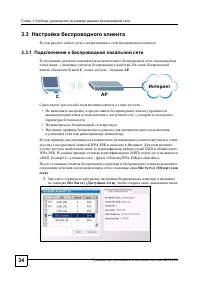
3 - NBG334W 34 3.3 . 3.3.1 , , . C , – AP . . • , . • . • . WPA-PSK . SSID WPA-PSK. (SSID) «SSID_Example3», – «ThisismyWPA-PSKpre-sharedkey». Site Syrvey ( ) . 1 Site Survey ( ) , , . AP C
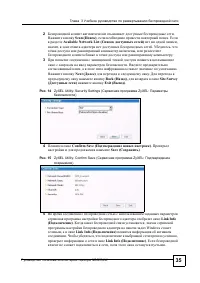
3 - NBG334W 35 2 . Scan ( ) , . Available Network List ( ) , , . , , . 3 . , . Next ( ) . Back ( ) , Site Survey ( ) Exit ( ) . . 14 ZyXEL Utility: Security Settings ( ZyXEL: ) 4 Confirm Save ( ) . Save ( ) . . 15 ZyXEL Utility: Confirm Save ( ZyXEL: ) 5 Link Info ( ) . , Windows , Link Info ( ) . ,...
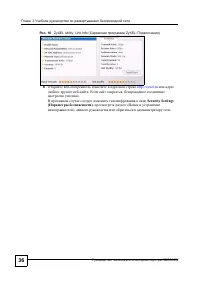
3 - NBG334W 36 . 16 ZyXEL Utility: Link Info ( ZyXEL: ) 6 - http://zyxel.ru - . , . Security Settings ( ) , « » .
37 I I (WLAN) (39) WAN (63) LAN (77) DHCP (83) (NAT) (89) (99)
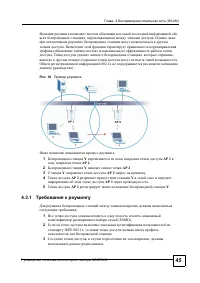
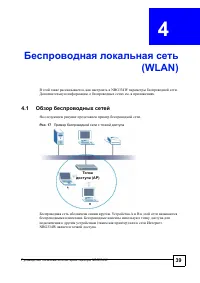
- NBG334W 39 4 (WLAN) , NBG334W . . . 4.1 . . 17 . A B . ( ) . NBG334W . (AP)
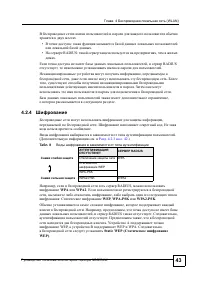
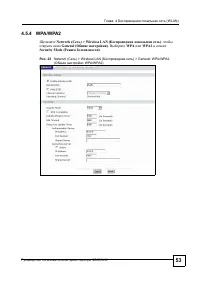
4 (WLAN) - NBG334W 43 . • : . • RADIUS: , . , RADIUS , . , , . , . . , . 4.2.4 , . . . . ( . . 4.2.3 . 42 .) , RADIUS, WPA WPA2 . , , : WEP , WPA-PSK WPA2-PSK . , . , , , RADIUS . , . , . A WEP, B WEP WPA. , Static WEP ( WEP) . . 8 RADIUS WPA WEP WPA-PSK WPA2-PSK WPA2
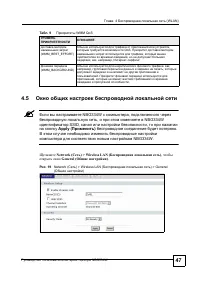
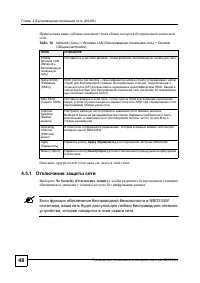
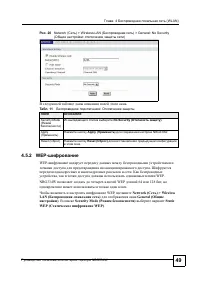
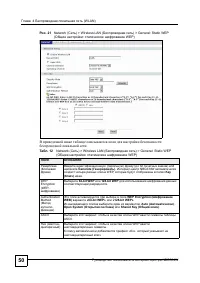
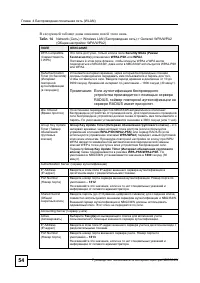
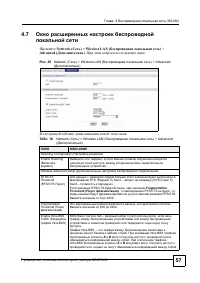
4 (WLAN) - NBG334W 49 . 20 Network ( ) > Wireless LAN ( ) > General: No Security ( : ) . 4.5.2 WEP- WEP- . . , WEP. NBG334W WEP 64 128 , . WEP, Network ( ) > Wireless LAN ( ) General ( ) . Security Mode ( ) Static WEP ( WEP) . . 11 : Security Mode ( ) No Security ( ) . Apply ( ) Apply ( ) N...
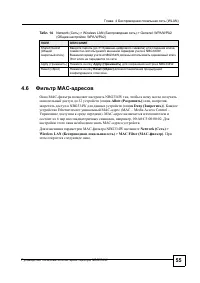
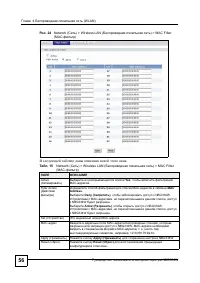
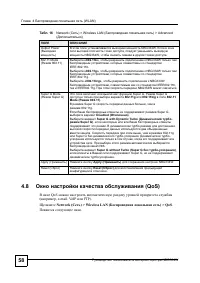
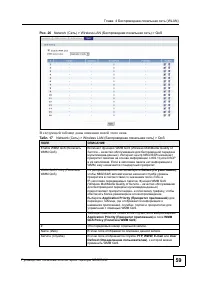
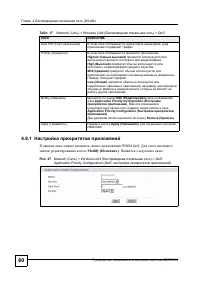
4 (WLAN) - NBG334W 58 4.8 (QoS) QoS ( , e-mail, VoIP FTP). Network ( ) > Wireless LAN ( ) > QoS . . Output Power ( ) NBG334W. , NBG334W, . 802.11 Mode ( 802.11) «802.11b» , NBG334W , IEEE 802.11b. «802.11g» , NBG334W , IEEE 802.11g. «802.11b/g» , NBG334W , IEEE802.11b, IEEE802.11g. NBG334W ....
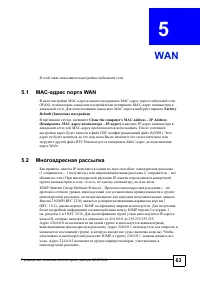
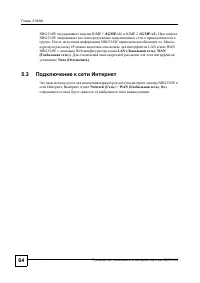
- NBG334W 63 5 WAN . 5.1 MAC- WAN MAC- MAC- (WAN): MAC- . MAC- Factory Default ( ) . , Clone the computer's MAC address – IP Address ( MAC- – IP- ) IP- , MAC- . ( ZyNOS). , . MAC- WAN. 5.2 , IP : (1 – 1 ) (1 – ). IP- , , , . IGMP (Internet Group Multicast Protocol – ) – , , . 2 IGMP (RFC 2236) 1 (...
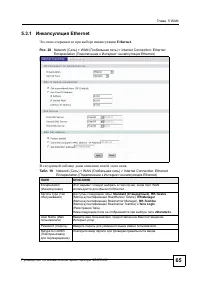
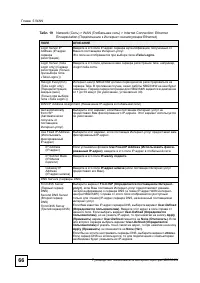
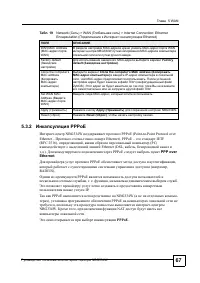
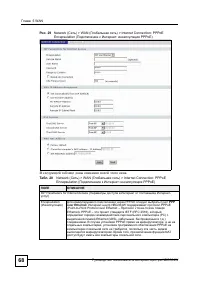
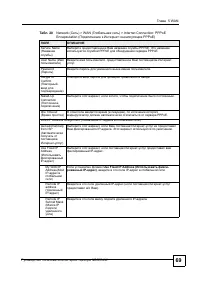
5 WAN - NBG334W 67 5.3.2 PPPoE - NBG334W PPPoE (Point-to-Point Protocol over Ethernet – « - » Ethernet). PPPoE – IETF (RFC 2516), , (PC) Ethernet (DSL, , . .). PPPoE PPP over Ethernet . PPPoE , ( , RADIUS). PPPoE , . . , . IP. PPPoE NBG334W ( - ), PPPoE , - NBG334W. , NAT . PPPoE . WAN MAC Addre...
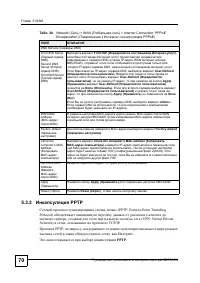
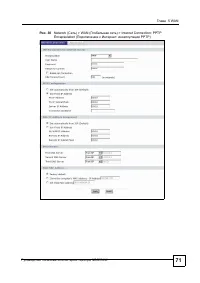
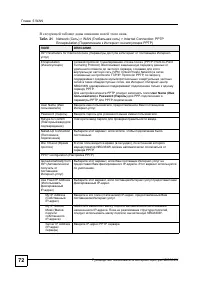
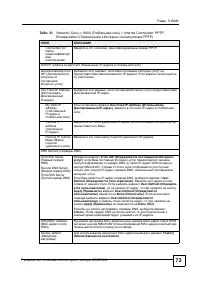
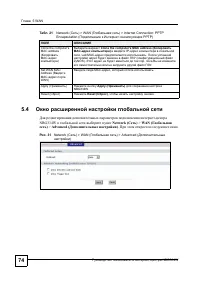
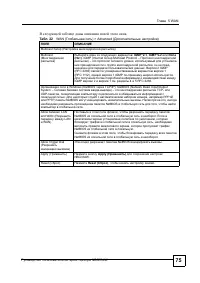
5 WAN - NBG334W 70 5.3.3 PPTP « - » (PPTP: Point-to-Point Tunneling Protocol) , (VPN: Virtual Private Network) , TCP/IP. PPTP, , , . PPTP . DNS Servers ( DNS) First DNS Server ( DNS)Second DNS Server ( DNS) Third DNS Server ( DNS) From ISP ( - ) , - DNS ( IP- WAN - NBG334W). ( ) IP- DNS, - ....
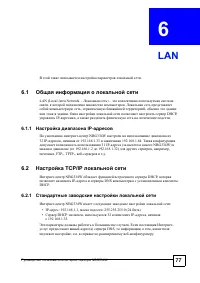
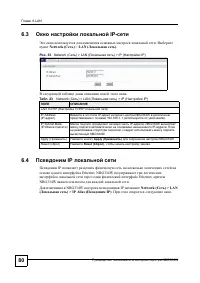
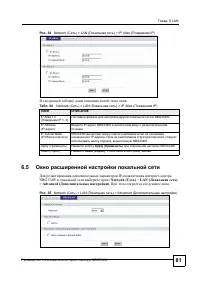
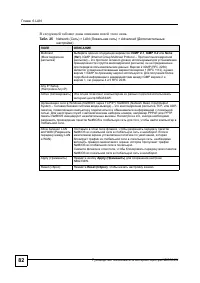
- NBG334W 77 6 LAN . 6.1 LAN (Local Area Network – ) – , . , , . DHCP, IP- , . 6.1.1 IP- - NBG334W 32 IP- , 192.168.1.33 192.168.1.64. 31 IP- ( NBG334W) ( 192.168.1.2 192.168.1.32) , , , FTP-, TFTP-, - . . 6.2 TCP/IP - NBG334W DHCP, IP- DNS DHCP. 6.2.1 - NBG334W : • IP- : 192.168.1.1, : 255.255....
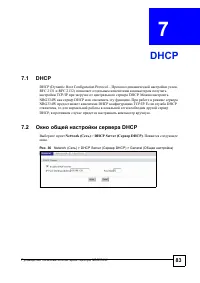
- NBG334W 83 7 DHCP 7.1 DHCP DHCP (Dynamic Host Configuration Protocol – , RFC 2131 RFC 2132) TCP/IP DHCP. NBG334W DHCP . NBG334W DHCP TCP/IP. DHCP , DHCP, . 7.2 DHCP Network ( ) > DHCP Server ( DHCP) . . . 36 Network ( ) > DHCP Server ( DHCP) > General ( )
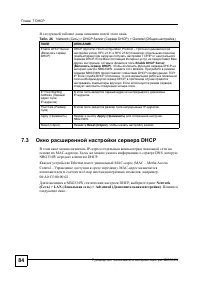
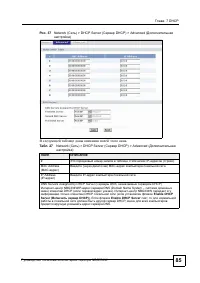
7 DHCP - NBG334W 84 . 7.3 DHCP IP- MAC- . DNS, NBG334W DHCP. Ethernet MAC- ( – Media Access Control – ). MAC- 6 , , 00:A0:C5:00:00:02. NBG334W DHCP, Network ( ) > LAN ( ) > Advanced ( ) . . . 26 Network ( ) > DHCP Server ( DHCP) > General ( ) Enable DHCP Server ( DHCP) DHCP (Dynamic Host...
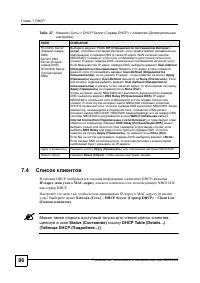
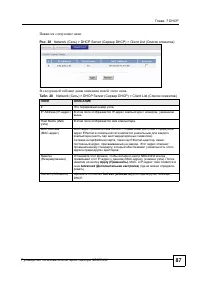
7 DHCP - NBG334W 86 7.4 DHCP DHCP ( IP- , MAC- ) , NBG334W, DHCP. , IP- MAC- ( ). Network ( ) > DHCP Server ( DHCP) > Client List ( ) . A , Status ( ) DHCP Table (Details...) ( DHCP ( ...)) . First DNS Server ( DNS)Second DNS Server ( DNS) Third DNS Server ( DNS) From ISP ( - ) , - DNS (...
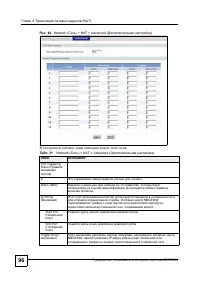
- NBG334W 89 8 (NAT) , NAT NBG334W. 8.1 NAT NAT (Network Address Translation – , RFC 1631) – IP- . : , , IP- . 8.2 NAT A NBG334W, NAT . 8.2.1 : – ( NAT), , web FTP, , , NAT , . Application ( ) ( ) . , IP- . , , web 80, FTP – 21. , ( , FTP web), . NAT . . , .
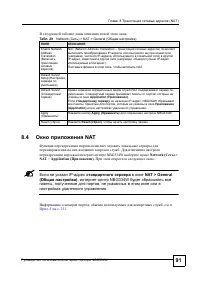
8 (NAT) - NBG334W 91 . 8.4 NAT . - NBG334W Network ( ) > NAT > Application ( ) . . A IP- NAT > General ( ) , - NBG334W , , . , , . . F . 251 . . 29 Network ( ) > NAT > General ( ) Enable Network Address Translation ( ) NAT (Network Address Translation – ) IP- , ( , IP- , ) IP- , (...
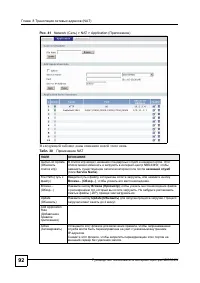
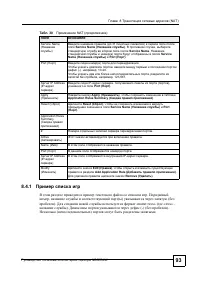
8 (NAT) - NBG334W 93 8.4.1 . , ( ) ( ). «name=xxx» ( «xxx» – ). (-) ( ). ( ) . Service Name ( ) ( 31 ) Service Name ( ) . , Service Name . ( ) Service Name ( ) Port ( ) . Port ( ) ( ) . , (-), , 10-20. , , , 123,567. Server IP Address (IP- ) IP- , ( ), Port ( ) . Apply ( ) Apply ( ) , Application Ru...
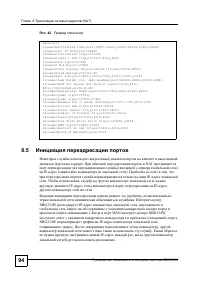
8 (NAT) - NBG334W 95 8.5.1 . . 43 1 Real Audio ( 7070). 2 7070 – « » - NBG334W IP- . NBG334W IP- « » (6970-7170). 3 Real Audio , 6970-7170. 4 - NBG334W IP- . 5 Real Audio, ( . . - ). - NBG334W UDP (User Datagram Protocol – ) TCP/IP (Transfer Control Protocol/Internet Protocol – / - ). 8.5.2 1 , - ...
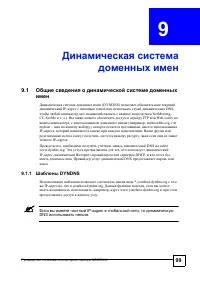
- NBG334W 99 9 9.1 (DYNDNS) IP- DNS, ( NetMeeting, CU-SeeMe . .). FTP Web- , ( , myhost.dhs.org, myhost – ), , IP- , . , IP- . , DNS www.dyndns.org. , IP- , - DHCP, . DNS . 9.1.1 DYNDNS *.yourhost.dyndns.org IP- , yourhost.dyndns.org. , , , www.yourhost.dyndns.org . A IP- , DNS .
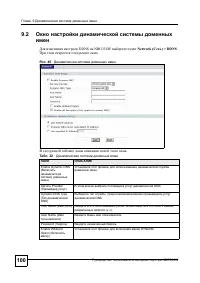
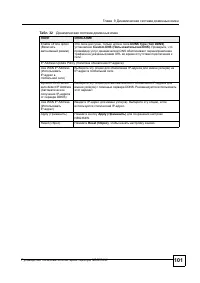
9 - NBG334W 100 9.2 DDNS NBG334W Network ( ) > DDNS . . . 45 . . 32 Enable Dynamic DNS ( ) . Service Provider ( ) DNS. Dynamic DNS Type ( DNS) , DNS Host Name ( ) . 2 , («,»). User Name ( ) . Password ( ) . Enable Wildcard Option ( ) DYNDNS.
- NBG334W 105 1 0 , - NBG334W. 10.1 ZyXEL 10.1.1 «firewall» , . «firewall» ( ) , . ( ) . , . ( – ) – , - . . . . , . 10.1.2 , . IP- . « » . , , , . .
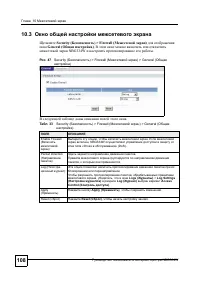
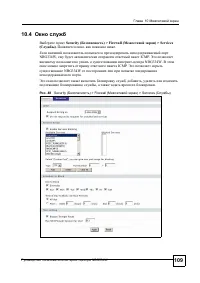
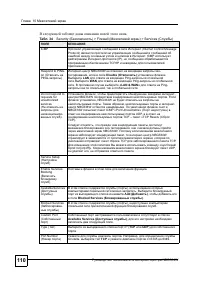
10 - NBG334W 106 10.1.3 - NBG334W - NBG334W « » ( General ( ) Firewall ( ) Enable Firewall ( ) ). NBG334W (LAN) . NBG334W , , . - NBG334W - . , . - NBG334W Ethernet WAN Ethernet LAN, . WAN (Wide Area Network – ) Ethernet, . LAN (Local Area Network – ) , . - , , FTP, WWW. « » ( ), . 10.1.4 1 Web- ....
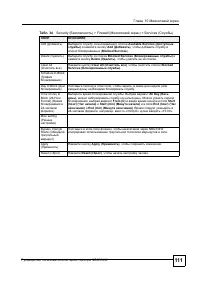
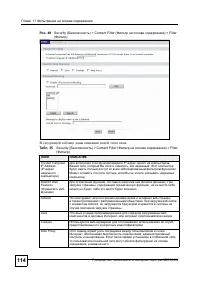
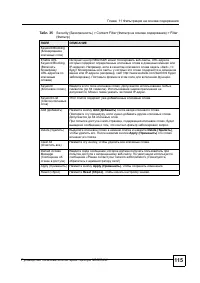
- NBG334W 113 11 - . 11.1 , , , . - URL- . 11.2 - - NBG334W , ActiveX, Java- , cookies, - . 11.3 - NBG334W , NBG334W . 11.4 Security ( ) > Content Filter ( ) , Filter ( ) .
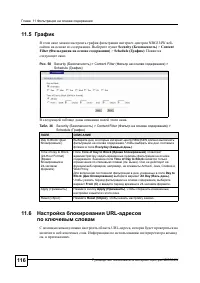
11 - NBG334W 116 11.5 - NBG334W - . Security ( ) > Content Filter ( ) > Schedule ( ) . . . 50 Security ( ) > Content Filter ( ) > Schedule ( ) . 11.6 URL- URL- , . . . . 36 Security ( ) > Content Filter ( ) > Schedule ( ) Day to Block: ( :) , - NBG334W . , Everyday ( ) . Time of ...
119 I V (121) (125) (139) Plug and Play (UPnP) (145)
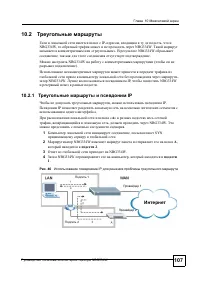
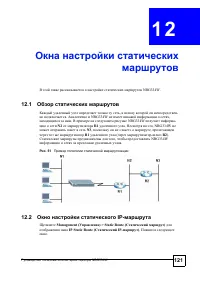
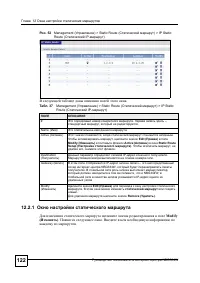
- NBG334W 121 1 2 NBG334W. 12.1 , - . NBG334W , . NBG334W - N2 R1 . , NBG334W N3 , « » , R1 ( - R2 ). , NBG334W . . 51 12.2 IP- Management ( ) > Static Route ( ) IP Static Route ( IP- ) . .
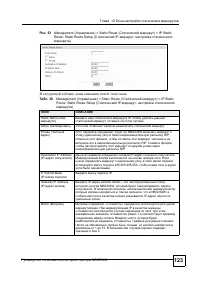
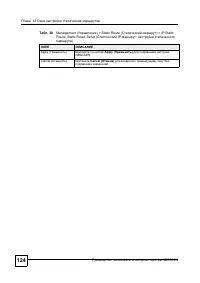
12 - NBG334W 122 . 52 Management ( ) > Static Route ( ) > IP Static Route ( IP- ) . 12.2.1 Modify ( ) . . . . 37 Management ( ) > Static Route ( ) > IP Static Route ( IP- ) # . – , . Name ( ) . Active ( ) , . , Edit ( ) Modify ( ) Active ( ) Static Route Setup ( ) . , , . Destination ( )...
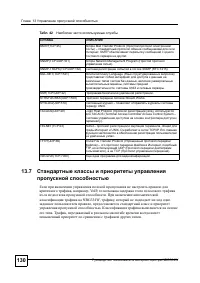
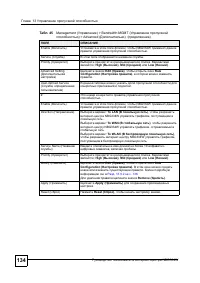
- NBG334W 125 1 3 NBG334W, . 13.1 ZyXEL / . ( ). , NBG334W. NBG334W . , , . IP , NBG334W, , . • , WAN ( LAN WAN, WLAN WAN, WAN WAN / NBG334W) , Bandwidth Management Advanced ( ) . • , LAN ( WAN LAN, WLAN LAN, LAN LAN / NBG334W) 100 000 / ( LAN). • , WLAN ( LAN WLAN, WAN WLAN, WLAN WLAN / NBG334W) ...
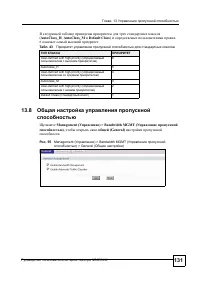
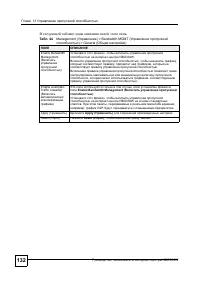
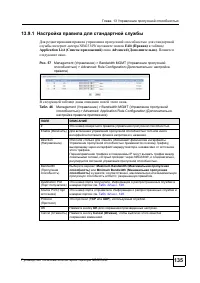
13 - NBG334W 131 ( AutoClass_H , AutoClass_M Default Class ) . 6 . 13.8 Management ( ) > Bandwidth MGMT ( ) , (General) . . 55 Management ( ) > Bandwidth MGMT ( ) > General ( ) . 43 User-defined with high priority ( ) 6 AutoClass_H 5 User-defined with high priority ( ) 4 AutoClass_M 3 U...
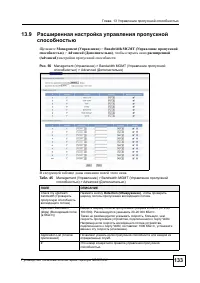
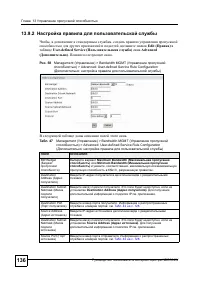
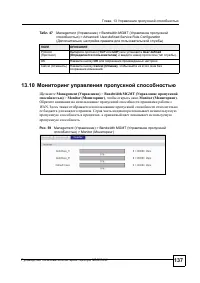
13 - NBG334W 136 13.9.2 , , , Edit ( ) User-defined Service ( ) Advanced ( ) . . . 58 Management ( ) > Bandwidth MGMT ( ) > Advanced: User-defined Service Rule Configuration ( : ) . . 47 Management ( ) > Bandwidth MGMT ( ) > Advanced: User-defined Service Rule Configuration ( : ) BW Bu...
- NBG334W 139 1 4 . 14.1 – / NBG334W, , , - . A , (WAN), . . , . NBG334W: A WAN ( ) LAN & WAN ( ) . , Disable ( ) Server Access ( ) . • ( ) • ( ) • •
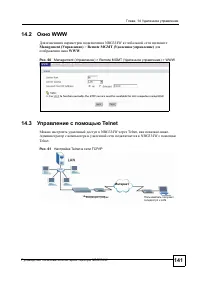
14 - NBG334W 141 14.2 WWW NBG334W Management ( ) > Remote MGMT ( ) WWW . . 60 Management ( ) > Remote MGMT ( ) > WWW 14.3 Telnet NBG334W Telnet, . NBG334W Telnet. . 61 Telnet TCP/IP LAN
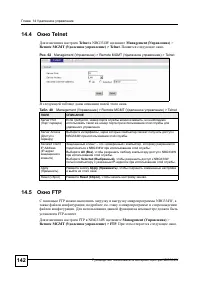
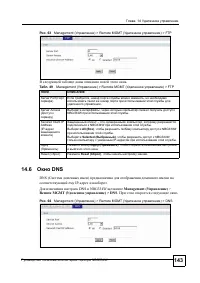
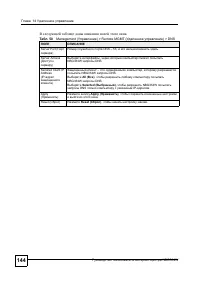
14 - NBG334W 142 14.4 Telnet Telnet NBG334W Management ( ) > Remote MGMT ( ) > Telnet . . . 62 Management ( ) > Remote MGMT ( ) > Telnet . 14.5 FTP FTP NBG334W, , . . FTP- . FTP NBG334W Management ( ) > Remote MGMT ( ) > FTP . . . 48 Management ( ) > Remote MGMT ( ) > Telnet ...
- NBG334W 145 1 5 Plug and Play (UPnP) UPnP Web- . 15.1 Plug and Play Plug and Play (UPnP) – , TCP/IP . UPnP , IP- , . , , . . . 15.3 . 146 . 15.1.1 , UPnP? UPnP Network Connections ( ) (Windows XP). UPnP , , . UPnP . 15.1.2 NAT Transversal NAT Traversal UPnP NAT. UPnP , UPnP . NAT Traversal :...
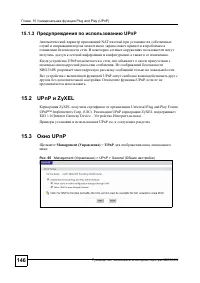
15 Plug and Play (UPnP) - NBG334W 146 15.1.3 UPnP NAT traversal . , . UPnP , . NBG334W . UPnP . UPnP, . 15.2 UPnP ZyXEL ZyXEL Universal Plug and Play Forum UPnP™ Implementers Corp. (UIC). UPnP ZyXEL IGD 1.0 (Internet Gateway Device – - ). UPnP . . 15.3 UPnP Management ( ) > UPnP , . . 65 Manage...
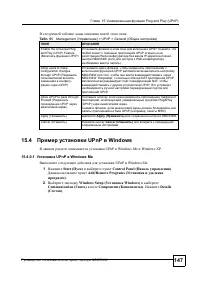
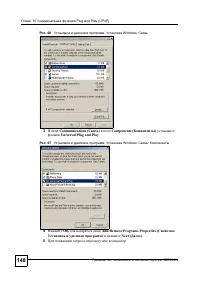
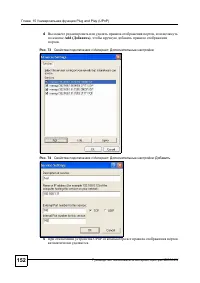
15 Plug and Play (UPnP) - NBG334W 147 . 15.4 UPnP Windows UPnP Windows Me Windows XP. 15.4.0.1 UPnP Windows Me UPnP Windows Me. 1 Start ( ) Control Panel ( ) . Add/Remove Programs ( ) . 2 Windows Setup ( Windows) Communication ( ) Components ( ) . Details ( ) . . 51 Management ( ) > UPnP > Gen...
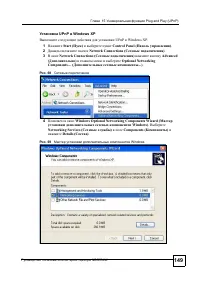
15 Plug and Play (UPnP) - NBG334W 149 UPnP Windows XP UPnP Windows XP. 1 Start ( ) Control Panel ( ) . 2 Network Connections ( ) . 3 Network Connections ( ) Advanced ( ) Optional Networking Components… ( ...) . . 68 4 Windows Optional Networking Components Wizard ( Windows) . Networking Services ( )...
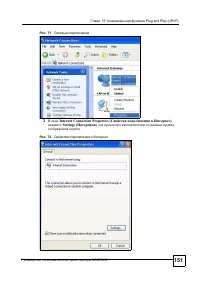
15 Plug and Play (UPnP) - NBG334W 151 . 71 3 Internet Connection Properties ( ) , Settings ( ) . . 72
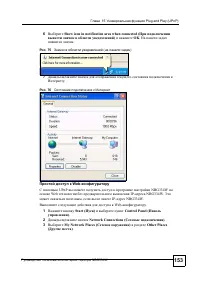
15 Plug and Play (UPnP) - NBG334W 153 6 Show icon in notification area when connected ( ) OK . . . 75 ( ) 7 . . 76 Web- UPnP NBG334W Web IP- NBG334W. , IP- NBG334W. Web- . 1 Start ( ) Control Panel ( ) . 2 Network Connections ( ) . 3 My Network Places ( ) Other Places ( ) .
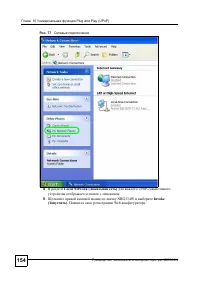
15 Plug and Play (UPnP) - NBG334W 154 . 77 4 Local Network ( ) UPnP- . 5 NBG334W Invoke ( ) . Web- .
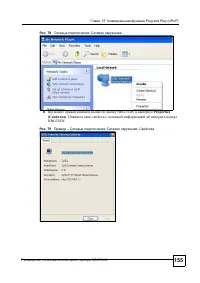
15 Plug and Play (UPnP) - NBG334W 155 . 78 : 6 NBG334W Properties ( ) . - NBG334W. . 79 – : :
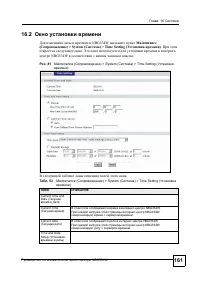
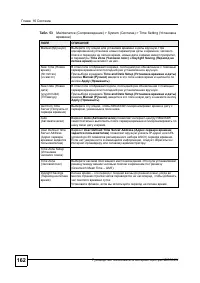
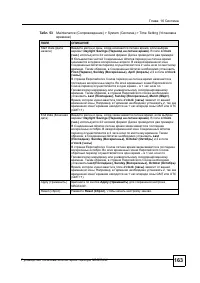
16 - NBG334W 161 16.2 NBG334W Maintenance ( ) > System ( ) > Time Setting ( ) . . - NBG334W . . 81 Maintenance ( ) > System ( ) > Time Setting ( ) . . 53 Maintenance ( ) > System ( ) > Time Setting ( ) Current Time and Date ( ) Current Time ( ) - NBG334W. - NBG334W . Current Date (...
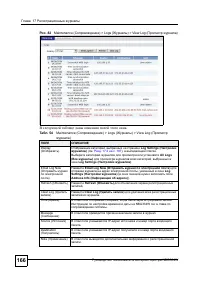
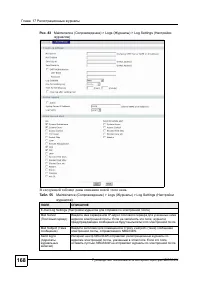
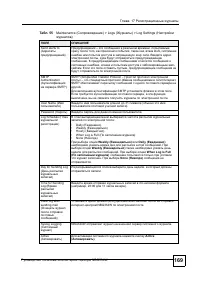
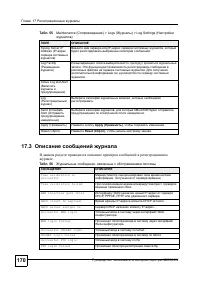
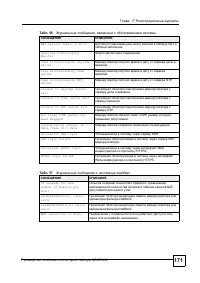
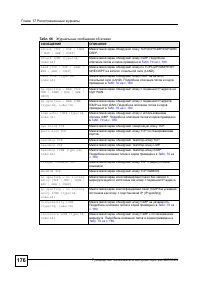
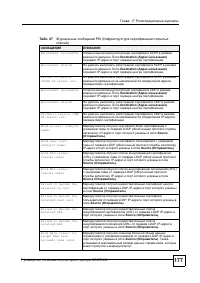
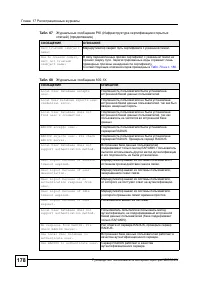
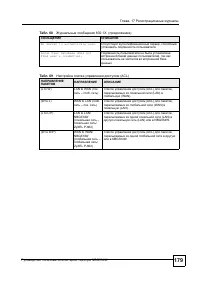
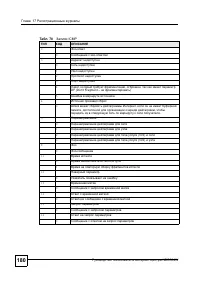
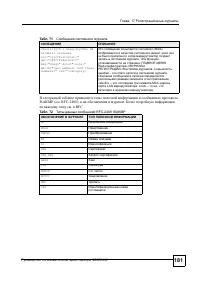
17 - NBG334W 167 17.2 - NBG334W . Maintenance ( ) > Logs ( ) > Log Settings ( ) . Log Settings ( ) : NBG334W ; , NBG334W / NBG334W . – , . , ( ) - - , , cookies, active X . . , System Errors ( ) , . View Log ( ) . , – . . ( . « »). / ( Access Control ( ) ) , .
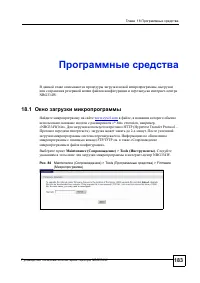
18 - NBG334W 183 1 8 , - NBG334W. 18.1 www.zyxel.com , «*.bin» extension, , «NBG334W.bin». HTTP (Hypertext Transfer Protocol – ), 2- . . FTP/TFTP . « ». Maintenance ( ) > Tools ( ) . - NBG334W. . 84 Maintenance ( ) > Tools ( ) > Firmware ( )
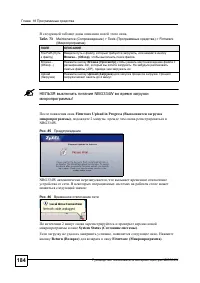
18 - NBG334W 184 . A NBG334W ! Firmware Upload in Progress ( ) , 2 , NBG334W. . 85 NBG334W , . : . 86 2 System Status ( ) . , . Return ( ) Firmware ( ) . . 73 Maintenance ( ) > Tools ( ) > Firmware ( ) File Path ( ) , , Browse... ( ) , . Browse... ( ...) Browse ( ) , .bin, . (.ZIP), . Upload (...
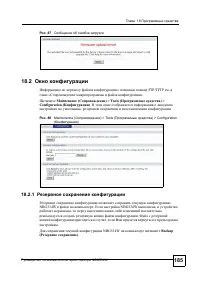
18 - NBG334W 185 . 87 18.2 FTP/TFTP . « ». Maintenance ( ) > Tools ( ) > Configuration ( ) . , . . 88 Maintenance ( ) > Tools ( ) > Configuration ( ) 18.2.1 NBG334W . NBG334W , , - . , . NBG334W Backup ( ) .
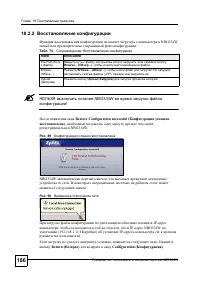
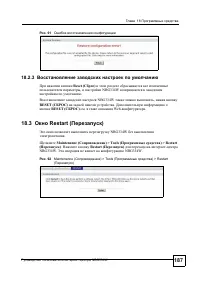
18 - NBG334W 186 18.2.2 NBG334W . A NBG334W ! Restore Configuration successful ( ) , , NBG334W. . 89 NBG334W , . : . 90 IP- , , IP- NBG334W (192.168.1.1). IP- . . , . Return ( ) Configuration ( ) . . 74 : File Path ( ) , , Browse... ( ...) , . Browse... ( ...) Browse... ( ...) , . (.ZIP), . Upload (...
19 - NBG334W 195 19.6 u - . , - . . Maintenance ( ) > Config Mode ( ) . u URL - . Enable URL Keyword Blocking ( - URL ) Content Filtering ( ) . , Keyword List ( ) . Keyword List , URL- , . . « URL- » « ».
197 V I (199) , Java (205) IP- (211) IP- (221) (237) (251) (257) (263)
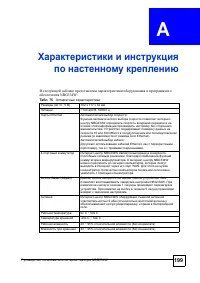
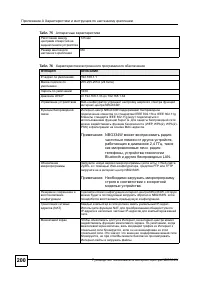
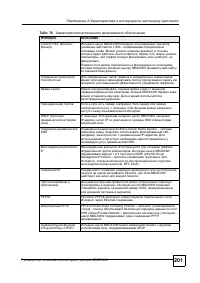
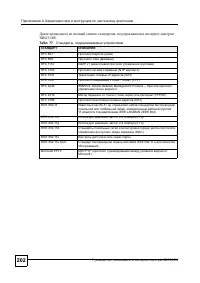
A - NBG334W 200 125 M4 . 76 IP- 192.168.1.1 255.255.255.0 (24 ) 1234 DHCP 192.168.1.33 192.168.1.64 - - NBG334W. - NBG334W IEEE 802.11b IEEE 802.11g. IEEE 802.11g Super G. (WEP, WPA(2), WPA(2)- PSK) MAC- . : NBG334W - , 2,4 , , - , Bluetooth LAN. ( ) Web- ZyXEL Web- , FTP TFTP - NBG334W. : . - NBG33...
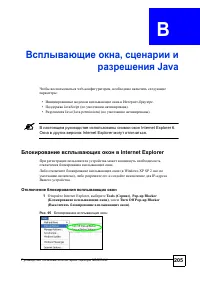
- NBG334W 205 B , Java web- , : • - . • JavaScript ( ). • Java (Java permissions) ( ). A Internet Explorer 6. Internet Explorer . Internet Explorer . ( Windows XP SP 2 ), IP- . 1 Internet Explorer, Tools ( ) , Pop-up Blocker ( ) , Turn Off Pop-up Blocker ( ) . . 95
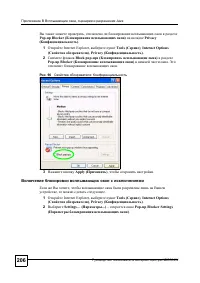
B , Java - NBG334W 206 , Pop-up Blocker ( ) Privacy ( ) . 1 Internet Explorer, Tools ( ) , Internet Options ( ) , Privacy ( ) . 2 Block pop-ups ( ) Pop-up Blocker ( ) . . . 96 : 3 Apply ( ) , . , , . 1 Internet Explorer, Tools ( ) , Internet Options ( ) , Privacy ( ) . 2 Settings… ( ...) – Pop-up ...
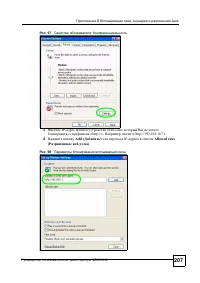
B , Java - NBG334W 207 . 97 : 3 IP- (web- , ) «http://». , http://192.168.167.1. 4 Add ( ) IP- Allowed sites ( - ) . . 98
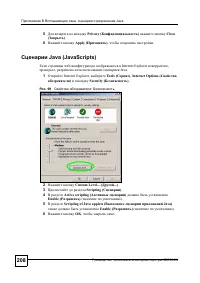
B , Java - NBG334W 208 5 Privacy ( ) Close ( ) . 6 Apply ( ) , . Java (JavaScripts) web- Internet Explorer , , Java. 1 Internet Explorer, Tools ( ) , Internet Options ( ) Security ( ) . . 99 : 2 Custom Level... ( ...) . 3 Scripting ( ) . 4 Active scripting ( ) Enable ( ) ( ). 5 Scripting of Java app...
B , Java - NBG334W 209 . 100 – Java Java 1 Internet Explorer, Tools ( ) , Internet Options ( ) Security ( ) . 2 Custom Level... ( ...) . 3 Microsoft VM . 4 Java permissions ( Java) . 5 OK , .
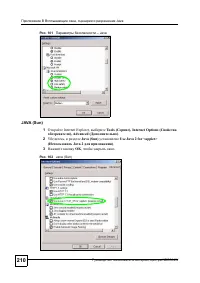
B , Java - NBG334W 210 . 101 – Java JAVA (Sun) 1 Internet Explorer, Tools ( ), Internet Options ( ), Advanced ( ) . 2 , Java (Sun) Use Java 2 for <applet> ( Java 2 ) . 3 OK , . . 102 Java (Sun)
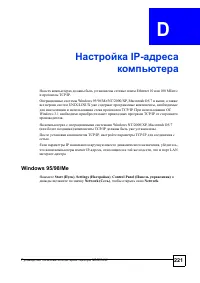
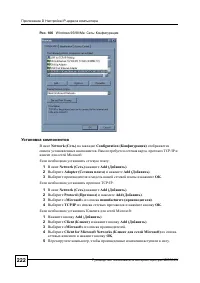
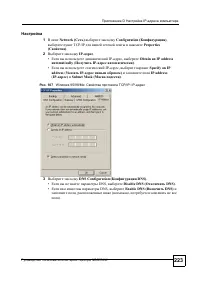
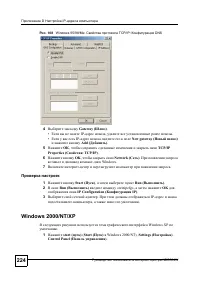
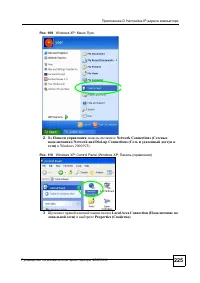
D IP- - NBG334W 224 . 108 Windows 95/98/Me: TCP/IP: DNS 4 Gateway ( Ш ) . • IP- , . • IP- , New gateway ( ) Add ( ) . 5 OK , TCP/IP Properties ( : TCP/IP) . 6 OK , Network ( ) . - Windows. 7 - . 1 Start ( ) , Run ( ) . 2 Run ( ) «winipcfg», OK IP Configuration ( IP) . 3 . IP- , . Windows 2000/NT/XP ...
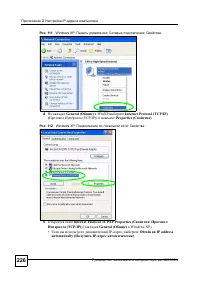
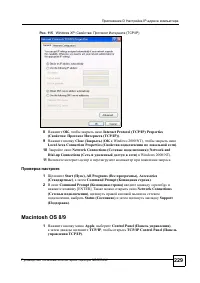
D IP- - NBG334W 226 . 111 Windows XP: : : 4 General ( ) WinXP Internet Protocol (TCP/IP) ( (TCP/IP)) Properties ( ) . . 112 Windows XP: : 5 Internet Protocol TCP/IP Properties ( : (TCP/IP)) ( General ( ) Windows XP). • IP- , Obtain an IP address automatically ( IP- ) .
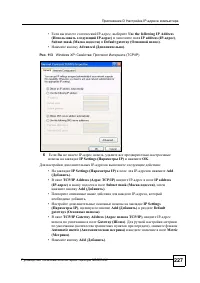
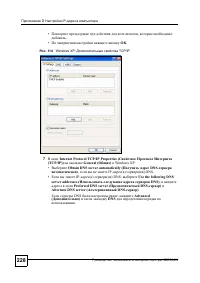
D IP- - NBG334W 229 . 115 Windows XP: : (TCP/IP) 8 OK , Internet Protocol (TCP/IP) Properties ( : (TCP/IP)) . 9 Close ( ) ( OK Windows 2000/NT), Local Area Connection Properties ( ) . 10 Network Connections ( ) ( Network and Dial-up Connections ( ) Windows 2000/NT). 11 - . 1 Start ( ), All Programs ...
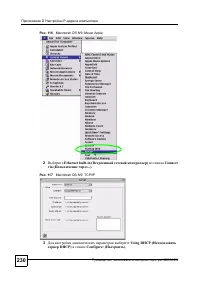
D IP- - NBG334W 230 . 116 Macintosh OS 8/9: Apple 2 Ethernet built-in ( ) Connect via ( ...) . . 117 Macintosh OS 8/9: TCP/IP 3 Using DHCP ( DHCP) Configure: ( ) .
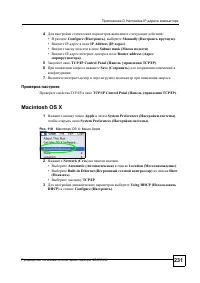
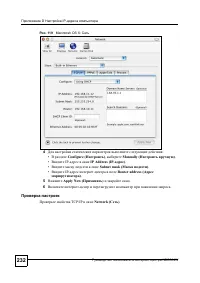
D IP- - NBG334W 231 4 : • Configure ( ) , Manually ( ) . • IP- IP Address (IP- ) . • Subnet mask ( ) . • IP- - Router address ( ) . 5 TCP/IP Control Panel ( TCP/IP) . 6 Save ( ) . 7 - . TCP/IP TCP/IP Control Panel ( TCP/IP) . Macintosh OS X 1 Apple System Preferences ( ) , System Preferences ( ) . ....
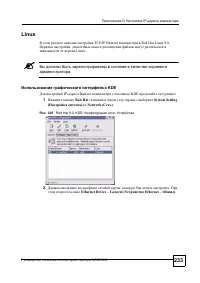
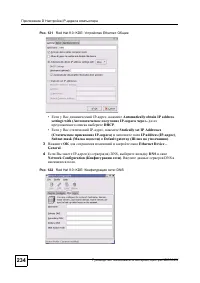
D IP- - NBG334W 233 Linux TCP/IP Red Hat Linux 9.0. , Linux. A . KDE IP- KDE . 1 Red Hat ( ), System Setting ( ) Network ( ) . . 120 Red Hat 9.0: KDE: : 2 , . Ethernet Device – General ( Ethernet – ) .
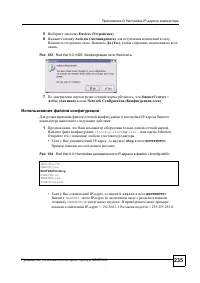
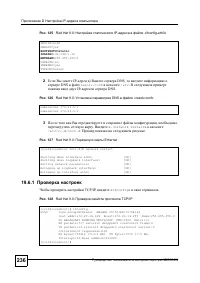
D IP- - NBG334W 235 5 Devices ( ) . 6 Activate ( ) . . (Yes) , . . 123 Red Hat 9.0: KDE: : 7 , Status ( ) = Active ( ) Network Configuration ( ) . IP- : 1 , . ifconfig-eth0 ( eth0 – Ethernet). . • IP- , dhcp BOOTPROTO= . . . 124 Red Hat 9.0: IP- «ifconfig-eth0» • IP- , static BOOTPROTO= . IPADDR =, ...
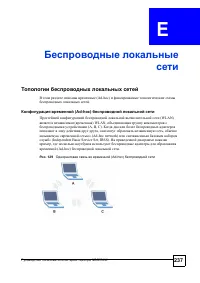
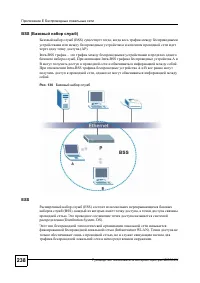
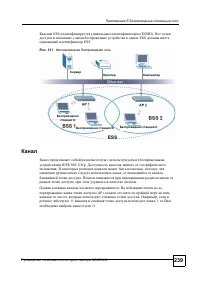
E - NBG334W 238 BSS ( ) (BSS) , (AP). Intra-BSS – . Intra-BSS A B . Intra-BSS A B , . . 130 ESS (ESS) (BSS), , . (Distribution System, DS). (Infrastructure WLAN). , .
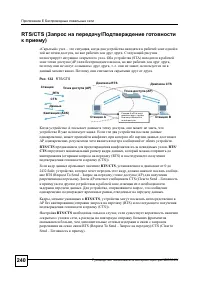
E - NBG334W 240 RTS/CTS ( / ) « » – , , . « » . (STA) (AP) , , « » , . . , . . . 132 RTS/CTS A , , B . , , AP , . RTS/CTS - . RTS/ CTS , ( (RTS) (CTS)). RTS/CTS , 0 2432 , , , - RTS (Request To Send – ) (AP) . AP CTS (Clear to Send – ) , . , , , . , RTS/CTS , AP ( (RTS) (CTS)). RTS/CTS , « » , , RTS...
E - NBG334W 241 RTS/CTS ( . ), RTS (Request To Send – )/CTS (Clear to Send – ) , , RTS/CTS . A RTS , , . – ( 256 2432 ), , . , , . RTS/CTS ( . ), RTS/CTS , RTS/CTS . (Preamble Type) ( ) . 2 : . , , . Long ( ) , « » , ( IEEE 802.11b ). . , , . , « » . Dynamic ( ) , , , .
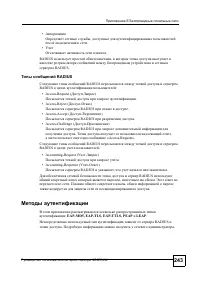
E - NBG334W 243 • , . • . RADIUS , RADIUS. RADIUS RADIUS RADIUS : • Access-Request ( - ) . • Access-Reject ( - ) RADIUS . • Access-Accept ( - ) RADIUS . • Access-Challenge ( - ) RADIUS . , «Access-Request». RADIUS RADIUS : • Accounting-Request ( - ) . • Accounting-Response ( - ) RADIUS , . RADIUS , ...
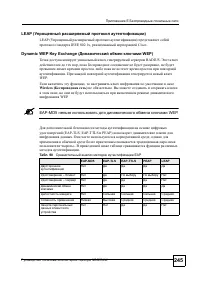
E - NBG334W 245 LEAP ( ) LEAP ( ) IEEE 802.1x, Cisco. Dynamic WEP Key Exchange ( WEP) , RADIUS. , , , . WEP. , Wireless ( ) . , WEP. A EAP-MD5 WEP. (EAP-TLS, EAP-TTLS PEAP) . , « + ». . . 90 EAP EAP-MD5 EAP-TLS EAP-TTLS PEAP LEAP – –
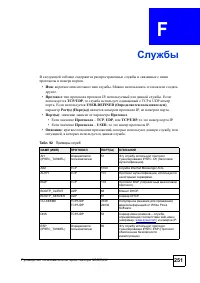
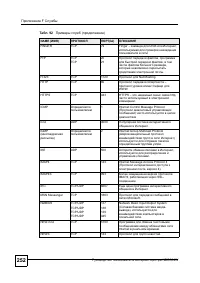
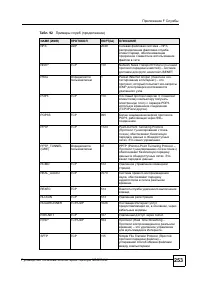
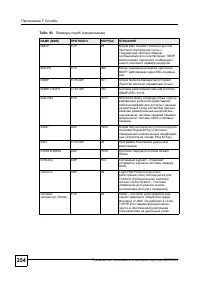
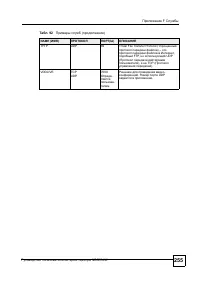
- NBG334W 251 F . • : . . • : IP, . TCP/UDP , TCP UDP . USER-DEFINED ( ) , Port(s) ( ( )) IP, . • ( ) : . • – TCP , UDP , TCP/UDP , IP. • – USER , IP. • : , , , . . 92 NAME ( ) ( ) AH (IPSEC_TUNNEL) 51 IPSEC AH ( ). AIM TCP 5190 Internet Messenger AOL. AUTH TCP 113 , . BGP TCP 179 BGP ( ). BOOTP_CLI...
G - NBG334W 258 • E-mail : [email protected] • E-mail : [email protected] • : +36-1-3361649 • : +36-1-3259100 • Web- : www.zyxel.hu • : ZyXEL Hungary, 48, Zoldlomb Str., H-1025, Budapest, Hungary • E-mail : [email protected] • E-mail : [email protected] • : +49-2405-6909-69 • : +49-2405-6909-99 ...
G - NBG334W 261 • E-mail : [email protected] • E-mail : [email protected] • : +358-9-4780-8411 • : +358-9-4780-8448 • Web- : www.zyxel.fi • : ZyXEL Communications Oy, Malminkaari 10, 00700 Helsinki, Finland • E-Mail: [email protected] • : +33-4-72-52-97-97 • : +33-4-72-52-19-20 • Web- : www.zy...
Manual Zyxel NBG334W
Summary
ENGLISH 2 Overview The NBG334W is an IEEE 802.11b/g wireless broadband router or access point (AP). As a router, the NBG334W directs traffic between your wireless network and another network such as the Internet as shown below, providing services such as content filtering, bandwidth management and a...
ENGLISH 3 1 Hardware Connections Do the following to make hardware connections for initial setup. WAN Connect your modem to the WAN port using the cable that came with your modem. LAN Connect your computer to a LAN port using the yellow Ethernet cable from the package. POWER Connection Use the power...
ENGLISH 4 V If an LED does not turn on, check your connections. If this doesn’t help, disconnect the NBG334W from its power source, wait for a few seconds and turn it back on. 2 Accessing the Web Configurator Default Login Information 1 Launch an Internet browser such as Internet Explorer. Enter “ht...
ENGLISH 5 5 Click Go to Wizard setup to set up your NBG334W for the first time 3 Connection Wizard Setup 1 Choose your language from the drop-down list box. Click Next . 2 Click Next in the following screen to proceed with the Connection Wizard . " Enter the Internet access information exactly a...
ENGLISH 6 3.2 Wireless LAN Configure your NBG334W to support a wireless network by following these steps. 1 Enter a unique Name (SSID) to identify the NBG334W on the wireless LAN. 2 Select a wireless channel. The NBG334W and other wireless clients must use the same channel. 3 Select Auto to automati...
ENGLISH 9 3.5 WAN MAC Address A MAC address is a number which uniquely identifies a device on any network. Set the WAN port’s MAC address by either using your device’s factory assigned default MAC address or cloning the MAC address of a computer on your LAN. By default, the NBG334W uses the factory ...
ENGLISH 10 2 Click Finish in the screen below to complete the wizard setup. 3 Congratulations. Open a web browser, such as Internet Explorer, to visit your favorite website. V If you cannot access the Internet when your computer is connected to one of the NBG334W’s LAN ports, check your connections....
ENGLISH 11 2 Locate your network’s name (SSID) and click Connect to add your computer to the wireless network. 3 Follow the instructions on your wireless utility. When finished, open a browser such as Internet Explorer to surf the Internet. • For more information see the User’s Guide for a tutorial ...
DEUTSCH 12 Übersicht Der NBG334W ist ein drahtloser IEEE 802.11b/g-Breitbandrouter und Access-Point (AP). Als Router leitet der NBG334W den Datenverkehr zwischen dem Drahtlosnetzwerk und einem anderen Netzwerk wie dem Internet wie unten dargestellt weiter und bietet Dienste an wie Inhaltsfilter, Ban...
DEUTSCH 13 1 Anschließen der Hardware Bei der Erstinstallation müssen die folgenden Hardwareverbindungen hergestellt werden. WAN Schließen Sie Ihr Modem mit dem mitgelieferten Kabel an den "WAN"- Anschluss an LAN Schließen Sie Ihren Computer mit dem mitgelieferten Ethernet-Kabel an einen ...
DEUTSCH 14 V Sollte eine LED nicht leuchten, prüfen Sie die Verbindung. Leuchtet sie auch dann nicht, trennen Sie den NBG334W von seiner Stromquelle, und schalten Sie ihn einige Sekunden später wieder an. 2 Zugriff auf den Web-Konfigurator Standard-Anmeldeinformationen 1 Starten Sie einen Internet-B...
DEUTSCH 15 5 Wenn Sie den NBG334W das erste Mal benutzen, klicken Sie auf Go Wizard setup (Zum Einrichtungsassistenten). 3 Assistent zum Einrichten der Verbindung 1 Wählen Sie aus dem Listenfeld Ihre Sprache aus. Klicken Sie auf Next (Weiter). 2 Klicken Sie auf Next (Weiter) und fahren Sie mit dem C...
DEUTSCH 16 3.1 Systeminformationen Dieses Fenster ist optional. Sie können einfach auf Next (Weiter) klicken. 3.2 Wireless-LAN Führen Sie die folgenden Schritte aus, um den NBG334W so zu konfigurieren, dass er ein drahtloses Netzwerk unterstützt. 1 Geben Sie einen Namen (SSID) ein, mit dem der NBG33...
DEUTSCH 17 zugreifen zu können. Achten Sie bei diesem Schlüssel auf die Groß- und Kleinschreibung ("BCD" ist etwas anderes als "bcd"). " Notieren Sie sich den Sicherheitsschlüssel, den Namen (SSID) , die Art der Sicherheit und den Kanal , da der NBG334W und andere Geräte im draht...
DEUTSCH 20 3.5 MAC-Adresse des WAN Eine MAC-Adresse ist eine Nummer, die ein Gerät in jedem Netzwerk eindeutig identifiziert. Konfigurieren Sie die MAC-Adresse des WAN-Ports entweder mit den Standardeinstellungen oder "klonen" Sie die MAC-Adresse eines Computers Ihres LAN. Standardmäßig verw...
DEUTSCH 21 2 Klicken Sie im folgenden Fenster auf Finish (Fertig stellen), um den Setup-Assistenten zu beenden. 3 Herzlichen Glückwunsch. Öffnen Sie einen Internetbrowser (z. B. Internet Explorer), um die gewünschte Website aufzurufen. V Wenn Sie keine Verbindung zum Internet herstellen können, währ...
DEUTSCH 22 2 Wählen Sie Ihren Netzwerknamen (SSID), und klicken Sie auf Connect (Verbinden), um den Computer zum Drahtlosnetzwerk hinzuzufügen. 3 Führen Sie die Anweisungen des Utility-Programms für das Drahtlosnetzwerk aus. Wenn Sie diesen Vorgang abgeschlossen haben, können Sie einen Internetbrows...
ESPAÑOL 24 Vista previa El NBG334W es un router de banda ancha inalámbrico IEEE 802.11b/g o punto de acceso (PA). Como router, el NBG334W dirige el tráfico entre su red inalámbrica y otras redes como Internet como se muestra a continuación, ofreciendo servicios como filtrado de contenidos, gestión d...
ESPAÑOL 25 1 Conexiones del hardware Realice lo siguiente para crear conexiones de hardware para la configuración inicial. WAN Conecte su módem al puerto WAN utilizando el cable que venía con su módem. LAN Conecte su ordenador a un puerto LAN con el cable Ethernet amarillo del paquete. Conexión de A...
ESPAÑOL 26 V Si un LED no se enciende, compruebe sus conexiones.Si esto no ayuda, desconecte el NBG334W de su fuente de alimentación, espere unos segundos y vuelva a encenderlo. 2 Acceder al configurador Web Información de acceso predeterminada 1 Abra un explorador de Internet como Internet Explorer...
ESPAÑOL 27 5 Haga clic en Go to Wizard setup (Ir al Asistente de configuración) para configurar su NBG334W por primera vez. 3 Asistente para la configuración de la conexión 1 Elija su idioma en el cuadro de la lista desplegable. Haga clic en Next (Siguiente).. 2 .Haga clic en Next (Siguiente) en la ...
ESPAÑOL 28 3.1 Información del sistema Esta pantalla es opcional. Puede hacer clic en Next (Siguiente). 3.2 LAN inalámbrica .Configure su NBG334W para que soporte una red inalámbrica con los siguientes pasos. 1 Introduzca un Name (SSID) (Nombre (SSID)) único para identificar al NBG334W en la LAN ina...
ESPAÑOL 29 " Escriba la clave de seguridad, Name (SSID) (Nombre (SSID), Security (Seguridad) y Channel Selection (Selección del canal) para utilizarlos más tarde, ya que el NBG334W y los otros dispositivos de su red inalámbrica deberán usar la misma configuración. 5 Haga clic en OK (Aceptar) par...
ESPAÑOL 33 2 Haga clic en Finish (Finalizar) en la pantalla siguiente para completar el asistente para la configuración. 3 Enhorabuena. Abra un explorador de web, como Internet Explorer, para visitar su sitio web favorito. V Si no puede acceder a Internet cuando su ordenador está conectado a uno de ...
ESPAÑOL 34 2 Localice su nombre de red (SSID) y haga clic en Connect (Conectar) para agregar el ordenador a la red inalámbrica. 3 Siga las instrucciones de su utilidad inalámbrica. Cuando finalice, abra un explorador como Internet Explorer para navegar por Internet. • Para más información, consulte ...
FRANÇAIS 36 Présentation Le NBG334W est un routeur large bande sans fil IEEE 802.11b/g ou un point d’accès (AP). En tant que routeur, le NBG334W dirige le trafic entre votre réseau sans fil et un autre réseau tel qu’Internet comme indiqué ci-dessous, offrant des services tels que le filtrage de cont...
FRANÇAIS 37 1 Connexions matérielles Procédez comme suit pour effectuer les connexions matérielles pour l'installation initiale. WAN Connectez votre modem au port WAN à l'aide du câble fourni avec votre modem. LAN .Connectez votre ordinateur à un port LAN à l'aide du câble Ethernet jaune se trouvant...
FRANÇAIS 38 V Si une LED ne s'allume pas, vérifiez vos connexions. Si le problème persiste, débranchez le NBG334W de sa source d’alimentation, patientez quelques secondes et rallumez-le. 2 Accéder au configurateur Web Informations de connexion par défaut 1 Lancez un navigateur Internet tel qu’Intern...
FRANÇAIS 39 V Cliquez sur Go to Wizard setup (Aller à installation de l'assistant) pour la première installation de votre NBG334W. 3 Installation de l'assistant de connexion 1 Choisissez votre langue dans la liste déroulante. Cliquez sur Next (Suivant). 2 Cliquez sur Next (Suivant) pour continuer av...
FRANÇAIS 40 3.1 Informations du système Cet écran est optionnel. Cliquez simplement sur Next (Suivant). 3.2 LAN sans fil Configurez votre NBG334W afin qu’il prenne en charge un réseau sans fil en suivant ces étapes. 1 Saisissez un Name (SSID) (Nom (SSID)) unique pour identifier le NBG334W sur le LAN...
FRANÇAIS 41 clé de sécurité est sensible à la casse de sorte que « ABCD » n’est pas la même chose que « abcd ». " Notez la clé de sécurité, Name (Nom) (SSID) , Security and Channel Selection (Sécurité et sélection de canal) pour une utilisation ultérieure étant donné que le NBG334W et les autres...
FRANÇAIS 45 2 Cliquez sur Finish (Terminer) dans l’écran ci-dessous pour terminer l'installation par l'assistant. 3 Félicitations. Ouvrez un navigateur web, Internet Explorer par exemple, pour visiter votre site web favori. V Si vous n'arrivez pas à accéder à Internet quand votre ordinateur est conn...
FRANÇAIS 46 2 Repérez le nom de votre réseau (SSID) et cliquez sur Connect (Connecter) pour ajouter votre ordinateur au réseau sans fil. 3 Suivez les instructions sur votre utilitaire sans fil. Quand c’est terminé, ouvrez un navigateur Internet, comme Internet Explorer par exemple pour naviguer sur ...
ITALIANO 48 Cenni generali NBG334W è un router broadband wireless IEEE 802.11b/g nonché un Access Point (AP). Come router, NBG334W dirige il traffico tra la rete wireless e un'altra rete, come ad esempio Internet (vedere sotto), fornendo servizi quali il filtraggio dei contenuti, la gestione della b...


ITALIANO 49 1 Collegamenti hardware Di seguito sono illustrati i collegamenti hardware per l'installazione iniziale. WAN Collegare il modem alla porta WAN utilizzando il cavo fornito a corredo del modem. LAN Collegare il computer a una porta LAN tramite il cavo Ethernet giallo presente nella confezi...
ITALIANO 50 V Se un LED non si accende, controllare i collegamenti. Se il problema persiste, scollegare NBG334W dall'alimentazione, attendere qualche secondo e poi riaccenderlo. 2 Accesso allo strumento di configurazione Web Informazioni di accesso predefinite 1 Aprire un browser Internet, come ad e...
ITALIANO 51 5 Scegliere Go to Wizard setup (vai a configurazione guidata) per configurare NBG334W la prima volta. 3 Configurazione guidata connessione 1 Selezionare la lingua desiderata dall'elenco a discesa. Fare clic su Next (avanti). 2 Scegliere Next (avanti) nella schermata successiva per proced...
ITALIANO 52 3.1 Informazioni sul sistema Questa schermata è opzionale. È unicamente possibile fare clic su Next (avanti) . 3.2 LAN Wireless Configurare NBG334W per supportare una rete wireless seguendo la procedura seguente 1 Immettere un Name (SSID, nome della rete) univoco per identificare il NBG3...
ITALIANO 53 chiave di sicurezza viene fatta distinzione tra maiuscole e minuscole, quindi ad esempio "BCD" è diverso da "bcd". " Annotare la chiave di sicurezza, Name (SSID) , Security (sicurezza)?e Channel Selection (selezione canale)?per poterli utilizzare in seguito affinché N...
ITALIANO 56 3.5 Indirizzo MAC WAN Un indirizzo MAC è un numero che identifica in modo univoco un dispositivo su una rete qualsiasi. Configurare l'indirizzo MAC?della porta WAN utilizzando l'indirizzo MAC?predefinito assegnato in fabbrica al dispositivo oppure clonando l'indirizzo MAC?di un computer ...
ITALIANO 57 2 Scegliere Finish (fine) nella schermata sotto per completare la configurazione guidata. 3 Congratulazioni! Aprire il browser, quale ad esempio Internet Explorer, per visitare un sito Web qualsiasi. V Se non è possibile accedere a Internet quando il computer è connesso a una delle porte...
ITALIANO 58 2 Individuare il nome della rete (SSID) e scegliere Connect (connetti)?per aggiungere il computer alla rete wireless. 3 Seguire le istruzioni dell'utilità wireless. Terminata l'operazione, aprire un browser Internet come Internet Explorer per navigare in Internet.. • Per ulteriori inform...
SVENSKA 60 Översikt NBG334W är en IEEE 802.11b/g trådlös bredbandsrouter eller accesspunkt (AP). Som router dirigerar NBG334W trafik mellan ditt trådlösa nätverk och ett annat nätverk som t.ex. Internet enligt nedan, tillhandahåller tjänster som t.ex. innehållsfiltrering, bandbreddshantering och en ...

SVENSKA 61 1 Maskinvaruanslutningar Gör följande för att utföra maskinvaruanslutningar för inledande inställning. WAN Anslut ditt modem till WAN -porten med sladden som medföljde ditt modem. LAN Anslut datorn till en LAN -port med den gula Ethernetsladden från förpackningen. Strömanslutning Använd s...
SVENSKA 62 V Kontrollera anslutningarna ifall ingen indikatorlampa tänds. Om detta inte hjälper, koppla bort NBG334W från strömkällan, vänta några sekunder och anslut sedan den igen. 2 Åtkomst till webbkonfigurator Standardinloggningsinformation 1 Öppna en Internet-webbläsare som t.ex. Internet Expl...
SVENSKA 63 5 Klicka på Go to Wizard setup (gå till guideinställning) för att ställa in din NBG334W för första gången. 3 Inställningsguide för anslutning 1 Välj språk i rullgardinsrutan. Klicka på Next (nästa) . 2 Klicka på Next (nästa) på den följande skärmen för att fortsätta med anslutningsguiden ...
SVENSKA 64 3.1 Systeminformation Denna skärm är valfri. Du kan helt enkelt klicka på Next (nästa). 3.2 Trådlöst LAN Konfigurera din NBG334W för att stödja ett trådlöst nätverk genom att följa dessa steg. 1 Ange ett unikt Name (SSID) (namn) för att identifiera NBG334W i det trådlösa LAN. 2 Välj en tr...
SVENSKA 65 " Skriv ner säkerhetsnyckeln, Name (namn) (SSID) , Security (säkerhet) och Channel Selection (kanalval) för senare användning eftersom NBG334W och andra enheter i ditt trådlösa nätverk måste använda samma inställningar. 5 Klicka på OK för att fortsätta. 3.3 WAN-anslutning 1 Du måste k...
SVENSKA 68 • Välj Set WAN MAC Address (ställ in WAN MAX-adress) och ange den MAC-adress du vill använda. 3.6 Bandbreddshantering Välj Enable BM for all traffic automatically (aktivera BM automatiskt för all trafik) för att låta NBG334W prioritera datatrafik beroende på dess användning. Till exempel ...
SVENSKA 69 V Om du inte kan ansluta till Internet när din dator är ansluten till en av NBG334W:s LAN-portar, kontrollera dina anslutningar. Stäng därefter av NBG334W, vänta några sekunder och sätt sedan på den igen. Om detta inte fungerar ska du köra guiden igen och vara extra noga med att skriva in...
SVENSKA 70 V Om du inte kan få åtkomst till Internet från det trådlösa nätverket, kontrollera att NBG334W och datorerna i ditt trådlösa nätverk använder samma trådlösa inställningar. Se kapitlet om trådlöst LAN i bruksanvisningen för mer information. Om du inte vet vilken säkerhetsnyckel du har, try...
Zyxel Routers Manuals
-
Zyxel Armor G1
User Manual
-
Zyxel Armor G5
User Manual
-
Zyxel N4100
User Manual
-
Zyxel N4100
Manual
-
Zyxel NBG318S
User Manual
-
Zyxel NBG-418N v2
User Manual
-
Zyxel NBG-418N v2
Manual
-
Zyxel NBG6515-EU0102F
User Manual
-
Zyxel NWA-3160_NWA-3163
User Manual
-
Zyxel NWA-3500_NWA-3550
User Manual
-
Zyxel P-2602H_P-2602HW
User Manual
-
Zyxel P-330W EE
User Manual
-
Zyxel WSQ50-EU0201F
User Manual