Page 2 - Tap functions
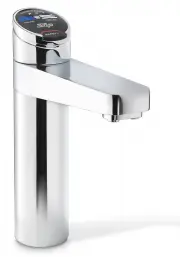
Page 2 of 28 802269 - Residential CS & CSHA User Manual - 09.2016 - v3.01 Elite Tap: The Elite tap uses touch sensitive controls, to dispense Chilled and Chilled Sparkling water. When operating the tap, ensure the touch surface is dry as moisture may interfere with the sensor touch control. 3. T...
Page 3 - Rotary control; Select Button
802269 - Residential CS & CSHA User Manual - 09.2016 v3.01 Page 3 of 28 On powerup, wait 30 secs. for the unit to calibrate. Tapping the select button will allow the selection of either the Chilled (BLUE) or Sparkling (White) water mode.The Arc/Cube control may be rotated in a forward or reverse...
Page 4 - ° left or right
Page 4 of 28 802269 - Residential CS & CSHA User Manual - 09.2016 - v3.01 3. Tap functions Celsius Arc/Cube: On powerup, wait 30 secs. for the unit to calibrate. The Celsius rotary control may be rotated clockwise to dispense Sparkling water or anti-clockwise for Chilled water.The rotary control...
Page 5 - Tap operation - Chilled; To dispense Chilled water:; Press or Pull the Chilled lever; Elite Tap; Chilled button
802269 - Residential CS & CSHA User Manual - 09.2016 - v3.01 Page 5 of 28 3. Tap operation - Chilled Elite Tap: Touching the chilled button allows the dispensing of chilled water. To dispense chilled water:(Classic Tap) To dispense Chilled water: Depressing the “Chilled” lever allows the dispens...
Page 6 - Indicator
Page 6 of 28 802269 - Residential CS & CSHA User Manual - 09.2016 - v3.01 Celsius Tap: Rotate for Chilled water Turn the rotary control anti-clockwise to dispense chilled water as shown 3. Tap operation - Chilled Arc/Cube Tap Indicator light HydroTap Arc/Cube: If not showing BLUE, tap the select...
Page 7 - Tap operation - Sparkling; Press or Pull the Sparkling lever; Sparkling button
802269 - Residential CS & CSHA User Manual - 09.2016 v3.01 Page 7 of 28 Tap operation - Sparkling To dispense Sparkling water: Depressing the ‘Sparkling’ lever allows the dispensing of Sparkling water. Pulling forward the lever allows the tap to operate in a in a “no-touch” mode. Water will flow...
Page 8 - Rotate for Sparkling water
Page 8 of 28 802269 - Residential CS & CSHA User Manual - 09.2016 - v3.01 HydroTap Arc/Cube: If showing BLUE, tap the select button until the indicator light turns WHITE.Rotating the control , when the indicator light is WHITE, will allow the dispensing of sparkling water. When unattended, the c...
Page 9 - Mixer; Vent; Tap lights; Blue Lights
802269 - Residential CS & CSHA User Manual - 09.2016 - v3.01 Page 9 of 28 Tap operation - Mixer The Mixer tap lever is operated as a conventional ‘Flick Mixer’. The hot side is marked with a red stripe and the cold side with a blue stripe, for dispensing cold to warm water. Lifting the handle up...
Page 10 - Turn filter light OFF:; Flashing filter lights:; Flashing warning light:
Page 10 of 28 802269 - Residential CS & CSHA User Manual - 09.2016 - v3.01 Filter light:(Classic, Elite & AIO taps) Filter Change Light Off: This indicates the filter is operating within its normal specified lifespan. Filter Change light flashing slowly: The light will flash slowly when the ...
Page 11 - LCD Screen
802269 - Residential CS & CSHA User Manual - 09.2016 - v3.01 Page 11 of 28 Note: When selecting Menu options, the screen will revert to the main menu, if the screen remains inactive for a period, in excess of 10 seconds. Zip HydroTap G4 introduces a ‘TOUCH’ screen for easy setup and operation ad...
Page 12 - LCD Screen Menu; Main Menu
Page 12 of 28 802269 - Residential CS & CSHA User Manual - 09.2016 - v3.01 3 LCD Screen Menu Main Menu Sub Menu Sub Menu Options Section Language • English A • Product Info• System Faults • Event Log • Product serial no. • Lists• Energy usage B Information Installation • Filter Flush• Filter Res...
Page 14 - ON
Page 14 of 28 802269 - Residential CS & CSHA User Manual - 09.2016 - v3.01 LCD Screen operation - Section B 1. Press [Energy] to view Energy information. 2. The Total energy consumption will be displayed, or 3. Select a date to view the energy used for that period 4. Press [<=] for the previo...
Page 15 - LCD Screen operation - Section C
802269 - Residential CS & CSHA User Manual - 09.2016 - v3.01 Page 15 of 28 1. Press the [MENU] button for main menu. 2. Press the [Install] button. Turn the stop cock ON. 3. Press the [Filter Flush] button. 4. Press [Start] [Stop] buttons to start and Stop the filter flush. Once the filter flush...
Page 16 - to confirm calibration.; - Lux Sensor Calibration
Page 16 of 28 802269 - Residential CS & CSHA User Manual - 09.2016 - v3.01 3 - Purge CO 2 When fitting a new gas bottle, it is important to purge the gas lines. 1. Press the [MENU] button for main menu. 2. Press the [Install] button. 3. Press the [Purge CO 2 ] button. 4. In the next screen, pres...
Page 17 - In Australia call a licensed electrician, plumber,or Zip office on; D Service; To set a password; Enter a 4 digit password; LCD Screen operation - Section E; To change a password; Enter your old 4 digit password
802269 - Residential CS & CSHA User Manual - 09.2016 - v3.01 Page 17 of 28 This section is reserved for service technicians only Note : In Australia call a licensed electrician, plumber,or Zip office on 1800-638-633, for assistance, service, spare parts, or enquiries. D Service LCD Screen operat...
Page 18 - To disable the WiFi setup
Page 18 of 28 802269 - Residential CS & CSHA User Manual - 09.2016 - v3.01 F Communication - WiFi (Select models) LCD Screen operation - Section F This section allows the user to use WiFi to monitor the product remotely. 1. From the Home screen Press [Menu]. Then [Comm’s] 2. Enter your 4 digit p...
Page 19 - g I; nstructions
802269 - Residential CS & CSHA User Manual - 09.2016 - v3.01 Page 19 of 28 G Settings 3. LCD Screen operation - Section G g I nstructions 1. Press the [MENU] button for main menu.2. Press the [Settings] button. 3. Press [Enable Password].4. Then enter your 4-digit password. You will need to ente...
Page 20 - LCD Screen operation - Section G; ions; To edit the filter life:; Filter; To edit the filter usage:; The filter life may be set as a
Page 20 of 28 802269 - Residential CS & CSHA User Manual - 09.2016 - v3.01 3. LCD Screen operation - Section G t ions To edit the filter life: 1. Press [MENU] button for main menu. 2. Press [Setting] button. 3. Press [Filter] button. 4. Press [Filter Life] button, for Internal filter. 5. To chan...
Page 22 - Select ‘group set 1’ if you wish to allocate the same time to all 7 days; Individual set screen; Press Group 1 or Group 2 option
Page 22 of 28 802269 - Residential CS & CSHA User Manual - 09.2016 - v3.01 LCD Screen operation - Section G To activate ON/OFF mode: 1. Press the [MENU] button for main menu. 2. Press the [Setting] button. 3. If required, Enter your 4 digit password 4. Press the [Energy Modes] button. 5. Select ...
Page 23 - To change the Filter:; close will do. Use the bucket to catch the discharge.; Water Filter; • The filter percentage will show 0% on the Home screen.; Filter Maintenance; To edit the dispensing times:
802269 - Residential CS & CSHA User Manual - 09.2016 - v3.01 Page 23 of 28 To change the Filter: (See also Section C) • Open the door of the under sink unit.• Relieve system pressure via the filter flush stop cock, a quick open and close will do. Use the bucket to catch the discharge. • Grasp fi...
Page 24 - For best performance the unit should only be operated with a clean
Page 24 of 28 802269 - Residential CS & CSHA User Manual - 09.2016 - v3.01 Filter Maintenance Air Inlet Filter The Zip HydroTap air filter is conveniently located on the outside of the condenser. The filter screen is a sliding fit in the plastic housing on the side of the under sink unit. The sc...
Page 25 - Gas bottle change
802269 - Residential CS & CSHA User Manual - 09.2016 - v3.01 Page 25 of 28 Gas bottle change Note: The 1.0 kg gas bottle supplied with this appliance is a disposable item and cannot be refilled. Please contact your local city council for collection centre details or return the bottle to your ser...
Page 27 - Home Menu Icons; Sleep mode is active.; CHILLED; Chilled Temperature
802269 - Residential CS & CSHA User Manual - 09.2016 - v3.01 Page 27 of 28 Home Menu Icons Sleep mode is active. There are 3 sleep mode options which display this icon on the home screen. See page 17 for details. Filter use. This icon displays the filter usage remaining from 100% (New filter) to...
Page 28 - Head Office; Contact Details
Page 28 of 28 802269 - Residential CS & CSHA User Manual - 09.2016 - v3.01 The terms “Zip” and “HydroTap” are registered trade marks of Zip Heaters (Aust) Pty Ltd. Zip products described in this publication are manufactured under one or more of the following patents: AU675601, AU637412, AU635979...