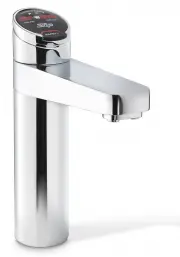
Page 2 - Boiling and boiling ambient tap models Page 2
Page 2 of 24 802258UK G4 Boiling (& ambient) residential, user guide - August 2015 - V2.01 3. Table of contents Boiling and boiling ambient tap models • Boiling and boiling ambient tap models Page 2 • T ap safety ................................................. Page 3 • Tap operation .............
Page 3 - Tap safety; To activate the safety lock
802258UK G4 Boiling (& ambient) residential, user guide - August 2015 - V2.01 Page 3 of 24 3. Tap safety The safety lock feature is provided to prevent boiling water flowing if the red BOILING control is inadvertently activated. This function can be activated and deactivated from either the tap ...
Page 4 - Tap operation; To dispense boiling water (with the safety lock off); Elite; Elite
Page 4 of 24 802258UK G4 Boiling (& ambient) residential, user guide - August 2015 - V2.01 3. Tap operation To dispense boiling water (with the safety lock off) Classic Depressing the red BOILING lever allows the dispensing of boiling water. Pulling forward the red BOILING lever allows the tap t...
Page 5 - Touching
802258UK G4 Boiling (& ambient) residential, user guide - August 2015 - V2.01 Page 5 of 24 Safety Lock Boiling button Ambient button Elite The Elite tap uses touch sensitive controls to dispense boiling and ambient water. When operating the tap ensure the touch surface is dry as moisture may int...
Page 7 - Classic mixer tap
802258UK G4 Boiling (& ambient) residential, user guide - August 2015 - V2.01 Page 7 of 24 3. Tap operation Classic mixer tap Lifting the lever up will increase the flow rate and lowering the lever will decrease the flow rate. Lower the lever all the way down to close the tap. When the lever is ...
Page 8 - Safety sensor calibration
Page 8 of 24 802258UK G4 Boiling (& ambient) residential, user guide - August 2015 - V2.01 Pull both levers forward Safety sensor Procedure • Shield the HydroTap ® G4 from any direct sunlight. • With the Command-Centre TM in normal operating mode turn the power off. • Pull both tap levers to the...
Page 9 - Tap lights
802258UK G4 Boiling (& ambient) residential, user guide - August 2015 - V2.01 Page 9 of 24 Filter light Tap lights Red warning light Filter light Warning light all models Flashing warning light When the indicator light flashes fast and continuous, a system fault has occurred. Check for details o...
Page 10 - Information; LCD Screen; Note
Page 10 of 24 802258UK G4 Boiling (& ambient) residential, user guide - August 2015 - V2.01 3 LCD Screen Zip HydroTap ® G4 features a ‘TOUCH’ screen for easy setup and operation adjustment. (See page 24 for home menu icons). Other possible messages in status window: Status** Information Notes Sa...
Page 11 - LCD Screen menu
802258UK G4 Boiling (& ambient) residential, user guide - August 2015 - V2.01 Page 11 of 24 3 LCD Screen menu Main menu Sub menu Sub menu options Section Language English / Deutsch A Information • Product info. • Filters log• System faults • Module RevisionSerial numberProduct numberCalibration ...
Page 12 - B. System information; LCD Screen operation - Section A
Page 12 of 24 802258UK G4 Boiling (& ambient) residential, user guide - August 2015 - V2.01 A. Set language B. System information In this section, you can find your product serial number, check system fault messages or view the filter logs of your product. LCD Screen operation - Section A LCD Sc...
Page 13 - LCD Screen operation - Section C
802258UK G4 Boiling (& ambient) residential, user guide - August 2015 - V2.01 Page 13 of 24 C. Install 1. Filter flush Sub menu 1. - Filter flush. 2. - Filter reset. 3. - Boiling calibration. 4. - Booster. 5. - Lux sensor calibration. LCD Screen operation - Section C OPEN Position CLOSED Positio...
Page 14 - LCD screen operation - section C; Caution
Page 14 of 24 802258UK G4 Boiling (& ambient) residential, user guide - August 2015 - V2.01 • Press the [MENU] button for main menu. • Press the [Install] button. • Press the [Filter Reset] button. • Press the [Reset Internal Filter] / [Reset External Filter] button. • If you need to flush the f...
Page 15 - LCD Screen operation - Section D; Lux sensor calibration
802258UK G4 Boiling (& ambient) residential, user guide - August 2015 - V2.01 Page 15 of 24 Caution must be observed when changing any settings within the service menu as any changes may affect the normal operation of the unit. This can only be done by a Zip technician. Please contact your Zip s...
Page 16 - To set a password; LCD Screen operation - Section E; To change a password; LCD Screen operation - Section F
Page 16 of 24 802258UK G4 Boiling (& ambient) residential, user guide - August 2015 - V2.01 E. Security The Zip HydroTap ® G4 allows the appliance coordinator to set up a password to protect against users changing the preferred system settings. To set a password • Press the [MENU] button for mai...
Page 17 - LCD Screen operation - Section G; g I; Set temperature
802258UK G4 Boiling (& ambient) residential, user guide - August 2015 - V2.01 Page 17 of 24 G. Settings 3. LCD Screen operation - Section G g I nstructions • Press the [MENU] button for main menu. • Press the [Settings] button. • Enter your 4-digit password and press [Enter]. • Once the password...
Page 18 - Filter
Page 18 of 24 802258UK G4 Boiling (& ambient) residential, user guide - August 2015 - V2.01 3. LCD Screen operation - Section G Filter Zip HydroTap ® G4 allows the user to adjust filter life and edit filter usage. To edit the filter life Press the [MENU] button for main menu. • Press the [Settin...
Page 19 - Energy modes
802258UK G4 Boiling (& ambient) residential, user guide - August 2015 - V2.01 Page 19 of 24 3. LCD Screen operation - Section G This mode allows the HydroTap ® G4 to go into energy saving mode. There are two options available: sleep mode and on/off mode. Energy modes In sleep mode the unit will ...
Page 20 - Individual set screen
Page 20 of 24 802258UK G4 Boiling (& ambient) residential, user guide - August 2015 - V2.01 LCD Screen operation - Section G On/Off mode menu Individual set screen Group set screen A A Note Any attempt, during off mode, to dispense water, will bring the unit out of sleep mode. The unit will retu...
Page 22 - Water filter
Page 22 of 24 802258UK G4 Boiling (& ambient) residential, user guide - August 2015 - V2.01 Filter Maintenance Dispense Times LCD Screen operation - Section G Water filter The HydroTap ® G4 notifies when filter replacement is due. If you notice one of the following, you will need to change the f...
Page 23 - Filter maintenance
802258UK G4 Boiling (& ambient) residential, user guide - August 2015 - V2.01 Page 23 of 24 Filter maintenance Warning: If the HydroTap ® G4 is switched off for a long period of time (e.g. more than a weekend), run water through the AMBIENT water outlet for at least 5 minutes before consumption....
Page 24 - General cleaning; Home menu icon; Home menu icons
Page 24 of 24 802258UK G4 Boiling (& ambient) residential, user guide - August 2015 - V2.01 Contact details Cleaning General cleaning Do not use strong, corrosive spray or abrasive cleaners / chemicals. Clean the casing, tapware, external filter, piping and all other fittings with a soft cloth a...